TangRj-Git/trajectory-graph
DeepSeek Harness 的交互式逐轮轨迹图与执行可视化插件。
项目介绍Project Overview
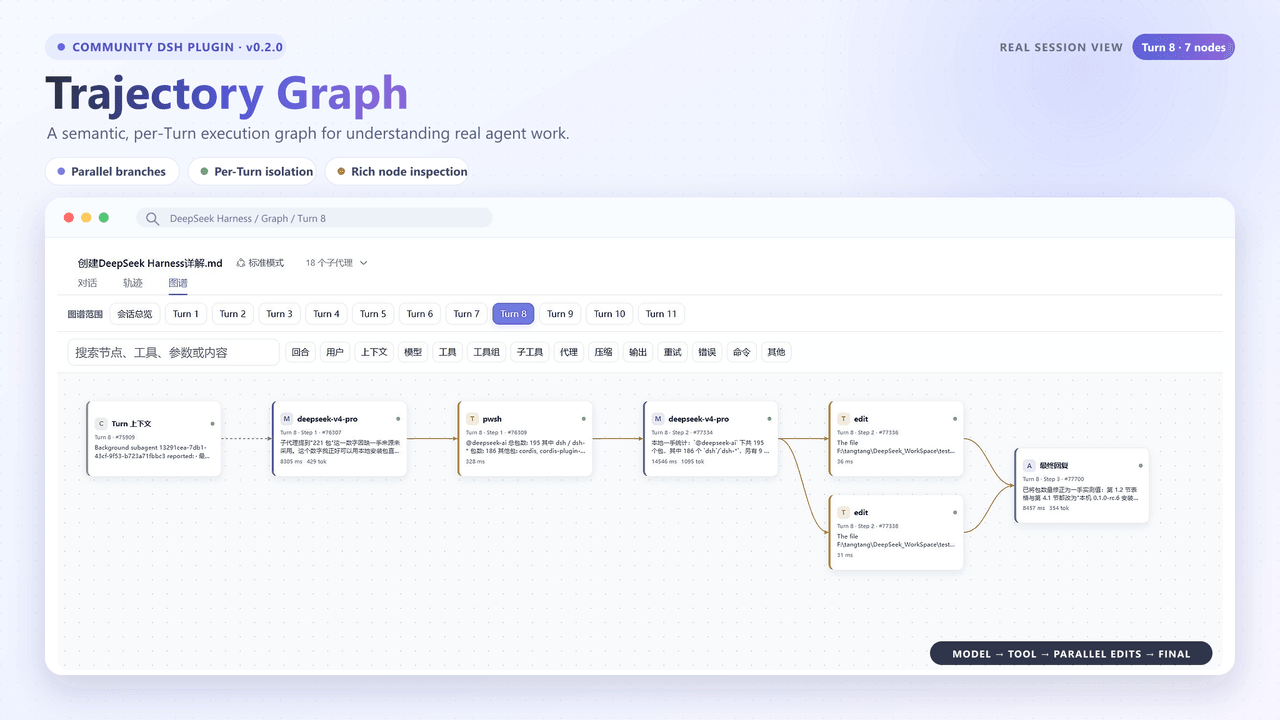
Trajectory Graph 是 DeepSeek Harness 的本地可视化插件,在对话与轨迹旁新增“图谱”页。它把结构化轨迹快照投影为交互式执行 DAG,支持按 Turn 查看、搜索、筛选、缩放及节点详情。适合排查多工具并行、代理调用与会话执行流程。它只读取快照、不改任务;无结构化轨迹的会话无法生成图谱。
Trajectory Graph is a local visualization plugin for DeepSeek Harness that adds a Graph tab beside Chat and Trajectory. It projects structured trajectory snapshots into interactive execution DAGs, with per-turn navigation, search, filters, zoom, collapse, and node details. Use it to inspect parallel tool calls, agent flow, and session execution. It only reads snapshots and does not mutate sessions; sessions without structured trajectory data cannot render graphs.
请帮我了解并安装插件:【trajectory-graph】【https://github.com/TangRj-Git/trajectory-graph】把上面这条消息直接发给当前会话里的 DSH,让它帮你了解并安装。安装命令不一定准确,发给 DSH 更稳。Send this message to DSH in your current session. CLI install commands may not be accurate across systems — DSH will figure it out for you.
或使用命令行安装(适合开发者)Or use CLI install (for developers)
命令行安装CLI Install
dsh plugin --profile web add github:TangRj-Git/trajectory-graph把 TangRj-Git/trajectory-graph 加入你的 DSH 配置(web profile)即可启用。
READMEREADME
Trajectory Graph for DeepSeek Harness
dsh-plugin-trajectory-graph adds a Graph / 图谱 tab beside DeepSeek Harness' built-in Chat / 对话 and Trajectory / 轨迹 views. It projects the structured trajectory snapshot into an interactive, left-to-right execution graph without changing the task, session, or model execution.
Highlights
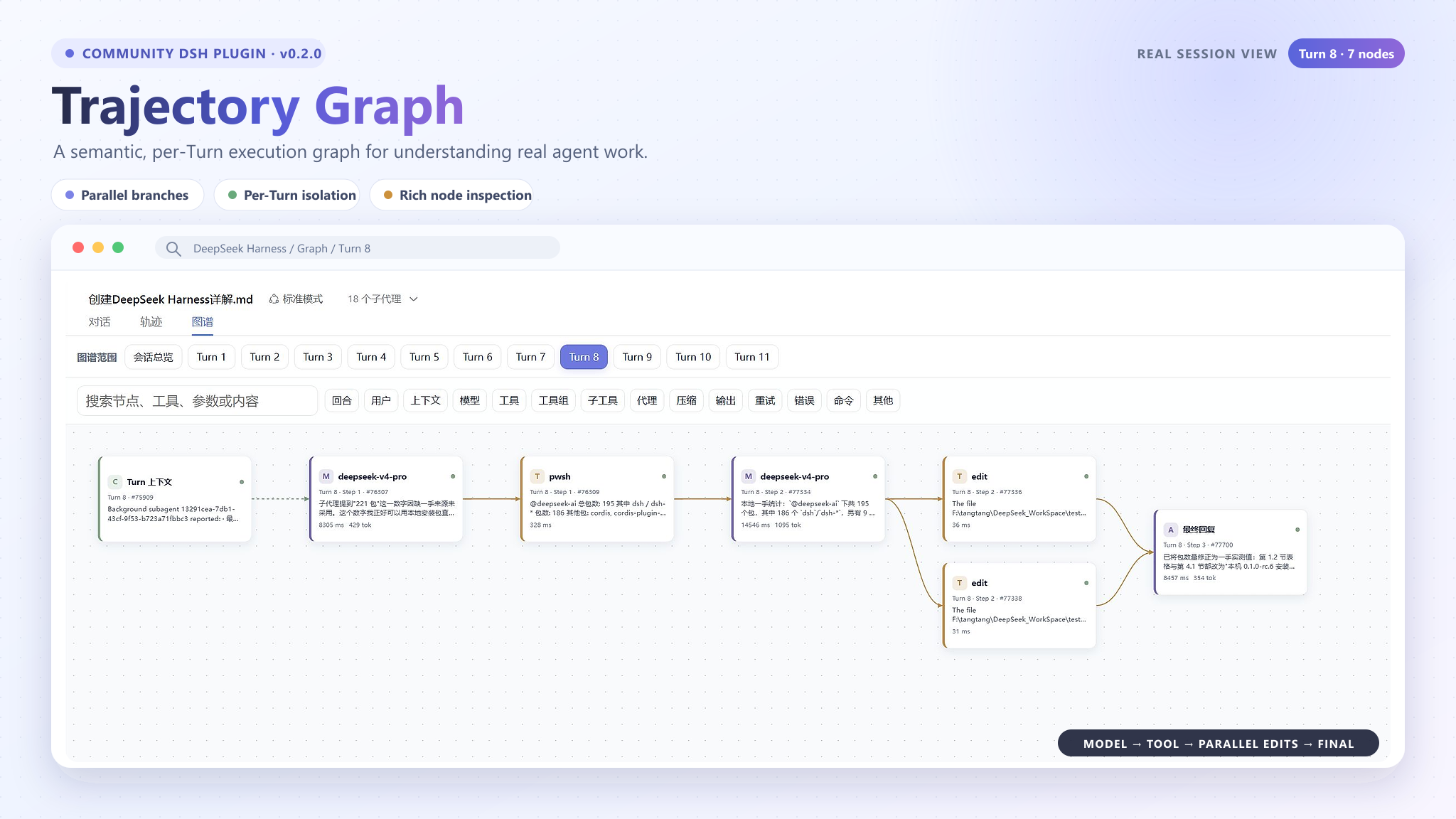
- Session overview plus independently selectable graphs for every Turn; the latest Turn is selected by default.
- Semantic User, Context, Model, Tool, Tool Group, Sub-tool, Agent, Compaction, Final, Retry, and Error nodes.
- Parallel tool calls branch vertically and converge into the next Model or Final node.
- Search, node-type filters, collapse/expand, zoom, fit-to-view, and load-older support.
- Drag the blank canvas with the primary mouse button to pan in any direction, and use the mouse wheel to zoom around the pointer; native scrollbars remain available.
- Search, filters, collapse state, selection, and zoom are isolated per Turn.
- Type-specific details. Tool nodes expose Payload, Result, Schema, Timing, Raw data, and source references when the snapshot provides them.
- Live updates during a running session, with stable layout reuse for streaming text changes.
- Conservative semantics: the plugin does not invent delegation or causal edges when Harness does not provide durable evidence.
- Local-only visualization. It does not upload trajectory data or mutate sessions.
Requirements
| Component | Requirement | Why it is needed |
|---|---|---|
| Node.js | 20 or newer | Required by the plugin build and the supported DeepSeek Harness runtimes. |
| DeepSeek Harness | 0.1.0-rc.6 or 0.1.0-rc.7 | Version 0.3.0 is validated against both trajectory contract versions; the examples below use rc.7. |
| pnpm | 10 or newer | The DSH plugin command delegates package installation to pnpm, so it must be available on PATH. |
| Browser | Current Chromium-based browser | Required by the DeepSeek Harness Web UI. |
Check the local environment:
node --version
npx --yes @deepseek-ai/dsh@0.1.0-rc.7 --version
pnpm --version
If pnpm is missing:
npm install --global pnpm@10
Install
- Download dsh-plugin-trajectory-graph-0.3.0.tgz from the repository's GitHub Releases page.
- Keep the TGZ file in a stable local directory. Do not extract it.
- Install it into the default web profile, replacing the example path with the actual download location:
npx --yes @deepseek-ai/dsh@0.1.0-rc.7 plugin --profile web add "C:\path\to\dsh-plugin-trajectory-graph-0.3.0.tgz"
A successful installation reports dsh-plugin-trajectory-graph under dependencies and finishes with Done.
Optionally verify that the composed Harness configuration contains the plugin:
npx --yes @deepseek-ai/dsh@0.1.0-rc.7 web --dump-config | Select-String "trajectory-graph"
Start and use
Start the default Web profile on port 3080:
npx --yes @deepseek-ai/dsh@0.1.0-rc.7 web --port 3080
Open http://127.0.0.1:3080, select a session that contains trajectory data, and choose:
Chat / 对话 | Trajectory / 轨迹 | Graph / 图谱
Use the Turn navigator to isolate a user request, or choose Session Overview to inspect the whole session. Select any node to open its structured details. Drag an empty area of the canvas with the primary mouse button to pan horizontally or vertically, and roll the mouse wheel to zoom around the pointer. The native scrollbars and toolbar zoom/fit controls remain available. Use the rest of the toolbar to search content, enable or disable node types, or collapse nested groups.
The plugin is installed once per profile. Normal Harness restarts do not require another installation.
Update or uninstall
Remove the installed version:
npx --yes @deepseek-ai/dsh@0.1.0-rc.7 plugin --profile web remove dsh-plugin-trajectory-graph
To update, remove the old version, download the new TGZ, install it with the same plugin command, and restart Harness.
Compatibility
Version 0.3.0 supports and has been validated with DeepSeek Harness 0.1.0-rc.6 and 0.1.0-rc.7. Installation and start examples use rc.7. The plugin consumes the built-in trajectory view snapshot structurally. Another Harness release may change those contracts, so rebuild and run the full verification suite before claiming compatibility with it.
Development stack
| Area | Components |
|---|---|
| Host integration | @deepseek-ai/cordis and cordis.patch.yml |
| Harness client contracts | Locale, runtime, slots, conversation, and trajectory packages compatible with DeepSeek Harness rc.6 and rc.7; development dependencies use rc.7 |
| UI | React 18 and React DOM 18 |
| Projection and layout | TypeScript semantic projector, deterministic ranked DAG layout, filtering, and per-Turn state |
| Build | TypeScript 5.9 and esbuild |
| Test | Vitest, Testing Library, user-event, and jsdom |
| Package management | pnpm 10+ |
Install development dependencies and verify the project:
npx pnpm@10 install
npm test
npm run typecheck
npm run build
Build the distributable plugin archive:
npm run pack:plugin
The generated archive is written to:
dist/dsh-plugin-trajectory-graph-0.3.0.tgz
Project structure
src/client.tsx                          Registers the Graph conversation view
src/components/TrajectoryGraphView.tsx Coordinates Turn state, filtering, layout, and details
src/components/TurnNavigator.tsx       Session overview and per-Turn navigation
src/components/GraphNodeCard.tsx       Semantic node cards and node actions
src/components/GraphDetailsPanel.tsx   Type-specific inspection tabs
src/graph/snapshot.ts                  Validates the Harness trajectory snapshot
src/graph/turns.ts                     Partitions data into coherent Turns
src/graph/projector.ts                 Projects events and requests into semantic DAGs
src/graph/layout.ts                    Computes deterministic ranked branch geometry
src/graph/filter.ts                    Search, type filtering, and collapse visibility
scripts/build.mjs                      Produces the Harness browser bundle
tests/                                 Projection, layout, UI, contract, and performance tests
cordis.patch.yml inserts the package after the built-in Web bundles. The host entry is intentionally minimal; src/client.tsx registers the localized trajectory-graph conversation view and reads the existing trajectory snapshot from the active session.
Current limits
- This is an execution viewer, not an editable workflow designer.
- Harness rc.6 and rc.7 do not expose durable Agent identity for every execution path, so the plugin does not infer Agent branches from tool names or model text.
- Very large histories can remain horizontally wide; use per-Turn navigation, search, filters, collapse, and fit-to-view.
- Sessions without a structured trajectory snapshot cannot produce graph nodes.
Privacy and safety
The plugin runs inside the local DeepSeek Harness Web UI. It reads the session's existing trajectory snapshot for presentation only. It does not upload data, call an external analytics service, modify prompts, change tool calls, or mutate session history.
License
MIT © 2026 TangRj-Git
相关推荐Related
-
 nexu-io/open-design
🎨 Best DeepSeek Harness Design Plugin. The open-source Claude Design alternative. 🖥️ Local-first desktop app. 🖼️ Your…
nexu-io/open-design
🎨 Best DeepSeek Harness Design Plugin. The open-source Claude Design alternative. 🖥️ Local-first desktop app. 🖼️ Your…
-
 freestylefly/awesome-gpt-image-2
Prompt as Code | GPT-Image2 工业级提示词引擎与模板库,530+ 个案例逆向工程,20+ 套工业级模板,并提炼出Skills,持续更新中
freestylefly/awesome-gpt-image-2
Prompt as Code | GPT-Image2 工业级提示词引擎与模板库,530+ 个案例逆向工程,20+ 套工业级模板,并提炼出Skills,持续更新中
-
 anywhere-labs/dsh-desktop
为 DeepSeek Harness (DSH) 插件生态打造的现代化桌面端解决方案。万物皆「插件」,桌面本身也是「插件」。
anywhere-labs/dsh-desktop
为 DeepSeek Harness (DSH) 插件生态打造的现代化桌面端解决方案。万物皆「插件」,桌面本身也是「插件」。
- Nagi-ovo/voyager Enhancement suite for Gemini, AI Studio, Claude & ChatGPT — plus a prompt manager for any web UI, DeepSeek Harness inclu…
-
 walkinglabs/learn-harness-engineering
Harness engineering beginner tutorial, from 0 to 1
walkinglabs/learn-harness-engineering
Harness engineering beginner tutorial, from 0 to 1
-
 awesome-dsh-plugin/awesome-dsh-plugin
A curated list of plugins for DeepSeek Harness (dsh) · DeepSeek Harness 插件精选列表
awesome-dsh-plugin/awesome-dsh-plugin
A curated list of plugins for DeepSeek Harness (dsh) · DeepSeek Harness 插件精选列表
-
 MemTensor/MemOS
Self-evolving memory OS for LLM & AI Agents: ultra-persistent memory, hybrid-retrieval, and cross-task skill reuse, with…
MemTensor/MemOS
Self-evolving memory OS for LLM & AI Agents: ultra-persistent memory, hybrid-retrieval, and cross-task skill reuse, with…
- yjh051108/dsh-routing-suite dsh-routing-suite — injector + router-standard kit: install the runtime injector first, then the task-aware reasoning-mo…