TelosmaYLX/dsh-session-notify
当dsh任务完成/出错/提问等情况出现时,自动推送windows消息进行提醒,支持针对不同场景自定义文案和图片,并可在推送内容中显示会话用时、消耗token、速度tps等指标。Windows desktop notifications for DSH tasks — get alerted on completion, errors, or when input is needed, with per-scenario text and images, plus session duration, token usage, and TPS stats.
Project Overview项目介绍
dsh-session-notify is a session-completion notification plugin built specifically for DSH (DeepSeek Harness) Web profile, packaged as @telosmaylx/dsh-session-notify on npm and installed with the single command dsh plugin add @telosmaylx/dsh-session-notify. It addresses a concrete pain point: when a long-running turn finishes, the user is usually on another tab and misses the result, so the plugin writes the end reason — completed / error / blocked / limit-reached — plus duration and token usage into the session log and pushes via three independent channels: an in-conversation system message folded into the JSONL log, a native browser Web Notification using a unique dsh-session-notify:<timestamp> tag so previous alerts are never coalesced, and a page-level toast in the lower-right corner that always shows as a fallback when notifications are silenced or denied.
The integration targets DSH exclusively: the repository declares the official dsh.bundle manifest so the cordis host recognises it during install, depends on cordis >= 4, and reads projections from @deepseek-ai/dsh-settings plus the session projection namespace that ships in the default DSH base bundle. Notification triggers fire on the running → idle edge from the session-list snapshot, on tool/call for AI questions routed through the session-complete-notify-question projection, and on approval/asked via a three-signal fallback (harness pendingInteractions → host approval projection keyed session-complete-notify-approval → snapshot pendingInteraction === 'approval'). Focus-aware routing lets the user pick double-channel, system-only, in-page-only, or no-notify independently for the focused and unfocused window states.
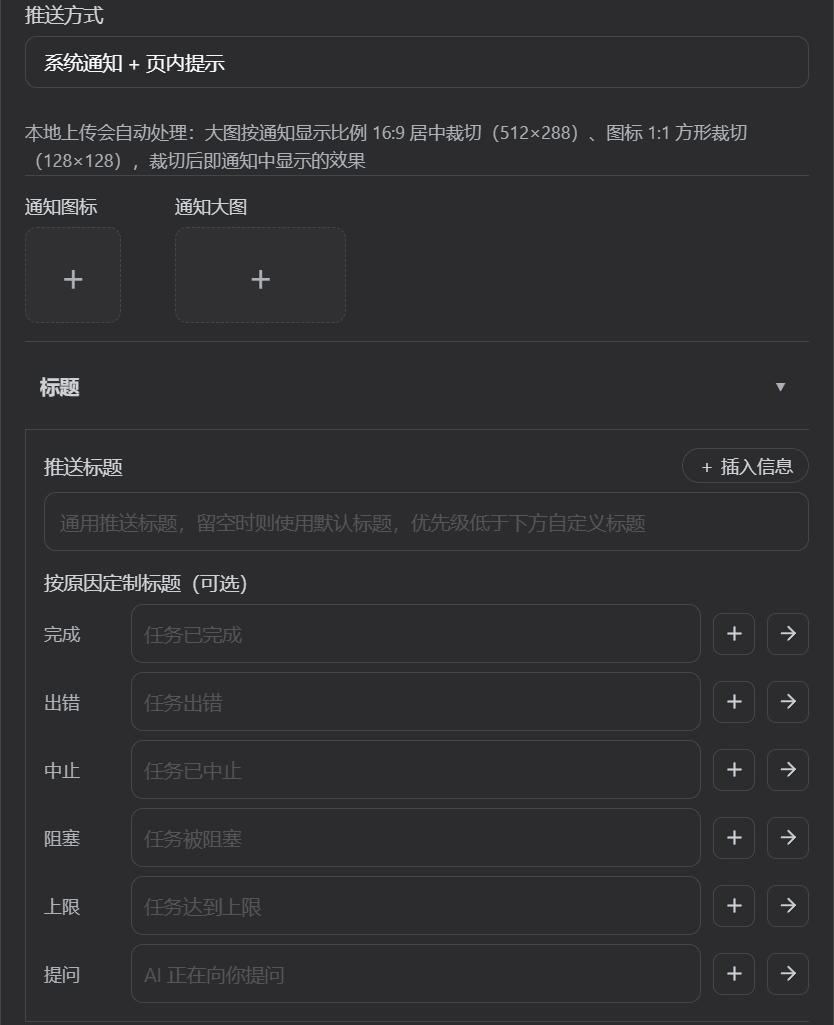
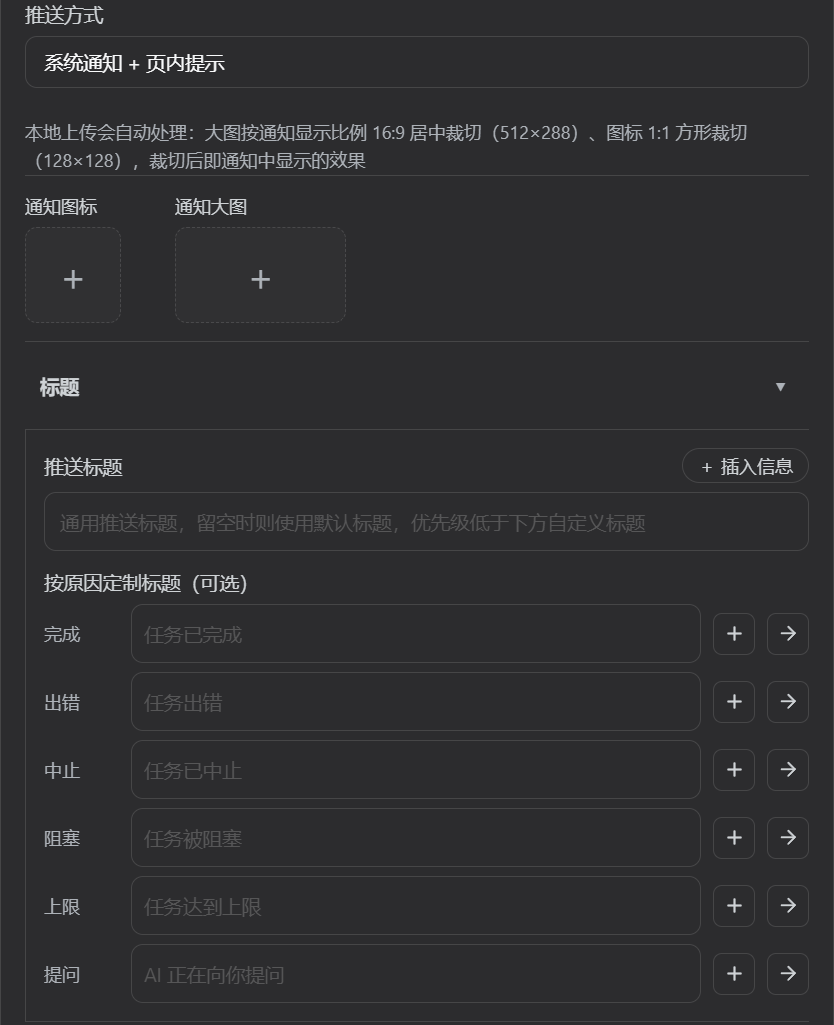
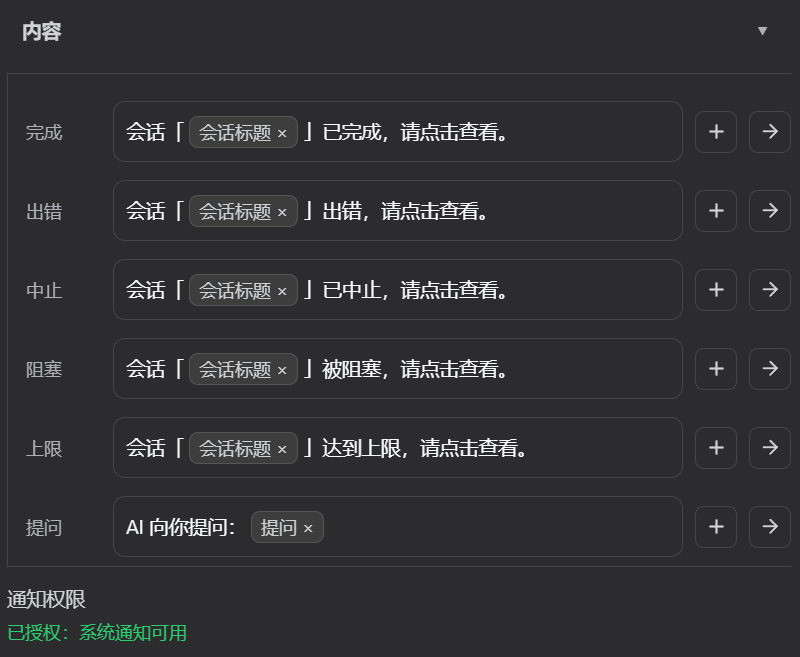
Typical users are developers and operators running multiple deep-reasoning or batch-style DSH sessions in parallel, who prefer to be pinged back when a turn finishes rather than watch the tab. After install, a settings panel exposes a chip-based visual template editor with placeholders such as {title}, {duration}, {tokens}, {cache}, {tps}, {question}, plus media switches {image} / {icon} / {audio}; five localisations (Simplified Chinese, Traditional Chinese, English, Japanese, Korean) and four built-in style presets (kaomoji, Elu-cat, Neko-cat, DeepSeek-chan) ship out of the box, and any current configuration can be saved as a custom preset to localStorage. Before publishing, contributors run npm run selftest, which executes schema and sanitisation checks, settings-panel render smoke tests, sound-playback chain assertions, and cross-README consistency checks as executable assertions.
Requirements are Node.js ≥ 22 and DSH Web profile with cordis ≥ 4; the plugin carries zero external runtime npm dependencies and the pure-logic layer in lib/core.js can be unit-tested in isolation, while timers and subscriptions are wrapped in ctx.effect() to return clearTimeout disposers so they unwind with the cordis fiber and survive HMR. First-run caveats: browser notification permission must be granted via a user gesture, the page-toast channel caps at three simultaneous toasts with ten-second auto-dismiss, the question prompt only displays if the host projection or one of the fallback signals is wired, and cache hit-rate plus generation-speed placeholders ({cache}, {tps}) only render when explicitly inserted into a custom template — default in-conversation messages do not surface numeric metrics. The package is distributed under the MIT license and is published on npm as @telosmaylx/dsh-session-notify.
dsh-session-notify 是一款面向 DSH(DeepSeek Harness)Web profile 的会话完成提醒插件,专门解决长时间运行或后台会话容易被遗忘的痛点。它在每轮对话结束时,将"已完成 / 出错 / 被阻塞 / 达到上限"以及用时、token 消耗写入会话日志,并通过浏览器 Web Notification 与页内 toast 三通道推送;窗口失焦与聚焦时各可指定独立通道(含"不通知"),AI 调用 ask_user_question 提问或触发 approval/asked 审批时也会立即弹窗。插件以官方 dsh.bundle manifest 声明安装入口,通过 dsh plugin add 一条命令即可挂载到 Web 部署的 DSH 宿主中,无需手写配置。
典型使用场景是开发者在 IDE 或浏览器里挂着多个 DSH 会话窗口,希望任务一结束就主动知道,而不是反复切回标签页检查。安装后用户进入设置面板,可视化模板编辑器允许把 {title}、{duration}、{tokens}、{cache}、{tps}、{question} 等占位符插入胶囊,5 种语言、4 套风格预设(颜文字、艾露猫、猫娘、DeepSeek 娘)可一键切换并另存自定义方案。该插件适合同时管理多个深度推理或长任务会话的用户,也适合习惯把窗口切到别处、靠通知回调工作流的运维与开发者。
运行环境要求为 Node.js ≥ 22 与 cordis ≥ 4,宿主需为 DSH Web profile 且默认包含 @deepseek-ai/dsh-settings 与会话投影单元;插件零外部 npm 依赖,纯逻辑层 lib/core.js 可独立测试,工程上遵守 cordis effect 纪律保证 HMR 安全。安装命令为 dsh plugin add @telosmaylx/dsh-session-notify,发布前可执行 npm run selftest 跑 schema 校验、设置面板冒烟与 README 一致性断言。首次运行需授予浏览器通知权限,模板中 {cache} 与 {tps} 仅在自定义文案里插入对应占位符时显示,宿主投影缺失时系统会自动回退到 harness 原生信号兜底;许可为 MIT,npm 通道分发。
请帮我安装这个 DSH 插件。安装前先完成【兼容性检查 + 安全性检查】,检查通过再动手。

插件:dsh-session-notify(TelosmaYLX/dsh-session-notify)
仓库:https://github.com/TelosmaYLX/dsh-session-notify
本站详情页:https://www.yhbd.top/plugins/telosmaylx-dsh-session-notify/
本站登记:类型 client · 归类 原生 DSH 插件 · 许可证 MIT · ⭐ 2 · 最近提交 2026-09-20 · 主语言 JavaScript

按下面顺序执行,每步先把结论告诉我,再进入下一步:

【1 兼容性检查】
① 我这边:DSH 版本、Node 版本、操作系统、当前 profile(web / desktop)。
② 读它的 README、package.json、插件 manifest,列出它要求的 DSH 版本 / Node 版本 / 操作系统 / 外部依赖 / 需要另外先装的运行时。
③ 逐条比对,结论只写「满足 / 不满足 / 未知」三种;不满足的给出可行替代方案。
④ 检查是否和我已装的插件冲突:命令名重复、skill / tool 重名、端口占用、重复注册的 MCP server。

【2 安全性检查】
① 仓库可信度:和上面「本站登记」是否一致;star / fork 数、创建时间、最近提交,是否归档或长期停更。
② 安装脚本:逐行看 package.json 的 preinstall / install / postinstall,以及 install.sh、setup.ps1 之类脚本。出现 curl|bash、下载后直接执行、混淆代码、访问与插件功能无关的域名,立刻停下来告诉我,不要继续装。
③ 依赖:列出新增依赖,标出无人维护、或与知名包拼写近似的可疑包(typosquatting)。
④ 权限与副作用:它会读写哪些目录、访问哪些域名、需要哪些 DSH 权限(filesystem / network / shell / clipboard 等),以及怎么卸载和回滚。
⑤ 如果它要求 sudo / 管理员权限,或权限明显超出功能所需,先停下来问我。

【3 安装】
上面两步没有「不满足」和「高危项」时才执行;用官方推荐方式安装,不要自行提权。

【4 汇报】
用表格输出:检查项 / 结论 / 依据 / 是否需要我决策。拿不准的一律写「未知」并说明要我怎么确认——不要猜,也不要替我决定。
Send this message to DSH in your current session: it verifies compatibility and security first (answering met / not met / unknown item by item) and only installs once everything checks out — it will stop and ask you if it finds a high-risk item. The box scrolls; the copy is the full prompt. CLI install commands may not be accurate across systems, so DSH is the safer route.把上面这条消息直接发给当前会话里的 DSH:它会先核对兼容性与安全性(逐条给「满足 / 不满足 / 未知」),确认没问题再安装,有高危项会停下来问你。框内可滚动,复制到的是完整提示词;安装命令不一定准确,发给 DSH 更稳。
- Only 2 stars - very few users, little community feedback星标只有 2,几乎没人在用,遇到问题缺少社区反馈
- Desktop client: installation downloads an executable - verify the publisher and checksums桌面客户端:安装会下载可执行文件,请核对发布者与校验和
DSH walks through these 9 checksDSH 会逐条核对这 9 项
Compatibility兼容性
- DSH, Node, OS and profile requirementsDSH 版本 / Node 版本 / 操作系统 / profile 是否满足要求
- External dependencies and runtimes (Electron / Python / Docker, ...)外部依赖与运行时(Electron / Python / Docker 等)是否齐备
- Conflicts with installed plugins: command names, skill / tool names, ports, duplicate MCP registration与已装插件是否冲突:命令名、skill / tool 重名、端口占用、重复 MCP 注册
Security安全性
- Repo matches the facts registered here; archived or abandoned?仓库是否与页面登记一致,是否归档或长期停更
- Safety of preinstall / install / postinstall and install.sh / setup.ps1preinstall / install / postinstall 与 install.sh、setup.ps1 是否安全
- curl|bash, download-then-execute, obfuscation, unrelated domains → stop immediatelycurl|bash、下载即执行、混淆代码、无关域名 → 立刻停止
- Typosquatting or unmaintained packages among the new dependencies新增依赖里有没有 typosquatting 或无人维护的包
- Requested permissions vs. what the feature actually needs申请了哪些权限、是否超出功能所需(filesystem / network / shell / clipboard)
- Any sudo / admin requirement, plus uninstall and rollback是否要求 sudo / 管理员权限,以及卸载与回滚方式
Anything uncertain must be marked unknown with a note on how to confirm it. This site's signal screen is a static snapshot, not a security audit.拿不准的必须标「未知」并说明要我怎么确认。本站的信号筛查是静态快照,不能替代安全审计。
Or use CLI install (for developers)或使用命令行安装(适合开发者)
CLI Install命令行安装
dsh plugin add github:TelosmaYLX/dsh-session-notify把 TelosmaYLX/dsh-session-notify 加入你的 DSH 配置(web profile)即可启用。
READMEREADME
dsh-session-notify
简体中文 · English · 繁體中文 · 日本語 · 한국어
DSH(DeepSeek Harness)会话完成提醒插件 —— 每一轮结束,让完成状态主动找你,而不是你盯着屏幕等。






每轮对话结束时,把「已完成 / 出错 / 被阻塞 / 达到上限」连同用时、token 消耗写入会话日志,并推送浏览器系统通知与页内 toast(窗口失焦 / 聚焦可分别指定通道,两路都含「不通知」);AI 向你提问、请求审批时同样立即弹窗提醒,不必守着会话页面。内置 5 种语言、4 套风格预设(颜文字 / 艾露猫 / 猫娘 / DeepSeek 娘)、可视化文案模板编辑器、自定义预设库,缓存命中率与生成速度取自官方投影,与状态栏同口径。
目录
功能特性
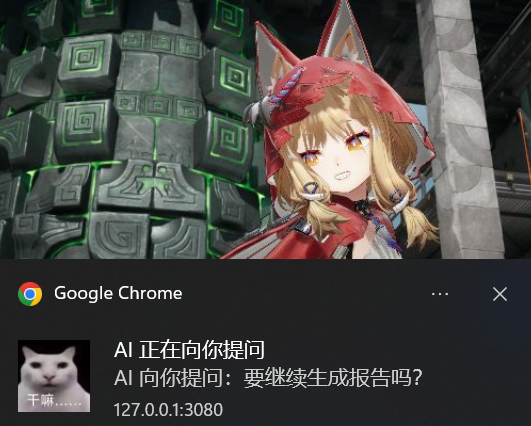
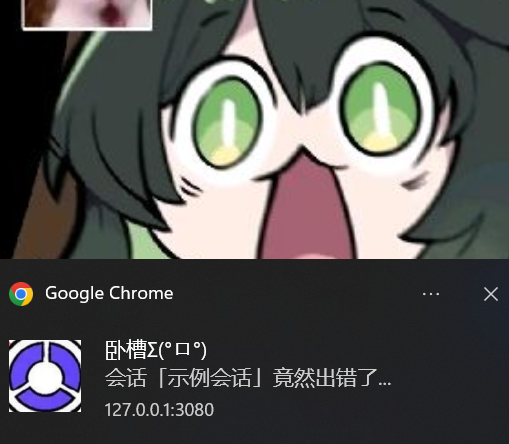
三通道提醒,一条不漏
| 通道 | 形式 | 说明 |
|---|---|---|
| 会话内系统消息 | 可折叠提示行 | 每轮结束把结束原因与用时、消耗作为插件来源的系统消息追加进会话日志,随 JSONL 落盘,恢复或回放会话后依然可见。 |
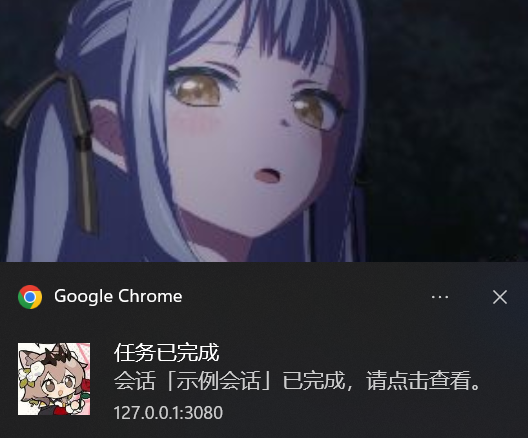
| 浏览器系统通知 | Web Notification | 原生弹窗。每次完成事件使用独立 tag(dsh-session-notify:<timestamp>),不与前一次互相替换,也不被折叠成一个分组条目;点击通知聚焦回窗口。 |
| 页内 toast | 右下角浮动弹窗 | 永远展示的保底通道:系统通知被平台静默、权限拒绝或环境不支持时仍有可见反馈。同屏最多 3 条(超出移除最旧),10 秒自动消失,点击关闭。 |
Showing the opening section of the README — the full document lives in the repository以上为 README 开头摘要,完整文档在仓库内 · View the full README on GitHub →在 GitHub 查看完整 README →
Related相关推荐
-
 Clarklevis1995/dsh-mobile
DeepSeek Harness Mobile 是一个面向 DeepSeek Harness 的原生 iOS 客户端。它通过 dsh-plugin-mobile-gateway 与 Harness 建立 WebSocket 连接,将工作区、…
Clarklevis1995/dsh-mobile
DeepSeek Harness Mobile 是一个面向 DeepSeek Harness 的原生 iOS 客户端。它通过 dsh-plugin-mobile-gateway 与 Harness 建立 WebSocket 连接,将工作区、…
-
 Plocr/dsh-desktop
DeepSeek Harness 桌面工作台:Electron 原生壳 + 内嵌 harness 运行时(离线、免装 Node),壳仅保留桌面原生能力,与 harness 间以 bridge 插件通信
Plocr/dsh-desktop
DeepSeek Harness 桌面工作台:Electron 原生壳 + 内嵌 harness 运行时(离线、免装 Node),壳仅保留桌面原生能力,与 harness 间以 bridge 插件通信
-
 nexu-io/open-design
🎨 Best DeepSeek Harness Design Plugin. The open-source Claude Design alternative. 🖥️ Local-first desktop app. 🖼️ Your…
nexu-io/open-design
🎨 Best DeepSeek Harness Design Plugin. The open-source Claude Design alternative. 🖥️ Local-first desktop app. 🖼️ Your…
-
 liustack/modlens
The first vision plugin for DeepSeek Harness, and the vision bridge for every text-only coding agent. Paste an image, ge…
liustack/modlens
The first vision plugin for DeepSeek Harness, and the vision bridge for every text-only coding agent. Paste an image, ge…
-
 EthanYoQ/AI-Novel-Writer
AI 小说创作软件:把灵感、角色、世界观、大纲、章节写作、审稿和修稿组织成可控流程;提供 Windows/macOS 桌面版,支持本地和在线模型。AI Novel Writing Software: Organizes inspiratio…
EthanYoQ/AI-Novel-Writer
AI 小说创作软件:把灵感、角色、世界观、大纲、章节写作、审稿和修稿组织成可控流程;提供 Windows/macOS 桌面版,支持本地和在线模型。AI Novel Writing Software: Organizes inspiratio…
-
 fufankeji/deepseek-harness-studio
DeepSeek Harness 零代码桌面端|一键启动,支持 Windows 与 macOS;内置插件发现、热点插件推送、一键安装与管理、AI 智能推荐和视觉增强。
fufankeji/deepseek-harness-studio
DeepSeek Harness 零代码桌面端|一键启动,支持 Windows 与 macOS;内置插件发现、热点插件推送、一键安装与管理、AI 智能推荐和视觉增强。
-
 EthanYoQ/Invoice-Downloader
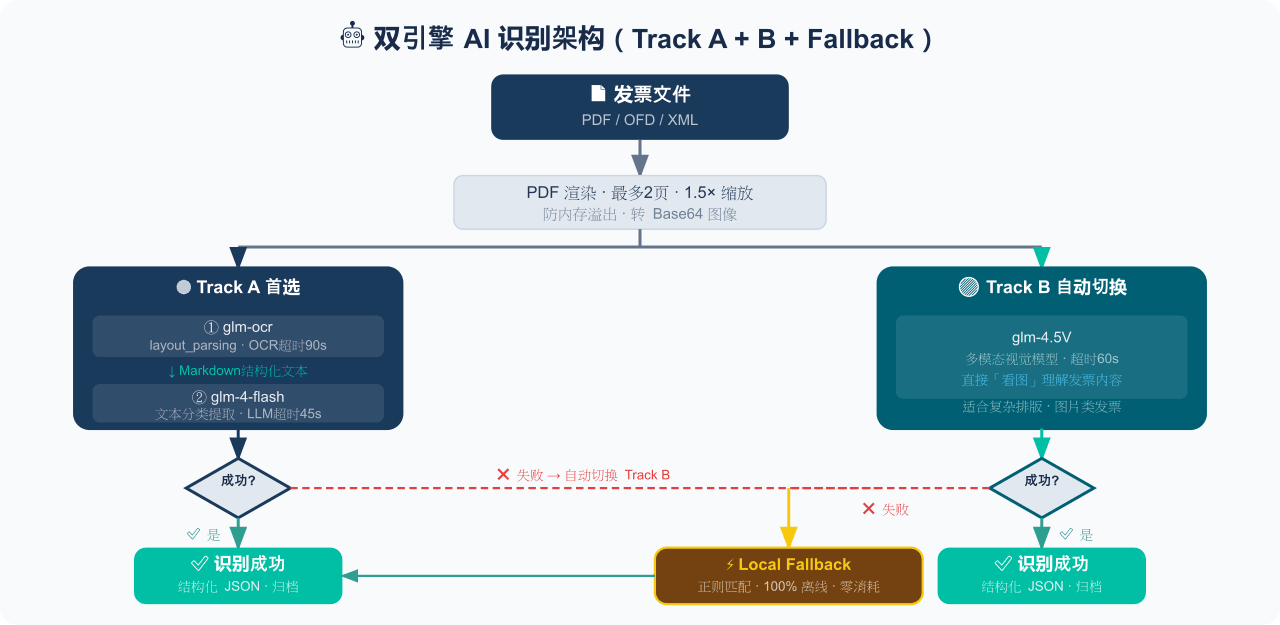
电子发票整理与报销准备工具:从邮箱批量收集 PDF/OFD/XML 发票,OCR 识别、分类归档并生成 Excel 汇总;提供 Windows/macOS 桌面版与 DSH 插件。
EthanYoQ/Invoice-Downloader
电子发票整理与报销准备工具:从邮箱批量收集 PDF/OFD/XML 发票,OCR 识别、分类归档并生成 Excel 汇总;提供 Windows/macOS 桌面版与 DSH 插件。
-
 ZSeven-W/dsh-ios
DeepSeek Harness (DSH) plugin: a live iOS Simulator — and a USB-connected iPhone — inside the conversation. 22 agent too…
ZSeven-W/dsh-ios
DeepSeek Harness (DSH) plugin: a live iOS Simulator — and a USB-connected iPhone — inside the conversation. 22 agent too…