TencentCloudADP/Tencent-ADP-dsh-plugin
Tencent Cloud ADP plugin for DeepSeek Harness
项目介绍Project Overview
DSH 插件,把 DSH profile 接入腾讯云 ADP。核心能力:提供 Hunyuan 等模型、Hunyuan AI 搜索、API/MCP 应用市场、技能广场,以及把 ADP 应用注册为 ask 工具;通过 Tool Key、SecretId/SecretKey、应用 AppKey 三套凭据分别鉴权。适用场景:在 DSH Web 中选用 adp:Hunyuan/hy3 走工具调用,或在公开云/独立站使用 ADP 应用、插件、Agent 流程时。需注意:本插件并非 ADP Worker,凭据仅本机回环写入;公开云子账号缺少 ADP 读写权限或工作区选错会导致 MISSING_CREDENTIAL 或 4510004 错误。
This DSH plugin connects a DSH profile to Tencent Cloud ADP, providing Hunyuan and other gateway models, Hunyuan AI web search, the API/MCP marketplace, the skill plaza, and ADP apps exposed as ask tools. Authentication uses three credential planes: a Tool Key, SecretId/SecretKey, and per-app AppKey. Use it when running DSH Web against an ADP independent-site or public-cloud account to chat, search, invoke marketplace plugins, or drive App/Agent CRUD. Note that this is not ADP Worker, credential writes are loopback-only, and missing workspace or CAM permissions produce MISSING_CREDENTIAL or 4510004 errors.
请帮我了解并安装插件:【Tencent-ADP-dsh-plugin】【https://github.com/TencentCloudADP/Tencent-ADP-dsh-plugin】把上面这条消息直接发给当前会话里的 DSH,让它帮你了解并安装。安装命令不一定准确,发给 DSH 更稳。Send this message to DSH in your current session. CLI install commands may not be accurate across systems — DSH will figure it out for you.
或使用命令行安装(适合开发者)Or use CLI install (for developers)
命令行安装CLI Install
dsh plugin --profile web add @tencentcloudadp/dsh-adp把 TencentCloudADP/Tencent-ADP-dsh-plugin 加入你的 DSH 配置(web profile)即可启用。
READMEREADME
@tencentcloudadp/dsh-adp
Tencent Cloud ADP as a DeepSeek Harness plugin bundle.




This plugin connects a DSH profile to Tencent Cloud ADP: gateway models (Hunyuan and friends), Hunyuan AI web search, the API/MCP plugin marketplace, the skill plaza, and ADP apps as ask tools. It is not ADP Worker.
Install
dsh plugin --profile web add @tencentcloudadp/dsh-adp
dsh web
Then open Settings → Plugins → Tencent Cloud ADP and fill in credentials (next section). Install issues (stale plugin name, pnpm build approval): docs/pitfalls.md.
Configure
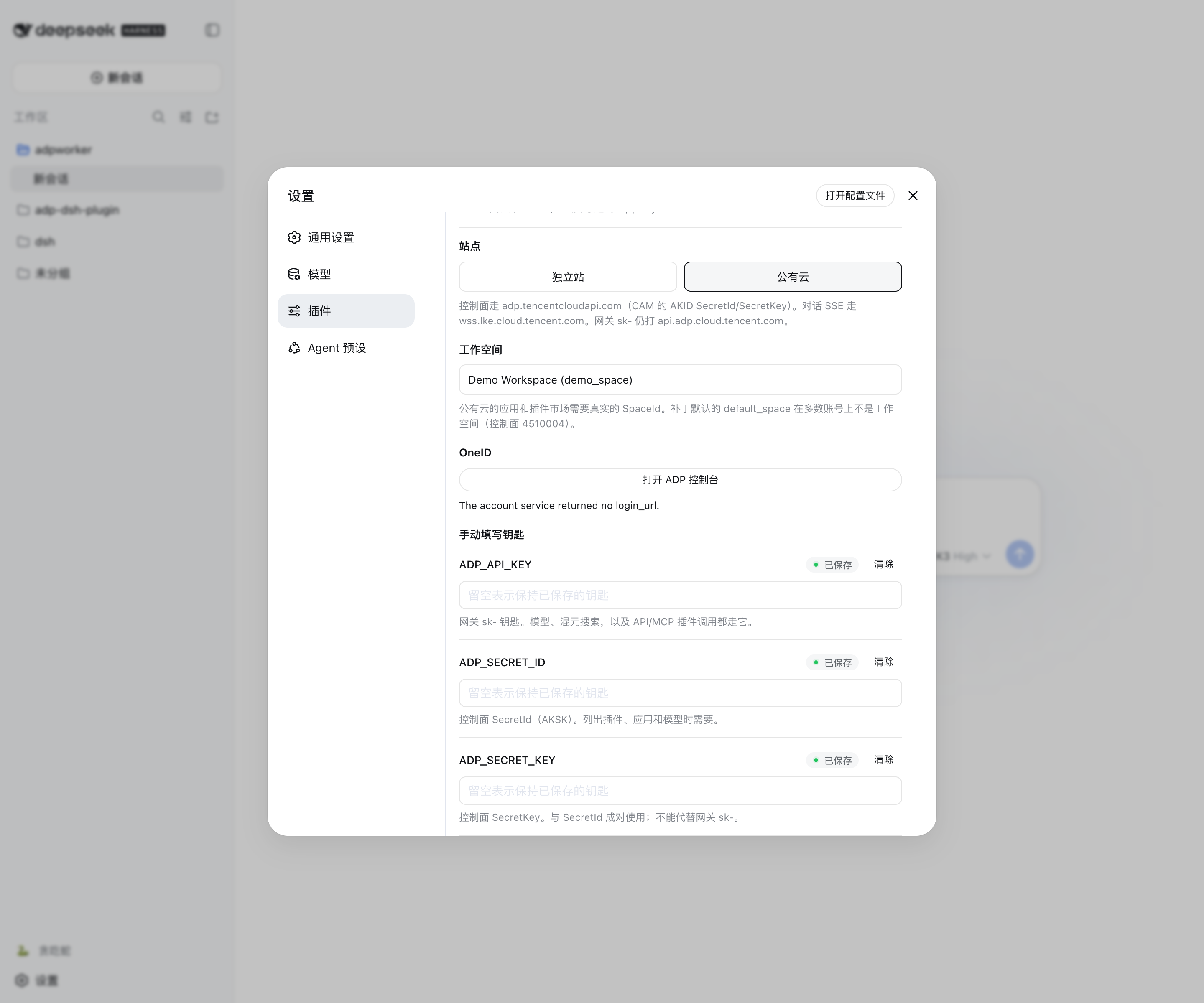
ADP has three credential planes. The patch stores reference names (ADP_API_KEY, …); values live in $DSH_HOME/.credentials.yaml or the environment.
Official ADP API docs cover control-plane AKSK and AppKey SSE chat. They do not document the OpenAI-shaped model gateway this plugin also uses. Endpoints and key sources: API overview. Planes and error codes: docs/credentials.md.
| Plane | Reference | Official source | If missing |
|---|---|---|---|
| Tool Key | ADP_API_KEY |
Create a Tool Key in the upper section of the site’s Key Management page | LLM / search / plugin calls fail with MISSING_CREDENTIAL |
| SecretId / SecretKey | ADP_SECRET_ID / ADP_SECRET_KEY |
Public cloud: CAM API keys. Independent site: ADP console Key Management | Model / plugin / app catalogs stay empty |
| Per-app AppKey | e.g. ADP_APP_KEY_DEMO |
App publish → API management or app Invoke (SSE) | The matching ask tool is not registered |
1. Open ADP
Register and complete real-name verification, then open the product (product overview). First login creates one enterprise and a default workspace; that workspace is not the string default_space this plugin ships in the patch (workspace overview).
| Site | Console | Control host | Agent SSE |
|---|---|---|---|
| Independent site | adp.tencent.com | capi.adp.tencent.com |
https://adp.tencent.com/adp/v2/chat |
| Public cloud | adp.cloud.tencent.com | adp.tencentcloudapi.com |
https://wss.lke.cloud.tencent.com/adp/v2/chat |
Both sites complete against https://api.adp.cloud.tencent.com/chat/completions (no /v1). There is no api.adp.tencent.com.
2. Get SecretId / SecretKey
Public cloud — CAM AKID… key (36 characters):
- Open CAM → API Key Management.
- Create a key if the list is empty (root account access keys). Copy SecretId and SecretKey at creation time; SecretKey is shown only once after 2023-11-30.
- Sub-accounts need ADP (formerly Large Model Knowledge Engine) read/write on the CAM role (FAQ). Collaborator accounts are not supported (122569).
Independent site — ADP console key (~26 characters, not AKID):
- Sign in at adp.tencent.com.
- Open Key Management and copy SecretId / SecretKey (API overview · independent site).
That pair signs control-plane calls (DescribeModelList, DescribeSpaceList, marketplace). It is not ADP_API_KEY.
3. Get the Tool Key (ADP_API_KEY)
- Independent site: open Key Management and create a Tool Key in the upper section.
- Public cloud: open Key Management and click Create Tool Key in the upper section.
The Tool Key is used for Hunyuan / DeepSeek completions, Hunyuan search, and API/MCP plugin calls.
4. Optional: AppKey
Needed only for adp_ask / adp_ask_<slug> (SSE to a published app), not for picking adp:Hunyuan/hy3.
- Publish the app.
- Open App Publish → Service Status → API Management, or App Management → Invoke, and copy AppKey (104209, 105560).
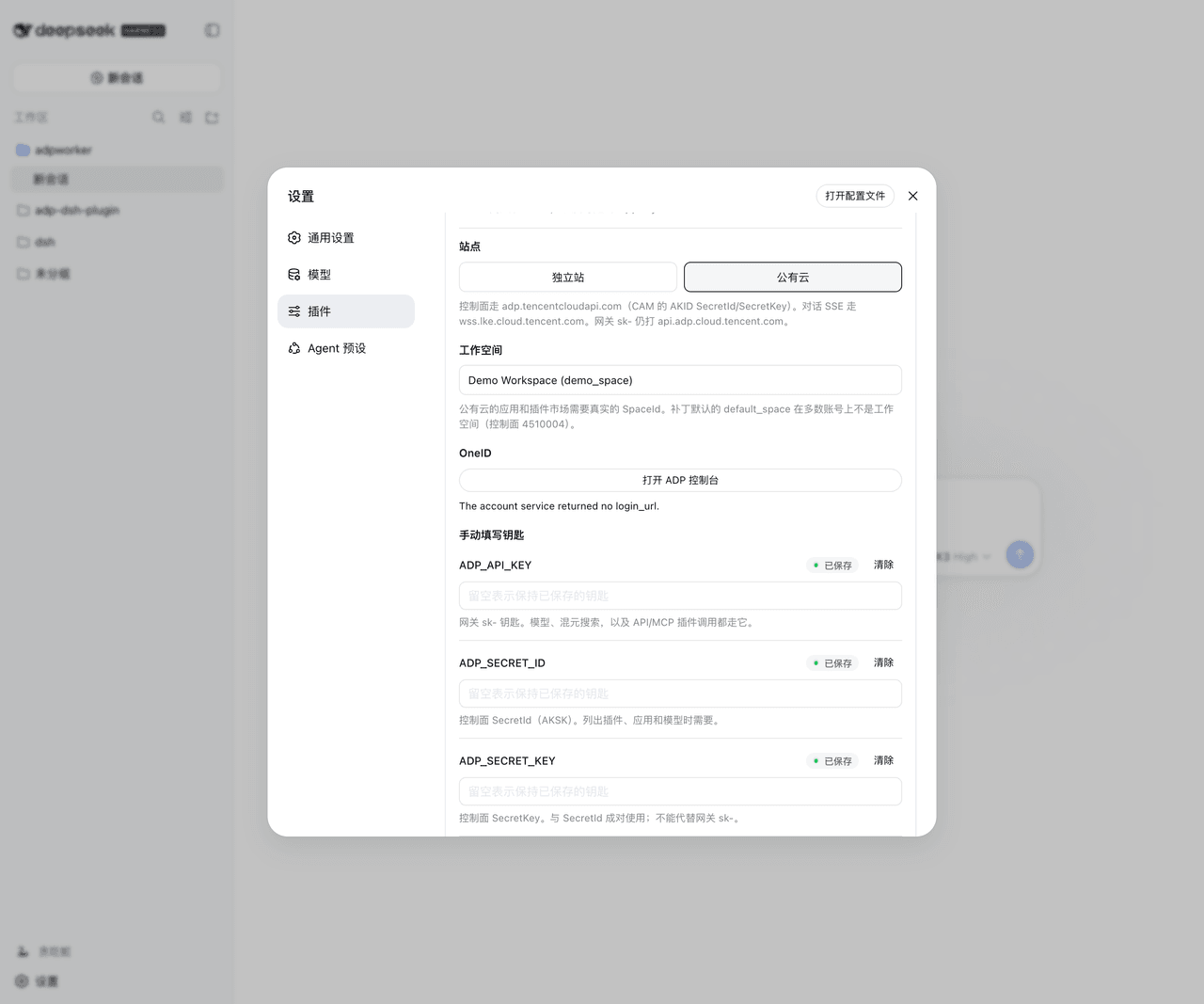
5. Fill the DSH card
- Run
dsh webon loopback (127.0.0.1). Credential writes are loopback-only. - Settings → Plugins → Tencent Cloud ADP.
- Choose Independent site or Public cloud.
- Paste the Tool Key, SecretId, and SecretKey. Save. Values go through
credentials.setinto$DSH_HOME/.credentials.yaml. - After AKSK is stored, the card lists workspaces from
DescribeSpaceList. Pick one. Public-cloud app and plugin calls need a real SpaceId; the patch defaultdefault_spaceis not a workspace on most accounts (control-plane4510004). If the list is empty, paste a SpaceId from the ADP console (workspaces). - Paste AppKey if you will use ask tools. Save again.
A Claw-style “build the app entirely via API” walkthrough (CreateSpace → CreateApp → CreateAgent → CreateRelease → chat) is 133869. That path is AppKey SSE, not this plugin’s gateway adapter.
What you get
adp-core, llm-adp, web-adp, plugins-adp, skills-adp, agents-adp, and control-adp start with the plugin:
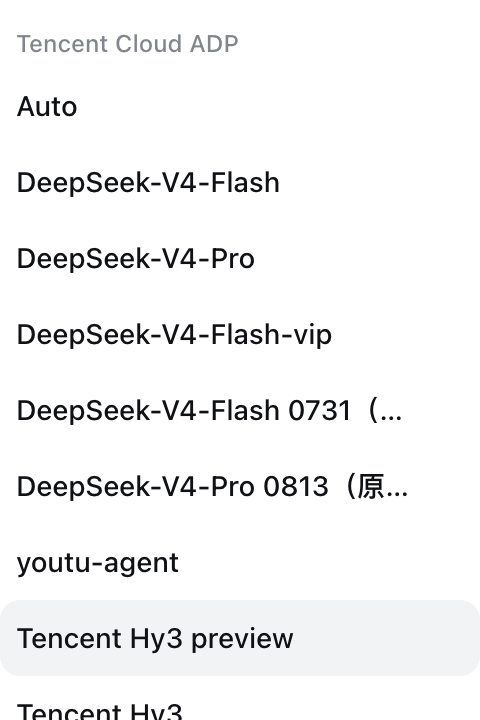
- Select
adp:Hunyuan/hy3(or another gateway model) and complete a tool-using turn. How catalog vs completions are wired: docs/seams.md. web_searchthrough Hunyuan AI search when this provider is selected (China-centric index).- Enable an API or MCP marketplace plugin via
adp_plugin_list/adp_plugin_enable, orenabledPluginIds. Public-cloud plugin/app calls need the workspace chosen above. - Generated media links (~24h COS) are saved into the workspace as
saved_files. - Skill plaza as a
ctx.skillsprovider (entries without download URLs stay inlistonly). adp_provision_agent— CreateApp → CreateAgent → CreateRelease → FieldMask AppKey →adp_ask_<slug>.adp_ask/adp_ask_<slug>— SSE ask; not a DSH subagent.adp_list_actions/adp_callwithallowMutatingfor App/Agent/Release CRUD. Mutating calls require approval.
Documentation
- docs/credentials.md — where each key comes from and what breaks without it
- docs/seams.md — contracts between this plugin and DSH
- docs/pitfalls.md — known traps
- docs/verification.md — manual checklist
Verify
pnpm test         # simulated HTTP; no secrets; CI gate
pnpm test:live    # real account; skips when env is absent
Contributing
Issues and pull requests are welcome on GitHub. Run pnpm test before opening a PR.
License
MIT. Copyright (C) 2026 Tencent. See LICENSE.txt for the text and third-party notices (eventsource-parser, fflate).
相关推荐Related
-
 ruvnet/ruflo
🌊 The original agent meta-harness. Deploy intelligent multi-player swarms, coordinate autonomous workflows, and build c…
ruvnet/ruflo
🌊 The original agent meta-harness. Deploy intelligent multi-player swarms, coordinate autonomous workflows, and build c…
-
 amruthpillai/reactive-resume
A one-of-a-kind resume builder that keeps your privacy in mind. Completely secure, customizable, portable, open-source a…
amruthpillai/reactive-resume
A one-of-a-kind resume builder that keeps your privacy in mind. Completely secure, customizable, portable, open-source a…
-
 volcengine/OpenViking
Self-evolving Context Database for AI Agents. Unify Agent Memory, Knowledge RAG and Skills.
volcengine/OpenViking
Self-evolving Context Database for AI Agents. Unify Agent Memory, Knowledge RAG and Skills.
-
 Molunerfinn/PicGo
:rocket: The Ultimate Image Uploader for Efficient Creators. Supports Obsidian, Typora, VS Code etc. and 60+ image hosti…
Molunerfinn/PicGo
:rocket: The Ultimate Image Uploader for Efficient Creators. Supports Obsidian, Typora, VS Code etc. and 60+ image hosti…
-
 titanwings/colleague-skill
将冰冷的离别化为温暖的 Skill,欢迎加入数字生命1.0!Transforming cold farewells into warm skills? It's giving rebirth era. Welcome to Digital …
titanwings/colleague-skill
将冰冷的离别化为温暖的 Skill,欢迎加入数字生命1.0!Transforming cold farewells into warm skills? It's giving rebirth era. Welcome to Digital …
-
 nocobase/nocobase
NocoBase is an open-source AI + no-code platform for building business systems fast. Instead of generating everything fr…
nocobase/nocobase
NocoBase is an open-source AI + no-code platform for building business systems fast. Instead of generating everything fr…
-
 Tencent/WeKnora
Open-source LLM knowledge platform: turn raw documents into a queryable RAG, an autonomous reasoning agent, and a self-m…
Tencent/WeKnora
Open-source LLM knowledge platform: turn raw documents into a queryable RAG, an autonomous reasoning agent, and a self-m…
- Nagi-ovo/voyager Enhancement suite for Gemini, AI Studio, Claude & ChatGPT — plus a prompt manager for any web UI, DeepSeek Harness inclu…