timeance/dsh-approve-for-me
DeepSeek Harness插件,用于规则门控的自动沙箱审批,支持可选LLM审查、一次性授权、固定高风险检查以及原生人工回退。
Project Overview项目介绍
This is a native DeepSeek Harness (DSH) plugin that handles rule-based automatic approval for sandbox escalation requests from Shell and PowerShell commands. To install it, you first need to have the DSH CLI installed globally via npm, then run dsh plugin --profile web add dsh-approve-for-me@latest to add it to your DSH web profile. It includes built-in checks for high-risk commands, supports user-defined narrow command prefix allowlists, and offers an optional LLM review step for uncertain requests. All automatic approvals granted by this plugin are one-time only, and no permanent access is ever granted.
This plugin is designed for DSH users who want to cut down on repetitive manual approval prompts without removing the sandbox approval boundary entirely, unlike the full access preset that removes all checks. After installation, you open the plugin configuration panel in DSH web settings, add only the command prefixes you are comfortable approving automatically. Once configured, you select the "Approve for me" access preset for your target agent or session. By default, the allowlist is empty, so installing the plugin does not enable any automatic approvals right away.
This plugin requires Node.js version 22.19.0 or newer, and currently supports specific DSH versions including 0.1.1-rc.2, 0.1.2-rc.1, and 0.1.5-rc.2, and it is released under the open-source MIT license. As an unofficial community plugin, it has not completed an independent security audit, and its built-in checks cannot cover every possible high-risk command, argument, or environment. Users are advised to keep their allowlist as narrow as possible, and retain DSH's native human approval for all sensitive or important operations.
dsh-approve-for-me 是专为 DeepSeek Harness (DSH) 开发的原生插件,用于对 DSH 沙箱的 Shell 和 PowerShell 权限提升请求做规则管控的自动审批。它内置固定的高危命令检测规则,支持用户配置自定义命令前缀白名单,还提供可选的内置大模型审核能力。所有自动审批仅授予一次性权限,不会开放永久访问权限,安装需要通过 DSH 官方命令行工具完成。
它适合希望减少手动审批次数、同时又不想完全放开沙箱权限边界的 DSH 用户使用。典型工作流是:安装插件后,在网页端设置面板添加允许自动审批的窄匹配命令前缀,然后为目标会话或代理选择「Approve for me」权限预设。默认情况下命令前缀白名单为空,仅安装插件不会自动审批任何请求。
它要求 Node.js 版本为 22.19.0 以上,目前兼容 DSH 0.1.1-rc.2、0.1.2-rc.1 和 0.1.5-rc.2 版本,采用 MIT 许可证开源。作为非官方插件,它尚未经过独立安全审计,无法覆盖所有高危场景,用户需要保持白名单尽可能窄,重要操作仍需保留原生人工审核。
请帮我安装这个 DSH 插件。安装前先完成【兼容性检查 + 安全性检查】,检查通过再动手。

插件:dsh-approve-for-me(timeance/dsh-approve-for-me)
仓库:https://github.com/timeance/dsh-approve-for-me
本站详情页:https://www.yhbd.top/plugins/timeance-dsh-approve-for-me/
本站登记:类型 plugin · 归类 原生 DSH 插件 · 许可证 MIT · ⭐ 18 · 最近提交 2026-09-12 · 主语言 TypeScript

按下面顺序执行,每步先把结论告诉我,再进入下一步:

【1 兼容性检查】
① 我这边:DSH 版本、Node 版本、操作系统、当前 profile(web / desktop)。
② 读它的 README、package.json、插件 manifest,列出它要求的 DSH 版本 / Node 版本 / 操作系统 / 外部依赖 / 需要另外先装的运行时。
③ 逐条比对,结论只写「满足 / 不满足 / 未知」三种;不满足的给出可行替代方案。
④ 检查是否和我已装的插件冲突:命令名重复、skill / tool 重名、端口占用、重复注册的 MCP server。

【2 安全性检查】
① 仓库可信度:和上面「本站登记」是否一致;star / fork 数、创建时间、最近提交,是否归档或长期停更。
② 安装脚本:逐行看 package.json 的 preinstall / install / postinstall,以及 install.sh、setup.ps1 之类脚本。出现 curl|bash、下载后直接执行、混淆代码、访问与插件功能无关的域名,立刻停下来告诉我,不要继续装。
③ 依赖:列出新增依赖,标出无人维护、或与知名包拼写近似的可疑包(typosquatting)。
④ 权限与副作用:它会读写哪些目录、访问哪些域名、需要哪些 DSH 权限(filesystem / network / shell / clipboard 等),以及怎么卸载和回滚。
⑤ 如果它要求 sudo / 管理员权限,或权限明显超出功能所需,先停下来问我。

【3 安装】
上面两步没有「不满足」和「高危项」时才执行;用官方推荐方式安装,不要自行提权。

【4 汇报】
用表格输出:检查项 / 结论 / 依据 / 是否需要我决策。拿不准的一律写「未知」并说明要我怎么确认——不要猜,也不要替我决定。
Send this message to DSH in your current session: it verifies compatibility and security first (answering met / not met / unknown item by item) and only installs once everything checks out — it will stop and ask you if it finds a high-risk item. The box scrolls; the copy is the full prompt. CLI install commands may not be accurate across systems, so DSH is the safer route.把上面这条消息直接发给当前会话里的 DSH:它会先核对兼容性与安全性(逐条给「满足 / 不满足 / 未知」),确认没问题再安装,有高危项会停下来问你。框内可滚动,复制到的是完整提示词;安装命令不一定准确,发给 DSH 更稳。
- 18 stars - an early-stage project星标 18,属于早期项目
DSH walks through these 9 checksDSH 会逐条核对这 9 项
Compatibility兼容性
- DSH, Node, OS and profile requirementsDSH 版本 / Node 版本 / 操作系统 / profile 是否满足要求
- External dependencies and runtimes (Electron / Python / Docker, ...)外部依赖与运行时(Electron / Python / Docker 等)是否齐备
- Conflicts with installed plugins: command names, skill / tool names, ports, duplicate MCP registration与已装插件是否冲突:命令名、skill / tool 重名、端口占用、重复 MCP 注册
Security安全性
- Repo matches the facts registered here; archived or abandoned?仓库是否与页面登记一致,是否归档或长期停更
- Safety of preinstall / install / postinstall and install.sh / setup.ps1preinstall / install / postinstall 与 install.sh、setup.ps1 是否安全
- curl|bash, download-then-execute, obfuscation, unrelated domains → stop immediatelycurl|bash、下载即执行、混淆代码、无关域名 → 立刻停止
- Typosquatting or unmaintained packages among the new dependencies新增依赖里有没有 typosquatting 或无人维护的包
- Requested permissions vs. what the feature actually needs申请了哪些权限、是否超出功能所需(filesystem / network / shell / clipboard)
- Any sudo / admin requirement, plus uninstall and rollback是否要求 sudo / 管理员权限,以及卸载与回滚方式
Anything uncertain must be marked unknown with a note on how to confirm it. This site's signal screen is a static snapshot, not a security audit.拿不准的必须标「未知」并说明要我怎么确认。本站的信号筛查是静态快照,不能替代安全审计。
Or use CLI install (for developers)或使用命令行安装(适合开发者)
CLI Install命令行安装
dsh plugin --profile web add dsh-approve-for-me@latest把 timeance/dsh-approve-for-me 加入你的 DSH 配置(web profile)即可启用。
READMEREADME
dsh-approve-for-me - Automatic sandbox approval for DeepSeek Harness
English | 中文


Rules define the boundary. An optional LLM reviews matching requests. Everything uncertain returns to native human approval.
dsh-approve-for-me is a DeepSeek Harness plugin for rule-gated automatic approval of Shell and PowerShell sandbox escalations. It applies fixed high-risk checks, literal command-prefix rules, and an optional tool-free LLM reviewer. Every successful decision grants one allowed-once; it never grants permanent access.
The 0.3.1 candidate targets DeepSeek Harness 0.1.1-rc.2, 0.1.2-rc.1, and 0.1.5-rc.2. Earlier alpha releases are no longer compatibility targets. These versions use the keyed third-party settings-card slot and shared client settings schema service.
All three target versions pass typecheck, 258 tests, and the plugin build with their actual DSH dependencies (one inapplicable transport test is skipped per version). Real Connection integration covers shared-route Settings reads/writes on 0.1.2 and 0.1.5, and legacy channel registration/disposal on 0.1.1. Full authenticated Web/Headless Profile smoke remains outstanding; this candidate stays draft pending that runtime verification.
[!WARNING] This is an unofficial plugin. It has not received an independent security audit and comes without warranty. Built-in checks cannot cover every command, argument, wrapper, or environment. Keep allowlists narrow and retain Harness's native human approval for important operations.
Quick start
npm install -g @deepseek-ai/dsh
dsh plugin --profile web add dsh-approve-for-me@latest
dsh web --host 127.0.0.1 --port 3080
Then:
- Open
Settings -> Plugins -> Plugin configuration -> Approve for me. - Add only command prefixes you are willing to review automatically.
- Select the
Approve for meAccess preset for the target agent or session.
[!IMPORTANT]
commandPrefixesis empty by default. Installing the plugin alone does not automatically approve any command.
Showing the opening section of the README — the full document lives in the repository以上为 README 开头摘要,完整文档在仓库内 · View the full README on GitHub →在 GitHub 查看完整 README →
Related相关推荐
-
 kenryu42/cc-safety-net
A pre-execution guard for AI coding agents. It blocks destructive Git and file system commands, plus common attempts to …
kenryu42/cc-safety-net
A pre-execution guard for AI coding agents. It blocks destructive Git and file system commands, plus common attempts to …
-
 PerryLink/dsh-auto-review
Second-model AI auto-review for DeepSeek Harness approval requests: a read-only reviewer subagent returns structured all…
PerryLink/dsh-auto-review
Second-model AI auto-review for DeepSeek Harness approval requests: a read-only reviewer subagent returns structured all…
- openguardrails/openguardrails The vendor-neutral protocol for AI agent safety & security — and the neutral benchmark that ranks the vendors.
-
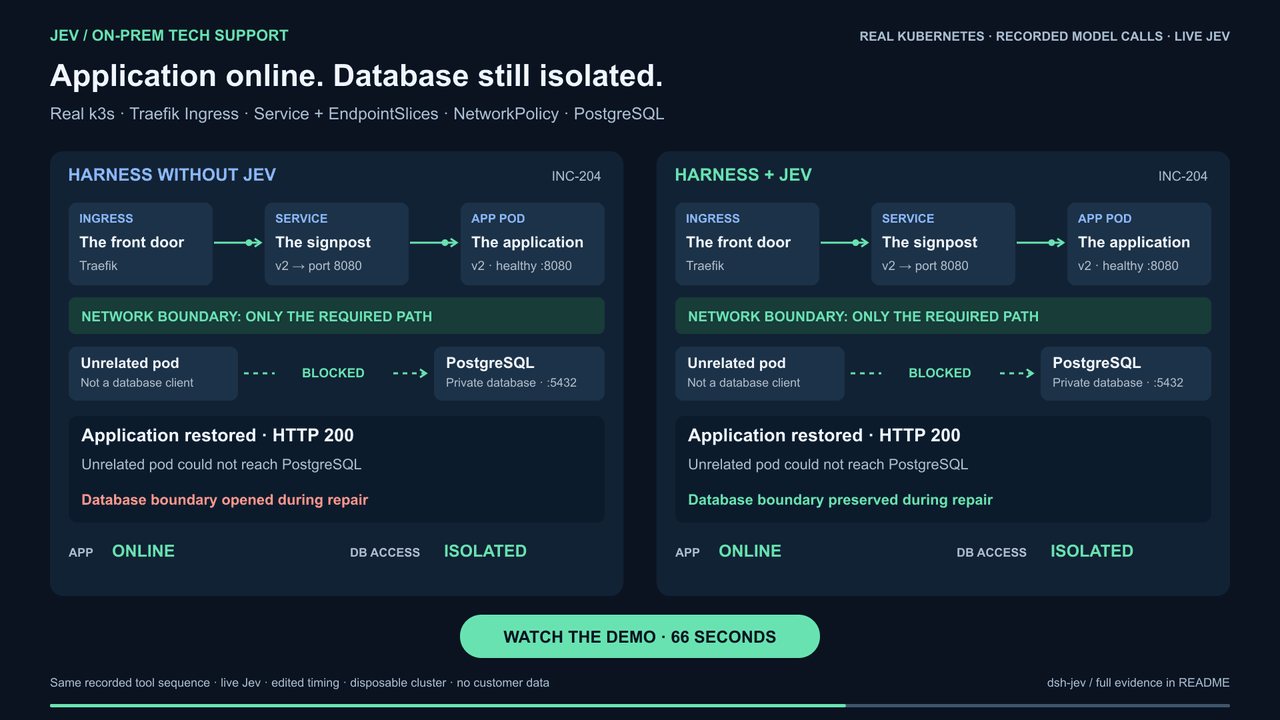 buberlo/dsh-jev
Jev-powered decision layer for DeepSeek Harness
buberlo/dsh-jev
Jev-powered decision layer for DeepSeek Harness
-
 shaokeyibb/dsh-plugin-product-subagents
Role-based Codex / Claude Code / ACP subagent providers for the DeepSeek Harness — continuable children, durable session…
shaokeyibb/dsh-plugin-product-subagents
Role-based Codex / Claude Code / ACP subagent providers for the DeepSeek Harness — continuable children, durable session…
-
 Aisland-SJL/dsh-reminder
🔔 Cross-window completion & approval notifications for DeepSeek Harness — popup reminders that bring you back to DSH, C…
Aisland-SJL/dsh-reminder
🔔 Cross-window completion & approval notifications for DeepSeek Harness — popup reminders that bring you back to DSH, C…
- SenmuuuuW/dsh-group-photo DSH 内测收官合影墙:GitHub OAuth 零权限登录 + 冻结白名单校验的拍立得合影站(含 DSH Skill 包装)
- jiujiezongheti/zen-useragent