
Tkingxiao/dsh-any-background
Deepseek Harness 自定义主题插件,支持自定义图片/视频壁纸,对话框,侧边栏等透明度模糊度调整,全局主题色的色轮调整插件
项目介绍Project Overview
dsh-any-background 是一款 DeepSeek Harness 外观插件,用于深度定制 Web UI。核心能力:PS 级取色环与 HSL/RGB 输入、图片/视频壁纸、网格渐变与几何动态背景、对主背景/侧边栏/卡片/设置面板等各部分独立调节不透明度与毛玻璃模糊,并支持主题导出导入。适用于希望通过壁纸与配色重塑聊天界面视觉的研究者与重度用户。需注意:deepseek-harness-desktop 在 Electron 打包下侧栏与中心区不透明度显示反向,待桌面客户端更新修复。
dsh-any-background is a DeepSeek Harness appearance plugin for deep Web UI customization. Core capability: a Photoshop-style color wheel with HSL/RGB inputs, image and video wallpapers, mesh-gradient and geometric dynamic backgrounds, plus independent per-part opacity and frosted-glass blur for the main background, sidebar, cards, and settings panel, with theme export/import. Use it when researchers or power users want to reshape the chat interface via wallpaper and palette. Caveat: on deepseek-harness-desktop, the sidebar and center opacity appear inverted under Electron packaging, pending a desktop client fix.
请帮我了解并安装插件:【dsh-any-background】【https://github.com/Tkingxiao/dsh-any-background】把上面这条消息直接发给当前会话里的 DSH,让它帮你了解并安装。安装命令不一定准确,发给 DSH 更稳。Send this message to DSH in your current session. CLI install commands may not be accurate across systems — DSH will figure it out for you.
或使用命令行安装(适合开发者)Or use CLI install (for developers)
命令行安装CLI Install
dsh plugin --profile web add dsh-any-background把 Tkingxiao/dsh-any-background 加入你的 DSH 配置(web profile)即可启用。
READMEREADME
dsh-any-background

English | 中文
A DeepSeek Harness appearance plugin that lets you fully customize the Web UI — custom theme color, background wallpaper, and fine-grained per-part opacity & blur controls.
Screenshots
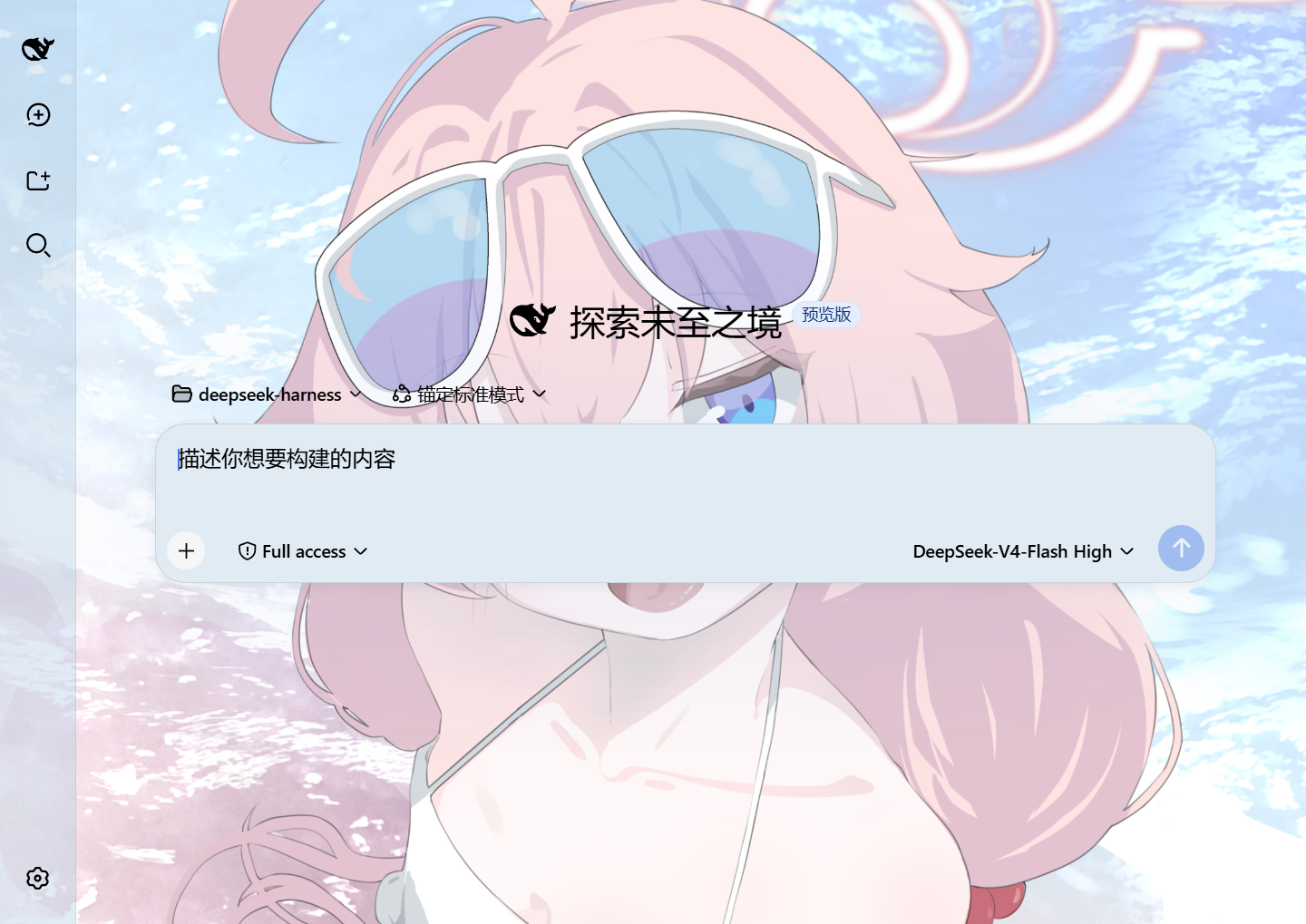
Custom homepage · wallpaper + theme color applied
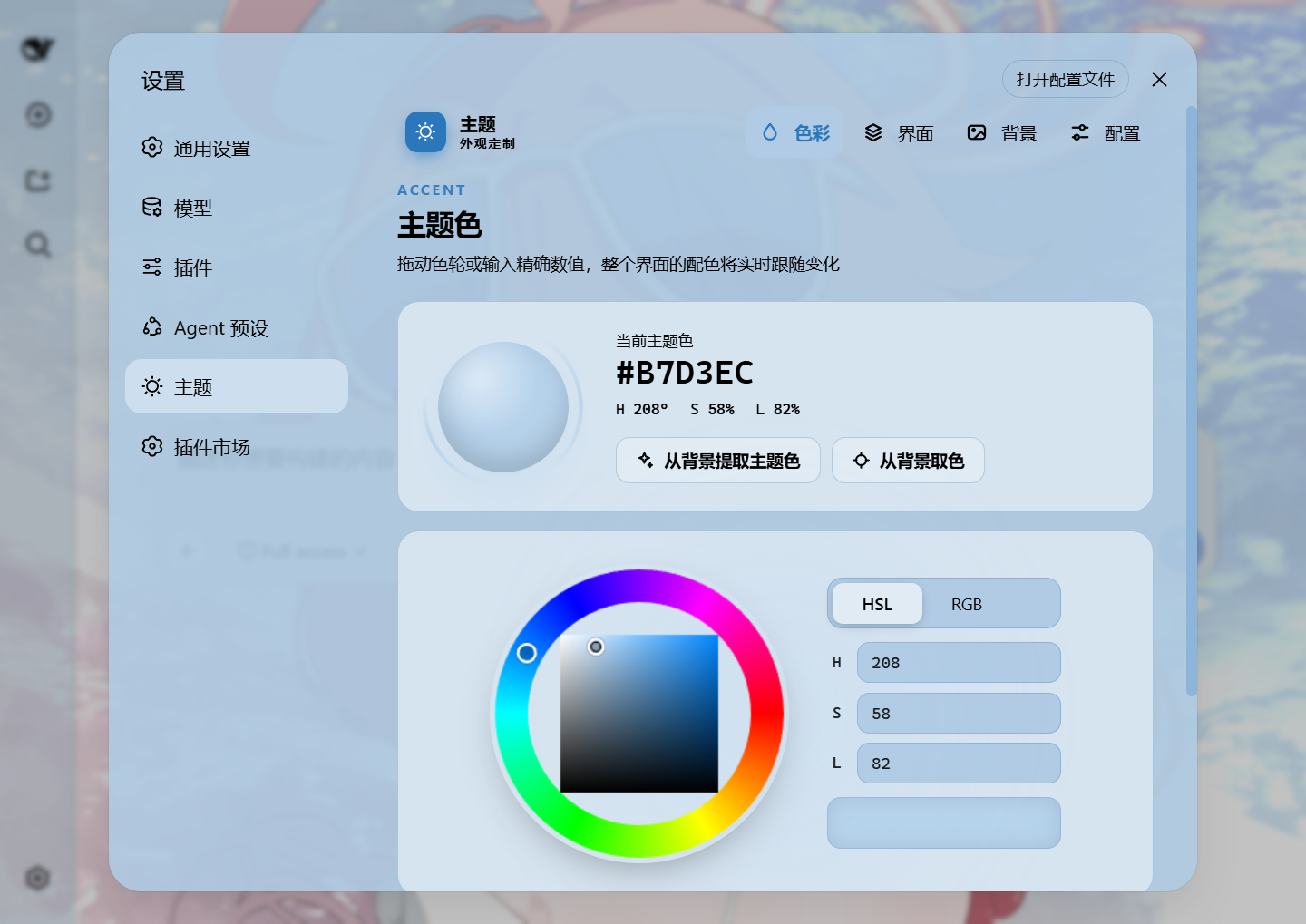
Theme color picker · PS-style wheel + precise HSL/RGB inputs
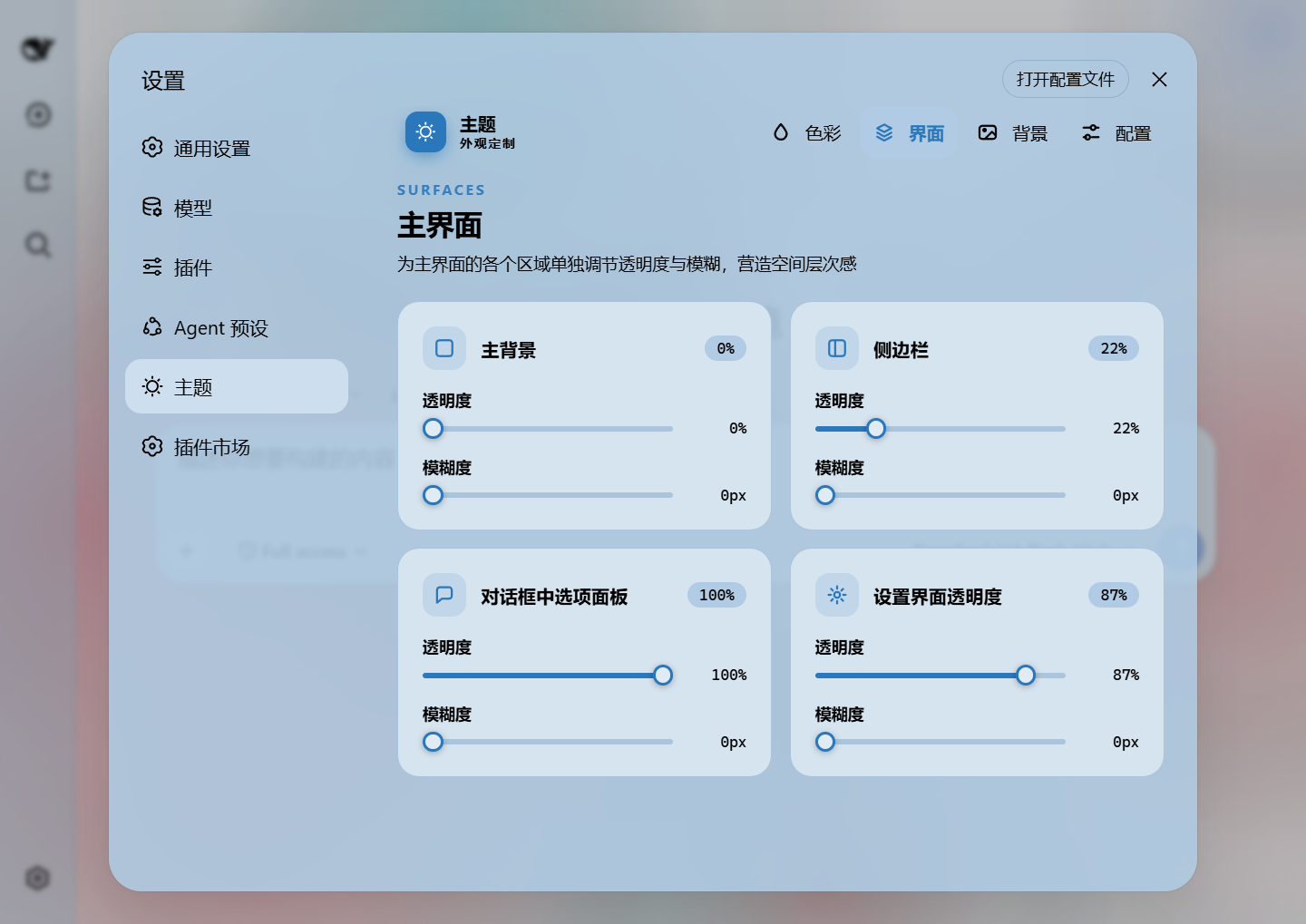
Per-part opacity and blur · main background, sidebar, cards, settings
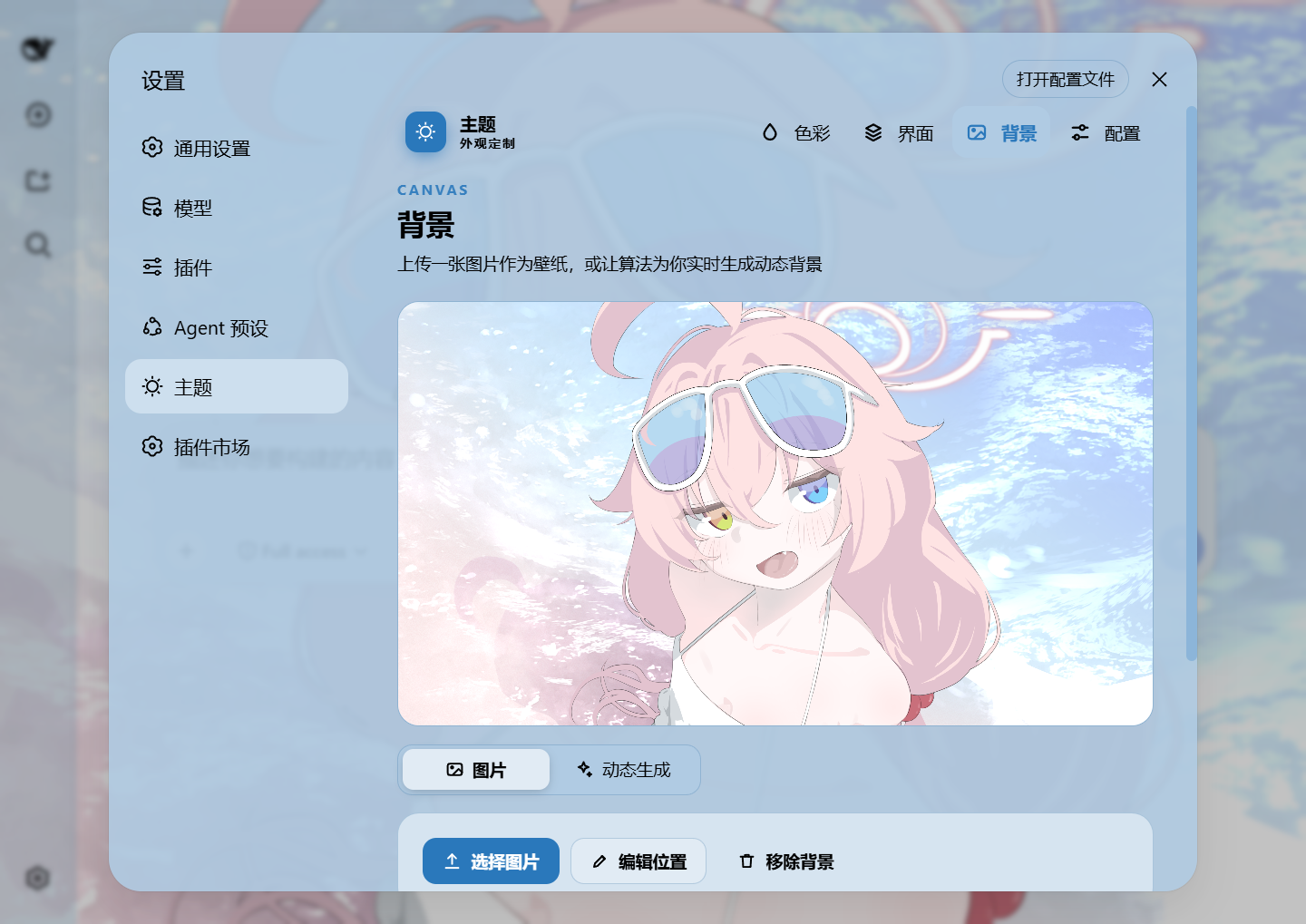
Background editor · image/video wallpapers support drag-to-pan and scroll-to-zoom
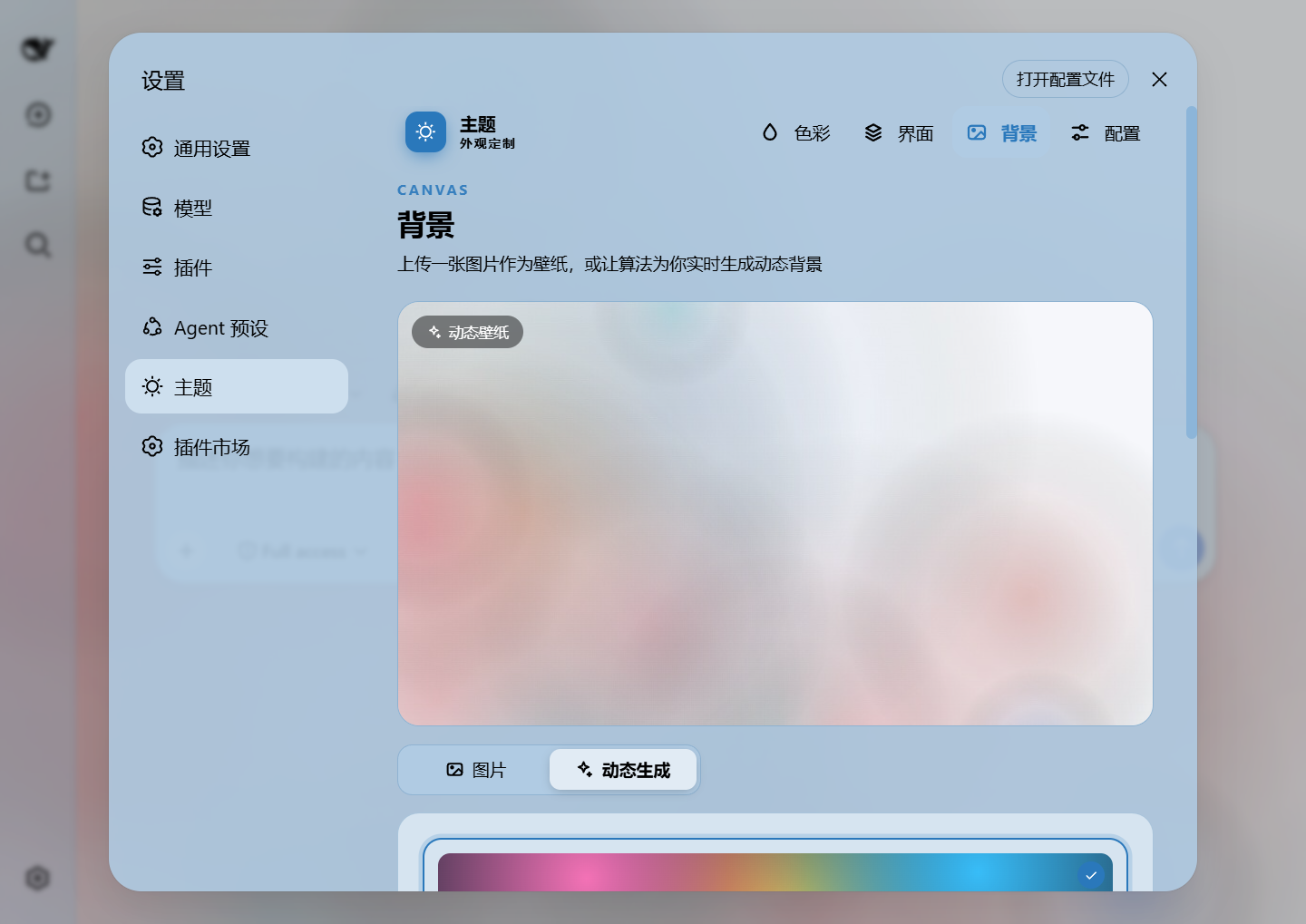
Generated dynamic background · mesh gradient / Shader / geometric presets
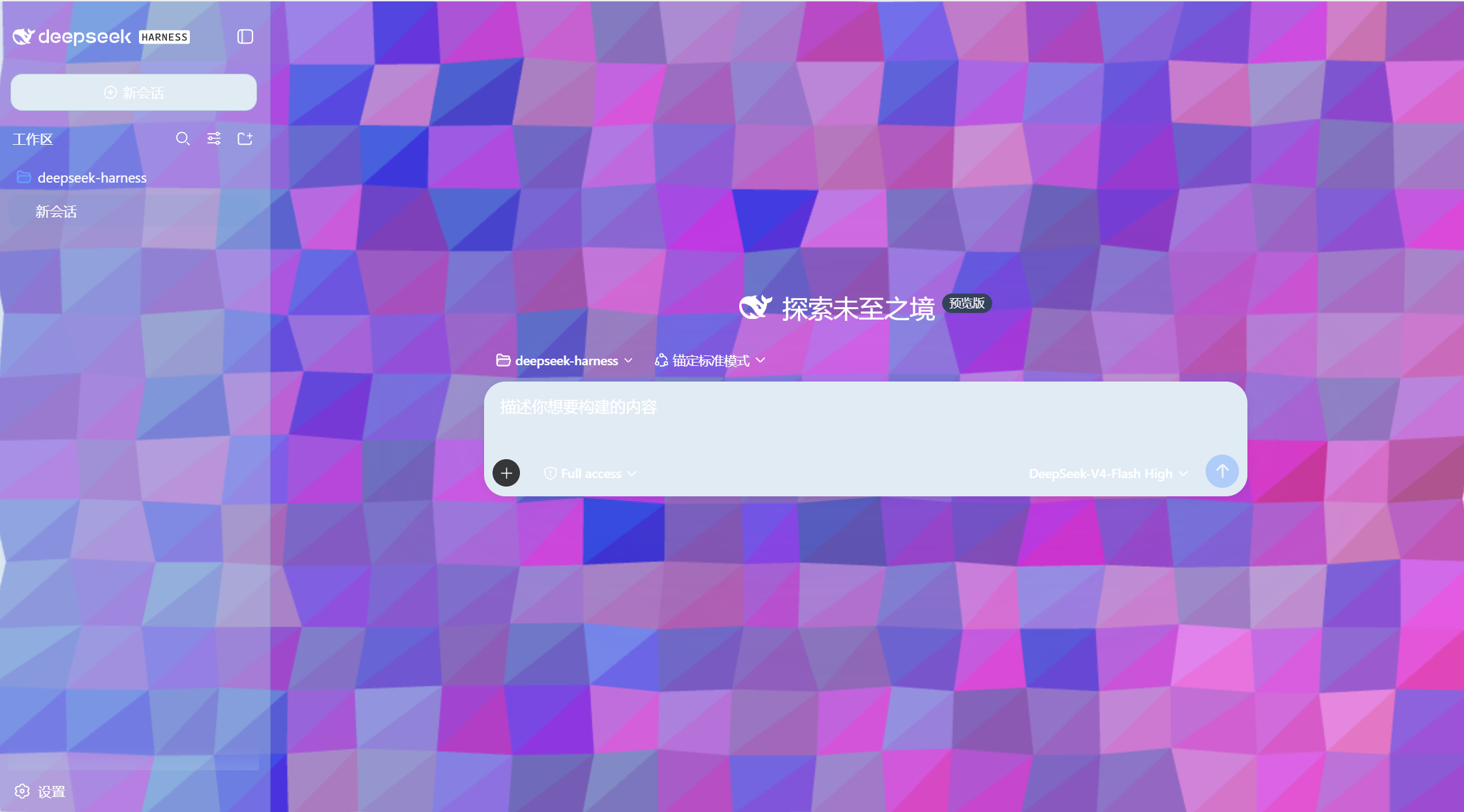
Generated dynamic background · geometric low-poly mode preview
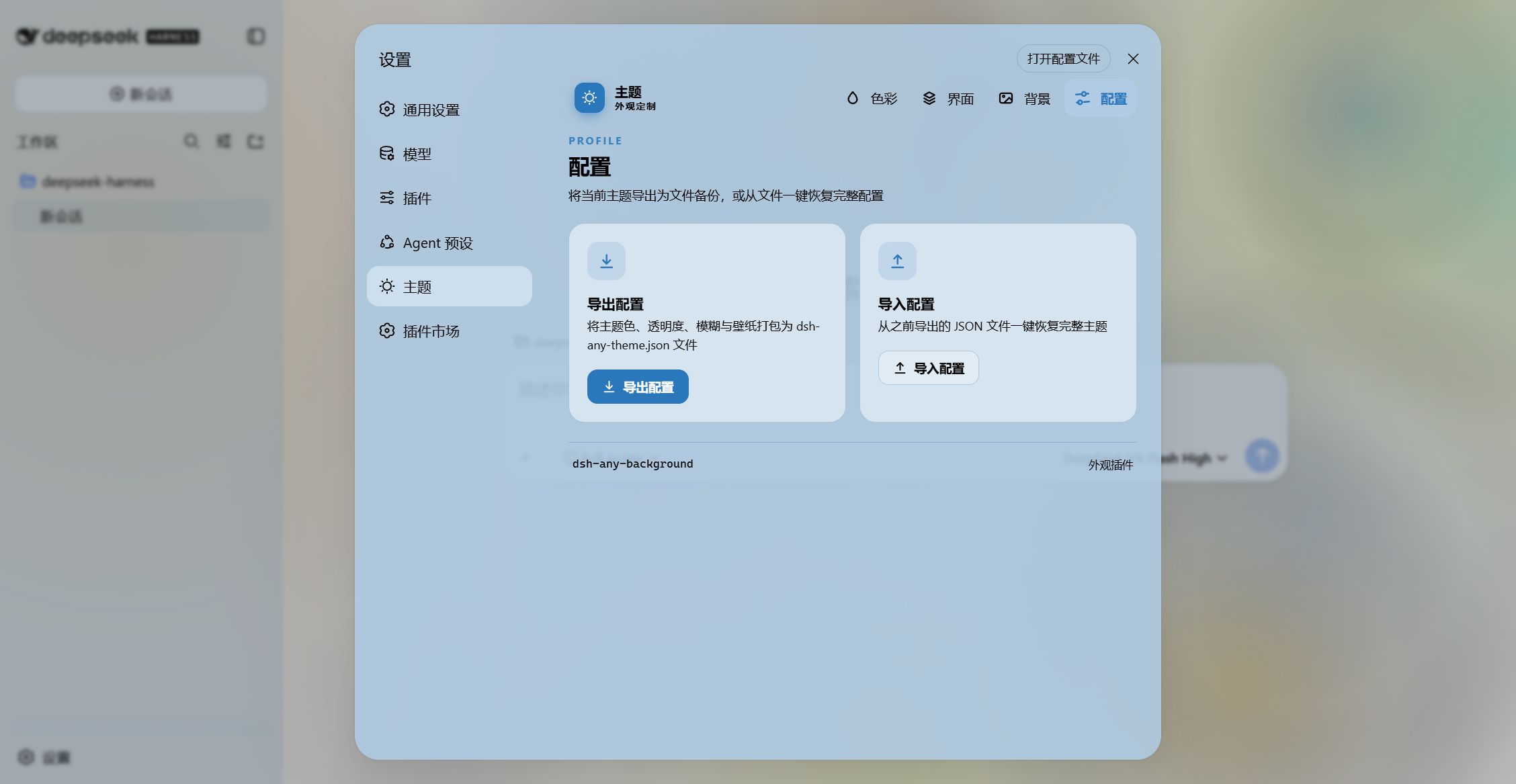
Export and import configs to share
Features
- PS-style Color Wheel — Pick hue on the ring, adjust saturation & lightness in the inscribed square. Generates 30+ CSS design tokens in real time.
- Precise HSL / RGB Input — Enter exact color values numerically with instant bidirectional sync to the wheel.
- Smart Color Extraction — One click derives a theme color from your wallpaper by sampling the visible region, quantizing, and filtering out gray / near-black / near-white pixels. Video wallpapers contribute via an auto-captured frame. Fully client-side.
- Eyedropper — Hover the wallpaper to preview a color and click to pick it as the theme color.
- Background Wallpaper — Upload any image as your wallpaper. Drag to pan and scroll to zoom inside a viewport-proportional editor.
- Video Wallpaper — Use a video as a live wallpaper: muted looping playback that survives refreshes (file persistence + HTTP streaming with Range seek), with an auto-captured frame powering the preview, theme-color extraction, and the position editor.
- Position Editor — One shared editor for images and videos: drag to pan, scroll to zoom, one-click reset. Image and video placements are stored separately and never overwrite each other.
- Layout Modes — Fit / Fill / Stretch / Tile / Center for both images and videos; in Fit mode the editor-committed framing stays consistent across window resizes and cross-monitor moves.
- Generated Dynamic Backgrounds — Choose mesh gradient, Shader, or geometric patterns with adjustable spread, intensity, and seed locking.
- Per-part Interface Opacity — Independent sliders for the main background, sidebar, cards & panels (including the dropdowns and menus around the dialog), the input & controls (composer box, Cordis panel), plus the settings panel and wallpaper.
- Per-part Interface Blur — Frosted-glass
backdrop-filterblur (0–60 px) for each interface part, including a real backdrop on the composer and Cordis panel via stable host selectors. - Conversation View Cards — The message list is wrapped in a translucent card automatically, and the trajectory page gets whole-page opacity & blur controls, letting the wallpaper shine through the content.
- Theme Export / Import — One-click export to a self-contained
dsh-any-theme.json(config + wallpaper, video embedded as a data URL) and import to restore it anywhere. - File-based Persistence — All settings are stored on the filesystem under
~/.dsh/.dsh-any-background-data/, notlocalStorage. - Bilingual — Full Chinese / English UI with automatic locale detection.
- Theme Watchdog — Re-asserts the custom theme if the host resets it.
Recent Optimizations
- Video wallpaper end-to-end — Videos are stored under MIME-derived names (
wallpaper.mp4/webm/...) and streamed over the plugin's own HTTP route; they restore automatically after refresh or restart and travel inside exported configs. - Binary upload for large videos — Uploads stream raw bytes over an HTTP POST straight to disk instead of a base64 detour through RPC (no channel body limit, any size works); aborted transfers clean up after themselves.
- Video position editing — The placement editor works on a captured frame reference with zoom/pan, adapted to all five layout modes; image and video framings persist independently.
- Conversation view cards — The message column gains an automatic card (border/radius/padding) and the trajectory page gets whole-page opacity & blur; switching views restores the previous host.
- Boot flicker eliminated — Theme tokens are injected through a dedicated
!importantstylesheet instead of inlinebodystyles, surviving host theme service resets. - Color wheel overlap fixed — The hue ring is drawn on top of the saturation/lightness square so the square corners no longer cover the ring.
- Inspiration palette selection cleared — Picking a theme color from the wheel deselects any previously selected inspiration swatch.
- Debug telemetry removed — Temporary boot-time logging and
MutationObserverinstrumentation have been cleaned out. - Per-part blur isolated — Blur is applied on
::beforeunderlays so it never traps the host's fixed-position settings dialog. - New "Input & controls" part — The composer box, slash menu, and Cordis plugin panel own a dedicated opacity slider; their translucent surfaces get real frosted-glass backdrop blur attached through stable host data attributes (
[data-composer-card],[data-cordis-panel]). - Native control contrast fixed — Solid surface tokens (composer, menus, Cordis panel) now carry per-part alpha, and a forced
color-schemekeeps native<select>popups legible — no more white-on-white when the wallpaper brightness verdict flips labels to white. - Translucency without self-damage — The "Input & controls" opacity slider is deliberately decoupled from the settings panel's own controls (which share the same button tokens), so adjusting it can never bleach the plugin's own sliders and buttons.
- Drag-time performance — Opacity tokens are written as CSS variables on
<html>instead of rebuilding the whole token stylesheet per tick; slider updates are coalesced to one rAF per frame; the main-background columns are only retinted when their own slider changes. - Drag-time wallpaper downscaling — While any slider is being dragged the wallpaper swaps to a (~720px) low-res copy for cheap rasterization over large images, then restores full resolution on release.
- Instant video playback on import — A picked video starts playing immediately from a local object URL while its raw bytes stream to disk in the background; the persisted serve URL takes over on the next reload — no more upload + first-buffer wait after import.
- Option boxes follow the card slider — The dropdowns, slash-trigger menu, model selector, and popovers around the dialog now follow the "Cards & panels" opacity slider instead of "Input & controls"; the Cordis panel keeps its own input-slider binding.
Installation
Method 1: npm install (Recommended)
dsh plugin --profile web add github:Tkingxiao/dsh-any-background
# or, if published to the registry:
dsh plugin --profile web add dsh-any-background
Then launch:
dsh web
The plugin appears as a "Theme" section in Settings.
Method 2: npx (No Global Install)
npx @deepseek-ai/dsh plugin --profile web add github:Tkingxiao/dsh-any-background
npx @deepseek-ai/dsh web
Method 3: Local Build (Development)
The lib/ directory is committed, so installs need no build step. To rebuild after editing src/:
git clone https://github.com/Tkingxiao/dsh-any-background.git
cd dsh-any-background
pnpm install
pnpm run bundle
pnpm dsh plugin --profile web add "dsh-any-background"
pnpm dsh web
Compatibility
dsh web— Full support.- deepseek-harness-desktop — Supported; a known Electron packaging issue makes the left sidebar and center area opacity appear inverted — awaiting a desktop-client update to fix it.
Star History
License
MIT
相关推荐Related
-
 nexu-io/open-design
🎨 Best DeepSeek Harness Design Plugin. The open-source Claude Design alternative. 🖥️ Local-first desktop app. 🖼️ Your…
nexu-io/open-design
🎨 Best DeepSeek Harness Design Plugin. The open-source Claude Design alternative. 🖥️ Local-first desktop app. 🖼️ Your…
-
 ruvnet/ruflo
🌊 The original agent meta-harness. Deploy intelligent multi-player swarms, coordinate autonomous workflows, and build c…
ruvnet/ruflo
🌊 The original agent meta-harness. Deploy intelligent multi-player swarms, coordinate autonomous workflows, and build c…
-
 amruthpillai/reactive-resume
A one-of-a-kind resume builder that keeps your privacy in mind. Completely secure, customizable, portable, open-source a…
amruthpillai/reactive-resume
A one-of-a-kind resume builder that keeps your privacy in mind. Completely secure, customizable, portable, open-source a…
-
 esengine/DeepSeek-Reasonix
DeepSeek-native AI coding agent for your terminal. Engineered around prefix-cache stability — leave it running.
esengine/DeepSeek-Reasonix
DeepSeek-native AI coding agent for your terminal. Engineered around prefix-cache stability — leave it running.
-
 volcengine/OpenViking
Self-evolving Context Database for AI Agents. Unify Agent Memory, Knowledge RAG and Skills.
volcengine/OpenViking
Self-evolving Context Database for AI Agents. Unify Agent Memory, Knowledge RAG and Skills.
-
 Molunerfinn/PicGo
:rocket: The Ultimate Image Uploader for Efficient Creators. Supports Obsidian, Typora, VS Code etc. and 60+ image hosti…
Molunerfinn/PicGo
:rocket: The Ultimate Image Uploader for Efficient Creators. Supports Obsidian, Typora, VS Code etc. and 60+ image hosti…
-
 titanwings/distilly
Distilly — Distill how they think into reusable Skills for any Agent or Bot. Formerly Colleague Skill(原同事 Skill).
titanwings/distilly
Distilly — Distill how they think into reusable Skills for any Agent or Bot. Formerly Colleague Skill(原同事 Skill).
-
 titanwings/colleague-skill