
tt-a1i/archify
用于创建美观、可验证的架构、工作流、时序、数据流及生命周期图的Agent技能——自带运动的独立HTML,并支持清晰导出。
项目介绍Project Overview
Archify 是面向 Raven、Cursor、Claude Code 等代理的技能插件,可将代码库或系统描述转化为可交互、可分享的架构图。支持五种图型、四种预设、快照对比和确定性校验,输出单文件 HTML 及 PNG、SVG、WebM 等格式。适用于代码评审、架构讲解与变更追溯。注意:自动 Mermaid 解析、托管分享与 WYSIWYG 编辑暂不在支持范围内。
Archify is an agent skill plugin for Raven, Cursor, Claude Code, Codex CLI, and OpenCode that turns codebases or system descriptions into interactive, shareable architecture maps. It offers five diagram types, four presets, Before/Delta/After snapshot comparison, and deterministic validation, exporting a self-contained HTML file plus PNG, SVG, WebM, and share cards. Use it for architecture reviews, change tracking, and presentations. Note: automatic Mermaid parsing, hosted sharing, and WYSIWYG editing are out of scope.
请帮我了解并安装插件:【archify】【https://github.com/tt-a1i/archify】把上面这条消息直接发给当前会话里的 DSH,让它帮你了解并安装。安装命令不一定准确,发给 DSH 更稳。Send this message to DSH in your current session. CLI install commands may not be accurate across systems — DSH will figure it out for you.
或使用命令行安装(适合开发者)Or use CLI install (for developers)
命令行安装CLI Install
dsh plugin --profile web add github:tt-a1i/archify把 tt-a1i/archify 加入你的 DSH 配置(web profile)即可启用。
READMEREADME
English · 简体中文
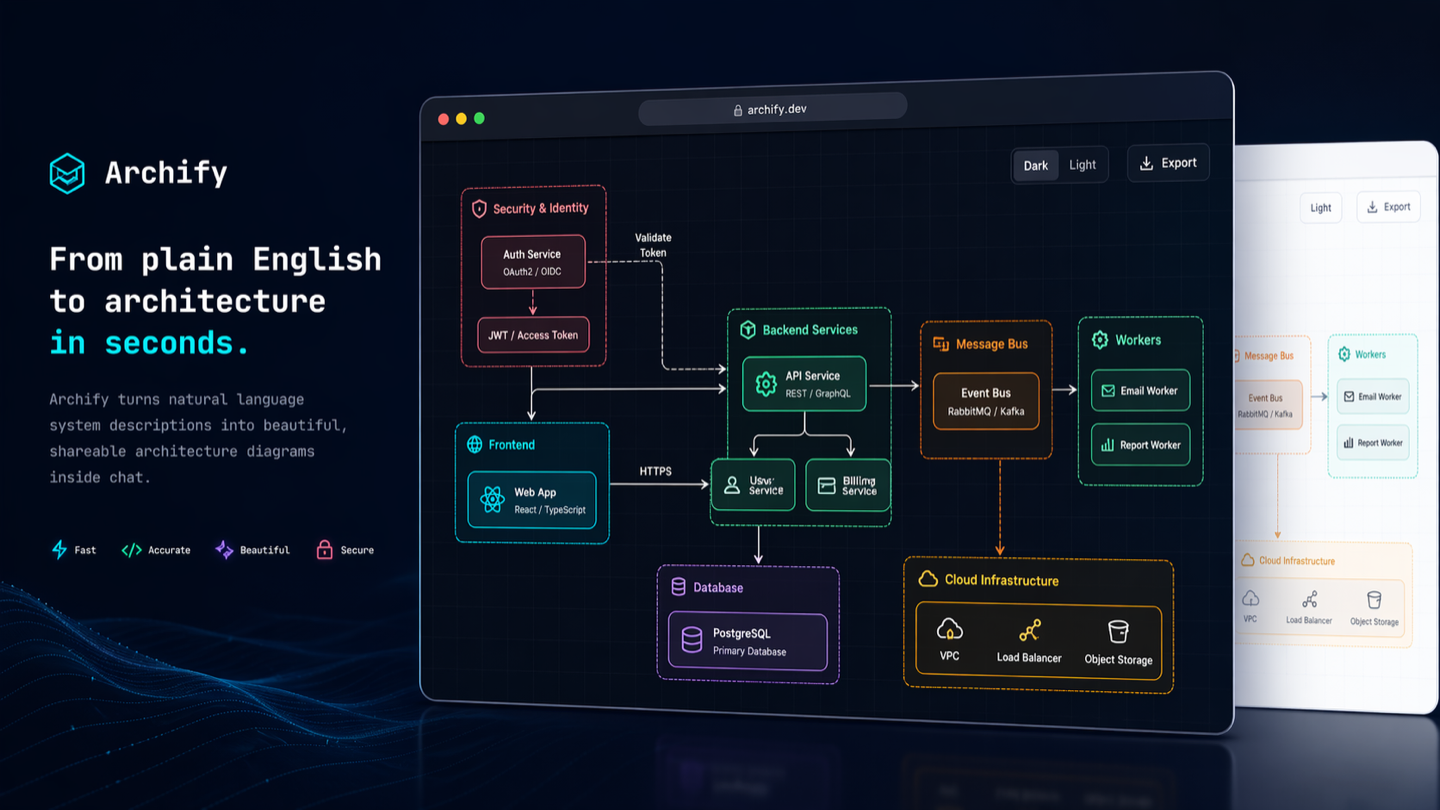
Archify
Turn a codebase or system description into a polished, interactive system map — directly in chat.
Archify is an agent skill for Raven, Cursor, Claude Code, Codex CLI, and OpenCode. Give it a system description or repository; get an interactive, shareable technical map.
- Open it and present — five diagram types, four presets, dark/light themes, built-in brand marks, and finite motion
- Review architecture changes before merge — compare two validated snapshots as Before / Delta / After, with exact added, removed, changed, moved, and rerouted facts
- Every interaction stays grounded — search nodes, optionally open revision-verified source, trace upstream/downstream authored reach and exact routes, compare roles, and play guided stories without inventing topology
- One file, ready to trust and share — typed JSON IR and deterministic checks produce self-contained HTML plus PNG, SVG, WebM, and 1200×630 share cards



Current development version: v2.16.0-dev.0. See Changelog.
Project page · Scenario guide · Proof Lab
npx skills add tt-a1i/archify -g
Using Cursor? Open the agent-aware quick start for exact global and project commands.
Then ask your agent: Use archify to map this repository's runtime architecture.
❤️ Sponsors
 APINEBULA | APINEBULA sponsors Archify with one API for Claude, GPT, Gemini, and more. Register through Archify and use Archify for 10% off. |
 EverMind · Raven | EverMind sponsors Archify and builds memory infrastructure for agents. Its Raven harness supports Archify as a Skill for verified, interactive system maps. |
Want to sponsor Archify? Contact us by email.
See Archify in action
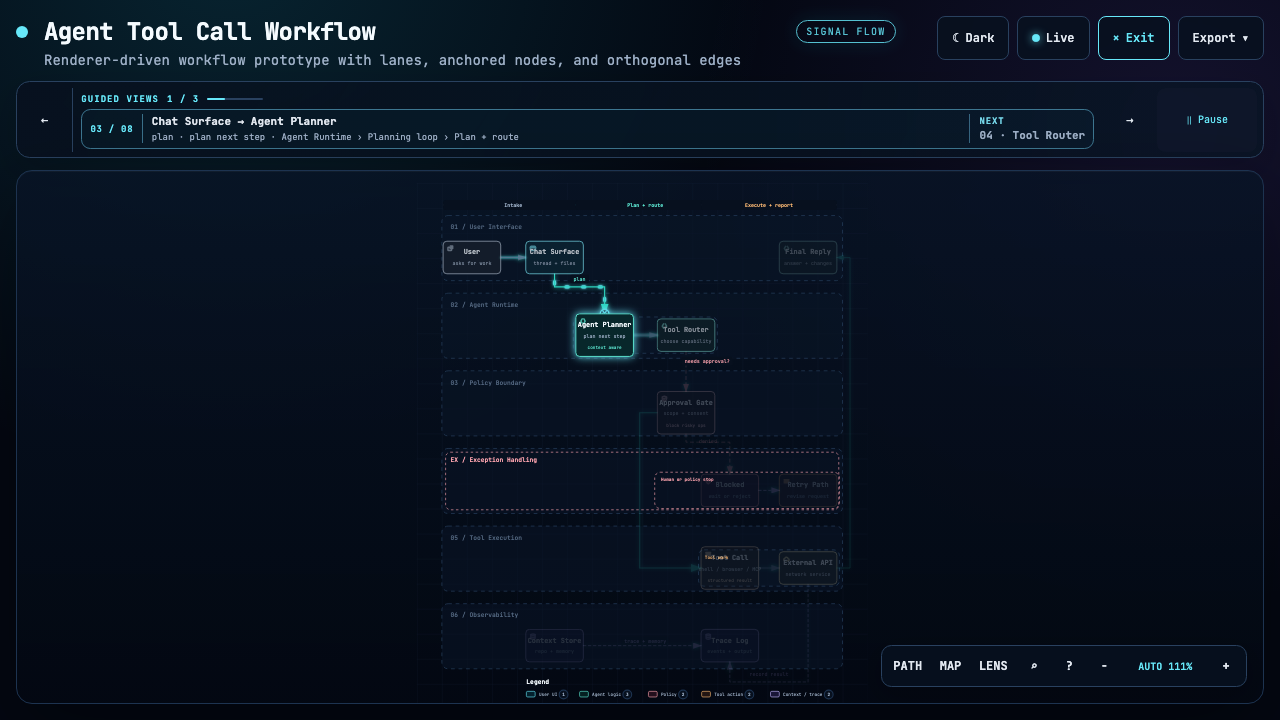
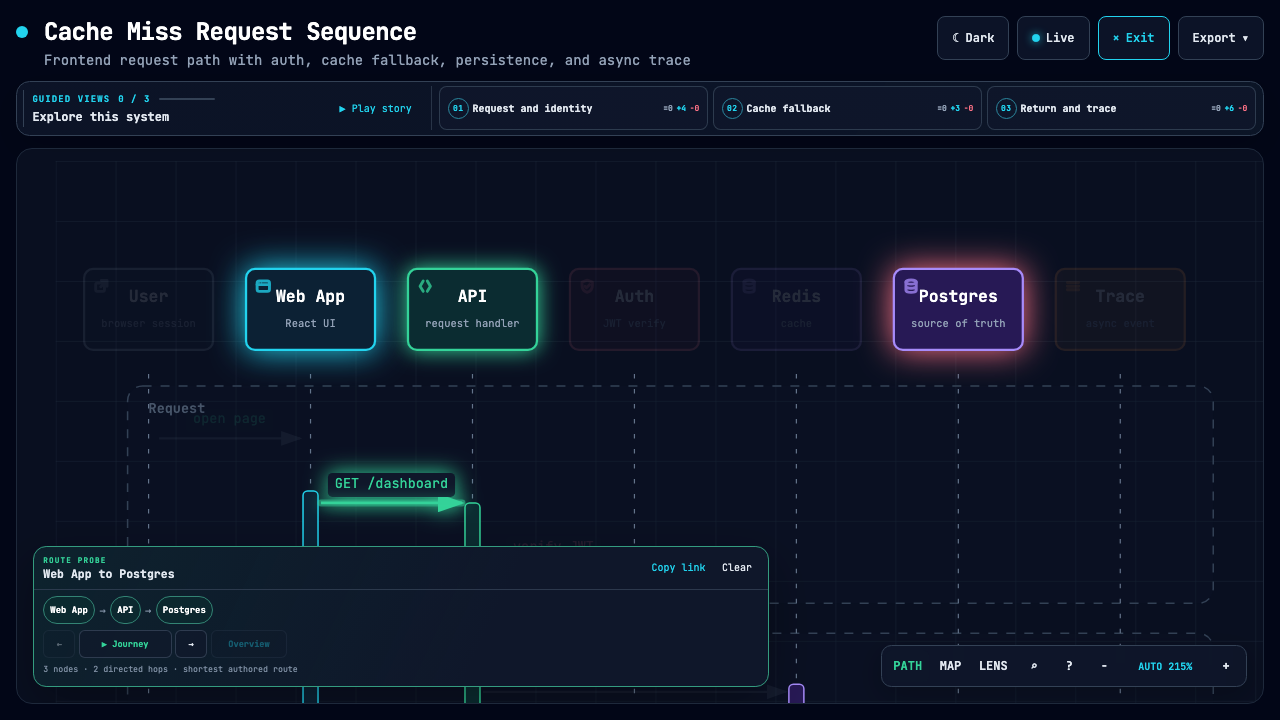
These are generated Archify artifacts, not product mockups. Click a frame to open its live, shareable state.
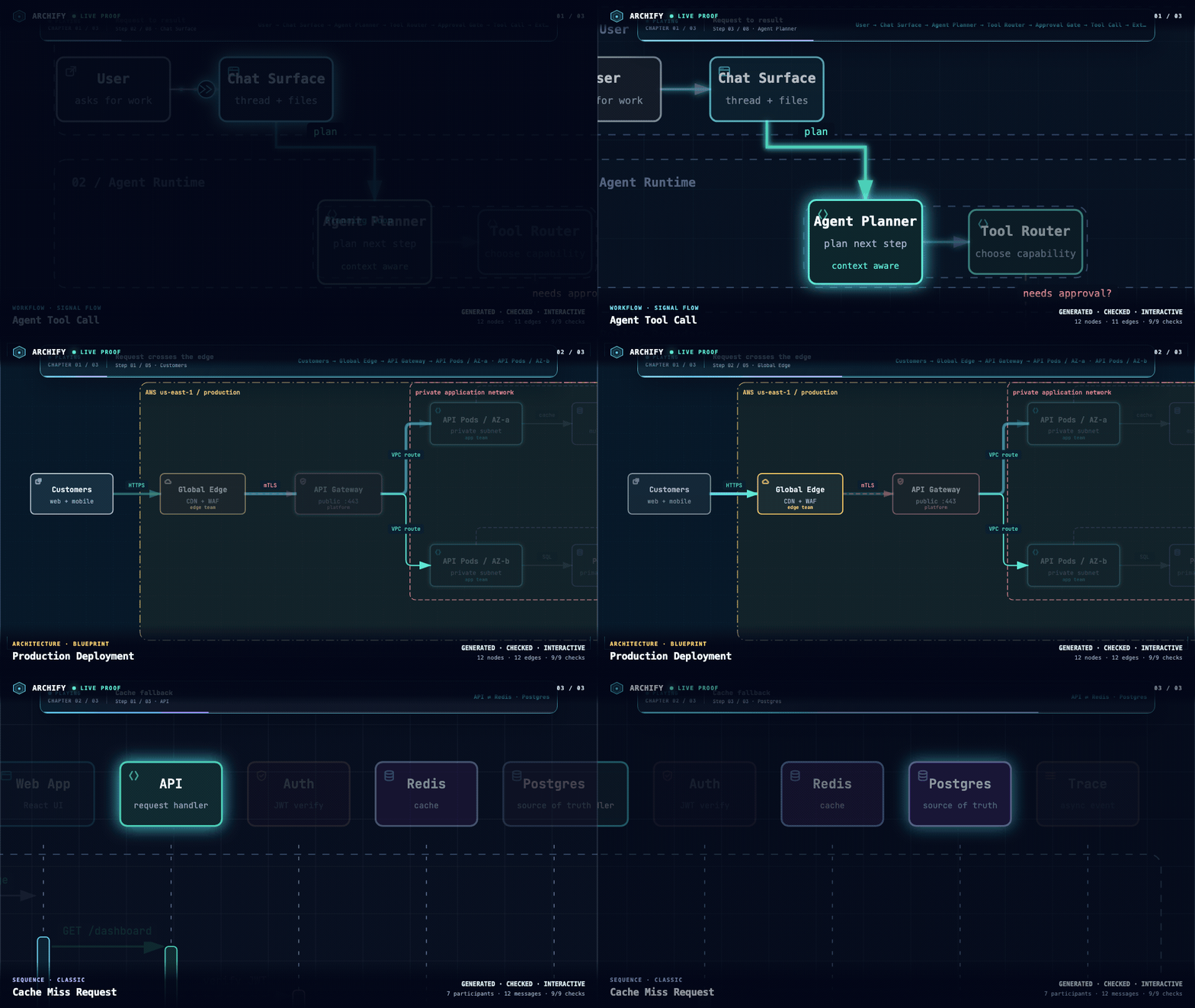
Three real generated artifacts. Signal Flow · Blueprint · Classic · open the interactive Proof Lab ↗
| Guided story | Route probe | Semantic lens |
|---|---|---|
 |
 |
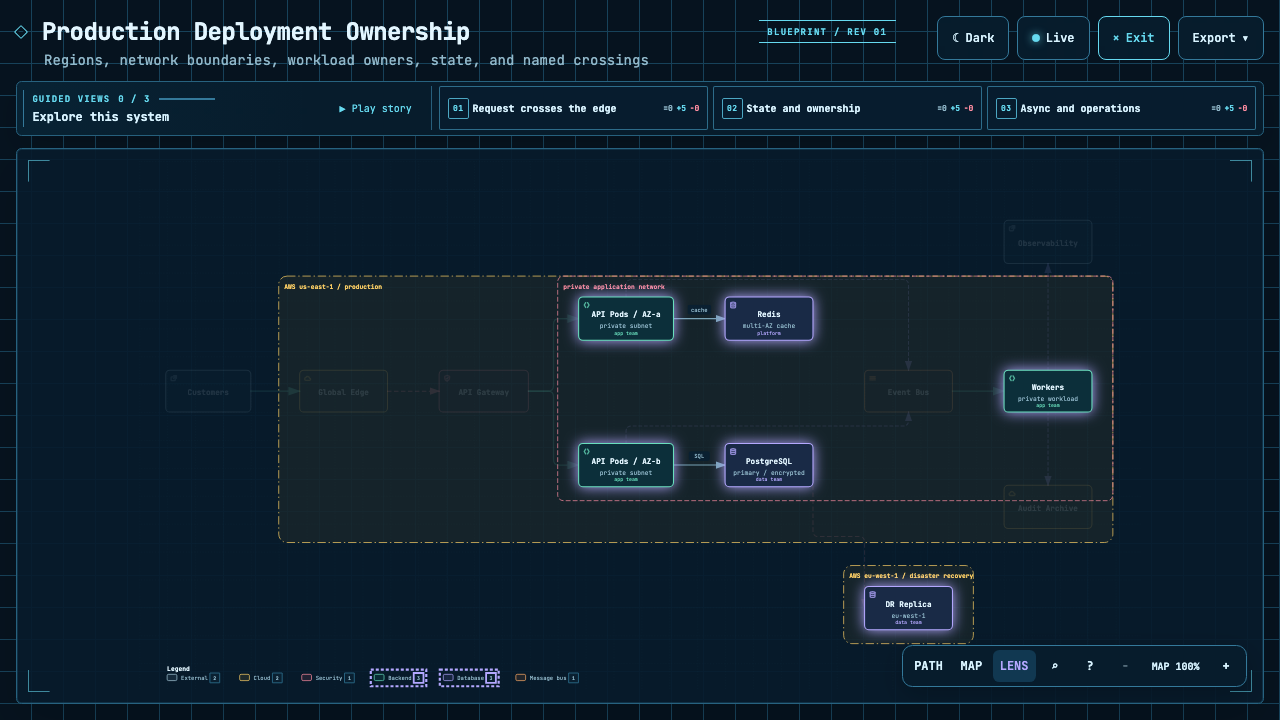 |
| Play one finite named chapter. | Inspect the shortest authored directed path. | Compare real traffic between semantic roles. |
The Proof Lab contains all 11 checked-in scenarios, their JSON sources, named views, and validation receipts.
A real repository, mapped from source
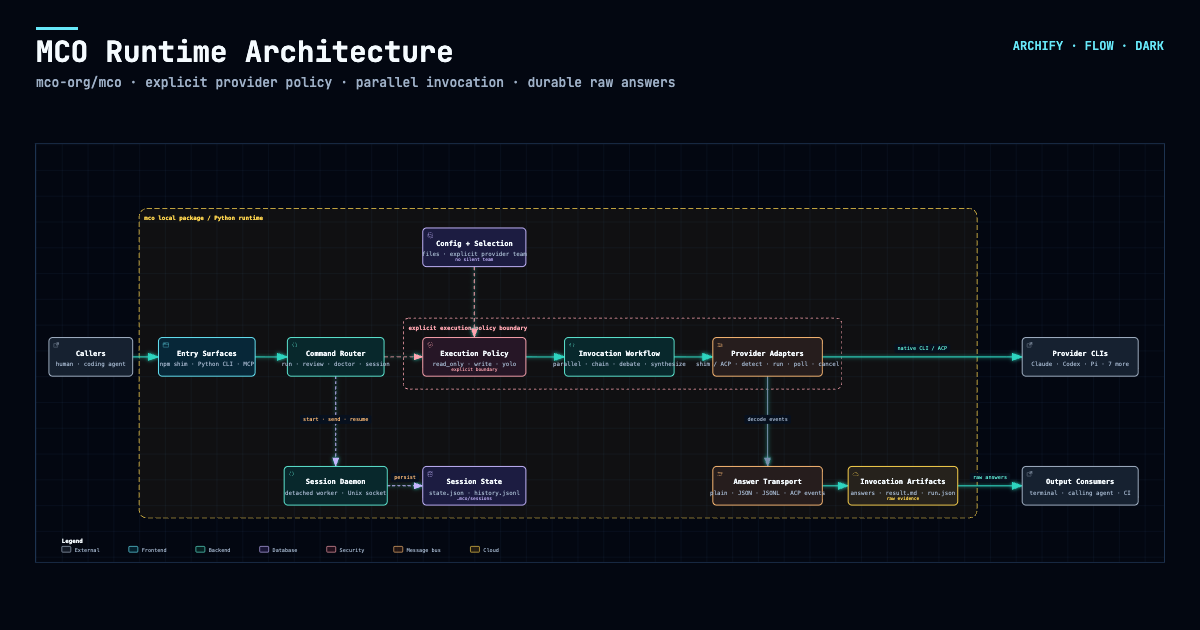
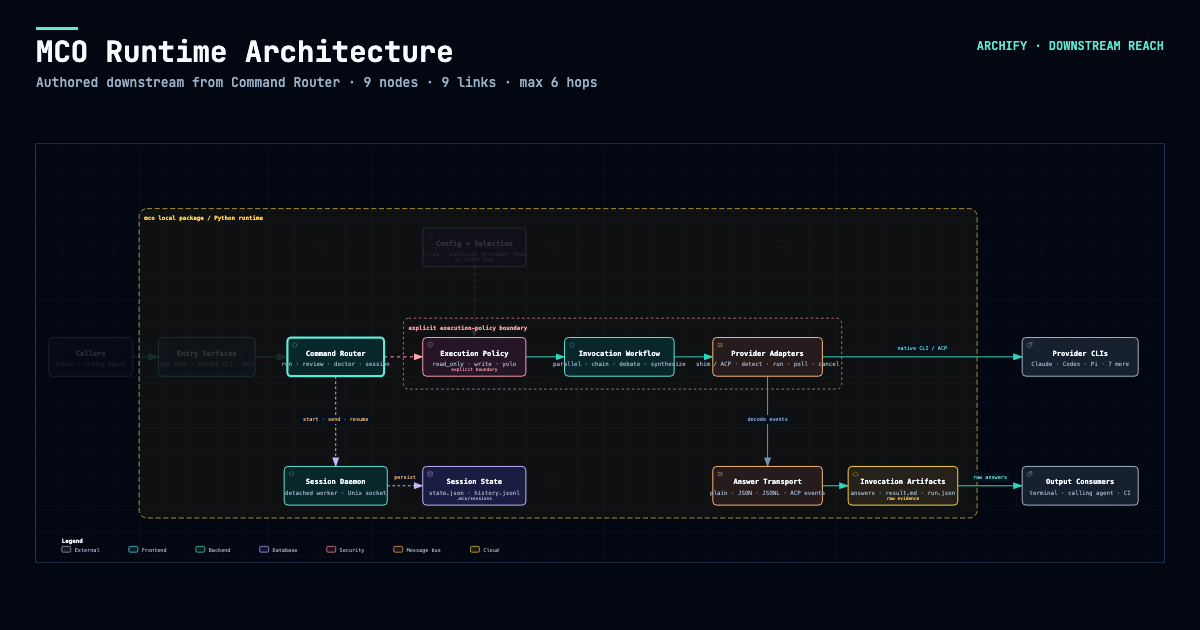
Archify traced mco-org/mco at 9f1a1cf and produced this checked map. Open it ↗ · trace reach ↗ · typed source
Preview
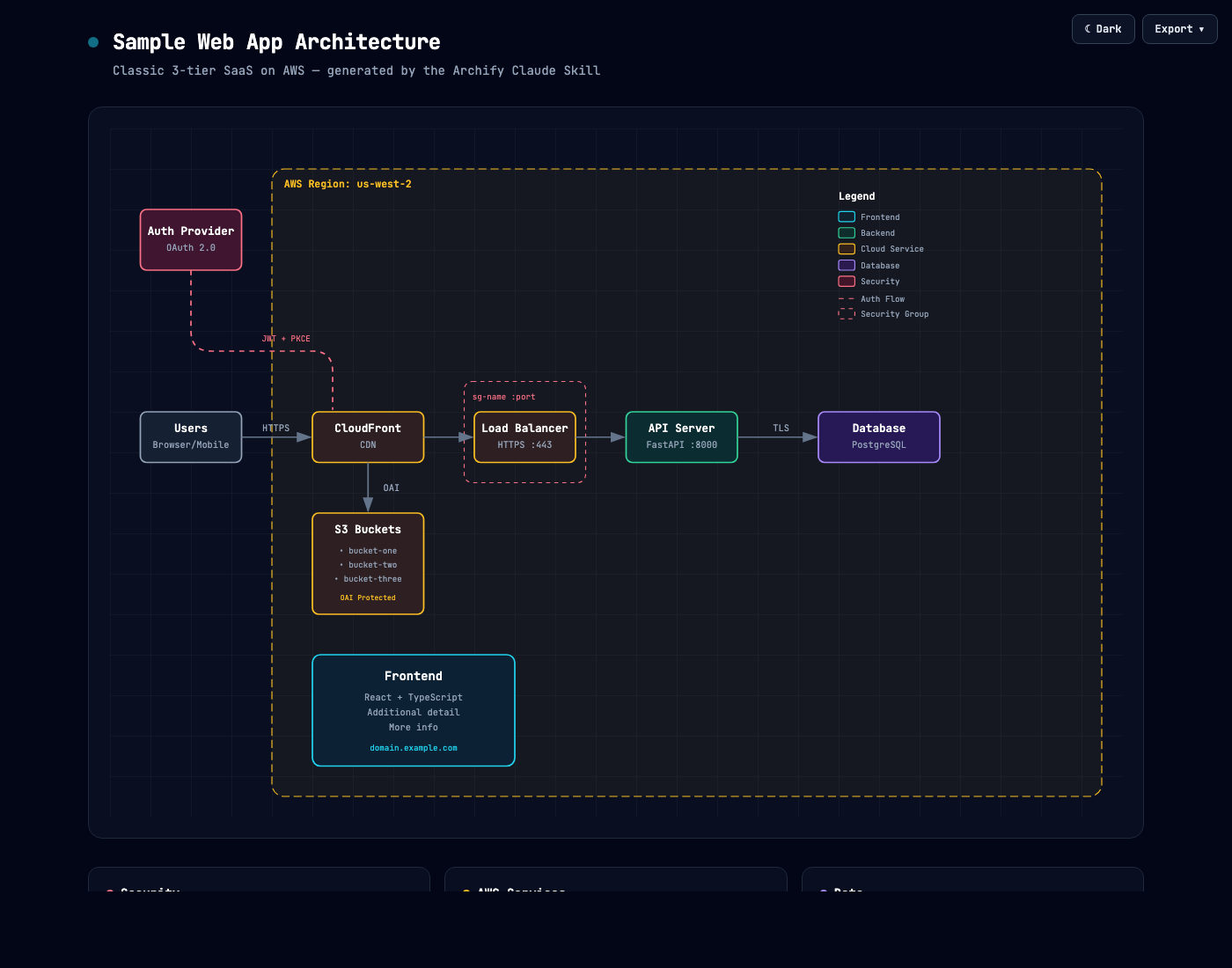
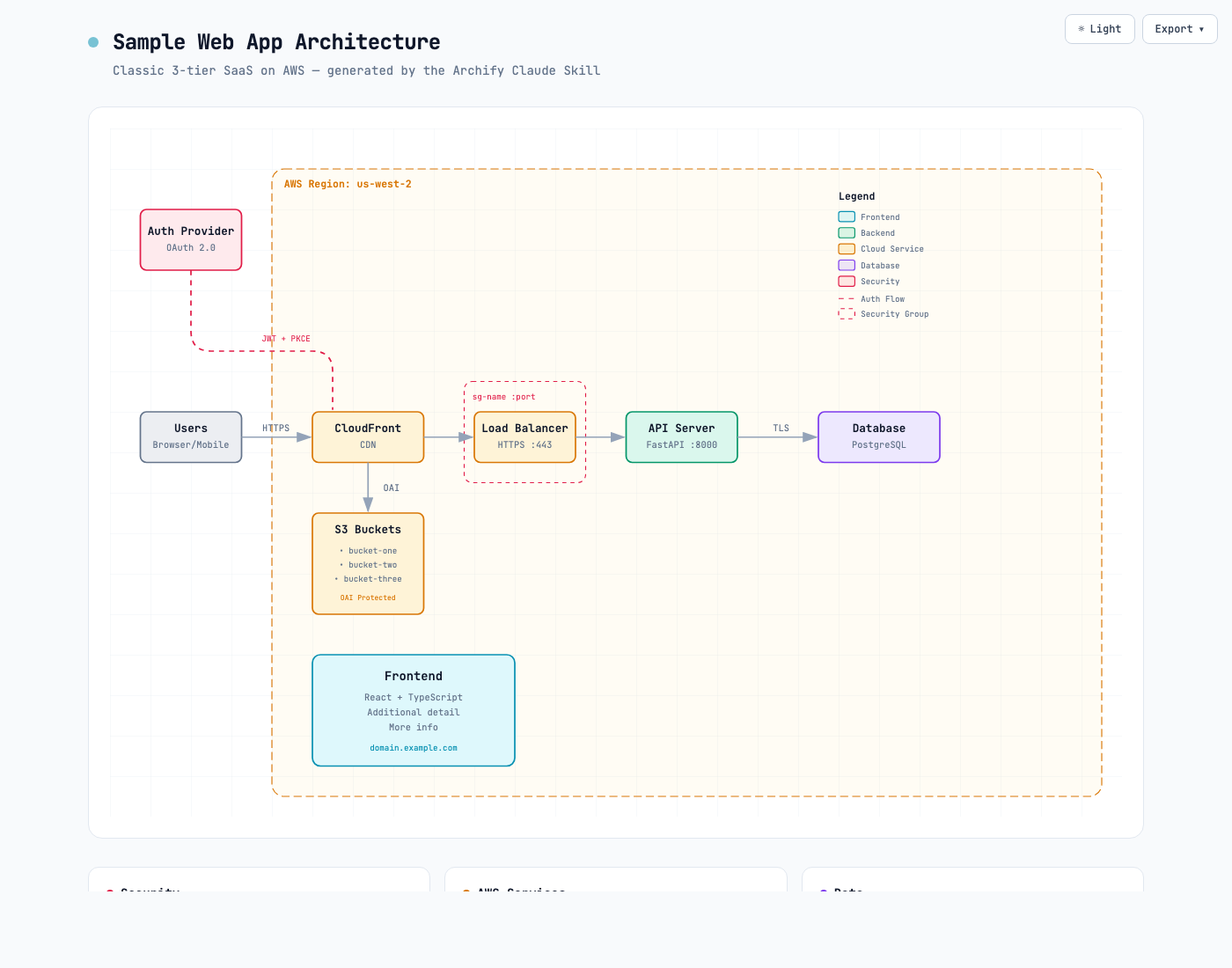
Same diagram, two themes, one click to switch:
| Dark | Light |
|---|---|
 |
 |
The Export menu copies PNG to the clipboard and downloads static or motion formats:
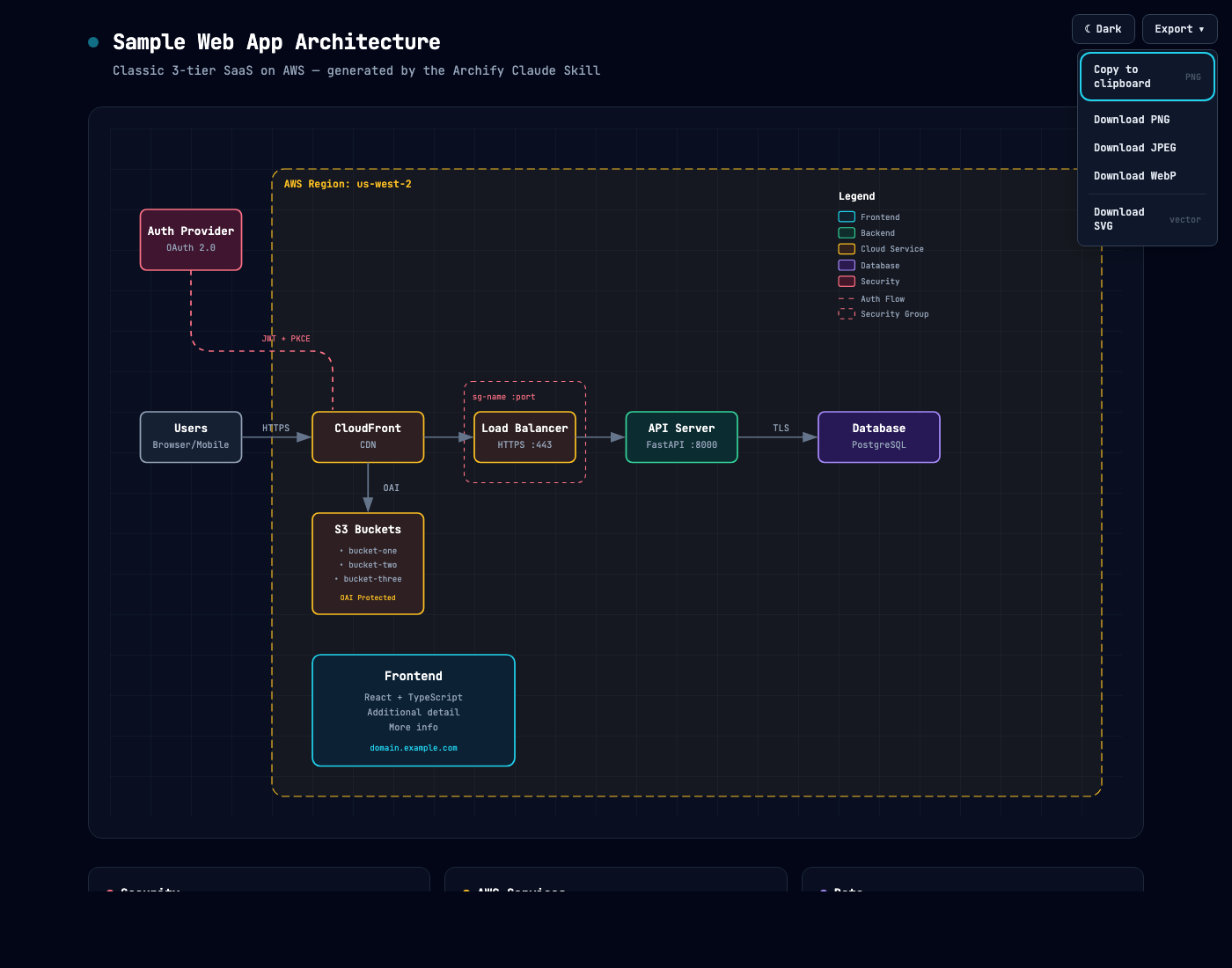
Use Copy Share Card when you want a canonical 1200×630 image for a README, release, or social post.
After tracing a route, Export → Route Share Card downloads that authored path as a 1200×630 PNG with the full diagram retained for context.
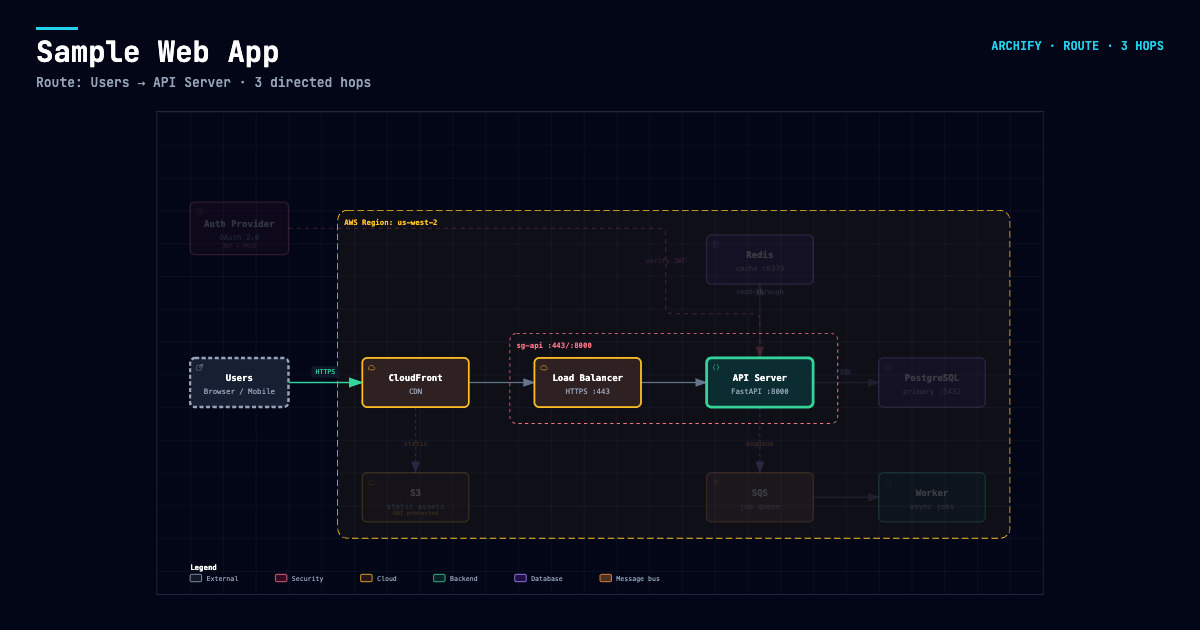
After tracing authored Upstream or Downstream reach, Export → Reach Share Card captures that exact reading without claiming runtime impact.
Open examples/web-app.html locally to try the complete viewer.
Quick start
1. Install
npx skills add tt-a1i/archify -g
For an explicit, non-interactive Cursor install:
npx -y skills add tt-a1i/archify --skill archify --agent cursor --global --copy --yes
To try without installing:
npx skills use tt-a1i/archify@archify --agent codex
DSH community opt-in: dsh plugin --profile web add @tt-a1i/archify-dsh@0.1.0
The agent switcher covers cursor, codex, claude-code, and opencode. For Raven's manual ZIP install, extract archify.zip into ~/.raven/workspace/skills; it yields ~/.raven/workspace/skills/archify. Raven is not a switcher target.
2. Ask for one bounded view
Analyze this repository, then use archify to create a high-level runtime architecture diagram.
Show 8–12 core components, one primary path, external dependencies, and trust boundaries.
Put supporting detail in cards instead of adding more edges.
For a focused flow:
Use archify to draw this login flow: Browser -> Web App -> API -> JWT validation ->
Redis session lookup -> PostgreSQL fallback. Keep the cache-miss path secondary.
3. Refine in chat
Continue with focused requests such as add Redis, move auth to the left, or highlight the rollback path. Archify keeps the typed source available for targeted iteration.
Choose the right diagram
| Type | Best for | Include in your prompt |
|---|---|---|
| Architecture | Components, services, storage, boundaries | Scope, core components, primary path |
| Workflow | CI/CD, approvals, tool calls, runbooks | Participants, order, branches, exceptions |
| Sequence | API calls, cache fallback, auth, async traces | Callers, callees, returns, timing |
| Data Flow | Pipelines, lineage, PII, consumers | Sources, transforms, stores, boundaries |
| Lifecycle | States, retries, waits, terminal outcomes | States, events, retry and cancellation paths |
For a production deployment review, Architecture can optionally enable the
deployment-ownership engineering profile. It fails closed when owners,
single-region placement, private database scope, or named boundary crossings
are missing. It is never enabled silently and validates authored facts—not live
infrastructure. See the checked deployment proof.
For design or PR review, Architecture Delta compares validated Before / Delta / After snapshots with a machine receipt. Select an exact authored change or play one finite Review—viewer-only, with no impact, risk, or merge-safety inference.
node archify/bin/archify.mjs compare architecture base.json head.json architecture-delta.html --json
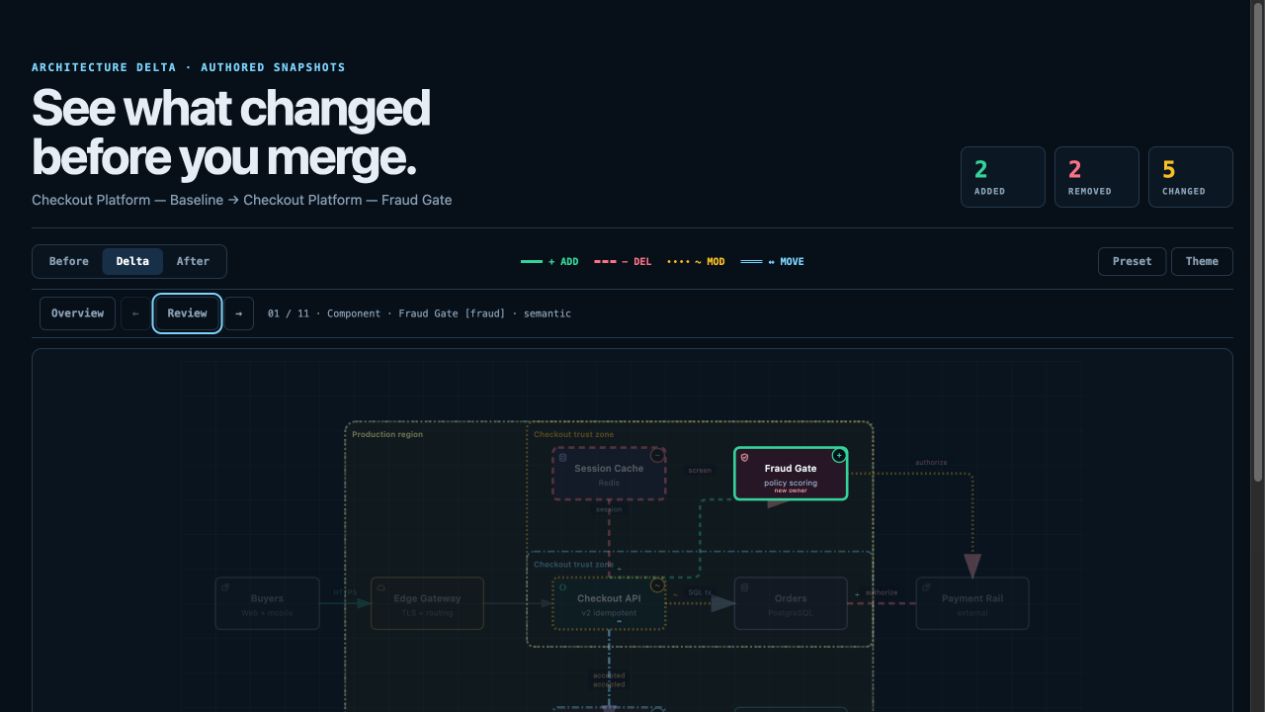
Not sure which one fits? Use the interactive scenario guide, or ask the zero-dependency CLI:
node archify/bin/archify.mjs guide "Show an API request with Redis cache miss"
node archify/bin/archify.mjs guide "Map Kafka topics, consumer groups, replay, and DLQ" --json
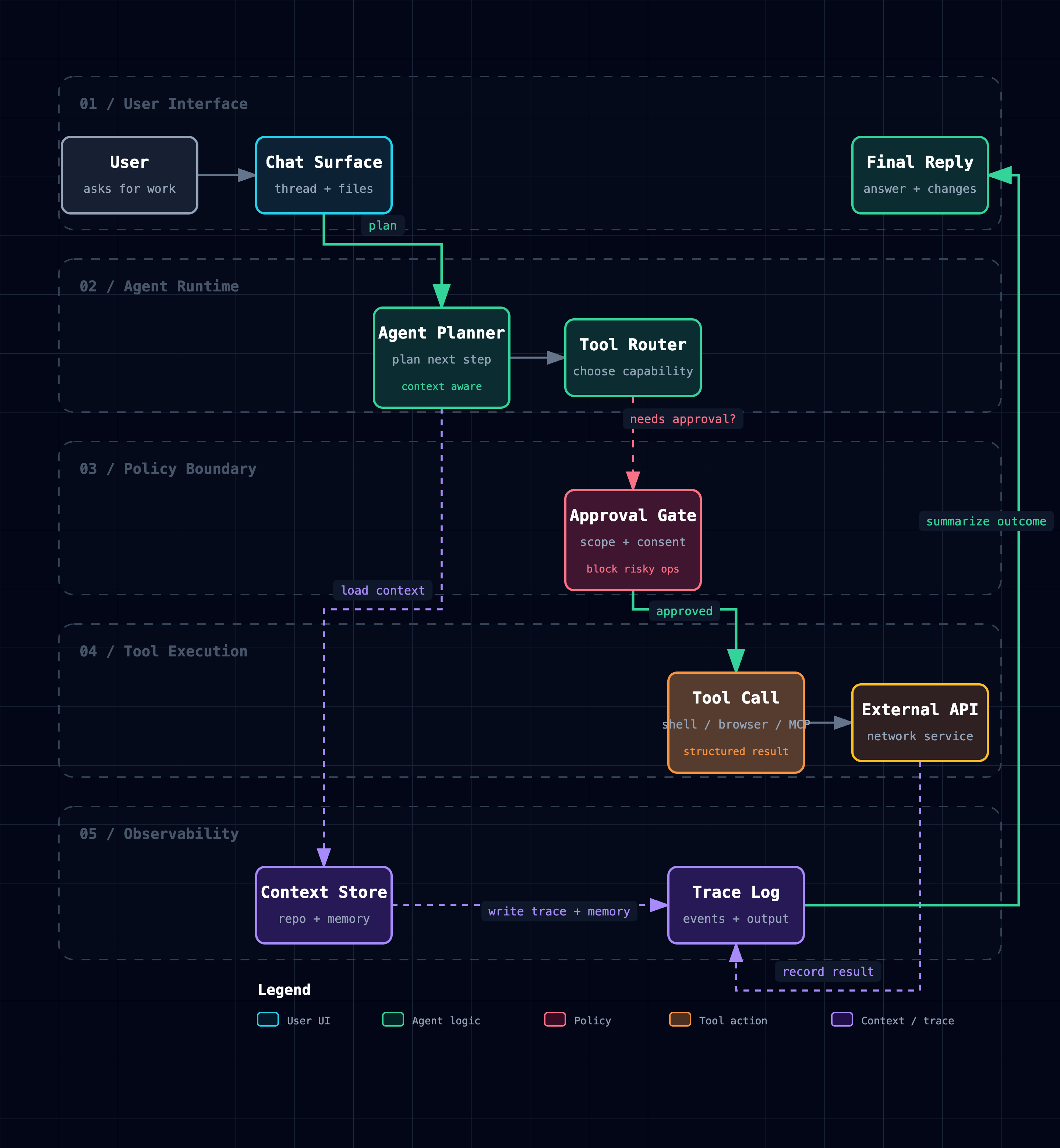
Workflow keeps the happy path clear across lanes:
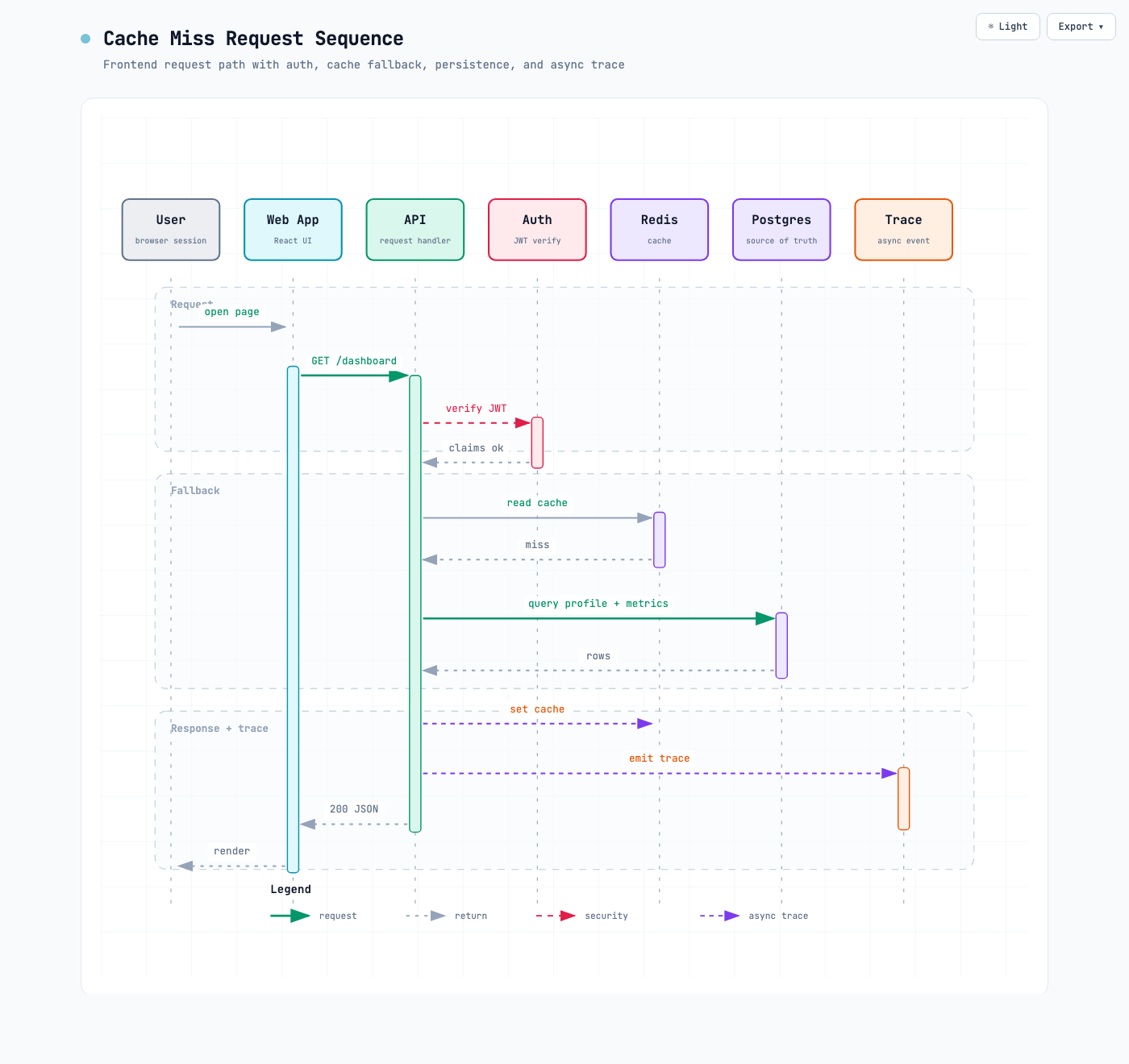
Sequence explains one interaction over time:
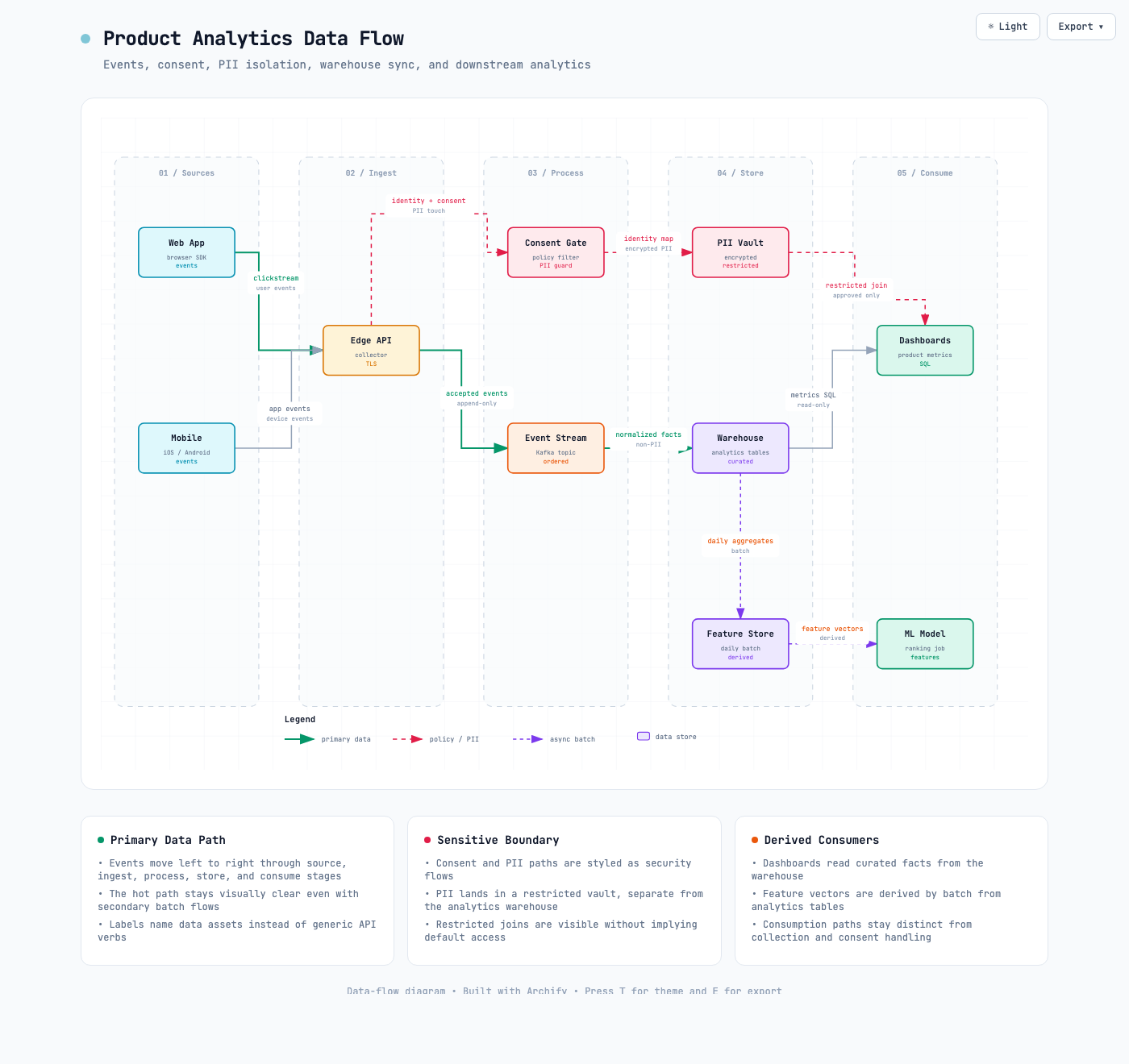
Data Flow makes movement and sensitivity boundaries explicit:
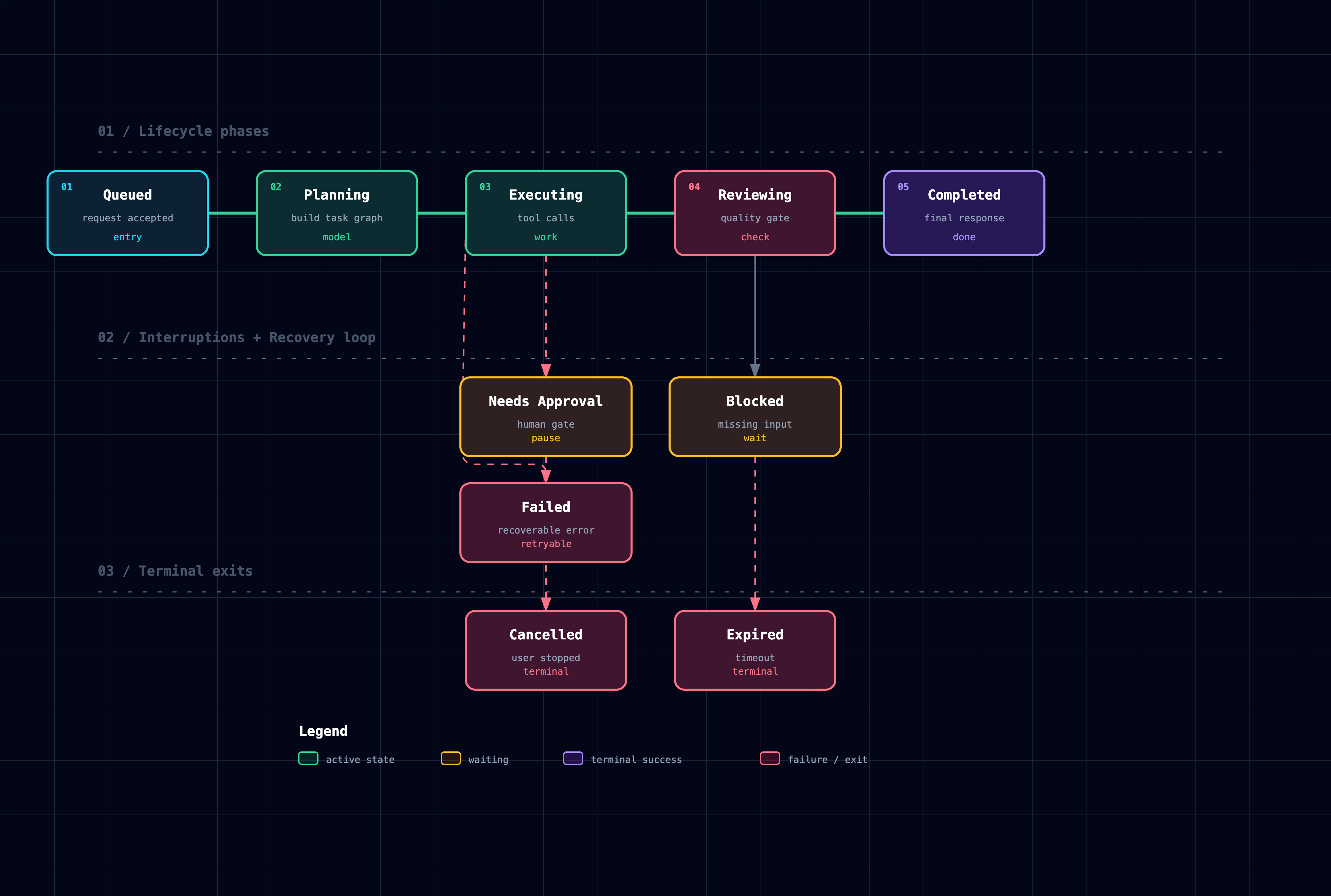
Lifecycle separates progress, waits, retries, and terminal outcomes:
Architecture examples: web-app · Archify pipeline · grid placement · desktop agent
Why Archify
- Layout judgment over generic auto-layout — the agent chooses hierarchy, spacing, routes, and emphasis; shared automatic endpoints spread deterministically instead of piling arrows on one midpoint.
- Typed JSON IR — every renderer-backed mode has a schema and reproducible source.
- Atomic validation before delivery — schema, layout, HTML/SVG, route, and label-to-route clearance checks must all pass before a showcase artifact replaces the last known good output.
- Failures come with a repair receipt —
validate --jsonanddeliver --jsonreturn stable rule codes, the exact subject, measured evidence, and only supported repair controls instead of a Node stack or an unstructured retry guess. - Last-good live preview — an optional desktop loop watches one JSON file, refreshes only after the latest candidate passes every gate, and keeps the previous verified diagram visible when a save is incomplete or invalid.
- Truthful interaction — focus, upstream/downstream reach, exact routes, role comparison, and stories reuse authored nodes and relationships instead of inventing topology or claiming runtime impact.
- Source evidence, only when requested — Evidence-backed Architecture nodes mark themselves
SRC nand open Git-verified files and line ranges pinned to one public commit; ordinary artifacts stay source-free. - Portable by default — the result is one HTML file; exports remain full-diagram and free of temporary viewer state.
Archify is not a general-purpose drawing editor or a Mermaid theme. It turns technical intent into a communication artifact.
How it works
| Step | What happens |
|---|---|
| Generate | The agent creates typed JSON IR from your description. |
| Validate | Bundled validators and layout rules check the source; failures identify the exact local repair in machine-readable JSON. |
| Preview (optional) | A loopback-only desktop session watches one source and reloads only verified revisions; failures keep the last-good artifact. |
| Deliver | A same-directory candidate is rendered and checked; only a passing artifact atomically replaces the target, then optional --open launches that exact file. |
| Iterate | The agent updates the source while unrelated structure stays stable. |
Useful repository commands:
cd archify
node bin/archify.mjs doctor
node bin/archify.mjs demo /tmp/archify-demo
node bin/archify.mjs guide "Show CI/CD checks, approval, deploy, and rollback"
node bin/archify.mjs validate workflow examples/agent-tool-call.workflow.json --quality showcase --json
node bin/archify.mjs preview workflow examples/agent-tool-call.workflow.json /tmp/workflow.html --quality showcase
node bin/archify.mjs deliver workflow examples/agent-tool-call.workflow.json /tmp/workflow.html --quality showcase --open --json
preview is an explicit desktop authoring mode, not a default background service: it binds only to 127.0.0.1 on a random port, watches the one named JSON file, preserves the last verified output through failures, and stops with Ctrl-C. Add --no-open for tests or when you will open the printed local URL yourself. It adds no runtime to the generated HTML.
Use deliver --open for a one-shot interactive local handoff. It is off by default, runs only after the verified artifact is committed, and never turns a successful delivery into a failure when the OS opener is unavailable; JSON stays on stdout and the absolute manual-open path goes to stderr.
On failure, validate --json and deliver --json still emit exactly one JSON object. Read diagnostics[] and change only the named subject using its supportedFixes; do not rewrite the whole diagram or exceed the Skill's two focused correction rounds. Deterministic diagnostics remain separate from visual review.
Settings:
{
  "meta": {
    "locale": "en",
    "animation": "trace",
    "visual_preset": "signal-flow"
  }
}
meta.locale=en|zh-CN localizes page title, Legend, states/errors, a11y, HTML/SVG lang—never authored content. Otherwise omit; preserve requested-language copy; disclose English fallback. Static omits animation; classic defaults.
Explore and share the output
| Action | Control |
|---|---|
| Open the factual Diagram Guide | ? |
| Find and focus a semantic node | / |
| Trace upstream/downstream authored reach | Focus a node → Upstream / Downstream |
| Probe a directed route and inspect its journey | R or PATH |
| Compare one or two semantic roles | L or LENS |
| Open the live overview radar | M or MAP |
| Play a guided story / change chapter | P / [ ] |
| Enter Presentation Stage | F |
Choose visual style (S cycles) / toggle theme / open Export |
S / T / E |
| Zoom or reset | + / - / 0 |
Stable links can restore #focus=<id>, #focus=<id>&reach=upstream|downstream, #relation=<id>, #route=<source>~<target>, #lens=<kind>~<kind>, and #view=<view-id>. Reader-driven motion is finite, respects prefers-reduced-motion, and never enters canonical exports.
The complete generation and viewer contract lives in archify/SKILL.md.
Installation options
| Surface | Install location or method | Capability |
|---|---|---|
| Raven | Manual ZIP into ~/.raven/workspace/skills → ~/.raven/workspace/skills/archify |
Full renderer + validation workflow |
| Claude Code | ~/.claude/skills/ or .claude/skills/ |
Full renderer + validation workflow |
| Codex CLI | ~/.agents/skills/ or .agents/skills/ |
Full renderer + validation workflow |
| opencode | ~/.config/opencode/skills/, .opencode/skills/, or .agents/skills/ |
Full renderer + validation workflow |
| Claude.ai | Upload archify.zip under Settings → Capabilities → Skills |
Depends on Node.js access in the sandbox |
| Project Knowledge | Upload archify.zip to the project |
Prompt-driven architecture fallback |
DeepSeek Harness: Community integration, not an official DeepSeek product; developer-preview @deepseek-ai/dsh@0.1.0-rc.6, Node `^22.19.0 |
>=24.0.0. Install: dsh plugin --profile web add @tt-a1i/archify-dsh@0.1.0; invoke: Use the archify skill to map this repository's runtime architecture.; remove: dsh plugin --profile web remove @tt-a1i/archify-dsh`. No telemetry. Shell files need exact workspace paths, not Web Produced Files. Details. |
Reference and scope
Automatic Mermaid parsing, general-purpose auto-layout, hosted sharing, and WYSIWYG editing are intentionally outside the current scope.
License
MIT — free to use, modify, and distribute.
Contributing
Issues, pull requests, and real-world diagrams are welcome. Start with the contribution guide, use the reproducible bug form for failures, or submit a validated diagram through the community showcase form.
相关推荐Related
-
 nexu-io/open-design
🎨 Best DeepSeek Harness Design Plugin. The open-source Claude Design alternative. 🖥️ Local-first desktop app. 🖼️ Your…
nexu-io/open-design
🎨 Best DeepSeek Harness Design Plugin. The open-source Claude Design alternative. 🖥️ Local-first desktop app. 🖼️ Your…
-
 ruvnet/ruflo
🌊 The original agent meta-harness. Deploy intelligent multi-player swarms, coordinate autonomous workflows, and build c…
ruvnet/ruflo
🌊 The original agent meta-harness. Deploy intelligent multi-player swarms, coordinate autonomous workflows, and build c…
-
 amruthpillai/reactive-resume
A one-of-a-kind resume builder that keeps your privacy in mind. Completely secure, customizable, portable, open-source a…
amruthpillai/reactive-resume
A one-of-a-kind resume builder that keeps your privacy in mind. Completely secure, customizable, portable, open-source a…
-
 esengine/DeepSeek-Reasonix
DeepSeek-native AI coding agent for your terminal. Engineered around prefix-cache stability — leave it running.
esengine/DeepSeek-Reasonix
DeepSeek-native AI coding agent for your terminal. Engineered around prefix-cache stability — leave it running.
-
 volcengine/OpenViking
Self-evolving Context Database for AI Agents. Unify Agent Memory, Knowledge RAG and Skills.
volcengine/OpenViking
Self-evolving Context Database for AI Agents. Unify Agent Memory, Knowledge RAG and Skills.
-
 Molunerfinn/PicGo
:rocket: The Ultimate Image Uploader for Efficient Creators. Supports Obsidian, Typora, VS Code etc. and 60+ image hosti…
Molunerfinn/PicGo
:rocket: The Ultimate Image Uploader for Efficient Creators. Supports Obsidian, Typora, VS Code etc. and 60+ image hosti…
-
 titanwings/distilly
Distilly — Distill how they think into reusable Skills for any Agent or Bot. Formerly Colleague Skill(原同事 Skill).
titanwings/distilly
Distilly — Distill how they think into reusable Skills for any Agent or Bot. Formerly Colleague Skill(原同事 Skill).
-
 titanwings/colleague-skill