u9521/dsh-advanced-model-editor
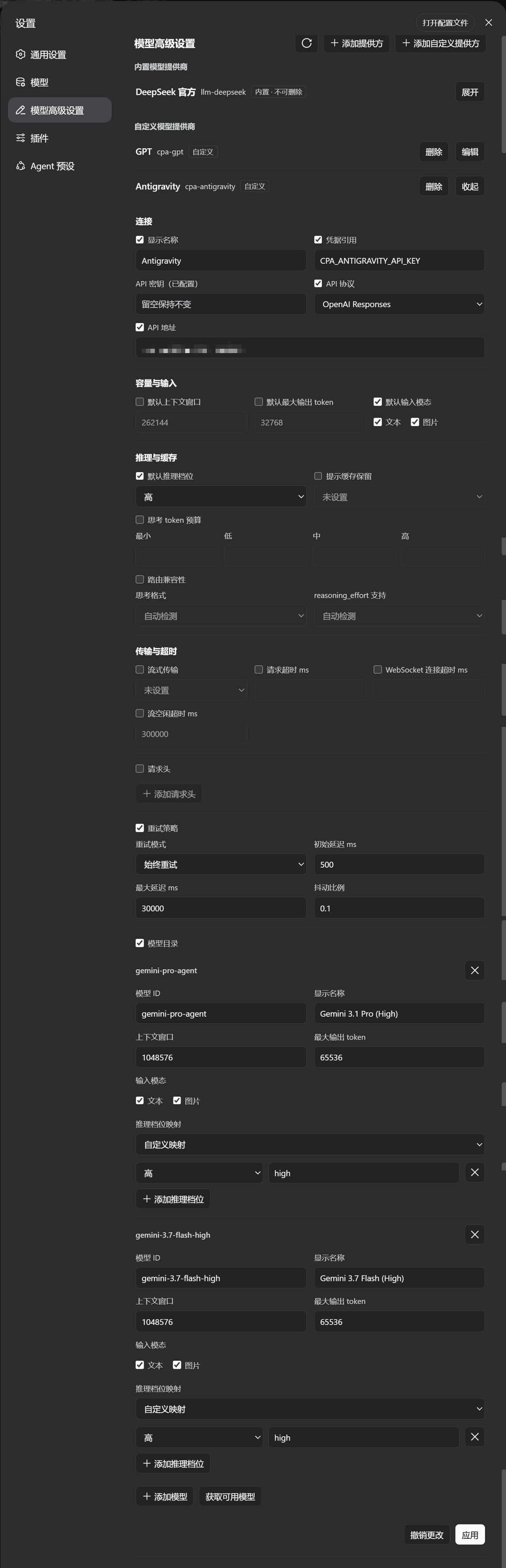
用于管理自定义LLM提供商、模型参数、思考预算及请求设置的DSH WebUI插件。
项目介绍Project Overview
这是一个 DSH WebUI 插件,在设置页新增“高级模型设置”。可统一管理自定义与官方命名空间下的 LLM 供应商配置,包括内置/自定义供应商、模型列表、推理选项、请求头和重试策略,并沿用官方界面的校验与冲突规则。适合需要集中编辑多供应商模型参数时使用;安装后需重启 Web 并强制刷新浏览器。
This DSH WebUI plugin adds an Advanced Model Settings section to the Settings page. It manages LLM provider profiles across the custom and official namespaces, including built-in and custom providers, model lists, reasoning options, headers, and retry policies, using the same validation and conflict rules as the official UI. Use it when configuring multiple providers or model parameters in one place. After installation, restart the web service and hard-refresh the browser.
请帮我了解并安装插件:【dsh-advanced-model-editor】【https://github.com/u9521/dsh-advanced-model-editor】把上面这条消息直接发给当前会话里的 DSH,让它帮你了解并安装。安装命令不一定准确,发给 DSH 更稳。Send this message to DSH in your current session. CLI install commands may not be accurate across systems — DSH will figure it out for you.
或使用命令行安装(适合开发者)Or use CLI install (for developers)
命令行安装CLI Install
dsh plugin --profile web add github:u9521/dsh-advanced-model-editor#dist把 u9521/dsh-advanced-model-editor 加入你的 DSH 配置(web profile)即可启用。
READMEREADME
dsh-advanced-model-editor
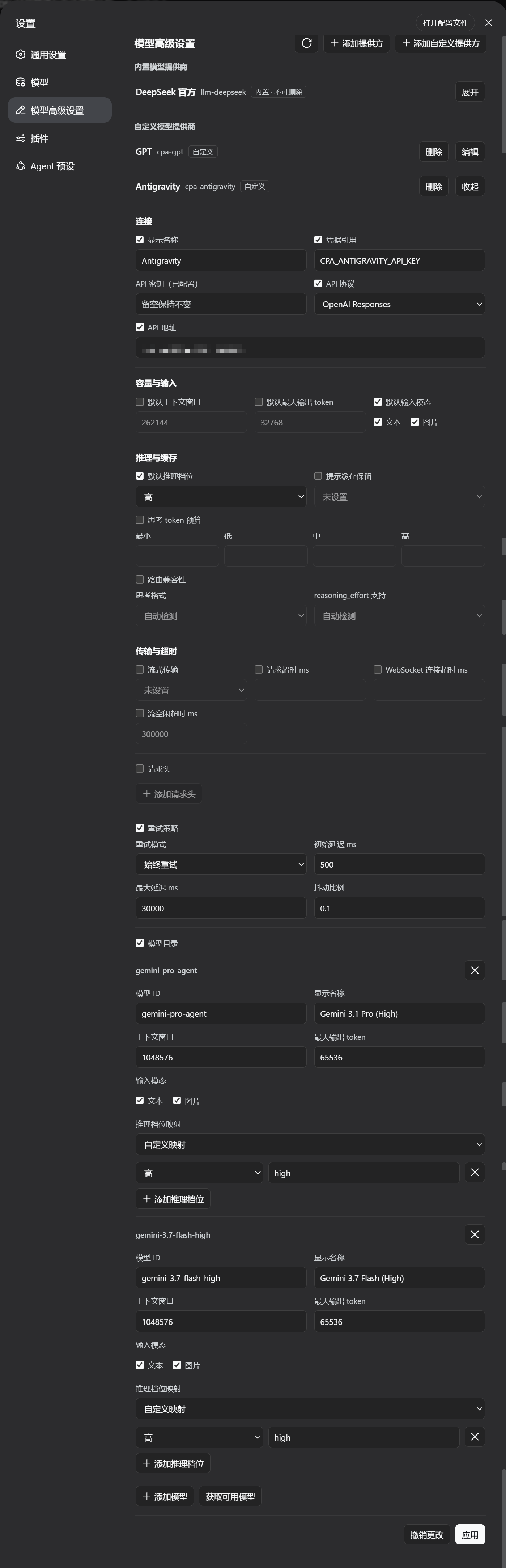
A DeepSeek Harness WebUI plugin that adds an Advanced Model Settings section to the
Settings page. It manages LLM provider profiles across the settings namespaces — the
custom provider namespace (llm-pi-ai) and the official provider namespace
(llm-deepseek) — including built-in and custom providers, model lists,
reasoning/thinking options, headers, retry policy and more, with the same validation
and conflict rules as the official settings UI.
Quick Install (Recommended / One-Line)
Install directly from the GitHub dist branch (pre-built by CI, no manual clone or compilation required):
dsh plugin --profile web add github:u9521/dsh-advanced-model-editor#dist
Then restart web (dsh web) and hard-refresh your browser (Cmd+Shift+R). The plugin appears as Advanced Model Settings in Settings.
Upgrade & Uninstall
# upgrade to the latest dist release
dsh plugin --profile web add github:u9521/dsh-advanced-model-editor#dist

# uninstall
dsh plugin --profile web remove @local/dsh-advanced-model-editor
Local Development & Manual Build
Prerequisites
- pnpm installed —
npx get-pnpm(see https://pnpm.io/installation; alternatives:corepack enableornpm install -g pnpm). Required both for building and becausedsh plugin --profile web addforwards to pnpm internally. - Node.js
^22.19 || >=24.
1. Clone
Clone the repository into the recommended location:
git clone https://github.com/u9521/dsh-advanced-model-editor.git ~/.dsh/plugins/cust-model-editor
cd ~/.dsh/plugins/cust-model-editor
2. Build
The build output (lib/) is not committed to the source branch — build it yourself for local development:
pnpm install
pnpm run build
The official DSH client-bundle preset is vendored under
external/deepseek-harness/packages/client/, so no DSH source checkout is needed:
pnpm run build runs tsc (type check + emit lib/types/) and tsdown (bundle
lib/index.js + lib/client.js) with the project's own dependencies.
Verify the build with:
pnpm test
3. Local Install
dsh plugin --profile web add ~/.dsh/plugins/cust-model-editor
Then restart web (dsh web) and hard-refresh the browser (Cmd+Shift+R).
Development & Maintenance Commands
| Command | Description |
|---|---|
pnpm run build |
Full build (runs tsc type check + generates lib/ bundles) |
pnpm run check |
Type check only (tsc --noEmit) without emitting files |
pnpm test |
Full build, then run the test suite (node --test) |
pnpm run fmt |
Format source and config files with Prettier |
pnpm run fmt:check |
Check code formatting compliance |
pnpm run sync |
Sync the vendored DSH client-bundle preset from upstream (--check or --yes) |
Local Source Upgrade / Uninstall
# pull new sources, rebuild, then re-add
git -C ~/.dsh/plugins/cust-model-editor pull
cd ~/.dsh/plugins/cust-model-editor && pnpm run build
dsh plugin --profile web add ~/.dsh/plugins/cust-model-editor

# uninstall
dsh plugin --profile web remove @local/dsh-advanced-model-editor
Restart web and hard-refresh the browser afterwards.
License
相关推荐Related
-
 nexu-io/open-design
🎨 Best DeepSeek Harness Design Plugin. The open-source Claude Design alternative. 🖥️ Local-first desktop app. 🖼️ Your…
nexu-io/open-design
🎨 Best DeepSeek Harness Design Plugin. The open-source Claude Design alternative. 🖥️ Local-first desktop app. 🖼️ Your…
-
 freestylefly/awesome-gpt-image-2
Prompt as Code | GPT-Image2 工业级提示词引擎与模板库,530+ 个案例逆向工程,20+ 套工业级模板,并提炼出Skills,持续更新中
freestylefly/awesome-gpt-image-2
Prompt as Code | GPT-Image2 工业级提示词引擎与模板库,530+ 个案例逆向工程,20+ 套工业级模板,并提炼出Skills,持续更新中
-
 anywhere-labs/dsh-desktop
为 DeepSeek Harness (DSH) 插件生态打造的现代化桌面端解决方案。万物皆「插件」,桌面本身也是「插件」。
anywhere-labs/dsh-desktop
为 DeepSeek Harness (DSH) 插件生态打造的现代化桌面端解决方案。万物皆「插件」,桌面本身也是「插件」。
- Nagi-ovo/voyager Enhancement suite for Gemini, AI Studio, Claude & ChatGPT — plus a prompt manager for any web UI, DeepSeek Harness inclu…
-
 walkinglabs/learn-harness-engineering
Harness engineering beginner tutorial, from 0 to 1
walkinglabs/learn-harness-engineering
Harness engineering beginner tutorial, from 0 to 1
-
 awesome-dsh-plugin/awesome-dsh-plugin
A curated list of plugins for DeepSeek Harness (dsh) · DeepSeek Harness 插件精选列表
awesome-dsh-plugin/awesome-dsh-plugin
A curated list of plugins for DeepSeek Harness (dsh) · DeepSeek Harness 插件精选列表
-
 MemTensor/MemOS
Self-evolving memory OS for LLM & AI Agents: ultra-persistent memory, hybrid-retrieval, and cross-task skill reuse, with…
MemTensor/MemOS
Self-evolving memory OS for LLM & AI Agents: ultra-persistent memory, hybrid-retrieval, and cross-task skill reuse, with…
- yjh051108/dsh-routing-suite dsh-routing-suite — injector + router-standard kit: install the runtime injector first, then the task-aware reasoning-mo…