uknowmyface/locallens
DeepSeek Harness 的本地 OCR — 通过 Apple 的 Vision 框架在 Mac 上从截图中读取文字。无需 API 密钥,无需上传。
项目介绍Project Overview
LocalLens 是 DeepSeek Harness 的插件,利用 macOS 内置 Vision OCR 从截图、剪贴板和图片中提取文字,全程本地处理,无需网络或 API 密钥。适合需要读取图片中文本的场景。注意:仅支持 macOS 13 及以上,且输出文本会进入模型上下文。
LocalLens is a DeepSeek Harness plugin that extracts text from screenshots, clipboard images, and image files using macOS's built-in Vision OCR. It runs entirely on-device, requiring no network, API keys, or vision models. Use it when you need to read text from images in your chat workflow. Note: it only works on macOS 13+, and extracted text enters the model context.
请帮我了解并安装插件:【locallens】【https://github.com/uknowmyface/locallens】把上面这条消息直接发给当前会话里的 DSH,让它帮你了解并安装。安装命令不一定准确,发给 DSH 更稳。Send this message to DSH in your current session. CLI install commands may not be accurate across systems — DSH will figure it out for you.
或使用命令行安装(适合开发者)Or use CLI install (for developers)
命令行安装CLI Install
dsh plugin --profile web add github:uknowmyface/locallens把 uknowmyface/locallens 加入你的 DSH 配置(web profile)即可启用。
READMEREADME
LocalLens
Read screenshots with text-only models using macOS's built-in Vision OCR. The image never leaves your Mac.
中文文档 · Security notes · SECURITY.md
Unofficial community project. Not affiliated with, endorsed by, or sponsored by DeepSeek or Apple. "DeepSeek", "Apple", "macOS", and "Vision" are trademarks of their respective owners, used here only to describe compatibility.
Overview
A DeepSeek Harness (dsh) plugin that extracts text from screen captures, clipboard images, and image files. It calls Apple's Vision framework (the engine behind macOS Live Text) directly: no vision model, no API key, no network.
Comparable plugins (visionDS, dsh-vision-router, dsh-vision-sidecar) route the image to a vision model. LocalLens uses no model at all, which removes keys, quotas, and uploads. The cost is that it reads text rather than understanding images, and runs on macOS only.
| LocalLens | Vision-model plugins | |
|---|---|---|
| Recognition | System OCR engine | Vision model (cloud / hosted / local VLM) |
| Where the image goes | Stays on the machine | Uploaded or fed to a model |
| Key / signup / quota | None | Usually required |
| Output | Text contained in the image | A description of the image |
| Platform | macOS only | Mostly cross-platform |
Requirements
- macOS 13 (Ventura) or later. Below 13,
recognitionLanguagesis unavailable, thelanguagesoption is ignored, and Chinese accuracy degrades. - Xcode Command Line Tools (
xcode-select --install). A Swift helper is compiled with/usr/bin/swiftcon first call. Full Xcode is not required. - DeepSeek Harness, Node.js 22+.
Install
dsh plugin --profile web add github:uknowmyface/locallens
The package ships its own cordis.patch.yml (declared via dsh.bundle.patch), so dsh plugin add installs and registers it in one step without writing to your profile's patch layer. Replace web with your profile name. Takes effect in a new session.
Usage
Ask in the chat box. No hotkey, no menu bar item, no background process.
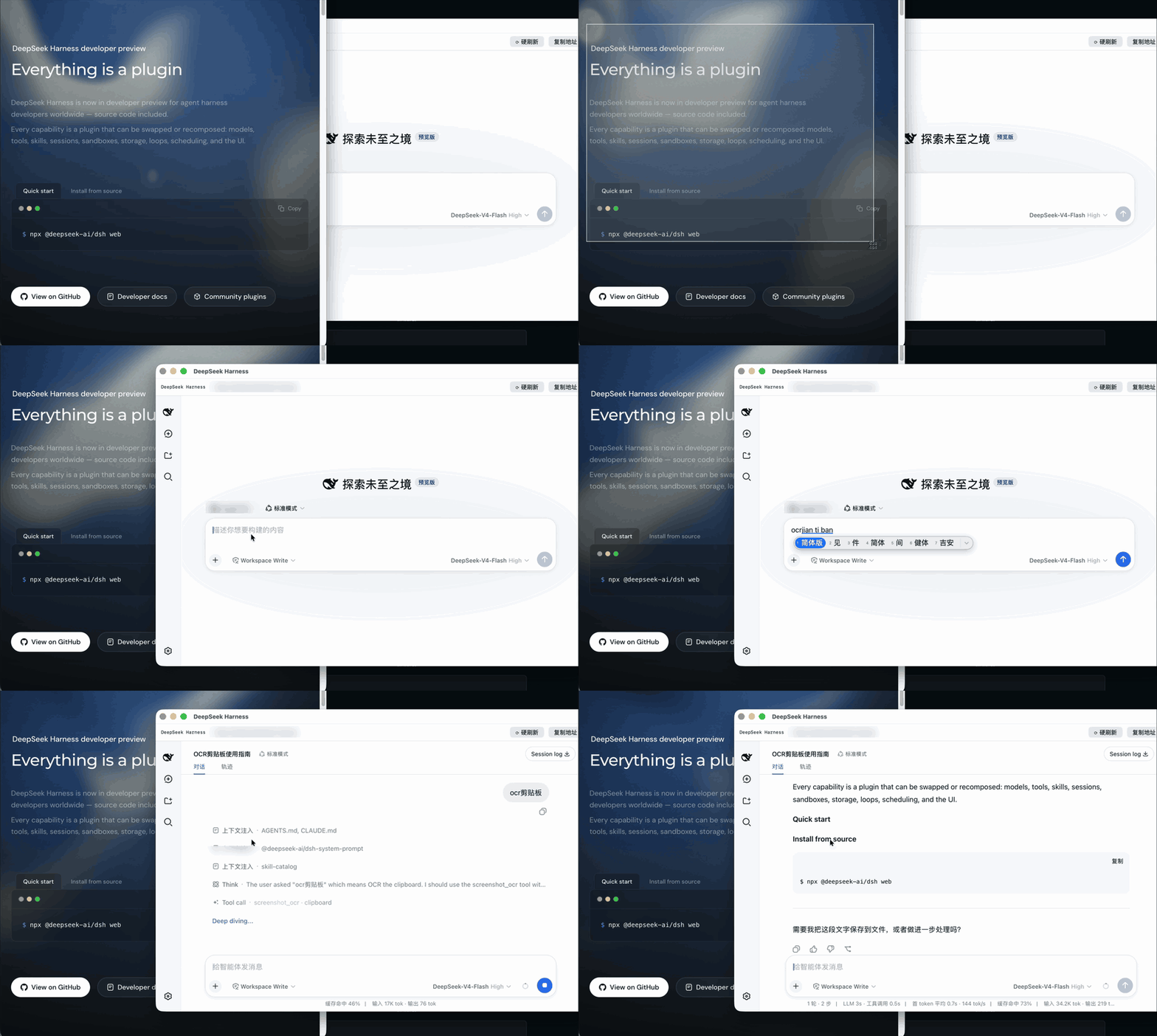
Clipboard (most common): press Cmd+Ctrl+Shift+4 and drag a region, which copies the capture to the clipboard, then say "OCR the clipboard".
Image file: "read the text in ~/Desktop/bug.png"
Screen: "read what's on my screen". Captures the entire main display and requires Screen Recording permission.
Results land in the conversation context, so the next instruction can act on them:
OCR the clipboard and turn the table into markdown
read this error screenshot, then grep the project for where it's thrown
Parameters
Filled in by the agent. Listed for reference.
| Parameter | Values | Notes |
|---|---|---|
source |
screen / clipboard / file |
Required, input source |
path |
file path | Required when source=file, not confined to the workspace |
languages |
comma-separated BCP-47 | Defaults to zh-Hans,en-US |
Returns { text, source, lineCount, warning? }.
Configuration
Override by id in your profile's own cordis.patch.yml rather than forking. The user layer is applied after every bundle layer:
- id: tool-screenshot-ocr
  config:
    languages: 'ja,en-US'
Privacy boundary
Stays local: image files and screen captures are read by Vision in a local process and never uploaded. The OCR computation involves no network call. The project contains no telemetry and no network code.
Does not stay local: the recognized text is returned as a tool result, enters the model context, and is sent to your configured model provider along the same path as anything you type.
The accurate claim is "images never reach a third-party vision service", not "no data leaves the machine". If a screenshot holds something you would not paste into the chat box, do not OCR it.
Security notes
OCR output is untrusted input. The text originates from arbitrary screen or image content and may be authored by a third party. dsh agents hold shell and filesystem access, so the risk is real. Results are wrapped in an <untrusted-ocr-text> marker and the tool description instructs the model to treat them as data rather than commands. This is a prompt-level mitigation, not a security boundary. Treat OCR of unknown images with the same caution as letting an agent browse an untrusted site.
source=screen captures the entire main display. No region or window scoping, including everything behind the chat window (password managers, 2FA codes). Use clipboard when the screen holds sensitive material. Region and window capture are planned.
source=file is not sandboxed. Any image file readable by the current user can be read.
Screen Recording permission is granted per application. Granting it to a terminal grants it to every process launched from that terminal. This is a macOS design constraint the plugin cannot narrow. clipboard and file require no permission.
Report vulnerabilities via SECURITY.md.
Scope
Vision also provides an image classifier of roughly 1300 categories, cat/dog detection, face and barcode detection. This plugin uses only VNRecognizeTextRequest.
The classifier returns coarse labels (dog, document, beach), not descriptions. Use a vision model when you need the picture understood. LocalLens does not attempt to substitute for one.
How it works
assets/ocr.swiftis a Swift CLI built onVNRecognizeTextRequestat.accuratewith language correction enabled.- It compiles to
bin/ocron first call (10 to 20 seconds) and is reused by mtime afterwards. screencapturegrabs the display, Vision extracts the text, and the result returns as plain text. The pipeline runs entirely on device.
The binary is cached alongside the source, so anyone able to write to the plugin directory can execute code in the dsh host process. This is the same trust boundary that applies to the rest of ~/.dsh.
Uninstall
dsh plugin --profile web remove @locallens/dsh-tool-screenshot-ocr
Removes the package and the bundle layer together, leaving nothing in the profile config.
Contributing
Issues and PRs welcome. These directions are wanted, in rough order of value:
Windows port. Windows 10+ ships Windows.Media.Ocr, structurally the same as Apple Vision: system-level OCR with no model, no upload, no key. The tool contract in lib/index.js carries over unchanged; only the engine layer needs replacing. This is the largest gap today.
Region and window capture. screencapture supports -R x,y,w,h and -l <windowid>. Wiring these into source would substantially narrow the data exposed by full-screen capture.
Linux port. No system-level equivalent exists. Tesseract is the obvious candidate, at the cost of an external dependency.
PDF input. Only bitmaps are accepted today; PDFs need rasterizing first.
Language testing. zh-Hans,en-US is the default. Accuracy in other languages has not been systematically verified.
lib/ocr-engine.js is the seam between the engine and the tool layer. Cross-platform ports start there.
Related projects
- ModLens and similar cloud-vision plugins provide genuine image understanding (scene description, layout reasoning, chart interpretation) that OCR cannot cover. Use them when you need the model to see rather than read.
- macOS has shipped Live Text since Monterey, which selects text from images directly in Preview and Quick Look. This plugin exposes the same capability to an agent programmatically.
Acknowledgements
- Built on Apple's Vision framework.
- Plugin and hot-reload mechanics come from cordis.
- Thanks to the DeepSeek Harness team for the plugin architecture.
The code was written by AI. DeepSeek produced the initial implementation; Claude performed the security review, corrected the package naming and install path, and rewrote the documentation. The author does not write code, and no human has reviewed it line by line. The project is roughly 800 lines with no runtime dependencies. Read it before trusting it.
License
MIT, see LICENSE.
相关推荐Related
-
 nexu-io/open-design
🎨 Best DeepSeek Harness Design Plugin. The open-source Claude Design alternative. 🖥️ Local-first desktop app. 🖼️ Your…
nexu-io/open-design
🎨 Best DeepSeek Harness Design Plugin. The open-source Claude Design alternative. 🖥️ Local-first desktop app. 🖼️ Your…
-
 freestylefly/awesome-gpt-image-2
Prompt as Code | GPT-Image2 工业级提示词引擎与模板库,530+ 个案例逆向工程,20+ 套工业级模板,并提炼出Skills,持续更新中
freestylefly/awesome-gpt-image-2
Prompt as Code | GPT-Image2 工业级提示词引擎与模板库,530+ 个案例逆向工程,20+ 套工业级模板,并提炼出Skills,持续更新中
-
 anywhere-labs/dsh-desktop
为 DeepSeek Harness (DSH) 插件生态打造的现代化桌面端解决方案。万物皆「插件」,桌面本身也是「插件」。
anywhere-labs/dsh-desktop
为 DeepSeek Harness (DSH) 插件生态打造的现代化桌面端解决方案。万物皆「插件」,桌面本身也是「插件」。
- Nagi-ovo/voyager Enhancement suite for Gemini, AI Studio, Claude & ChatGPT — plus a prompt manager for any web UI, DeepSeek Harness inclu…
-
 walkinglabs/learn-harness-engineering
Harness engineering beginner tutorial, from 0 to 1
walkinglabs/learn-harness-engineering
Harness engineering beginner tutorial, from 0 to 1
-
 awesome-dsh-plugin/awesome-dsh-plugin
A curated list of plugins for DeepSeek Harness (dsh) · DeepSeek Harness 插件精选列表
awesome-dsh-plugin/awesome-dsh-plugin
A curated list of plugins for DeepSeek Harness (dsh) · DeepSeek Harness 插件精选列表
-
 MemTensor/MemOS
Self-evolving memory OS for LLM & AI Agents: ultra-persistent memory, hybrid-retrieval, and cross-task skill reuse, with…
MemTensor/MemOS
Self-evolving memory OS for LLM & AI Agents: ultra-persistent memory, hybrid-retrieval, and cross-task skill reuse, with…
- yjh051108/dsh-routing-suite dsh-routing-suite — injector + router-standard kit: install the runtime injector first, then the task-aware reasoning-mo…