Ultronen/dsh-archived-chats
DeepSeek Harness 已归档会话管理页:在设置里查看、搜索、取消归档、删除已归档的聊天,按项目分组。
Project Overview项目介绍
Session Archive is a local-first archived-chat center for DeepSeek Harness. It provides workspace-grouped browsing, full-text search, read-only previews, validated local history, JSON plus Markdown backup and import, a snapshot-protected Recycle Bin, and storage retention policies. Use it to locate, inspect, and safely recover conversations that disappear from the sidebar after archiving. All data stays under $DSH_HOME/plugin-data/archived-chats/; manually back up anything needed before permanent removal.
Session Archive 是 DeepSeek Harness 的本地化归档聊天中心。核心能力包括按工作区浏览与全文搜索、只读预览、版本化本地历史、JSON 与 Markdown 备份导入、可撤销的回收站及存储保留策略。适用于需要从侧边栏隐藏后仍可定位、检索并安全恢复历史对话的场景。数据完全保存在 $DSH_HOME/plugin-data/archived-chats/,请注意永久删除前需手动备份。
请帮我了解并安装插件:【dsh-archived-chats】【https://github.com/Ultronen/dsh-archived-chats】Send this message to DSH in your current session. CLI install commands may not be accurate across systems — DSH will figure it out for you.把上面这条消息直接发给当前会话里的 DSH,让它帮你了解并安装。安装命令不一定准确,发给 DSH 更稳。
Or use CLI install (for developers)或使用命令行安装(适合开发者)
CLI Install命令行安装
dsh plugin --profile web add dsh-archived-chats@latest把 Ultronen/dsh-archived-chats 加入你的 DSH 配置(web profile)即可启用。
READMEREADME
Session Archive
A local-first archived-chat center for DeepSeek Harness
dsh-archived-chats







English · 简体中文
Plugin market · npm · Releases · Discussions · Private security report
Session Archive gives DeepSeek Harness a first-class home for chats that disappear from the sidebar after archive. Browse every archived conversation by workspace, search its full content, inspect validated local history, and recover or remove it through explicit, reversible workflows.
Formerly Archived Chats, now Session Archive / 会话档案. The package name, repository, install command, and local data location are unchanged; existing users need no data migration.
Quick start
dsh plugin --profile web add dsh-archived-chats@latest
Restart DSH once, then open Settings → Session Archive.
Update an existing installation:
dsh plugin --profile web update dsh-archived-chats
Core capabilities
| Area | What it provides |
|---|---|
| Browse and search | Workspace-grouped archive browsing, full-text search across messages and tool results, filters, sorting, tags, and notes. |
| Archive a workspace | From Settings → Session Archive, choose a workspace and open one confirmation for every eligible chat in it. Empty new-session windows are excluded; the workspace and its directory stay unchanged. |
| Read-only preview | Native conversation layout for Markdown, reasoning, tool activity, JSON, code, and available stored images, with responsive turn navigation. |
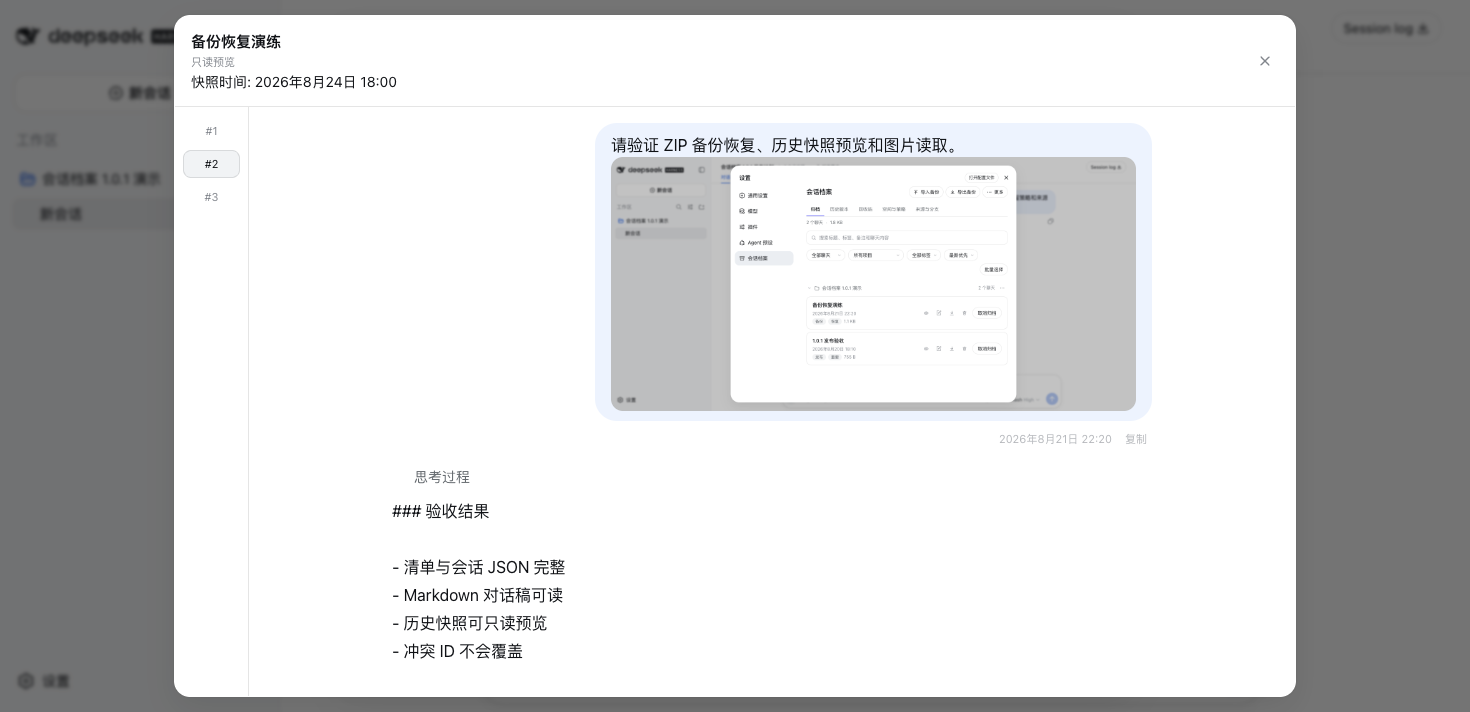
| Local History | Validated versions captured after archive, read-only snapshot preview, confirmed deletion, clear-history, and Restore as copy without overwriting the source. |
| Backup and restore | JSON + Markdown ZIP export with preview-first, conflict-safe import. Existing session IDs are never overwritten. |
| Recoverable deletion | Snapshot-protected Recycle Bin with immediate Undo, two-level restore, and separately confirmed permanent deletion. |
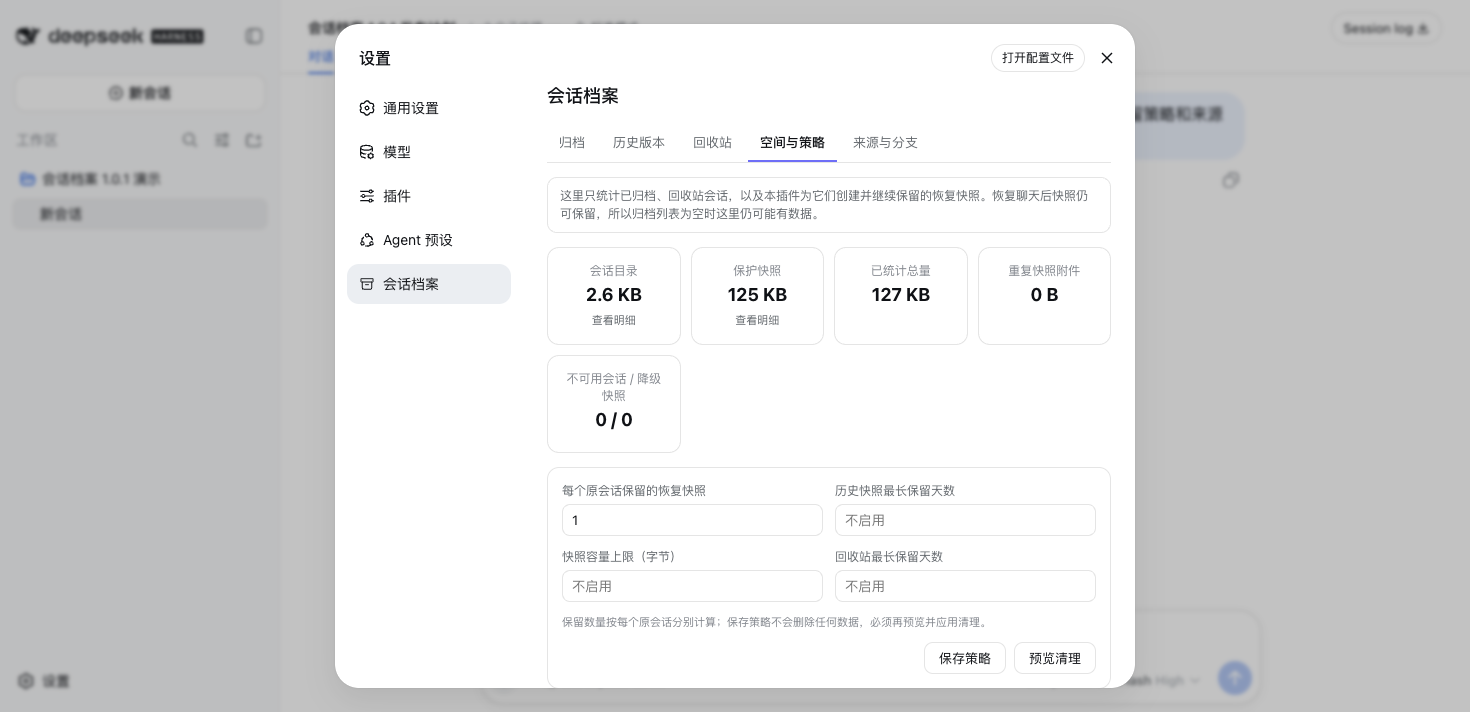
| Storage and relationships | Separate storage accounting, preview-first retention policies, and read-only Origins & Branches for forks and subagent trees. |
Safety by design
- Local only: plugin metadata, recycle records, policies, and validated snapshots stay under
$DSH_HOME/plugin-data/archived-chats/. Nothing is uploaded or cloud-synced. - No silent overwrite: imports and History restores create or select non-conflicting IDs; they never replace an existing session.
- Deletion stays explicit: ordinary removal enters the Recycle Bin after snapshot protection. Physical removal is available only through confirmed permanent-purge actions.
- No automatic cleanup: retention policies are saved separately from execution. Every cleanup starts with a short-lived preview and explicit selection.
- Confirmed workspace archive: the plugin prepares the exact set in the background, then shows one confirmation with the workspace and chat count. Only sessions whose inspected log contains a real
turn/startare eligible; empty new-session windows and sessions whose content cannot be confirmed are skipped. Its five-minute, single-use credential excludes chats added later; a running chat is skipped, never stopped or moved. - Backup scope is visible: ZIP exports preserve complete session JSON and readable Markdown, but do not include attachment bytes or descendant sessions.
Compatibility
Features activate from the public capabilities exposed by the DeepSeek Harness Host instead of a hard-coded Host version.
| Host capability | Plugin behavior |
|---|---|
| Archive and session reads | Browsing, search, preview, History inventory, storage accounting, and lineage. |
settings.section + public archiveSession |
The plugin-owned settings page provides the workspace chooser and one-confirmation archive flow without requiring a workspace-menu extension slot. Without archive capability, preparation returns workspace-archive-unsupported and makes no change. |
| Attachment reads | Stored images appear in conversation and snapshot previews; without it, text remains readable. |
| Session-scoped log location | Recycle Bin permanent deletion uses the persistence provider's public locate(meta) capability. Providers without a session-scoped location remain unsupported; failed operations retain their rows and display the reason. |
| Public session writer | ZIP import, Restore as copy, and snapshot fallback when an original is missing all write through the Host's public create / append / locate capability, or a dedicated restore entry point where one exists. |
| Missing write capability | The operation returns restore-unsupported without writing or overwriting data. |
Back up $DSH_HOME/plugin-data/archived-chats/ before downgrading to a release that does not display History or understand recycle snapshots.
Demo preview
The eight fixed screenshots below come from an isolated Simplified Chinese light-theme Web environment with synthetic conversations. They contain no real user data, paths, notes, or credentials, and are the same ordered image set declared to the plugin market.
View all eight screenshots
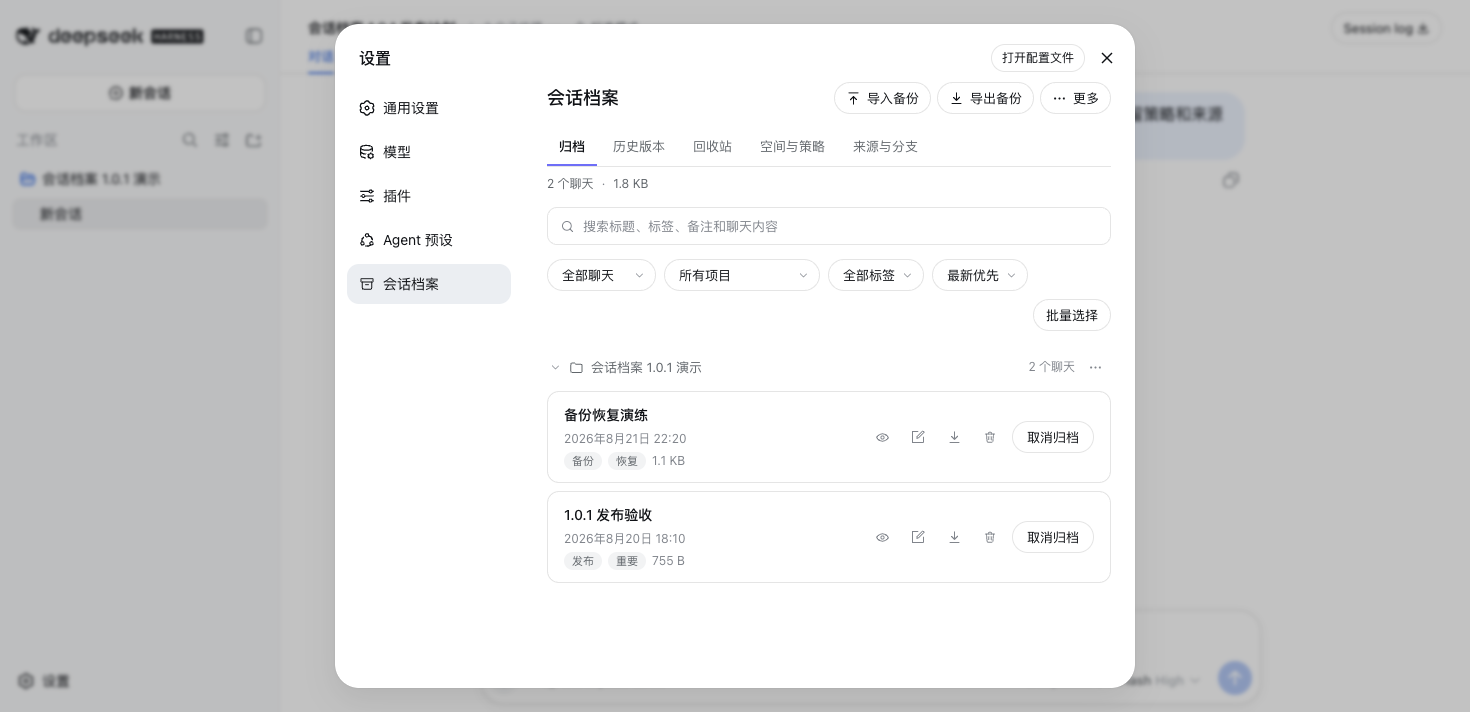 Archive overview |
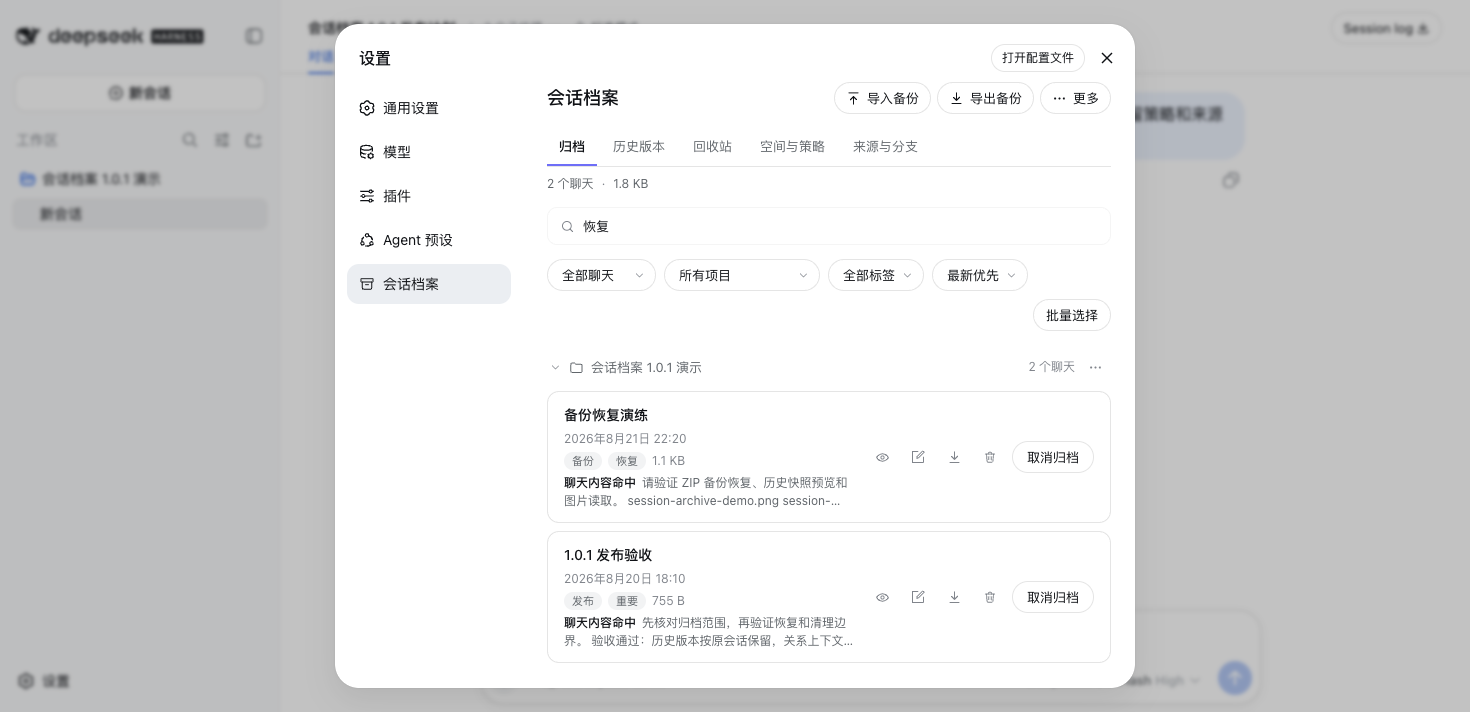 Full-text search |
Read-only preview |
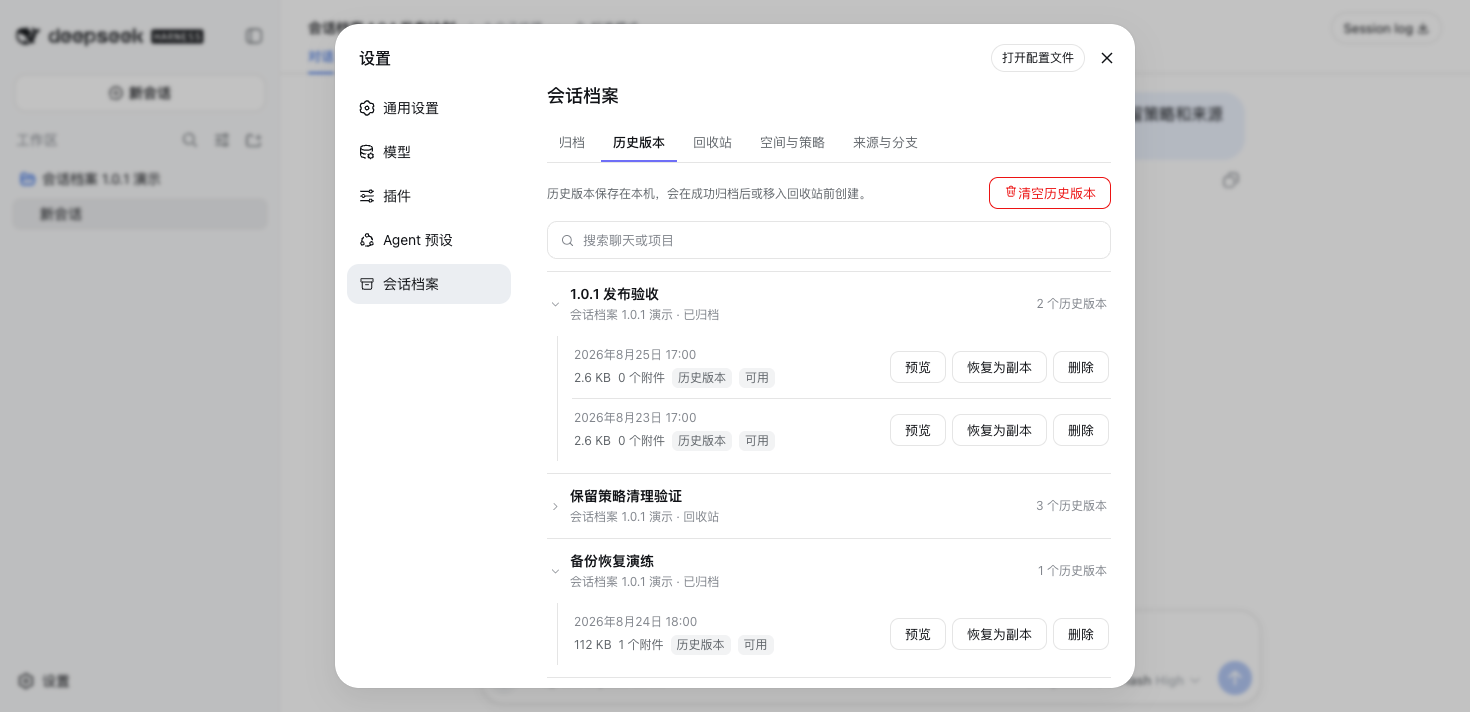 History timeline |
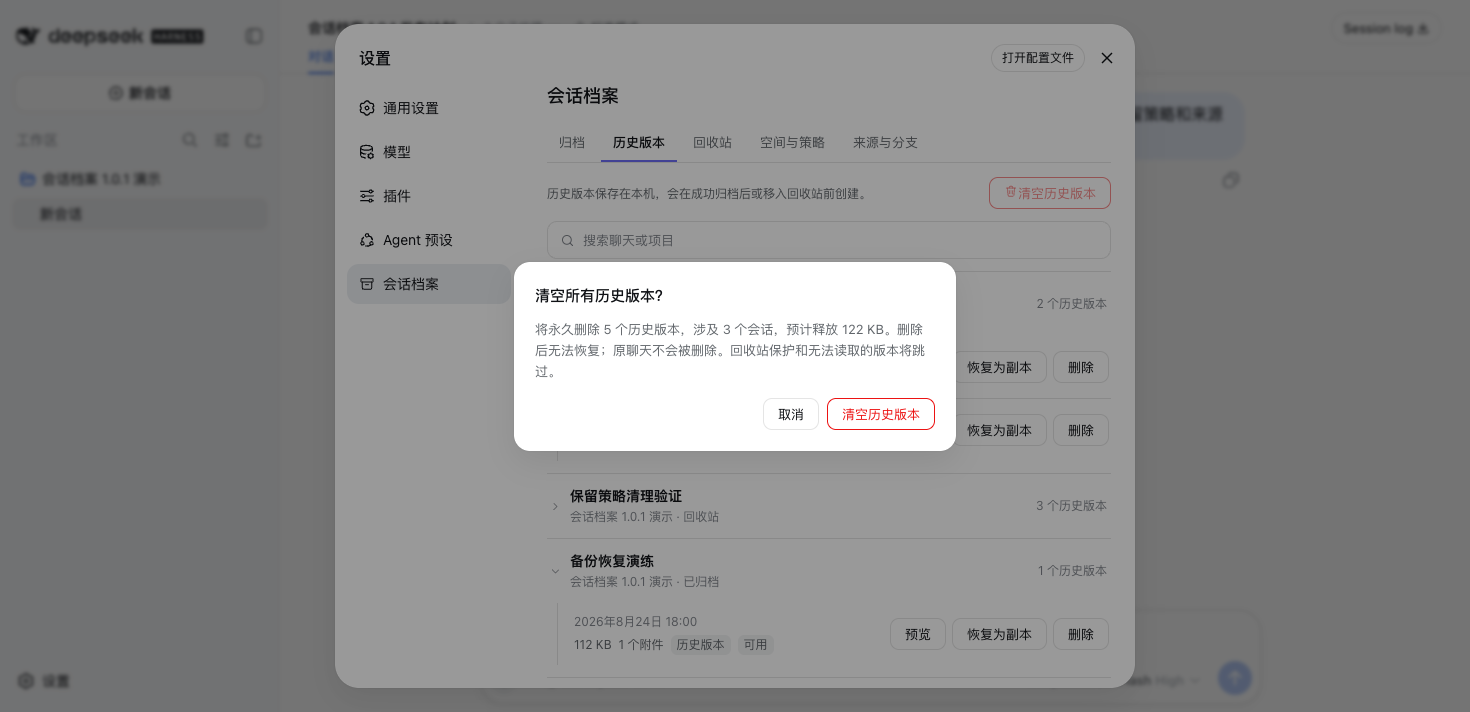 Clear History confirmation |
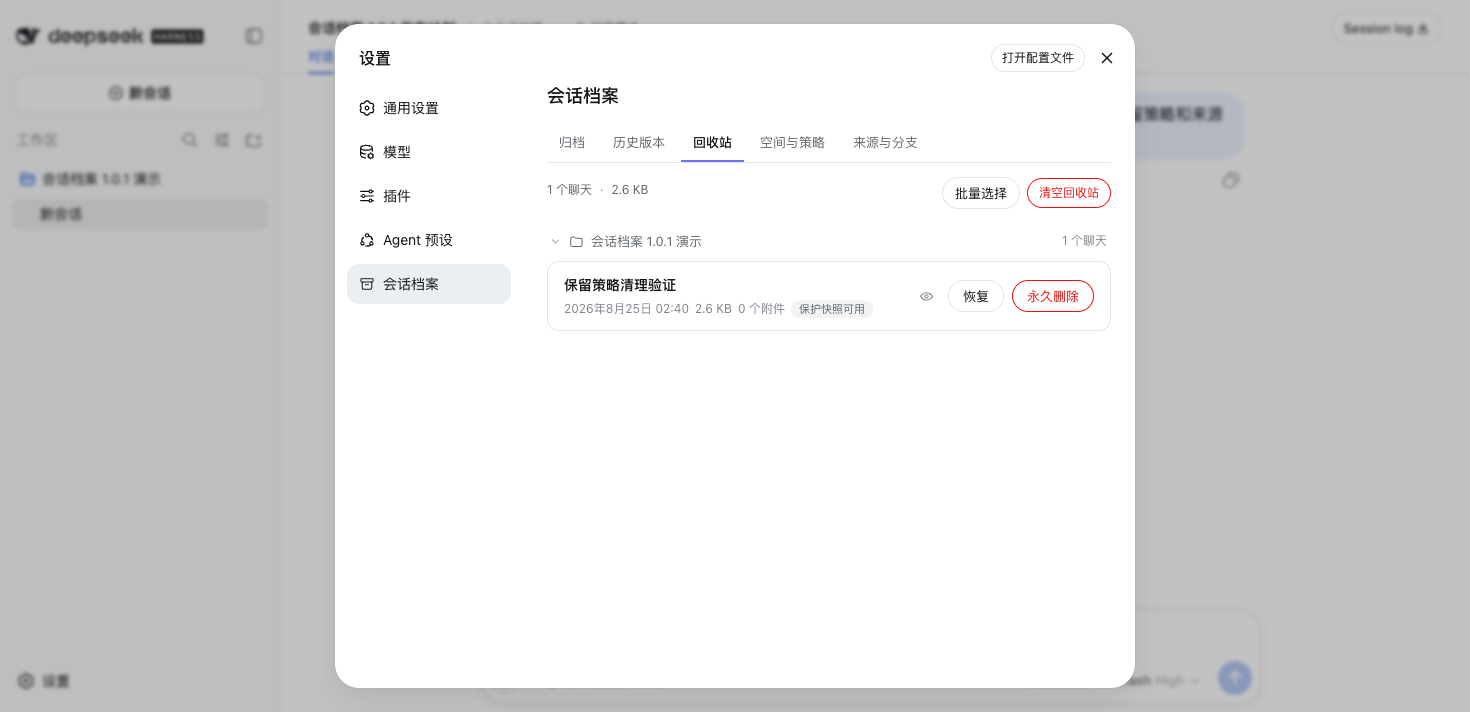 Recycle Bin |
Storage and retention |
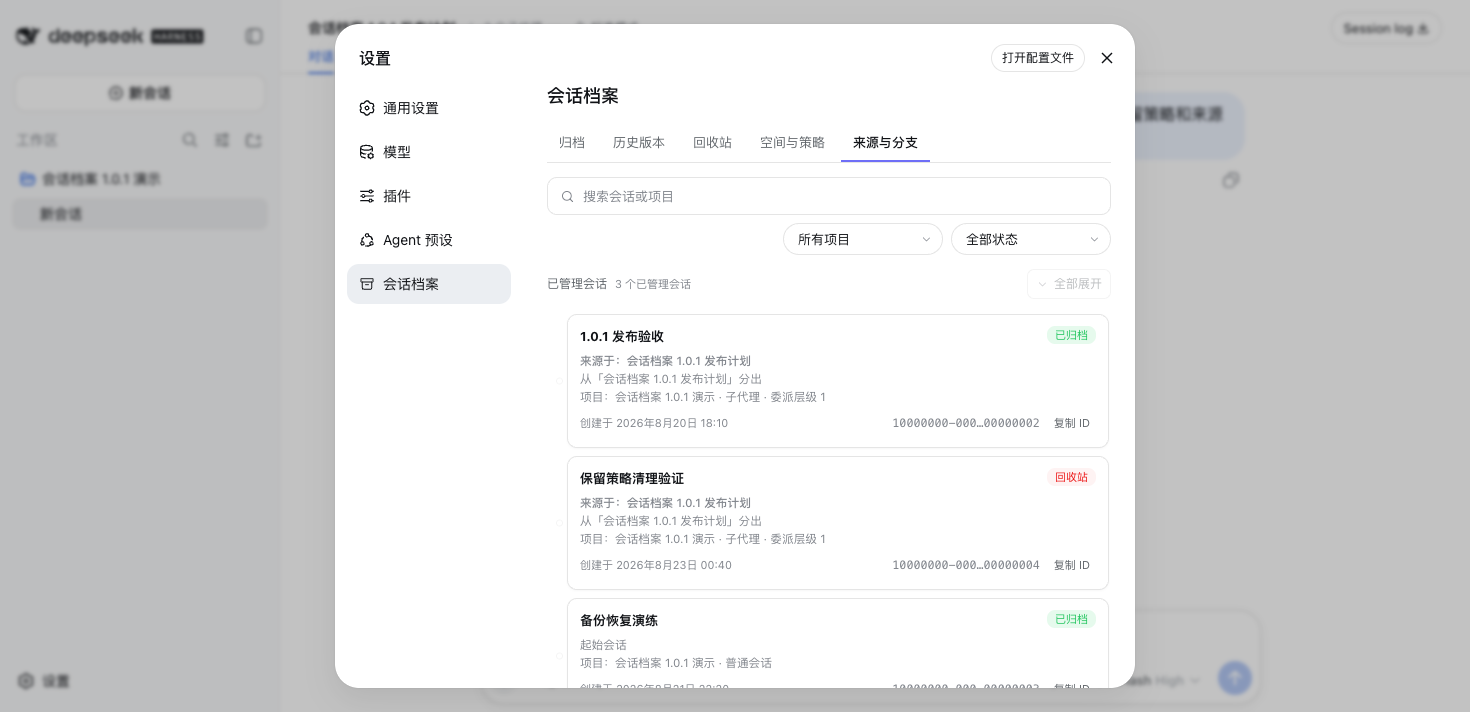 Origins and Branches |
Documentation
| Resource | English | 简体中文 |
|---|---|---|
| User guide | Read the guide | 查看指南 |
| Architecture | Maintainer architecture | 维护者架构 |
| Release history | GitHub Releases | GitHub Releases |
See also Support, Security, Contributing, Code of Conduct, and Discussions. Before claiming work or opening a pull request, contributors must read the Contributing Guide in full.
Project status
Session Archive is actively maintained. The latest stable npm release receives fixes and security updates; older releases should be upgraded before reporting a problem. Reproducible bug reports and focused pull requests are welcome. Accepted community tasks are marked help wanted; read the claim workflow before starting substantial work. Maintenance is performed as availability permits, so no fixed response or release schedule is promised.
Development
npm test
The suite covers Host and browser behavior, export/import, History, Recycle Bin, retention, search, responsive layout, public types, package contents, and repository hygiene. It uses isolated temporary data and never reads real sessions.
Uninstall
dsh plugin --profile web remove dsh-archived-chats
Uninstalling removes only the plugin package. It does not delete local data under $DSH_HOME/plugin-data/archived-chats/ or trigger Recycle Bin permanent purge. Retained data includes metadata.json, trash.json, retention.json, the snapshots/ directory, and any legacy pending-deletions.json that has not yet been migrated. A later reinstall can use this data. Before permanently removing the directory, restore and back up anything you need, then delete it manually only after confirming that none of its data is still required.
License
Related相关推荐
-
 liangmianya/dsh-synapse
A visual, non-linear conversation workspace plugin for DeepSeek Harness ; A canvas-based session explorer and branching …
liangmianya/dsh-synapse
A visual, non-linear conversation workspace plugin for DeepSeek Harness ; A canvas-based session explorer and branching …
-
 alaliqing/claude-paper
📖 Cross-agent research paper toolkit for Claude Code, Codex, OpenCode, and DeepSeek Harness—quick summaries, deep study…
alaliqing/claude-paper
📖 Cross-agent research paper toolkit for Claude Code, Codex, OpenCode, and DeepSeek Harness—quick summaries, deep study…
-
 omdsh-dev/dsh-annotation
DSH Web 选中批注插件:选文字→批注→回车随消息发送;气泡隐藏批注块(零闪烁);回复按 Annotation N 逐条对照(可悬浮芯片)。官方 bundle,零核心改动
omdsh-dev/dsh-annotation
DSH Web 选中批注插件:选文字→批注→回车随消息发送;气泡隐藏批注块(零闪烁);回复按 Annotation N 逐条对照(可悬浮芯片)。官方 bundle,零核心改动
-
 Anionex/dsh-turn-rewind
deepseek harness对话和代码状态回退插件 | DSH — rewind conversation and workspace state, powered by a persistent Change Ledger
Anionex/dsh-turn-rewind
deepseek harness对话和代码状态回退插件 | DSH — rewind conversation and workspace state, powered by a persistent Change Ledger
-
 hanshenmesen/dsh-turn-delete
Delete one complete turn from a DeepSeek Harness session without deleting the session
hanshenmesen/dsh-turn-delete
Delete one complete turn from a DeepSeek Harness session without deleting the session
-
 qkycir-123/dsh-run2skill
Automatically turn successful DeepSeek Harness sessions into reusable, reviewable Agent Skills.
qkycir-123/dsh-run2skill
Automatically turn successful DeepSeek Harness sessions into reusable, reviewable Agent Skills.
-
 Tyan66666/billion-context-dsh
Model-driven context management (Active Context Pruning / ACP) for the DeepSeek Harness — the model decides when and wha…
Tyan66666/billion-context-dsh
Model-driven context management (Active Context Pruning / ACP) for the DeepSeek Harness — the model decides when and wha…
-
 PKUfudawei/dsh-capability-menu
Unified capability menu for DeepSeek Harness: manage exposure level (context footprint) and execution mode of MCP tools …
PKUfudawei/dsh-capability-menu
Unified capability menu for DeepSeek Harness: manage exposure level (context footprint) and execution mode of MCP tools …