V1ki/dsh-plugin-subscriptions
使用ChatGPT(Codex)、Claude和Grok(X Premium)订阅作为DeepSeek Harness LLM提供商——在Web界面中进行OAuth登录,无需API密钥
项目介绍Project Overview
dsh-plugin-subscriptions 是 DeepSeek Harness 的 Web UI 插件,把 ChatGPT(Codex)、Claude 与 Grok(X Premium) 订阅接入为 LLM 提供方,无需 API Key。Codex 与 Grok 通过网页 OAuth 登录,Claude 优先读取本地 Claude Code 凭据,降级走同套浏览器流程。已登录提供方进入会话模型选择器,自动刷新目录,附 Effort、Speed 切换与限额展示,附带 x_search、image_generate、video_generate 工具。注意:使用受订阅条款与各提供方限流约束。
dsh-plugin-subscriptions is a DeepSeek Harness web UI plugin that exposes ChatGPT (Codex), Claude, and Grok (X Premium) subscriptions as LLM providers without API keys. Codex and Grok authorize via in-app browser OAuth; Claude imports credentials from a local Claude Code session when present, otherwise falls back to the same browser flow. Logged-in providers populate the model picker with live catalogs, surface effort/speed toggles, per-window usage meters, and add x_search, image_generate, and video_generate tools. Note: usage is bound by each provider's subscription terms and rate limits.
请帮我了解并安装插件:【dsh-plugin-subscriptions】【https://github.com/V1ki/dsh-plugin-subscriptions】把上面这条消息直接发给当前会话里的 DSH,让它帮你了解并安装。安装命令不一定准确,发给 DSH 更稳。Send this message to DSH in your current session. CLI install commands may not be accurate across systems — DSH will figure it out for you.
或使用命令行安装(适合开发者)Or use CLI install (for developers)
命令行安装CLI Install
dsh plugin --profile web add dsh-plugin-subscriptions把 V1ki/dsh-plugin-subscriptions 加入你的 DSH 配置(web profile)即可启用。
READMEREADME
dsh-plugin-subscriptions 
English | 中文
Use your ChatGPT (Codex), Claude, and Grok (X Premium) subscriptions as LLM providers in DeepSeek Harness — no API keys. Codex and Grok log in via OAuth in the dsh web UI (Settings → Subscriptions); Claude imports credentials from an existing Claude Code session when there is one (macOS Keychain or ~/.claude/.credentials.json) and otherwise falls back to the same browser OAuth flow, so the Claude Code CLI is not required. Tokens live at ~/.dsh/plugins/subscriptions/auth.json (mode 0600) and refresh automatically.
Demo
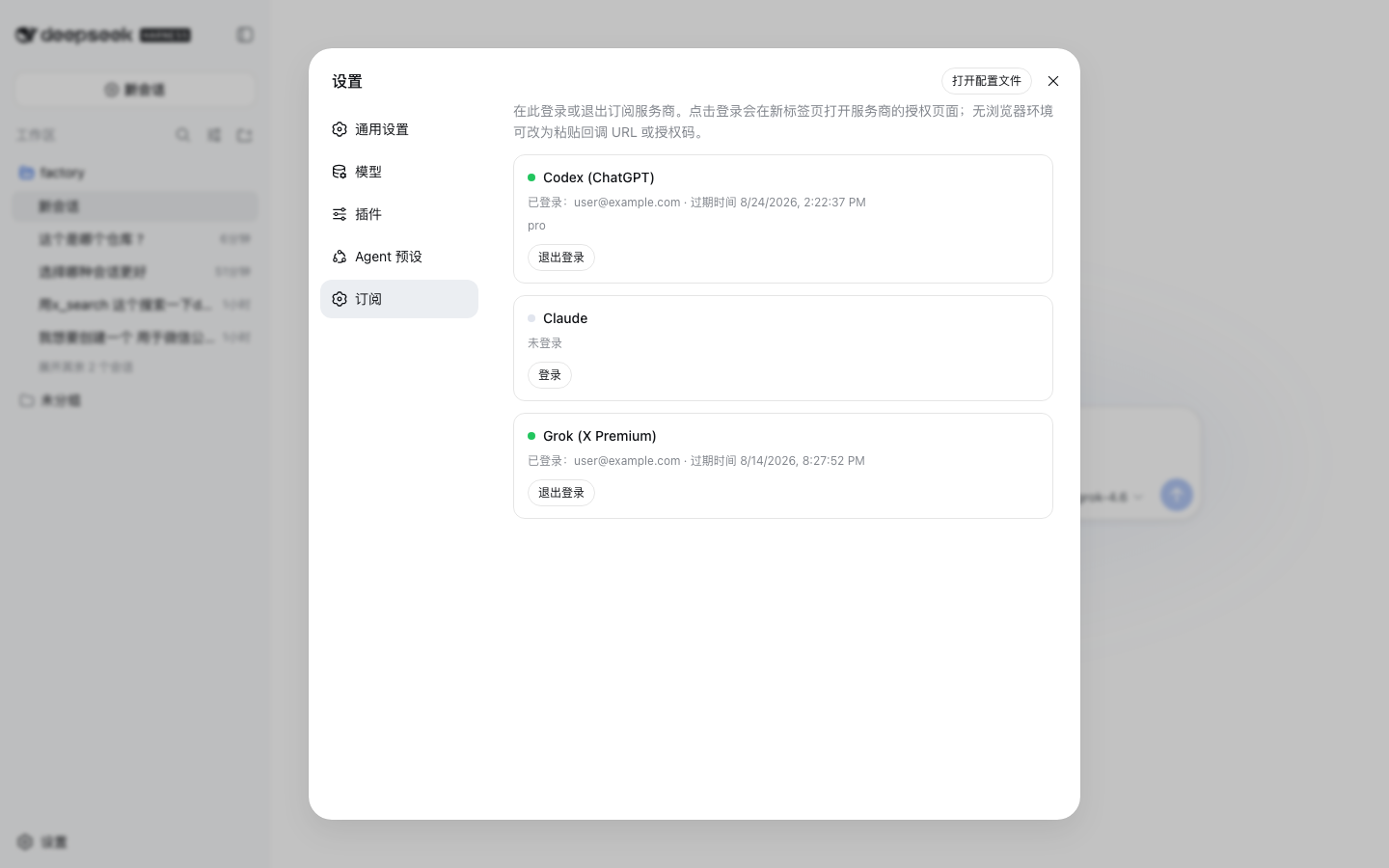
Settings → Subscriptions: per-provider login/logout, no API keys. Claude imports credentials from Claude Code when available and otherwise uses OAuth, as Codex and Grok always do (account address masked in the screenshot):
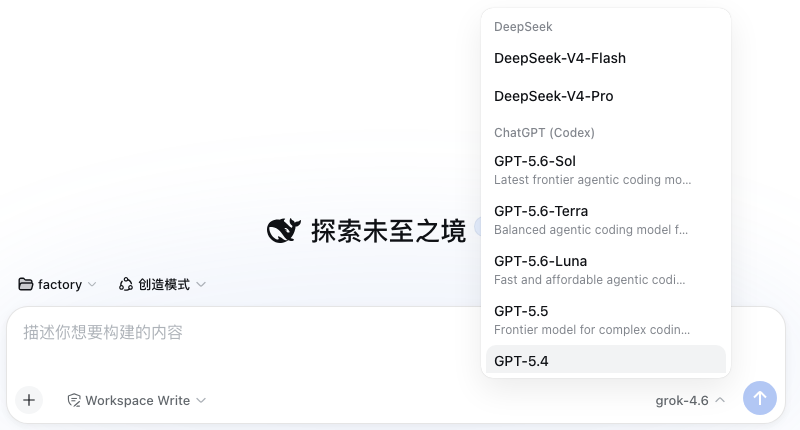
Logged-in providers join the session model picker with their live model catalogs:
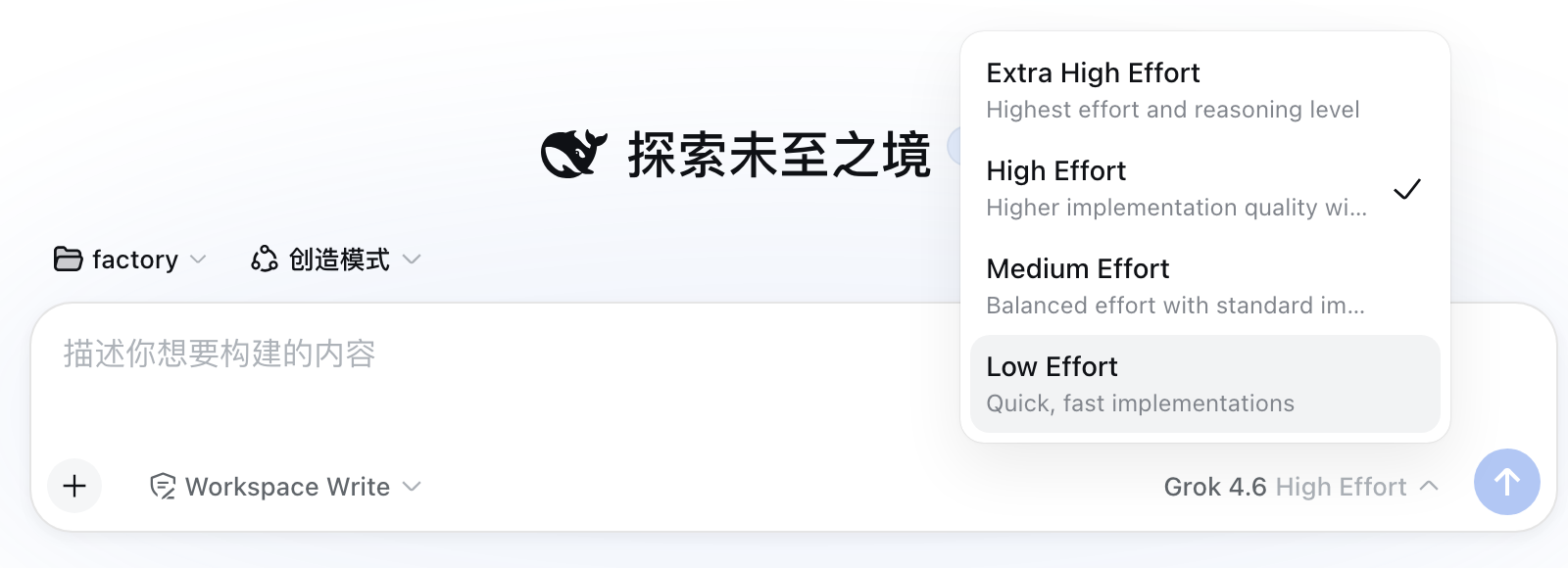
Models that advertise reasoning levels get an Effort selector in the same menu — Codex models, Grok 4.6 / 4.5, and Copilot's reasoning models (levels and defaults come from each provider's live catalog, not a hardcoded list; Copilot's capabilities.supports.reasoning_effort array is sent as reasoning_effort on chat completions and reasoning.effort on the Responses wire). Models listing both Copilot endpoints (gpt-5.4, gpt-5-mini) normally speak chat completions but reroute to /responses when a request combines function tools with an effort — Copilot rejects that combination on the chat wire:
Codex models whose catalog advertises the fast tier (the codex CLI's fast mode) get a Speed toggle in the composer's tool row, next to the model selector — Standard or Fast (service_tier: priority), per session. The /fast slash command offers the same choice as a popup; it errors with an explanation when the current model has no fast tier.

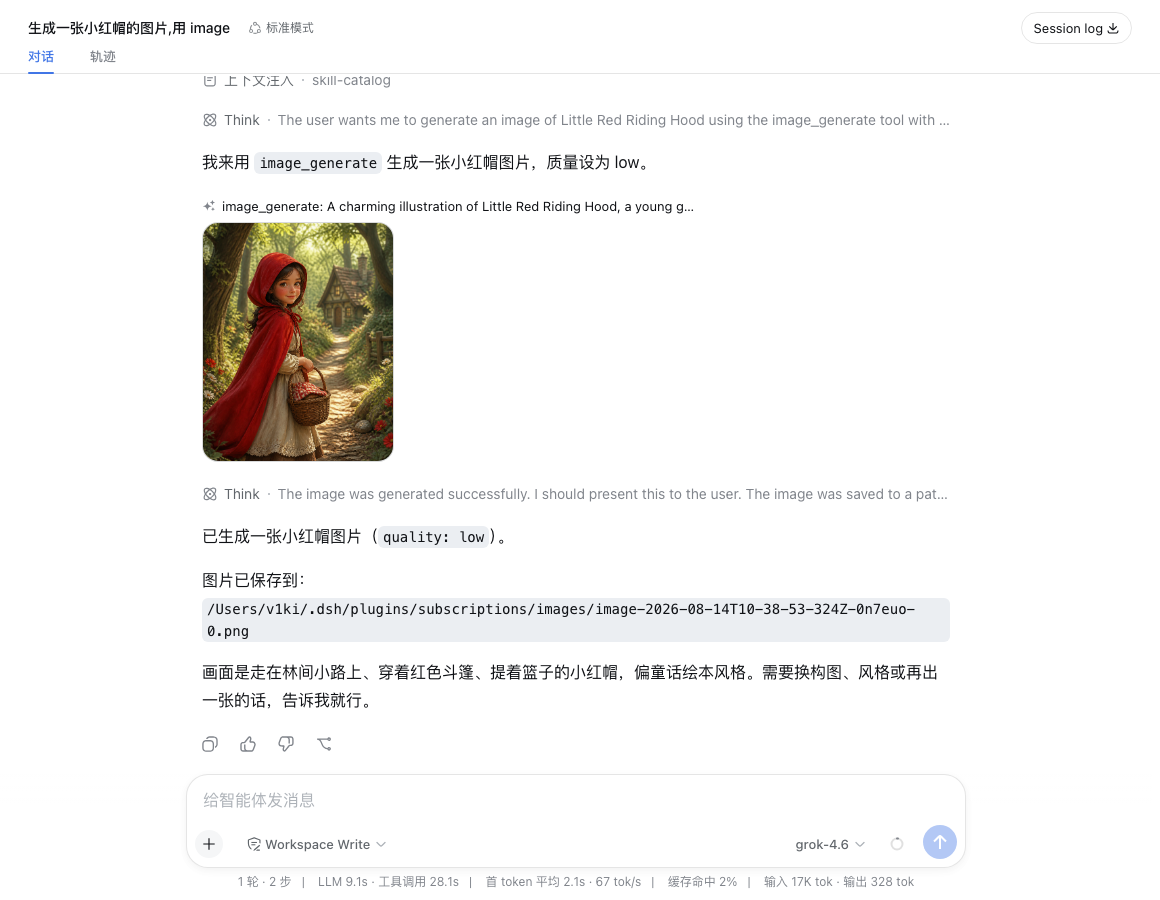
The image_generate tool renders its result inline in the conversation:
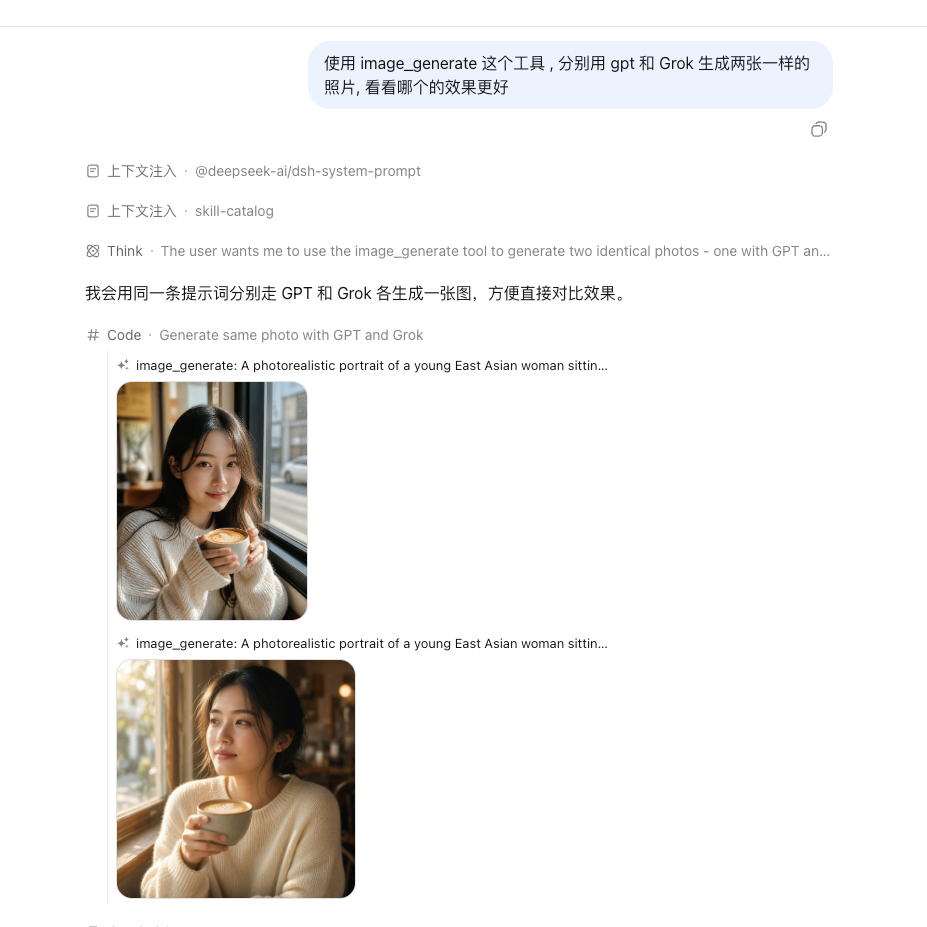
Its provider parameter picks the image backend — the same prompt through GPT (gpt-image-2, top) and Grok (grok-imagine-image-2.0, bottom):
The video_generate tool plays the generated clip inline:

Providers
| Route | Subscription | Models |
|---|---|---|
codex |
ChatGPT Plus/Pro | live catalog from chatgpt.com/backend-api/codex/models |
claude |
Claude Pro/Max | all models available in your subscription (Opus, Sonnet, Haiku, Fable — static catalog, updated with the plugin) |
grok |
X Premium (xAI) | live catalog from api.x.ai/v1/models (chat models only); reasoning efforts from the Grok CLI catalog (cli-chat-proxy.grok.com/v1/models) |
copilot |
GitHub Copilot | live catalog from api.githubcopilot.com/models (chat models on both wires, with per-model vision flags and reasoning efforts); login uses the OAuth device flow (enter the shown code at github.com/login/device) |
Only logged-in providers appear in the session model picker; the lists above refresh on login/logout. Vision-capable models declare ['text', 'image'] input modalities, and image content is translated to each provider's wire format.
Logged-in cards also show subscription usage — per rate-limit window (5-hour session, weekly, and per-model weekly where the plan has one) with the used percentage, a progress bar, and the reset time, plus a Refresh button. Codex usage comes from chatgpt.com/backend-api/wham/usage (also reports the plan), Claude usage from api.anthropic.com/api/oauth/usage, and Grok usage from the Grok Build CLI proxy's cli-chat-proxy.grok.com/v1/billing (the source of the CLI's /usage panel; reports the shared weekly pool and the subscription tier). Copilot exposes no usage endpoint, so its card shows no usage section.
Also included, registered when the matching provider is enabled:
x_searchtool (Grok) — xAI's hosted X search, returning{ answer, citations }.image_generatetool (ChatGPT or Grok) —gpt-image-2via the Codex backend, orgrok-imagine-image-2.0viaapi.x.ai/v1/images/generations. Theproviderargument picks the preferred provider (gpt, the default, orgrok); when the preferred one is logged out the other serves as fallback. Images are saved under~/.dsh/plugins/subscriptions/images/and the paths returned. Thesize/qualityarguments map onto Grok'saspect_ratio/qualityon the Grok path.video_generatetool (Grok) —grok-imagine-video-1.5viaapi.x.ai/v1/videos(async submit + poll); MP4s are saved under~/.dsh/plugins/subscriptions/videos/, the path returned, and the clip plays inline in the conversation. Supports duration (1–15 s), aspect ratio, resolution, and image-to-video viaimage_url.
Install
With the dsh CLI available, install from npm (prebuilt artifacts, no build permission needed):
dsh plugin --profile web add dsh-plugin-subscriptions
Or install the sources from GitHub:
dsh plugin --profile web add github:V1ki/dsh-plugin-subscriptions
pnpm will ask you to allow this package's build script on first install (git installs fetch sources, not built artifacts); add the printed key to the profile's pnpm-workspace.yaml:
allowBuilds:
  dsh-plugin-subscriptions: true
and re-run the add. Only grant this to packages you trust — it runs the package's code at install time.
From a local checkout instead:
git clone https://github.com/V1ki/dsh-plugin-subscriptions.git
cd dsh-plugin-subscriptions && pnpm install && pnpm build
dsh plugin --profile web add ./dsh-plugin-subscriptions
Headless-only usage without installing into a profile (log in via the web UI first — the token file is shared):
cp overlay.example.yml overlay.yml   # then edit the name: to this checkout's absolute lib/index.js path
dsh --profile headless --patch <checkout>/overlay.yml "your task"
Update
Installed from npm:
dsh plugin --profile web update --latest dsh-plugin-subscriptions
Installed from GitHub: re-run the same add github:V1ki/dsh-plugin-subscriptions command — it re-fetches the sources and rebuilds. A linked local checkout just needs git pull && pnpm build in the checkout.
Either way, restart dsh web afterwards so the new version loads.
Use
dsh web, open the printed URL.- Settings → Subscriptions: click Connect on a provider. For Claude, credentials are imported instantly if you have run
claudeand logged in at least once; without them, Claude authorizes in the browser like the others. For Codex and Grok, authorize in the opened browser tab; if the browser flow can't complete (headless host), expand the manual fallback and paste the callback URL or code. - In any session, open the model picker (
/model) and choose a model under ChatGPT (Codex) / Claude (Subscription) / Grok (Subscription).
Not logged in? The provider stays out of the picker, and requests fail with MISSING_CREDENTIAL pointing at the Settings page; nothing else breaks.
Config
- id: llm-subscriptions
  name: dsh-plugin-subscriptions
  config:
    providers: [codex, claude]        # subset; default all three
    streamIdleTimeoutMs: 300000
    models:                            # override the discovered/built-in catalogs
      codex:
        - { id: gpt-5.6-sol, name: GPT-5.6 Sol, contextWindow: 272000, inputModalities: [text, image] }
      copilot:                         # manual entries disable Copilot catalog discovery
        - { id: gpt-5.6-sol, wire: responses }   # copilot only: force the upstream protocol
wire (copilot entries only) pins a model to chat-completions or responses. Manual
entries keep working without it — the field exists because a configured model the live
catalog does not know would otherwise default to /chat/completions, which
responses-only families (gpt-5.5/5.6, …) reject. Pinning chat-completions also opts
out of the tools+effort auto-reroute described above.
Proxy
Every subscription request — token exchanges, model-API streams, usage lookups, model discovery, and the x_search / image_generate / video_generate tools — can be routed through an HTTP(S) proxy. Configure it in Settings → Subscriptions → Proxy → Configure…: enable the flag, enter the proxy URL (http://127.0.0.1:7890), optional username/password, and an optional comma-separated bypass list of hostnames that stay direct (127.0.0.1, localhost, *.example.com). The password is stored in ~/.dsh/plugins/subscriptions/proxy.json (mode 0600) and is never returned to the browser. A "Test" button probes one endpoint through the current configuration and shows the HTTP status/latency.
Changes apply immediately to subsequent requests — no restart needed. The OAuth authorization page opens in your browser and follows the browser/system proxy, not this setting. SOCKS proxies are not supported.
Develop
pnpm install   # devDependencies link into a local deepseek-harness checkout — edit the paths first
pnpm build     # tsc (lib/) + tsdown (lib/client.js browser bundle)
pnpm test      # node --test over compiled unit specs
prepare (used by git installs) runs tsdown.prepare.config.ts: a self-contained bundle build of both faces with all @deepseek-ai/* specifiers external — they resolve from the dsh installation at runtime, so this package never carries a second cordis copy.
After pnpm build, restart dsh web to pick up changes.
Layout
src/index.ts— plugin entry: config schema, adapter registration, auth-change re-announce, RPC wiringsrc/auth/— PKCE/JWT helpers, token store, OAuth flow engine (temp loopback callback server), Claude Code credential reader (Keychain/file),/subscriptions-authRPC channelsrc/providers/— per-provider OAuth constants/exchange/refresh +LlmAdapterssrc/translate/— dshMessage[]⟷ OpenAI Responses / Anthropic Messages wire formats, SSE →StreamChunksrc/tools/—x_search,image_generate, andvideo_generatesrc/client/— the Settings → Subscriptions page (browser half, zh/en, theme-token aware)
相关推荐Related
-
 nexu-io/open-design
🎨 Best DeepSeek Harness Design Plugin. The open-source Claude Design alternative. 🖥️ Local-first desktop app. 🖼️ Your…
nexu-io/open-design
🎨 Best DeepSeek Harness Design Plugin. The open-source Claude Design alternative. 🖥️ Local-first desktop app. 🖼️ Your…
-
 ruvnet/ruflo
🌊 The original agent meta-harness. Deploy intelligent multi-player swarms, coordinate autonomous workflows, and build c…
ruvnet/ruflo
🌊 The original agent meta-harness. Deploy intelligent multi-player swarms, coordinate autonomous workflows, and build c…
-
 amruthpillai/reactive-resume
A one-of-a-kind resume builder that keeps your privacy in mind. Completely secure, customizable, portable, open-source a…
amruthpillai/reactive-resume
A one-of-a-kind resume builder that keeps your privacy in mind. Completely secure, customizable, portable, open-source a…
-
 esengine/DeepSeek-Reasonix
DeepSeek-native AI coding agent for your terminal. Engineered around prefix-cache stability — leave it running.
esengine/DeepSeek-Reasonix
DeepSeek-native AI coding agent for your terminal. Engineered around prefix-cache stability — leave it running.
-
 volcengine/OpenViking
Self-evolving Context Database for AI Agents. Unify Agent Memory, Knowledge RAG and Skills.
volcengine/OpenViking
Self-evolving Context Database for AI Agents. Unify Agent Memory, Knowledge RAG and Skills.
-
 Molunerfinn/PicGo
:rocket: The Ultimate Image Uploader for Efficient Creators. Supports Obsidian, Typora, VS Code etc. and 60+ image hosti…
Molunerfinn/PicGo
:rocket: The Ultimate Image Uploader for Efficient Creators. Supports Obsidian, Typora, VS Code etc. and 60+ image hosti…
-
 titanwings/distilly
Distilly — Distill how they think into reusable Skills for any Agent or Bot. Formerly Colleague Skill(原同事 Skill).
titanwings/distilly
Distilly — Distill how they think into reusable Skills for any Agent or Bot. Formerly Colleague Skill(原同事 Skill).
-
 titanwings/colleague-skill