vibeinging/dsh-desktop
DeepSeek Harness Desktop App: a local AI desktop workspace for DSH Sessions, projects, files, web research, plugins, and Office artifacts.
项目介绍Project Overview
DSH Desktop 是社区维护的 Electron 桌面发行版,基于官方 DSH Web 构建。它打包官方运行时,内置插件市场、任务看板、附件、Git Worktree 等社区 Bundle,通过窄原生 Host 以白名单方式开放窗口、文件与 Browser Workspace 能力。当需要官方 Web 体验同时集成可控社区插件与桌面原生能力时使用。注意:它是独立社区项目,与深度求索无隶属关系;desktop-adapter Bundle 离开本桌面将无法运行。
DSH Desktop is a community-maintained Electron distribution built on the official DSH Web runtime. It packages the official runtime, bundles a default plugin marketplace, task board, attachments, Git Worktree, and other community Bundles, and exposes window, file, and Browser Workspace capabilities through a narrow native host with method whitelisting. Use it when you need the official DSH Web experience alongside curated community plugins and controlled desktop-native features. Note: it is an independent community project unaffiliated with DeepSeek; desktop-adapter Bundles will fail outside this desktop host.
请帮我了解并安装插件:【dsh-desktop】【https://github.com/vibeinging/dsh-desktop】把上面这条消息直接发给当前会话里的 DSH,让它帮你了解并安装。安装命令不一定准确,发给 DSH 更稳。Send this message to DSH in your current session. CLI install commands may not be accurate across systems — DSH will figure it out for you.
或使用命令行安装(适合开发者)Or use CLI install (for developers)
命令行安装CLI Install
dsh plugin --profile web add github:vibeinging/dsh-desktop把 vibeinging/dsh-desktop 加入你的 DSH 配置(web profile)即可启用。
READMEREADME
DSH Desktop
把官方 DSH Web、社区插件和桌面能力装进一个开箱即用的应用。
对话、文件、Git、终端、任务、Worktree 与插件市场,都运行在同一个 DSH Profile 中。




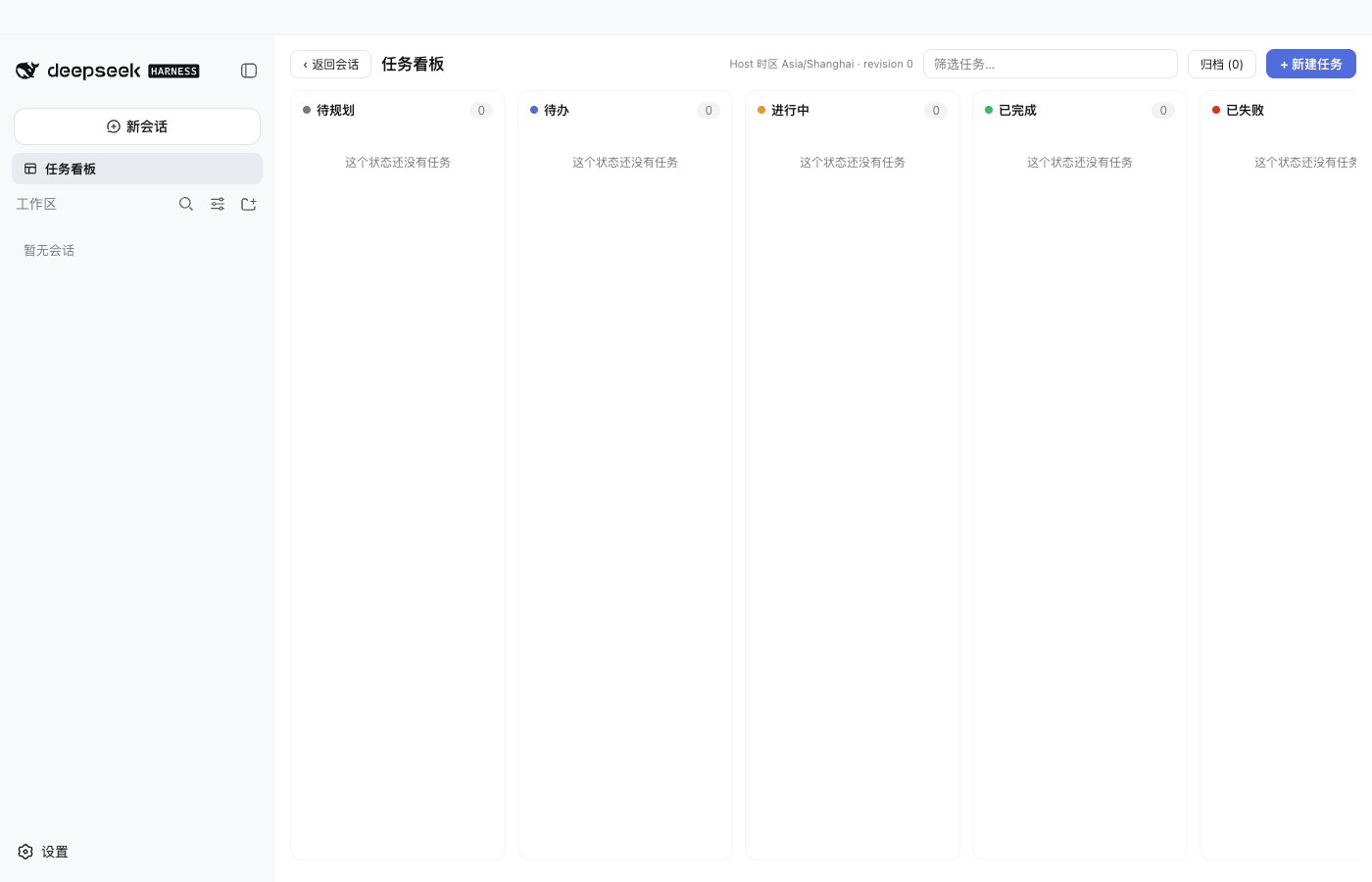
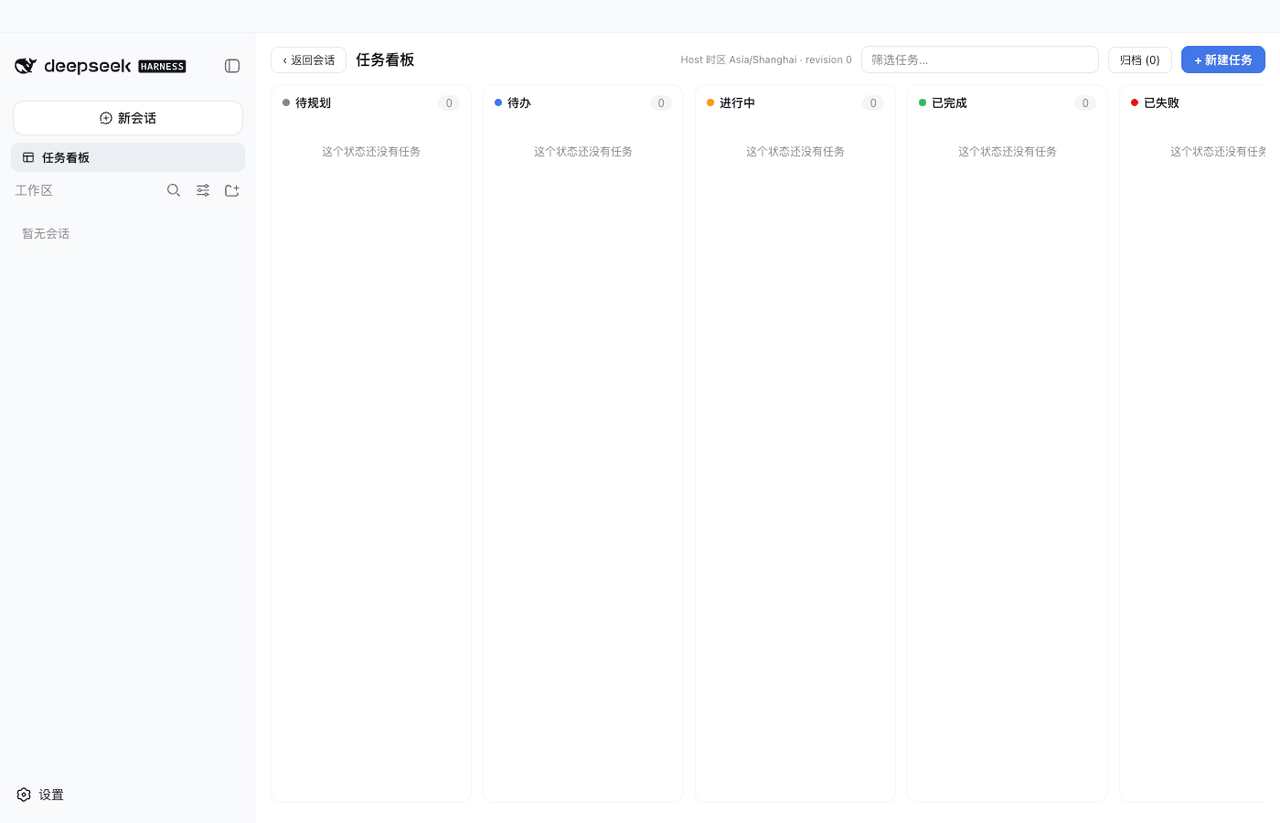
DSH Desktop 是一个社区维护的桌面发行版。它直接运行官方 DeepSeek Harness npm 运行时与官方 dsh-web-app,并预装一组经过固定和验证的社区 Bundle。你不需要先搭环境、找插件或维护另一套插件状态,打开应用即可从同一个 Profile 开始工作。
下载
| 平台 | 安装方式 | 状态 |
|---|---|---|
| macOS Apple Silicon | 下载 .dmg,拖入“应用程序” |
Developer ID 签名并完成 Apple 公证 |
| Windows x64 | 下载 .exe 安装器 |
以当前 Release 页面提供的产物为准 |
| macOS Intel / Linux | 暂无正式安装包 | 可以从源码运行 |
打开就能用
官方对话与 Agent主窗口就是官方 DSH Web。Session、Agent、Tool、Skill、MCP、设置和历史由 DSH 自己管理,没有第二套 Chat 页面。 |
Better Sidebar 工作台内置文件树、代码与 Markdown 编辑、Git、终端、网页与扩展 Tab。0.16.0 支持多仓库、Worktree、Vue 文件和本地 Markdown 图片。 |
插件市场在官方设置页里发现、安装、更新、停用和卸载插件。界面、CLI 和应用重启都以同一个 Profile 为准。 |
任务、附件与 Worktree任务看板、文件和文件夹附件、Git Worktree、项目工具、Office 与结构化结果都由独立 Bundle 提供,可以按需组合。 |
桌面 Host 与恢复应用负责窗口、原生文件选择、更新、启动和恢复。正式安装包发现新版本时先询问,再下载、预检 Profile 并安装;Profile 或 Client 出错时进入恢复页。 |
可复现的默认环境新 Profile 从随包固定产物离线初始化;普通启动不重写已有 Profile,也不会把用户卸载的插件悄悄装回来。 |
界面
对话、问题卡片与审批
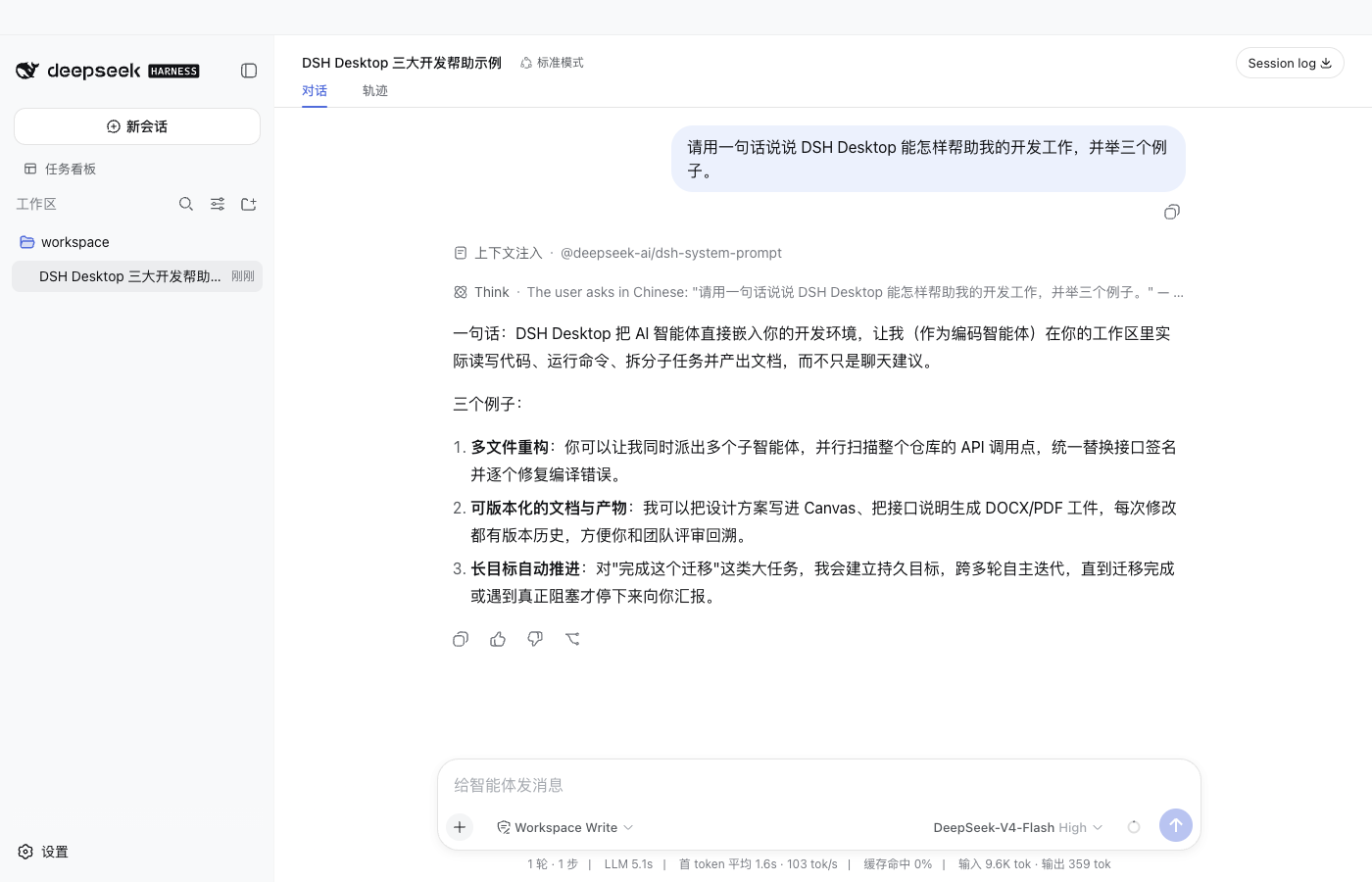
对话、工具审批、问题卡片、排队消息和历史回放都留在官方 Session 中。
官方设置里的插件市场
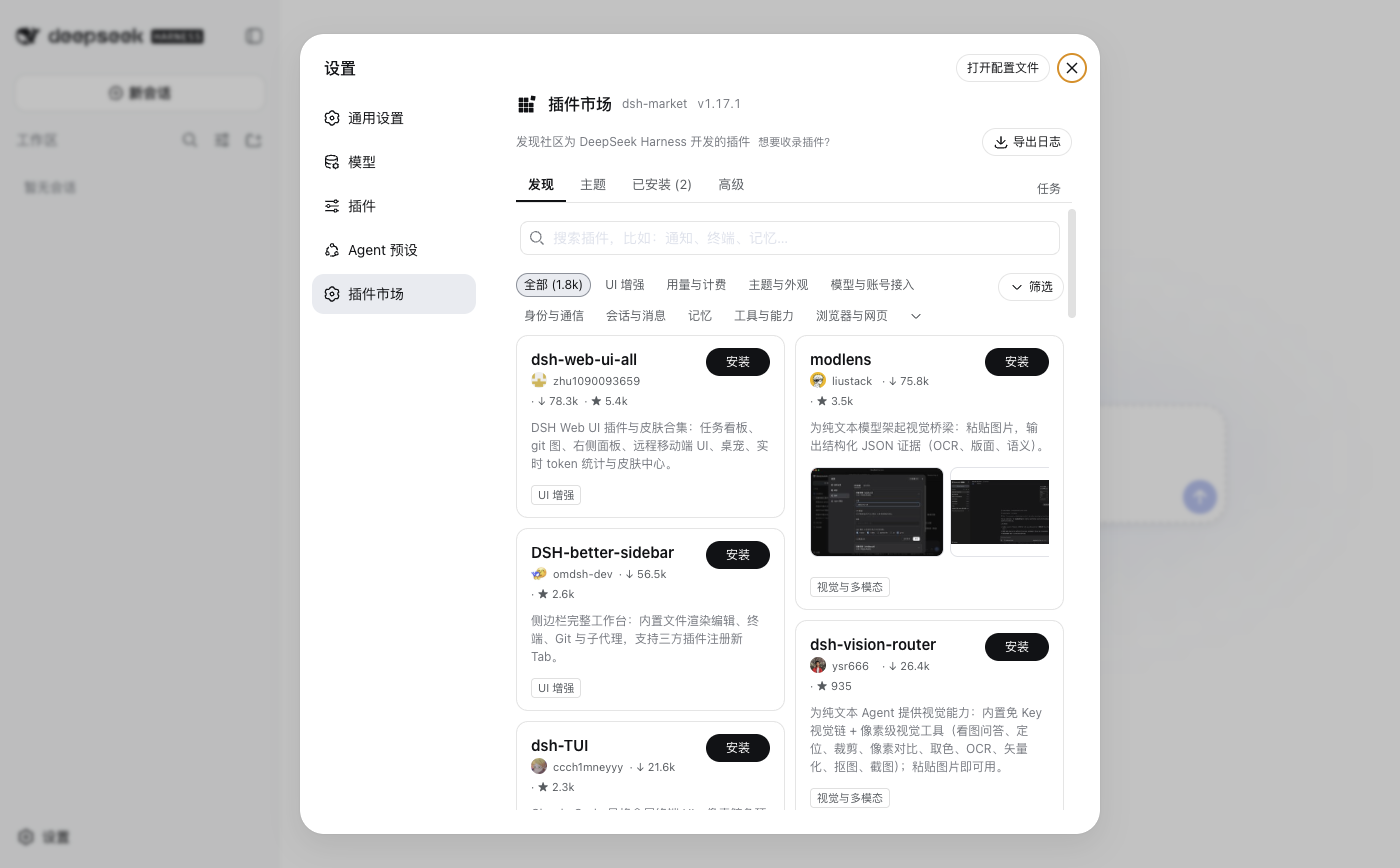
插件市场使用官方设置 Slot,不替换设置页面,也不另建插件数据库。
Git Worktree 工作区
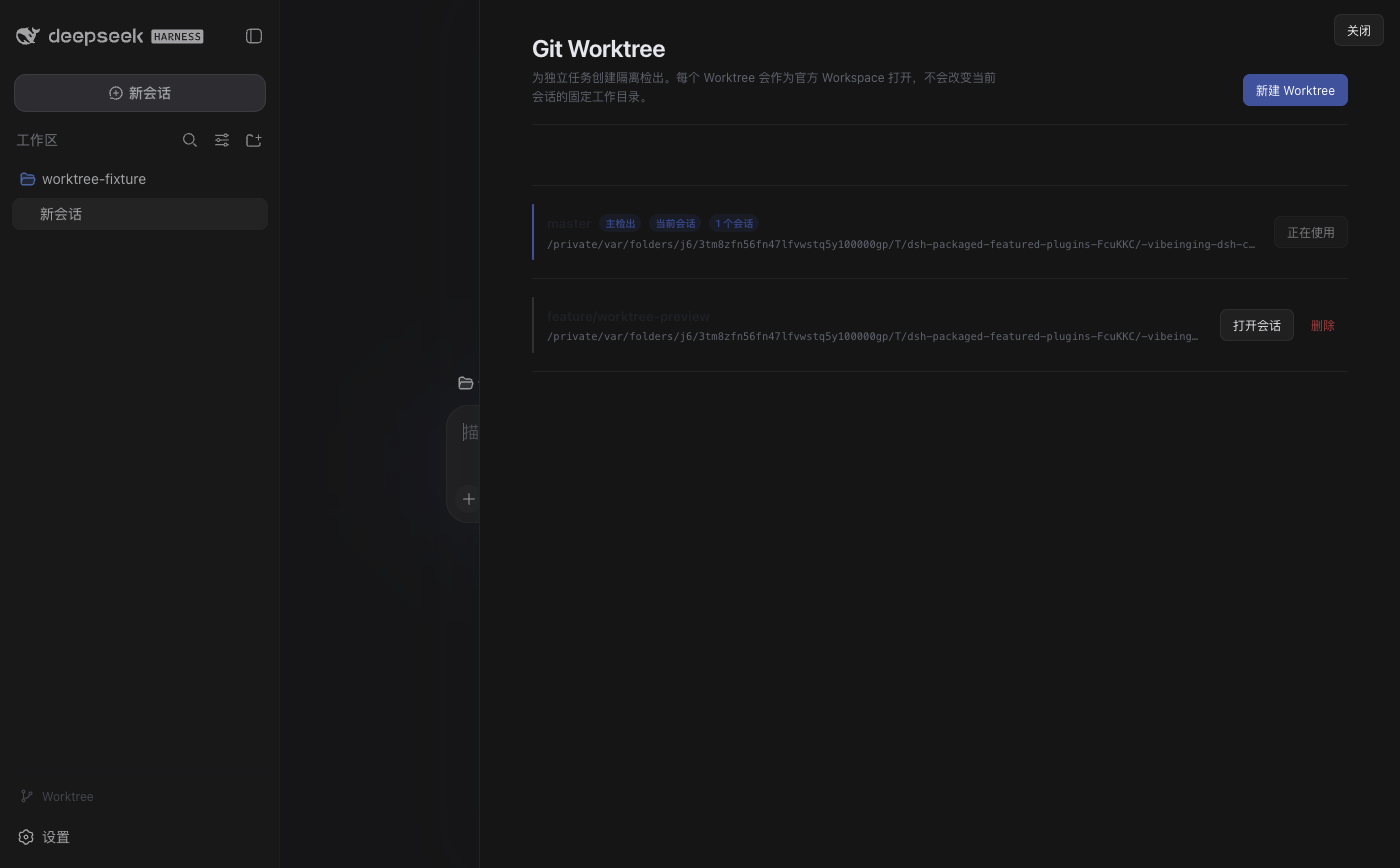
从当前 Session 的工作目录创建隔离 Worktree,并为新工作区建立官方 Session。
为什么选择这条路线
| 你关心的事 | DSH Desktop 的做法 |
|---|---|
| 是否依赖私有前端 | 直接加载官方 Web 与 npm 运行时,不维护私有 Chat 分叉 |
| 社区插件能否直接使用 | 普通 UI、Tool 和工作流继续使用官方 Bundle、Service 与 Slot |
| 插件状态会不会错乱 | 官方 Profile 是唯一权威;市场、设置和 CLI 操作同一份数据 |
| 默认插件是否可靠 | 固定版本、完整性、权限、依赖和许可证,并保留离线安装产物 |
| 原生能力是否过大 | 文件、窗口和 Browser Workspace 只通过按 Session 绑定的有限方法开放 |
| 启动会不会覆盖配置 | 已有 Profile 保持用户选择;失败时保留原 Profile 并进入恢复页 |
| 应用更新会不会改插件 | 更新前只读预检 Profile;不恢复用户已停用或卸载的 Bundle |
Electron 在这里是一层很薄的桌面 Host。真正的 Agent、会话和插件系统仍属于 DSH;项目自己的功能也尽量拆成 Bundle。这样,portable 插件可以同时安装到兼容的官方 Web 和 DSH Desktop,桌面专属能力才使用明确的 desktop-adapter。
开始使用
- 从 Releases 下载适合的平台安装包。
- 启动应用,选择一个工作目录或直接创建会话。
- 在侧栏打开文件、Git 或终端;在输入框添加文件和文件夹。
- 需要更多能力时,打开“设置 → 插件市场”。
模型凭据由 DSH 设置与本地环境管理。项目不会把 API Key 写入 README、截图或插件清单。
安装更多插件
普通用户直接使用“设置 → 插件市场”。插件市场会显示来源、版本、兼容性和权限;安装前仍应查看上游说明,市场可见不等于本项目已经审查或默认内置。
也可以使用官方 CLI 操作同一个 Profile:
dsh plugin --profile web add -w <package>@<exact-version> --save-exact --ignore-scripts
dsh plugin --profile web remove <package>
符合官方 DSH Bundle 与 dshClient 合同的插件,不需要专门为 DSH Desktop 重写。需要窗口、原生文件对话框或 Browser Workspace 的插件,则要显式使用 DSH Desktop 的窄 Host 合同;在其他宿主中缺少这些能力时应直接报告。
默认插件
新 Profile 默认包含 Better Sidebar、dshmarket、任务看板、附件输入、Git Worktree,以及项目、Canvas、Office、结构化结果和模型继承等能力。所有可管理 Bundle 都能被停用或卸载。
查看新 Profile 默认安装的 14 个 Bundle
| 默认 Bundle | 类型 | 声明权限 | 官方管理方式 | 来源 |
|---|---|---|---|---|
@vibeinging/dsh-work-product-host-ipc |
desktop-adapter | dsh-work-parent-ipc、browser-workspace-host、file-dialog-host、window-host | 桌面基础服务,不提供卸载 | 本地包 |
@vibeinging/dsh-desktop-profile-host |
desktop-adapter | dsh-profile-filesystem、controlled-pnpm-runtime、dsh-cli-runtime | 桌面基础服务,不提供卸载 | 本地包 |
@vibeinging/dsh-desktop-chrome |
desktop-adapter | 无 Host 权限 | dsh plugin --profile web remove @vibeinging/dsh-desktop-chrome |
本地包 |
@vibeinging/dsh-project-tools |
desktop-adapter | product-host | dsh plugin --profile web remove @vibeinging/dsh-project-tools |
本地包 |
@vibeinging/dsh-canvas-tools |
desktop-adapter | product-host | dsh plugin --profile web remove @vibeinging/dsh-canvas-tools |
本地包 |
@vibeinging/dsh-structured-ui-tools |
desktop-adapter | product-host | dsh plugin --profile web remove @vibeinging/dsh-structured-ui-tools |
本地包 |
@vibeinging/dsh-model-inheritance |
portable | 无 Host 权限 | dsh plugin --profile web remove @vibeinging/dsh-model-inheritance |
本地包 |
@vibeinging/dsh-product-bridge |
desktop-adapter | product-host | dsh plugin --profile web remove @vibeinging/dsh-product-bridge |
本地包 |
@vibeinging/dsh-office-tools |
desktop-adapter | office-artifact-host | dsh plugin --profile web remove @vibeinging/dsh-office-tools |
本地包 |
@vibeinging/dsh-client-ui-worktree |
portable | 无 Host 权限 | dsh plugin --profile web remove @vibeinging/dsh-client-ui-worktree |
本地包 |
@linxin666/dsh-client-ui-task-board |
portable | 读取当前 DSH Session、Workspace 与完成历史、在 DSH_HOME 写入任务账本和执行记录、按用户操作或 Host cron 启动 DSH Session 任务、可选启动固定的跨平台防休眠 helper | dsh plugin --profile web remove @linxin666/dsh-client-ui-task-board |
上游仓库 |
dsh-multimedia-webui-input |
portable | 读取用户主动选择的文件和文件夹、向当前 Session 工作区的 .dsh/tmp/attachments 写入附件、按用户二次确认清理带插件所有权标记的附件目录 | dsh plugin --profile web remove dsh-multimedia-webui-input |
上游仓库 |
dsh-better-sidebar |
portable | 读取、搜索、创建、修改和删除当前 Session 工作区文件、在当前 Session 工作区执行 Git 操作、启动和停止本地终端进程;模型终端工具默认关闭、打开用户输入的网页或外部编辑器,并接收用户主动上传的文件、用户开启后向模型注册 sidebar_open 工具,用于在当前会话侧栏打开工作区文件、文件夹或 HTTP(S) 页面;默认关闭 | dsh plugin --profile web remove dsh-better-sidebar |
上游仓库 |
dshmarket |
portable | 读取和修改当前 DSH Profile 的依赖、Bundle 顺序和启停状态、通过受控 pnpm 安装、更新和卸载用户确认的插件、访问插件目录、npm、GitHub 以及用户配置的 WebDAV 或 Gist、导出或导入包含 Profile 配置的备份 | dsh plugin --profile web remove dshmarket |
上游仓库 |
插件选择、权限和离线边界见插件市场选择与桌面接入。
从源码运行
需要 Node.js 24 或更高版本:
git clone https://github.com/vibeinging/dsh-desktop.git
cd dsh-desktop
npm install
npm run doctor
npm run dev:electron
本地构建 macOS Apple Silicon App:
npm run package:mac:dir
open "release/mac-arm64/DSH Desktop.app"
本地目录包用于开发;面向普通用户的签名安装包以 GitHub Release 为准。
数据与权限
- Profile、Session 和本地运行数据默认保存在
~/.dsh; - 官方 Web 没有产品 preload、Node 权限或通用 IPC;
- 文件与目录只有在用户主动选择或插件已声明权限时才进入当前 Session;
- 插件启动失败不会静默修改原 Profile;恢复页可重试、安全启动、移除问题插件和导出过滤后的诊断;
- 正式安装包从本项目公开 GitHub Release 检查更新,用户确认后才下载和安装;
- 第三方 Bundle、原生二进制与视觉资产各自遵守上游许可证和再分发条件。
与其他社区桌面项目的区别
DSH Desktop 选择“官方 Web 单一界面 + 官方 Profile 单一权威 + 精选社区 Bundle + 窄 Native Host”。它不追求再做一套完整前端,而是把桌面体验做成 DSH 插件生态的一个可靠发行组合。
DSH Desktop by anywhere-labs 是另一个独立社区桌面发行版,更强调完整桌面 Shell 与跨平台客户端体验;dataelement/dsh-desktop 也是独立社区项目。三个项目的代码、发行和路线互不从属,用户可以按界面、插件方式和平台产物选择。
相关项目
| 项目 | 关系 |
|---|---|
| DeepSeek Harness | Agent、Session、Tool、Skill、MCP、Profile 与官方 Web 运行时 |
| Cordis | 插件化基础 |
| DSH Better Sidebar | 默认工作区侧栏、编辑器、Git 与终端 |
| dsh-market | 默认插件市场 |
| dsh-web-ui | 默认任务看板的上游社区仓库 |
| dshfind | DSH 学习、分享与插件发现社区 |
与 DeepSeek Harness 的关系
DSH Desktop 是基于 DeepSeek Harness 与 Cordis 插件体系构建的独立社区项目。“DeepSeek Harness”仅用于说明兼容性和技术来源。本项目与深度求索不存在隶属、合作、授权或背书关系。
许可证
项目代码使用 MIT License。第三方组件、固定 tarball、原生二进制和视觉资产的来源与分发条件见 THIRD_PARTY_NOTICES.md。
相关推荐Related
-
 nexu-io/open-design
🎨 Best DeepSeek Harness Design Plugin. The open-source Claude Design alternative. 🖥️ Local-first desktop app. 🖼️ Your…
nexu-io/open-design
🎨 Best DeepSeek Harness Design Plugin. The open-source Claude Design alternative. 🖥️ Local-first desktop app. 🖼️ Your…
-
 ruvnet/ruflo
🌊 The original agent meta-harness. Deploy intelligent multi-player swarms, coordinate autonomous workflows, and build c…
ruvnet/ruflo
🌊 The original agent meta-harness. Deploy intelligent multi-player swarms, coordinate autonomous workflows, and build c…
-
 amruthpillai/reactive-resume
A one-of-a-kind resume builder that keeps your privacy in mind. Completely secure, customizable, portable, open-source a…
amruthpillai/reactive-resume
A one-of-a-kind resume builder that keeps your privacy in mind. Completely secure, customizable, portable, open-source a…
-
 esengine/DeepSeek-Reasonix
DeepSeek-native AI coding agent for your terminal. Engineered around prefix-cache stability — leave it running.
esengine/DeepSeek-Reasonix
DeepSeek-native AI coding agent for your terminal. Engineered around prefix-cache stability — leave it running.
-
 volcengine/OpenViking
Self-evolving Context Database for AI Agents. Unify Agent Memory, Knowledge RAG and Skills.
volcengine/OpenViking
Self-evolving Context Database for AI Agents. Unify Agent Memory, Knowledge RAG and Skills.
-
 Molunerfinn/PicGo
:rocket: The Ultimate Image Uploader for Efficient Creators. Supports Obsidian, Typora, VS Code etc. and 60+ image hosti…
Molunerfinn/PicGo
:rocket: The Ultimate Image Uploader for Efficient Creators. Supports Obsidian, Typora, VS Code etc. and 60+ image hosti…
-
 titanwings/distilly
Distilly — Distill how they think into reusable Skills for any Agent or Bot. Formerly Colleague Skill(原同事 Skill).
titanwings/distilly
Distilly — Distill how they think into reusable Skills for any Agent or Bot. Formerly Colleague Skill(原同事 Skill).
-
 titanwings/colleague-skill