vlln/dsh-navbar
DSH 插件:对话节点导航条(右缘节点串快速跳转 user 消息)。官方 bundle 插件,dsh plugin --profile web add 安装
项目介绍Project Overview
navbar 是一款 DSH 浏览器端 bundle 插件,在对话区右边缘生成一条用户消息节点导航栏。核心能力:悬停预览(6 行截断)、点击平滑跳转、阅读位置高亮跟随、超过 11 节点自动滑窗、置入📌 助手消息便于直达;通过 data-time-hover-root 锚点驱动,无轮询无路由。适用长对话快速定位。使用注意:少于 2 条用户消息或非对话页自动隐藏;安装后需重启 web 端。
navbar is a DSH browser-side bundle plugin that renders a vertical node rail along the right edge of the conversation area, one dot per user message. It previews messages on hover (truncated to six lines), smooth-scrolls on click with a brand-blue active pill that follows the reading position, auto-switches to a sliding window beyond 11 nodes, and exposes a Load-earlier control and a per-session pin button. Use it to jump quickly inside long chats. Caveat: it stays hidden with fewer than two user messages or off conversation pages, and requires a web restart after installation.
请帮我了解并安装插件:【dsh-navbar】【https://github.com/vlln/dsh-navbar】把上面这条消息直接发给当前会话里的 DSH,让它帮你了解并安装。安装命令不一定准确,发给 DSH 更稳。Send this message to DSH in your current session. CLI install commands may not be accurate across systems — DSH will figure it out for you.
或使用命令行安装(适合开发者)Or use CLI install (for developers)
命令行安装CLI Install
dsh plugin --profile web add "github:vlln/dsh-navbar#main"把 vlln/dsh-navbar 加入你的 DSH 配置(web profile)即可启用。
READMEREADME
中文 | English
navbar
Conversation node navigation rail: jump between user messages from the node strip on the right edge of the conversation — hover to preview, click to jump
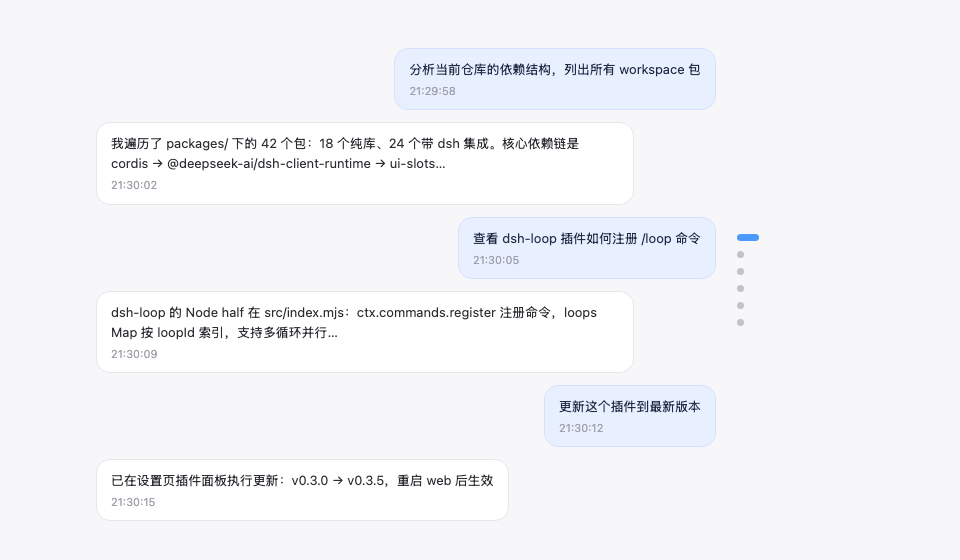
An evenly spaced node strip along the right edge of the conversation area (one node per user message): the active pill follows your reading position, hovering shows a preview card (truncated at 6 lines), clicking smooth-scrolls with a brand-blue highlight ring, more than 11 nodes automatically switch to a sliding window, it stays invisible until hovered, and it auto-hides when there are fewer than 2 user messages. Implements the dsh-external/issues#144 spec. Form: an official bundle plugin (dsh.bundle + dshClient channel, browser-only, empty Node half), 0 patches.
Preview
Features
| Feature | Description |
|---|---|
| Node navigation rail | Vertical node strip on the right edge of the conversation area, one dot node per user message |
| Follows reading position | The active pill (22px brand-blue capsule) moves with your current reading position |
| Hover preview | Hovering a node shows a message preview card (6-line truncation, matching the official HoverCard look) |
| Continuous hover | The entire rail (including the gaps between nodes) responds to hover continuously: the preview switches to the nearest node and the corresponding pill elongates (gray) to indicate the click target — no dead zones |
| Scroll-wheel switching | With the cursor over the rail, scrolling the wheel moves up/down one message (blocking conversation-area scrolling) |
| Click to jump | The whole rail is clickable (including gaps, jumping to the nearest node) plus an enlarged pill hit area — no need to precisely aim at tiny dots |
| Sliding window | When there are more than 11 nodes, only the nodes inside the window are shown (avoids overflow) |
| Load earlier history | An ↑ button pinned at the top of the rail (visible only while the conversation has older history): click to load earlier messages — it forwards to the official load-older control, so your reading position is preserved. Hovering it instantly shows a hint card in the same style as the node previews (the official HoverCard look) |
| Auto-hide | Not shown with fewer than 2 user messages or on non-conversation pages |
| Message pin | 📌 button on the assistant action bar (between copy and Good response); pinned turns render as a golden slim elliptical disc in the rail (always visible, the preview card carries a 📌 badge, clicking jumps straight to the pinned reply), persisted per session |
Zero data-channel dependencies: driven only by official anchor attributes (data-time-hover-root, on user rows since 0806) — no polling, no routing, no tools.
Installation
Recommended: one-line install from git source (build artifacts are committed, so git source does not trigger a build):
dsh plugin --profile web add "github:vlln/dsh-navbar#main"   # one-line git-source install (build artifacts committed)
# or npm source: dsh plugin --profile web add @vlln/dsh-navbar@0.4.0
Or from a local directory (when you have the source): git clone, then cd dsh-navbar && dsh plugin --profile web add ..
Restart web after installing for it to take effect; you can disable/enable it in the Plugins panel on the Settings page.
Usage
Works out of the box — no commands, no tools. The node rail appears on the right edge of the conversation page (Chat view); hover for a preview, click to jump. Animations are disabled under prefers-reduced-motion.
Pin: hover an assistant message's action bar and click 📌 to pin that reply — the corresponding turn's navigation node becomes a golden slim elliptical disc (click to jump straight to that reply; the preview card shows a 📌 badge and the reply text). Pin state is saved per session in browser localStorage and survives refreshes; click again to unpin.
Load earlier history: when the open conversation still has older messages (its history window is not fully loaded), an ↑ button sits at the very top of the node rail. Click it to load the earlier messages — the rail then grows new nodes at the top. The button hides automatically once all history is loaded, and is disabled while a load is in flight. Hovering it instantly shows a hint card in the same style as the node previews (the official HoverCard look), and it reads "Loading…" while a load is in flight. The click is forwarded to the official load-older control, so your current reading position is preserved (no content jump).
Development
pnpm install
pnpm run build      # tsdown: client bundle (lib/client.js)
- client:
src/client/index.ts(self-rendered DOM + official anchor contract; the pin button uses the officialconversation.chat.assistant-actionsslot, with React provided by the client runtime; ctx services accessed must be declared in the plugin object'sinject) - Node half:
src/index.mjs(empty apply, the bundle mount carrier)
License
MIT License (an example plugin in the DSH ecosystem).
相关推荐Related
-
 ruvnet/ruflo
🌊 The original agent meta-harness. Deploy intelligent multi-player swarms, coordinate autonomous workflows, and build c…
ruvnet/ruflo
🌊 The original agent meta-harness. Deploy intelligent multi-player swarms, coordinate autonomous workflows, and build c…
-
 amruthpillai/reactive-resume
A one-of-a-kind resume builder that keeps your privacy in mind. Completely secure, customizable, portable, open-source a…
amruthpillai/reactive-resume
A one-of-a-kind resume builder that keeps your privacy in mind. Completely secure, customizable, portable, open-source a…
-
 volcengine/OpenViking
Self-evolving Context Database for AI Agents. Unify Agent Memory, Knowledge RAG and Skills.
volcengine/OpenViking
Self-evolving Context Database for AI Agents. Unify Agent Memory, Knowledge RAG and Skills.
-
 Molunerfinn/PicGo
:rocket: The Ultimate Image Uploader for Efficient Creators. Supports Obsidian, Typora, VS Code etc. and 60+ image hosti…
Molunerfinn/PicGo
:rocket: The Ultimate Image Uploader for Efficient Creators. Supports Obsidian, Typora, VS Code etc. and 60+ image hosti…
-
 titanwings/colleague-skill
将冰冷的离别化为温暖的 Skill,欢迎加入数字生命1.0!Transforming cold farewells into warm skills? It's giving rebirth era. Welcome to Digital …
titanwings/colleague-skill
将冰冷的离别化为温暖的 Skill,欢迎加入数字生命1.0!Transforming cold farewells into warm skills? It's giving rebirth era. Welcome to Digital …
-
 nocobase/nocobase
NocoBase is an open-source AI + no-code platform for building business systems fast. Instead of generating everything fr…
nocobase/nocobase
NocoBase is an open-source AI + no-code platform for building business systems fast. Instead of generating everything fr…
-
 Tencent/WeKnora
Open-source LLM knowledge platform: turn raw documents into a queryable RAG, an autonomous reasoning agent, and a self-m…
Tencent/WeKnora
Open-source LLM knowledge platform: turn raw documents into a queryable RAG, an autonomous reasoning agent, and a self-m…
- Nagi-ovo/voyager Enhancement suite for Gemini, AI Studio, Claude & ChatGPT — plus a prompt manager for any web UI, DeepSeek Harness inclu…