WhitePlusMS/dsh-input-plus
DSH Web UI 插件,用于工作区文件引用、提示历史记录及轻量级编辑器增强功能。
项目介绍Project Overview
dsh-input-plus 是 DSH Web UI 的输入增强插件,通过官方 @ 与 / 触发器在 Composer 中提供文件目录检索与历史提示选择。Host 端为当前 Session 工作区构建索引,浏览器端基于原生输入管线显示候选菜单,选中后仅写入纯文本路径(如 @src/contract.ts),不读取文件或展开目录。键入 /h 可按关键字筛选当前 Session 已成功提交的用户提示,按时间倒序排列。安装时需 DSH 0.1.0-rc.6 以上,并保证标签包含构建产物 lib/。配置项 maxIndexDepth、maxIndexEntries、referenceRoot 可调整索引深度、条目上限与路径根覆盖。
dsh-input-plus is an input composer enhancement plugin for the DSH Web UI that hooks into the official @ and / triggers to add file, directory, and prompt-history candidates. On the Host side, it builds an index of the active Session workspace; in the browser, it renders a candidate menu through the native input pipeline and inserts only plain-text path references such as @src/contract.ts without reading files or expanding directories. Typing /h filters user prompts already submitted in the current Session, ordered most-recent first. Installation requires DSH 0.1.0-rc.6 or compatible and a tag containing the built lib/ artifacts. Settings maxIndexDepth, maxIndexEntries, and referenceRoot control index depth, entry cap, and path root override.
请帮我了解并安装插件:【dsh-input-plus】【https://github.com/WhitePlusMS/dsh-input-plus】把上面这条消息直接发给当前会话里的 DSH,让它帮你了解并安装。安装命令不一定准确,发给 DSH 更稳。Send this message to DSH in your current session. CLI install commands may not be accurate across systems — DSH will figure it out for you.
或使用命令行安装(适合开发者)Or use CLI install (for developers)
命令行安装CLI Install
dsh plugin --profile web add https://github.com/WhitePlusMS/dsh-input-plus/archive/refs/tags/v0.0.2.tar.gz把 WhitePlusMS/dsh-input-plus 加入你的 DSH 配置(web profile)即可启用。
READMEREADME
dsh-input-plus

An input composer enhancement plugin for the DSH Web UI. On the Host side, it builds an index of the active workspace. In the browser, it connects to DSH's official @ input trigger so files and directories can be searched and inserted into the composer. Type /h to open a candidate menu of previous prompts from the current Session.
Features
@ file and directory path selection
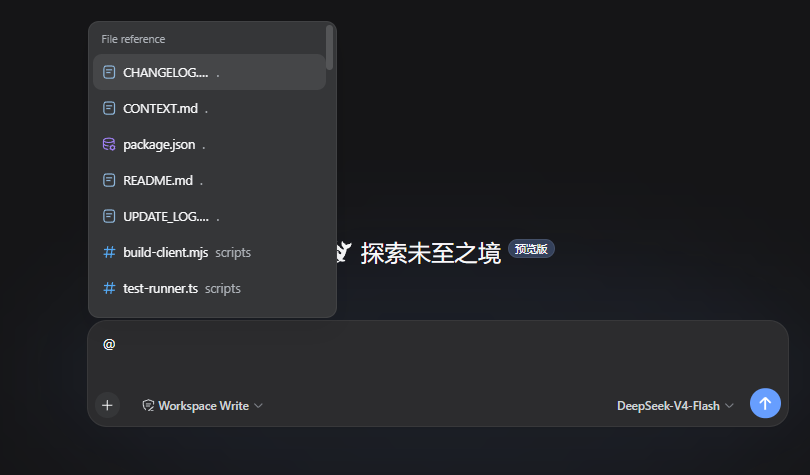
Type @ in the DSH composer, then continue with a file name, directory name, or path fragment. The candidate menu lists files and directories from the current Session workspace. After selection, the draft keeps a plain-text path reference, for example:
@src/contract.ts
The reference contains only the path. Sending the message does not read the file, expand the directory, or generate a directory manifest. When the model needs the target, it can inspect the path with the native workspace tools provided by the current Session.
After selecting a directory, you can continue with an instruction:
@src Find the code responsible for candidate ranking
The official input-trigger pipeline owns the candidate menu, caret, and write-back behavior. This plugin does not replace the official textarea, send button, or candidate menu, and it does not take over native arrow-key behavior.
/h input history
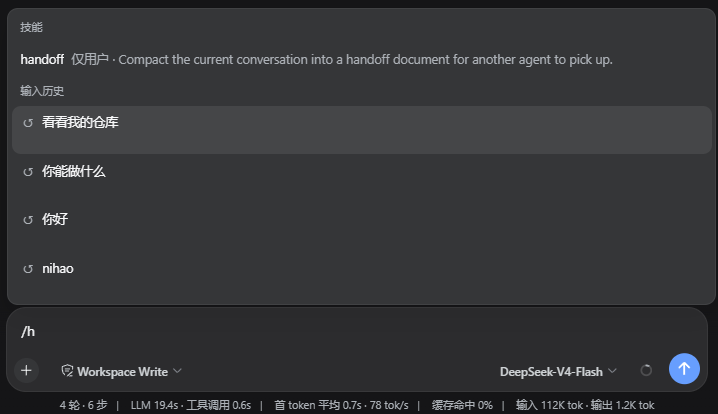
Type /h in the composer to open the history candidate menu through DSH's official / input trigger. You can continue typing a keyword to filter the results, for example:
/h
The candidates contain only user prompts that were successfully submitted in the current Session, ordered from most recent to oldest.
Installation
Requires DSH 0.1.0-rc.6 or a compatible DSH Web profile. Install through the official DSH profile plugin flow:
dsh plugin --profile web add https://github.com/WhitePlusMS/dsh-input-plus/archive/refs/tags/v0.0.2.tar.gz
GitHub tag installation consumes the committed lib/ Host and Client artifacts directly.
Before creating or updating an installation tag, run pnpm run build and include the
generated lib/ directory in the commit; installing a source-only archive will fail
because the package entry points resolve to lib/index.js and lib/client.js.
Configuration
The plugin registers the input-plus settings namespace. The options used by workspace indexing and path resolution are:
| Option | Default | Range | Description |
|---|---|---|---|
maxIndexDepth |
3 |
0–10 |
Maximum workspace indexing depth |
maxIndexEntries |
200 |
1–2000 |
Maximum number of entries retained per candidate index |
referenceRoot |
'' |
Absolute path or empty | Overrides the current Session workspace; empty uses the Session workspace |
Development
Requirements: Node.js 18+ and pnpm.
pnpm install

# TypeScript type checking
pnpm run typecheck

# Run the in-process test suite
pnpm test

# Build the Host and browser bundles
pnpm run build

# Check that lib/client.js is synchronized with the source
pnpm run check:client
The build has two parts:
tsc -p tsconfig.build.jsongenerates the Host code and declaration files;scripts/build-client.mjsuses the TypeScript Compiler API to generatelib/client.jsin-process, avoiding an esbuild service subprocess in restricted environments.
Repository layout
src/
  index.ts            Host plugin entry, settings, and HTTP routes
  contract.ts         Minimal Host/Client wire contract
  host/
    files.ts          Workspace indexing, matching, and path safety
    git.ts            Git modification state
    settings.ts       Settings schema and defaults
    workspace.ts      Session workspace resolution
  client/
    index.ts          Browser plugin entry
    input-source.ts   @ candidate source and path write-back
    history-source.ts /h and /history candidate source and two-line menu styles
    history-recorder.ts Current Session prompt recording
    find.ts           Client candidate matching and ranking
    file-icons.ts     Candidate icons
    input-status.ts   Composer status dock
scripts/
  build-client.mjs    Browser bundle builder
  test-runner.ts      In-process test entry
License
MIT
相关推荐Related
-
 nexu-io/open-design
🎨 Best DeepSeek Harness Design Plugin. The open-source Claude Design alternative. 🖥️ Local-first desktop app. 🖼️ Your…
nexu-io/open-design
🎨 Best DeepSeek Harness Design Plugin. The open-source Claude Design alternative. 🖥️ Local-first desktop app. 🖼️ Your…
-
 ruvnet/ruflo
🌊 The original agent meta-harness. Deploy intelligent multi-player swarms, coordinate autonomous workflows, and build c…
ruvnet/ruflo
🌊 The original agent meta-harness. Deploy intelligent multi-player swarms, coordinate autonomous workflows, and build c…
-
 amruthpillai/reactive-resume
A one-of-a-kind resume builder that keeps your privacy in mind. Completely secure, customizable, portable, open-source a…
amruthpillai/reactive-resume
A one-of-a-kind resume builder that keeps your privacy in mind. Completely secure, customizable, portable, open-source a…
-
 esengine/DeepSeek-Reasonix
DeepSeek-native AI coding agent for your terminal. Engineered around prefix-cache stability — leave it running.
esengine/DeepSeek-Reasonix
DeepSeek-native AI coding agent for your terminal. Engineered around prefix-cache stability — leave it running.
-
 volcengine/OpenViking
Self-evolving Context Database for AI Agents. Unify Agent Memory, Knowledge RAG and Skills.
volcengine/OpenViking
Self-evolving Context Database for AI Agents. Unify Agent Memory, Knowledge RAG and Skills.
-
 Molunerfinn/PicGo
:rocket: The Ultimate Image Uploader for Efficient Creators. Supports Obsidian, Typora, VS Code etc. and 60+ image hosti…
Molunerfinn/PicGo
:rocket: The Ultimate Image Uploader for Efficient Creators. Supports Obsidian, Typora, VS Code etc. and 60+ image hosti…
-
 titanwings/distilly
Distilly — Distill how they think into reusable Skills for any Agent or Bot. Formerly Colleague Skill(原同事 Skill).
titanwings/distilly
Distilly — Distill how they think into reusable Skills for any Agent or Bot. Formerly Colleague Skill(原同事 Skill).
-
 titanwings/colleague-skill