WilliamShi666/dsh-multiple-chat-panels
Multiple chat panels for DeepSeek Harness: view and interact with several Agents side by side.
catalog 简介 / catalog descriptioncatalog description:DeepSeek Harness 多对话面板:并排查看并与多个 Agent 会话同时交互。
项目介绍Project Overview
DSH 插件 multiple-chat-panels 为 DeepSeek Harness 提供多聊天面板功能。核心能力:把左侧栏的对话拖到中间区域,即可在 Mission Control 中以独立、实时可交互的面板并排查看和操控多个 Agent。适用于需要同时处理多个 Agent 会话和并行多任务的场景。支持深色与浅色模式。需注意:面板依赖运行时外壳适配,可能随 Harness 布局变动而调整。
multiple-chat-panels is a DSH plugin that adds multi-chat panel support to DeepSeek Harness. Its core capability lets users drag conversations from the sidebar into a center Mission Control area, opening each session as a live, independently interactive panel for parallel work with multiple Agents. Use it when handling several Agent conversations or multitasking at once, without leaving the web UI. It supports both dark and light mode. Note: panel behavior depends on the runtime shell adapter and may shift with Harness layout changes.
请帮我了解并安装插件:【dsh-multiple-chat-panels】【https://github.com/WilliamShi666/dsh-multiple-chat-panels】把上面这条消息直接发给当前会话里的 DSH,让它帮你了解并安装。安装命令不一定准确,发给 DSH 更稳。Send this message to DSH in your current session. CLI install commands may not be accurate across systems — DSH will figure it out for you.
或使用命令行安装(适合开发者)Or use CLI install (for developers)
命令行安装CLI Install
dsh plugin --profile web add multiple-chat-panels把 WilliamShi666/dsh-multiple-chat-panels 加入你的 DSH 配置(web profile)即可启用。
READMEREADME
dsh-multiple-chat-panels
Multiple chat panels for DeepSeek Harness: view and interact with several Agents side by side.
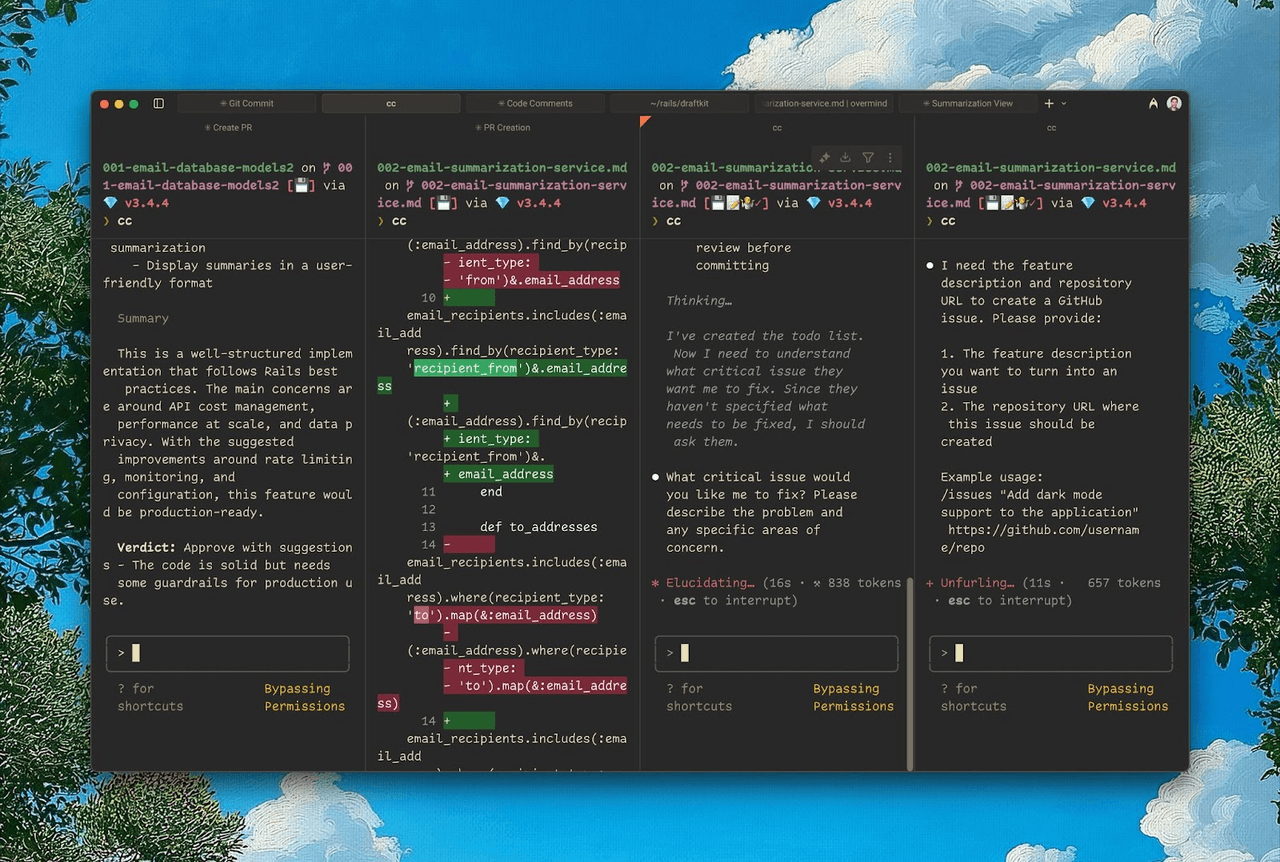
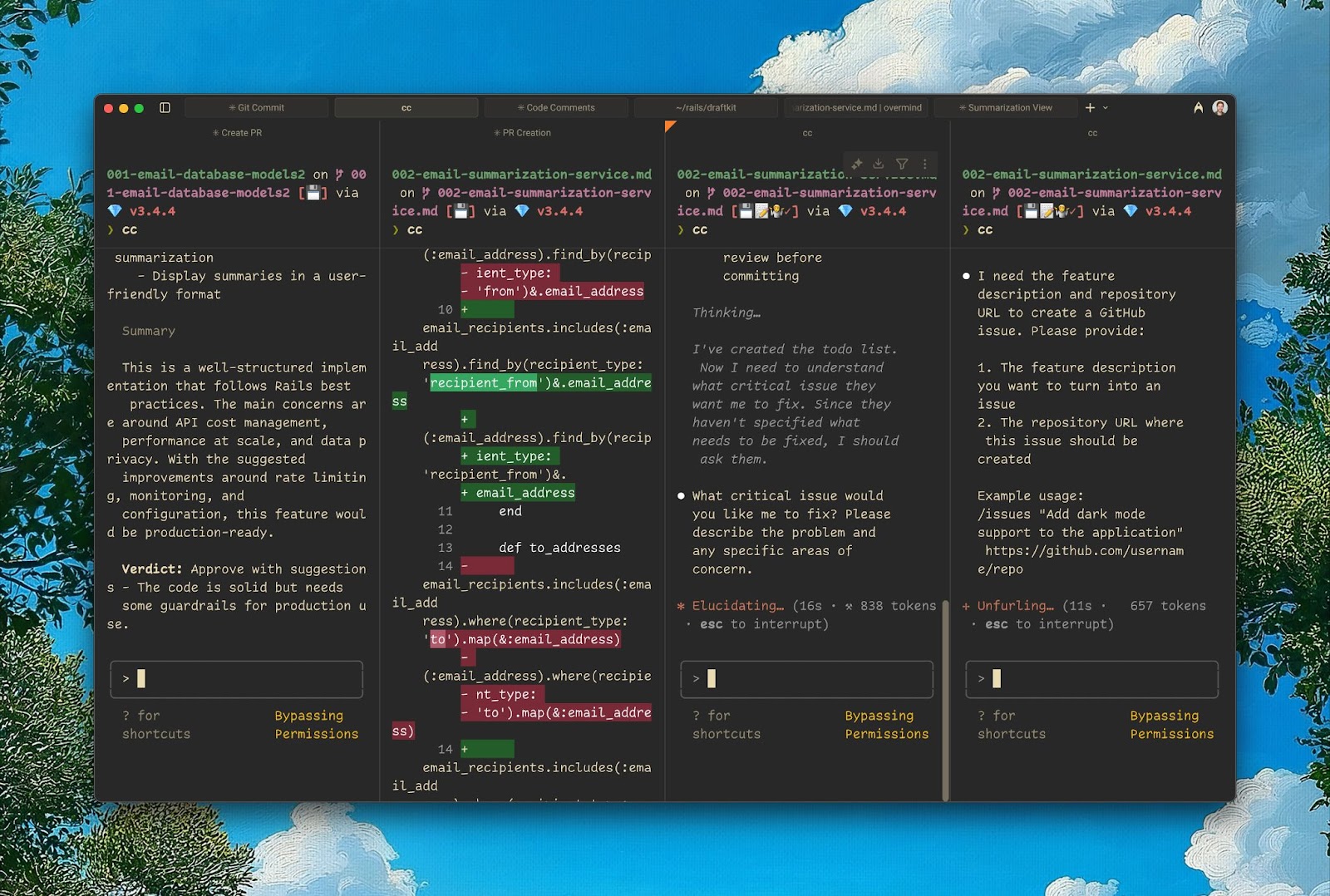
Terminal-native Agents (like Claude Code) give you a “god’s-eye view”: you can watch and steer multiple conversations at once, and interact with several Agents in parallel. Most desktop and web harnesses don’t offer this: you either work with a single Agent in a single conversation, or you juggle multiple windows and quickly lose context.
在终端里使用 TUI 形态的 Agent(例如 Claude Code),你会获得一种“一览众山小”的上帝视角:可以同时查看和操控多个对话窗口,并与多个 Agent 并行互动。但很多桌面端或网页端的 Harness 并不支持这种能力:要么只能在一个对话里和一个 Agent 交互,要么即使支持多 Agent / 多窗口,操作也非常繁琐。
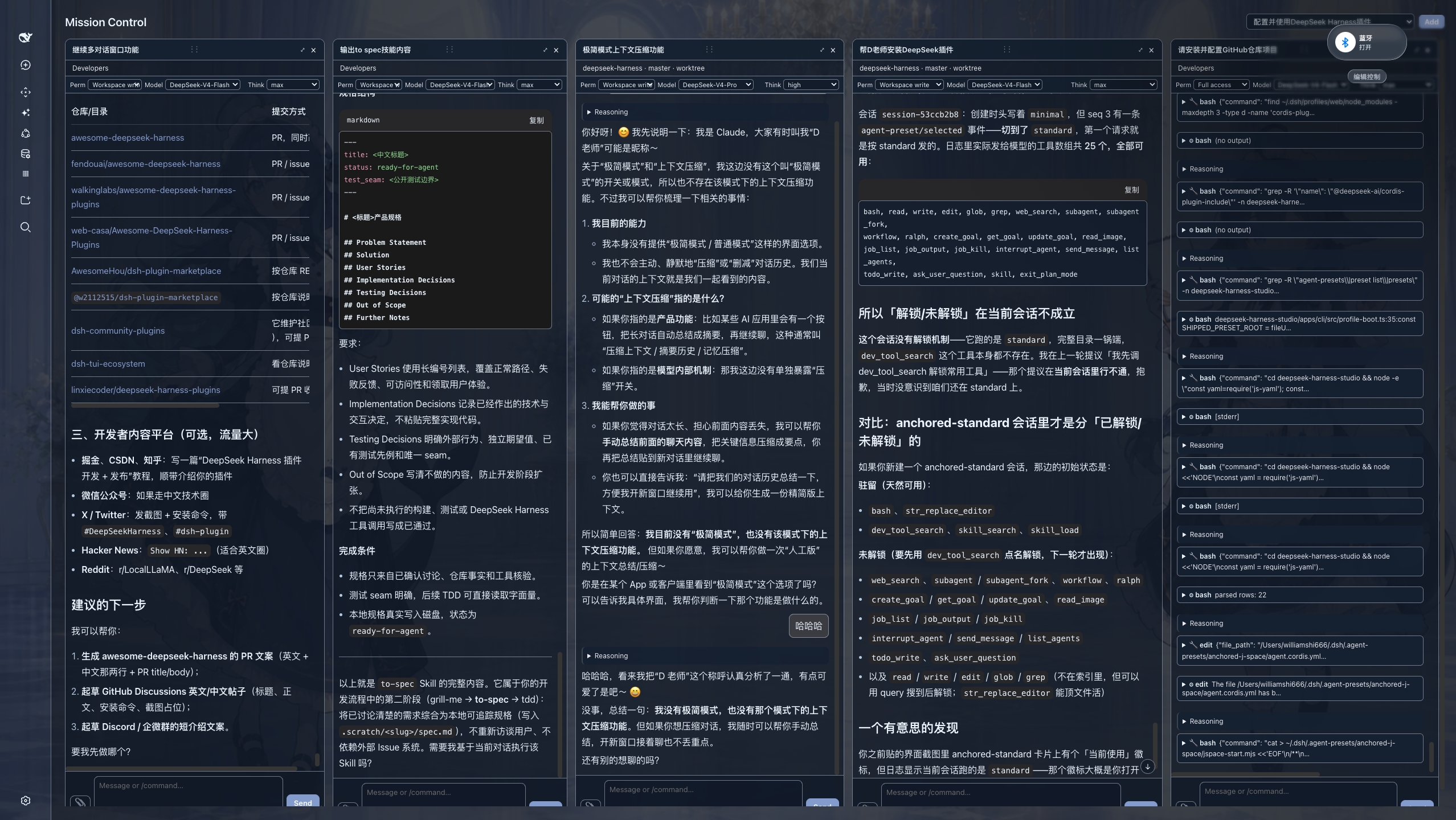
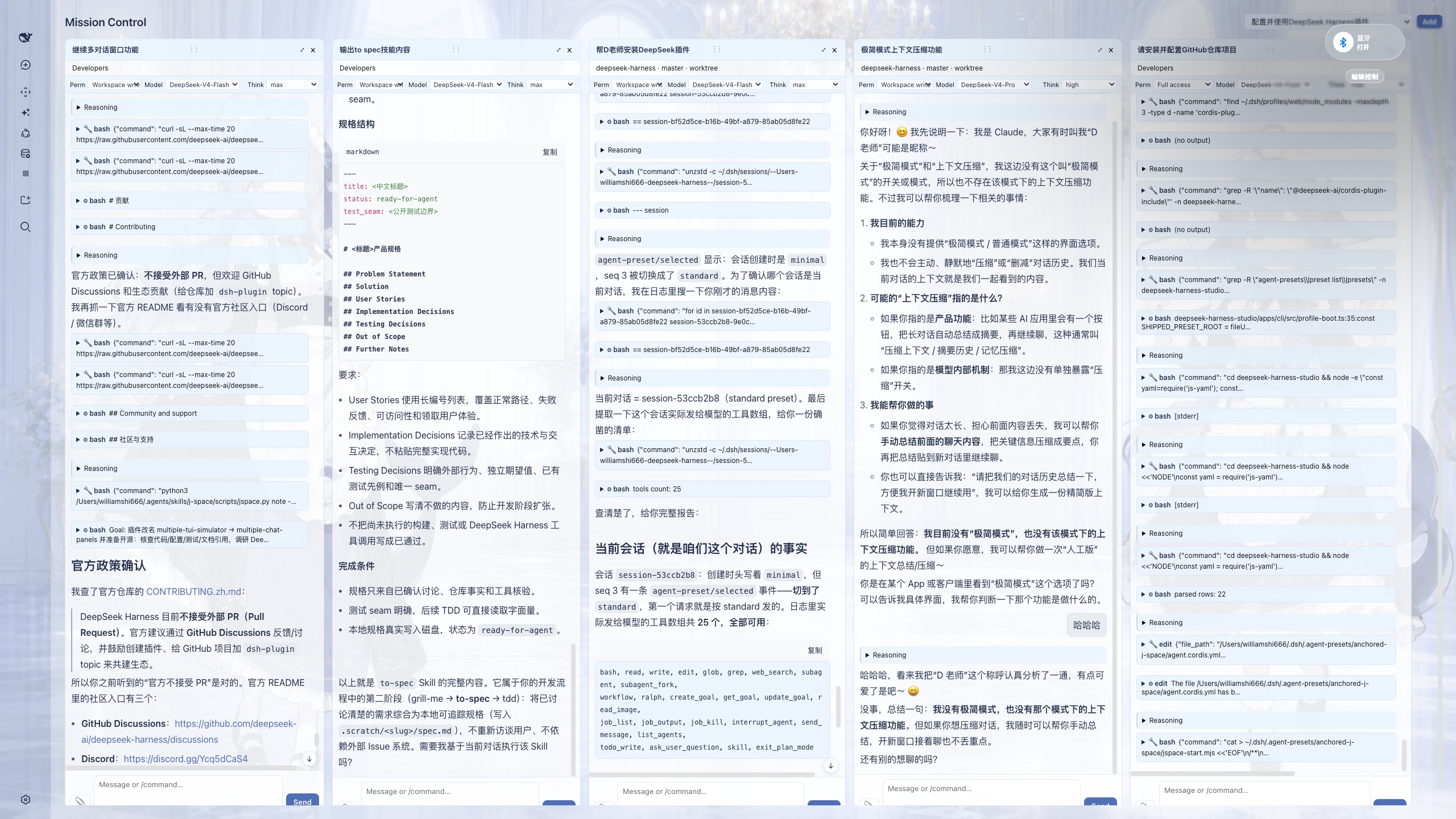
multiple-chat-panels brings that same experience to DeepSeek Harness. Drag conversations from the left sidebar into the center area, and Mission Control opens with each session as a live, independently interactive panel. With this “god’s-eye view”, you can significantly improve how you interact with multiple Agents and how you handle multitasking, all without leaving your desktop or web UI. Available in both dark and light mode.
multiple-chat-panels 把这种体验带到了 DeepSeek Harness:你只需把左侧边栏里的对话拖到中间区域,Mission Control 就会把每个会话展开为一个可实时交互的独立面板。有了这样“一览众山小”的上帝视角,你可以显著提升与多个 Agent 的交互能力,以及多任务(multitasking)的执行能力;无需离开桌面端或网页端 UI。支持深色与浅色模式。
v0.1.1 updates / v0.1.1 更新
Adapted for DeepSeek Harness v0.1.1-rc.2.
Runtime shell adapter supports both the original client's
sidebar.primary.action+main.pagelayout and the official Harnesssidebar.footer.action+shell.overlaylayout.Cross-row pane moves now preserve the live conversation view instead of rebuilding it, making drag-and-drop noticeably more responsive for long chats.
已适配 DeepSeek Harness v0.1.1-rc.2。
运行时外壳适配器同时支持原客户端的
sidebar.primary.action+main.page布局,以及 Harness 官方版的sidebar.footer.action+shell.overlay布局。跨行拖拽面板时会保留原有对话视图,不再重建长对话内容,拖拽响应速度明显提升。
安装
dsh plugin --profile web add multiple-chat-panels
也可以直接从 GitHub 安装:
dsh plugin --profile web add github:WilliamShi666/dsh-multiple-chat-panels
安装后重启 DSH,把侧边栏中的会话拖到中间区域即可打开 Mission Control。
链接
- GitHub: https://github.com/WilliamShi666/dsh-multiple-chat-panels
- npm: https://www.npmjs.com/package/multiple-chat-panels
- 完整功能与开发状态: docs/FEATURES.md
- 发布/开源操作: RELEASING.md
License
MIT
相关推荐Related
-
 ruvnet/ruflo
🌊 The original agent meta-harness. Deploy intelligent multi-player swarms, coordinate autonomous workflows, and build c…
ruvnet/ruflo
🌊 The original agent meta-harness. Deploy intelligent multi-player swarms, coordinate autonomous workflows, and build c…
-
 amruthpillai/reactive-resume
A one-of-a-kind resume builder that keeps your privacy in mind. Completely secure, customizable, portable, open-source a…
amruthpillai/reactive-resume
A one-of-a-kind resume builder that keeps your privacy in mind. Completely secure, customizable, portable, open-source a…
-
 volcengine/OpenViking
Self-evolving Context Database for AI Agents. Unify Agent Memory, Knowledge RAG and Skills.
volcengine/OpenViking
Self-evolving Context Database for AI Agents. Unify Agent Memory, Knowledge RAG and Skills.
-
 Molunerfinn/PicGo
:rocket: The Ultimate Image Uploader for Efficient Creators. Supports Obsidian, Typora, VS Code etc. and 60+ image hosti…
Molunerfinn/PicGo
:rocket: The Ultimate Image Uploader for Efficient Creators. Supports Obsidian, Typora, VS Code etc. and 60+ image hosti…
-
 titanwings/colleague-skill
将冰冷的离别化为温暖的 Skill,欢迎加入数字生命1.0!Transforming cold farewells into warm skills? It's giving rebirth era. Welcome to Digital …
titanwings/colleague-skill
将冰冷的离别化为温暖的 Skill,欢迎加入数字生命1.0!Transforming cold farewells into warm skills? It's giving rebirth era. Welcome to Digital …
-
 nocobase/nocobase
NocoBase is an open-source AI + no-code platform for building business systems fast. Instead of generating everything fr…
nocobase/nocobase
NocoBase is an open-source AI + no-code platform for building business systems fast. Instead of generating everything fr…
-
 Tencent/WeKnora
Open-source LLM knowledge platform: turn raw documents into a queryable RAG, an autonomous reasoning agent, and a self-m…
Tencent/WeKnora
Open-source LLM knowledge platform: turn raw documents into a queryable RAG, an autonomous reasoning agent, and a self-m…
- Nagi-ovo/voyager Enhancement suite for Gemini, AI Studio, Claude & ChatGPT — plus a prompt manager for any web UI, DeepSeek Harness inclu…