
WTStarMark/dsh-plugin-mesh
把带 dsh 系列 GitHub 标签的仓库,画成一张可交互的生态网络图
Project Overview项目介绍
dsh-plugin-mesh is an independent visualization site built around the DSH ecosystem rather than a native DSH plugin or client. It crawls GitHub via the public search API for repositories carrying tags such as dsh, dsh-plugin, dsh-plugin-desktop, dsh-plugin-market, and dsh-plugins, then arranges them by function into an interactive concentric mesh of 19 sectors including agent skills, model integrations, desktop clients, interface panels, skins, plugin marketplaces, conversation interaction, memory and context, voice reminders, tool commands, development debugging, web frontends, usage quotas, security permissions, remote access, integration bridges, file management, reading docs, and desktop pets. The official repository deepseek-ai/deepseek-harness is pinned to the center, and every sector subdivides into 2–5 fine branches governed by 61 classification rules shared verbatim between the front-end layout and the Python classifier.
The typical workflow begins by visiting the live deployment at <http://104.129.51.126/> or by cloning the repository and running npm run serve:lan (which requires Node 20 or newer) to launch the local preview at port 8788. To refresh the underlying data, users copy .env.example to .env, supply a GITHUB_TOKEN, run python3 backend/check_token.py to confirm the quota has risen from 10 to 30 requests per minute, and then invoke python3 backend/collect.py --once for a single pass or --loop --interval 3600 for continuous hourly refreshes. The site lets visitors click any sector to expand it into a full circle with its fine branches re-fanned, filter by tag-AND, language, archived status, and keyword, and reuse pre-generated 420×168 self-contained SVG repository cards in other READMEs or web pages through /api/card/<owner>/<name>.svg and the read-only /api/repos JSON endpoint.
Dependencies are deliberately minimal: the front-end requires only Node 20 with zero npm packages, while the back-end is written entirely against the Python standard library with zero pip requirements and zero model calls. The recommended token is a fine-grained GitHub personal access token whose permissions can all stay blank since the collector only reads public search results; the token mainly raises the search quota from 10 to 30 requests per minute and should be rotated roughly every 90 days. The project is released under the MIT license, exposes only a single HTTP port (port 80 in production), rejects any non-GET/HEAD write with HTTP 405, and applies IP-based sliding-window rate limiting that returns 429 when exceeded. Operators using pm2 must invoke --loop rather than --watch, otherwise the manager restarts the collector via SIGINT on every snapshot write and silently drops captured repositories.
dsh-plugin-mesh 是一个面向 DSH 生态的独立可视化站点,并非 DSH 原生插件或客户端。它通过 GitHub 搜索接口自动抓取带有 dsh、dsh-plugin、dsh-plugin-desktop 等标签的仓库,按 19 个功能扇区(例如智能体技能、模型接入、桌面客户端、界面面板、皮肤美化、插件市场、会话交互等)铺成可交互的同心圆生态图,圆心固定为官方仓库 deepseek-ai/deepseek-harness。项目以静态前端配合 Python 采集后端呈现,部署后任何 DSH 社区成员都可在线浏览,无须安装 DSH 运行时。
典型使用流程是先访问 <http://104.129.51.126/> 查看线上版,或本地克隆仓库后执行 npm run serve:lan(需 Node 20 以上)启动预览,再视情况填入 GitHub 令牌运行 python3 backend/collect.py。访问者既可以点扇区放大查看细枝分类(共 61 条规则),也可以借助标签、语言、关键词等筛选条件淡化非目标节点;站点还提供自包含 SVG 卡片(420×168)与 REST 查询接口,方便其他项目贴入 README 或网页。它适合 DSH 生态的维护者、插件作者、文档站编辑以及希望整体把握生态结构的研究者使用。
依赖方面,前端只有 Node ≥ 20 这一个硬要求,零 npm 依赖;后端完全使用 Python 标准库实现,零 pip 依赖、零模型调用。GitHub 令牌推荐使用 fine-grained 个人令牌,且无需勾选任何权限,仅用于把搜索配额从 10 次/分提升到 30 次/分。许可证为 MIT,仅监听单一端口开放只读 API,写方法一律返回 405,超出速率返回 429。pm2 部署时必须使用 --loop 而非 --watch,否则采集器会被 SIGINT 反复重启;并留意项目名称虽含 "dsh-plugin-",但它本身不加载 DSH 运行时。
请帮我安装这个 DSH 插件。安装前先完成【兼容性检查 + 安全性检查】,检查通过再动手。

插件:dsh-plugin-mesh(WTStarMark/dsh-plugin-mesh)
仓库:https://github.com/WTStarMark/dsh-plugin-mesh
本站详情页:https://www.yhbd.top/plugins/wtstarmark-dsh-plugin-mesh/
本站登记:类型 client · 归类 原生 DSH 插件 · 许可证 MIT · ⭐ 3 · 最近提交 2026-10-03 · 主语言 JavaScript · 未检测到 DSH 插件清单

按下面顺序执行,每步先把结论告诉我,再进入下一步:

【1 兼容性检查】
① 我这边:DSH 版本、Node 版本、操作系统、当前 profile(web / desktop)。
② 读它的 README、package.json、插件 manifest,列出它要求的 DSH 版本 / Node 版本 / 操作系统 / 外部依赖 / 需要另外先装的运行时。
③ 逐条比对,结论只写「满足 / 不满足 / 未知」三种;不满足的给出可行替代方案。
④ 检查是否和我已装的插件冲突:命令名重复、skill / tool 重名、端口占用、重复注册的 MCP server。

【2 安全性检查】
① 仓库可信度:和上面「本站登记」是否一致;star / fork 数、创建时间、最近提交,是否归档或长期停更。
② 安装脚本:逐行看 package.json 的 preinstall / install / postinstall,以及 install.sh、setup.ps1 之类脚本。出现 curl|bash、下载后直接执行、混淆代码、访问与插件功能无关的域名,立刻停下来告诉我,不要继续装。
③ 依赖:列出新增依赖,标出无人维护、或与知名包拼写近似的可疑包(typosquatting)。
④ 权限与副作用:它会读写哪些目录、访问哪些域名、需要哪些 DSH 权限(filesystem / network / shell / clipboard 等),以及怎么卸载和回滚。
⑤ 如果它要求 sudo / 管理员权限,或权限明显超出功能所需,先停下来问我。

【3 安装】
上面两步没有「不满足」和「高危项」时才执行;用官方推荐方式安装,不要自行提权。

【4 汇报】
用表格输出:检查项 / 结论 / 依据 / 是否需要我决策。拿不准的一律写「未知」并说明要我怎么确认——不要猜,也不要替我决定。
Send this message to DSH in your current session: it verifies compatibility and security first (answering met / not met / unknown item by item) and only installs once everything checks out — it will stop and ask you if it finds a high-risk item. The box scrolls; the copy is the full prompt. CLI install commands may not be accurate across systems, so DSH is the safer route.把上面这条消息直接发给当前会话里的 DSH:它会先核对兼容性与安全性(逐条给「满足 / 不满足 / 未知」),确认没问题再安装,有高危项会停下来问你。框内可滚动,复制到的是完整提示词;安装命令不一定准确,发给 DSH 更稳。
- Only 3 stars - very few users, little community feedback星标只有 3,几乎没人在用,遇到问题缺少社区反馈
- No DSH plugin manifest detected - it may only carry the dsh-plugin topic, so the install method must be confirmed on the spot未检测到 DSH 插件清单:可能只是打了 dsh-plugin 话题,安装方式要现场确认
- Desktop client: installation downloads an executable - verify the publisher and checksums桌面客户端:安装会下载可执行文件,请核对发布者与校验和
DSH walks through these 9 checksDSH 会逐条核对这 9 项
Compatibility兼容性
- DSH, Node, OS and profile requirementsDSH 版本 / Node 版本 / 操作系统 / profile 是否满足要求
- External dependencies and runtimes (Electron / Python / Docker, ...)外部依赖与运行时(Electron / Python / Docker 等)是否齐备
- Conflicts with installed plugins: command names, skill / tool names, ports, duplicate MCP registration与已装插件是否冲突:命令名、skill / tool 重名、端口占用、重复 MCP 注册
Security安全性
- Repo matches the facts registered here; archived or abandoned?仓库是否与页面登记一致,是否归档或长期停更
- Safety of preinstall / install / postinstall and install.sh / setup.ps1preinstall / install / postinstall 与 install.sh、setup.ps1 是否安全
- curl|bash, download-then-execute, obfuscation, unrelated domains → stop immediatelycurl|bash、下载即执行、混淆代码、无关域名 → 立刻停止
- Typosquatting or unmaintained packages among the new dependencies新增依赖里有没有 typosquatting 或无人维护的包
- Requested permissions vs. what the feature actually needs申请了哪些权限、是否超出功能所需(filesystem / network / shell / clipboard)
- Any sudo / admin requirement, plus uninstall and rollback是否要求 sudo / 管理员权限,以及卸载与回滚方式
Anything uncertain must be marked unknown with a note on how to confirm it. This site's signal screen is a static snapshot, not a security audit.拿不准的必须标「未知」并说明要我怎么确认。本站的信号筛查是静态快照,不能替代安全审计。
Or use CLI install (for developers)或使用命令行安装(适合开发者)
CLI Install命令行安装
dsh plugin --profile web add github:WTStarMark/dsh-plugin-mesh把 WTStarMark/dsh-plugin-mesh 加入你的 DSH 配置(web profile)即可启用。
READMEREADME
插件生态图 · Plugin Ecosystem Map
把带 dsh 系列 GitHub 标签的仓库,画成一张可交互的生态网络图。




👉 在线地址:http://104.129.51.126/
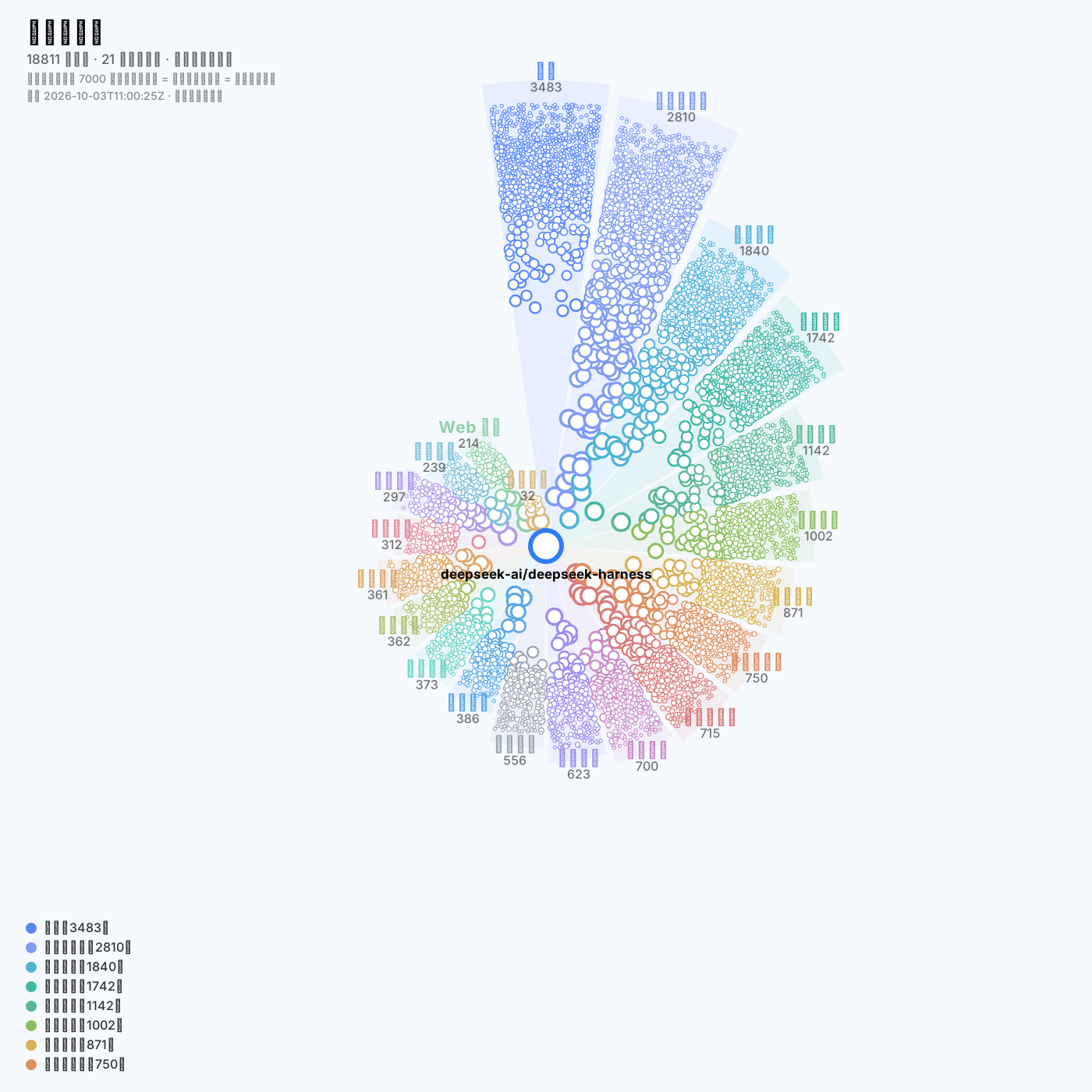
上图由
node tools/snapshot-svg.mjs从真实数据生成 —— 复用前端的布局与配色代码, 所以它永远和当前代码一致,不会出现「README 里的图还是三个版本前」的情况。
这是什么
自动捕获带以下标签的 GitHub 仓库:
dsh · dsh-desktop · dsh-plugin · dsh-plugin-desktop · dsh-plugin-market · dsh-plugins
然后按功能(不是按标签)把它们铺成一张生态图:
- 圆心固定为官方仓库
deepseek-ai/deepseek-harness - 21 个功能扇区:智能体技能、模型接入、桌面客户端、界面面板、皮肤美化、插件市场、会话交互、记忆上下文、语音提醒、工具命令、开发调试、Web 前端、用量额度、安全权限、远程访问、集成桥接、文件管理、阅读文档、桌宠娱乐、协议基座、其他
- 细枝分类:每个扇区下再分 3~8 个细枝(共 79 条规则),单扇区放大时铺成二级扇区
- 单扇区放大:点任一扇区,该扇区铺满整圆,圆内按细枝重新分扇区
这不是 DSH 插件,不依赖 DSH 运行时;它是一个独立的静态前端 + Python 采集后端。
功能
| 能力 | 说明 |
|---|---|
| 扇区布局 | 按功能分区、同心散布;位置由可播种 PRNG 决定,同一 seed 逐点可复现 |
| 单扇区放大 | 点扇区 → 大扇区当整圆、细枝当扇区;Esc 或「← 返回全局」退回 |
| 侧栏顺序 | 左栏:总览 → 功能扇区 → 筛选 → 其余(划分依据 / 捕获标签 / 高频标签)。右栏未选中时:图例 → 操作提示 → 待复核清单;点开项目球后:仓库档案 → 命中标签 → 仓库主题 → 关联 → 图例 → 操作提示(让档案内容占前排,图例与操作提示压到最底部)。顺序由 renderRail / renderInspector 的组装数组决定,并有 DOM 顺序回归测试 |
| 三类连线 | 点选仓库就画出它的同作者(完整关系:不论几个同作者仓库都能互相指向)、主题共现(琥珀虚线)与生态共鸣(紫罗兰实线);度数上限只裁主题边,owner 边豁免 |
| 目标光圈 | 被连线指着的球,球边缘按边色套一圈光圈(主色 / 琥珀 / 紫罗兰一一对应),同一球被两类线指着时按 2.4px 一档外扩、两种颜色同时可见;连线两端退让到光圈外沿再画(trimSegment),不插进球里、不压光圈 |
| 搜索指向 | 搜索后从圆心打出一道光(外层光晕 + 内层光芯 + 落点光斑,宽度随缩放自适应),照向每个命中的仓库球;清空搜索即消失 |
| 相关性判定 | 三档结论:确认相关(有 DSH 专有线索)/ 确认噪声(与 DSH 无关、空壳、堆标签,可一键隐藏)/ 仍需人工;只有真正模糊的才进「待复核」 |
| 噪声黑名单 | 同一作者被收录 超过 200 个仓库、且每个仓库星标都低于 1(即全是 0 星)时判为垃圾账号:从扫描管道与累积索引里剔除,前端(含预计算产物)也不再展示 |
| 筛选 | 标签「与」语义、语言、归档状态、关键词搜索;筛选只淡化不移除,位置保持不变 |
| 头像 | 并发 6、按 URL 去重、球太小不发请求;默认开 |
| 手机端 | ≤900px 画布全屏、侧栏变底部抽屉且左右互斥、双指缩放、安全区适配 |
| 访问统计 | 同端口最小 API:访问数 / 同时在线;拿不到接口时整栏隐藏 |
| 缓存 | gzip + ETag/304 + IndexedDB 秒开 + 后台校验 |
| 双主题 | 清爽(蓝白)、粉黛;明暗各一套,画布文字深色白字 / 浅色黑字 |
Showing the opening section of the README — the full document lives in the repository以上为 README 开头摘要,完整文档在仓库内 · View the full README on GitHub →在 GitHub 查看完整 README →
Related相关推荐
-
 esengine/DeepSeek-Reasonix
A reliable coding agent for complex software engineering tasks.
esengine/DeepSeek-Reasonix
A reliable coding agent for complex software engineering tasks.
-
 strukto-ai/mirage
The World's First Virtual Terminal for AI Agents
strukto-ai/mirage
The World's First Virtual Terminal for AI Agents
-
 chuspeeism/dashi-taskboard
现代化可灵活嵌入的任务面板,支持 Codex、DeepSeek Harness
chuspeeism/dashi-taskboard
现代化可灵活嵌入的任务面板,支持 Codex、DeepSeek Harness
-
 Aisland-SJL/dsh-worktable
🖥️ Agent-project workbench for DeepSeek Harness — sidebar app drawer + dockable split workspace + a live control room w…
Aisland-SJL/dsh-worktable
🖥️ Agent-project workbench for DeepSeek Harness — sidebar app drawer + dockable split workspace + a live control room w…
-
 ccch1mneyyy/working-activity
Lively Working-line extension for pi CLI and DSH
ccch1mneyyy/working-activity
Lively Working-line extension for pi CLI and DSH
-
 zhoushoujianwork/easyeda-agent
嘉立创EDA专业版(EasyEDA Pro)自动化:给 AI harness 装上画板的「手」—— 一套 typed 原理图/PCB 动作,CLI / Agent Skill / stdio MCP 三形态融合接入。承接嘉立创「不以卖板赚钱…
zhoushoujianwork/easyeda-agent
嘉立创EDA专业版(EasyEDA Pro)自动化:给 AI harness 装上画板的「手」—— 一套 typed 原理图/PCB 动作,CLI / Agent Skill / stdio MCP 三形态融合接入。承接嘉立创「不以卖板赚钱…
-
 pulseaiclub/phi
a coding agent, rpc plugin, sub-agents, hashline edits, and mcp
pulseaiclub/phi
a coding agent, rpc plugin, sub-agents, hashline edits, and mcp
-
 Ikalus1988/MisakaNet
📚 A zero-dependency, git-backed micro-lesson library for AI Agents to asynchronously share and search verified debuggin…
Ikalus1988/MisakaNet
📚 A zero-dependency, git-backed micro-lesson library for AI Agents to asynchronously share and search verified debuggin…