x102201/deepseek-harness-helper
DSHHelper is a desktop app for running multiple isolated DeepSeek Harness (dsh) workspaces on one machine. It ships a built-in Node.js + dsh runtime, supports quad-pane layouts, and lets you export / import configured environments as .dshpack packages.
catalog 简介 / catalog descriptioncatalog description:DSHHelper 是一款 Windows / macOS / Linux 桌面软件,帮你更方便地使用 DeepSeek Harness(dsh)。不用自己装 Node、配环境,打开软件就能创建多个独立工作区,像开多个浏览器窗口一样并排使用;还能把配置打包成 .dshpack 文件,方便备份或在另一台电脑恢复。
项目介绍Project Overview
DSHHelper 是一款桌面应用,用于在同一台机器上运行多个相互隔离的 DeepSeek Harness(dsh)工作区。它内置 Node.js 与 dsh 运行时,支持四格分屏布局,并可将配置好的环境导出或导入为 .dshpack 包。适合需要并行管理多个 dsh 实例、共享预设或补丁时使用。注意:该仓库仅包含文档和发布安装包,不含应用源代码。
DSHHelper is a desktop app for running multiple isolated DeepSeek Harness (dsh) workspaces on one machine. It includes a built-in Node.js and dsh runtime, supports quad-pane layouts, and can export or import configured environments as .dshpack packages. Use it when you need to manage several dsh instances side by side or share presets and patches. Note: this repository contains documentation and release installers only, not the application source code.
请帮我了解并安装插件:【deepseek-harness-helper】【https://github.com/x102201/deepseek-harness-helper】把上面这条消息直接发给当前会话里的 DSH,让它帮你了解并安装。安装命令不一定准确,发给 DSH 更稳。Send this message to DSH in your current session. CLI install commands may not be accurate across systems — DSH will figure it out for you.
或使用命令行安装(适合开发者)Or use CLI install (for developers)
命令行安装CLI Install
dsh plugin --profile web add github:x102201/deepseek-harness-helper把 x102201/deepseek-harness-helper 加入你的 DSH 配置(web profile)即可启用。
READMEREADME
DSHHelper — DeepSeek Harness Desktop Helper
中文 · User Guide (EN) · 用户指南 (ZH)
DSHHelper is a desktop app for running multiple isolated DeepSeek Harness (dsh) workspaces on one machine. It ships a built-in Node.js + dsh runtime, supports quad-pane layouts, and lets you export / import configured environments as .dshpack packages.
This repository contains documentation and release installers only — no application source code.
Download
Installers are published on GitHub Releases.
| Platform | File name pattern |
|---|---|
| Windows x64 | DSHHelper_{version}_windows_x64-setup.exe |
| Windows arm64 | DSHHelper_{version}_windows_arm64-setup.exe |
| macOS | DSHHelper_{version}_macos_{arch}.dmg |
| Linux | DSHHelper_{version}_linux_{arch}.deb · .AppImage |
Version numbers match the installer file name. See Releases for the latest build.
Highlights
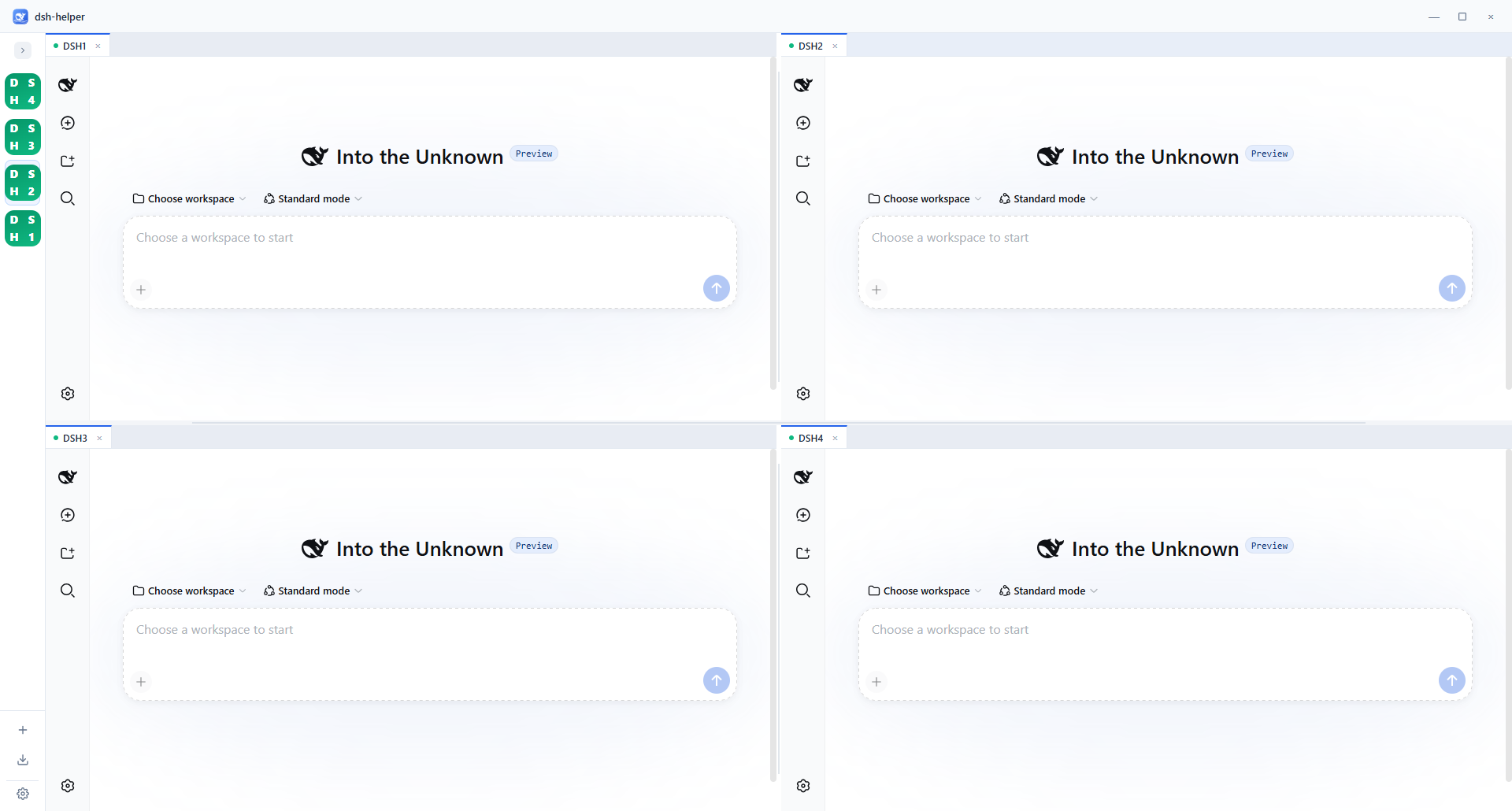
- Multi-instance — several dsh environments side by side; drag tabs to split into a 2×2 grid
- Built-in runtime — Node + dsh cached under your data folder (default
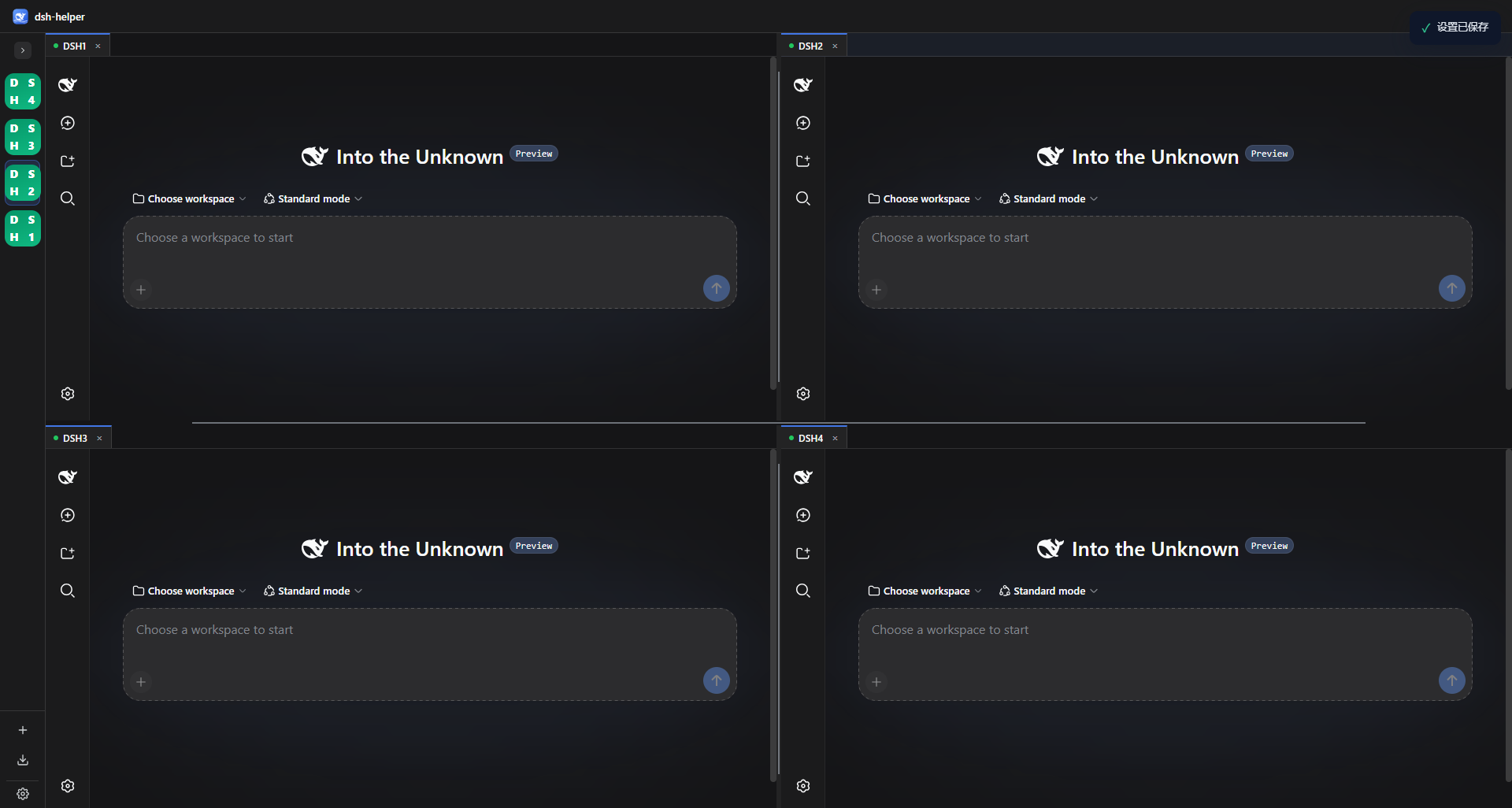
%USERPROFILE%\.dshHelperon Windows) .dshpackpackages — share presets, patches, and settings with optional machine / password protection- Light & dark shell — Settings → General → Appearance (affects the helper UI only, not pages inside instances)
Quick start
- Install from Releases and launch DSHHelper
- Follow the first-run wizard (data directory → runtime → create first instance)
- Create more instances from the sidebar; open several in a quad-pane layout
Full walkthrough: docs/user-guide.en.md
Data directory
All environments, cache, imports, settings, and logs live under one folder (default: ~/.dshHelper or %USERPROFILE%\.dshHelper). You can change it in Settings → General.
Feedback
- GitHub Issues
- In-app: Settings → About → Feedback
License & notice
Installers are distributed via this repository’s Releases. Usage statistics are collected anonymously to improve the product (duration and aggregate counts only; no paths or instance names).
相关推荐Related
-
 nexu-io/open-design
🎨 Best DeepSeek Harness Design Plugin. The open-source Claude Design alternative. 🖥️ Local-first desktop app. 🖼️ Your…
nexu-io/open-design
🎨 Best DeepSeek Harness Design Plugin. The open-source Claude Design alternative. 🖥️ Local-first desktop app. 🖼️ Your…
-
 freestylefly/awesome-gpt-image-2
Prompt as Code | GPT-Image2 工业级提示词引擎与模板库,530+ 个案例逆向工程,20+ 套工业级模板,并提炼出Skills,持续更新中
freestylefly/awesome-gpt-image-2
Prompt as Code | GPT-Image2 工业级提示词引擎与模板库,530+ 个案例逆向工程,20+ 套工业级模板,并提炼出Skills,持续更新中
-
 anywhere-labs/dsh-desktop
为 DeepSeek Harness (DSH) 插件生态打造的现代化桌面端解决方案。万物皆「插件」,桌面本身也是「插件」。
anywhere-labs/dsh-desktop
为 DeepSeek Harness (DSH) 插件生态打造的现代化桌面端解决方案。万物皆「插件」,桌面本身也是「插件」。
- Nagi-ovo/voyager Enhancement suite for Gemini, AI Studio, Claude & ChatGPT — plus a prompt manager for any web UI, DeepSeek Harness inclu…
-
 walkinglabs/learn-harness-engineering
Harness engineering beginner tutorial, from 0 to 1
walkinglabs/learn-harness-engineering
Harness engineering beginner tutorial, from 0 to 1
-
 awesome-dsh-plugin/awesome-dsh-plugin
A curated list of plugins for DeepSeek Harness (dsh) · DeepSeek Harness 插件精选列表
awesome-dsh-plugin/awesome-dsh-plugin
A curated list of plugins for DeepSeek Harness (dsh) · DeepSeek Harness 插件精选列表
-
 MemTensor/MemOS
Self-evolving memory OS for LLM & AI Agents: ultra-persistent memory, hybrid-retrieval, and cross-task skill reuse, with…
MemTensor/MemOS
Self-evolving memory OS for LLM & AI Agents: ultra-persistent memory, hybrid-retrieval, and cross-task skill reuse, with…
- yjh051108/dsh-routing-suite dsh-routing-suite — injector + router-standard kit: install the runtime injector first, then the task-aware reasoning-mo…