xiajiajun516/dsh-config-manager
备份/导出/导入/迁移您的DeepSeek Harness(DSH)配置——双面Cordis插件(主机引擎+Web界面)。在任何机器上一键恢复。
项目介绍Project Overview
DSH Config Manager 是 DeepSeek Harness 的备份、恢复与迁移插件。核心能力:一键导出/导入完整 DSH 配置(设置、模型、插件、MCP、Skills、Agent 预设、工作区),支持 Git/WebDAV 同步、配置市场与多环境 Profile 切换,并提供路径自动映射、冲突选择、自动快照与回滚。适用于换机迁移、多机同步或复用社区配置。注意:默认不导出 API Key 等敏感信息;插件或 MCP 安装后需重启 DSH 才生效;部分 UI 状态不参与迁移。
DSH Config Manager is a backup, restore, and migration plugin for DeepSeek Harness. It packages settings, model providers, plugins, MCP servers, skills, agent presets, and workspaces into a single ZIP for one-click transfer, with Git/WebDAV sync, a configuration marketplace, multi-profile switching, path auto-mapping, conflict resolution, and automatic snapshot/rollback. Use it for cross-machine migration, multi-device sync, or installing community configs. Caveats: secrets like API keys are excluded by default, plugin and MCP changes require restarting DSH, and some UI state is not migrated.
请帮我了解并安装插件:【dsh-config-manager】【https://github.com/xiajiajun516/dsh-config-manager】把上面这条消息直接发给当前会话里的 DSH,让它帮你了解并安装。安装命令不一定准确,发给 DSH 更稳。Send this message to DSH in your current session. CLI install commands may not be accurate across systems — DSH will figure it out for you.
或使用命令行安装(适合开发者)Or use CLI install (for developers)
命令行安装CLI Install
dsh plugin --profile web add dsh-config-manager@latest把 xiajiajun516/dsh-config-manager 加入你的 DSH 配置(web profile)即可启用。
READMEREADME
🎒 DSH Config Manager
DeepSeek Harness Backup, Restore & Migration Plugin.
Backup, restore, export, import, migrate and sync your complete DeepSeek Harness (DSH) configuration — settings, model providers, plugins, MCP servers, skills, agent presets and workspaces — and restore your whole environment on a new machine with one click.
- 🔄 Backup & Restore DeepSeek Harness configuration
- 📦 Export / Import complete DSH configuration
- 🚚 Migrate DSH to another machine
- ⏰ Scheduled full backups — automatic, on your own cadence (6h / 12h / 24h / 7d / custom weekly), secrets never included
- 🔌 Backup installed plugins and plugin configuration
- 🧩 Backup MCP servers and Skills
- 🔐 Encrypted backups with optional credentials
- ☁️ Git / WebDAV configuration sync
- 🛒 Configuration market — browse & one-click install shared configs
- ↩️ Automatic snapshot and rollback before restore
What is this? 🤔
DSH is your AI assistant workbench — it holds your settings: model configs, plugins, skills, workspaces…
DSH Config Manager is its "moving service":
┌──────────────┐   ① one-click    ┌─────────────────┐   ② one-click    ┌──────────────┐
│  Machine A    │ ──── export ───► │ dsh-config.zip   │ ──── import ───► │  Machine B    │
│  my config    │                  │   (one file)     │                  │  all restored │
└──────────────┘                  └─────────────────┘                  └──────────────┘
⚠️ Security first: no secrets (API Key / Token / Password) are exported by default. See Security.
🎯 Use Cases
Backup DeepSeek Harness configuration
Create a portable backup of your DSH settings, model providers, plugins, MCP servers, skills, agent presets, profiles and workspace — one ZIP file, no secret values included by default.
Restore DeepSeek Harness on another machine
Export your current DSH environment as a single ZIP and import it on a new Windows, macOS or Linux machine. One click brings back settings, plugins, MCP servers, skills and global instructions (AGENTS.md).
Migrate DSH configuration to a new computer
Move your complete DeepSeek Harness setup without manually reinstalling plugins, MCP servers and skills. Dead absolute paths are detected and remapped automatically (batch prefix mapping supported).
Sync DSH configuration across machines
Keep portable configuration synchronized between machines through a private Git repository or WebDAV — secrets never sync.
Schedule automatic full backups
Turn on scheduled backups (6h / 12h / 24h / 7d — or a custom weekly weekday & time) and DSH quietly keeps a fresh full backup of your configuration in the background — secrets are never included, so it stays safe on disk without a password. Consecutive failures are highlighted in red in the settings card.
Discover & install configurations from the marketplace
Browse the built-in official market for ready-made configurations (model providers, plugins, MCP servers, skills, agent presets…), preview what would be imported (dry-run), and install with one click — supply-chain warnings are always shown and every section must be explicitly approved before anything is written.
✨ Highlights
| Icon | Feature | In one line |
|---|---|---|
| 🚀 | One-click Export | Package your recommended config into a ZIP |
| 📦 | One-click Import | Restore your environment on another machine |
| 👀 | Preview before import | Full preview first — never touches your config silently |
| ⚔️ | Conflict handling | Keep Current / Use Imported — you decide |
| 🗺️ | Path auto-mapping | Detects dead absolute paths and lets you remap them |
| 🔒 | Secret safety | API Keys are not exported by default — non-encrypted imports ask you to re-enter; encrypted backups restore them with the password |
| ↩️ | Automatic rollback | Failed import restores everything automatically |
| 📸 | Snapshot restore | Undo an import: whole-file restore + uninstall added plugins (CLI & GUI) |
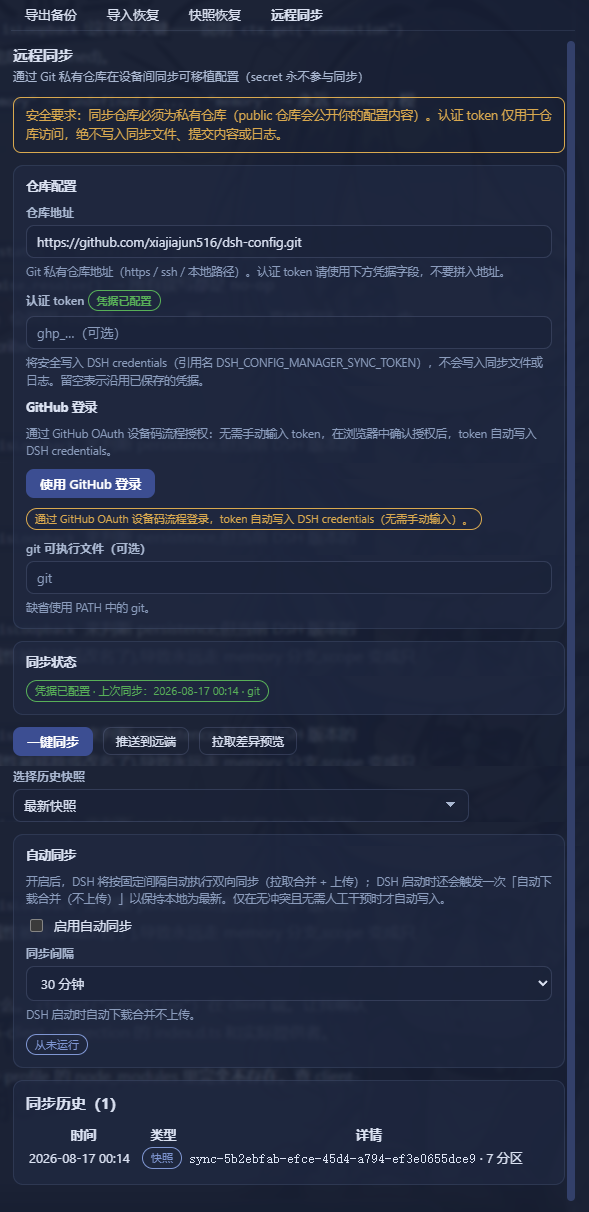
| 🔄 | Remote Sync | Push/pull portable config via Git private repo or WebDAV (secrets never sync) |
| ⏰ | Scheduled backups | Full backup on a fixed cadence (6h / 12h / 24h / 7d) — set-and-forget, secrets never included |
| 🛒 | Config Marketplace | Browse & one-click install community configs — supply-chain warnings + per-section approval |
| 🗂️ | Profiles | Save multiple setups (Work / Personal) and switch anytime — preview + auto-backup + rollback |
| 🌐 | Bilingual UI | Interface, reports and error details follow the DSH app language (中文 / English) |
| 🤖 | Agent tools | Backup / snapshot / restore / sync right from an agent session |
📸 Screenshots
| Export | Import Preview |
|---|---|
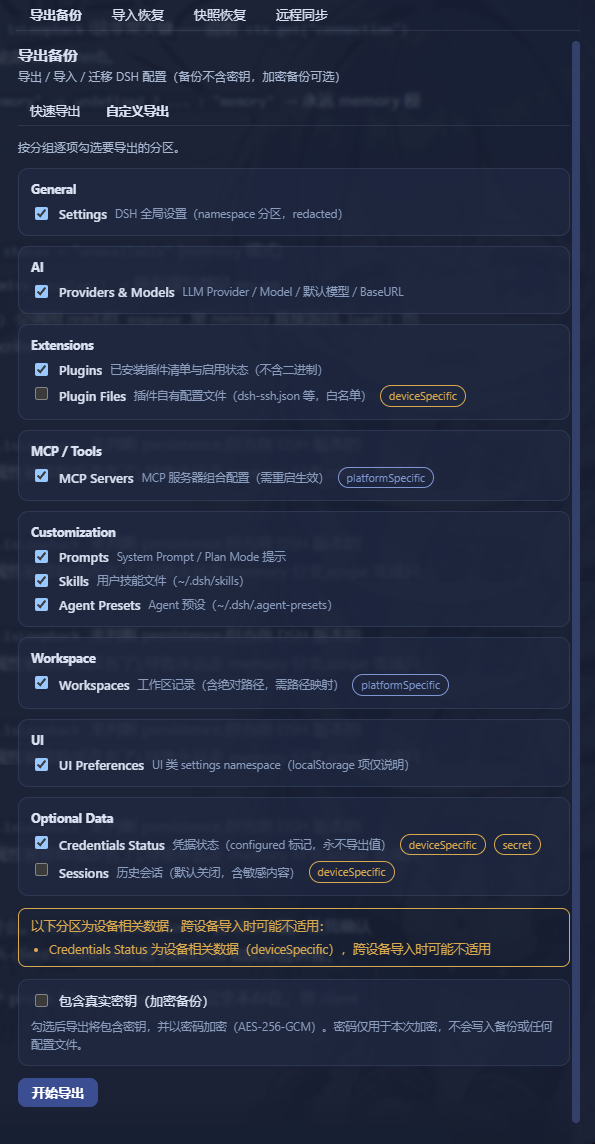 |
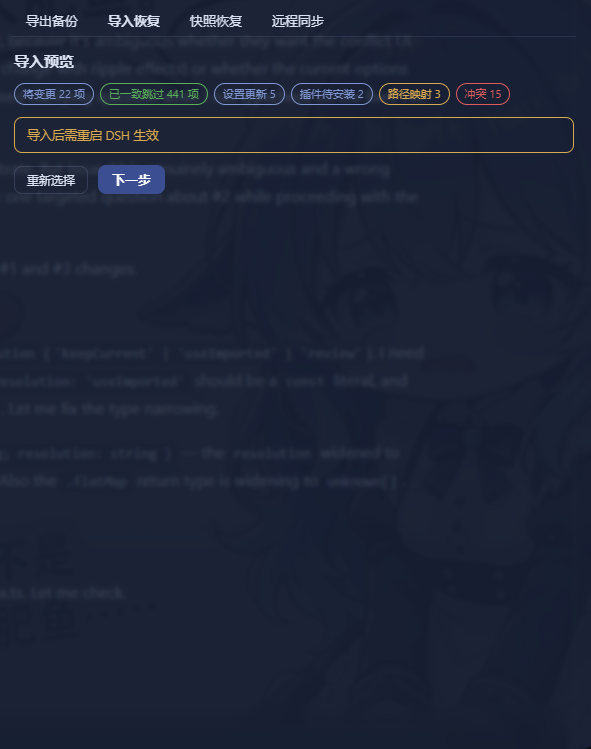 |
| Snapshot Restore | Remote Sync |
|---|---|
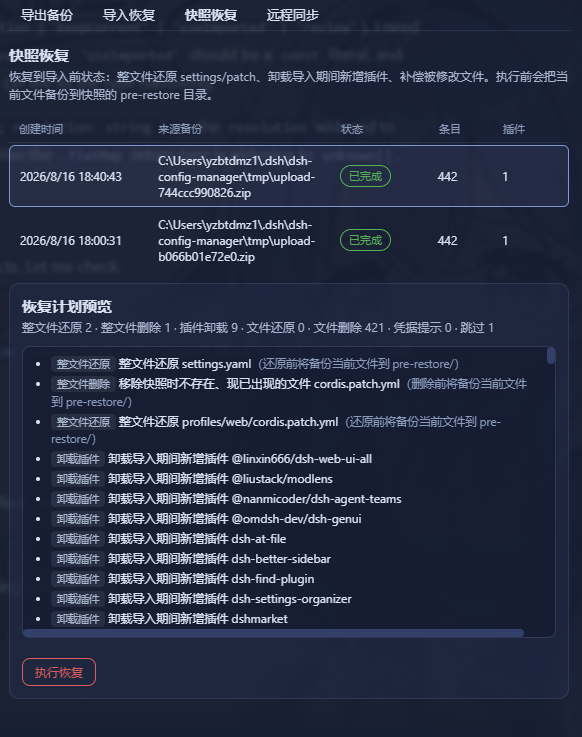 |
 |
| Configuration Market |
|---|
 |
🔄 How it works?
Export (pack it up)
Read your config → strip secrets (safe) → build manifest → compute checksums → pack into ZIP
Import (restore the environment)
Every step confirms and backs up first — it never modifies your config directly:
Select ZIP → validate file → check integrity → check schema → compatibility check
    → scan contents → build import plan → preview & confirm
    → auto-backup current config → apply → validate → done
                      │
                      └─ failed midway? → automatically restored (rollback)
📥 Installation
It's a standard DSH plugin — two steps:
# ① Install the plugin
dsh plugin --profile web add dsh-config-manager@latest

# ② Restart DSH (a "Backup & Migration" entry appears in Settings)
💡 Just copy-paste the command:
@latestensures you get the newest build.🐛
@latestinstalled an old version? That's pnpm 11'sminimumReleaseAgesupply-chain policy, not a cache issue: versions published less than ~30 days ago are excluded from resolution until whitelisted. Two fixes:
- Install an exact version once (it auto-whitelists, then
@latestworks):dsh plugin --profile web add dsh-config-manager@0.1.8- Or disable the age gate with a one-liner (adds
minimumReleaseAge: 0at the top of the profile'spnpm-workspace.yaml):$f = "$env:USERPROFILE\.dsh\profiles\web\pnpm-workspace.yaml" $c = Get-Content $f -Raw if ($c -notmatch '(?m)^minimumReleaseAge:') { Set-Content -LiteralPath $f -Value ("minimumReleaseAge: 0`n" + $c) -Encoding utf8 Write-Output "Added minimumReleaseAge: 0" } else { Write-Output "Already present, nothing to do" }
🚀 Quick start (3-minute tour)
Machine A (export)
  1. Open DSH → Settings → "Backup & Migration"
  2. Click "Export Configuration" → choose "Quick Export"
  3. You get dsh-config-2026-08-14.zip (the report confirms no secrets inside)

Copy the ZIP to Machine B (import)
  1. Open DSH → "Backup & Migration" → "Import Configuration"
  2. Select the ZIP → wait for analysis → review the "Import Preview"
  3. Path issues? → choose new paths (batch mapping supported)
  4. Conflicts? → choose Keep Current / Use Imported
  5. Confirm import → wait
  6. Re-enter any missing API Keys as prompted
  7. ✅ Settings / plugins / MCP / skills / workspace / global instructions (AGENTS.md) are back
🧩 Features
📤 Export (two modes)
| Mode | Description |
|---|---|
| Quick Export (recommended) | One-click: settings / UI / models / plugins / MCP / skills / agent presets / global instructions (AGENTS.md) / workspaces… |
| Custom Export | Tick the categories you want |
Output:
dsh-config-<date>.zipwith manifest + per-category data + SHA-256 checksums.
Export extras:
- Preview before export — see what will be packaged (section count + estimated size, no secrets) before anything is written
- Custom file name & note — name the ZIP yourself (auto-naming is the default) and attach an optional note that shows in the Backup Files list (the note travels with the self section when you sync/backup the config)
📥 Import (safe flow)
- Nothing is written before confirmation — analyze & preview are zero-write
- Backup before applying — the target config is snapshotted automatically
- Automatic rollback on failure — full rollback or skip-and-continue, your choice
- Next-steps checklist after import — the result page lists what needs a DSH restart (per plugin/MCP), credentials to re-enter, and failed/skipped items you can retry
👀 Import Preview (dry run)
Shown fully before importing:
✓ 18 settings will be updated    ✓ 6 plugins already installed
⚠ 2 plugins need installation    ⚠ 3 secrets need re-entry
⚠ 1 path needs mapping           ⚠ 2 conflicts need attention
⚔️ Conflict handling
When the target already has a same-named item, you choose:
| Option | Meaning |
|---|---|
| Keep Current | Leave the target's config untouched |
| Use Imported | Overwrite with the backup's value |
Note: a "decide later / review" option is intentionally not offered — an undecided conflict would block the import from proceeding. Every conflict must be resolved before continuing.
🗺️ Path mapping
C:\Users\alice\projects doesn't exist on the new machine? The plugin:
- Detects the dead absolute paths automatically
- Lets you pick new paths
- Supports batch prefix mapping (
C:\Users\alice\→/Users/bob/in one shot)
🔒 Secrets
| Scenario | Behavior |
|---|---|
| Default backup | No secret values at all — only records which keys are needed |
| Encrypted backup (explicit opt-in) | scrypt + AES-256-GCM, random salt & IV per export; secrets never leave as plaintext, and the password is never written to the file |
| Encrypted backup import | The export-time password is required: enter → verify → credentials are restored; no password, no import |
| After non-encrypted import | "3 secrets need re-entry" — values stay in memory only |
🔄 Remote Sync (Git / WebDAV)
Push / pull your portable config between machines through either of two channels — usage is identical except for the transport itself:
| Git private repo | WebDAV | |
|---|---|---|
| Endpoint | repoUrl |
webdav.url |
| Credentials | auth token in DSH credentials (DSH_CONFIG_MANAGER_SYNC_TOKEN) |
username stored in the config (echoed in the UI); password never synced / never logged — DSH credentials DSH_CONFIG_MANAGER_SYNC_WEBDAV_PASSWORD |
- Same snapshot retention for both channels: only the newest 10 snapshots are kept on the remote (
MAX_REMOTE_SNAPSHOTS=10); older ones are deleted automatically. - Switching channels starts fresh: Git and WebDAV do not share snapshots or a common ancestor. When you switch transport, sync begins again from the new remote's empty baseline — push a fresh snapshot first.
- WebDAV auth uses HTTP Basic: the
usernameis stored in the config and may be echoed back into the UI, while thepasswordis read live from the DSH credentials slotDSH_CONFIG_MANAGER_SYNC_WEBDAV_PASSWORD— it never appears in any sync file or log. - Plugins auto-install: when pulling diffs, plugins that are new in the backup are installed automatically on confirm — no manual per-item ticking in the diff list. Only version-conflict plugins still ask you to pick "Keep Current / Use Imported".
- Push preview before uploading — the Push button first shows a read-only preview of what will be sent (sections + per-section counts + changed-vs-baseline markers, first-baseline notice) and only writes the remote after you confirm.
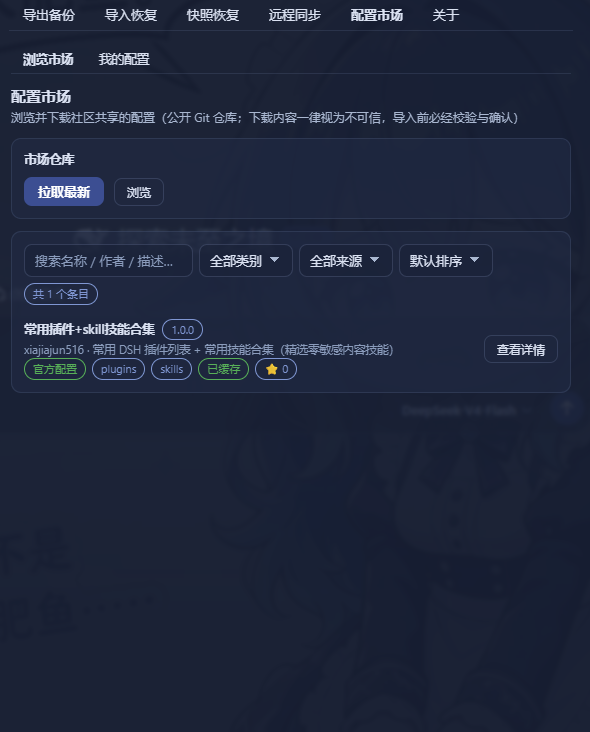
🛒 Configuration Marketplace
Browse and install ready-made configurations (model providers, plugins, MCP servers, skills, agent presets…) shared by the community:
- Built-in official market — read-only, bound to the official public repo (official badge shown, not editable); first open auto-refreshes, manual refresh also available
- Search & filter — keyword search (matches name / description / author / categories), category filter, section filter (items already downloaded list their sections; others are excluded with a hint), source filter (Official / Community), sorting (recently updated / most starred / name A–Z), and a ⭐ badge showing the source repo's star count (queried anonymously, no token involved)
- Impact preview — the detail view shows "what installing this will change" (items updated / identical / conflicts / secrets to re-enter / DSH restart needed) before you approve anything
- Supply-chain warnings always shown — source repo URL, "not officially reviewed", download time; per-section approval — high-risk sections (sessions / arbitrary files) are banned from listing outright, and every remaining section must be explicitly approved before the import is confirmed
- Install reuses the safe import pipeline — analyze → preview → auto-backup → apply → rollback; nothing is written before you confirm
- "My Configs" — sign in with GitHub (device flow), upload a config to your own public repo in one click, and an auto listing PR is opened against the official market repo; manage your listings (status badges: not listed / PR pending / listed), update in one click, install back locally, or delist (auto de-listing PR)
🗂️ Profiles
Save multiple configurations (Work / Personal) and switch anytime; switching includes preview + auto-backup + rollback.
- Save current config — pick a name and store the current DSH configuration (settings / providers / plugins / skills / agent presets…; no secrets, file sections embedded)
- Switch with safety — preview first (zero writes) → confirm → automatic snapshot → staged apply; any failure rolls back fully
- Manage — rename / delete (confirmed) / import an exported profile.json
- Library is an independent tab: Settings → "Backup & Migration" → Profiles
📸 Snapshot restore (undo an import)
Every import creates a safety snapshot first. If something feels off afterwards, restore the target back to its pre-import state:
| Action | What it does |
|---|---|
| Whole-file restore | settings.yaml / settings.json / cordis.patch.yml blobs are written back to $DSH_HOME; files that didn't exist at snapshot time but appeared after import are removed |
| Plugin uninstall | Plugins added during import are removed via the official dsh plugin remove (baseline comparison; old snapshots without a baseline only get a hint) |
| File compensation | skills / agentPresets / agentInstructions / pluginFiles / sessions blobs are written back to their original paths |
| Credentials | DSH never reads credential values back — you get a manual re-entry hint instead |
GUI: Settings → "Backup & Migration" → Snapshots & Restore tab → pick a snapshot → preview the plan (dry-run, zero writes) → confirm.
Snapshot management:
- Retention is visible — up to 10 snapshots are kept automatically (oldest pruned); the hint is shown in the list
- Pin important snapshots — a pinned snapshot is exempt from auto-pruning and can only be deleted manually
- Manual delete — remove any snapshot (danger, confirmed) when you no longer need that rollback point
Backup Files management (same tab → "Backup Files"):
- List every export ZIP (manual + scheduled) with source badge, size, time and your custom note
- Search by file name or note
- Inspect / Compare — read-only preview of what the backup contains (sections + per-section counts) and the diff against your current config (zero writes) before deciding to import
🚨 CLI — the first line of defense when DSH is broken
The GUI lives inside DSH — it can't help you if DSH won't start. The dsh-config-manager CLI is completely independent of the DSH runtime (pure Node + the core engine, zero @deepseek-ai/* imports — it runs even when the DSH peer packages are broken or missing). That makes it your first rescue tool when the config is corrupted, the GUI won't boot, or you changed machines and need to bring an environment back.
It is a standalone npm tool, installed separately from the plugin. Install it once on any machine that might need rescuing:
# --omit=peer: the offline CLI only needs js-yaml, not the DSH peer packages
npm install -g dsh-config-manager@latest --omit=peer
⚠️ Installing/updating the plugin (
dsh plugin --profile web add ...) only enables the GUI — it does not create thedsh-config-managercommand. Run the install command above, then any of the commands below.
All commands (also shown by dsh-config-manager help):
dsh-config-manager help                                        # list all commands & options
dsh-config-manager snapshots [--data-dir <dir>]                # list snapshots (newest first)
dsh-config-manager restore [--id <id>] [--dry-run]
                           [--profile <name>] [--settings <path>]
dsh-config-manager reinstall [--version <v>] [--yes] [--list]
                             [--wipe-config] [--dry-run]       # one-click reinstall of DSH itself
reinstall — rescue when DSH is broken. It reinstalls the @deepseek-ai/dsh launcher across platforms (uses the right command per OS: PowerShell on Windows, bash on Unix). By default it reinstalls the launcher + clears global caches; interactively it asks which dangerous clean-up items to include (settings / plugins / session data & credentials) — those are not selected by default, and any destructive choice requires a second confirmation by typing YES before anything runs. Before wiping any ~/.dsh data it makes an emergency backup at .reinstall-backup (the snapshots/ folder is deliberately never touched).
# see the selectable clean-up items
dsh-config-manager reinstall --list

# interactive: pick items, confirm, then reinstall DSH
dsh-config-manager reinstall

# non-interactive: everything checked, skip confirmation
dsh-config-manager reinstall --yes

# wipe config data too (equivalent to checking all data items) — interactive confirm still required
dsh-config-manager reinstall --wipe-config

# preview the exact plan without running anything
dsh-config-manager reinstall --dry-run
Snapshot restore. List and restore the safety snapshots (offline — the restore engine is part of the CLI, so it works whether or not DSH can start):
dsh-config-manager snapshots                                  # list snapshots (newest first)
dsh-config-manager restore --dry-run                          # preview the plan (zero writes)
dsh-config-manager restore --id <snapshot-id>                 # execute (current files are backed up first)
Every overwrite/delete is first copied to <snapshotDir>/pre-restore/ so you can manually change your mind. Exit code is 1 if any action failed; the report honestly lists restored / removedPlugins / manualHints / failed / skipped.
A typical rescue flow when DSH won't start: ① dsh-config-manager reinstall to bring the launcher back (plus any clean-up), ② dsh web to start DSH again, ③ re-add the plugin from the registry, and ④ pull a snapshot from the remote repo (or run dsh-config-manager restore) to bring your config back. The CLI works at every step regardless of DSH's health.
🤖 Agent tools (for AI assistants)
The plugin also registers 5 model tools that an AI agent (a DSH assistant session) can call directly — the same backup / snapshot / sync engines, no GUI needed:
| Tool | What it does |
|---|---|
config_backup |
Full backup of DSH config to the local exports dir — no secrets by default; pass password for an encrypted backup. Returns ZIP name / size / included sections / encryption state |
config_list_snapshots |
List local rollback snapshots (id / created / source / status / entry count) for use with config_restore |
config_restore |
Restore to a snapshot. Default is a zero-write plan preview; pass confirm: true to actually execute (overwrites / deletes $DSH_HOME files and uninstalls plugins added during import — destructive, always preview first) |
config_sync_push |
Push config sync to the remote (Git / WebDAV) using the persisted channel config. Writing the remote is an explicit action; encryption / credentials require password and the engine forces encrypt |
config_sync_pull |
Pull a remote diff preview (zero-write: download + analyze only). Landing the diff requires the separate confirm-import pipeline |
Once the plugin is installed the tools appear automatically in every agent session (hosts without an agent tools service silently skip registration). The agent calls them when the task matches — e.g. "back up my config", "what snapshots do I have", "restore to that snapshot", "sync to my repo" or "show me the remote diff". Safety invariants are built in: config_restore is dry-run by default, config_sync_pull never writes, config_sync_push is an explicit remote write, and secret values never enter tool inputs / outputs / logs.
🛡️ Security
- The default backup contains no secret values — a hard invariant, enforced at export
- Not exported by default: API Keys / passwords / tokens / cookies / sessions / device unique ID / logs & cache / plugin binaries
- A ZIP is untrusted input: defends against Zip Slip, malicious paths, zip bombs, corrupt archives — any trigger rejects the whole file
- Logs are fully redacted — secret values never reach logs
- Encrypted backup (explicit opt-in): secrets are exported only as scrypt + AES-256-GCM ciphertext — random salt & IV per export, never plaintext; the password lives in memory only
🤝 Compatibility
| Status | Meaning |
|---|---|
| ✅ Excellent | Same platform, complete sections, supported schema |
| 👍 Good | Backup from an older DSH |
| ⚠️ Partial | Cross-platform / missing sections / backup newer than target |
| ❌ Unsupported | Schema beyond the supported range (cannot import) |
❓ FAQ
Q: Will my API Key be in the backup? Not by default. The default backup never contains any secret value — only records which keys you'll need to re-enter. If you explicitly choose an encrypted backup, secrets are included, but only as scrypt + AES-256-GCM ciphertext (random salt & IV per export) — never plaintext.
Q: Will importing overwrite my existing config? Not silently. Conflicts ask you to choose (Keep Current / Use Imported); the target is auto-backed-up and can roll back.
Q: Does it work across platforms (Windows → macOS)? Yes. Dead absolute paths are detected and remapped (batch replacement supported).
Q: Can a corrupted ZIP still be imported? No. A checksum mismatch rejects the import outright (protects against corruption or tampering).
Q: Will re-importing duplicate things? No. Items are deduplicated by stable IDs (plugin ID / MCP name / skill name…); existing items are skipped.
Q: Does importing an encrypted backup require the password? Yes. The import wizard asks for the export-time encryption password and verifies it before the import can proceed; the password is never saved — memory only. A wrong or missing password blocks the import (credentials are restored from the backup instead of being re-entered when the password is correct).
📋 Known limitations (user-facing)
- Installing / updating plugins or MCP takes effect after restarting DSH
- Some UI state is not migrated (e.g. task board data, panel widths — they live in the browser, not in DSH's config files)
- keybindings / workflow configs / commands — DSH has no such concepts, so nothing is exported for them. Global agent rules are covered by Agent Instructions (
~/.dsh/AGENTS.md, injected into every session); per-projectAGENTS.md/CLAUDE.mdbelong to each project's repo and are not migrated - History/session migration is off by default (v1 copies files only)
- Encrypted backups: a lost password means the
secrets.enccan't be decrypted (by design — keep your password safe) - Snapshot restore is offline and honest: entries the offline engine can't restore (settings namespaces / patch lines when the snapshot has no whole-file backup, workspace records stored in DSH storages) are reported as skipped with a pointer to online rollback; credential values are never auto-written (manual re-entry hint only); old snapshots without a plugin baseline only get a hint to remove added plugins manually
Maintainers & developers: see DEVELOPERS.md for build, testing, auto-publishing and full technical notes.
Product principles: better to migrate one config less than to break your existing config. Every import follows Analyze → Preview → Backup → Apply → Validate → Rollback(if needed); every secret follows never export by default / never log / never expose / never silently transfer.
相关推荐Related
-
 nexu-io/open-design
🎨 Best DeepSeek Harness Design Plugin. The open-source Claude Design alternative. 🖥️ Local-first desktop app. 🖼️ Your…
nexu-io/open-design
🎨 Best DeepSeek Harness Design Plugin. The open-source Claude Design alternative. 🖥️ Local-first desktop app. 🖼️ Your…
-
 ruvnet/ruflo
🌊 The original agent meta-harness. Deploy intelligent multi-player swarms, coordinate autonomous workflows, and build c…
ruvnet/ruflo
🌊 The original agent meta-harness. Deploy intelligent multi-player swarms, coordinate autonomous workflows, and build c…
-
 amruthpillai/reactive-resume
A one-of-a-kind resume builder that keeps your privacy in mind. Completely secure, customizable, portable, open-source a…
amruthpillai/reactive-resume
A one-of-a-kind resume builder that keeps your privacy in mind. Completely secure, customizable, portable, open-source a…
-
 esengine/DeepSeek-Reasonix
DeepSeek-native AI coding agent for your terminal. Engineered around prefix-cache stability — leave it running.
esengine/DeepSeek-Reasonix
DeepSeek-native AI coding agent for your terminal. Engineered around prefix-cache stability — leave it running.
-
 volcengine/OpenViking
Self-evolving Context Database for AI Agents. Unify Agent Memory, Knowledge RAG and Skills.
volcengine/OpenViking
Self-evolving Context Database for AI Agents. Unify Agent Memory, Knowledge RAG and Skills.
-
 Molunerfinn/PicGo
:rocket: The Ultimate Image Uploader for Efficient Creators. Supports Obsidian, Typora, VS Code etc. and 60+ image hosti…
Molunerfinn/PicGo
:rocket: The Ultimate Image Uploader for Efficient Creators. Supports Obsidian, Typora, VS Code etc. and 60+ image hosti…
-
 titanwings/distilly
Distilly — Distill how they think into reusable Skills for any Agent or Bot. Formerly Colleague Skill(原同事 Skill).
titanwings/distilly
Distilly — Distill how they think into reusable Skills for any Agent or Bot. Formerly Colleague Skill(原同事 Skill).
-
 titanwings/colleague-skill