xiaoksio/dsh-solution-explorer
Right-sidebar plugin for the DSH Web GUI: a VS Code-style file explorer plus source control management (git status, stage/unstage/discard, commit, diff) and a text editor with save, all in a dedicated right column of the three-column layout.
catalog 简介 / catalog descriptioncatalog description:DSH Web GUI right sidebar: VS Code-style file explorer plus source control (git status, stage/unstage/discard, commit, diff) and a file editor with save.
项目介绍Project Overview
DSH 插件:右栏文件资源管理器,集成 VS Code 风格目录树、图标、git 状态标记与多仓库切换。内置差异对比、提交图谱、同步、分支、合并冲突检测等源码管理。提供语法高亮、实时搜索、文件编辑、拖拽与多选操作,支持英中文。需工作区可用,仅作为 DSH Web GUI 的右侧列加载。
DSH plugin: a right-column file explorer for the Web GUI, offering a VS Code-style directory tree with file-type icons and git status markers. It bundles source control (status, stage/unstage/discard, commit, diff, commit graph, sync, branches, remotes, multi-repo) with syntax highlighting, live name search, in-conversation file editing, drag-and-drop, and multi-select actions. English and Chinese supported. Requires an active session with a workspace; loads as its own column in the three-column layout.
请帮我了解并安装插件:【dsh-solution-explorer】【https://github.com/xiaoksio/dsh-solution-explorer】把上面这条消息直接发给当前会话里的 DSH,让它帮你了解并安装。安装命令不一定准确,发给 DSH 更稳。Send this message to DSH in your current session. CLI install commands may not be accurate across systems — DSH will figure it out for you.
或使用命令行安装(适合开发者)Or use CLI install (for developers)
命令行安装CLI Install
dsh plugin --profile web add dsh-solution-explorer把 xiaoksio/dsh-solution-explorer 加入你的 DSH 配置(web profile)即可启用。
READMEREADME
dsh-solution-explorer



Right-sidebar plugin for the DSH Web GUI: a VS Code-style file explorer plus source control management (git status, stage/unstage/discard, commit, diff) and a text editor with save, all in a dedicated right column of the three-column layout.
Features
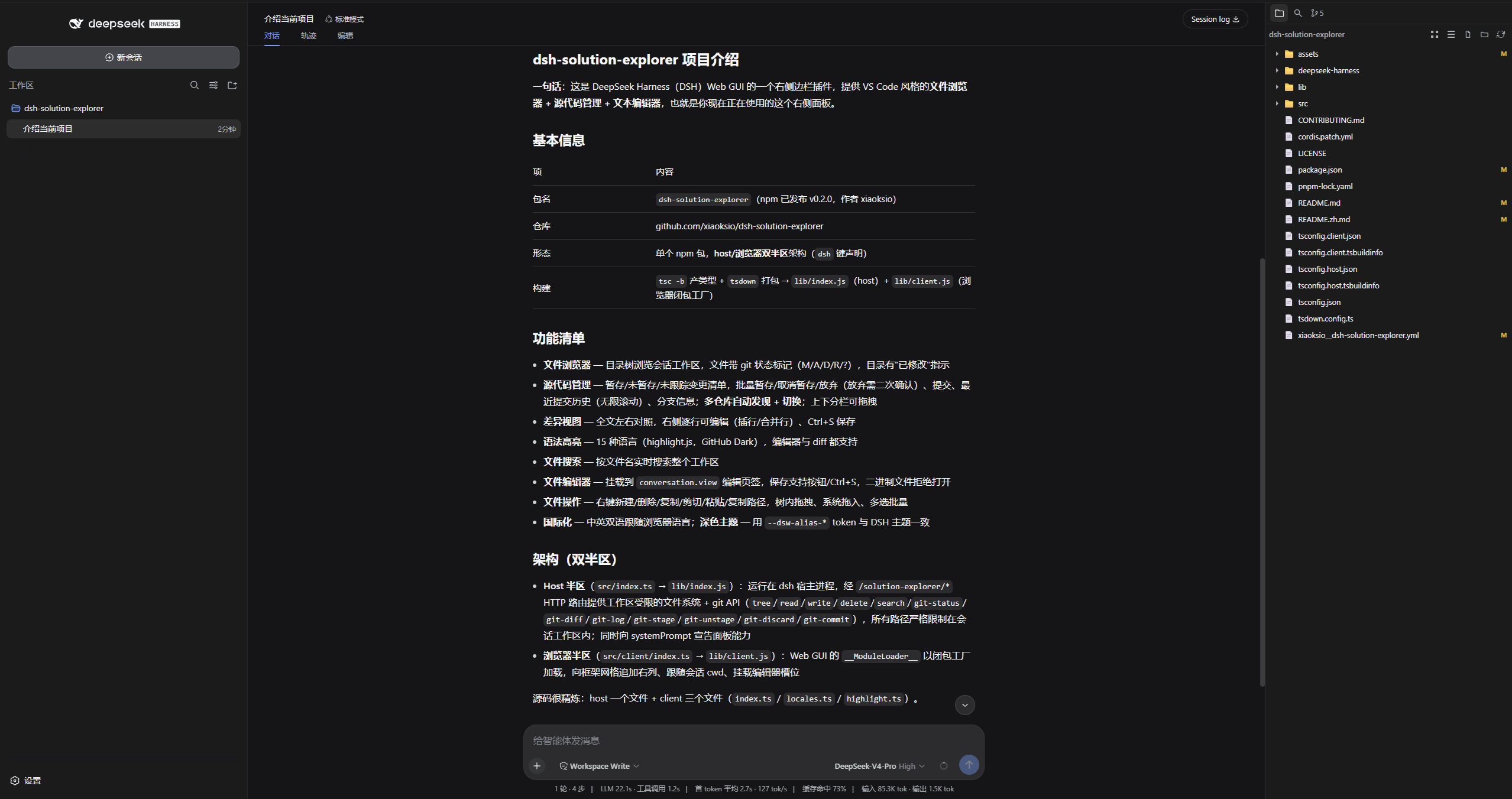
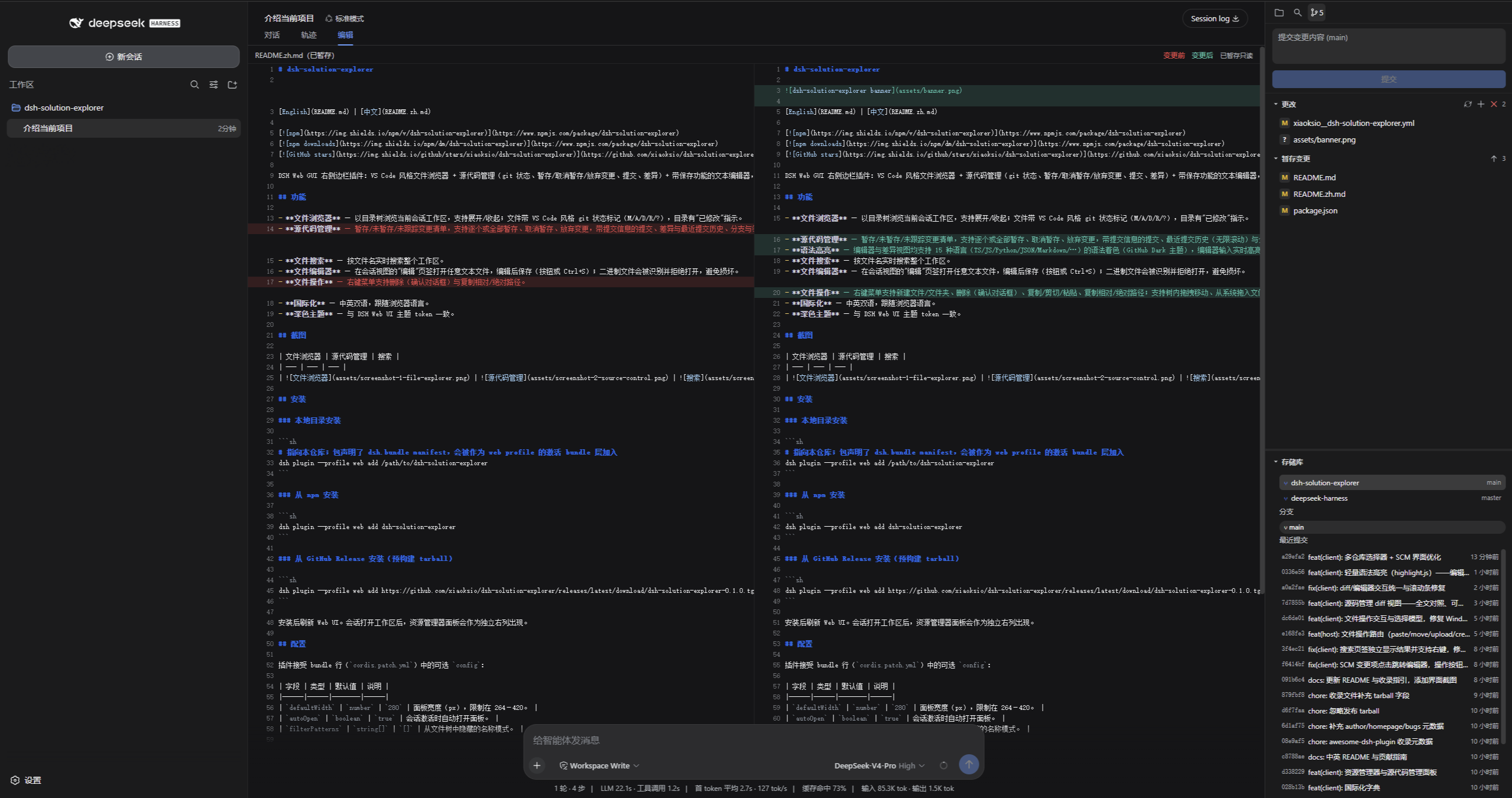
- File Explorer — browse the current session workspace as a directory tree
with expand/collapse, VS Code-style file-type icons (TS/JS/Vue/JSON/image/
archive/script and 30+ more extensions), git status markers (M/A/D/R/?), names
color-coded by status (green untracked / yellow modified / grey ignored),
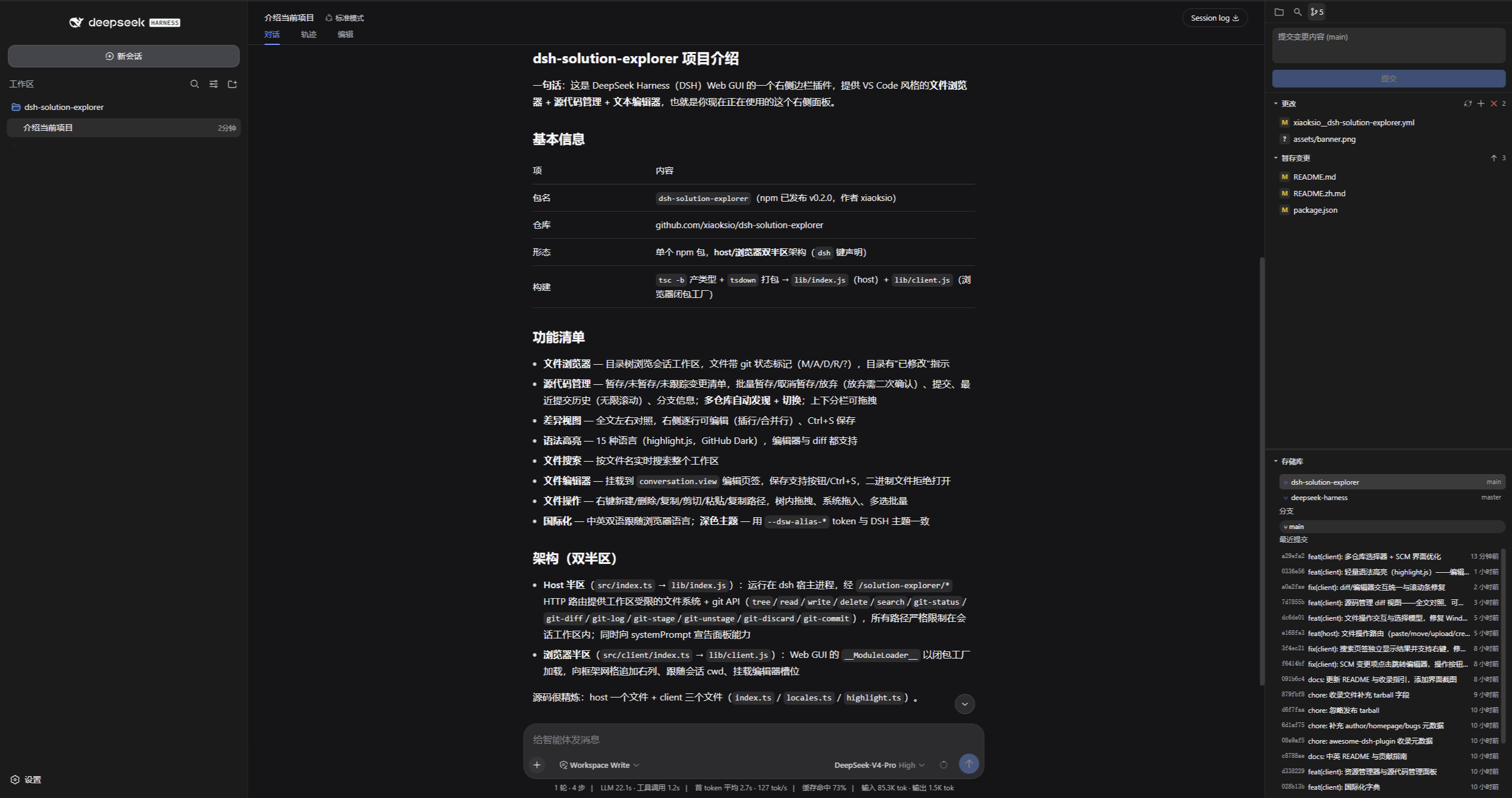
.gitignore-excluded files and folders shown grey, and directory "modified" indicators. - Source Control — staged / unstaged / untracked change lists with stage / unstage / discard (per-file or all), commit with a message, and a branch info bar. Diff view: full-file side-by-side compare with an editable right column (Enter splits lines, backspace/delete merges, NBSP placeholders), Ctrl+S to save. Commit Graph: an SVG history view with branch lanes, merge lines and per-commit details (author, date, parents, changed files) plus checkout. Sync: fetch / pull / push / sync (pull + push) with ahead/behind counts, each remote-write confirmed. Branches: switch / create / rename / delete / merge / publish. Remotes: add / remove / set URL. Git Init: initialize a repository from a plain directory. Merge changes: pull/merge conflicts (UU/AA/DD/…) are detected and listed for manual resolution. Multi-repo support: auto-discovers git repositories under the workspace and lets you switch between them; the SCM panel follows the selected repo. Split panes: drag the divider between changes and repository to resize, history fills the bottom. Bulk actions live in the section headers; discard all asks for confirmation.
- Syntax highlighting — editor and diff views colorize 15 languages (TS/JS/Python/JSON/Markdown/...) with a GitHub Dark theme; the editor re-highlights live while typing, lightweight.
- File Search — live name search across the workspace.
- File Editor — open any text file in an "Edit" tab of the conversation view, edit, and save (button or Ctrl+S); binary files are detected and refused instead of corrupted.
- File operations — context menu with new file/folder, delete (confirm dialog), copy / cut / paste, copy relative / absolute path; drag files within the tree, drag files in from the OS, multi-select bulk actions.
- i18n — English and Chinese, follows the browser language.
- Dark theme — matches the DSH Web UI tokens.
Screenshots
| File Explorer | Source Control | Diff |
|---|---|---|
 |
 |
 |
Installation
From a local checkout
# Point dsh at this checkout; the package declares a dsh.bundle manifest so it
# is added as an active bundle layer of the web profile.
dsh plugin --profile web add /path/to/dsh-solution-explorer
From npm
dsh plugin --profile web add dsh-solution-explorer
From a GitHub Release (prebuilt tarball)
dsh plugin --profile web add https://github.com/xiaoksio/dsh-solution-explorer/releases/latest/download/dsh-solution-explorer-0.2.1.tgz
After installing, reload the Web UI. The explorer panel appears as its own right column once a session with a workspace is active.
Configuration
The plugin accepts an optional config in the bundle row
(cordis.patch.yml):
| Field | Type | Default | Description |
|---|---|---|---|
defaultWidth |
number |
280 |
Panel width in px, clamped to 264–420. |
autoOpen |
boolean |
true |
Auto-open the panel when a session activates. |
filterPatterns |
string[] |
[] |
Name patterns to hide from the file tree. |
Development
pnpm install
pnpm build    # tsc declarations + tsdown bundles (lib/index.js, lib/client.js)
pnpm watch    # rebuild on change
See CONTRIBUTING.md for the submission guide.
pnpm install also runs the prepare script, so a git-based install
(dsh plugin add github:xiaoksio/dsh-solution-explorer) builds lib/ on
the target machine without manual steps.
How it works
The plugin is a single npm package with two halves, both declared in
package.json under the dsh key:
- Host half (
src/index.ts, exports.→lib/index.js): runs in the dsh host process and serves the workspace-gated filesystem and git API over HTTP routes under/solution-explorer/*(tree,read,write,delete,search,git-repos,git-status,git-diff,git-log,git-stage,git-unstage,git-discard,git-commit,paste,move,upload,create). All routes resolve paths strictly inside the session workspace root. It also announces itself in the system prompt so the agent knows what the panel can do. - Browser half (
src/client/index.ts, exports./client→lib/client.js): loaded by the Web GUI's__ModuleLoader__as a closure-factory bundle. It appends the explorer column to the frame grid ([data-dsh-frame]), follows the active session'scwd, and mounts the file editor into theconversation.viewslot.
See CONTRIBUTING.md for development conventions and how to submit the plugin to awesome-dsh-plugin.
License
MIT
相关推荐Related
-
 nexu-io/open-design
🎨 Best DeepSeek Harness Design Plugin. The open-source Claude Design alternative. 🖥️ Local-first desktop app. 🖼️ Your…
nexu-io/open-design
🎨 Best DeepSeek Harness Design Plugin. The open-source Claude Design alternative. 🖥️ Local-first desktop app. 🖼️ Your…
-
 ruvnet/ruflo
🌊 The original agent meta-harness. Deploy intelligent multi-player swarms, coordinate autonomous workflows, and build c…
ruvnet/ruflo
🌊 The original agent meta-harness. Deploy intelligent multi-player swarms, coordinate autonomous workflows, and build c…
-
 amruthpillai/reactive-resume
A one-of-a-kind resume builder that keeps your privacy in mind. Completely secure, customizable, portable, open-source a…
amruthpillai/reactive-resume
A one-of-a-kind resume builder that keeps your privacy in mind. Completely secure, customizable, portable, open-source a…
-
 esengine/DeepSeek-Reasonix
DeepSeek-native AI coding agent for your terminal. Engineered around prefix-cache stability — leave it running.
esengine/DeepSeek-Reasonix
DeepSeek-native AI coding agent for your terminal. Engineered around prefix-cache stability — leave it running.
-
 volcengine/OpenViking
Self-evolving Context Database for AI Agents. Unify Agent Memory, Knowledge RAG and Skills.
volcengine/OpenViking
Self-evolving Context Database for AI Agents. Unify Agent Memory, Knowledge RAG and Skills.
-
 Molunerfinn/PicGo
:rocket: The Ultimate Image Uploader for Efficient Creators. Supports Obsidian, Typora, VS Code etc. and 60+ image hosti…
Molunerfinn/PicGo
:rocket: The Ultimate Image Uploader for Efficient Creators. Supports Obsidian, Typora, VS Code etc. and 60+ image hosti…
-
 titanwings/colleague-skill
将冰冷的离别化为温暖的 Skill,欢迎加入数字生命1.0!Transforming cold farewells into warm skills? It's giving rebirth era. Welcome to Digital …
titanwings/colleague-skill
将冰冷的离别化为温暖的 Skill,欢迎加入数字生命1.0!Transforming cold farewells into warm skills? It's giving rebirth era. Welcome to Digital …
-
 nocobase/nocobase
NocoBase is an open-source AI + no-code platform for building business systems fast. Instead of generating everything fr…
nocobase/nocobase
NocoBase is an open-source AI + no-code platform for building business systems fast. Instead of generating everything fr…