xiaweiliang060035/dsh-opencode-go-usage
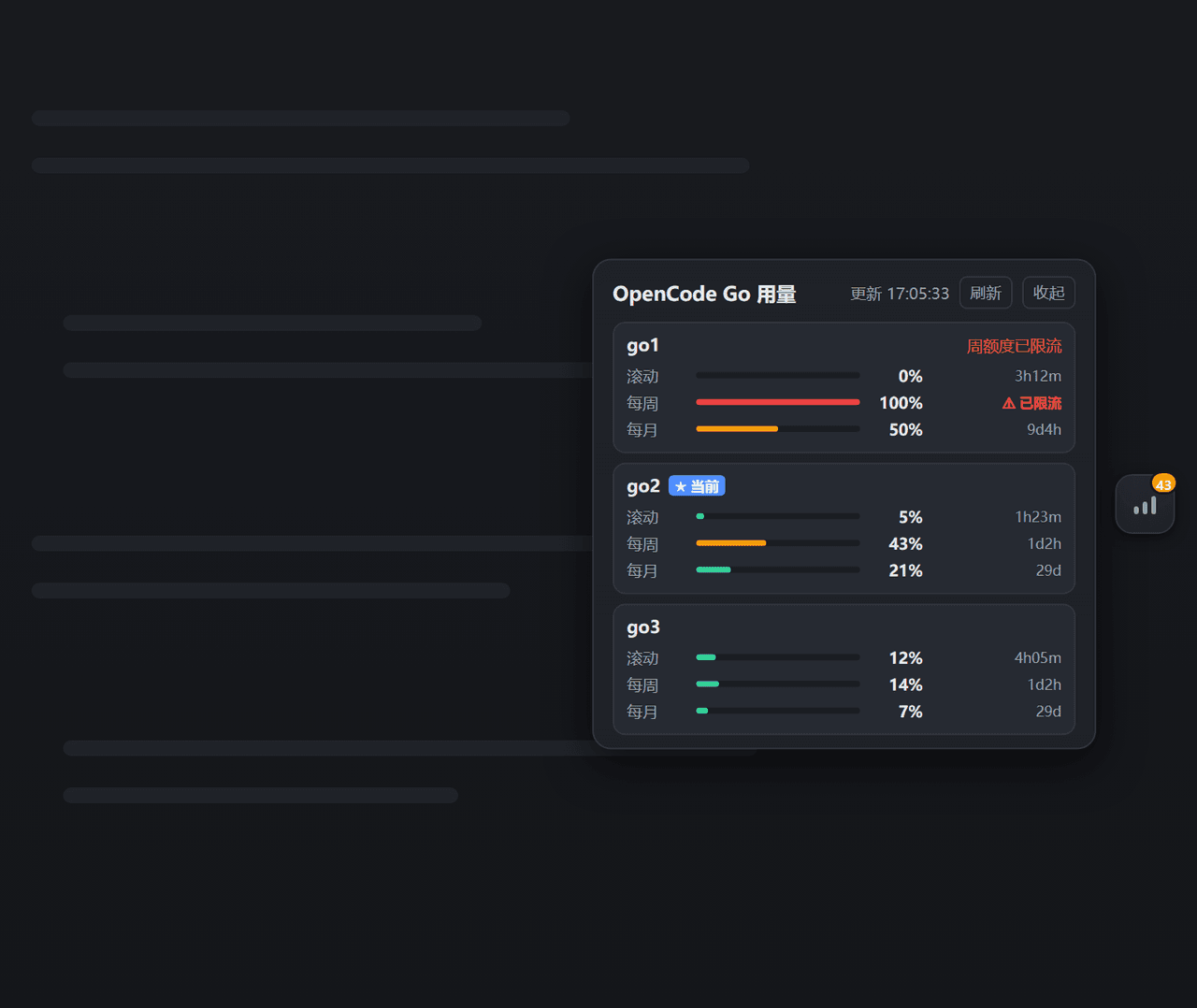
DSH(DeepSeek Harness)网页插件——悬浮小部件,实时显示每个API密钥的OpenCode Go订阅使用量(滚动/周/月)。悬浮实时展示opencode-go各密钥用量。
项目介绍Project Overview
一个 DSH 插件,在 Web GUI 侧边栏以悬浮小部件实时展示 OpenCode Go 订阅用量:自动发现凭证池中所有密钥,轮询官方接口获取滚动/周/月配额并以进度条和颜色(绿/橙/红脉冲)显示剩余额度与重置倒计时,每 60 秒刷新。适用于需要同时监控多把 Go 密钥配额的使用者。注意:使用量接口并非 OpenCode 公开文档的一部分,由社区验证,解析采用防御式写法。
A DSH plugin that displays OpenCode Go subscription usage in real time as a floating widget in the web GUI. It auto-discovers every key in the credential pool, polls the official usage endpoint every 60 seconds, and shows rolling, weekly, and monthly quotas as color-coded progress bars with reset countdowns. Use it when managing multiple Go keys and tracking quota limits. The usage endpoint is not part of OpenCode's public docs, was verified by the community, and parsing is defensive.
请帮我了解并安装插件:【dsh-opencode-go-usage】【https://github.com/xiaweiliang060035/dsh-opencode-go-usage】把上面这条消息直接发给当前会话里的 DSH,让它帮你了解并安装。安装命令不一定准确,发给 DSH 更稳。Send this message to DSH in your current session. CLI install commands may not be accurate across systems — DSH will figure it out for you.
或使用命令行安装(适合开发者)Or use CLI install (for developers)
命令行安装CLI Install
dsh plugin --profile web add github:xiaweiliang060035/dsh-opencode-go-usage把 xiaweiliang060035/dsh-opencode-go-usage 加入你的 DSH 配置(web profile)即可启用。
READMEREADME
dsh-opencode-go-usage
简体中文 · English
A DeepSeek Harness web-GUI plugin that shows your OpenCode Go subscription usage in real time — a floating widget that tracks rolling / weekly / monthly quota for every API key in your pool, with color-coded progress bars and reset countdowns.
Features
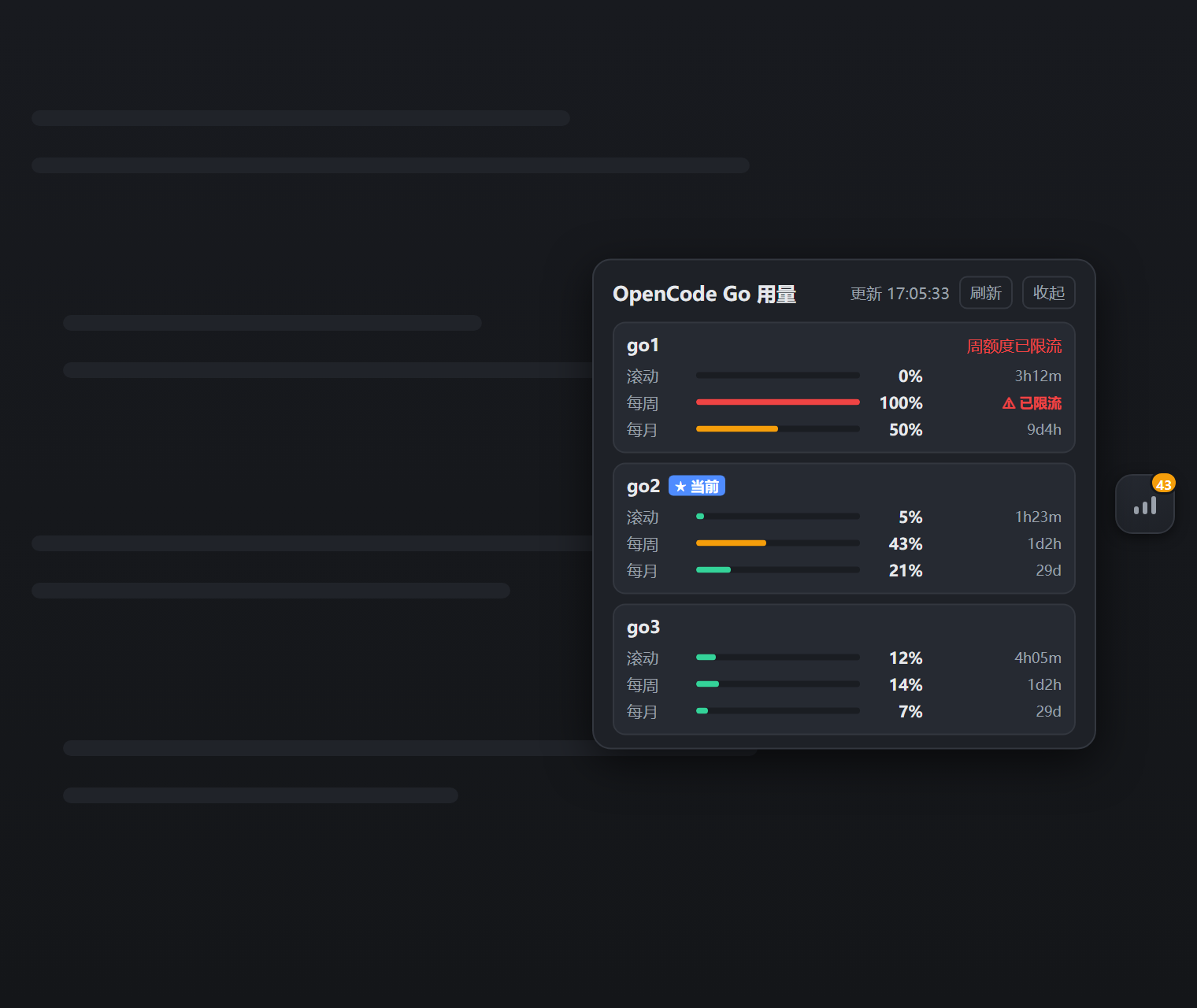
- Floating widget — a compact button pinned to the right edge of the page. Its badge shows the worst window across all keys at a glance; the color (green / orange / pulsing red) tells you whether any key is close to its quota limit.
- Expandable panel — click the button to open a panel with one card per key (the currently active key is marked with a ★), each showing rolling / weekly / monthly usage as progress bars, percentages, and time-until-reset. Rate-limited windows are flagged with ⚠.
- Real-time — the Host polls the official usage endpoint every 60 seconds (configurable); the panel refreshes automatically and has a manual refresh button.
- Auto key-pool discovery — reads your key pool from
$DSH_HOME/.credentials.yaml(anyOPENCODE_GO_KEY_<name>entries), so there is no hardcoded key count or name. Falls back to the single current key (OPENCODE_GO_API_KEY) when no pool exists. - i18n — Chinese / English, auto-selected from your browser language.
- Theme-aware — uses DSH theme tokens; works in both light and dark themes.
Screenshot
How it works
Host half (plain Node ESM):
- Discovers key-pool names — from
config.keyNamesif provided, otherwise by scanning.credentials.yamlforOPENCODE_GO_KEY_*entries. - Resolves each key value through the
credentialsservice (environment → credentials file →.envlayering). - Calls the official usage endpoint with
Authorization: Bearer <key>:
GET https://opencode.ai/zen/go/v1/usage
Authorization: Bearer <API_KEY>
Response example:
{
  "usage": {
    "rolling": { "status": "ok", "percent": 9,  "resetsAt": "2026-08-14T07:20:04.810Z" },
    "weekly":  { "status": "ok", "percent": 12, "resetsAt": "2026-08-17T00:00:00.810Z" },
    "monthly": { "status": "ok", "percent": 6,  "resetsAt": "2026-09-09T00:41:03.810Z" }
  }
}
The usage endpoint is not yet part of OpenCode's public documentation; it was discovered and verified via farion1231/cc-switch#6433. Parsing is defensive.
Client half (browser bundle) registers in the shell.overlay slot and polls the Host's web-server route /plugins/dsh-opencode-go-usage/snapshot. Keys never leave the Host.
Requirements
- Node.js + a DeepSeek Harness web profile (the default
dsh webprofile mountswebServer,credentials, andtimer, which this plugin needs).
Install
Option A — local package via file: dependency (recommended)
- Copy the package directory anywhere on disk, e.g.
D:\tools\dsh-opencode-go-usage. - In your profile's
package.json(e.g.$DSH_HOME/profiles/web/package.json), add todependencies:
"@xiaweiliang060035/dsh-opencode-go-usage": "file:D:/tools/dsh-opencode-go-usage"
- Add the package to the profile's bundle list (
dsh.profile.bundles):
"dsh": {
  "profile": {
    "bundles": [ "...existing...", "dsh-opencode-go-usage" ]
  }
}
- Install and restart:
cd $DSH_HOME/profiles/web
pnpm install
# restart dsh web
The bundle carries its own cordis.patch.yml (declared via dsh.bundle.patch), so the plugin row is composed automatically — no manual patch edit needed.
Option B — npm package
The package is published on npm as @xiaweiliang060035/dsh-opencode-go-usage:
cd $DSH_HOME/profiles/web
pnpm add @xiaweiliang060035/dsh-opencode-go-usage
Then add "@xiaweiliang060035/dsh-opencode-go-usage" to the profile's dsh.profile.bundles list and restart dsh web.
The plugin registers both a Host half (fetch + webServer route) and a Client half (browser bundle). A plain copy into
plugins/with a relative patch entry loads the Host half only — the floating widget needs the bundle mechanism above.
Configuration
Tunables go in the plugin row's config (override it in your profile's cordis.patch.yml):
- id: opencode-go-usage
  config:
    keyNames: [go1, go2]      # optional: explicit key-pool names
    baseUrl: https://opencode.ai/zen/go/v1/usage   # optional
    refreshMs: 60000          # optional: poll interval (ms)
    timeoutMs: 15000          # optional: fetch timeout (ms)
    dshHome: ~                # optional: override the DSH home directory
    hideCordisPanel: true     # optional: hide the built-in "Cordis plugins" sidebar entry
| Key | Default | Description |
|---|---|---|
keyNames |
auto-discovered | Explicit key-pool names (OPENCODE_GO_KEY_<name> in .credentials.yaml) |
baseUrl |
https://opencode.ai/zen/go/v1/usage |
The usage endpoint |
refreshMs |
60000 |
Host poll interval in milliseconds |
timeoutMs |
15000 |
Fetch timeout in milliseconds |
dshHome |
resolveDshHome() |
DSH home directory containing .credentials.yaml |
hideCordisPanel |
false |
Hide the built-in "Cordis plugins" sidebar entry (dynamic-plugin admin panel) |
Key pool format
Keys are read from $DSH_HOME/.credentials.yaml (the standard DSH credentials file). A pool looks like:
OPENCODE_GO_API_KEY: sk-opencode-…      # the currently active key
OPENCODE_GO_KEY_ACTIVE: go2             # which pool entry is active
OPENCODE_GO_KEY_go1: sk-opencode-…
OPENCODE_GO_KEY_go2: sk-opencode-…
OPENCODE_GO_KEY_go3: sk-opencode-…
Any OPENCODE_GO_KEY_<name> entry is discovered automatically — the number and names of keys are arbitrary. If you have only one key (no pool), just set OPENCODE_GO_API_KEY; the widget shows that single key.
Troubleshooting
| Symptom | Likely cause / fix |
|---|---|
Widget shows ! |
Snapshot fetch failed — confirm dsh web is running and /plugins/dsh-opencode-go-usage/snapshot responds |
Card shows Invalid key (401) |
That key is invalid or expired |
Card shows Network error |
Host cannot reach opencode.ai (proxy / offline / timeout) |
| Panel says "no keys configured" | .credentials.yaml has neither OPENCODE_GO_KEY_* nor OPENCODE_GO_API_KEY |
⚠ rate-limited |
That window's quota is exhausted server-side |
License
MIT
相关推荐Related
-
 ruvnet/ruflo
🌊 The original agent meta-harness. Deploy intelligent multi-player swarms, coordinate autonomous workflows, and build c…
ruvnet/ruflo
🌊 The original agent meta-harness. Deploy intelligent multi-player swarms, coordinate autonomous workflows, and build c…
-
 amruthpillai/reactive-resume
A one-of-a-kind resume builder that keeps your privacy in mind. Completely secure, customizable, portable, open-source a…
amruthpillai/reactive-resume
A one-of-a-kind resume builder that keeps your privacy in mind. Completely secure, customizable, portable, open-source a…
-
 volcengine/OpenViking
Self-evolving Context Database for AI Agents. Unify Agent Memory, Knowledge RAG and Skills.
volcengine/OpenViking
Self-evolving Context Database for AI Agents. Unify Agent Memory, Knowledge RAG and Skills.
-
 Molunerfinn/PicGo
:rocket: The Ultimate Image Uploader for Efficient Creators. Supports Obsidian, Typora, VS Code etc. and 60+ image hosti…
Molunerfinn/PicGo
:rocket: The Ultimate Image Uploader for Efficient Creators. Supports Obsidian, Typora, VS Code etc. and 60+ image hosti…
-
 titanwings/colleague-skill
将冰冷的离别化为温暖的 Skill,欢迎加入数字生命1.0!Transforming cold farewells into warm skills? It's giving rebirth era. Welcome to Digital …
titanwings/colleague-skill
将冰冷的离别化为温暖的 Skill,欢迎加入数字生命1.0!Transforming cold farewells into warm skills? It's giving rebirth era. Welcome to Digital …
-
 nocobase/nocobase
NocoBase is an open-source AI + no-code platform for building business systems fast. Instead of generating everything fr…
nocobase/nocobase
NocoBase is an open-source AI + no-code platform for building business systems fast. Instead of generating everything fr…
-
 Tencent/WeKnora
Open-source LLM knowledge platform: turn raw documents into a queryable RAG, an autonomous reasoning agent, and a self-m…
Tencent/WeKnora
Open-source LLM knowledge platform: turn raw documents into a queryable RAG, an autonomous reasoning agent, and a self-m…
-
 anywhere-labs/deepseek-harness-desktop
为 DeepSeek Harness (DSH) 插件生态打造的现代化桌面端解决方案。万物皆「插件」,桌面本身也是「插件」。
anywhere-labs/deepseek-harness-desktop
为 DeepSeek Harness (DSH) 插件生态打造的现代化桌面端解决方案。万物皆「插件」,桌面本身也是「插件」。