xmuwenxiang/dsh-web-chat
A "Codex ChatGPT mode" plugin for DeepSeek Harness: drive chat.deepseek.com with a real browser, chat with deepseek-chat (and deepseek-reasoner) using your DeepSeek web session — no API billing. Transfer a conversation into a harness session as development context (distilled into an executable task brief), import stored web conversations as markdown context, or let the harness agent keep chatting through the same web session.
catalog 简介 / catalog descriptioncatalog description:Deepseek Harness插件,可以直接在Deepseek Harness中使用网页版deepseek进行聊天,并将聊天过程直接迁移到Deepseek Harness进一步进行开发。主要目的是节省前期方案讨论时的token
项目介绍Project Overview
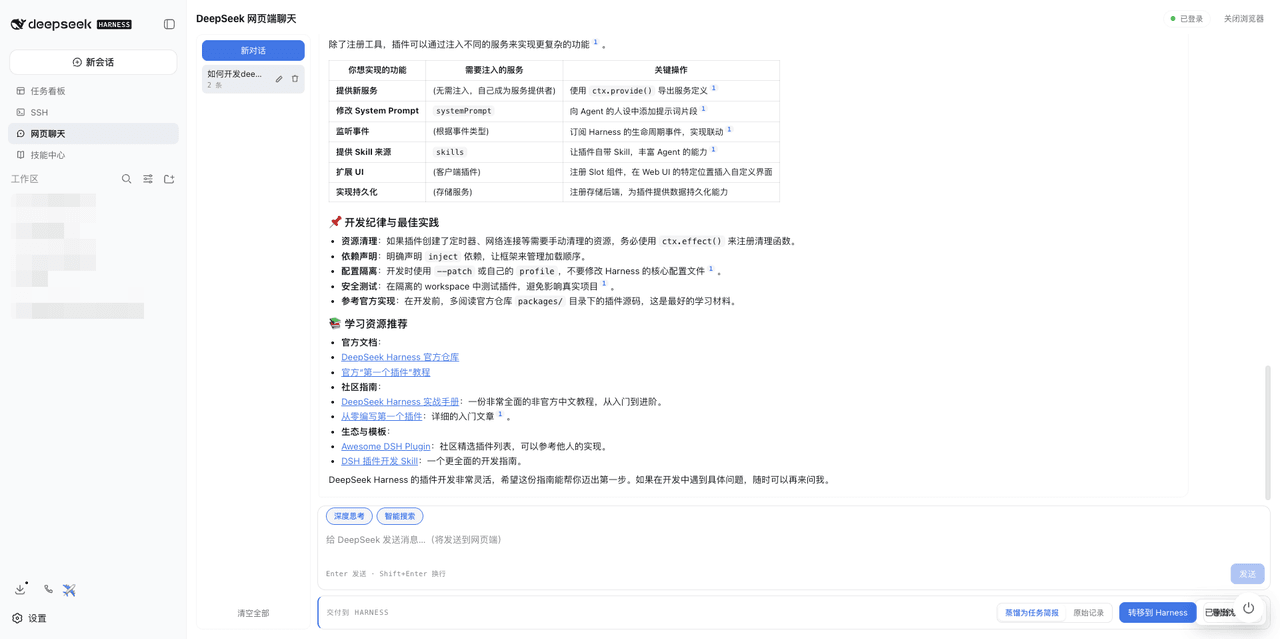
dsh-webchat 是 DeepSeek Harness 的 Web 聊天插件,通过真实浏览器驱动 chat.deepseek.com,复用你的网页登录会话与 deepseek-chat 和 deepseek-reasoner 对话,免 API 计费。核心能力包括流式回复、Deep Think (R1) 与 Web Search 切换、将对话蒸馏为任务简报转入 harness 会话继续开发、导出历史对话为 markdown 上下文,以及 webchat_status、webchat_send、webchat_import、webchat_transfer 等代理工具。适用于需要复用网页会话、免计费调用或跨 harness 继续开发的场景。注意:网页端受 DeepSeek 风控影响,页面变更或风控可能直接报错;首次使用需图形会话完成登录。
dsh-webchat is a DeepSeek Harness plugin that drives chat.deepseek.com through a real browser, reusing your web login to chat with deepseek-chat and deepseek-reasoner without API billing. Core capabilities include streaming replies, Deep Think (R1) and Web Search toggles, distilling a conversation into a task brief opened as a new harness session, exporting stored web conversations as markdown context, and agent tools webchat_status, webchat_send, webchat_import, and webchat_transfer. Use it when you need to reuse a web session, avoid API costs, or continue development in a harness session. Caveat: subject to DeepSeek's web risk controls, so page changes may surface errors; a graphical session is required for the one-time login.
请帮我了解并安装插件:【dsh-web-chat】【https://github.com/xmuwenxiang/dsh-web-chat】把上面这条消息直接发给当前会话里的 DSH,让它帮你了解并安装。安装命令不一定准确,发给 DSH 更稳。Send this message to DSH in your current session. CLI install commands may not be accurate across systems — DSH will figure it out for you.
或使用命令行安装(适合开发者)Or use CLI install (for developers)
命令行安装CLI Install
dsh plugin --profile web add dsh-webchat把 xmuwenxiang/dsh-web-chat 加入你的 DSH 配置(web profile)即可启用。
READMEREADME
dsh-webchat
A "Codex ChatGPT mode" plugin for DeepSeek Harness: drive chat.deepseek.com with a real browser, chat with deepseek-chat (and deepseek-reasoner) using your DeepSeek web session — no API billing. Transfer a conversation into a harness session as development context (distilled into an executable task brief), import stored web conversations as markdown context, or let the harness agent keep chatting through the same web session.
Features
- Web chat over your DeepSeek web login, with streaming replies and "Deep Think (R1)" / "Web Search" toggles.
- Transfer to Harness: distill the current conversation into a task brief and open it as a new harness session to continue development; pick a target workspace (or leave it ungrouped).
- Import as context: export a stored web conversation to markdown.
- Agent tools:
webchat_status,webchat_send,webchat_import,webchat_transfer— the harness agent can chat via the web, inspect transcripts, list workspaces, and transfer a conversation into a new session (optionally into a target workspace). - Hands-free login: first use opens a visible browser window for login, which auto-closes afterward; chat then runs headless.
Install
From npm (once published)
dsh plugin --profile web add dsh-webchat
From GitHub
dsh plugin --profile web add github:xmuwenxiang/dsh-web-chat
lib/is committed, so git installs need no build step.
First use
- Open the "网页聊天" (Web Chat) sidebar entry in the Web GUI.
- Click "打开登录窗口" and sign in to DeepSeek in the browser window that appears.
- The window auto-closes after login; you can then chat and transfer normally.
Config
Settings expose: browserChannel (default auto), browserExecutablePath, browserProxy, browserHeadless (chat headless; default true — the login window is always visible and auto-closes), replyTimeoutMs, and transferDistill / transferProvider / transferModel (distillation model for transfer).
Requirements
- Node.js >= 22
- Google Chrome or Microsoft Edge installed
- A graphical session for the one-time login window
Limitations
- The web app is subject to DeepSeek's own risk controls; failures or page changes return errors rather than crashing.
- Session credentials live in a local private profile directory.
Development
pnpm install
pnpm typecheck   # type-check src/ and test/
pnpm test        # run unit tests (Node built-in test runner)
pnpm build       # emit lib/ (host half) and lib/client.js (browser bundle)
lib/ is committed, so git installs need no build step.
License
相关推荐Related
-
 ruvnet/ruflo
🌊 The original agent meta-harness. Deploy intelligent multi-player swarms, coordinate autonomous workflows, and build c…
ruvnet/ruflo
🌊 The original agent meta-harness. Deploy intelligent multi-player swarms, coordinate autonomous workflows, and build c…
-
 amruthpillai/reactive-resume
A one-of-a-kind resume builder that keeps your privacy in mind. Completely secure, customizable, portable, open-source a…
amruthpillai/reactive-resume
A one-of-a-kind resume builder that keeps your privacy in mind. Completely secure, customizable, portable, open-source a…
-
 volcengine/OpenViking
Self-evolving Context Database for AI Agents. Unify Agent Memory, Knowledge RAG and Skills.
volcengine/OpenViking
Self-evolving Context Database for AI Agents. Unify Agent Memory, Knowledge RAG and Skills.
-
 Molunerfinn/PicGo
:rocket: The Ultimate Image Uploader for Efficient Creators. Supports Obsidian, Typora, VS Code etc. and 60+ image hosti…
Molunerfinn/PicGo
:rocket: The Ultimate Image Uploader for Efficient Creators. Supports Obsidian, Typora, VS Code etc. and 60+ image hosti…
-
 titanwings/colleague-skill
将冰冷的离别化为温暖的 Skill,欢迎加入数字生命1.0!Transforming cold farewells into warm skills? It's giving rebirth era. Welcome to Digital …
titanwings/colleague-skill
将冰冷的离别化为温暖的 Skill,欢迎加入数字生命1.0!Transforming cold farewells into warm skills? It's giving rebirth era. Welcome to Digital …
-
 nocobase/nocobase
NocoBase is an open-source AI + no-code platform for building business systems fast. Instead of generating everything fr…
nocobase/nocobase
NocoBase is an open-source AI + no-code platform for building business systems fast. Instead of generating everything fr…
-
 Tencent/WeKnora
Open-source LLM knowledge platform: turn raw documents into a queryable RAG, an autonomous reasoning agent, and a self-m…
Tencent/WeKnora
Open-source LLM knowledge platform: turn raw documents into a queryable RAG, an autonomous reasoning agent, and a self-m…
- Nagi-ovo/voyager Enhancement suite for Gemini, AI Studio, Claude & ChatGPT — plus a prompt manager for any web UI, DeepSeek Harness inclu…