yangzhe1991/dsh-code-review
DSH Web 插件:一键打开独立双栏 Code Review 页面用于 git diff,支持语法高亮与行内评论
项目介绍Project Overview
dsh-code-review 是 DSH Web UI 的浏览器插件,可把对话中的 git diff 一键在新标签页打开为双栏代码审查页:旧文件在左、新文件在右,带行号、增删配色、字符级高亮、文件导航与行内评论,评论可回填到输入框。适合 diff 太长、聊天窗口不便审阅时使用。注意:它仅识别 diff 内容,不修改对话,安装后需重启 Web GUI 并刷新页面。
dsh-code-review is a browser plugin for the DSH web UI that turns git diff output in a conversation into a one-click code review page in a new tab. It provides a side-by-side old/new file view with line numbers, add/remove coloring, character-level highlights, file navigation, stats, and inline comments that can be submitted back into the composer. Use it when diffs are too large or awkward to read in chat. It only detects diff content and requires a Web GUI restart and refresh after install.
请帮我了解并安装插件:【dsh-code-review】【https://github.com/yangzhe1991/dsh-code-review】把上面这条消息直接发给当前会话里的 DSH,让它帮你了解并安装。安装命令不一定准确,发给 DSH 更稳。Send this message to DSH in your current session. CLI install commands may not be accurate across systems — DSH will figure it out for you.
或使用命令行安装(适合开发者)Or use CLI install (for developers)
命令行安装CLI Install
dsh plugin --profile web add @yangzhe1991/dsh-code-review把 yangzhe1991/dsh-code-review 加入你的 DSH 配置(web profile)即可启用。
READMEREADME
dsh-code-review




dsh-code-review is a browser plugin for the DSH (DeepSeek Harness) web UI that turns git diff output in a conversation into a one-click code review page in its own browser tab — a two-column, human-friendly view (old file on the left, new file on the right, both with line numbers), free from the chat window's width/height limits.
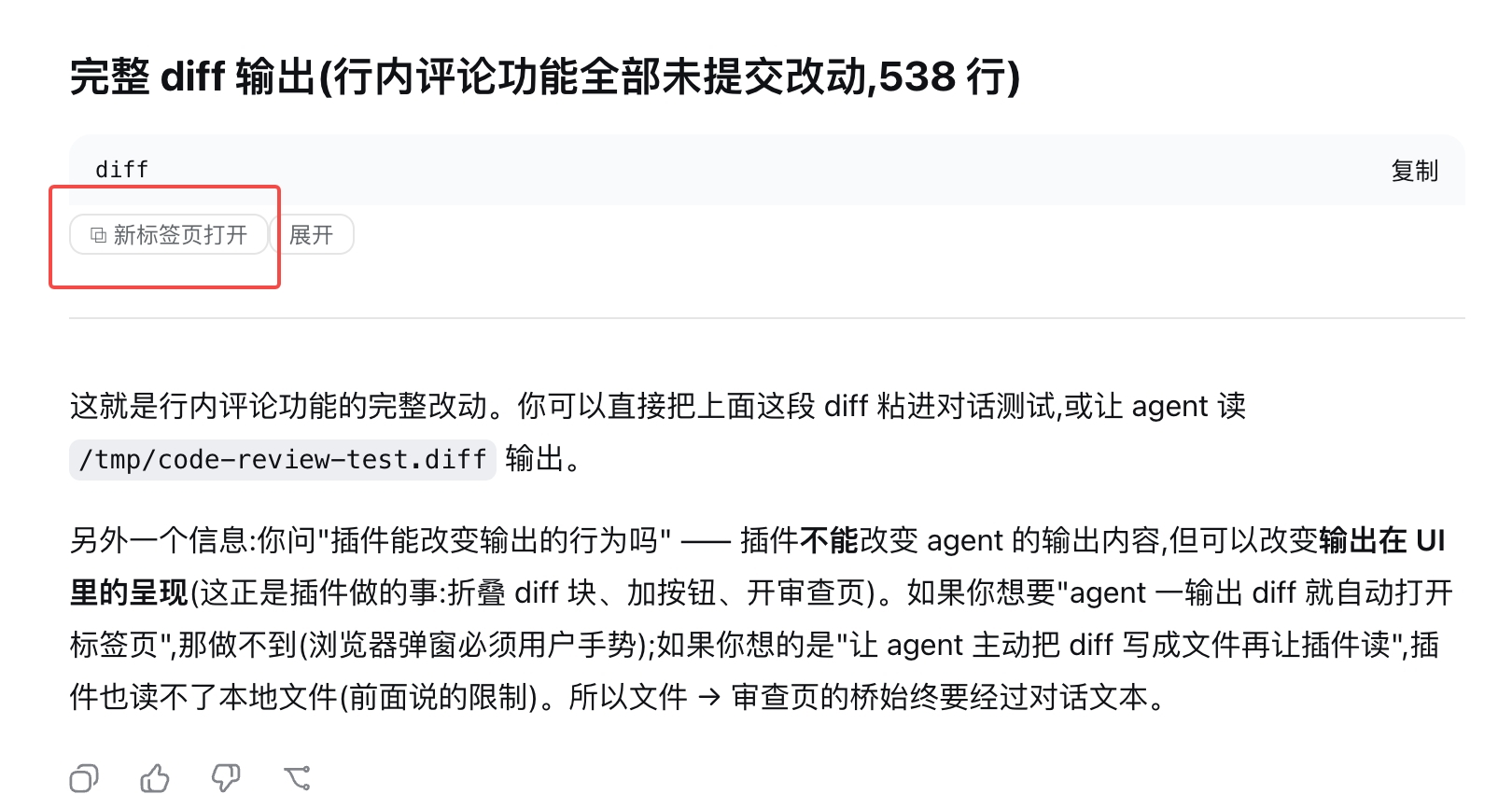
The conversation itself stays untouched: when a git diff shows up, a small "open in new tab" button appears on the block (a markdown diff code block, or the bash tool row that produced the diff — even while collapsed). One click opens the review page.
Features
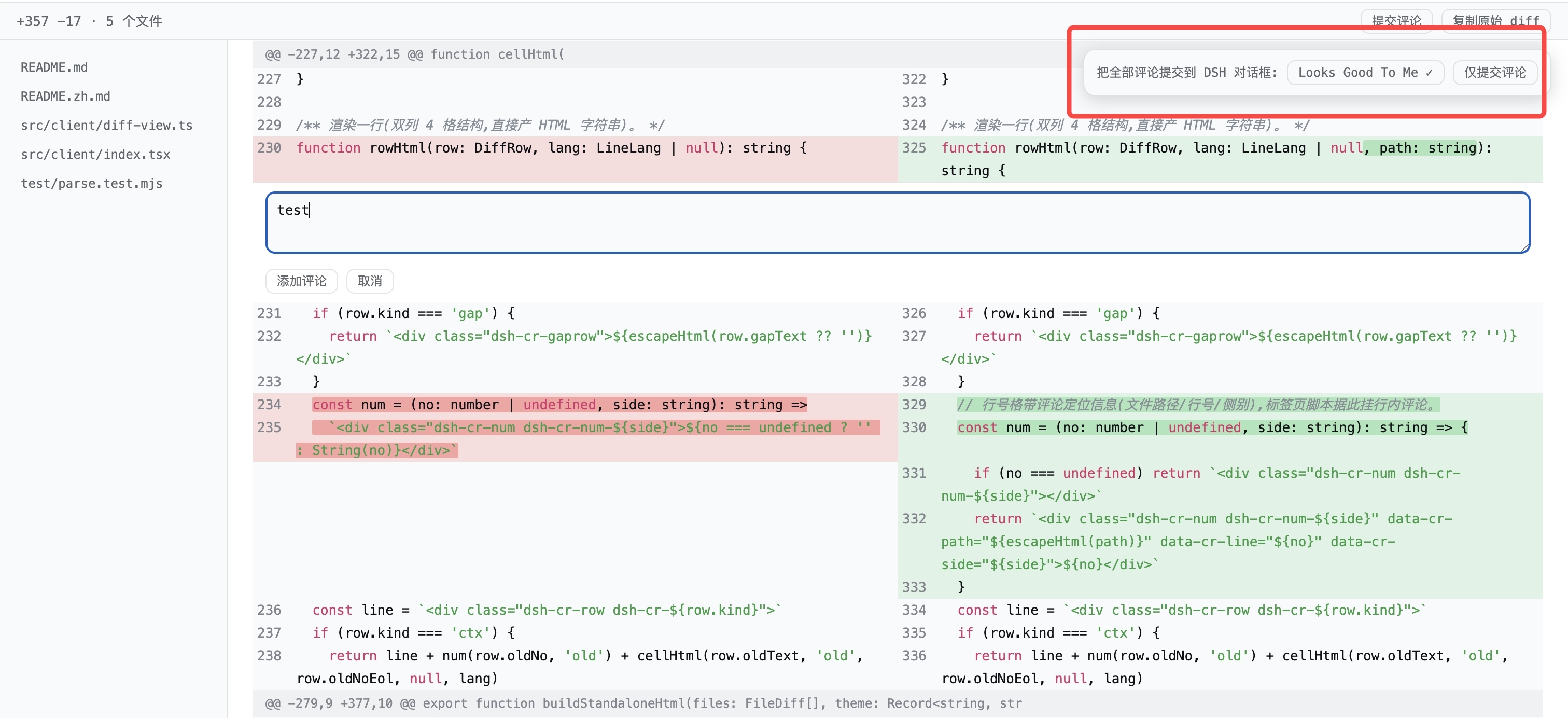
- ⬅️➡️ Two-column side-by-side view — the old file on the left, the new file on the right, each with its own line numbers, exactly like a GitHub split review.
- 🟥🟩 Add/remove coloring — deleted lines get a red background, added lines green; a consecutive delete-then-add block is paired row-by-row into a single "changed" row (the GitHub alignment).
- 🔎 Inline character-level highlight — when only a few characters change on a line, exactly those characters get a stronger red/green background (common prefix/suffix trimmed).
- 💡 Basic syntax highlighting — keywords, strings, comments, and numbers are colored using the official shiki theme variables (language inferred from the file extension; unknown languages just skip syntax coloring).
- 🧷 Hunk-aware — every
@@hunk header is kept as a separator row with its original section name; multiple files in one diff are split into per-file sections with a status badge (modified / new file / deleted / renamed / binary). - 🗂️ File navigation sidebar — every file is listed on the left; click to jump.
- 📊 Stats bar —
+N −M · F filesin a sticky top bar, with a "copy raw diff" button and a collapsible raw-text section at the bottom. - 🎨 Theme-matched — the page inherits the DSH theme colors at open time, so light/dark mode stays consistent.
- 📜 Full-page scrolling — no height caps; thousands of lines scroll naturally, and long lines wrap.
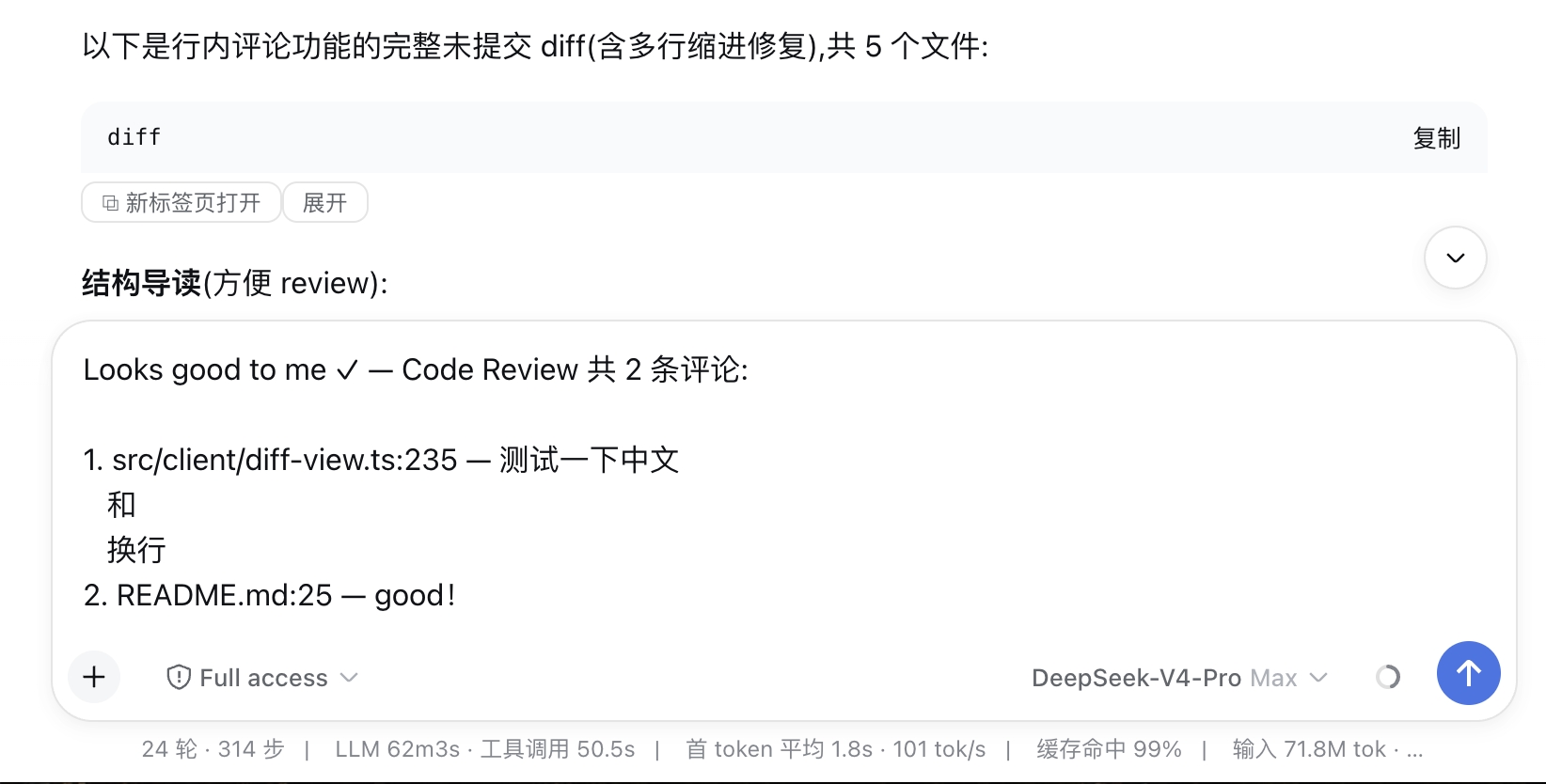
- 💬 Inline comments — hover any line number and click to add a comment right on that line (like GitHub reviews). Comments accumulate with a per-line count badge; when done, submit them all at once — as Looks Good To Me ✓ or plain comments — and they are written into the DSH composer as
file:line — commentlines, ready to send to the agent. - 🌐 Bilingual UI — follows the DSH interface language (official locale service): a Chinese UI gets Chinese buttons and review page, everything else gets English.
Screenshots
Where the button appears
- Markdown code blocks in assistant messages — a
```diff/```patchfence, or any code block whose content looks like a git diff (e.g. pasted inside atextfence). The block is collapsed by default (just the title row + buttons), with an "expand/collapse" toggle if you want to read the raw text inline. - Bash tool rows — when the agent runs
git diffin a bash tool, the button is added to the tool row (visible even while the row is collapsed; detected from the conversation data, since a collapsed row has no output in the DOM). The terminal card in the details panel gets one too.
Streaming output is handled gracefully: the button only appears once the content has been stable for ~1 second, so half-streamed diffs never produce a broken page.
Install (30 seconds)
dsh plugin --profile web add @yangzhe1991/dsh-code-review
Restart the Web GUI (Ctrl+C the dsh web process and run it again) and refresh the browser tab. (dsh plugin runs pnpm add and auto-appends the bundle to dsh.profile.bundles.)
For local development, install from a path instead — the link: spec keeps a live symlink so edits take effect after a rebuild + restart:
dsh plugin --profile web add link:/path/to/@yangzhe1991/dsh-code-review
How it works
The plugin registers a root-scope shell.overlay seat that renders nothing and watches the whole document with a MutationObserver. For every .md-code-block and [data-terminal] element it runs a stability-debounced check; candidates get a small button appended to the block's banner/header (never replacing official nodes, so React's reconciliation stays safe). Collapsed bash tool rows are handled from the data layer: a session-scope seat subscribes to the conversation snapshot and records settled bash results that look like a diff.
Clicking the button synchronously builds a self-contained HTML page (inline styles + inherited theme variables + the two-column content, all HTML-escaped) and opens it via a Blob URL — no server route needed, and the synchronous window.open inside the click gesture is not popup-blocked. The parser is a pure module (src/client/diff-parse.ts, unit-tested in test/parse.test.mjs) and supports: multi-file diffs, hunks with line-number tracking, delete/add pairing into changed rows (uneven counts degrade to single-side rows), \ No newline at end of file markers, new/deleted/renamed/binary files, bare patches without a diff --git header, and commit-message prefixes (git show output).
Development
npm install
npm run build   # esbuild → lib/index.js (host half) + lib/client.js (browser half)
node test/parse.test.mjs         # parser + standalone HTML unit tests
node test/client-smoke.test.mjs  # bundle smoke test (mock __ModuleLoader__)
Browser-side changes only need a rebuild; the host serves lib/ live, so a hard refresh (⌘+Shift+R) picks them up. Profile-level changes (package name/bundles) require restarting dsh web.
相关推荐Related
-
 nexu-io/open-design
🎨 Best DeepSeek Harness Design Plugin. The open-source Claude Design alternative. 🖥️ Local-first desktop app. 🖼️ Your…
nexu-io/open-design
🎨 Best DeepSeek Harness Design Plugin. The open-source Claude Design alternative. 🖥️ Local-first desktop app. 🖼️ Your…
-
 freestylefly/awesome-gpt-image-2
Prompt as Code | GPT-Image2 工业级提示词引擎与模板库,530+ 个案例逆向工程,20+ 套工业级模板,并提炼出Skills,持续更新中
freestylefly/awesome-gpt-image-2
Prompt as Code | GPT-Image2 工业级提示词引擎与模板库,530+ 个案例逆向工程,20+ 套工业级模板,并提炼出Skills,持续更新中
-
 anywhere-labs/dsh-desktop
为 DeepSeek Harness (DSH) 插件生态打造的现代化桌面端解决方案。万物皆「插件」,桌面本身也是「插件」。
anywhere-labs/dsh-desktop
为 DeepSeek Harness (DSH) 插件生态打造的现代化桌面端解决方案。万物皆「插件」,桌面本身也是「插件」。
- Nagi-ovo/voyager Enhancement suite for Gemini, AI Studio, Claude & ChatGPT — plus a prompt manager for any web UI, DeepSeek Harness inclu…
-
 walkinglabs/learn-harness-engineering
Harness engineering beginner tutorial, from 0 to 1
walkinglabs/learn-harness-engineering
Harness engineering beginner tutorial, from 0 to 1
-
 awesome-dsh-plugin/awesome-dsh-plugin
A curated list of plugins for DeepSeek Harness (dsh) · DeepSeek Harness 插件精选列表
awesome-dsh-plugin/awesome-dsh-plugin
A curated list of plugins for DeepSeek Harness (dsh) · DeepSeek Harness 插件精选列表
-
 MemTensor/MemOS
Self-evolving memory OS for LLM & AI Agents: ultra-persistent memory, hybrid-retrieval, and cross-task skill reuse, with…
MemTensor/MemOS
Self-evolving memory OS for LLM & AI Agents: ultra-persistent memory, hybrid-retrieval, and cross-task skill reuse, with…
- yjh051108/dsh-routing-suite dsh-routing-suite — injector + router-standard kit: install the runtime injector first, then the task-aware reasoning-mo…