Yihong89/dsh-teacher
DSH教师插件:苏格拉底式导师,引导你从Markdown问题集中找到答案,在会话中追踪知识盲点,并按间隔重复计划重新测试。
Project Overview项目介绍
This is a DSH-native plugin built exclusively for DeepSeek Harness, designed to turn your DSH agent into a Socratic teaching assistant that never answers directly. It follows evidence-based cognitive science principles that prioritize active retrieval practice and spaced repetition over passive explanation, which research shows is far more effective for learning. To install the plugin, you need a working installation of DSH rc.6 or newer and Node.js version 22.5 or higher, as it uses Node’s built-in sqlite module. You can add it by running the command dsh plugin --profile web add "github:Yihong89/dsh-teacher" then restart your DSH web profile.
To get started, you create a markdown file with your questions, storing the answer keys as hidden HTML comments that are never shown to the learner. The plugin’s format-tolerant parser automatically recognizes questions in most common markdown layouts, including numbered questions, heading-formatted questions, and multiple answer formats. If the automatic parser fails to parse your file, you can use the LLM-assisted import_curriculum tool to convert it to the required standard format. Once loaded, all questions are stored in a persistent SQLite question store, accessible across all DSH sessions.
After installation and restart of the DSH web profile, the plugin adds a custom web client interface with several interactive components. These include color-coded quiz cards, a header button that shows a badge for due gaps and opens a floating gap panel, and an LLM-free quiz popup for multiple-choice or free-text responses. All knowledge gaps are persisted across sessions in a SQLite ledger stored at $DSH_HOME/state/dsh-teacher/ledger.db, with a JSON fallback if SQLite is unavailable. You can trigger on-demand retesting of gaps at any time, and generate a summary of knowledge gaps at the end of a learning session. The plugin is released under the open source MIT license.
这是一款原生 DeepSeek Harness(DSH)插件,专门为 DSH 设计,能将 DSH 代理转化为苏格拉底式教学助手。它不会直接给出答案,而是通过提问引导学习者自行找到答案,跟踪学习过程中出现的知识缺口,并按照 FSRS-5 算法安排间隔重复复习。安装需要 DSH rc.6 以上版本和 Node.js ≥ 22.5,执行插件添加命令后重启 DSH 即可使用。
使用者需要准备一份包含问题的 markdown 文件,正确答案放在 HTML 注释中不会被学习者看到。加载问题文件后,插件会将问题存入 SQLite 存储,支持多种格式的问题自动解析,也可通过 LLM 辅助导入不规范的文件。学习者可以通过指令调出无 LLM 参与的测验弹窗,作答后插件会自动批改、记录缺口并开始引导。
插件自带 Web 客户端,重启 DSH 网页端后会新增测验卡片、缺口列表面板、测验弹窗等交互组件。知识缺口账本会跨会话持久保存在 SQLite 数据库中,支持随时发起缺口重测,还能生成学习会话的知识缺口总结报告。插件遵循 MIT 许可开源,核心逻辑已经过完整单元测试,可稳定使用。
请帮我安装这个 DSH 插件。安装前先完成【兼容性检查 + 安全性检查】,检查通过再动手。

插件:dsh-teacher(Yihong89/dsh-teacher)
仓库:https://github.com/Yihong89/dsh-teacher
本站详情页:https://www.yhbd.top/plugins/yihong89-dsh-teacher/
本站登记:类型 plugin · 归类 原生 DSH 插件 · 许可证 MIT · ⭐ 3 · 最近提交 2026-08-16 · 主语言 JavaScript

按下面顺序执行,每步先把结论告诉我,再进入下一步:

【1 兼容性检查】
① 我这边:DSH 版本、Node 版本、操作系统、当前 profile(web / desktop)。
② 读它的 README、package.json、插件 manifest,列出它要求的 DSH 版本 / Node 版本 / 操作系统 / 外部依赖 / 需要另外先装的运行时。
③ 逐条比对,结论只写「满足 / 不满足 / 未知」三种;不满足的给出可行替代方案。
④ 检查是否和我已装的插件冲突:命令名重复、skill / tool 重名、端口占用、重复注册的 MCP server。

【2 安全性检查】
① 仓库可信度:和上面「本站登记」是否一致;star / fork 数、创建时间、最近提交,是否归档或长期停更。
② 安装脚本:逐行看 package.json 的 preinstall / install / postinstall,以及 install.sh、setup.ps1 之类脚本。出现 curl|bash、下载后直接执行、混淆代码、访问与插件功能无关的域名,立刻停下来告诉我,不要继续装。
③ 依赖:列出新增依赖,标出无人维护、或与知名包拼写近似的可疑包(typosquatting)。
④ 权限与副作用:它会读写哪些目录、访问哪些域名、需要哪些 DSH 权限(filesystem / network / shell / clipboard 等),以及怎么卸载和回滚。
⑤ 如果它要求 sudo / 管理员权限,或权限明显超出功能所需,先停下来问我。

【3 安装】
上面两步没有「不满足」和「高危项」时才执行;用官方推荐方式安装,不要自行提权。

【4 汇报】
用表格输出:检查项 / 结论 / 依据 / 是否需要我决策。拿不准的一律写「未知」并说明要我怎么确认——不要猜,也不要替我决定。
Send this message to DSH in your current session: it verifies compatibility and security first (answering met / not met / unknown item by item) and only installs once everything checks out — it will stop and ask you if it finds a high-risk item. The box scrolls; the copy is the full prompt. CLI install commands may not be accurate across systems, so DSH is the safer route.把上面这条消息直接发给当前会话里的 DSH:它会先核对兼容性与安全性(逐条给「满足 / 不满足 / 未知」),确认没问题再安装,有高危项会停下来问你。框内可滚动,复制到的是完整提示词;安装命令不一定准确,发给 DSH 更稳。
- Only 3 stars - very few users, little community feedback星标只有 3,几乎没人在用,遇到问题缺少社区反馈
DSH walks through these 9 checksDSH 会逐条核对这 9 项
Compatibility兼容性
- DSH, Node, OS and profile requirementsDSH 版本 / Node 版本 / 操作系统 / profile 是否满足要求
- External dependencies and runtimes (Electron / Python / Docker, ...)外部依赖与运行时(Electron / Python / Docker 等)是否齐备
- Conflicts with installed plugins: command names, skill / tool names, ports, duplicate MCP registration与已装插件是否冲突:命令名、skill / tool 重名、端口占用、重复 MCP 注册
Security安全性
- Repo matches the facts registered here; archived or abandoned?仓库是否与页面登记一致,是否归档或长期停更
- Safety of preinstall / install / postinstall and install.sh / setup.ps1preinstall / install / postinstall 与 install.sh、setup.ps1 是否安全
- curl|bash, download-then-execute, obfuscation, unrelated domains → stop immediatelycurl|bash、下载即执行、混淆代码、无关域名 → 立刻停止
- Typosquatting or unmaintained packages among the new dependencies新增依赖里有没有 typosquatting 或无人维护的包
- Requested permissions vs. what the feature actually needs申请了哪些权限、是否超出功能所需(filesystem / network / shell / clipboard)
- Any sudo / admin requirement, plus uninstall and rollback是否要求 sudo / 管理员权限,以及卸载与回滚方式
Anything uncertain must be marked unknown with a note on how to confirm it. This site's signal screen is a static snapshot, not a security audit.拿不准的必须标「未知」并说明要我怎么确认。本站的信号筛查是静态快照,不能替代安全审计。
Or use CLI install (for developers)或使用命令行安装(适合开发者)
CLI Install命令行安装
dsh plugin --profile web add "github:Yihong89/dsh-teacher"把 Yihong89/dsh-teacher 加入你的 DSH 配置(web profile)即可启用。
READMEREADME
dsh-teacher 🧑🏫
A DeepSeek Harness plugin that turns the agent into a teacher — never answers, always asks.
Give it a markdown file of questions. It leads you to the answers with the Socratic method, keeps a quiet ledger of the gaps it notices in your reasoning, and retests those gaps on-demand on a spaced-repetition schedule.
The loop
questions.md ──▶  /teach questions.md
                      │  LLM parse / tolerant parser
                      ▼
        SQLite question store (courses + questions + quiz runs)
                      │  /quiz → 📝 LLM-free quiz popup (MCQ / free-text)
                      ▼
            answers ──▶ POST /dsh-teacher/quiz/submit (run stored)
                      │  "Quiz finished (run N)" → LLM analysis
                      ▼
            grade each answer (vs hidden keys) ──▶ gaps → Socratic walk
                      │  gap ledger (persists across sessions, SQLite)
                      │  you: "/retest" (on-demand, anytime)
                      ▼
            "Explain rebase to me."  ──▶  graded, rescheduled (FSRS-5)
Status
v0.3.0 — core + Web client + SQLite question store + LLM-free quiz popup; tests passing (83/83).
| Milestone | Status |
|---|---|
| M0 Scaffold (bundle patch, plugin row, zero-build JS) | ✅ |
| M1 Core Socratic loop (curriculum parser, policy section, 5 tools) | ✅ |
| M2 Gap ledger + persistence (SQLite + JSON fallback, session events) | ✅ |
| M3 FSRS-5 spaced retest (official test vector pinned) | ✅ |
| M4 Web client (quiz cards, gaps button + panel, gap projection) | ✅ |
| M5 Publish (dsh-plugin topic ✓, awesome lists, live e2e) | ◐ |
| M6 SQLite question store (courses/questions/quiz runs) | ✅ |
M7 LLM-free quiz popup (MCQ + free-text, POST /dsh-teacher/quiz/submit) |
✅ |
M8 Post-quiz LLM analysis + Socratic walk (analyze_quiz) |
✅ |
Design decisions are in docs/PLAN.md (§10 = the v0.3 redesign).
Web client
Once the plugin is installed and the web profile restarted, the browser bundle
(lib/client.js, registered via dsh.client) adds:
- Quiz cards — custom
tool.call.toolviewcards fornext_question,grade_answer,note_gap,hint, andretest(question prompt, verdict color-coded by outcome, gap chips by kind). - 🧑🏫 gaps button — in the session header action row, shows a due-count badge and opens the gap panel.
- Gap panel — floating overlay listing this session's gaps (kind, topic,
due/✓ mastered), fed by the
teacherGapssession projection (same seam dsh-usage-plugin uses). The durable cross-session ledger stays in/gapsand/retest. - 📝 quiz popup — the LLM-free quiz: questions come from the
teacherQuizsession projection (loaded from the SQLite store, no AI involved); each question shows clickable multiple-choice options when present, else a free-text box, with a 💡 hint toggle. Finish submits your answers to the plugin (POST /dsh-teacher/quiz/submit), then the teacher's LLM analysis grades them, records gaps, and walks you through the misses Socratically. Open it from the header button or/quiz.
Showing the opening section of the README — the full document lives in the repository以上为 README 开头摘要,完整文档在仓库内 · View the full README on GitHub →在 GitHub 查看完整 README →
Related相关推荐
-
 nexu-io/open-design
🎨 Best DeepSeek Harness Design Plugin. The open-source Claude Design alternative. 🖥️ Local-first desktop app. 🖼️ Your…
nexu-io/open-design
🎨 Best DeepSeek Harness Design Plugin. The open-source Claude Design alternative. 🖥️ Local-first desktop app. 🖼️ Your…
-
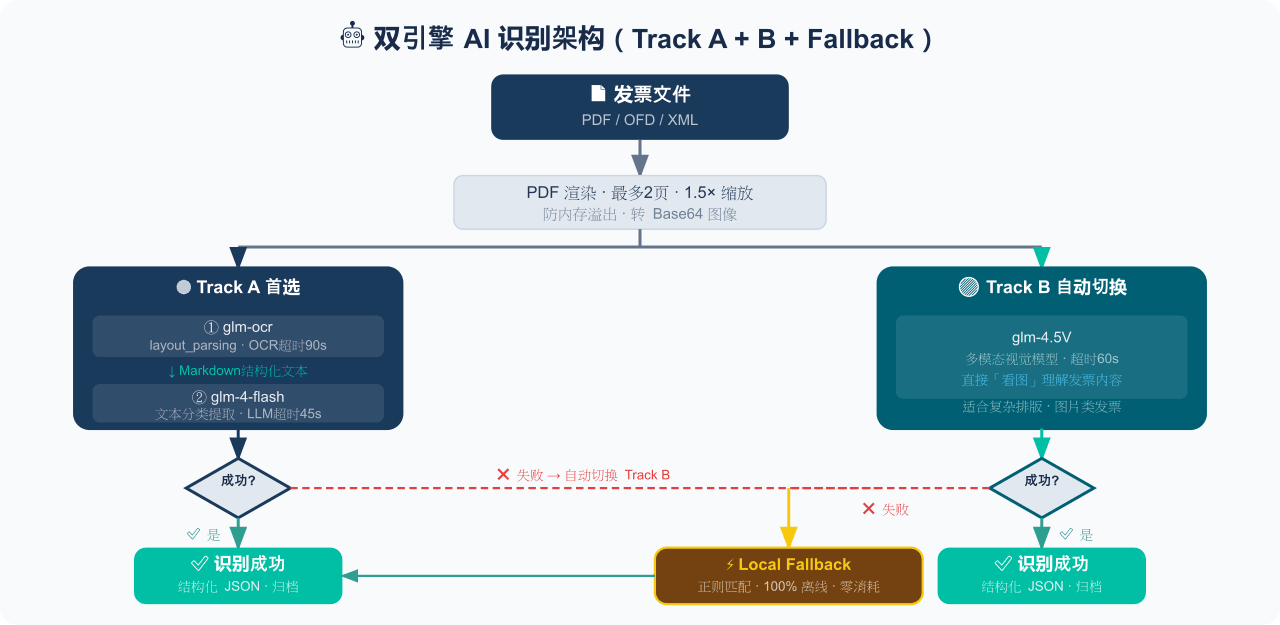 EthanYoQ/Invoice-Downloader
电子发票整理与报销准备工具:从邮箱批量收集 PDF/OFD/XML 发票,OCR 识别、分类归档并生成 Excel 汇总;提供 Windows/macOS 桌面版与 DSH 插件。
EthanYoQ/Invoice-Downloader
电子发票整理与报销准备工具:从邮箱批量收集 PDF/OFD/XML 发票,OCR 识别、分类归档并生成 Excel 汇总;提供 Windows/macOS 桌面版与 DSH 插件。
-
 sunchaokun/PPT-Design-Skill
Precision PPT design skill for OpenCode/Claude Code/Codex, with 40,000+ styles, pixel-perfect Build Mode control, AI ima…
sunchaokun/PPT-Design-Skill
Precision PPT design skill for OpenCode/Claude Code/Codex, with 40,000+ styles, pixel-perfect Build Mode control, AI ima…
-
 THU-MAIC/dsh-openmaic
OpenMAIC for DeepSeek Harness: classrooms, slides, interactive widgets, and Socratic teaching
THU-MAIC/dsh-openmaic
OpenMAIC for DeepSeek Harness: classrooms, slides, interactive widgets, and Socratic teaching
-
 HuanLinOTO/dsh-plugin-mineru
向模型暴露 MinerU 文档解析工具,将 PDF/图片/DOCX/PPTX/XLSX 转为结构化 Markdown/JSON | Exposes MinerU document-parsing tools to the model, co…
HuanLinOTO/dsh-plugin-mineru
向模型暴露 MinerU 文档解析工具,将 PDF/图片/DOCX/PPTX/XLSX 转为结构化 Markdown/JSON | Exposes MinerU document-parsing tools to the model, co…
-
 jing-hy/picturereader
DSH plugin: pixel-to-text image reading for text-only models. image_scan/image_ocr/image_sample tools + image-reading sk…
jing-hy/picturereader
DSH plugin: pixel-to-text image reading for text-only models. image_scan/image_ocr/image_sample tools + image-reading sk…
-
 hellodigua/dsh-share
DSH 对话分享插件,分享单轮或多轮对话,可导出为图片或 Markdown。Share DSH Q&As or selected conversation groups as PNG or Markdown.
hellodigua/dsh-share
DSH 对话分享插件,分享单轮或多轮对话,可导出为图片或 Markdown。Share DSH Q&As or selected conversation groups as PNG or Markdown.
-
 LaplaceYoung/dsh-directorx
DirectorX as a DeepSeek Harness plugin: AI video/image/audio skills, knowledge corpus, and configurable vision/image/vid…
LaplaceYoung/dsh-directorx
DirectorX as a DeepSeek Harness plugin: AI video/image/audio skills, knowledge corpus, and configurable vision/image/vid…