Young4ever33/dsh-token-attention
Token Check · 词元管理:DeepSeek Harness (DSH) 的 token 注意力管理面板——按任务/日/周/月记录 token 消耗与费用(命中/未命中/输出/推理),支持 DeepSeek 峰谷计价,并给出换对话、写 hand-off 的执行时机建议。
项目介绍Project Overview
dsh-token-attention 是 DSH 的词元与成本管理面板,订阅会话事件,用本地 SQLite 记录每次对话的输入命中/未命中、输出、推理词元及估算费用,按任务、日、周、月汇总,识别任务类型,并结合峰谷定价与上下文占用给出运行时段、切换会话、交接文件等建议。适合需要追踪用量和成本时使用。它不会限流或取消请求,只提供事实与建议,数据保存在本地。
dsh-token-attention is a token-attention and cost panel for DeepSeek Harness. It subscribes to session events, stores token usage and estimated cost in local SQLite, and aggregates records by task, day, week, and month. It recognizes task types and uses peak/off-peak pricing, context occupancy, hit rate, and model mix to advise when to run tasks, switch sessions, or write hand-off files. Use it for usage and cost visibility. It does not throttle or cancel requests; it only presents facts and suggestions.
请帮我了解并安装插件:【dsh-token-attention】【https://github.com/Young4ever33/dsh-token-attention】把上面这条消息直接发给当前会话里的 DSH,让它帮你了解并安装。安装命令不一定准确,发给 DSH 更稳。Send this message to DSH in your current session. CLI install commands may not be accurate across systems — DSH will figure it out for you.
或使用命令行安装(适合开发者)Or use CLI install (for developers)
命令行安装CLI Install
dsh plugin --profile web add dsh-token-attention把 Young4ever33/dsh-token-attention 加入你的 DSH 配置(web profile)即可启用。
READMEREADME
dsh-token-attention — Token Check for DeepSeek Harness
English | 中文说明
Token Check is a token-attention management panel for DeepSeek Harness (DSH). It records every conversation's token usage and estimated cost by task / day / week / month, recognizes task types, and — combined with DeepSeek's peak/off-peak pricing and DSH's context mechanics — tells you when to run a task, whether to switch sessions, and whether to write a hand-off file.
It is not a money-saving tool: it never throttles or cancels requests. It presents facts and advice; you decide.
Features
- Five views in DSH Settings — Overview / Sessions / Tasks / Cost / Settings
- Per-task ledger — token consumption (input hit / miss / output / reasoning) and estimated cost, rolled up by day / week / month
- Task-type recognition & advice engine — best execution window, switch-session, hand-off, context, cost and model suggestions
- Attention KPI — attention score, hit rate, context occupancy, compaction count per session
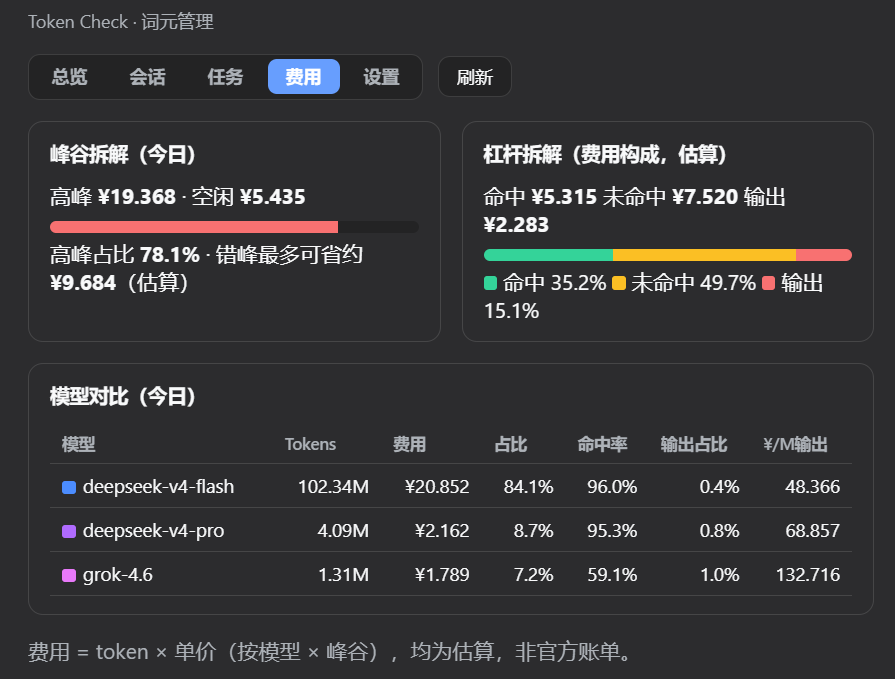
- Peak/off-peak pricing — DeepSeek off-peak half-price windows (peak 9:00–12:00 / 14:00–18:00), estimated cost breakdown by bucket
- Multi-model breakdown — cost and hit rate per model (e.g. deepseek-v4-flash / pro / grok)
- Ledger export — Markdown / CSV download, one-click hand-off template
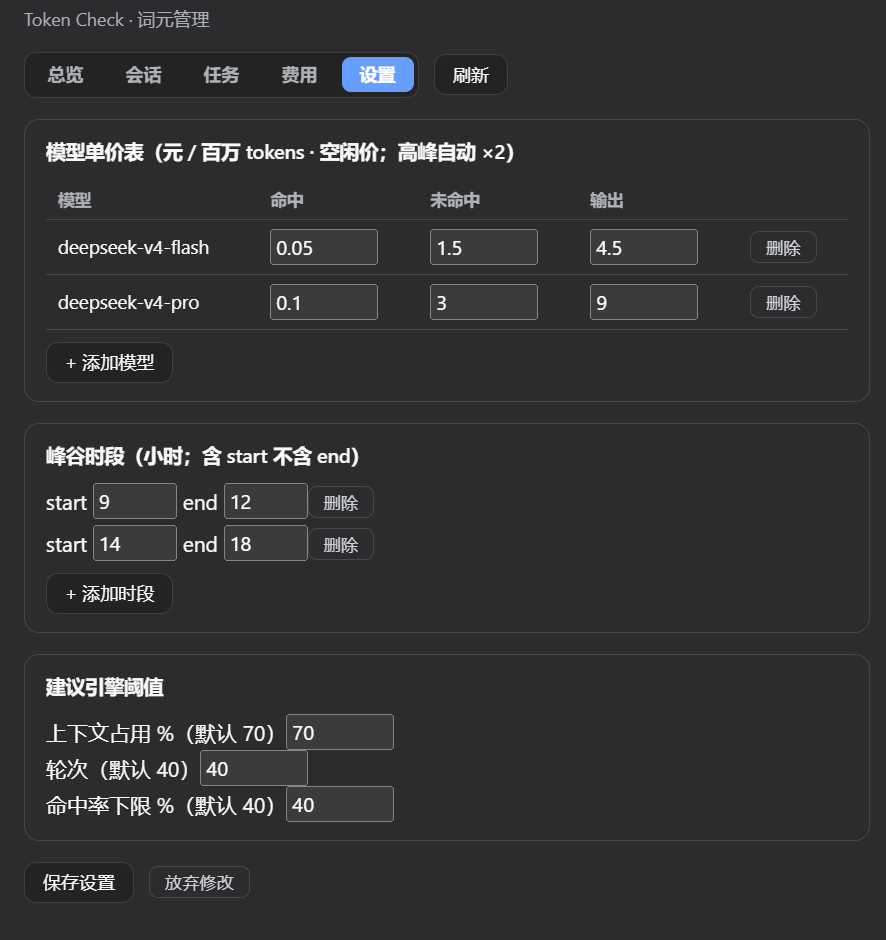
- Editable settings — pricing table, peak hours, advice thresholds; new records are priced immediately
- Zero runtime dependencies — local SQLite via
node:sqlite; no network calls
Screenshots
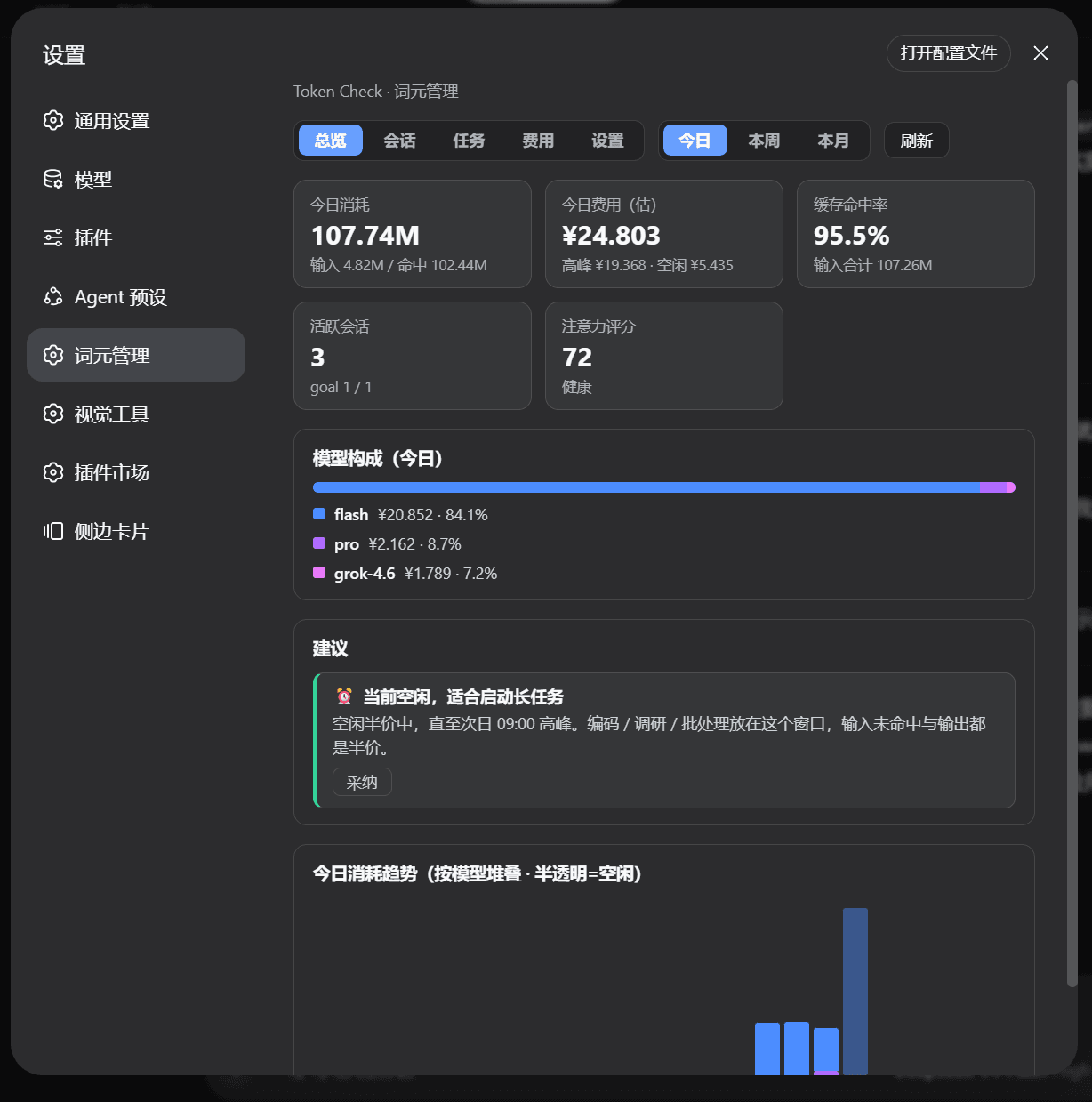
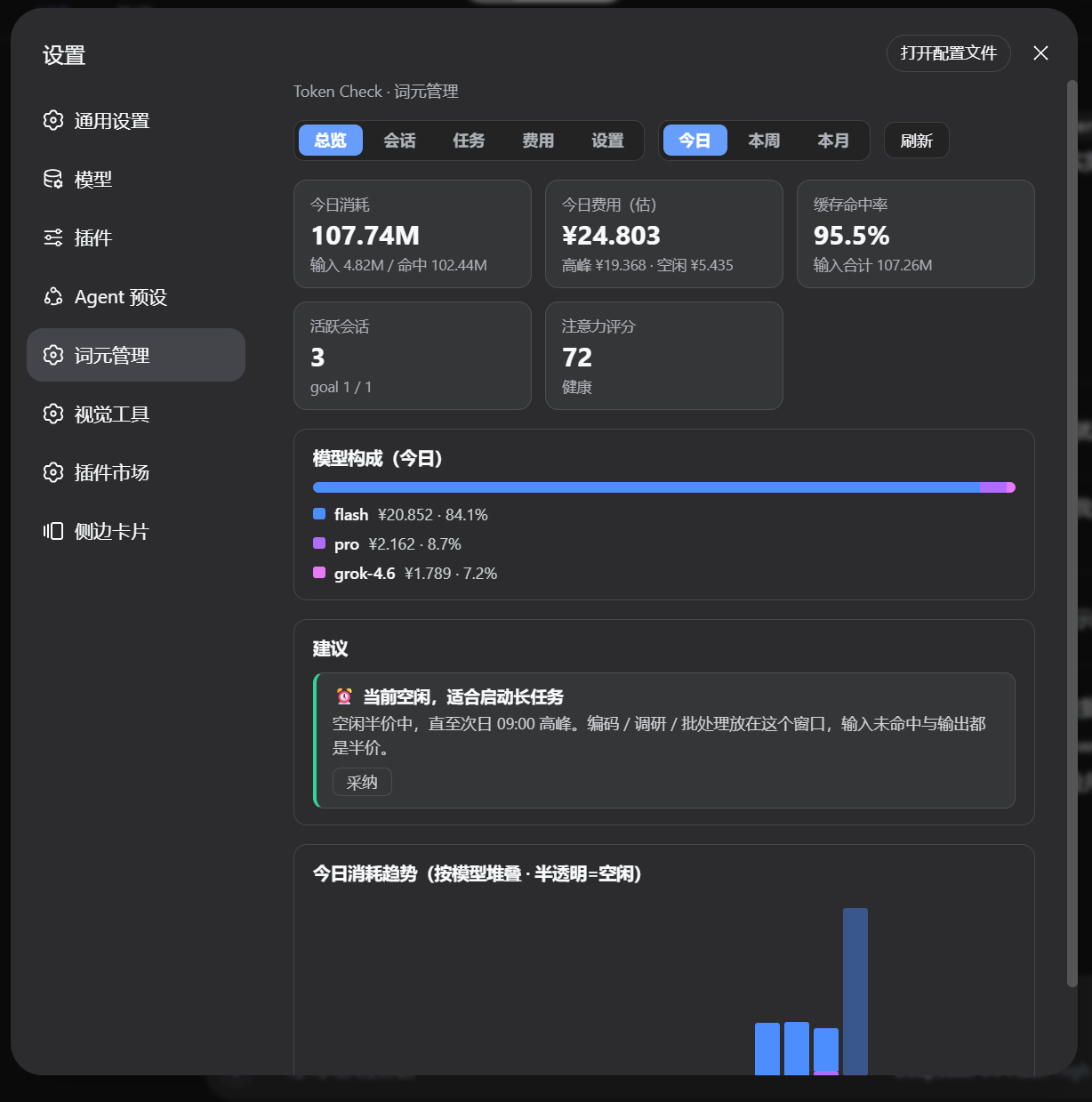
Overview — today's usage, cost, hit rate, attention score, model mix, advice card, and trend
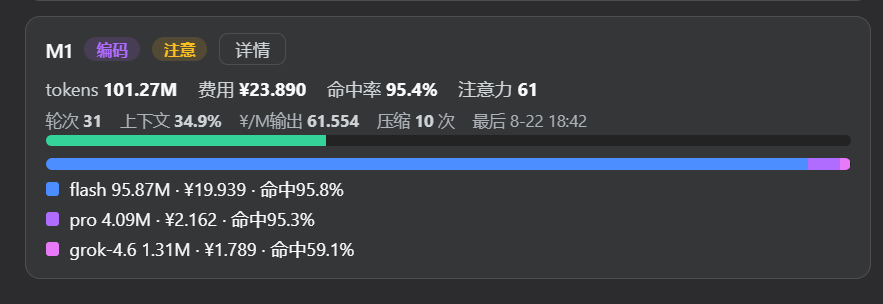
Session card — per-session model breakdown and attention metrics
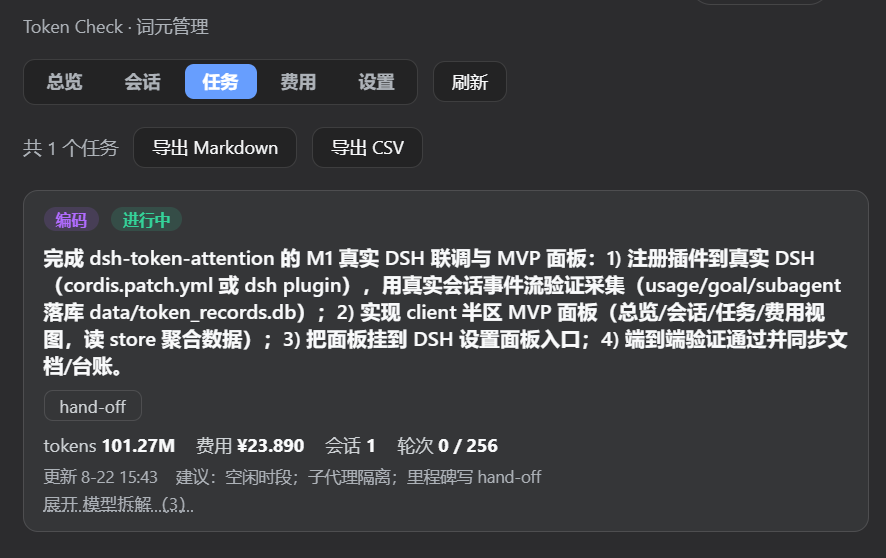
Tasks — task ledger with Markdown / CSV export
Cost — peak split, cost leverage breakdown, and model comparison
Settings — pricing table, peak hours, and advice thresholds
Install
Once published to npm:
dsh plugin --profile web add dsh-token-attention
Restart DSH, then open Settings → 词元管理 (Token Check). Data is stored at DSH_HOME/token-attention/token_records.db.
Development install (link)
npm install && npm run build
Then register the plugin in the web profile (%APPDATA%\dsh-desktop\harness\profiles\web\package.json):
{
  "dependencies": { "dsh-token-attention": "link:/path/to/dsh-token-attention" },
  "dsh": { "profile": { "bundles": ["...", "dsh-token-attention"] } }
}
Run pnpm install inside profiles\web, restart DSH, and verify:
curl http://127.0.0.1:<port>/token-attention/api/health # → {"ok":true,...}
How it works
- Collection: the node half subscribes to DSH's
session/eventstream (usage, goal, subagent, compaction, turn) and writes normalized records to SQLite; a startup backfill replays existing sessions with an idempotentlast_seqcursor. - Aggregation: hourly incremental rollups into
daily_agg, with a daily full rebuild for correction. - Advice:
src/shared/advice.tsevaluates context occupancy, turns, hit rate, cost and model mix against your thresholds and suggests concrete actions.
Configuration
Settings are editable in the panel and saved to SQLite:
| Setting | Default |
|---|---|
| Model pricing (¥ / million tokens, off-peak) | flash: hit 0.05 / miss 1.5 / output 4.5 |
| Peak hours (24h, start-inclusive) | 9–12, 14–18 |
| Context-occupancy advice threshold | 70% |
| Turn-count advice threshold | 40 |
| Hit-rate advice threshold | 40% |
Development
npm run typecheck   # tsc --noEmit
npm run check       # node --check src/client/index.js
npm run build       # tsc → dist/
npm run demo        # collection-layer demo (idempotency / peak pricing / aggregation assertions)
npm pack            # build the publish tarball
Uninstall
Uninstall in DSH Settings → Plugins, or remove the dependency and the bundles entry from the profile's package.json. The data directory DSH_HOME\token-attention\ can be deleted manually; dispose cleans up timers and the SQLite connection.
License
MIT © 2026 Young4ever33
相关推荐Related
-
 nexu-io/open-design
🎨 Best DeepSeek Harness Design Plugin. The open-source Claude Design alternative. 🖥️ Local-first desktop app. 🖼️ Your…
nexu-io/open-design
🎨 Best DeepSeek Harness Design Plugin. The open-source Claude Design alternative. 🖥️ Local-first desktop app. 🖼️ Your…
-
 freestylefly/awesome-gpt-image-2
Prompt as Code | GPT-Image2 工业级提示词引擎与模板库,530+ 个案例逆向工程,20+ 套工业级模板,并提炼出Skills,持续更新中
freestylefly/awesome-gpt-image-2
Prompt as Code | GPT-Image2 工业级提示词引擎与模板库,530+ 个案例逆向工程,20+ 套工业级模板,并提炼出Skills,持续更新中
-
 anywhere-labs/dsh-desktop
为 DeepSeek Harness (DSH) 插件生态打造的现代化桌面端解决方案。万物皆「插件」,桌面本身也是「插件」。
anywhere-labs/dsh-desktop
为 DeepSeek Harness (DSH) 插件生态打造的现代化桌面端解决方案。万物皆「插件」,桌面本身也是「插件」。
- Nagi-ovo/voyager Enhancement suite for Gemini, AI Studio, Claude & ChatGPT — plus a prompt manager for any web UI, DeepSeek Harness inclu…
-
 walkinglabs/learn-harness-engineering
Harness engineering beginner tutorial, from 0 to 1
walkinglabs/learn-harness-engineering
Harness engineering beginner tutorial, from 0 to 1
-
 awesome-dsh-plugin/awesome-dsh-plugin
A curated list of plugins for DeepSeek Harness (dsh) · DeepSeek Harness 插件精选列表
awesome-dsh-plugin/awesome-dsh-plugin
A curated list of plugins for DeepSeek Harness (dsh) · DeepSeek Harness 插件精选列表
-
 MemTensor/MemOS
Self-evolving memory OS for LLM & AI Agents: ultra-persistent memory, hybrid-retrieval, and cross-task skill reuse, with…
MemTensor/MemOS
Self-evolving memory OS for LLM & AI Agents: ultra-persistent memory, hybrid-retrieval, and cross-task skill reuse, with…
- yjh051108/dsh-routing-suite dsh-routing-suite — injector + router-standard kit: install the runtime injector first, then the task-aware reasoning-mo…