yu2025-luo/dsh-file-panel
DeepSeek Harness 的右侧文件面板 — 当代理创建或下载文件时自动弹出,支持图片/文本预览、在文件夹中显示和打开操作。双语 · MIT
项目介绍Project Overview
dsh-file-panel 是 DeepSeek Harness 的 Web 界面插件,可在会话中自动监听智能体写入或下载的文件,并在右侧弹出面板显示。它支持图像内联预览、文本前 256KB 展示、调用系统默认应用打开、在文件管理器中定位以及复制绝对路径,并提供工作目录快捷入口。适用于需要实时查看智能体产出文件的场景。注意:该面板依赖 fs.watch 递归功能,进程重启后文件列表会清空。
dsh-file-panel is a DeepSeek Harness web UI plugin that watches files the agent writes or downloads during a session and displays them in a right-side popup panel. It offers inline image preview, text preview up to 256KB, opening files with the OS default app, revealing in the system file manager, copying absolute paths, and a workspace folder shortcut. Use it to track agent output in real time. Note: the panel is process-local, so its file list clears on restart.
请帮我了解并安装插件:【dsh-file-panel】【https://github.com/yu2025-luo/dsh-file-panel】把上面这条消息直接发给当前会话里的 DSH,让它帮你了解并安装。安装命令不一定准确,发给 DSH 更稳。Send this message to DSH in your current session. CLI install commands may not be accurate across systems — DSH will figure it out for you.
或使用命令行安装(适合开发者)Or use CLI install (for developers)
命令行安装CLI Install
dsh plugin --profile web add github:yu2025-luo/dsh-file-panel把 yu2025-luo/dsh-file-panel 加入你的 DSH 配置(web profile)即可启用。
READMEREADME
dsh-file-panel


A plugin for DeepSeek Harness (dsh web GUI) that watches what the agent creates and downloads during a session, and shows it in a right-side popup panel — like the file viewer in Codex.
When a file or image is written to disk during a session, the panel pops up automatically on the right. Every row lets you:
- 👁 Preview — images render inline; text files show their first 256 KB; other types show metadata.
- 📂 Show in folder — opens the OS file manager with the file selected (
explorer.exe /selecton Windows,open -Ron macOS,xdg-openon Linux). - ↗ Open — opens the file with the OS default application (via the harness's built-in
host.openPathRPC). - 📋 Copy path — copies the absolute path to the clipboard.
Also ships a workspace folder shortcut at the bottom of the panel.
Screenshots
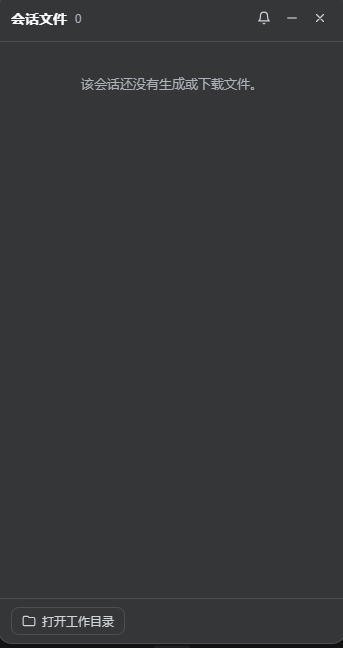
The right-docked session files panel: every row previews, opens, reveals, or copies its path; the bottom button opens the session's working directory. The panel is fully draggable (grab the header) and resizable from its left and bottom edges, with scrollbars appearing when it gets narrow.
Installation
Requires DeepSeek Harness dsh CLI (npm package @deepseek-ai/dsh) and pnpm.
From a local checkout
cd dsh-file-panel
npm install          # installs esbuild (dev-only)
npm run build        # produces lib/index.js + lib/client.js (committed)

# register in the web profile (link: tracks your checkout live)
dsh plugin --profile web add link:.
From GitHub
dsh plugin --profile web add github:yu2025-luo/dsh-file-panel
The built artifacts are committed, so no build step runs during install.
Activate
Restart the dsh web server (plugin sets take effect on restart), then refresh
http://127.0.0.1:3080. That's it — no configuration required.
Remove with:
dsh plugin --profile web remove dsh-file-panel
Usage
| Gesture | Result |
|---|---|
| Agent creates/downloads a file | Panel pops up automatically (newest files carry a NEW chip) |
| Click a row | Inline preview (image / text / metadata) |
| Row hover actions | Preview, open, show in folder, copy path |
| 🔔 bell | Toggle auto-pop for new files |
– / × |
Collapse to a floating launcher button (with new-file badge) or hide |
| Bottom "open workspace folder" | Opens the session's working directory |
Panel state (open/collapsed) and the auto-pop preference persist in
localStorage. The auto-pop baseline is per session: files that already
existed when the panel first saw the session do not re-trigger a popup.
How it works
One npm package with two halves, registered as a single loader row
(cordis.patch.yml → row file-panel):
Host half (src/index.js)                     Browser half (src/client.jsx)
────────────────────────                     ──────────────────────────────
ctx.on('fs/observed')          ──┐
  write/edit tools report        │            shell.overlay slot entry:
  files (precise, attributed     │            a right-docked floating panel
  to the session)                ├──▶ FileTracker (per-session lists,
recursive fs.watch per           │      ignore rules, caps, fence)
  session working directory       │                │
  (catches shell downloads:    ──┘                ▼
  curl, Invoke-WebRequest, …)          RPC channel /file-panel
                                        authority: 'loopback'
                                        list · readText · readImage
                                        reveal · describe
                                                  ▲
                                                  │ poll every 1.5 s
                                        client: ctx.connection.rpc.call()
                                        open file: built-in api.host.openPath
The client half registers into the shipped shell.overlay slot (additive,
frame-wide floating layer), reads the current session through the standard
useSessions prop, and polls the plugin's own loopback-only RPC channel.
The channel is registered with ctx.connection.rpc.handle, the sanctioned
static-package RPC seam.
Security
- The
/file-panelchannel is registered withauthority: 'loopback', so only pages served from127.0.0.1can call it. When the GUI is accessed over the network (--trusted-host), the panel shows a notice and stays inactive. - Every read/reveal endpoint only accepts absolute paths that the tracker has actually seen (a tool write or a watcher event under a watched working directory) — the RPC can never be used as a generic file-read/reveal primitive.
Project layout
src/
  index.js      host half: tracker wiring + /file-panel RPC endpoints
  tracker.js    pure-Node file tracker (fs/observed ingestion, recursive
                watcher with debounce, ignore rules, caps, RPC fence)
  client.jsx    browser half: the right-side panel UI (React, JSX)
build.mjs       esbuild build for both halves
cordis.patch.yml  the bundle patch inserting the loader row
tests/          node:test unit + host-half smoke tests
lib/            built artifacts (committed, so installs need no build step)
Development
npm install
npm run build   # rebuild lib/index.js and lib/client.js
npm test        # node --test
For a fast client-side iteration loop after changing src/client.jsx:
npm run build
then hard-refresh the GUI page (lib/client.js is served with
cache-control: no-cache; plugin sets only change on restart, but bundle
content re-hashes per request — see dsh-client-modules). During active
UI development you can also run pnpm run dev:web from the harness checkout
to rebuild client bundles on change.
Compatibility
Built against the public seams of @deepseek-ai/dsh 0.1.0-rc.x:
- host:
ctx.connection.rpc.handle/ctx.on('fs/observed') - client:
shell.overlayslot,useSessionsstandard prop,ctx.connection.rpc.call,ctx.locale
DeepSeek Harness is pre-release: those seams may move. If the panel stops
working after a dsh upgrade, check the pinned version in
package.json and re-run the build.
Known limitations
- The recursive watcher uses
fs.watch({ recursive: true })(Node ≥ 20). On platforms where that is unavailable, the panel still tracks everything the harnesswrite/edittools produce, but shell-side downloads may be missed. - The panel is process-local: it starts empty after a restart (it only records files it actually observed; it does not scan history).
node_modules,.git, and temporary-file noise are ignored by design.revealon headless Linux reportscanReveal: falseand hides the button (no desktop to open).
Publishing to GitHub / npm
Create a GitHub repo and push (the repo is already a git repository with a
v0.1.4tag):git remote add origin https://github.com/yu2025-luo/dsh-file-panel.git git push -u origin main --tagsAdd the
dsh-plugintopic on the repo page (About → gear icon → Topics) together withdeepseek-harness,dsh,deepseek, andfile-preview. The repo then appears on the public plugin topic page automatically.Users install with
dsh plugin --profile web add github:yu2025-luo/dsh-file-panel#v0.1.4.Optionally publish to npm (
npm publish) — then install withdsh plugin --profile web add dsh-file-panel.
Community catalogs that sync from the dsh-plugin topic:
Oh-My-DSH (auto-synced) and
awesome-deepseek-harness
(PR-based).
Remember to bump the version and re-run npm run build before releasing.
License
相关推荐Related
-
 nexu-io/open-design
🎨 Best DeepSeek Harness Design Plugin. The open-source Claude Design alternative. 🖥️ Local-first desktop app. 🖼️ Your…
nexu-io/open-design
🎨 Best DeepSeek Harness Design Plugin. The open-source Claude Design alternative. 🖥️ Local-first desktop app. 🖼️ Your…
-
 ruvnet/ruflo
🌊 The original agent meta-harness. Deploy intelligent multi-player swarms, coordinate autonomous workflows, and build c…
ruvnet/ruflo
🌊 The original agent meta-harness. Deploy intelligent multi-player swarms, coordinate autonomous workflows, and build c…
-
 amruthpillai/reactive-resume
A one-of-a-kind resume builder that keeps your privacy in mind. Completely secure, customizable, portable, open-source a…
amruthpillai/reactive-resume
A one-of-a-kind resume builder that keeps your privacy in mind. Completely secure, customizable, portable, open-source a…
-
 volcengine/OpenViking
Self-evolving Context Database for AI Agents. Unify Agent Memory, Knowledge RAG and Skills.
volcengine/OpenViking
Self-evolving Context Database for AI Agents. Unify Agent Memory, Knowledge RAG and Skills.
-
 Molunerfinn/PicGo
:rocket: The Ultimate Image Uploader for Efficient Creators. Supports Obsidian, Typora, VS Code etc. and 60+ image hosti…
Molunerfinn/PicGo
:rocket: The Ultimate Image Uploader for Efficient Creators. Supports Obsidian, Typora, VS Code etc. and 60+ image hosti…
-
 titanwings/colleague-skill
将冰冷的离别化为温暖的 Skill,欢迎加入数字生命1.0!Transforming cold farewells into warm skills? It's giving rebirth era. Welcome to Digital …
titanwings/colleague-skill
将冰冷的离别化为温暖的 Skill,欢迎加入数字生命1.0!Transforming cold farewells into warm skills? It's giving rebirth era. Welcome to Digital …
-
 nocobase/nocobase
NocoBase is an open-source AI + no-code platform for building business systems fast. Instead of generating everything fr…
nocobase/nocobase
NocoBase is an open-source AI + no-code platform for building business systems fast. Instead of generating everything fr…
-
 Tencent/WeKnora
Open-source LLM knowledge platform: turn raw documents into a queryable RAG, an autonomous reasoning agent, and a self-m…
Tencent/WeKnora
Open-source LLM knowledge platform: turn raw documents into a queryable RAG, an autonomous reasoning agent, and a self-m…