Yujm888/dsh-turn-rail
A Codex-style auto-hiding turn rail for DeepSeek Harness Web.
catalog 简介 / catalog descriptioncatalog description:—
项目介绍Project Overview
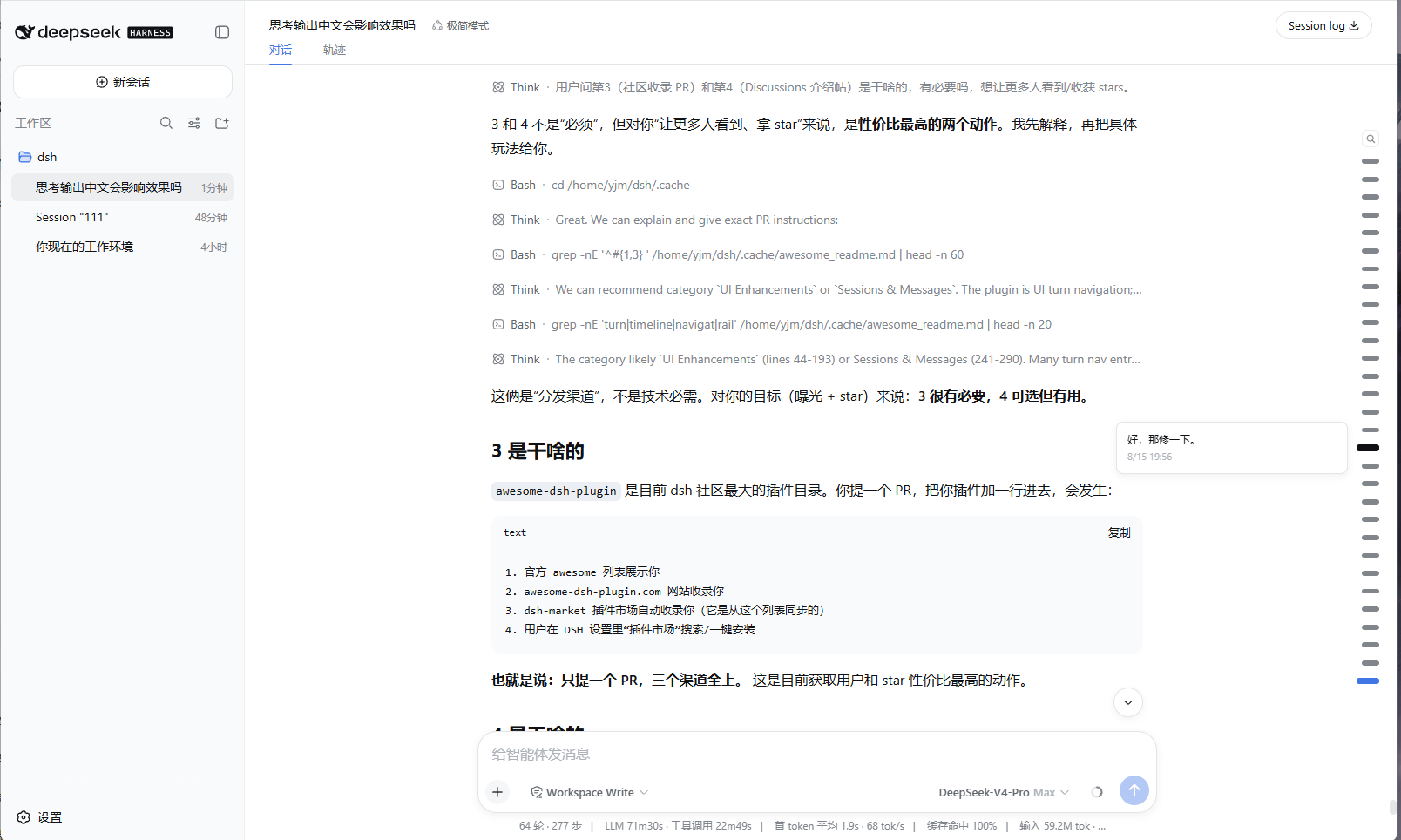
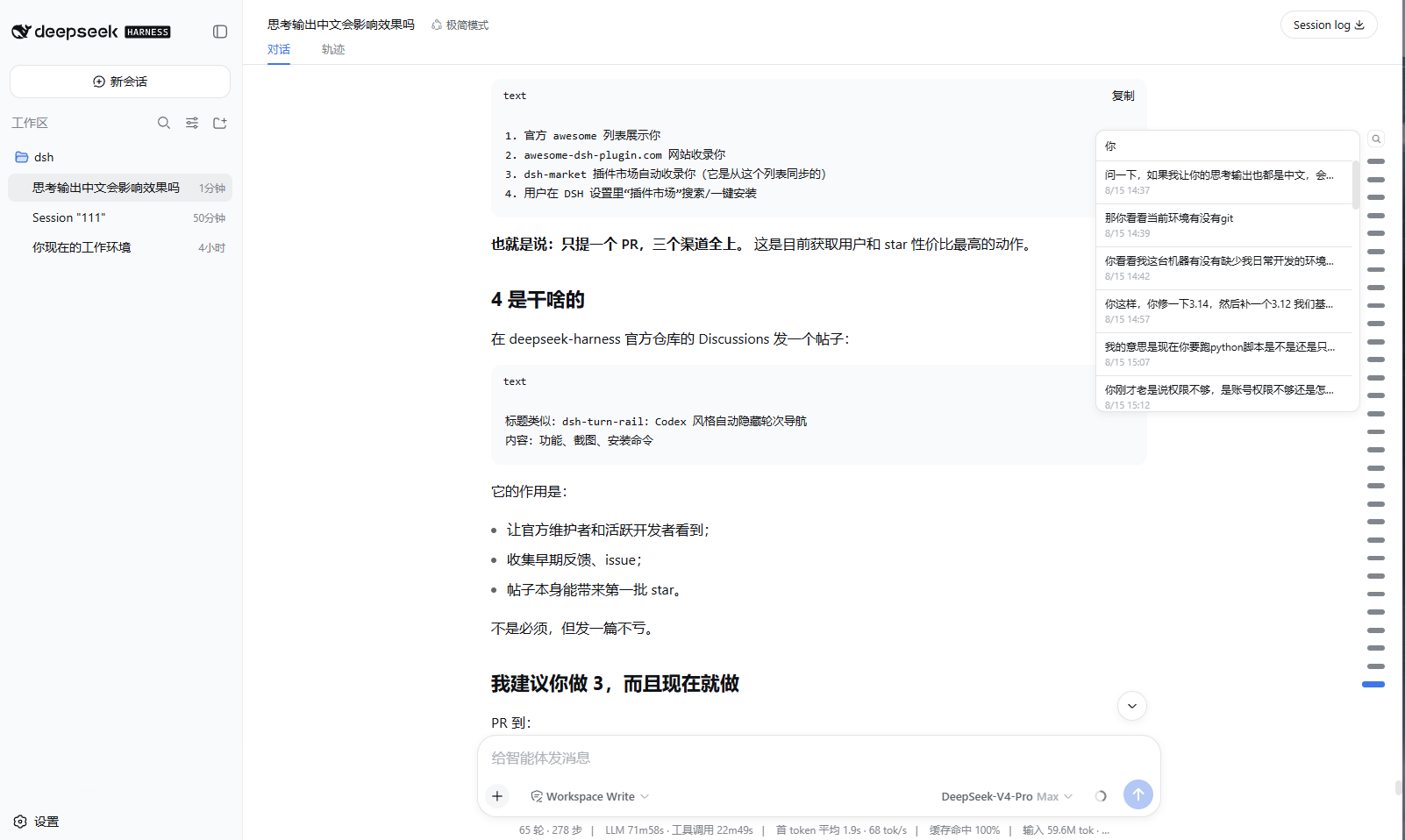
dsh-turn-rail 是 DSH Web 的自动隐藏会话转向栏插件,位于右侧边缘。指针靠近时淡入,移开后淡出;悬停标记可预览该轮消息,点击可跳转,并支持搜索用户消息。长会话最多显示 30 个标记并在栏内滚动。适合在长对话中快速定位回合;需 DSH ≥0.1.0-rc.6 且 Web 配置启用 sessionProjections。
dsh-turn-rail is a DSH Web plugin that adds an auto-hiding turn rail on the right edge. It fades in near the pointer, shows per-turn tooltips, jumps to a turn on click, and supports searching user messages. Long sessions show at most 30 markers with internal scrolling. Use it to navigate long conversations quickly. It requires DSH ≥0.1.0-rc.6 and a web profile with sessionProjections enabled.
请帮我了解并安装插件:【dsh-turn-rail】【https://github.com/Yujm888/dsh-turn-rail】把上面这条消息直接发给当前会话里的 DSH,让它帮你了解并安装。安装命令不一定准确,发给 DSH 更稳。Send this message to DSH in your current session. CLI install commands may not be accurate across systems — DSH will figure it out for you.
或使用命令行安装(适合开发者)Or use CLI install (for developers)
命令行安装CLI Install
dsh plugin --profile web add dsh-turn-rail把 Yujm888/dsh-turn-rail 加入你的 DSH 配置(web profile)即可启用。
READMEREADME
dsh-turn-rail
A Codex-style auto-hiding turn rail for DeepSeek Harness Web.
Minimal by design: no settings, no extra panels, zero runtime dependencies.
The rail lives on the right edge of the conversation. Move the pointer near the edge and it fades in; move away and it fades out. Hover the thin zone around a marker to preview that turn, click anywhere in the wider marker area to jump. Long conversations keep at most 30 visible markers and scroll inside the rail, following the current reading position.
This project is not affiliated with DeepSeek. The interaction pattern is inspired by common turn-navigation rails such as Codex and the DeepSeek web client; the implementation is independent.
Screenshots
Features
- Edge-peek auto-hide — appears when the pointer is within 110 px of the right edge, fades out 120 ms after leaving. Leaving the browser window or switching away follows the same fade timing.
- Layered hit zones — the outer zone only keeps the rail visible; the marker zone is clickable and highlights on hover; only the narrow detail zone around the marker shows the tooltip.
- Per-turn tooltip — one marker previews one message with time. It fades in
and fades out with the rail, and the native browser
titleis not used. - Search — the magnifier button opens a pinned search box. Type to filter
user messages, click a result to jump. Close with
Esc, another click on the button, a result click, or a click outside the rail. - 30-marker scrolling window — with more than 30 turns the rail scrolls internally with a hidden scrollbar. It pins to the newest window once when a session opens, then never moves itself again: the rail scroll position is fully user-owned.
- Theme-aware and responsive — markers use DSH CSS variables and scale slightly with viewport size.
- Full-session projection — the host half folds the durable session log so a page reload paints the complete rail without replaying history.
Requirements
- DSH
>= 0.1.0-rc.6 - Web profile with
sessionProjectionsavailable (the shipped web profile has it)
Install
dsh plugin --profile web add dsh-turn-rail
Then restart dsh web and hard-refresh the browser tab.
From a local checkout
dsh plugin --profile web add /path/to/dsh-turn-rail
Remove
dsh plugin --profile web remove dsh-turn-rail
Tuning
All tunables live at the top of lib/client.js:
| Constant | Default | Meaning |
|---|---|---|
EDGE_TRIGGER_PX |
110 |
Show the rail when the pointer is this close to the right edge |
DETAIL_LEFT_PX / DETAIL_RIGHT_PX |
46 / 10 |
Distance band from the right edge that opens the tooltip |
HIDE_DELAY_MS |
120 |
Wait before the rail starts fading out |
UNMOUNT_AFTER_MS |
200 |
Remove tooltip/search after the fade completes |
MAX_VISIBLE_MARKS |
30 |
Maximum markers visible when the rail scrolls |
MAX_MARK_GAP_PX |
30 |
Maximum center-to-center distance between markers when there are 30 or fewer turns |
SEARCH_LIMIT |
30 |
Maximum search results |
Rail geometry and marker sizes are in the css array in the same file.
Model Experience
None. This is a browser UI plugin; nothing here enters a model request.
License
MIT
相关推荐Related
-
 ruvnet/ruflo
🌊 The original agent meta-harness. Deploy intelligent multi-player swarms, coordinate autonomous workflows, and build c…
ruvnet/ruflo
🌊 The original agent meta-harness. Deploy intelligent multi-player swarms, coordinate autonomous workflows, and build c…
-
 amruthpillai/reactive-resume
A one-of-a-kind resume builder that keeps your privacy in mind. Completely secure, customizable, portable, open-source a…
amruthpillai/reactive-resume
A one-of-a-kind resume builder that keeps your privacy in mind. Completely secure, customizable, portable, open-source a…
-
 volcengine/OpenViking
Self-evolving Context Database for AI Agents. Unify Agent Memory, Knowledge RAG and Skills.
volcengine/OpenViking
Self-evolving Context Database for AI Agents. Unify Agent Memory, Knowledge RAG and Skills.
-
 Molunerfinn/PicGo
:rocket: The Ultimate Image Uploader for Efficient Creators. Supports Obsidian, Typora, VS Code etc. and 60+ image hosti…
Molunerfinn/PicGo
:rocket: The Ultimate Image Uploader for Efficient Creators. Supports Obsidian, Typora, VS Code etc. and 60+ image hosti…
-
 titanwings/colleague-skill
将冰冷的离别化为温暖的 Skill,欢迎加入数字生命1.0!Transforming cold farewells into warm skills? It's giving rebirth era. Welcome to Digital …
titanwings/colleague-skill
将冰冷的离别化为温暖的 Skill,欢迎加入数字生命1.0!Transforming cold farewells into warm skills? It's giving rebirth era. Welcome to Digital …
-
 nocobase/nocobase
NocoBase is an open-source AI + no-code platform for building business systems fast. Instead of generating everything fr…
nocobase/nocobase
NocoBase is an open-source AI + no-code platform for building business systems fast. Instead of generating everything fr…
-
 Tencent/WeKnora
Open-source LLM knowledge platform: turn raw documents into a queryable RAG, an autonomous reasoning agent, and a self-m…
Tencent/WeKnora
Open-source LLM knowledge platform: turn raw documents into a queryable RAG, an autonomous reasoning agent, and a self-m…
-
 anywhere-labs/deepseek-harness-desktop
为 DeepSeek Harness (DSH) 插件生态打造的现代化桌面端解决方案。万物皆「插件」,桌面本身也是「插件」。
anywhere-labs/deepseek-harness-desktop
为 DeepSeek Harness (DSH) 插件生态打造的现代化桌面端解决方案。万物皆「插件」,桌面本身也是「插件」。