Yummyxl/dsh-eyecare
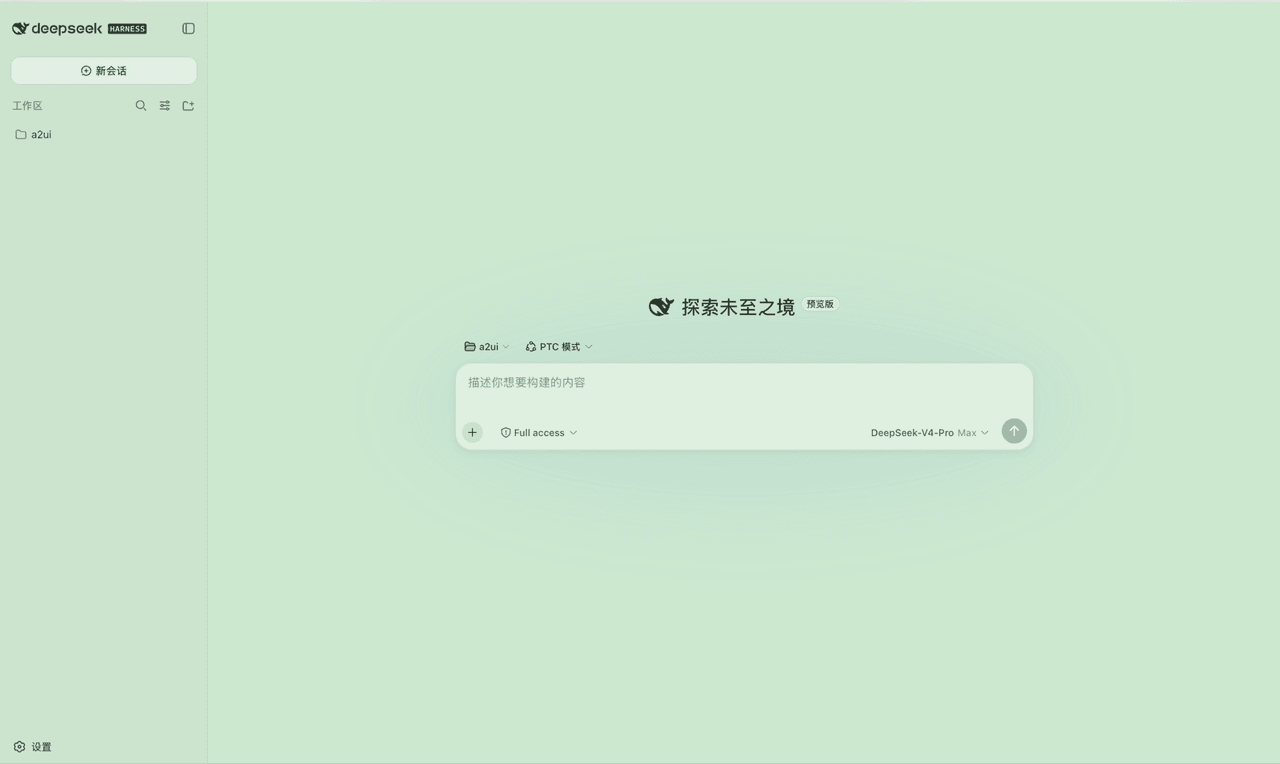
给 DeepSeek Harness(DSH)Web 界面加一个 护眼模式开关:一键切换科学护眼的豆沙绿配色,浅色 / 深色 / 跟随系统全部适配, 开关状态自动记忆,刷新不丢失。
catalog 简介 / catalog descriptioncatalog description:dsh护眼插件
项目介绍Project Overview
dsh-eyecare 是面向 DeepSeek Harness(DSH)Web 界面的护眼模式插件,核心能力是一键切换豆沙绿护眼配色,并自动适配浅色、深色与跟随系统主题。当长时间阅读或夜间使用时,可在「设置 → 常规」中开启开关,状态通过 localStorage 记忆。注意:插件依赖 DSH 同大版本的主题与 slot 内部接口,大版本升级后可能失效,届时卸载即可恢复。
dsh-eyecare is a plugin for the DeepSeek Harness (DSH) web interface that adds an eye-care mode toggle, switching the UI to a low-saturation bean-paste green palette compatible with light, dark, and system-follow themes. Use it during long reading sessions or at night by enabling the toggle in Settings → General; the state persists via localStorage. Note: the plugin relies on DSH theme and slot internals of the same major version, and may break after upgrades.
请帮我了解并安装插件:【dsh-eyecare】【https://github.com/Yummyxl/dsh-eyecare】把上面这条消息直接发给当前会话里的 DSH,让它帮你了解并安装。安装命令不一定准确,发给 DSH 更稳。Send this message to DSH in your current session. CLI install commands may not be accurate across systems — DSH will figure it out for you.
或使用命令行安装(适合开发者)Or use CLI install (for developers)
命令行安装CLI Install
dsh plugin --profile web add dsh-eyecare把 Yummyxl/dsh-eyecare 加入你的 DSH 配置(web profile)即可启用。
READMEREADME
🌿 dsh-eyecare · DSH 护眼模式插件




给 DeepSeek Harness(DSH)Web 界面加一个 护眼模式开关:一键切换科学护眼的豆沙绿配色,浅色 / 深色 / 跟随系统全部适配, 开关状态自动记忆,刷新不丢失。
📖 目录
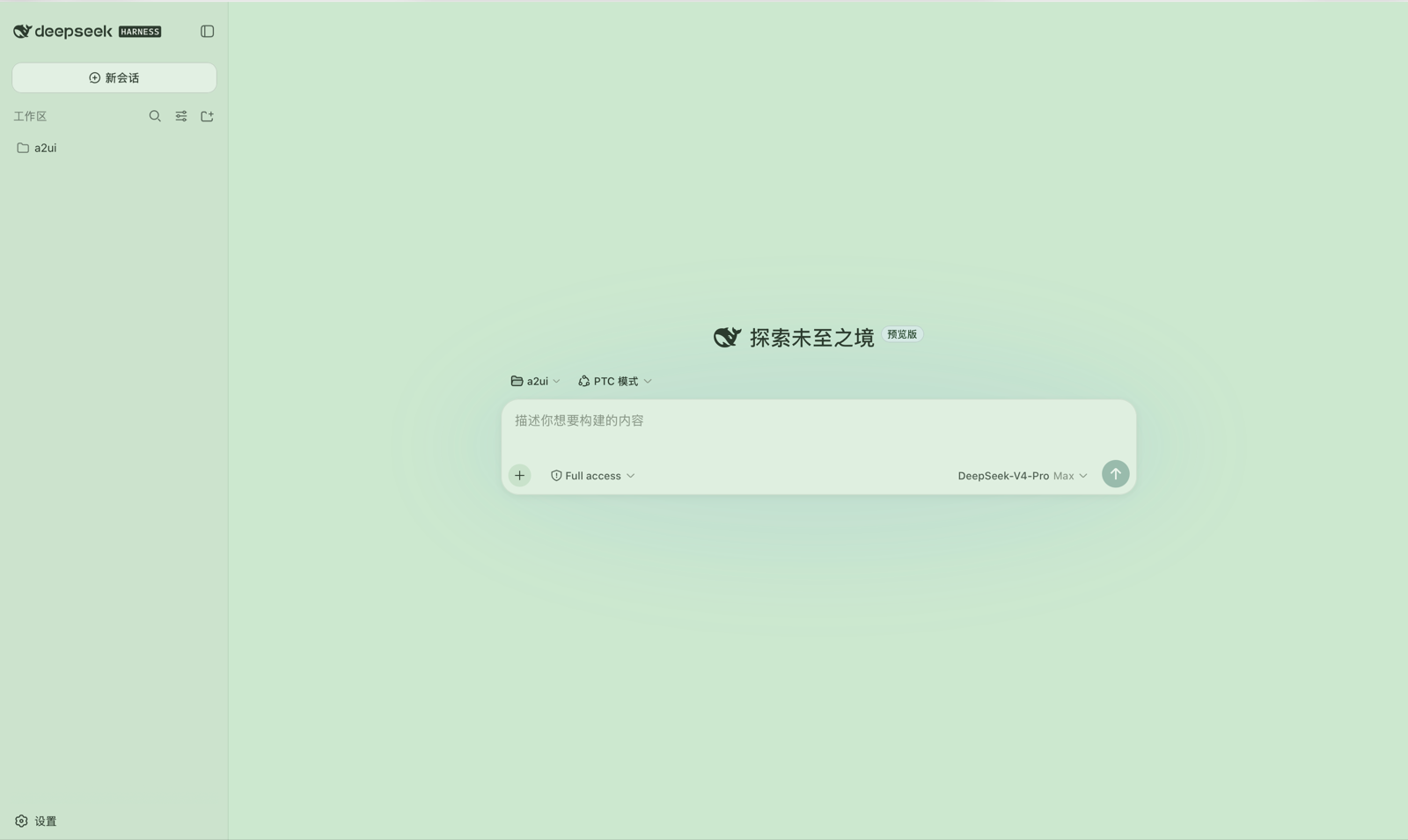
✨ 效果预览
🚀 快速开始
# 1. 安装(一条命令,全自动,无需手改任何配置)
dsh plugin --profile web add dsh-eyecare

# 2. 打开 DSH Web 界面 → 左下角「设置」→「常规」→ 打开「护眼模式」开关
完事 🎉
📦 安装
方式一:官方命令(推荐)
dsh plugin --profile web add dsh-eyecare
需要本机装有 pnpm(
dsh plugin内部转发给 pnpm;没有的话:npm install -g pnpm)。
原理:本包声明了 dsh.bundle,dsh plugin 会自动把它加入 profile 的组合层,
包内自带的 cordis.patch.yml 随层生效,插件行自动挂载——不需要手动编辑任何文件。
方式二:本地脚本(无需 pnpm)
git clone git@github.com:Yummyxl/dsh-eyecare.git
cd dsh-eyecare
bash install.sh          # 默认 profile 名 web;其他名字: bash install.sh <profile名>
脚本自动完成:复制插件包 → 建立软链 → 写入 patch 条目(幂等,可重复执行)。
安装完成后:重启 dsh(或等它热重载)→ 刷新浏览器页面,即可进入下面的使用步骤。
🧭 使用
- 打开 DSH Web 界面;
- 点击左下角 「设置」;
- 左侧选择 「常规」 分组;
- 在 「外观」 行正下方找到 「护眼模式」(英文界面:Eye care);
- 打开右侧开关 —— 整个界面立即切换为护眼配色 ✨;
- 想恢复:再次点击开关关闭即可,瞬间还原。
| 行为 | 说明 |
|---|---|
| 开关状态 | 自动记忆(localStorage),刷新页面 / 重启浏览器不丢失 |
| 主题兼容 | 叠加在浅色 / 深色 / 跟随系统之上,切换主题护眼层持续生效 |
| 多语言 | 中文「护眼模式」/ 英文 "Eye care" 自动跟随界面语言 |
🎨 配色特性
| 特性 | 说明 |
|---|---|
| 🟢 科学护眼 | 浅色模式锚定标准护眼绿 #CCE8CF(Windows 豆沙绿标准),低饱和、低蓝光 |
| 🌙 夜间友好 | 深色模式为暖绿黑底 + 柔绿白文字,告别蓝黑底与纯白刺眼 |
| 🧊 无纯白表面 | 输入框、按钮、气泡、菜单、代码块等 89 个颜色 token 全量重映射 |
| 🗂 层级分明 | 代码块、行内代码、引用、文件、链接等信息层级保留,状态色(成功/警告/错误)各自可辨 |
🛠 自定义配色
所有颜色集中在 lib/client.js 的 EYE_CARE_TOKENS 一张表里,
每项都是 { light: "...", dark: "..." }。改完保存、刷新页面立即生效,无需重启。
🗑 卸载
dsh plugin --profile web remove dsh-eyecare # 官方方式
方式二安装的用户:删除 ~/.dsh/profiles/web/packages/dsh-eyecare、
~/.dsh/profiles/web/node_modules/dsh-eyecare,并编辑 cordis.patch.yml
删掉包含 ui-eye-care 的那一段,最后刷新页面即可。
⚠️ 注意事项
- 需要同一大版本的 DSH(插件依赖 DSH 的主题/slot 内部接口;升级后如失效, 启动页会明确报错,卸载本插件即可恢复);
- 1.0.x 手动安装的用户升级到 1.1+:1.1 起本包自带组合层,请先删掉你手动加在
cordis.patch.yml里的ui-eye-care条目,再改用dsh plugin安装,避免重复挂载; - Windows 用户可手动执行 install.sh 中的三步,或用 WSL 运行本脚本。
📄 License
如果这个插件帮到了你,欢迎点个 ⭐ Star!
相关推荐Related
-
 nexu-io/open-design
🎨 Best DeepSeek Harness Design Plugin. The open-source Claude Design alternative. 🖥️ Local-first desktop app. 🖼️ Your…
nexu-io/open-design
🎨 Best DeepSeek Harness Design Plugin. The open-source Claude Design alternative. 🖥️ Local-first desktop app. 🖼️ Your…
-
 ruvnet/ruflo
🌊 The original agent meta-harness. Deploy intelligent multi-player swarms, coordinate autonomous workflows, and build c…
ruvnet/ruflo
🌊 The original agent meta-harness. Deploy intelligent multi-player swarms, coordinate autonomous workflows, and build c…
-
 amruthpillai/reactive-resume
A one-of-a-kind resume builder that keeps your privacy in mind. Completely secure, customizable, portable, open-source a…
amruthpillai/reactive-resume
A one-of-a-kind resume builder that keeps your privacy in mind. Completely secure, customizable, portable, open-source a…
-
 esengine/DeepSeek-Reasonix
DeepSeek-native AI coding agent for your terminal. Engineered around prefix-cache stability — leave it running.
esengine/DeepSeek-Reasonix
DeepSeek-native AI coding agent for your terminal. Engineered around prefix-cache stability — leave it running.
-
 volcengine/OpenViking
Self-evolving Context Database for AI Agents. Unify Agent Memory, Knowledge RAG and Skills.
volcengine/OpenViking
Self-evolving Context Database for AI Agents. Unify Agent Memory, Knowledge RAG and Skills.
-
 Molunerfinn/PicGo
:rocket: The Ultimate Image Uploader for Efficient Creators. Supports Obsidian, Typora, VS Code etc. and 60+ image hosti…
Molunerfinn/PicGo
:rocket: The Ultimate Image Uploader for Efficient Creators. Supports Obsidian, Typora, VS Code etc. and 60+ image hosti…
-
 titanwings/distilly
Distilly — Distill how they think into reusable Skills for any Agent or Bot. Formerly Colleague Skill(原同事 Skill).
titanwings/distilly
Distilly — Distill how they think into reusable Skills for any Agent or Bot. Formerly Colleague Skill(原同事 Skill).
-
 titanwings/colleague-skill