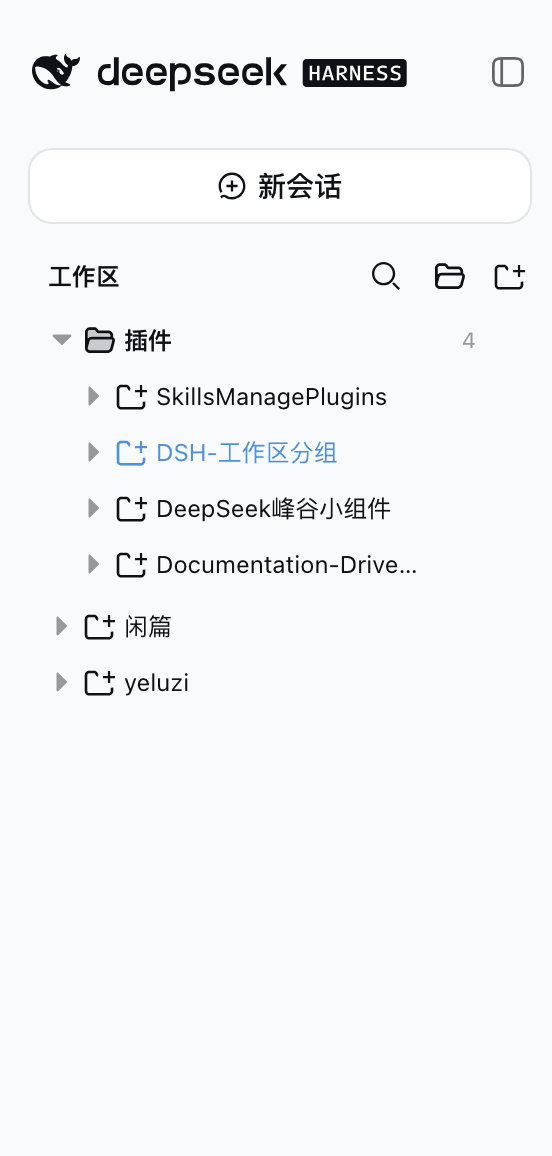
z-col/dsh-workspace-groups
- Group folder → project folder → session row, both levels collapsible; expansion state persists independently (dsh.workspace.groups.view.v1, survives refresh/restart) - Top-level project rows: ungrouped projects (matching no rule, dragged out of a group, or returned by a group delete) render as plain rows right after the group folders, at the
catalog 简介 / catalog descriptioncatalog description:DeepSeek Harness web client plugin: group sidebar workspaces into a configurable three-level tree (分类→项目→会话). Sidecar YAML rules. dsh-plugin.
项目介绍Project Overview
DSH 客户端插件,将侧边栏工作区从两层(项目→会话)升级为三层分组树(分类文件夹→项目文件夹→会话),支持手动建组、重命名/删除、拖拽分组与排序、基于规则(pathPrefix/pathExact/nameContains/basenameContains)的自动归类,以及树形搜索与高亮,250ms 防抖,状态原子写入自有叠加层 ~/.dsh/workspace-groups.manual.json。所有改动即时持久化、永不动 ~/.dsh/storages/workspace.json、会话文件与官方 @deepseek-ai/dsh-client-ui-workspace 包,零侵入。当需要为多项目工作区建立可定制、可搜索、可拖拽整理的分组视图时使用;注意:规则文件需手动编辑 YAML 来调整归类,无 GUI 规则编辑器。
A DSH client plugin that upgrades the sidebar's two-level workspace list (projects → sessions) into a three-level tree: category folder → project folder → session. It supports manual group creation, rename/delete, drag-and-drop grouping and free ordering, rule-based auto-classification via a sidecar YAML, and tree-shaped search with 250ms debounce. All changes persist atomically to its own overlay file and never touch the official workspace storage, session files, or the official UI package. Use it when you need a customizable, searchable, draggable grouping view for many projects. Caveat: rules are configured by editing the YAML file — there is no in-app rule editor.
请帮我了解并安装插件:【dsh-workspace-groups】【https://github.com/z-col/dsh-workspace-groups】把上面这条消息直接发给当前会话里的 DSH,让它帮你了解并安装。安装命令不一定准确,发给 DSH 更稳。Send this message to DSH in your current session. CLI install commands may not be accurate across systems — DSH will figure it out for you.
或使用命令行安装(适合开发者)Or use CLI install (for developers)
命令行安装CLI Install
dsh plugin --profile web add github:z-col/dsh-workspace-groups把 z-col/dsh-workspace-groups 加入你的 DSH 配置(web profile)即可启用。
READMEREADME
English · 简体中文
dsh-workspace-groups



A DeepSeek Harness (DSH) web client plugin: a complete workspace grouping manager. Turns the GUI sidebar's two-level workspace list (Projects → Sessions) into a three-level Category folder → Project folder → Session tree, backed by full group-management capabilities: manual group creation, rename/delete of any group, drag-and-drop grouping, free ordering of projects and groups, rule-based auto-classification, and tree-shaped search. Every action takes effect immediately and persists, with zero intrusion on official data.
Screenshot
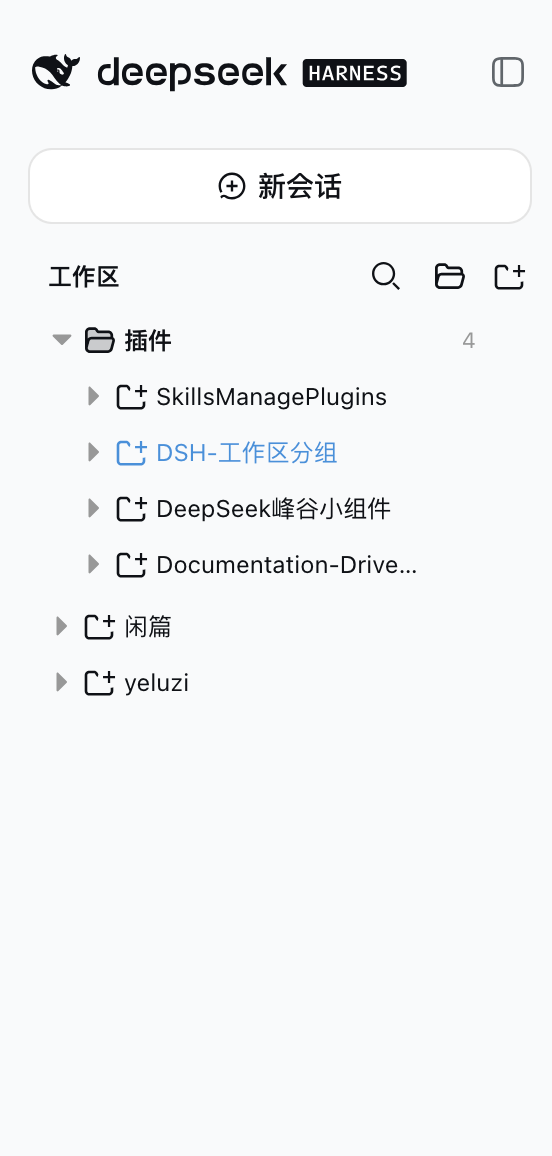
Features
Grouped tree browsing
- Group folder → project folder → session row, both levels collapsible; expansion state
persists independently (
dsh.workspace.groups.view.v1, survives refresh/restart) - Top-level project rows: ungrouped projects (matching no rule, dragged out of a group, or returned by a group delete) render as plain rows right after the group folders, at the same level — there is no "未分类" bucket
Group management (full lifecycle)
- Create groups manually: the "新建分组" button in the section header shows the group immediately (empty groups render too)
- Rename / delete any group: every group row (rule categories included) has a hover
⋯menu; deleting a group sends all of its projects back to the top level; rule-category rename/delete rides the overlay (renamed/hidden), the rule YAML stays untouched - Rule-based auto-classification: the sidecar YAML declares category rules (
pathPrefix/pathExact/nameContains/basenameContains); edit the config to adjust grouping without touching code
Drag-and-drop grouping + ordering
- Drag projects into groups: drop on any group row or on a project row inside a group (cross-group move = overrides the rule classification)
- Drag projects OUT of a group: the entire top-level area is the move-out drop target while dragging, shown with an insertion line (not a highlight box) — drop on any top-level row (reorder before/after it), on the blank space below the last row (append), or, when the top level is empty, a standalone line under the last group folder; grouped projects also have a "移出分组" menu item (rule-classified ones included)
- Reorder projects inside a group: top half of a project row = insert before it, bottom half = insert after it
- Reorder top-level projects: top-level rows are draggable too — top half = insert
before, bottom half = insert after; the top-level order persists under
workspaceOrder["__topLevel__"] - Reorder groups: group rows are draggable — top half of another group row = move before it, bottom half = move after it
- Insertion position indicator: a 2px line (above/below the row) shows the exact drop point while dragging — what you see is where it lands
- Level-aware folding, auto-restored: dragging a project folds every project row (grouped AND top-level; group rows stay expanded); dragging a group folds every group (project rows keep their expansion) — dragend restores the pre-drag expansion snapshot
- Distinct row icons: group rows use a folder glyph, project rows a project glyph (same as the official workspace browser) — groups and projects are easy to tell apart
Search & operations
- Tree-shaped search: results keep the three-level structure (category → project → matched session), matched rows highlighted with a content snippet, 250ms debounce
- No regression on workspace/session actions: Add Workspace, project rename/delete, session new/open/rename/fork/archive
Persistence & zero intrusion
- Every manual action (groups, grouping, ordering, rename, hide) is written to the plugin's own
overlay (
~/.dsh/workspace-groups.manual.json), validated by the host and written atomically (a malformed write returns 400 and keeps the previous file) - Zero intrusion: never touches
~/.dsh/storages/workspace.json, session on-disk structures, or the official@deepseek-ai/dsh-client-ui-workspacepackage; the rule YAML is never rewritten - Self-contained artifact:
lib/is prebuilt and shipped with the repo — installing from Git runs no dependency scripts
How it works
- The plugin is a client plugin registered into the official sidebar shell's
sidebar.workspacesslot (kind: 'single') atpriority: -1, replacing the official WorkspaceBrowser (registered at priority 0; lowest priority wins in a single slot). - All data comes from the runtime API: the
useWorkspaces/useSessionsglobal hooks andctx.workspaces.*/ctx.sessions.*— grouping is purely a presentation-layer transform. - The host half does two things: parses the sidecar YAML and merges it with the runtime
overlay, served to the client via
GET /workspace-groups/config(Cache-Control: no-cache); andPUT /workspace-groups/manualaccepts the full overlay (manual groups, per-workspace grouping overrides, group/project ordering, rule-category renames and hides), validates it and writes it atomically to$DSH_HOME/workspace-groups.manual.json. - Classification priority: manual override (written by drag/menu;
null= forced top-level, rules ignored) → YAML rule classification (hidden rule categories are inert) → top level (ungrouped projects render as top-level rows). The YAML is never rewritten.
Install (GitHub distribution)
Prerequisite: DeepSeek Harness installed (
dshavailable) with a target profile initialized (e.g. the built-inweb).
dsh plugin --profile web add github:z-col/dsh-workspace-groups
This automatically:
- Adds
"dsh-workspace-groups": "github:z-col/dsh-workspace-groups"(pinned to version/commit) todependenciesin~/.dsh/profiles/web/package.json - Appends
"dsh-workspace-groups"todsh.profile.bundles - Runs pnpm install and validates the bundle layer
Restart the web profile after installing (both the bundle and the host half only load on restart):
# Stop the running dsh web process and start it again, e.g.:
dsh web
Verify the install:
dsh --profile web --dump-config | grep -A3 workspace-groups
# expect: - id: workspace-groups / name: dsh-workspace-groups / config: {}
curl http://127.0.0.1:3080/workspace-groups/config
# expect: the sidecar YAML parsed as JSON
Uninstall
dsh plugin --profile web remove dsh-workspace-groups
This removes the dependency from dependencies and the matching line from
dsh.profile.bundles. A web profile restart is required for it to take effect.
Manual equivalent (pick one, don't repeat): edit
~/.dsh/profiles/web/package.json, remove thedsh-workspace-groupsline fromdependenciesand"dsh-workspace-groups"fromdsh.profile.bundles, then runpnpm installin that directory.
Classification config (sidecar)
Default location ~/.dsh/workspace-groups.yaml (override the home dir with the
$DSH_HOME env var). Template: workspace-groups.example.yaml at the repo root.
categories:
  - name: DSH 插件
    rules:
      - pathPrefix: /Users/zcol/Project/SkillsManagePlugins
      - nameContains: 插件
      - basenameContains: plugin
  - name: 个人项目
    rules:
      - pathPrefix: /Users/zcol/Project/yeluzi
Rule fields (each rule is an OR — any match classifies; categories are matched in order, first match wins):
| Field | Meaning |
|---|---|
pathPrefix |
Project absolute path prefix |
pathExact |
Project absolute path exact match |
nameContains |
Project display title contains (case-insensitive) |
basenameContains |
Project directory name contains (case-insensitive) |
Projects matching no category — or moved out of a group — render as top-level project rows (same level as the group folders), never hidden.
Manual groups & drag-and-drop grouping (runtime overlay)
Besides the rule YAML there is a plugin-owned runtime overlay, recording only manual
UI operations, at $DSH_HOME/workspace-groups.manual.json (e.g. ~/.dsh/workspace-groups.manual.json):
{
  "categories": ["临时", "归档"],
  "assignments": {
    "a1b2c3d4-e5f6-7890-abcd-ef1234567890": "临时",
    "a1b2c3d4-e5f6-7890-abcd-ef1234567891": null
  },
  "categoryOrder": ["临时", "DSH 插件"],
  "workspaceOrder": { "临时": ["a1b2c3d4-e5f6-7890-abcd-ef1234567890"] },
  "renamed": { "DSH 插件": "插件集" },
  "hidden": ["文档"]
}
categories— manually created group names (no rules; empty groups render too).assignments— workspace → group classification overrides keyed by the stable workspace id (renames don't affect it). Takes precedence over YAML rules; a value ofnullmeans forced top-level (even when a rule would match).categoryOrder— group display order (top-level rows are not listed here; they always render after the group folders).workspaceOrder— per-group manual ordering of projects (written by drag ordering).renamed/hidden— UI rename/delete of rule categories (a hidden category's rules become inert and its matches go top-level); the rule YAML stays untouched.- The file is written in full by the browser UI (
PUT /workspace-groups/manual, atomic replace); manual edits also take effect on next load. A malformed write returns 400 and keeps the previous file — the rule YAML is never at risk.
| Action | How |
|---|---|
| Create group | "新建分组" button in the section header (folder icon), enter a name in the dialog |
| Rename/delete group | hover ⋯ menu on any group (rule categories included); deleting sends its projects back to the top level |
| Drag project into group | drag a project row onto a target group row / any project row inside a group, release to move |
| Reorder projects | drag a project row onto another project row in the same group: top half = insert before, bottom half = insert after (indicator shows the spot); all project rows fold while dragging and restore on dragend |
| Reorder top-level projects | drag a top-level row onto another top-level row: top half = insert before, bottom half = insert after; order persists under workspaceOrder["__topLevel__"] |
| Move out of a group | drop anywhere on the top-level area (an insertion line shows the spot — reorder before/after a top-level row, or append below the last row; when the top level is empty a line shows under the last group), or the project row's "移出分组" menu (forced top-level) |
| Reorder groups | drag a group row onto another group row: top half = move before, bottom half = move after (indicator shows the spot; all groups fold while dragging, restored on dragend) |
Topics
This repo targets automatic discovery by the DSH plugin ecosystem (community marketplaces scan GitHub topics). Already set:
dsh-plugin(core tag; 1024Store and similar marketplaces discover by this topic periodically, validatingpackage.json+ the plugin bundle manifest (cordis.patch.yml))deepseek-harness/deepseek-harness-plugin/dshsidebar/workspace/workspace-groups
package.json also provides keywords for npm/search indexing.
Development
pnpm install
pnpm typecheck   # host + client dual-program type checking
pnpm test        # core rules, overlay, tree derivation unit tests
pnpm build       # build lib/ (node half + client bundle)
pnpm watch       # tsdown watch (client HMR)
node scripts/verify-groups.mjs   # real-browser CDP verification (host restarted; self-spawns a headless Chrome, auto-restores the scene)
Artifact contract (mirrors the official client packages):
lib/index.js— host half (ESM; reads the sidecar +/workspace-groups/configroute; js-yaml inlined, no runtime dependencies)lib/client.js— browser half (window.__ModuleLoader__.load({id, factory}); only requires platform seeds: react / react/jsx-runtime / @deepseek-ai/dsh-client-runtime/client / @deepseek-ai/dsh-client-ui-primitives; cross-plugin value imports are rejected at build time by the purity gate)lib/types/**— declaration files
Release strategy:
lib/build artifacts are committed (nopreparescript), sodsh plugin add github:...never runs third-party build scripts — install and use.
Repository layout
src/
  index.ts              # host half: config snapshot route + manual write route
  host-config.ts        # sidecar YAML reading/validation
  host-manual.ts        # runtime overlay read/write/validation (atomic publish)
  context-types.ts      # host-side cordis service structure types
  core/
    types.ts            # config types (shared by both halves)
    matcher.ts          # classification + manual override priority + ordering pure functions (shared)
  client/
    index.ts            # apply: registers sidebar.workspaces (priority -1)
    contract.ts         # injected surface types
    stores.ts           # expansion-state store (persist: dsh.workspace.groups.view.v1)
    tree.ts             # three-level tree derivation + tree search derivation
    GroupsBrowser.tsx   # browser region component (group dialogs + drag grouping/ordering + insertion indicator)
    rows.tsx            # category/project/session/search-result rows (drag sources/targets)
    locales.ts          # zh/en copy
    styles.css          # inline styles
tests/
  core.test.ts          # classification rules + override priority + moveBefore/moveAfter + config parsing
  manual.test.ts        # overlay validation + atomic file round-trip
  tree.test.ts          # tree derivation rendering contract (manual group empty render / override priority)
  store.test.ts         # expansion semantics (collapse writes false, never deletes the key)
scripts/
  verify-groups.mjs     # real-browser CDP verification (self-spawns headless Chrome, auto-restores the scene)
Development docs (
docs/five-level framework andAGENTS.md) are engineering files for development, not shipped with the repo (excluded via.gitignore).
Verification record
- v0.1/v0.2 real-combination verification (headless Chrome + CDP): three-level tree takeover,
correct classification, expansion persistence, search keeps workspace membership;
workspace.json/ session on-disk / official store: zero intrusion. - v0.3 real-browser verification 24/24 (
scripts/verify-groups.mjs: create group / drag / order / collapse / rule-category menu / rename / delete-back-to-top-level / scene restore; zero-intrusion assertions). - v0.4 real-browser verification 30/30 (added: insertion indicator, project/group downward drag (bottom half → insert after the target), group upward drag (top half → move before the target); scene restored).
- v0.4.1 real-browser verification 34/34 (added: dragging projects OUT of a group — top-level drop zone / top-level rows = forced top-level; grouped projects get the "移出分组" menu item).
- v0.5 real-browser verification 35/35 (model change: no "未分类" bucket — top-level project rows, group delete returns members to the top level, drag/menu move-out to the top level, no uncategorized bucket anywhere in the tree; scene restored).
- v0.6 real-browser verification 40/40 (added: level-aware folding — dragging a project folds project rows only (group rows stay open), dragging a group folds group rows only; dragend restores the pre-drag expansion snapshot).
- v0.6.1 real-browser verification 42/42 (added: the whole top-level area as the move-out drop target with a visible landing highlight; distinct folder-vs-project row icons; scene restored).
- v0.7 real-browser verification 46/46 (added: top-level landing shown with an insertion
line instead of a highlight box — reorder before/after a top-level row, append below
the last row, or a standalone line when the top level is empty; top-level projects are
reorderable with their order persisted under
workspaceOrder["__topLevel__"]; also fixed a host validation bug that rejected__topLevel__and a drop-positioning bug where dropping between two top-level rows landed above the first; scene restored). - 66 unit tests green (vitest:
core/manual/tree/store). - Reproducible automated verification:
node scripts/verify-groups.mjs(host restarted).
License
MIT
相关推荐Related
-
 ruvnet/ruflo
🌊 The original agent meta-harness. Deploy intelligent multi-player swarms, coordinate autonomous workflows, and build c…
ruvnet/ruflo
🌊 The original agent meta-harness. Deploy intelligent multi-player swarms, coordinate autonomous workflows, and build c…
-
 amruthpillai/reactive-resume
A one-of-a-kind resume builder that keeps your privacy in mind. Completely secure, customizable, portable, open-source a…
amruthpillai/reactive-resume
A one-of-a-kind resume builder that keeps your privacy in mind. Completely secure, customizable, portable, open-source a…
-
 volcengine/OpenViking
Self-evolving Context Database for AI Agents. Unify Agent Memory, Knowledge RAG and Skills.
volcengine/OpenViking
Self-evolving Context Database for AI Agents. Unify Agent Memory, Knowledge RAG and Skills.
-
 Molunerfinn/PicGo
:rocket: The Ultimate Image Uploader for Efficient Creators. Supports Obsidian, Typora, VS Code etc. and 60+ image hosti…
Molunerfinn/PicGo
:rocket: The Ultimate Image Uploader for Efficient Creators. Supports Obsidian, Typora, VS Code etc. and 60+ image hosti…
-
 titanwings/colleague-skill
将冰冷的离别化为温暖的 Skill,欢迎加入数字生命1.0!Transforming cold farewells into warm skills? It's giving rebirth era. Welcome to Digital …
titanwings/colleague-skill
将冰冷的离别化为温暖的 Skill,欢迎加入数字生命1.0!Transforming cold farewells into warm skills? It's giving rebirth era. Welcome to Digital …
-
 nocobase/nocobase
NocoBase is an open-source AI + no-code platform for building business systems fast. Instead of generating everything fr…
nocobase/nocobase
NocoBase is an open-source AI + no-code platform for building business systems fast. Instead of generating everything fr…
-
 Tencent/WeKnora
Open-source LLM knowledge platform: turn raw documents into a queryable RAG, an autonomous reasoning agent, and a self-m…
Tencent/WeKnora
Open-source LLM knowledge platform: turn raw documents into a queryable RAG, an autonomous reasoning agent, and a self-m…
- Nagi-ovo/voyager Enhancement suite for Gemini, AI Studio, Claude & ChatGPT — plus a prompt manager for any web UI, DeepSeek Harness inclu…