ZekaiShi/evo-subagent
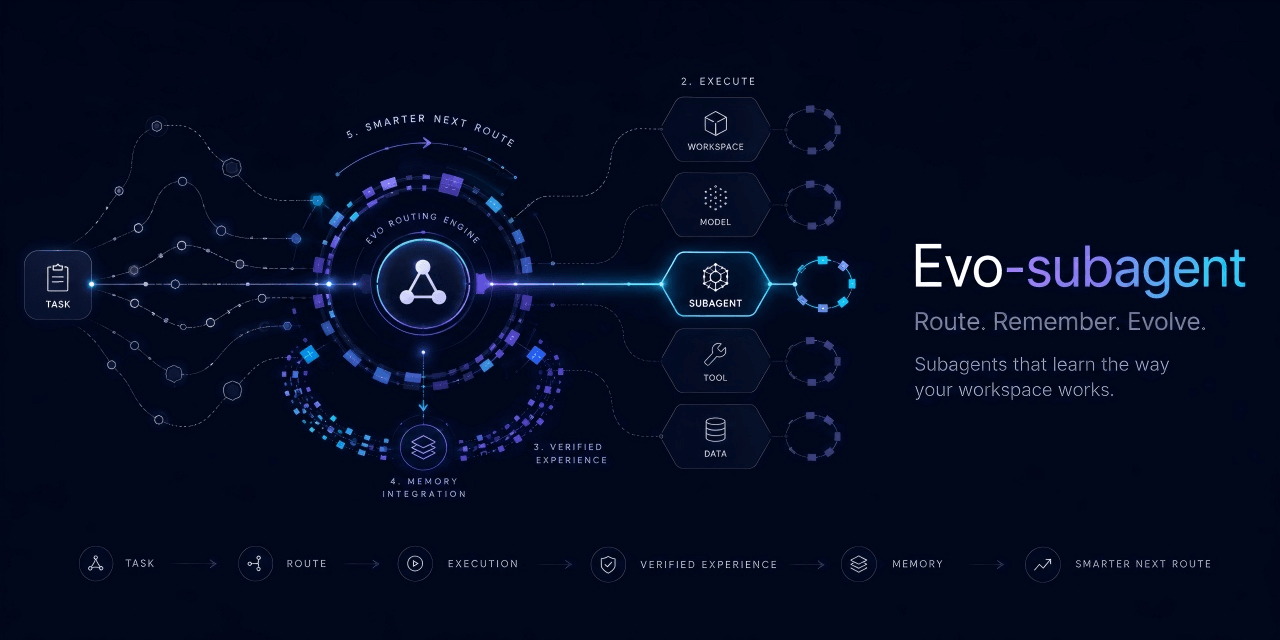
Unified DeepSeek Harness plugin: role-based subagent routing + per-agent evolution (prefercmd/memory as knowledge allow/deny lists), so repeated tasks start from proven commands and save tokens. Unified subagent routing and evolution: prefercmd/memory serve as knowledge allow/deny lists, saving tokens.
项目介绍Project Overview
evo-subagent 是 DSH 插件,用同名 Markdown 把稳定角色绑定到已注册的 provider/model,并按项目隔离 prefercmd.md 与 memory.md,记录验证命令和经验。需要可预测路由、子代理 spawn/fork 或项目级记忆时使用;provider/model 须精确匹配且已注册,插件不存储密钥或供应商定义。
evo-subagent is a DeepSeek Harness plugin for predictable subagent routing and project-scoped evolution. It maps stable agent roles to registered provider/model pairs via Markdown bindings, supports spawn/fork children, and keeps per-agent prefercmd.md and memory.md knowledge isolated by workspace. Use it when routing, verified commands, or reusable lessons matter. Bindings must exactly match registered provider/model values; the plugin stores no API keys or provider definitions.
请帮我了解并安装插件:【evo-subagent】【https://github.com/ZekaiShi/evo-subagent】把上面这条消息直接发给当前会话里的 DSH,让它帮你了解并安装。安装命令不一定准确,发给 DSH 更稳。Send this message to DSH in your current session. CLI install commands may not be accurate across systems — DSH will figure it out for you.
或使用命令行安装(适合开发者)Or use CLI install (for developers)
命令行安装CLI Install
dsh plugin add evo-subagent把 ZekaiShi/evo-subagent 加入你的 DSH 配置(web profile)即可启用。
READMEREADME
evo-subagent
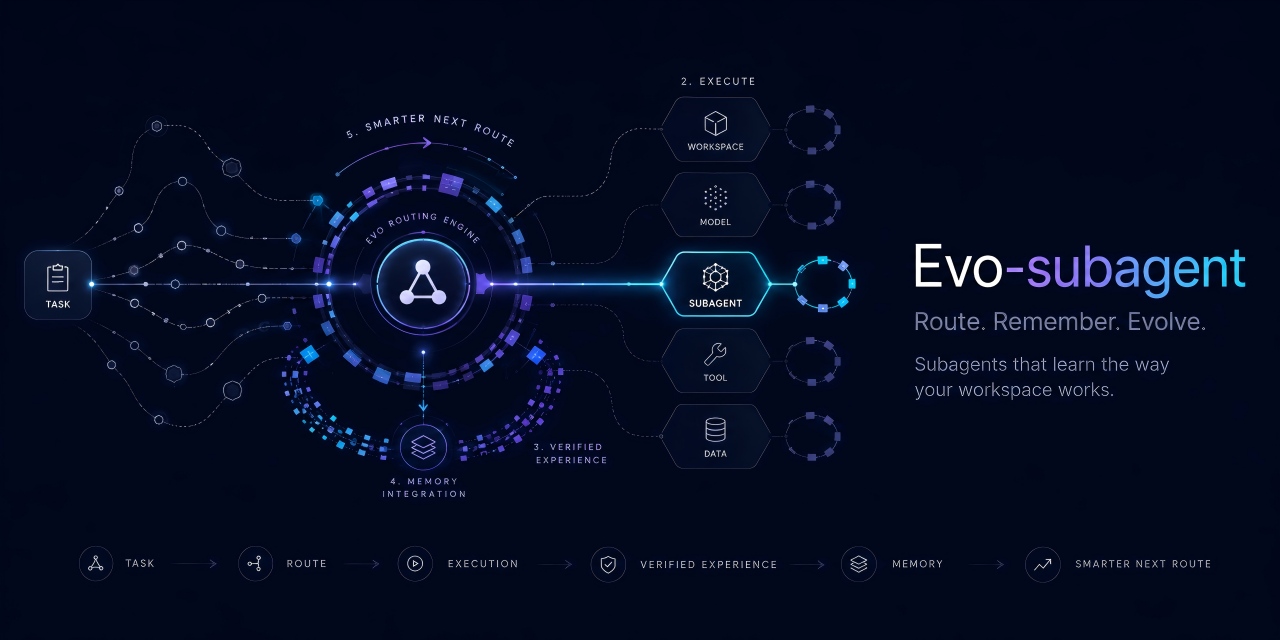



evo-subagent is a DeepSeek Harness plugin for predictable subagent routing and project-scoped evolution.
It maps stable agent roles to registered provider/model pairs, remembers verified commands and lessons for each role, and keeps every project's agent knowledge isolated.
Features
- Route each
agent_keythrough a same-named Markdown binding. - Validate the exact provider/model pair before creating a child agent.
- Maintain per-agent
prefercmd.mdandmemory.mdknowledge files. - Isolate bindings and evolution data by project workspace.
- Support fresh
spawnchildren and context-awareforkchildren. - Fall back to DSH's native model inheritance when no binding exists.
- Store no API keys, endpoints, credentials, or provider definitions.
Installation
dsh plugin add evo-subagent
Quick start
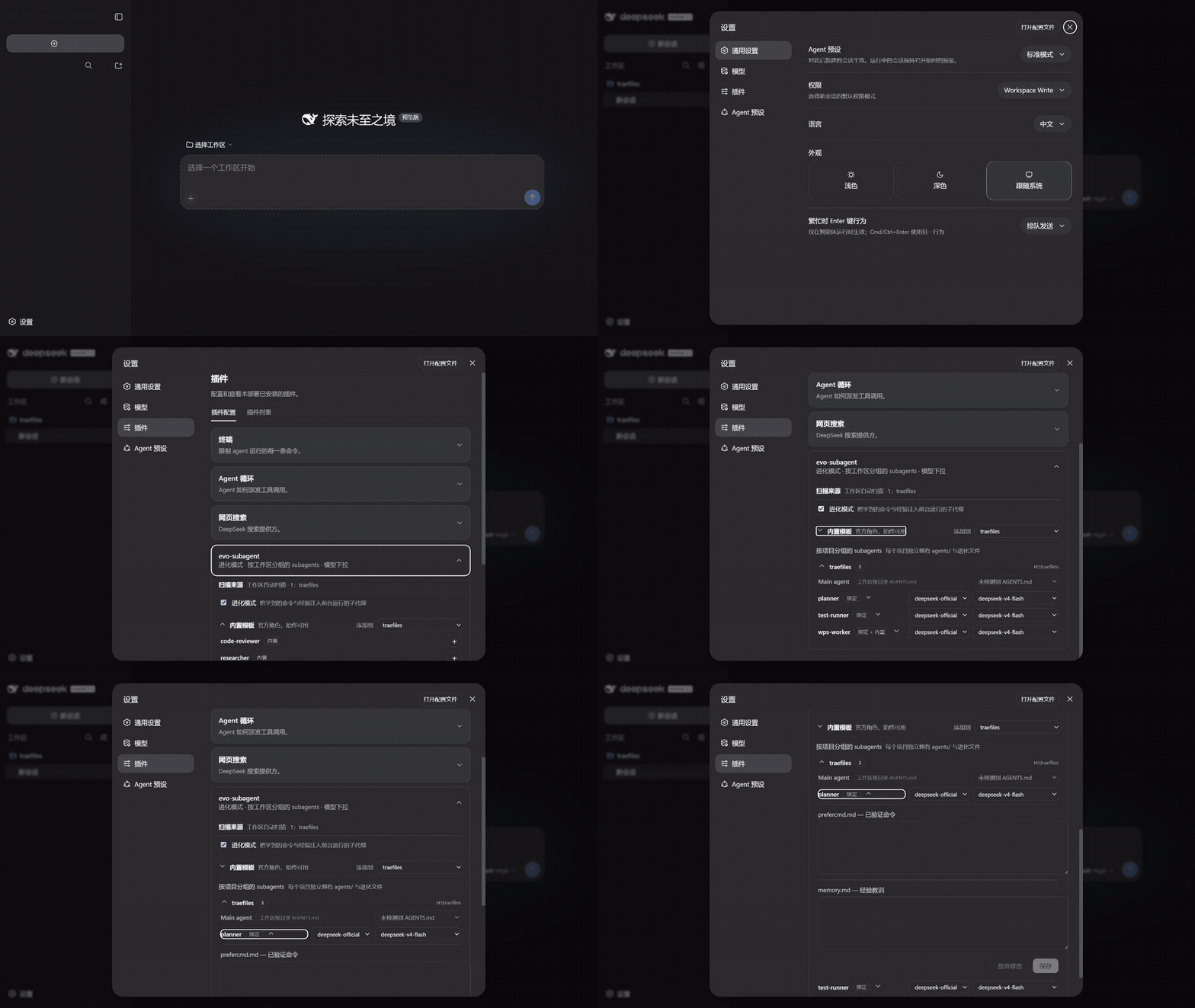
- Open Settings → Plugins and expand evo-subagent.
- Select a workspace and add a built-in role, or place a custom binding in its
agents/directory. - Choose a registered provider/model pair for each custom binding.
- Expand an agent to review its
prefercmd.mdandmemory.mdevolution files.
Agent bindings
Create an agents/ directory in the project and add one Markdown file per role. The filename stem becomes the agent_key.
project/
├─ agents/
│  ├─ code-reviewer.md
│  └─ researcher.md
└─ .evo_subagent/
   └─ evolution/
Each binding begins with a strict front matter block:
---
provider: deepseek-official
model: deepseek-v4-flash
---

# Code reviewer
Optional role notes may follow.
The provider and model must already be registered. Matching is exact and case-sensitive.
Call the plugin tool with the corresponding key:
{
  "agent_key": "code-reviewer",
  "description": "Review the implementation",
  "prompt": "Report correctness, security, and test coverage issues.",
  "run_in_background": false
}
Built-in roles
Three templates are included:
agent_key |
Role |
|---|---|
code-reviewer |
Severity-ranked code review |
researcher |
Evidence-backed investigation |
wps-worker |
Office document production |
A project binding with the same agent_key overrides its built-in template.
Evolution
Each project stores role-specific knowledge under:
.evo_subagent/evolution/<agent_key>/prefercmd.md
.evo_subagent/evolution/<agent_key>/memory.md
prefercmd.mdrecords commands that have been verified to work.memory.mdrecords reusable lessons and failures to avoid.
Foreground subagents receive a bounded knowledge block. They can return new entries with:
[[EVOLUTION]]
prefercmd:
- pnpm test
memory:
- Do not use --force in CI.
[[/EVOLUTION]]
Entries are deduplicated and bounded. Prefix an entry with ! to keep it at highest priority, or ? to make it compressible when the context budget is tight.
Legacy .smart_subagent/evolution data remains a read-only fallback and is copied to the new location on the next save.
Workspace management
The plugin settings card groups agents by project and lets users:
- view or collapse workspace agent lists;
- edit a custom binding's registered provider/model route;
- add a built-in role to a workspace by copying its template;
- bind one workspace-root
AGENTS.mdas the Main agent; - inspect and edit each agent's evolution files.
Main-agent evolution is stored under .evo_subagent/evolution/main/. Binding and unbinding only changes the plugin-managed instruction block in AGENTS.md.
Tool fields
| Field | Required | Description |
|---|---|---|
agent_key |
Yes | Binding filename without .md. |
description |
Yes | Short task label. |
prompt |
Yes | Complete task for the child agent. |
run_in_background |
No | Defaults to true; use false to collect evolution output. |
Routing behavior
- Resolve
<agent_key>.mdsafely. - Parse its fenced
providerandmodelfields. - Verify both values against the live model registry.
- Start the child through the selected
spawnorforkprovider.
Invalid bindings fail before a child is created. Missing bindings preserve native DSH inheritance unless a built-in template matches.
Development
Requires Node.js 22 or newer.
npm test
npm run check
npm pack --dry-run
License
相关推荐Related
-
 nexu-io/open-design
🎨 Best DeepSeek Harness Design Plugin. The open-source Claude Design alternative. 🖥️ Local-first desktop app. 🖼️ Your…
nexu-io/open-design
🎨 Best DeepSeek Harness Design Plugin. The open-source Claude Design alternative. 🖥️ Local-first desktop app. 🖼️ Your…
-
 ruvnet/ruflo
🌊 The original agent meta-harness. Deploy intelligent multi-player swarms, coordinate autonomous workflows, and build c…
ruvnet/ruflo
🌊 The original agent meta-harness. Deploy intelligent multi-player swarms, coordinate autonomous workflows, and build c…
-
 amruthpillai/reactive-resume
A one-of-a-kind resume builder that keeps your privacy in mind. Completely secure, customizable, portable, open-source a…
amruthpillai/reactive-resume
A one-of-a-kind resume builder that keeps your privacy in mind. Completely secure, customizable, portable, open-source a…
-
 esengine/DeepSeek-Reasonix
DeepSeek-native AI coding agent for your terminal. Engineered around prefix-cache stability — leave it running.
esengine/DeepSeek-Reasonix
DeepSeek-native AI coding agent for your terminal. Engineered around prefix-cache stability — leave it running.
-
 volcengine/OpenViking
Self-evolving Context Database for AI Agents. Unify Agent Memory, Knowledge RAG and Skills.
volcengine/OpenViking
Self-evolving Context Database for AI Agents. Unify Agent Memory, Knowledge RAG and Skills.
-
 Molunerfinn/PicGo
:rocket: The Ultimate Image Uploader for Efficient Creators. Supports Obsidian, Typora, VS Code etc. and 60+ image hosti…
Molunerfinn/PicGo
:rocket: The Ultimate Image Uploader for Efficient Creators. Supports Obsidian, Typora, VS Code etc. and 60+ image hosti…
-
 titanwings/distilly
Distilly — Distill how they think into reusable Skills for any Agent or Bot. Formerly Colleague Skill(原同事 Skill).
titanwings/distilly
Distilly — Distill how they think into reusable Skills for any Agent or Bot. Formerly Colleague Skill(原同事 Skill).
-
 titanwings/colleague-skill