ziduup/dsh-programming-mode
DeepSeek Harness 编程模式组合包:标准模式之上强制执行 Superpowers 工程纪律(TDD、系统化调试、先计划后编码、完成前验证、代码审查)与常驻 Ponytail 代码量纪律,内置 20 个技能(14 superpowers + 6 ponytail),dsh plugin add 一键安装。
Project Overview项目介绍
dsh-programming-mode is a DeepSeek Harness bundle that ships the 编程模式 agent preset, layering mandatory Superpowers engineering discipline onto the standard coding agent. It enforces skills-first invocation, brainstorming before design, plan-driven execution, TDD with RED-GREEN-REFACTOR, systematic root-cause debugging, verification before completion, and code review, while mechanically injecting using-superpowers into the first request batch. Use it when running controlled, auditable Chinese-language programming workflows in DSH. Caveat: an agent preset carries shell-level authority, so review agent.cordis.yml and every referenced plugin row before installing.
dsh-programming-mode 是 DeepSeek Harness 插件包,预装 编程模式 agent 预设:在标准编码智能体的基础上强制套用 Superpowers 工程规范。核心能力涵盖技能优先、设计先行、计划驱动、TDD 红绿重构、系统化调试、完成前验证及代码审查,并将 using-superpowers 在会话首批请求中由引擎强制注入。适用场景:需在 DSH 中跑受控、可审计的中文编程流程时。注意事项:预设等同 shell 权限,安装前请审阅 agent.cordis.yml 中引用的所有插件行。
请帮我了解并安装插件:【dsh-programming-mode】【https://github.com/ziduup/dsh-programming-mode】Send this message to DSH in your current session. CLI install commands may not be accurate across systems — DSH will figure it out for you.把上面这条消息直接发给当前会话里的 DSH,让它帮你了解并安装。安装命令不一定准确,发给 DSH 更稳。
Or use CLI install (for developers)或使用命令行安装(适合开发者)
CLI Install命令行安装
dsh plugin --profile web add @ziduup/dsh-programming-mode把 ziduup/dsh-programming-mode 加入你的 DSH 配置(web profile)即可启用。
READMEREADME
dsh-programming-mode



English · 中文
编程模式:一个 DeepSeek Harness 组合包(bundle),在标准模式的全部能力之上强制执行 Superpowers 工程纪律。一条命令即可安装。
目录
这是什么
编程模式 = 部署自带 standard 模式的全部能力 + 强制 Superpowers 工程纪律的人设:
- 行动前先查技能(using-superpowers)
- 创作前先头脑风暴(brainstorming),设计批准后才实现
- 多步任务先写计划(writing-plans → executing-plans)
- 实现走 TDD 红绿重构(test-driven-development)
- 调试先找根因(systematic-debugging)
- 完成前必须跑验证(verification-before-completion)
- 重要工作请求代码审查(requesting / receiving-code-review)
- 需求文档与开发计划一律用中文撰写
- 首条消息强制注入 using-superpowers:新会话的第一条请求前自动注入技能全文,纪律从第一句就生效
- 代码量纪律(Ponytail)常驻:默认 full 强度,7 级阶梯(YAGNI → 复用 → stdlib → 原生 → 已有依赖 → 一行 → 最少可用)始终生效;只管实现代码量,不触碰上面的流程规则(测试 / 计划 / 验证 / 审查归 Superpowers),用户可说 "ponytail lite/ultra" 或 "停止 ponytail" 调整
本包捆绑了全部 20 个所需技能,安装即用、无需自备技能。
技能归属:捆绑的 20 个技能中,14 个源自 Superpowers 方法论(MIT),6 个源自 Ponytail(MIT),署名声明见
preset/programming/skills/SKILLS-LICENSE.md。
安装
# 从 npm(推荐,registry 通道更稳)
dsh plugin --profile web add @ziduup/dsh-programming-mode

# 从 GitHub(git 直装)
dsh plugin --profile web add github:ziduup/dsh-programming-mode

# 从本地目录 / tarball
dsh plugin --profile web add ./dsh-programming-mode
dsh plugin --profile web add ./dsh-programming-mode-<版本>.tgz
安装后重启该 profile,模式选择器里即出现 编程模式。
升级行为
安装后在 profile 启动时,本包将捆绑的 preset 目录植入 roster 的第一个用户根(默认 $DSH_HOME/.agent-presets/)。升级按版本戳判断:
| 目标目录状态 | 行为 |
|---|---|
| 不存在 | 全新植入,写入版本戳 |
| 版本戳 == 本包版本 | 无操作(保留你的本地修改) |
| 版本戳 != 本包版本 | 覆盖文件并刷新版本戳(升级) |
| 存在但无版本戳 | 拒绝触碰(不是我们植入的,可能是你手写的同名 preset) |
卸载
dsh plugin --profile web remove @ziduup/dsh-programming-mode
卸载组合包不会删除已植入的 preset——它已属于你的用户目录、可能含你的修改。不需要时手动删除 $DSH_HOME/.agent-presets/programming/ 即可。
安全与信任
- agent preset 与 shell 访问权限同级:安装本 preset 即表示信任它引用的全部插件行。
- 若从 GitHub 安装,pnpm 会要求你在
pnpm-workspace.yaml中allowBuilds授权构建脚本——这等于允许包代码在安装时于本机执行;建议锁定 commit(github:ziduup/dsh-programming-mode#<sha>)。从 npm 或 tarball 安装的是预构建产物,无此门槛。
自行构建
pnpm pack # 产出 tarball,可用 dsh plugin add ./dsh-programming-mode-<版本>.tgz 安装
作者与许可
子都(ziduup)· 仓库:ziduup/dsh-programming-mode · MIT
Related相关推荐
-
 chuspeeism/dashi-taskboard
现代化可灵活嵌入的任务面板,支持 Codex、DeepSeek Harness
chuspeeism/dashi-taskboard
现代化可灵活嵌入的任务面板,支持 Codex、DeepSeek Harness
-
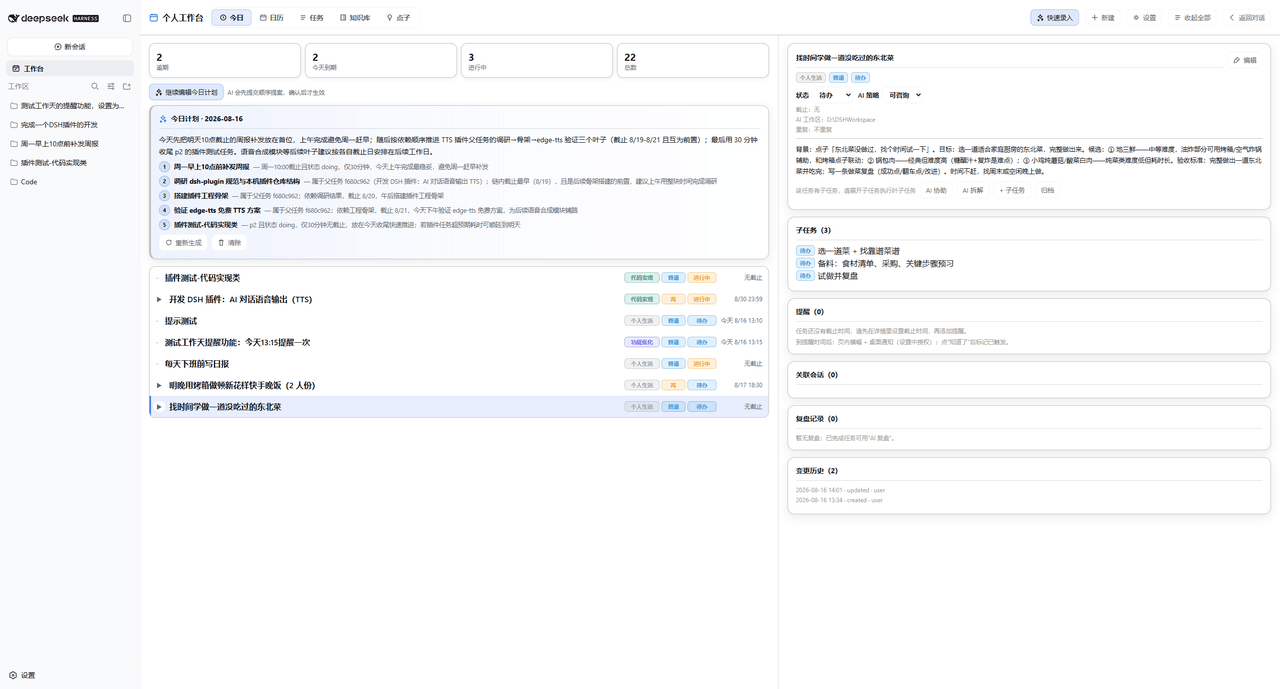 Dely0/dsh-personal-workbench
DSH 个人工作台:日历 + 任务列表 + AI 澄清/拆解/执行/复盘 | Personal workbench for DeepSeek Harness Web: calendar + task list + AI assistant
Dely0/dsh-personal-workbench
DSH 个人工作台:日历 + 任务列表 + AI 澄清/拆解/执行/复盘 | Personal workbench for DeepSeek Harness Web: calendar + task list + AI assistant
-
 Aisland-SJL/dsh-worktable
🖥️ Agent-project workbench for DeepSeek Harness — sidebar app drawer + dockable split workspace + a live control room w…
Aisland-SJL/dsh-worktable
🖥️ Agent-project workbench for DeepSeek Harness — sidebar app drawer + dockable split workspace + a live control room w…
-
 zhoushoujianwork/easyeda-agent
嘉立创EDA专业版(EasyEDA Pro)自动化:给 AI harness 装上画板的「手」—— 一套 typed 原理图/PCB 动作,CLI / Agent Skill / stdio MCP 三形态融合接入。承接嘉立创「不以卖板赚钱…
zhoushoujianwork/easyeda-agent
嘉立创EDA专业版(EasyEDA Pro)自动化:给 AI harness 装上画板的「手」—— 一套 typed 原理图/PCB 动作,CLI / Agent Skill / stdio MCP 三形态融合接入。承接嘉立创「不以卖板赚钱…
-
 morluto/rea
Reverse engineer anything with agents, from app behavior down to native binaries.
morluto/rea
Reverse engineer anything with agents, from app behavior down to native binaries.
-
 linhay/harmony-next.skills
Offline HarmonyOS NEXT developer skill library for AI coding assistants. Covers API 12–26 declarations, ArkTS/ArkUI, NDK…
linhay/harmony-next.skills
Offline HarmonyOS NEXT developer skill library for AI coding assistants. Covers API 12–26 declarations, ArkTS/ArkUI, NDK…
- ericshang98/Perfect-Web-Clone Pixel-perfect clones of any webpage. Paste a URL, get a measured Vite + React replica.
-
 GraySilver/dsh-evolve-modes
让 Agent 的工作方式可组合、可审查、可持续改进,最终实现 Agent Self Evoling。 DeepSeek Harness Web plugin with composable task controls and isolat…
GraySilver/dsh-evolve-modes
让 Agent 的工作方式可组合、可审查、可持续改进,最终实现 Agent Self Evoling。 DeepSeek Harness Web plugin with composable task controls and isolat…