
ZSeven-W/dsh-openpencil
OpenPencil 的 DeepSeek Harness 插件——在对话中预览、检查和编辑真实的 .op 文档。
项目介绍Project Overview
DSH OpenPencil 是 DeepSeek Harness 的插件,用于在对话中预览、检查与编辑真实 .op 设计文档。核心能力包括多帧精确预览、可缩放交互画布、可编辑管理工作台,以及供 Agent 调用的五个原生设计工具。适用于需要 Agent 驱动真实矢量画布的 UI 设计协作场景。注意:当前为 0.1.0-rc.2 版本,仅兼容 DSH 0.1.1-rc.1,事务失败时不会留下空文件覆盖原路径。
DSH OpenPencil is a DeepSeek Harness plugin that previews, inspects, and edits real .op design documents inside a conversation. Its core capabilities include exact multi-frame previews, an interactive zoomable canvas, a resizable managed editor, and five agent-native tools for transactional canvas edits. Use it when an agent must drive a real, editable vector design surface rather than return generated images. Note: version 0.1.0-rc.2 is tested only with DSH 0.1.1-rc.1, and a failed batch never overwrites an existing document path.
请帮我了解并安装插件:【dsh-openpencil】【https://github.com/ZSeven-W/dsh-openpencil】把上面这条消息直接发给当前会话里的 DSH,让它帮你了解并安装。安装命令不一定准确,发给 DSH 更稳。Send this message to DSH in your current session. CLI install commands may not be accurate across systems — DSH will figure it out for you.
或使用命令行安装(适合开发者)Or use CLI install (for developers)
命令行安装CLI Install
dsh plugin --profile web add @zseven-w/dsh-openpencil@next把 ZSeven-W/dsh-openpencil 加入你的 DSH 配置(web profile)即可启用。
READMEREADME
DSH OpenPencil
The DeepSeek Harness plugin for OpenPencil — preview, inspect, and edit real .op documents inside a conversation.
Exact Multi-Frame Previews • Interactive Canvas • Managed Editor • Agent-Native Design Tools
npm: @zseven-w/dsh-openpencil · Current plugin release: 0.1.0-rc.6 · Tested through DSH 0.1.1-rc.2
English · 简体中文 · 繁體中文 · 日本語 · 한국어 · Français · Español · Deutsch · Português · Русский · हिन्दी · Türkçe · ไทย · Tiếng Việt · Bahasa Indonesia



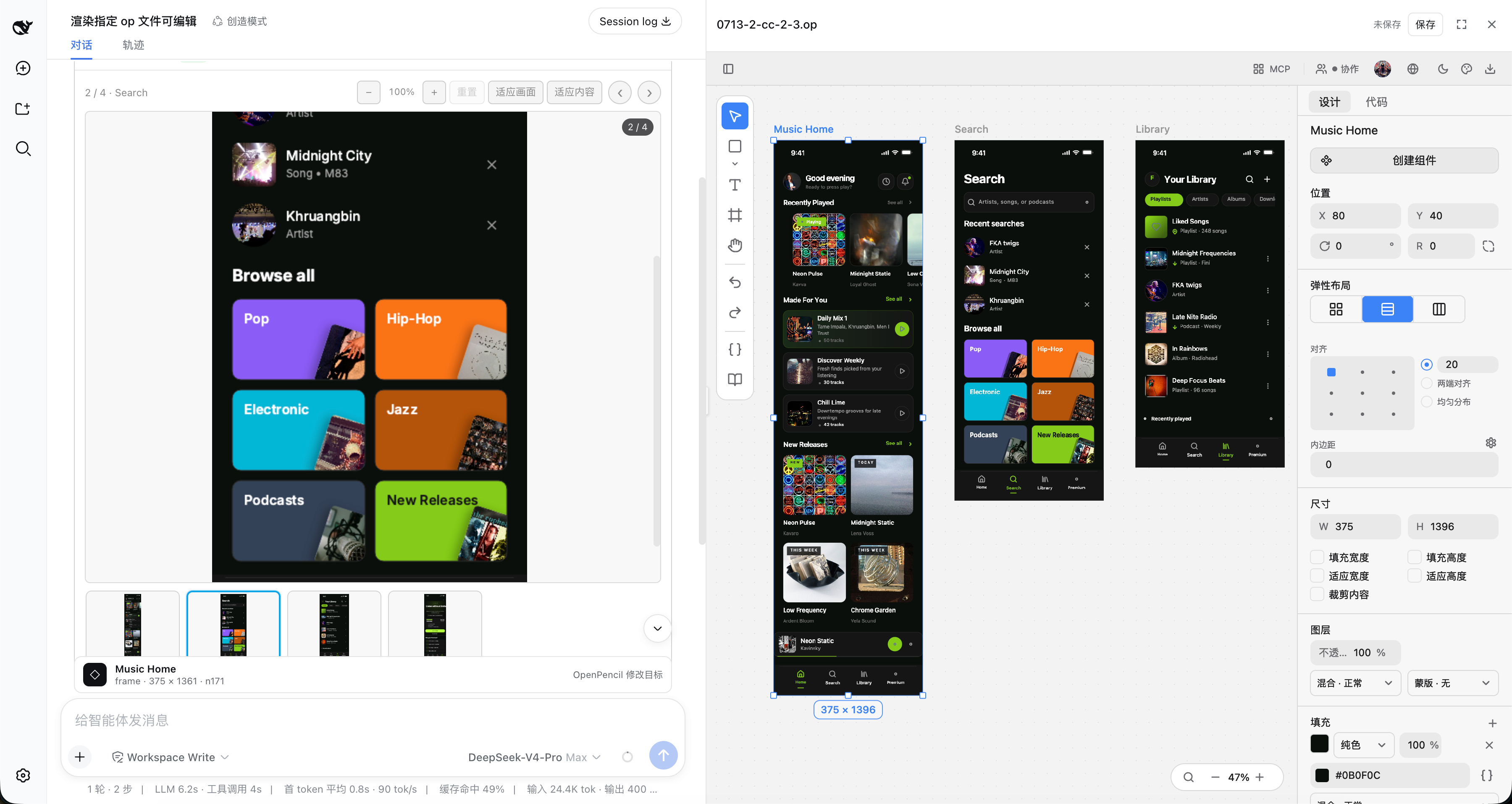
Exact multi-frame .op previews with an interactive canvas and the managed editor workbench
Why DSH OpenPencil
DSH OpenPencil connects DeepSeek Harness with OpenPencil so an Agent drives a real, editable, interactive design canvas instead of returning a generated image.
🖼️ Exact Multi-Frame PreviewsThe installed OpenPencil headless exporter renders design-faithful previews: the first top-level frame as a large replay-safe PNG, plus a horizontally scrollable thumbnail rail, click-to-select, and previous/next navigation for multi-frame documents. |
🗺️ Interactive Canvas"Open interactive canvas" lazily mounts the read-only OpenPencil Web SDK with pan, zoom, and fit — inspect any page, nested node, or inactive page without leaving the conversation. |
✏️ Managed EditorWith |
🤖 Agent-Native Design ToolsFive direct-canvas tools plus six |
🔐 Capability-Gated GrantsImage and document grants are signed, hash-bound capabilities. Browser metadata never exposes an arbitrary host path, and signed preview/editor capabilities never enter the canonical tool result or model context. |
⚡ Transactional SafetyA full-pipeline document stays in a private unpublished draft until every native and DSH quality gate passes. Publication never overwrites an existing path, and aborts or failed batches leave no empty target behind. |
🌍 Follows DSH Look & FeelThe tool card and managed editor follow DSH's Chinese/English locale and light/dark theme without reloading the editing session. |
🎯 One Complete Workflow"Requirement → private draft → semantic batches → exact PNG review and repairs → quality-gated atomic publish" — one complete loop inside DSH. |
Install into DSH
DSH is a separate package. Install it once if you do not already have it:
npm install -g @deepseek-ai/dsh@latest
Then add the plugin to a profile and start the web app:
dsh plugin --profile web add @zseven-w/dsh-openpencil@next
dsh web
The plugin is still on a prerelease line, so install it from the npm next tag. The npm latest tag currently points to the older 0.1.0-rc.1 package.
For local development, build the checkout, link its absolute path into the Web profile, and then restart DSH:
pnpm run build
dsh plugin --profile web add link:/absolute/path/to/dsh-openpencil
dsh web
The link: dependency exposes subsequent rebuilds from this checkout, but DSH must be fully restarted after replacing the profile dependency because the shipped Web profile does not hot-reload host bundles by default.
Prefer not to install DSH globally? Run the same two steps through pnpm dlx:
pnpm dlx --package=@deepseek-ai/dsh@latest dsh plugin --profile web add @zseven-w/dsh-openpencil@next
pnpm dlx --package=@deepseek-ai/dsh@latest dsh web
The OpenPencil plugin is public and requires no npm token. If the DSH prerelease itself requires registry authentication, keep that credential in a user-level or temporary npm config outside the checkout. This repository intentionally contains no registry credentials.
Design Tools
| Tool | What it does |
|---|---|
openpencil_new |
Compatible fast path for simple jobs: runs one transactional QuickJS batch_design script, publishes with create-if-absent semantics, and returns an editable presentation. Prefer the full pipeline below for production design. |
openpencil_pipeline_begin |
Starts an owner-scoped private draft for a new workspace-relative .op path; the target file remains unpublished and untouched. |
openpencil_pipeline_context |
Loads the native dynamic design-agent prompt together with relevant guidelines, style guides, variables/themes, and UI-kit metadata or script references. |
openpencil_pipeline_batch |
Applies serialized semantic QuickJS batches to the draft; build the skeleton first, then add and refine sections. |
openpencil_pipeline_inspect |
Runs native quality or resolved-layout inspection, or creates an exact PNG that the model can open with image reading and review visually. |
openpencil_pipeline_finish |
Runs native finalization, lint, layout, screenshot freshness, and DSH quality gates, then atomically publishes with createIfAbsent and returns an editable presentation. |
openpencil_pipeline_abort |
Discards the unpublished draft without creating the target file. |
openpencil_create |
Applies a transactional batch_design program to generate or restructure nodes on an existing live canvas. |
openpencil_edit |
Modifies an explicit node or the single node selected by the user. |
openpencil_render |
Creates an immutable, content-addressed .op snapshot and renders every top-level frame on the active page — optional scale and editable. |
openpencil_selection |
Reads the exact nodes selected in the live editor canvas. |
Agent Design Workflow
For production design, use openpencil_pipeline_begin → openpencil_pipeline_context → repeated openpencil_pipeline_batch and openpencil_pipeline_inspect calls → openpencil_pipeline_finish. The draft daemon is private to the owning DSH session, and the requested workspace path does not exist until publication succeeds. Intermediate draft screenshots never expose an editable sidebar, preventing user edits from racing the Agent's batches; editability is granted only after publication.
Context is dynamic rather than a static template: it combines OpenPencil's native design-agent prompt with the relevant guidelines, style guides, variables/themes, and UI kits. Build a structural skeleton first, then add content and refinement in semantic section batches. Successful batch calls return only compact layout diagnostics for speed; request the full resolved layout through openpencil_pipeline_inspect when needed. At minimum, call openpencil_pipeline_inspect with kind: "screenshot" after the signature/heading is established and again after the primary task or form plus CTA is in place. At each milestone the model opens the exact PNG with image reading, fixes visible clipping, overflow, hierarchy, spacing, control proportions, contrast, and text legibility, and repeats as needed; visual review does not happen automatically.
Finishing runs OpenPencil's native finalization, lint, and layout checks plus DSH's quality gate. These deterministic checks do not create taste or visual polish. After finalization, take a separate new exact screenshot and have the model review it visually; intermediate milestone screenshots can never satisfy this post-final freshness gate. Only then does the final finish call atomically create the target with createIfAbsent. A failed gate or openpencil_pipeline_abort leaves the target absent. Every published generation result is one presentation containing the exact final PNG preview and a document-scoped editable grant; it auto-opens the sidebar only when idle, never replaces another session's editor, and always keeps Edit canvas for an explicit switch. A nested openpencil_pipeline_finish result returned through PTC/Code Mode preserves that same presentation and never degrades into ordinary JSON or a read-only card. Historical or hydrated cards never auto-open.
Within the same running DSH service, switching browsers or reloading can recover a strictly parsed durable publication from openpencil_new or openpencil_pipeline_finish as the exact PNG plus an explicit Edit canvas action. A historical card never auto-opens the sidebar; the user must click that action. An ordinary historical openpencil_render remains read-only, and non-loopback connections never receive an editor grant.
The bundled openpencil-design skill remains the scripting and quality guide, and the managed runtime does not depend on the desktop binary. openpencil_new remains a compatible single-batch fast path for simple work, but production-quality generation should prefer the full pipeline.
Use openpencil_create and openpencil_edit only for an existing live canvas. Their edits remain unsaved until the editor Save action.
Web Viewer Assets
DSH serves only client.js for a client plugin, so the OpenPencil ESM SDK, its WASM, and CanvasKit are staged as explicit same-origin assets:
pnpm run sync:viewer-assets
The sync command prefers a sibling ../openpencil checkout (local development), falling back to the vendored vendor/openpencil submodule (CI and fresh clones). Override it with OPENPENCIL_ROOT or --openpencil-root. A complete prebuilt asset directory can be selected with DSH_OPENPENCIL_VIEWER_SOURCE. Runtime lookup can be overridden with DSH_OPENPENCIL_VIEWER_ASSET_DIR.
Viewer assets are lazy-loaded only after the user opens the canvas. If they are absent or invalid, PNG preview remains available and no canvas button is advertised.
Managed Editor
Editable sessions use OpenPencil's managed web host — the same architecture used by op-vscode. The plugin starts the host only after an authorized user action, keeps the daemon token in memory, validates iframe source and origin, and closes the process when the editor session ends. The editor surface is selected progressively: native Tool details when the host declares that seam, otherwise the plugin's right-hand workbench with resize and full-screen controls.
Startup uses a slow-mount-safe listening handshake: readiness probes begin only after the bundled host announces its bound address. No desktop OpenPencil installation is required.
Published installations provide six native package targets: darwin-arm64, darwin-x64, linux-arm64, linux-x64, win32-arm64, and win32-x64; both Linux packages target glibc. The root package declares every platform package under exact-version optionalDependencies, allowing npm to select the matching package by OS and CPU. Each platform package stages op-host-web-server, the editor web bundle, and CanvasKit as one matching atomic runtime. New packages use the daemon's native deploy layout: the executable lives in bin/, the wasm-bindgen bundle in bin/web-bundle/, and CanvasKit in bin/web-bundle/canvaskit/. Release smoke tests start that executable with both asset-discovery environment variables removed, so the package must boot on its own. The managed editor therefore does not depend on /Applications/OpenPencil.app, openpencil-desktop on PATH, or an OpenPencil source checkout.
If DSH reloads or unloads the plugin while the canvas is dirty, the host keeps an opaque local recovery draft for up to seven days. Reopening the same source asks before restoring it into the live canvas; recovery never overwrites the .op file until the user explicitly saves.
Official six-platform packages receive their China and Global collaboration bootstrap endpoints during the protected release build, which validates the injected endpoints before publishing. A local self-build without that injection may override the bootstrap before starting DSH with OPENPENCIL_COLLAB_BOOTSTRAP_URL=https://<your-host>/api/v1/collaboration/bootstrap; the value must use https and exactly the /api/v1/collaboration/bootstrap path.
Cross-device canvas synchronization requires both the PC/DSH native runtime and the mobile app to be updated to the same OpenPencil release line that includes the current collaboration queue fix. Mixing an older mobile app with a newer PC runtime may still show remote cursors while failing to receive canvas commits.
When developing from this repository, build the editor Web bundle, build the native host, and then stage that matching runtime before launching DSH.
pnpm run build:editor-web runs OpenPencil's supported WASM bundle gate. It requires Bash, Cargo/Rust with the wasm32-unknown-unknown target, the wasm-bindgen CLI, Binaryen's wasm-opt, Node.js, and gzip; CanvasKit does not require EMSDK. The Web build does not use the collaboration bootstrap build variables. Before pnpm run build:editor-runtime, set both OPENPENCIL_BUILD_COLLAB_BOOTSTRAP_URL_CN and OPENPENCIL_BUILD_COLLAB_BOOTSTRAP_URL_GLOBAL; they are used only by the native Cargo build, which fails closed if either is missing. After both builds succeed, stage the runtime with the final command below.
pnpm run build:editor-web
pnpm run build:editor-runtime
pnpm run stage:editor-runtime
For a local, non-production smoke without the protected release bootstrap URLs, build the native host directly and stage it after the Web bundle. This validates the exact preview, MCP, and managed-editor paths; collaboration still requires an explicit runtime bootstrap override or an official release package.
cargo build --manifest-path vendor/openpencil/Cargo.toml --locked --release -p op-host-web-server
pnpm run stage:editor-runtime
Explicit runtime overrides are accepted only as one complete, matching set:
DSH_OPENPENCIL_EDITOR_BINARYforop-host-web-server;DSH_OPENPENCIL_EDITOR_WEB_BUNDLE_DIRfor the built editor web bundle;DSH_OPENPENCIL_EDITOR_CANVASKIT_DIRfor the CanvasKit assets.
Providing only part of the set is invalid; the plugin does not combine custom paths with packaged runtime assets.
The older 0.1.0-rc.5 platform packages used the legacy web/pkg plus web/canvaskit layout. When starting one of those daemons directly rather than through the plugin, pass both native asset variables together:
OPENPENCIL_WEB_BUNDLE_DIR="<runtime-root>/web/pkg" \
OPENPENCIL_CANVASKIT_DIR="<runtime-root>/web/canvaskit" \
"<runtime-root>/bin/op-host-web-server" --serve-web
Saves use an optimistic source hash, an atomic replace, and a successor capability. If the source changes outside the editor, the plugin reports a conflict instead of overwriting it.
Result Metadata
The model-visible result stays plain JSON. Browser-only presentationMeta.$dshOpenPencil carries additive grants for:
image: PNG path, preview/download URLs, and real width/height;frames: every exact-rendered top-level frame in active-page order, including its node id/name/index and signed PNG URLs;document: source action path plus immutable snapshot URL, bytes, and SHA-256;viewer: revisioned SDK/WASM/CanvasKit URLs when the asset route is attached;editor: scoped launch/refresh capabilities wheneditable: trueis authorized.
The result also records renderer, rendererBinary, fidelity, and any warnings. Existing PNG-only schema-v1 messages remain renderable.
DSH 0.1.1-rc.2 does not persist browser presentation metadata for tools nested under PTC/Code Mode. The plugin recovers that UI-only projection through a same-origin, session-bound endpoint: the browser sends only the session id, call id, and immutable document SHA-256, while the host resolves the authoritative result from the durable DSH session log and uses a short-lived in-process marker only to authorize recent live editing. Signed preview/editor capabilities never enter the canonical tool result or model context. Durable ordinary openpencil_render history remains read-only. A strictly parsed durable publication from openpencil_new or openpencil_pipeline_finish may receive a loopback-only editor grant only after an explicit user click; automatic sidebar opening is reserved for recent, trusted live results.
For bounded replay, nested metadata recovery accepts up to 128 top-level frames; larger Code Mode results remain available through their canonical JSON fallback.
Current Limits
- Follow-up edits to an existing canvas require an already-open managed editor. Changes remain unsaved until the user invokes its Save action.
- The lightweight Web SDK canvas is read-only; full editing uses the separate managed editor surface. On DSH
0.1.1-rc.2, the plugin uses the resizable right workbench with a full-screen option. - The exact gallery covers top-level frames on the active page; the interactive canvas remains the way to inspect inactive pages and nested nodes.
- Render and snapshot caches still need a product-level retention policy.
Project Structure
dsh-openpencil/
├── src/                       Plugin sources (TypeScript)
│   ├── index.ts               Host plugin entry — Cordis service, tools, assets
│   ├── tool.ts / design-tools.ts / new-tool.ts   Host-side design tools
│   ├── renderer.ts            Exact OpenPencil renderer + Jian fallback
│   ├── editor-host.ts / editor-recovery.ts       Managed editor lifecycle + drafts
│   ├── viewer-assets.ts       Web SDK / WASM / CanvasKit asset staging
│   ├── mcp-client.ts          OpenPencil MCP connection
│   └── client/                Browser client — React workbench, gallery, selection dock
├── lib/                       Compiled output (published to npm)
├── scripts/                   Build helpers — viewer asset sync, client build, host tests
├── tests/                     Node test suites (client, host API, MCP, viewer assets)
├── docs/images/               Documentation screenshots
├── vendor/openpencil/         OpenPencil checkout (git submodule — viewer asset source)
├── cordis.patch.yml           DSH bundle patch that mounts the plugin
├── tsconfig.json              Host / Node TypeScript config
└── tsconfig.client.json       Browser client TypeScript config
Build and Verify
pnpm run sync:viewer-assets
pnpm run build
pnpm run test:viewer-assets
pnpm run test:client
pnpm run test:host /absolute/path/to/design.op 375 1091
Builds require Node 24.11 or newer and pnpm. DSH host/client packages are peer dependencies supplied by the target DSH profile. Build tools are resolved from local dev dependencies, the active linked DSH checkout, or an installed DSH source bundle; DSH_SOURCE_ROOT can select a source checkout explicitly. The lockfile pins standalone public build tooling when that environment is provisioned separately.
For a private DSH prerelease, keep the issued npm credential outside this repository (for example in a user-level or temporary .npmrc) and run the requested version directly:
pnpm dlx --package=@deepseek-ai/dsh@latest dsh web
Never commit .npmrc, NPM_TOKEN, or copied registry credentials. This repository ignores local npm configuration by default.
test:host performs a real exact render, validates PNG IHDR geometry and SHA-256, exercises immutable image/document capabilities over HTTP, starts the staged managed editor, pushes a live selection, applies an MCP mutation, saves, and proves that the latest bytes reopen. The expected dimensions are fixture-specific.
Ecosystem
DSH OpenPencil is the DeepSeek Harness plugin for OpenPencil — the world's first open-source AI-native vector design tool — and part of the ZSeven-W family of pure-Rust, AI-native tools.
| Project | What it is |
|---|---|
| OpenPencil | The design tool this plugin drives — prompt-to-canvas generation, concurrent agent teams, design-as-code .op files, and a built-in MCP server. The exact previews, interactive canvas, and managed editor here are powered by OpenPencil itself. |
| agent-rs | A pure-Rust async runtime for shipping LLM agents — multi-provider, tool-capable end-to-end, structured permissions, real MCP, zero unsafe. Powers OpenPencil's built-in agent runtime. |
| jian | Pure-Rust, GPU-Skia UI framework — widgets, layout, events, and hot reload in one stack. OpenPencil's UI framework, and the source of this plugin's fallback renderer. |
| Zode | Open-source, AI-native coding assistant for your terminal — reads your code, runs commands, and drives OpenPencil over MCP. |
| noema | Local-first, non-vector memory system for coding agents — durable memory as inspectable files, works across runtimes. |
| openpencil-skill | The LLM skill plugin that teaches AI agents how to design with op — a companion to this DSH plugin. |
Sibling DSH plugins:
- DSH Android — a live Android emulator or USB device inside the conversation, driven entirely through adb
- DSH Crew — dispatch work to DSH agents from Claude Code / Codex
- DSH iOS — a live iOS Simulator and a USB-connected iPhone, inside the conversation
- DSH Noema — long-term memory for DSH
Contributing
Contributions are welcome! Fork and clone, create a branch, run pnpm run build and the test suites, commit with Conventional Commits, and open a PR against main.
Community
 Join our Discord
— Ask questions, share designs, suggest features.
Join our Discord
— Ask questions, share designs, suggest features.Recognized community: LINUX DO
License
MIT — Copyright (c) 2026 ZSeven-W
Third-party components are listed in THIRD_PARTY_NOTICES.md.
相关推荐Related
-
 nexu-io/open-design
🎨 Best DeepSeek Harness Design Plugin. The open-source Claude Design alternative. 🖥️ Local-first desktop app. 🖼️ Your…
nexu-io/open-design
🎨 Best DeepSeek Harness Design Plugin. The open-source Claude Design alternative. 🖥️ Local-first desktop app. 🖼️ Your…
-
 ruvnet/ruflo
🌊 The original agent meta-harness. Deploy intelligent multi-player swarms, coordinate autonomous workflows, and build c…
ruvnet/ruflo
🌊 The original agent meta-harness. Deploy intelligent multi-player swarms, coordinate autonomous workflows, and build c…
-
 amruthpillai/reactive-resume
A one-of-a-kind resume builder that keeps your privacy in mind. Completely secure, customizable, portable, open-source a…
amruthpillai/reactive-resume
A one-of-a-kind resume builder that keeps your privacy in mind. Completely secure, customizable, portable, open-source a…
-
 esengine/DeepSeek-Reasonix
DeepSeek-native AI coding agent for your terminal. Engineered around prefix-cache stability — leave it running.
esengine/DeepSeek-Reasonix
DeepSeek-native AI coding agent for your terminal. Engineered around prefix-cache stability — leave it running.
-
 volcengine/OpenViking
Self-evolving Context Database for AI Agents. Unify Agent Memory, Knowledge RAG and Skills.
volcengine/OpenViking
Self-evolving Context Database for AI Agents. Unify Agent Memory, Knowledge RAG and Skills.
-
 Molunerfinn/PicGo
:rocket: The Ultimate Image Uploader for Efficient Creators. Supports Obsidian, Typora, VS Code etc. and 60+ image hosti…
Molunerfinn/PicGo
:rocket: The Ultimate Image Uploader for Efficient Creators. Supports Obsidian, Typora, VS Code etc. and 60+ image hosti…
-
 titanwings/distilly
Distilly — Distill how they think into reusable Skills for any Agent or Bot. Formerly Colleague Skill(原同事 Skill).
titanwings/distilly
Distilly — Distill how they think into reusable Skills for any Agent or Bot. Formerly Colleague Skill(原同事 Skill).
-
 titanwings/colleague-skill