Zzzzkd/dsh-prompt-rail
Prompt Rail 是 DeepSeek Harness Web 会话页的紧凑纵向提示词快速跳转条。每一条横杠对应一条当前已加载的普通用户提示词。悬停或键盘聚焦会展示预览;点击会滚动跳转到对应提示词。
项目介绍Project Overview
Prompt Rail 是 DeepSeek Harness Web 端的垂直快速跳转栏,每条短标记对应一个已加载的普通用户提示,悬停或键盘聚焦显示预览,点击即滚动至该提示。仅显示用户消息,助手、工具、命令、引导与上下文行不渲染。使用需将仓库放入 plugins/dsh-prompt-rail 后运行安装脚本,并保留该目录。需留意:单条提示的会话仍会渲染一个标记。
Prompt Rail is a vertical quick-jump rail for the DeepSeek Harness Web conversation view. Each mark represents one loaded ordinary user prompt; hover or keyboard focus shows a preview, and clicking scrolls to that prompt. Assistant, tool, command, steering, and injected-context rows are excluded. Use it to navigate long sessions. Installation requires copying the repo into the plugins/dsh-prompt-rail directory and running the install script, and that directory must be kept afterward.
请帮我了解并安装插件:【dsh-prompt-rail】【https://github.com/Zzzzkd/dsh-prompt-rail】把上面这条消息直接发给当前会话里的 DSH,让它帮你了解并安装。安装命令不一定准确,发给 DSH 更稳。Send this message to DSH in your current session. CLI install commands may not be accurate across systems — DSH will figure it out for you.
或使用命令行安装(适合开发者)Or use CLI install (for developers)
命令行安装CLI Install
dsh plugin --profile web add github:Zzzzkd/dsh-prompt-rail把 Zzzzkd/dsh-prompt-rail 加入你的 DSH 配置(web profile)即可启用。
READMEREADME
DSH Prompt Rail
English | 中文
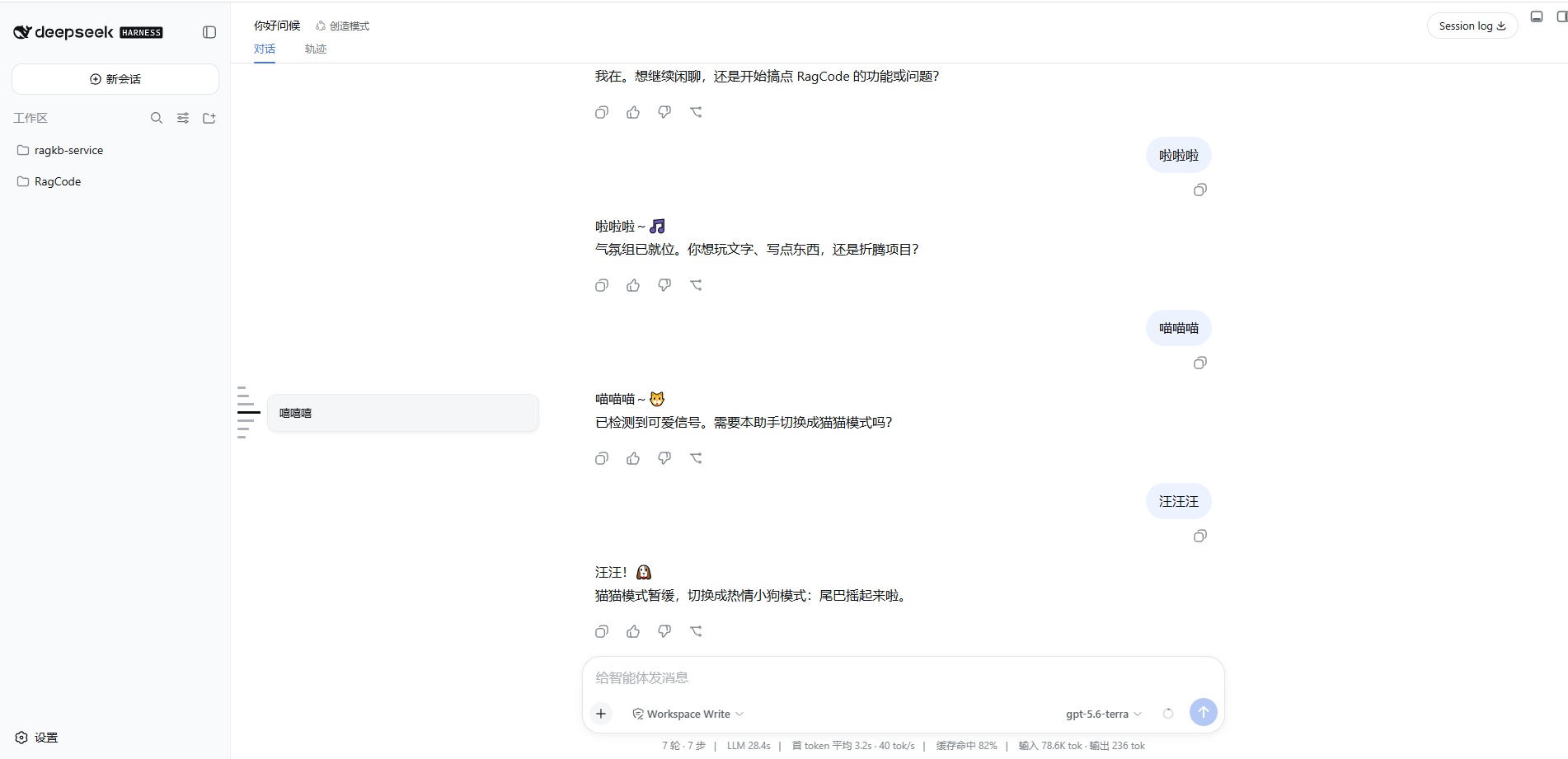
Prompt Rail is a compact vertical quick-jump rail for the DeepSeek Harness Web conversation view. One mark represents one loaded ordinary user prompt. Hover or keyboard focus shows its preview; clicking scrolls to that prompt.
Behavior
- The rail stays vertically centered beside the session sidebar.
- Every mark has a 10px high hit slot, while its default visible mark is an 8px by 3px light line.
- Hover/focus makes the current mark 28px wide and dark; nearby marks taper to 20px, 14px, and 10px.
- Clicking records the selected prompt. When the pointer leaves, all marks return to their default length while the selected mark stays dark.
- Assistant, tool, command, steering, and injected-context rows are excluded. A one-prompt conversation still renders one mark.
Install
Clone or copy this repository into the Harness root plugins directory:
deepseek-harness/
└─ plugins/
   └─ dsh-prompt-rail/
Then open a terminal in the deepseek-harness root and run:
Windows
.\plugins\dsh-prompt-rail\install-and-restart.bat
macOS / Linux
node ./plugins/dsh-prompt-rail/compat/install.mjs
pnpm dsh web
Keep the plugins/dsh-prompt-rail directory after installation.
Development
The development layout expects sibling checkouts:
workspace/
├─ dsh/                       # DeepSeek Harness checkout
└─ dsh-prompt-rail/
Then run:
pnpm install
pnpm run check
lib/ is committed because profile installation loads the prebuilt Host and browser files without running package build scripts.
Release checklist
- Add an exact compatibility patch for every supported pre-slot Harness revision.
- Run
pnpm run checkand exercisenode compat/install.mjs --apply-onlyin a clean matching checkout. - Commit source,
lib/,compat/, README files, screenshot, and lockfile. - Push a
v0.1.0tag and create a GitHub Release from that tag. - State the compatible Harness versions and revision hashes in the release notes.
License
MIT
相关推荐Related
-
 ruvnet/ruflo
🌊 The original agent meta-harness. Deploy intelligent multi-player swarms, coordinate autonomous workflows, and build c…
ruvnet/ruflo
🌊 The original agent meta-harness. Deploy intelligent multi-player swarms, coordinate autonomous workflows, and build c…
-
 amruthpillai/reactive-resume
A one-of-a-kind resume builder that keeps your privacy in mind. Completely secure, customizable, portable, open-source a…
amruthpillai/reactive-resume
A one-of-a-kind resume builder that keeps your privacy in mind. Completely secure, customizable, portable, open-source a…
-
 volcengine/OpenViking
Self-evolving Context Database for AI Agents. Unify Agent Memory, Knowledge RAG and Skills.
volcengine/OpenViking
Self-evolving Context Database for AI Agents. Unify Agent Memory, Knowledge RAG and Skills.
-
 Molunerfinn/PicGo
:rocket: The Ultimate Image Uploader for Efficient Creators. Supports Obsidian, Typora, VS Code etc. and 60+ image hosti…
Molunerfinn/PicGo
:rocket: The Ultimate Image Uploader for Efficient Creators. Supports Obsidian, Typora, VS Code etc. and 60+ image hosti…
-
 titanwings/colleague-skill
将冰冷的离别化为温暖的 Skill,欢迎加入数字生命1.0!Transforming cold farewells into warm skills? It's giving rebirth era. Welcome to Digital …
titanwings/colleague-skill
将冰冷的离别化为温暖的 Skill,欢迎加入数字生命1.0!Transforming cold farewells into warm skills? It's giving rebirth era. Welcome to Digital …
-
 nocobase/nocobase
NocoBase is an open-source AI + no-code platform for building business systems fast. Instead of generating everything fr…
nocobase/nocobase
NocoBase is an open-source AI + no-code platform for building business systems fast. Instead of generating everything fr…
-
 Tencent/WeKnora
Open-source LLM knowledge platform: turn raw documents into a queryable RAG, an autonomous reasoning agent, and a self-m…
Tencent/WeKnora
Open-source LLM knowledge platform: turn raw documents into a queryable RAG, an autonomous reasoning agent, and a self-m…
- Nagi-ovo/voyager Enhancement suite for Gemini, AI Studio, Claude & ChatGPT — plus a prompt manager for any web UI, DeepSeek Harness inclu…