Grammarly AI 对写作者真的有用吗?Is Grammarly AI Actually Worth It for Writers?
多年来,Grammarly 几乎躺在每位写作者的工具箱里,在后台悄悄挑错别字。如今表面之下的 AI 层已经大不一样:只要你允许,它会重写句子、调整语气,甚至直接生成整段文字。一个正当的问题随之而来——Grammarly AI 是真的帮得上忙,还是只是看上去更有用了?
For years, Grammarly has sat inside nearly every writer's kit, silently trapping typos in the background. Beneath the surface, the AI layer has come a long way: given permission, it reworks sentences, recalibrates voice, and even composes paragraphs. A legitimate question follows — does Grammarly AI genuinely help writers, or has it merely grown more convincing at looking helpful?
我自己断断续续用了 Grammarly 很多年:学生时代靠它赶论文截止日,做内容写手时靠它应付编辑,现在则以测试写作工具为生。所以被问起 Grammarly AI 好不好,我不给营销式回答。若跟朋友喝咖啡聊起,我会说:取决于你写什么,以及对它依赖多深。
真正变化的是:我们都熟悉的那条波浪线底下,如今藏着多少人工智能。2026 年的 Grammarly 不只是抓错别字——句子会被重写、语气会被调整,整段文字也能按需生成。这篇评测会拆解它真正做好的事、悄悄不足的地方、要花多少钱,以及谁能真正获益。
如果你还在权衡那些从零生成内容、而不只是修改内容的工具,我们这篇 Claude AI 与 ChatGPT 写作对比适合搭配阅读,因为两类工具解决的是同一问题的两半。
01快速回答
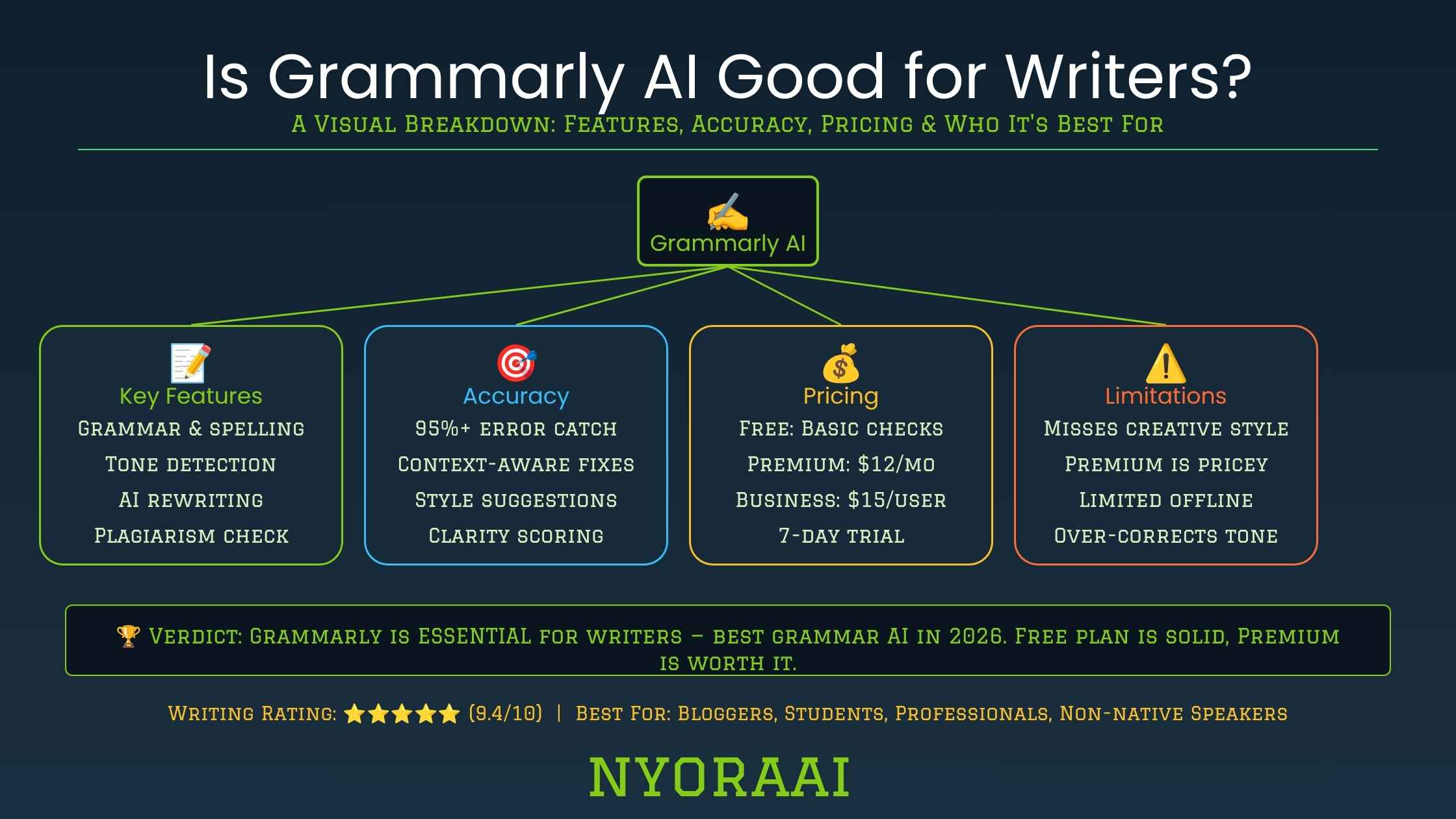
对多数写作者来说,Grammarly AI 作为每日修改助手确实称职。语法、拼写和标点错误能被可靠拦下,之上还有实用的语气识别和句子改写。经常写邮件、帖子、文章或客户材料的人,等于多了一双快速审稿的眼睛。但它不适合作为高风险作品唯一的修改环节——小说手稿、学位论文,或任何结构和风格比表面打磨更重要的文字——因为论证与故事是否连贯超出了它的判断。这类写作里,它只能当人工编辑之外的辅助层。
02Grammarly AI 到底是什么
Grammarly 最初是一个检查语法和拼写的浏览器插件。如今叫它「AI 写作助手」更贴切:浏览器、邮件客户端、Google Docs、Microsoft Word、Slack 以及它自己的编辑器,你在哪打字它就在哪。一个大语言模型如今与老牌的规则语法引擎协同工作,这种组合的意义比听起来大。
规则那一半可靠地处理主谓一致、错位逗号和拼写错误——不起眼却不可或缺。更模糊的活儿交给 AI 那一半:理顺拗口的句子、缓和生硬的邮件,或让提案读起来更有底气。两者合在一起,感觉不再是一条红色波浪线,而更像一位安静坐在你身旁的编辑。
还有一个个性化层很多人从不打开。动笔之前,Grammarly 允许你设定文档目标——读者、正式程度、领域、意图——建议会随之改变。同一封求职信设成「正式」「说服性」,和设成「随意」「告知性」,收到的语气反馈完全不同。跳过这一步,是人们觉得建议与本意不合的头号原因。
03核心功能,逐一拆解
语法、拼写与标点
语气检测器
生成式 AI 请求
查重与品牌语气
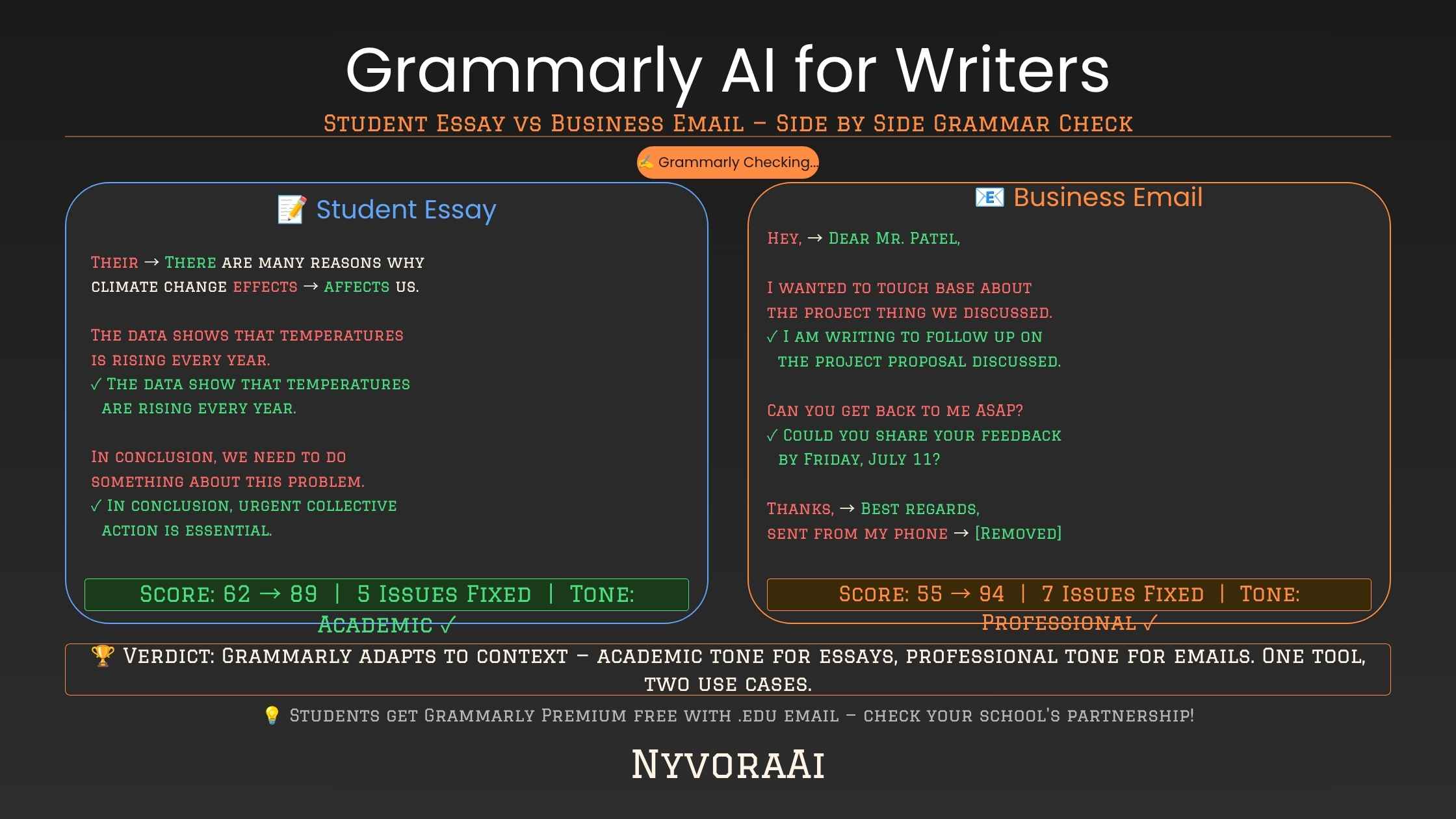
042026 年 Grammarly AI 价格档位
| 计划 | 适合 | 包含内容 |
|---|---|---|
| 免费 | 偶尔写作的人 | 基础语法、拼写和标点检查 |
| Premium | 自由职业者与学生 | 语气改写、清晰度建议、原创性扫描、生成式请求 |
| Business | 内容团队 | 品牌语气规则、团队风格指南、管理员管控,以及团队层面的洞察 |
价格会不时调整,锁定年度计划前,最好到 Grammarly 官网核对当前数字。免费版应付偶尔使用确实不错;把高频写作者推向 Premium 的,是生成式和语气功能。
05哪些人真正用得上 Grammarly AI
- 1
母语非英语的写作者
1 介词选择和习语搭配错误,拼写检查不会标,仔细通读也常漏掉,Grammarly 却能拦下。
- 2
赶截止日期的学生
2 凌晨一点,一个连句警告立刻弹出,胜过第五遍扫读自己的论文。
- 3
自由撰稿人与博主
3 发布越频繁,小错越容易溜走,而客户注意到错别字比注意到好结构更快。
- 4
面向客户的职场写作者
4 语气检测器能避免消息读起来唐突或没把握——语气不对,一单生意可能就黄了。
- 5
结构编辑仍超出它的范围
5 守护特定风格或论证的小说家与研究者,在 Grammarly 判断不了的部分仍需人工编辑。
特别是学生,把 Grammarly 与面向课业设计的 AI 选项放在一起比一比很划算。我们这篇学生首选 AI 工具完整盘点,范围远不止语法检查。
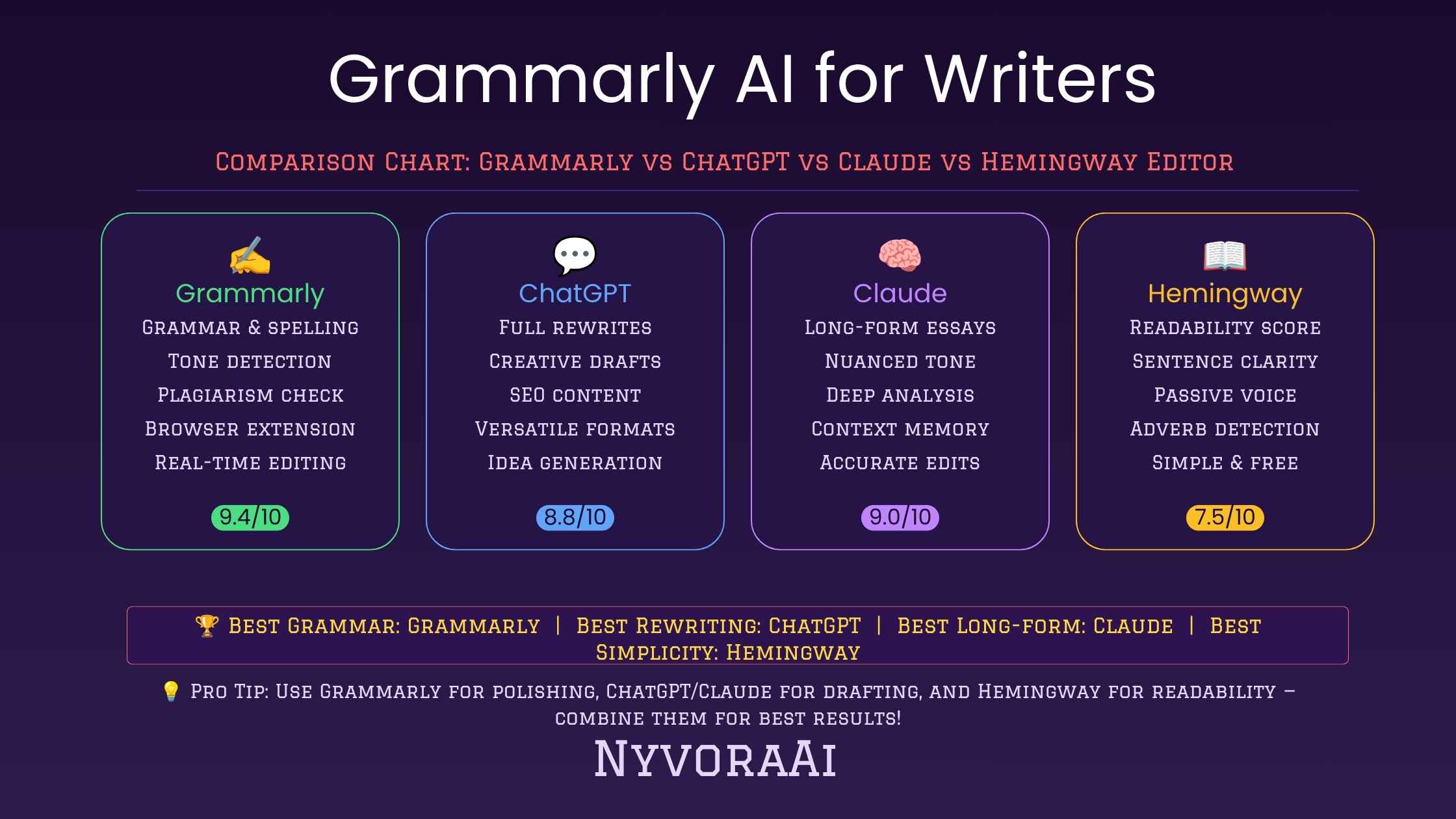
06Grammarly 与其他 AI 写作工具对比
Grammarly 是润色工具,不是代笔——这是它与 ChatGPT、Claude 这类生成优先工具的核心分界:后者擅长从零生成,而不是修改已有文字。该修自己的草稿,还是该用提示词生成一篇?我们详细的 Claude AI 与 ChatGPT 写作对比分析了谁处理长文起草更在行。
2026 年合理的流程常常把两边合起来:先用生成模型写,再让 Grammarly 润色、检查语气和清理语法,因为谁也不能完全替代谁。依赖视觉的写作——博客头图、社交配图、插画——配上得力的图像工具也很有帮助;我们为自己发布内容的写作者评测了2026 年领先的 AI 图像生成器。
07优点与缺点
- 优点:逐行修正可靠。语法和拼写检查一贯准确,很少打断写作节奏。
- 优点:语气识别能拦误会;发送前抓住一封无意中显得生硬的邮件,这个功劳被低估了。
- 优点:几乎覆盖你所有写作场景,不必把文字搬进另一个应用。
- 缺点:不加辨别地接受每条重写,会把个人风格磨平。
- 缺点:它不理解叙事结构和论证逻辑,无法判断一篇作品是否真的站得住。
- 缺点:高级生成功能藏在付费墙之后;用得太狠,写作者可能依赖工具,而不是自己掌握语法。
08从 Grammarly AI 榨出更多价值
多数对 Grammarly 的不满,根源在于无论写什么都用同一套方式。几个小习惯就能让建议明显更贴心:
- 每条生成式重写都带着判断读,而不是看一眼就接受
- 手动设定语气目标,建议才贴合你的真实读者
- 把它留作最后一道关,而不是唯一的修改环节
- 关掉你一再拒绝的建议,减少干扰
- 配合朗读使用——节奏别扭的地方 Grammarly 看不出来
09人们使用 Grammarly 时的误区
- 自动接受每条建议。重写只是开场报价,不是判决;带着判断读,才能保住风格。
- 从不设定文档目标。跳过读者与语气设置,收到的只是通用默认值,而非调过的反馈。
- 把它当成唯一的编辑。逐行打磨是强项,结构、论证和故事仍是需要人判断的盲区。
- 指望语法知识被动长进。研究一条修改为何成立——而不只是点接受——才是写作随时间进步的原因。
- 忽视免费版的上限。经常需要语气改写或查重,留在免费版只会不断碰壁。
10常见问题
Grammarly AI 真的帮得上写作者吗?
它是真 AI,还是只有规则?
Grammarly AI 可以免费用吗?
它能取代人工编辑吗?
写作方面 Grammarly 比 ChatGPT 强吗?
11结语
那么 Grammarly AI 到底帮不帮写作者?以上种种指向一个答案:帮,但有边界。抓错别字、调语气、收紧句子又不拖慢节奏,少有工具能与它匹敌。它适合待在流程中的某一层,而不是整个流程本身;让它打磨、你来思考,文字就始终是你的,只是更干净。
经常写作的人可以用生成模型起草、Grammarly 收紧文字、图像工具处理画面,补齐从空白页到发布的完整产线。还没决定底下用哪款生成模型?Claude AI 与 ChatGPT 写作对比和学生首选 AI 工具盘点,按你手头的工作选一篇接着读都合适。
My own Grammarly history stretches across years of intermittent use: student years spent dodging essay deadlines, content-writing years spent dodging editors, and a present in which testing writing tools is the job itself. So my answer about Grammarly AI skips the marketing script. Over coffee with a friend, I'd say it hinges on your kind of writing and how heavily you lean on the tool.
What shifted is the volume of artificial intelligence hiding behind that familiar squiggly line. Grammarly in 2026 goes beyond typist correction: sentences get rewritten, voice recalibrated, whole paragraphs produced on demand. This assessment weighs the genuine wins, the quiet weak spots, the price tag, and the people who truly benefit.
If generative assistants for building text from zero — not just refining it — are also on your shortlist, our Claude AI versus ChatGPT writing comparison pairs well, since the two categories cover opposite halves of one problem.
01Fast Answer
For the majority of writers, Grammarly AI earns its place as a daily revision aide. Grammar, spelling, and punctuation errors get caught reliably, topped by worthwhile voice detection and sentence rewrites. Anyone producing emails, posts, essays, or client material on a regular basis gains a quick second set of eyes. It fits poorly as the sole revision stage for high-stakes work — fiction manuscripts, dissertations, anything where architecture and voice outweigh surface buffing — since coherence of argument or story sits beyond its judgment. There, it serves as a supporting layer beside a human editor.
02What Grammarly AI Really Is
Grammarly began life as a browser extension policing grammar and spelling. Today, "AI writing assistant" describes it better, present wherever you compose: browsers, email apps, Google Docs, Microsoft Word, Slack, plus its own editor. A large language model now works in tandem with the older rule-based grammar engine, and that pairing carries more weight than expected.
The rule-based half reliably handles subject-verb agreement, stray commas, and misspellings — unglamorous yet indispensable. Fuzzier work falls to the AI half: untangling a clumsy sentence, taking the edge off a blunt message, or lending a pitch more assurance. The combined effect reads less like a red underline and more like an editor quietly working at your elbow.
A personalization layer sits unused by many users. Before composing, Grammarly accepts document goals — reader, formality, domain, intent — and its guidance bends accordingly. A cover letter marked "formal" and "persuasive" draws different voice feedback than identical words marked "casual" and "informative." Skipping this setup leads the list of reasons suggestions feel misaligned with intent.
03Core Capabilities, One by One
Grammar, Spelling & Punctuation
Voice Detector
Generative AI Requests
Plagiarism & Brand Voice
04Grammarly AI Price Points for 2026
| Plan | Ideal For | What's Included |
|---|---|---|
| Free | Occasional writers | Elementary grammar, spelling, and punctuation scans |
| Premium | Freelancers & students | Voice rewrites, clarity guidance, originality scan, generative requests |
| Business | Content teams | Brand voice rules, team style guides, administrator controls, and team-level insights |
Prices shift from time to time, so verify current figures on Grammarly's official site before locking into a yearly plan. Casual use gets covered well by the free tier; the generative and voice tools are what pull frequent writers toward Premium.
05Who Truly Benefits From Grammarly AI
- 1
Writers whose first language isn't English
1 Preposition picks and mismatched idioms slip past spellcheck and even careful rereading alike, yet Grammarly flags them.
- 2
Students racing the clock
2 At 1 a.m., an instant warning on a run-on beats scanning your own paper for the fifth pass.
- 3
Freelance writers and bloggers
3 Frequent publishing gives small errors room to escape, and typos catch a client's eye before solid structure does.
- 4
Workplace writers addressing clients
4 Voice detection keeps a message from reading terse or uncertain when a wrong tone could sink a deal.
- 5
Structural editing stays outside its scope
5 Novelists and researchers guarding a particular voice or argument still require a human editor where Grammarly can't judge.
For students in particular, weighing Grammarly against coursework-focused AI alternatives pays off. Our full rundown of the leading AI tool for students reaches well past grammar checks.
06Grammarly Against Other AI Writing Tools
Grammarly polishes; it doesn't ghostwrite — the central divide separating it from generative-first assistants such as ChatGPT or Claude, built to build text from zero rather than refine existing prose. Choosing between repairing your draft and generating one from a prompt? Our detailed Claude AI vs ChatGPT writing comparison examines which handles long-form drafting more deftly.
A sensible 2026 routine often joins the two camps: compose with a generative model, then pass the output through Grammarly for buffing, voice checks, and grammar cleanup, since neither fully covers the other's ground. Visual-dependent writing — blog headers, social art, illustrations — also benefits from pairing with a capable image tool, and we've assessed the leading AI image generators in 2026 for self-publishing writers.
07Strengths and Weaknesses
- Pro: Dependable line-by-line fixes. Grammar and spelling corrections stay accurate and seldom interrupt flow.
- Pro: Voice detection heads off misread signals; catching an unintentionally blunt note before send deserves more credit than it gets.
- Pro: Coverage spans nearly every place you already compose, so shuttling text into a separate app isn't required.
- Con: Accepting every rewrite uncritically can sand away individual voice.
- Con: Narrative architecture and argument logic sit beyond it, so it can't confirm whether a piece actually holds together.
- Con: Advanced generative tools live behind a paywall, and heavy reliance may teach writers to lean on the tool instead of mastering grammar.
08Drawing More Value From Grammarly AI
Most Grammarly frustration traces back to one-size use across every kind of writing. A handful of small habit shifts noticeably sharpen the guidance:
- Read each generative rewrite critically instead of approving it on sight
- Choose voice goals by hand so the guidance fits your actual reader
- Reserve it for a closing pass rather than the only revision stage
- Silence guidance you repeatedly reject to cut the noise down
- Combine it with reading aloud, since rhythmic awkwardness escapes Grammarly
09How People Go Wrong With Grammarly
- Auto-approving each suggestion. Rewrites are opening offers rather than rulings, and reading critically preserves your voice.
- Never defining document goals. Skipping reader and voice settings leaves you with generic defaults instead of tuned feedback.
- Treating it as the sole editor. Line-level polish is its strength; structure, argument, and story stay blind spots for human judgment.
- Expecting grammar knowledge to arrive passively. Studying why a fix was offered — not just approving it — is what lifts your writing over time.
- Overlooking free-tier ceilings. Frequent needs for voice rewrites or originality scans make staying free a source of constant friction.
10Frequently Asked Questions
Does Grammarly AI actually help writers?
Is it genuinely AI, or rules alone?
Can Grammarly AI be used free?
Might it replace a human editor?
Does Grammarly beat ChatGPT for writing?
11Conclusion
So does Grammarly AI help writers? Everything above points to yes — within bounds. Few tools rival it for catching slips, recalibrating voice, and tightening prose without dragging pace. Its natural home is a layer inside your process rather than the whole process; let it refine while you do the thinking, and the writing stays unmistakably yours, simply cleaner.
Regular writers can round out a full pipeline — blank page through published post — by using a generative model to draft, Grammarly to tighten the text, and an image tool to handle visuals. Still weighing which generative model sits underneath? Both our Claude AI vs ChatGPT writing comparison and our rundown of the leading AI tool for students make sensible next reads given your work.