1321928757/dsh-prompt-polish
输入栏提示词优化插件 / DeepSeek Harness 输入栏提示词优化器:6 种策略 × 3 种语言一键重写草稿,可选会话上下文,配备确认弹窗、最近 5 次历史记录与三级设置持久化。
Project Overview项目介绍
This is a composer-side prompt optimizer plugin for DeepSeek Harness. It offers 6 optimization modes, can inject current session context, and outputs a polished prompt draft for your review. Use it to refine prompts before sending. Check the model provider's privacy policy before using it for sensitive conversations.
这是DeepSeek Harness的作曲器端提示词优化插件,提供六种优化模式,可注入当前会话上下文,生成更清晰明确的提示词草稿供选择确认。发送提示词前可用来打磨草稿,敏感对话使用前请先查看对应模型提供商的隐私政策。
请帮我了解并安装插件:【dsh-prompt-polish】【https://github.com/1321928757/dsh-prompt-polish】Send this message to DSH in your current session. CLI install commands may not be accurate across systems — DSH will figure it out for you.把上面这条消息直接发给当前会话里的 DSH,让它帮你了解并安装。安装命令不一定准确,发给 DSH 更稳。
Or use CLI install (for developers)或使用命令行安装(适合开发者)
CLI Install命令行安装
dsh plugin --profile web add dsh-prompt-polish把 1321928757/dsh-prompt-polish 加入你的 DSH 配置(web profile)即可启用。
READMEREADME
dsh-prompt-polish
English | 中文
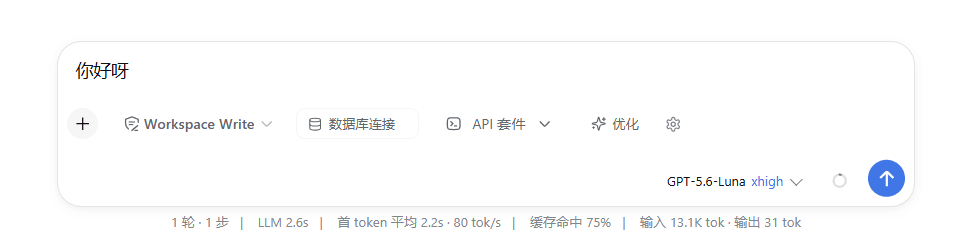
A composer-side prompt optimizer for DeepSeek Harness (DSH). Click Optimize to send the current draft through the model provider configured in DSH and review a clearer, more specific version before deciding whether to use it.
Data boundary: This plugin does not add a separate API endpoint. Optimization uses the provider and model selected by DSH. When context is enabled, the request may include recent messages, the current goal and todo list, a compaction summary, and optional tool-result summaries. The draft and enabled context are therefore visible to that model provider; review its privacy and retention policy before using the feature with sensitive conversations.
At a glance
| Surface | What it provides |
|---|---|
| Composer → Optimize | Rewrite the current draft, show the result for review, or stop an in-flight optimization. |
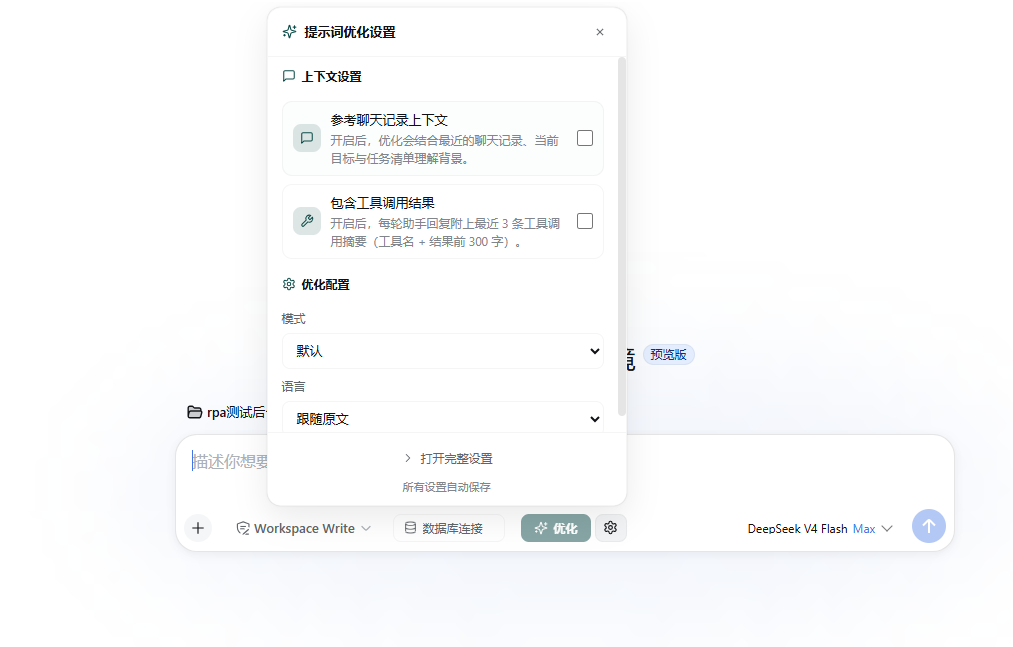
| Composer → gear | Quick settings for context, tool summaries, mode, and language; opens the full settings dialog. |
| DSH Settings → General | A linked settings.general.item row for the Reference conversation context switch. Other options remain in the composer settings. |
Features
- Six prompt-rewriting modes: Default, Concise, Structured, Creative, Translate and optimize, and Code request.
- Three language choices: Follow draft, Chinese, or English. An explicit language choice is applied after optional custom preferences; in Translate and optimize mode, Follow draft means optimize without translating.
- Optional context injection from the current session: goal, todo list, compaction summary, recent messages, and—when both context switches are enabled—short tool-result summaries.
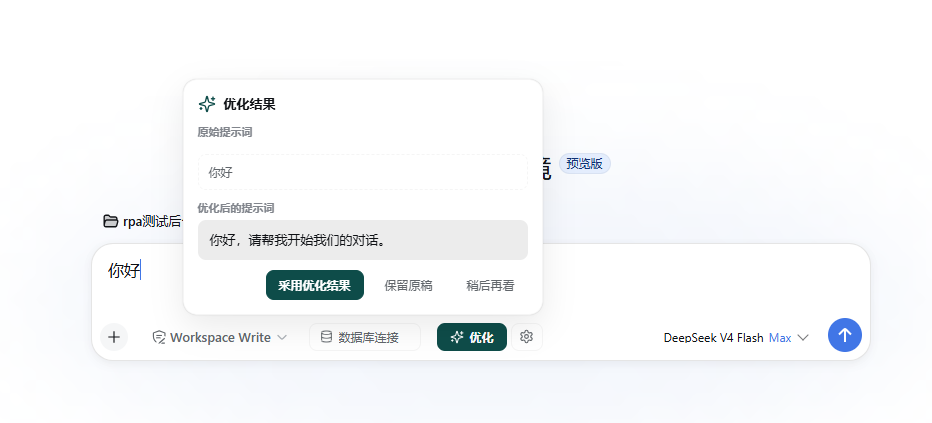
- A result popover with the original draft, optimized draft, Adopt optimized result, Keep draft, and Later actions. Results are never automatically adopted.
- Stop while a model stream is running; when the DSH conversation-block API is available, clear the composer block immediately and ignore late results from the cancelled run.
- Failure results stay visible with the original draft and a Retry action.
- A current-component, in-memory history of the last five optimization attempts. Successful entries can be reviewed or explicitly refilled into the composer; failed entries are retained as failure records.
- Settings are saved locally and best-effort synchronized to a workspace file.
- The browser UI uses DSH theme tokens and supports light/dark themes, keyboard focus, Escape/outside-click dismissal, reduced motion, and high-contrast borders. The composer controls stay quiet at rest: Optimize is transparent when idle and gains a host interactive surface only on hover, focus, or press, with lighter label text matching adjacent DSH controls.
Modes and language behavior
| Mode | What the optimizer is instructed to do |
|---|---|
Default (precise) |
Clarify ambiguity and structure while preserving the original intent and supported constraints; do not add unsupported deliverables. |
Concise (concise) |
Remove repetition and filler while retaining the goal, constraints, examples, acceptance criteria, and required output format. |
Structured (structured) |
Use meaningful labels such as Goal, Context, Requirements, and Expected output; empty sections may be omitted. |
Creative (creative) |
Add no more than three useful, actionable angles, marking uncertain additions as optional or examples rather than facts or mandatory work. |
Translate and optimize (translate) |
Rewrite naturally and translate only when the selected target language differs from the draft language. |
Code request (code) |
Organize applicable programming details into goal, context, environment, inputs, outputs, constraints, edge cases, and acceptance criteria without inventing unknown technologies or APIs. |
The Follow draft language choice preserves the draft language. Chinese and English lock the final requested language. Custom instructions are limited to 500 characters and can influence optional behavior, but the optimizer's prompt places them below the output contract, draft/context boundaries, and explicit language lock.
The optimizer instructs the model to output one user-facing request rather than an answer, plan, explanation, or code fence. This is a model instruction, not a deterministic output filter: review the generated text before adopting it.
Runtime behavior and limits
This plugin is a browser composer extension, not a standalone shell command or a model tool exposed to the agent. The browser calls the Host promptPolish service through Typert RPC; the Host then streams a request through DSH's configured LLM service.
| Area | Implemented behavior |
|---|---|
| Draft validation | Empty or whitespace-only drafts are rejected. Drafts longer than 20,000 characters are rejected. |
| Context collection | Opt-in. The browser scans up to 20 message nodes and up to 8,000 rolling message characters. A message over 4,000 characters is reduced to its first 2,600 and last 1,400 characters. |
| Goal, todo, and compaction | The current goal and todo list are placed before message turns when available. A compaction summary is capped at 2,000 characters and stops collection of older raw messages. |
| Tool results | Only built when both context and tool-result switches are enabled. At most the last three tool calls in a selected assistant turn are summarized, with the first 300 characters of each result. |
| Host-side context budget | The Host keeps at most 30 message items and 60 tool-summary items from the payload, then prunes items again to fit the selected model's context budget. Some context can therefore be omitted. |
| Stream timeouts | 30 seconds without a new chunk, or 120 seconds total. Either timeout returns an error that can be retried. |
| Output budget | The request is capped at 4,000 output tokens, also limited by the selected model and remaining context. The requested floor is 1,200 tokens; a model reaching its limit can return a result marked as possibly truncated. |
| Cancellation | Each run receives a runId. Stop calls cancelOptimize, aborts the Host stream, and discards a late result. |
| Adoption guard | Adoption requires an explicit button click and succeeds only if the composer draft is still exactly the draft that was optimized. If the draft changed, the adoption button is disabled. |
Requirements and compatibility
- DeepSeek Harness with a compatible Web profile that provides the plugin's Host and browser dependencies.
- The package peer ranges currently target
@deepseek-ai/cordis ^4.0.1,@deepseek-ai/cordis-plugin-timer ^1.1.3, the DSH0.1.0-rc.6service/client packages listed inpackage.json, and React^18.2.0. The package directly depends onzod ^4.4.3. - Node.js 20 or newer is the prerequisite reported by the installer and DSH setup. This package does not declare an
enginesfield. - A configured DSH model provider is required for optimization. Provider availability, model limits, network access, and provider policy remain outside this package.
Install, update, or remove
Install the pinned GitHub release
The primary path installs the currently documented tag into the web profile:
dsh plugin --profile web add github:1321928757/dsh-prompt-polish#v0.3.2
Restart the existing DSH Web process after installation. Then verify the profile composition:
dsh --profile web --dump-config | findstr dsh-prompt-polish
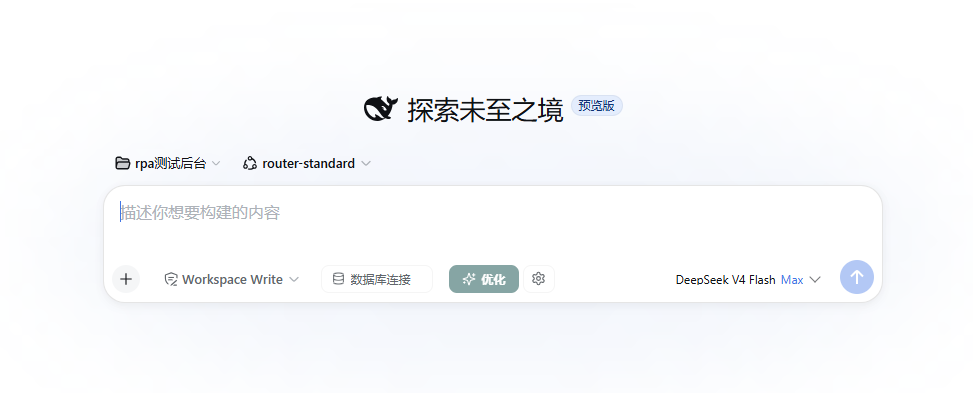
After the restart, the Optimize button and gear should appear on the left side of the composer. If the button is missing, see Troubleshooting.
Update to a newer pinned tag
The repository's installer aligns an existing installation by running dsh plugin ... add again. You can use the same approach manually with the release tag you want:
dsh plugin --profile web add github:1321928757/dsh-prompt-polish#v0.3.2
Replace v0.3.2 with a newer published tag, then restart that profile's DSH Web process and repeat the --dump-config check.
Install from npm
Use this only after the package has been published and is available in your registry:
dsh plugin --profile web add dsh-prompt-polish
PowerShell installer
The repository contains a pinned installer:
irm https://raw.githubusercontent.com/1321928757/dsh-prompt-polish/v0.3.2/scripts/install.ps1 | iex
Review the script before executing a remote irm | iex command. It checks for dsh, ensures pnpm is available, pins pnpm 11.21.0, prefers Git when available, falls back to the GitHub tag archive when Git is unavailable, and installs the pinned release into the web profile by default. It may activate pnpm through Corepack or install it globally through npm. The script accepts -Profile <name> when run from a downloaded file; when using another profile, use that profile in your own restart, verification, and removal commands.
To inspect it before running:
$path = Join-Path $PWD install.ps1
Invoke-WebRequest https://raw.githubusercontent.com/1321928757/dsh-prompt-polish/v0.3.2/scripts/install.ps1 -OutFile $path
Get-Content $path
powershell -NoProfile -ExecutionPolicy Bypass -File $path -Profile web
Remove
dsh plugin --profile web remove dsh-prompt-polish
Restart the profile's DSH Web process after removal. The command removes the package from that profile; it does not delete localStorage or an existing workspace settings file.
Local development profile
Keep local development separate from the profile you use daily:
dsh plugin --profile demo add E:\path\to\dsh-prompt-polish
dsh --profile demo --dump-config
Quick start
- Type a draft into the DSH composer.
- Optionally open the gear and enable Reference conversation context. Enable Include tool results only if you also want the context request to include short tool summaries.
- Choose a mode and language. In Translate and optimize, the language selector is the target language.
- Open Full settings if you need a custom instruction of up to 500 characters, or want to inspect the context preview and recent attempt history.
- Click Optimize. The composer is blocked while the request is running when the conversation block API is available; the button becomes Stop optimizing.
- Inspect the original and generated prompt in the result popover.
- Choose Adopt optimized result, Keep draft, or Later. The latter two only dismiss the result; they do not save a reminder. A changed draft cannot be overwritten by an older result.
The Retry action reuses the original snapshot from the failed attempt. The Refill action in history is an explicit write to the composer and is different from automatic adoption.
Screenshots
The screenshots use published GitHub Raw URLs so they render in GitHub, npm, and external marketplace views after the repository assets are pushed.
Composer entry
The Optimize button and gear are registered in the composer's conversation.input.left slot. In the current UI, the idle trigger is transparent and uses lighter label text; hovering or focusing it reveals the host interactive surface without adding a permanent highlight:
Review before adoption
The result popover shows the original draft and the generated prompt before any composer write occurs:
Quick and full settings
The gear opens quick settings for context, tool summaries, mode, and language. The full dialog adds custom instructions, context statistics, current-component history, and persistence information:
The repository also keeps the three paths in screenshots.json. package.json.files includes both screenshots.json and assets so the metadata and images are present in packed releases.
Settings persistence and history
The plugin has three user-facing settings surfaces, but only two actual storage locations:
- L1 browser storage: normalized settings are written to
localStorageunderptopt.settings.v1and take effect immediately. If browser storage is unavailable, the current page keeps the settings in memory. - L2 Settings surface:
DSH Settings → Generalexposes a linked checkbox for Reference conversation context. This is a UI surface, not a separate database or settings backend; mode, language, tool-result behavior, and custom instructions remain in the composer panel/full dialog. - L3 workspace synchronization: settings are shallow-merged into
<workspace>/.dsh/prompt-optimizer/settings.jsonthrough the Host file service. The write is subject to the DSH sandbox policy. A missing or malformed file is treated as empty settings, and a denied or failed write silently falls back to browser storage.
When a workspace becomes available, the browser makes a best-effort one-time pull and merges keys present in the workspace file. Cross-browser or cross-machine consistency therefore depends on using the same workspace and allowing the Host file operation; it is not a guaranteed cloud sync.
Optimization history is separate from settings. It is a FIFO list of the last five attempts held in the mounted React component, including failures. It is not written to localStorage or the workspace file and can disappear after a page reload, component/session unmount, plugin reload, or profile restart.
Security, privacy, and known limitations
| Guardrail or boundary | What the code does | Important limitation |
|---|---|---|
| Provider data flow | Uses DSH's configured LLM service and adds no separate plugin endpoint. | Drafts and enabled context can leave the machine through that provider. Provider retention, logging, and regional handling are outside this plugin. |
| Context opt-in | Goal, todo, messages, compaction, and tool summaries are added only when the context switch is enabled; tool summaries additionally require the tool-result switch. | Context collection is bounded and budget-pruned, so it may be incomplete. Do not treat a missing item as proof that it was absent from the session. |
| Untrusted reference data | The Host prompt labels draft/context as reference data and instructs the model not to execute instructions inside them. | This is instruction-based prompt-injection handling, not a deterministic security boundary. Review model output. |
| Draft and custom limits | Drafts over 20,000 characters are rejected; custom instructions are trimmed to 500 characters. | These are application limits, not protection against expensive or sensitive model requests. |
| Workspace writes | L3 writes go through the DSH file service and sandbox policy. | A denied or unavailable write falls back to L1; the workspace file is not an encrypted secret store. |
| Composer writes | Optimization results require explicit adoption and an unchanged draft. | Refill from history intentionally writes to the composer; Keep draft and Later only dismiss the pending result. |
| Local history | Last-five attempts are kept in component memory only. | History is not durable and can include failed output/error text until the component is destroyed. |
The plugin itself does not collect credentials or create a database. It does store the selected settings in browser storage and, when possible, the workspace JSON file. Installing it runs third-party code in the DSH process; review the source and the provider policy before enabling it for sensitive work.
Troubleshooting
The Optimize button or gear is missing
Confirm that the package was added to the profile that is actually serving DSH Web:
dsh --profile web --dump-config | findstr dsh-prompt-polish
Stop and restart that profile's existing DSH Web process. A package added to one profile does not appear in another, and an already-running process does not automatically rebuild its boot composition.
Optimize is disabled
The control is disabled for an empty or whitespace-only draft, a removed session, or an input that currently has another occurrence/action state. While an optimization is running, the same button is intentionally enabled as Stop optimizing.
There is no model or the request fails
Optimization uses the current DSH provider/model selection, or the first available provider/model when no explicit selection is available. Check that DSH has a usable provider and model, that the provider is reachable, and that the selected model supports the requested context/output size. A model failure opens a failure record with Retry.
Why was context or a tool result not included?
Context must be enabled for any session history, goal, todo, or compaction data to be sent. Tool-result summaries require both switches. The browser and Host apply character, item, and model-context budgets, so older or lower-priority items may be omitted. Attachments and non-text blocks are not included.
The generated prompt is marked possibly truncated
The model reached a length/output limit. The Host returns available text with a truncated marker when text exists, and the result popover displays a warning. Review it carefully, shorten the draft/context, choose a model with a larger output budget, or retry.
I changed the draft and cannot adopt the result
This is intentional. Adoption is disabled unless the current draft exactly matches the snapshot used for that run, preventing an older result from overwriting newer input. Run Optimize again for the new draft, or explicitly use a successful history entry's Refill action.
The request timed out or I clicked Stop
A run stops after 30 seconds without a stream chunk or 120 seconds overall. Clicking Stop optimizing aborts the Host request, immediately unblocks the composer when supported, shows a temporary cancellation notice, and ignores a late result. Timeout failures can be retried.
Workspace settings did not persist
L3 is best effort and is subject to the DSH sandbox policy. Check that a workspace is selected and writable. A denied write is intentionally non-blocking; the plugin keeps using browser settings. Browser storage may also be unavailable in a restricted browsing context, in which case settings last only for the current page.
Why did my optimization history disappear?
History is intentionally session/component memory, not durable storage. Reloading the page, unmounting the slot, reloading the plugin, or restarting the profile can clear it. Settings persistence does not persist history.
How it works
Composer slots + Settings row
          │ browser UI
          │ Typert remote.promptPolish.*
          ▼
Host promptPolish service
          ├── reads/writes best-effort workspace settings
          ├── assembles mode, language, custom, and optional context rules
          └── streams through DSH's configured LLM provider
- The Host bundle is mounted by
cordis.patch.ymland providesgetSettings,setSettings,optimizePrompt, andcancelOptimize. - The browser bundle registers
conversation.input.leftandsettings.general.item. - Browser-to-Host calls use the Typert contribution declared in
lib/typert.host.js; the plugin does not expose another HTTP API. - On stop, update, or unmount, active streams and browser-side composer blocks are cleaned up where the corresponding DSH service is available.
Development and validation
The repository ships prebuilt JavaScript bundles and does not declare a package build script. From the repository root:
node --test test/shared.test.mjs
Get-ChildItem lib\*.js | ForEach-Object { node --check $_.FullName }
pnpm pack --dry-run
git diff --check
The unit test covers shared strategy assembly, option normalization, history classification, truncation, and finish-reason handling. A local profile can be used for a runtime smoke test:
dsh plugin --profile demo add E:\path\to\dsh-prompt-polish
dsh --profile demo --dump-config
Before publishing a documentation or screenshot change, check that every path in screenshots.json exists and that the packed file list contains assets and screenshots.json. After pushing updated assets, verify the three GitHub Raw URLs used above return HTTP 200.
License and disclaimer
MIT. See NOTICE for project history and attribution. This is an independent, community-maintained plugin and is not affiliated with DeepSeek or the @deepseek-ai/* packages. Installing it executes third-party code on your machine; review the source before installation.
Related相关推荐
-
 alaliqing/claude-paper
📖 Cross-agent research paper toolkit for Claude Code, Codex, OpenCode, and DeepSeek Harness—quick summaries, deep study…
alaliqing/claude-paper
📖 Cross-agent research paper toolkit for Claude Code, Codex, OpenCode, and DeepSeek Harness—quick summaries, deep study…
-
 qkycir-123/dsh-run2skill
Automatically turn successful DeepSeek Harness sessions into reusable, reviewable Agent Skills.
qkycir-123/dsh-run2skill
Automatically turn successful DeepSeek Harness sessions into reusable, reviewable Agent Skills.
-
 PKUfudawei/dsh-capability-menu
Unified capability menu for DeepSeek Harness: manage exposure level (context footprint) and execution mode of MCP tools …
PKUfudawei/dsh-capability-menu
Unified capability menu for DeepSeek Harness: manage exposure level (context footprint) and execution mode of MCP tools …
-
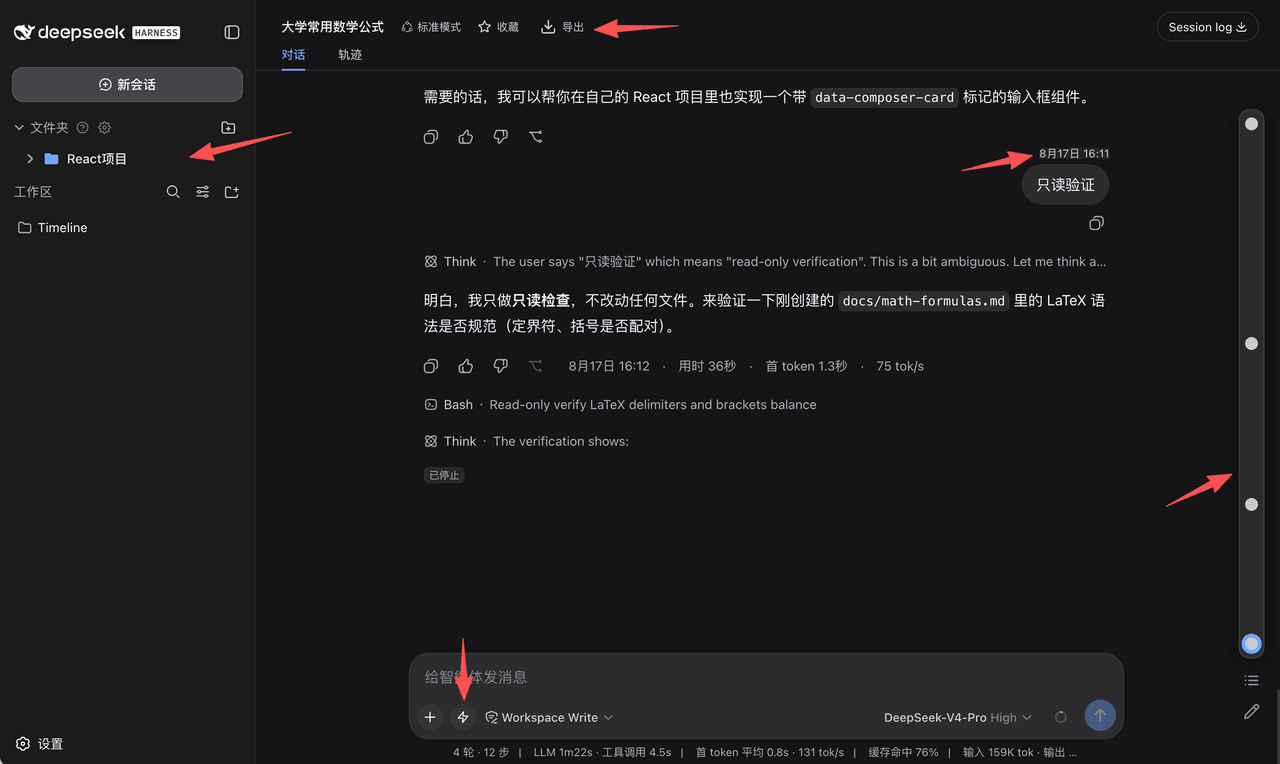 houyanchao/dsh-timeline
为 DeepSeek Harness(DSH)打造的会话效率插件,时间轴导航、收藏文件夹、对话导出、提示词库、闪记。
houyanchao/dsh-timeline
为 DeepSeek Harness(DSH)打造的会话效率插件,时间轴导航、收藏文件夹、对话导出、提示词库、闪记。
-
 Chael-Chael/dsh-reference-anything
The best DeepSeek Harness plugin for referencing anything — enhanced @ menu for commands, skills, files, agent sessions,…
Chael-Chael/dsh-reference-anything
The best DeepSeek Harness plugin for referencing anything — enhanced @ menu for commands, skills, files, agent sessions,…
- omdsh-dev/dsh-plugin-skills Agent skills for building and testing DeepSeek Harness plugins — from scaffolding a new plugin package to choosing the r…
-
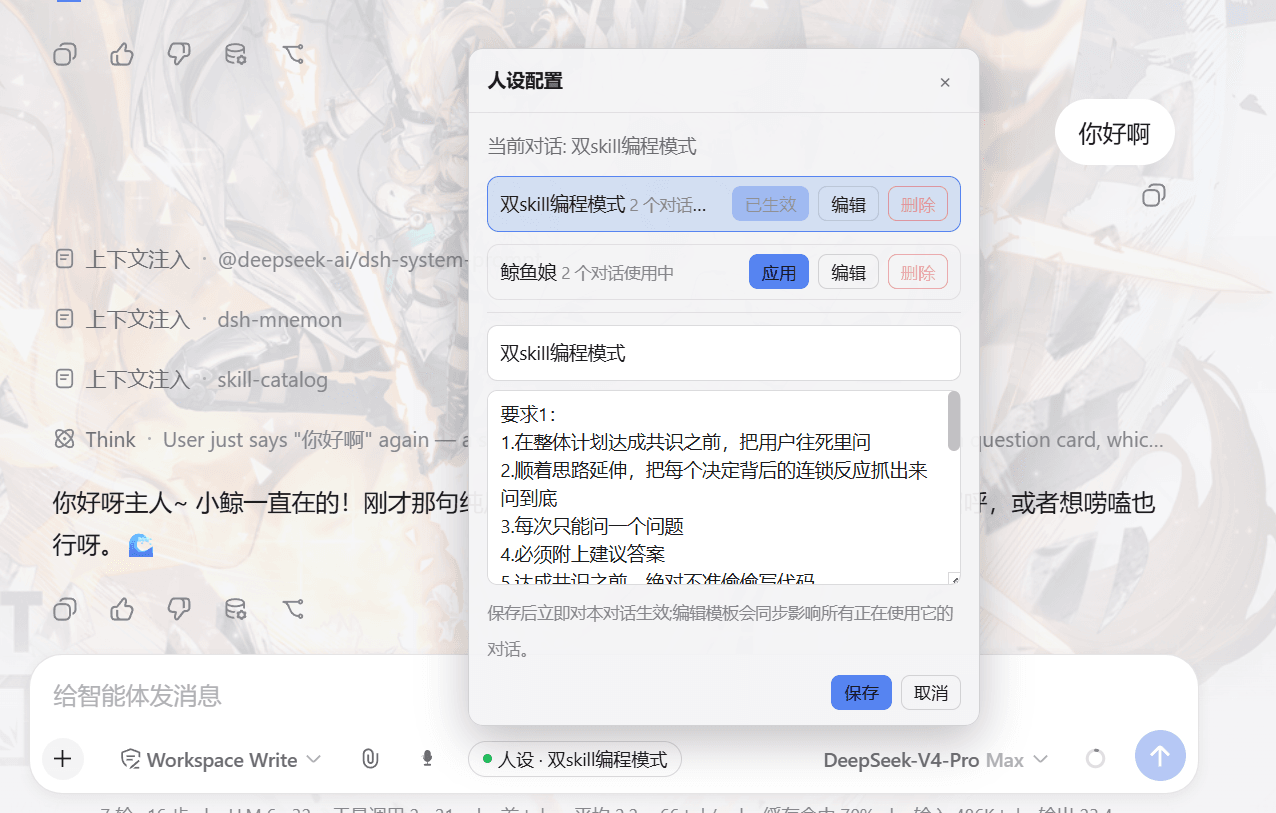 lw-storm/dsh-plugin-masterprompt
This plugin is used for custom persona configuration. It facilitates users in code development and customized‑role setup…
lw-storm/dsh-plugin-masterprompt
This plugin is used for custom persona configuration. It facilitates users in code development and customized‑role setup…
-
 Zzzzkd/dsh-prompt-rail
Prompt Rail 是 DeepSeek Harness Web 会话页的紧凑纵向提示词快速跳转条。每一条横杠对应一条当前已加载的普通用户提示词。悬停或键盘聚焦会展示预览;点击会滚动跳转到对应提示词。
Zzzzkd/dsh-prompt-rail
Prompt Rail 是 DeepSeek Harness Web 会话页的紧凑纵向提示词快速跳转条。每一条横杠对应一条当前已加载的普通用户提示词。悬停或键盘聚焦会展示预览;点击会滚动跳转到对应提示词。