Anionex/dsh-eye-care
暖光、暖暗与系统感知护眼主题,适用于DSH Web
项目介绍Project Overview
DSH Eye Care 是 DeepSeek Harness Web 配置插件,提供六套暖色语义主题,含自动、亮、暗模式与三档色温,并通过 ThemeService 替换背景、文字、按钮、代码块等令牌。适合想降低冷白界面刺激时使用;切换原生外观会退出护眼,远程浏览器选择不写回 Host。
DSH Eye Care is a DeepSeek Harness Web profile plugin that adds six warm semantic themes through ThemeService, with auto/light/dark modes and three warmth levels for backgrounds, text, buttons, code blocks, and more. Use it to replace cool-toned Web UI colors without a global filter. Note: changing native Appearance disables eye care, and remote-browser selections do not persist to the Host.
请帮我了解并安装插件:【dsh-eye-care】【https://github.com/Anionex/dsh-eye-care】把上面这条消息直接发给当前会话里的 DSH,让它帮你了解并安装。安装命令不一定准确,发给 DSH 更稳。Send this message to DSH in your current session. CLI install commands may not be accurate across systems — DSH will figure it out for you.
或使用命令行安装(适合开发者)Or use CLI install (for developers)
命令行安装CLI Install
dsh plugin --profile web add @anionex/dsh-eye-care把 Anionex/dsh-eye-care 加入你的 DSH 配置(web profile)即可启用。
READMEREADME
DSH Eye Care
English | 中文
Warm Light, Warm Dark, System-Aware.
A DeepSeek Harness Web profile bundle that replaces cool white interface colors with six warm semantic themes while leaving the native Appearance preference intact.
What it does
DSH Web's built-in Light and Dark themes are cool-toned. Eye care adds a warm light palette, a warm dark palette, and an automatic scheme without a global sepia filter or image transform.
- Four operating modes:
off,auto,light, anddark. - Three warmth levels:
soft,balanced, andwarm. - Six concrete themes registered through the official ThemeService.
- Real semantic tokens for backgrounds, text, borders, buttons, sidebar, bubbles, inputs, code blocks, scrollbars, and Shiki colors.
- Native Appearance stays authoritative: choosing Light, Dark, or System turns eye care off and keeps that newly selected theme.
- Loopback persistence stores the selection in Host settings; remote browsers keep the selection in the current process.
Preview
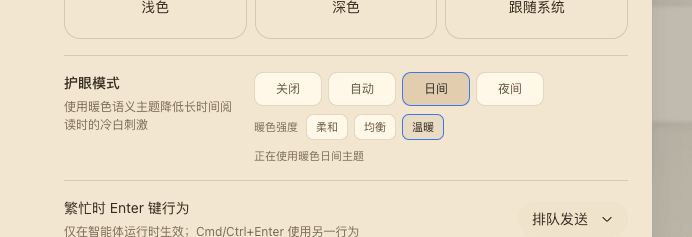
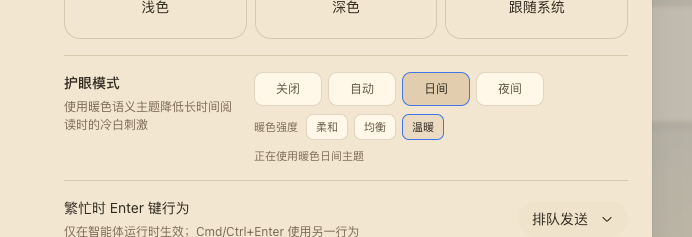
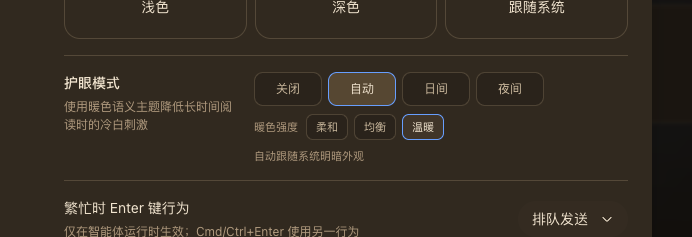
The screenshots above show the General settings row in warm day mode and warm night mode. Day and Night are explicit; Auto follows prefers-color-scheme at the selected warmth. The row also renders an aria-live status and keyboard-visible focus states.
Install
Install the public npm package into the Web profile:
dsh plugin --profile web add @anionex/dsh-eye-care
For local development, replace the package name with the checkout's absolute path or a locally packed tarball. DSH_HOME defaults to ~/.dsh; point it at a temporary directory to try the bundle without changing your main profiles.
Restart or start the Web UI:
dsh web
Open Settings → General → Eye care and choose a mode and warmth.
Theme matrix
| Scheme | Soft | Balanced | Warm |
|---|---|---|---|
| Light | eye-care-light-soft |
eye-care-light-balanced |
eye-care-light-warm |
| Dark | eye-care-dark-soft |
eye-care-dark-balanced |
eye-care-dark-warm |
How it works
The Host half registers the eye-care Settings namespace and exposes a loopback-only Connection RPC channel /eye-care. Writes are serialized and fenced by expectedRevision; a conflict re-reads the Host snapshot and retries the latest intent.
The browser half registers the six themes, injects the General-settings row, and owns the controller lifecycle. The controller subscribes to theme/change and prefers-color-scheme, restores the pre-eye-care theme on disable or unload, and unregisters every theme on dispose. Remote browsers do not inject the Host RPC and therefore stay process-local.
Compatibility and limitations
- Requires a DeepSeek Harness Web profile with the standard
settings,connection,locale,slots, andthemeservices. - A native Appearance change is treated as an explicit opt-out by design.
- Remote browser sessions do not persist eye care back to the Host.
- There is no global color filter; all colors come from named semantic tokens.
- The package is pre-release and follows the profile bundle format; its generated theme ids are stable while the bundle is installed.
Development
cd dsh-eye-care
pnpm install --frozen-lockfile
pnpm run check
pnpm run test
pnpm run build
Run the optional clean-profile installation test:
DSH_EYE_CARE_PROFILE_E2E=1 pnpm exec vitest run tests/profile-install.e2e.spec.ts
License
相关推荐Related
-
 nexu-io/open-design
🎨 Best DeepSeek Harness Design Plugin. The open-source Claude Design alternative. 🖥️ Local-first desktop app. 🖼️ Your…
nexu-io/open-design
🎨 Best DeepSeek Harness Design Plugin. The open-source Claude Design alternative. 🖥️ Local-first desktop app. 🖼️ Your…
-
 freestylefly/awesome-gpt-image-2
Prompt as Code | GPT-Image2 工业级提示词引擎与模板库,530+ 个案例逆向工程,20+ 套工业级模板,并提炼出Skills,持续更新中
freestylefly/awesome-gpt-image-2
Prompt as Code | GPT-Image2 工业级提示词引擎与模板库,530+ 个案例逆向工程,20+ 套工业级模板,并提炼出Skills,持续更新中
-
 anywhere-labs/dsh-desktop
为 DeepSeek Harness (DSH) 插件生态打造的现代化桌面端解决方案。万物皆「插件」,桌面本身也是「插件」。
anywhere-labs/dsh-desktop
为 DeepSeek Harness (DSH) 插件生态打造的现代化桌面端解决方案。万物皆「插件」,桌面本身也是「插件」。
- Nagi-ovo/voyager Enhancement suite for Gemini, AI Studio, Claude & ChatGPT — plus a prompt manager for any web UI, DeepSeek Harness inclu…
-
 walkinglabs/learn-harness-engineering
Harness engineering beginner tutorial, from 0 to 1
walkinglabs/learn-harness-engineering
Harness engineering beginner tutorial, from 0 to 1
-
 awesome-dsh-plugin/awesome-dsh-plugin
A curated list of plugins for DeepSeek Harness (dsh) · DeepSeek Harness 插件精选列表
awesome-dsh-plugin/awesome-dsh-plugin
A curated list of plugins for DeepSeek Harness (dsh) · DeepSeek Harness 插件精选列表
-
 MemTensor/MemOS
Self-evolving memory OS for LLM & AI Agents: ultra-persistent memory, hybrid-retrieval, and cross-task skill reuse, with…
MemTensor/MemOS
Self-evolving memory OS for LLM & AI Agents: ultra-persistent memory, hybrid-retrieval, and cross-task skill reuse, with…
- yjh051108/dsh-routing-suite dsh-routing-suite — injector + router-standard kit: install the runtime injector first, then the task-aware reasoning-mo…