ccq1/dsh-side-panel
> [!IMPORTANT] > 本项目已停止维护并归档。推荐使用功能更完整、仍在持续维护的 DSH-better-sidebar。本仓库保留现有代码和历史版本,仅供参考。
catalog 简介 / catalog descriptioncatalog description:DSH 侧边栏,集成文件浏览器、终端和 Git 审查,方便预览文件。
编辑导读Editor's Brief
## 核心特性
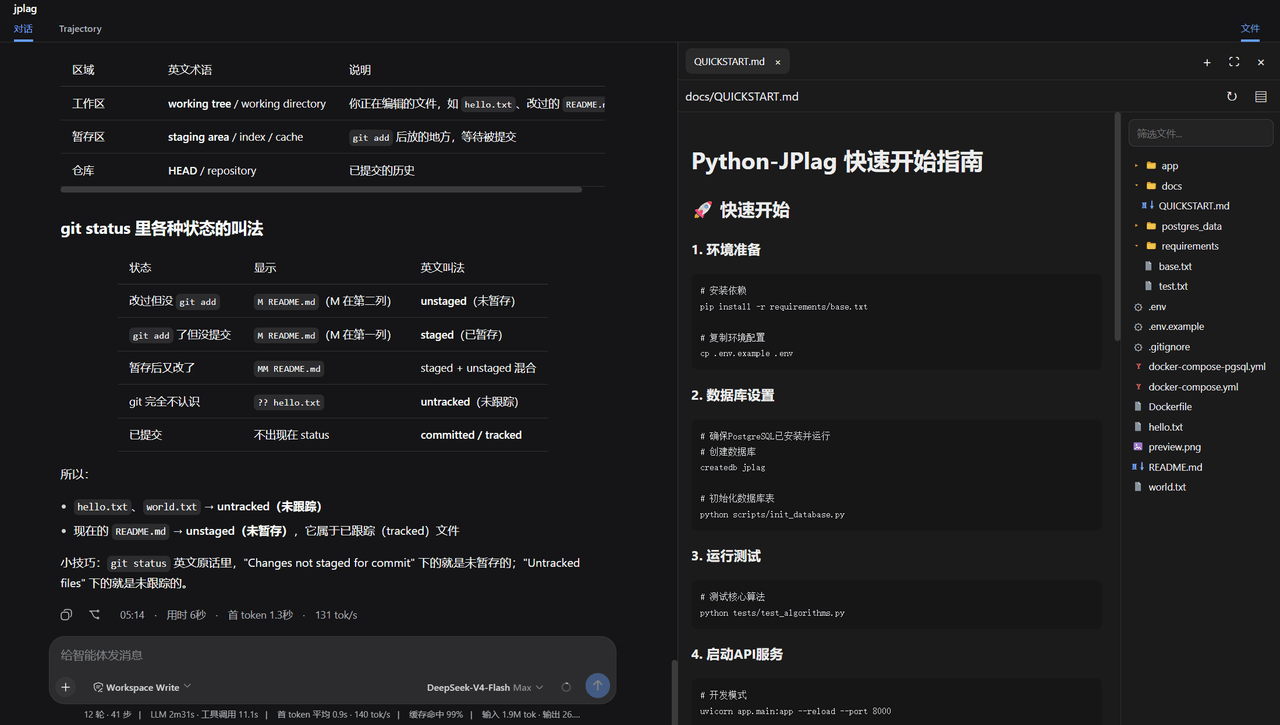
- 插件为 DSH Web 增加右侧工作区面板,将 Git 审查、终端访问和文件操作集中在当前会话旁边。
- Git 审查显示工作区和暂存文件,以及每个 DSH 轮次中产生的代码变更;回滚支持被列为后续新增功能。
- DSH 会话区域输出的文件链接可打开对应文件以供审查,文件浏览器允许用户导航到这些文件。
- 内置终端可直接在当前工作区运行命令,用户无需离开会话界面即可执行 shell 操作。
## 使用场景
- 在编码会话期间审查 DSH 生成的代码修改,同时在同一 Web 界面中保持会话可见。
- 检查当前仓库中的工作区和暂存 Git 状态,同时决定是否接受、检查或比较变更。
- 在基于 Web 的开发过程中,打开 DSH 会话链接引用的文件,并通过侧边面板阅读或编辑它们。
- 在终端辅助编码任务中,在用于文件浏览和 Git 审查的同一面板中运行工作区命令。
## 技术细节
- 该插件可通过 dsh plugin --profile web add github:dsh-external/dsh-side-panel 安装到 DSH web profile,然后运行 dsh web。
- 本地安装方式为克隆仓库,运行 npm install 和 npm run build,然后使用 dsh plugin --profile web add . 添加本地目录。
- 默认包配置会以 side-panel ID 插入,包名为 @dsh-external/dsh-side-panel,并包含用于文件和搜索限制的 YAML 设置。
- 可配置限制包括:可读和可编辑文本文件的 maxTextBytes 为 2 MiB,预览图片的 maxImageBytes 为 10 MiB,文件过滤结果的 searchMaxResults 为 200。
## 注意事项
- 该仓库已不再维护并已归档,README 指引用户使用 DSH-better-sidebar 作为推荐替代方案。
- README 说明 Git 审查的回滚功能将在以后添加,因此当前 Git 审查不包含该操作。
- 该项目基于 BSD-3-Clause 许可证分发,现有代码和历史版本仅供参考。
## Core Features
- The plugin adds a right-side workspace panel for DSH Web that concentrates Git review, terminal access, and file operations beside the current session.
- Git review displays workspace and staged files, as well as code changes made during each DSH round, with rollback support listed as a future addition.
- File links emitted in the DSH session area open the corresponding files for review, and the file browser lets users navigate to those files.
- An embedded terminal runs commands directly in the current workspace so users can execute shell operations without leaving the session interface.
## Use Cases
- Reviewing code modifications produced by DSH during a coding session while keeping the conversation visible in the same web interface.
- Inspecting workspace and staged Git states while deciding whether to accept, examine, or compare changes in the current repository.
- Opening files referenced by DSH session links and reading or editing them through the side panel during web-based development.
- Running workspace commands in the same panel used for file browsing and Git review during terminal-assisted coding tasks.
## Technical Details
- The plugin is installed into the DSH web profile with dsh plugin --profile web add github:dsh-external/dsh-side-panel, followed by dsh web.
- A local installation path is provided by cloning the repository, running npm install and npm run build, then adding the local directory with dsh plugin --profile web add ..
- Default package configuration is inserted under the side-panel ID with the package name @dsh-external/dsh-side-panel and YAML settings for file and search limits.
- Configurable limits include maxTextBytes at 2 MiB for readable and editable text files, maxImageBytes at 10 MiB for previewed images, and searchMaxResults at 200 for file filtering results.
## Notes
- The repository is no longer maintained and has been archived, while the README points users to DSH-better-sidebar as the recommended alternative.
- The README states that rollback functionality for Git review will be added later, so current Git review does not include that operation.
- The project is distributed under the BSD-3-Clause license and retains existing code and historical versions for reference only.
安装Install
dsh plugin --profile web add github:dsh-external/dsh-side-panel把 ccq1/dsh-side-panel 加入你的 DSH 配置(web profile)即可启用。
READMEREADME
dsh-side-panel
[!IMPORTANT] 本项目已停止维护并归档。推荐使用功能更完整、仍在持续维护的 DSH-better-sidebar。本仓库保留现有代码和历史版本,仅供参考。
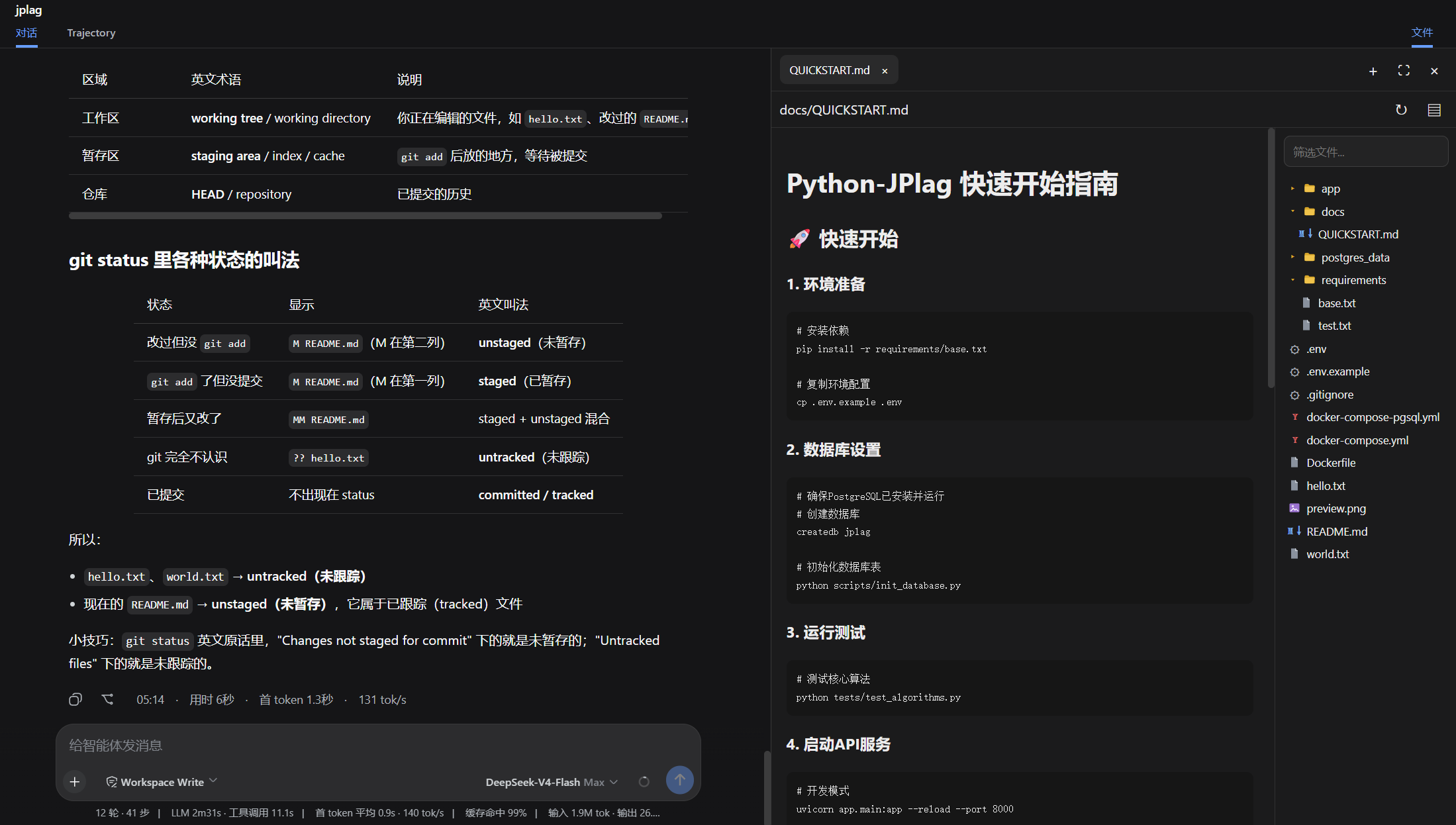
DSH Web 的右侧工作区面板,在当前会话旁集中提供 Git 审查、终端和文件操作。 可以点击dsh会话区弹出的文件链接,会自动打开相应的文件以供审阅。
功能
- Git审查,可以查看工作区和暂存区的文件,以及dsh每轮修改的代码,后续会增加回退。
- 文件浏览器, 可以在会话区点击文件跳转到文件浏览器浏览文件。
- 终端,在当前工作区直接运行命令,无需离开工作区,专注你的任务。
安装
从 github-dsh-external仓库安装
dsh plugin --profile web add github:dsh-external/dsh-side-panel
dsh web
或者可以先从git clone 到本地,然后从本地目录安装
git clone git@github.com:dsh-external/dsh-side-panel.git
cd dsh-side-panel
npm install
npm run build
dsh plugin --profile web add .
配置
组合包默认启用以下配置:
- insert:
    - id: side-panel
      name: '@dsh-external/dsh-side-panel'
      config:
        maxTextBytes: 2097152
        maxImageBytes: 10485760
        searchMaxResults: 200
| 配置项 | 默认值 | 说明 |
|---|---|---|
maxTextBytes |
2 MiB | 可读取和编辑的单个文本文件大小上限 |
maxImageBytes |
10 MiB | 可预览的单个图片大小上限 |
searchMaxResults |
200 | 文件筛选返回的最大结果数 |
许可
相关推荐Related
- deepseek-ai/deepseek-harness DeepSeek Harness (dsh) — 由 DeepSeek AI 开发的开源 agent harness(智能体框架)。一切皆插件:核心 + 插件 + 技能 = 可热插拔的 AI 编程工作台。DeepSeek Harness: …
-
 amruthpillai/reactive-resume
A one-of-a-kind resume builder that keeps your privacy in mind. Completely secure, customizable, portable, open-source a…
amruthpillai/reactive-resume
A one-of-a-kind resume builder that keeps your privacy in mind. Completely secure, customizable, portable, open-source a…
-
 tt-a1i/archify
Agent skill for beautiful, verifiable architecture, workflow, sequence, data-flow, and lifecycle diagrams—self-contained…
tt-a1i/archify
Agent skill for beautiful, verifiable architecture, workflow, sequence, data-flow, and lifecycle diagrams—self-contained…
-
 zhu1090093659/dsh-web-ui
Plugin and skin collection for DeepSeek Harness (DSH) Web UI - task board, git graph, right-side panel, remote mobile UI…
zhu1090093659/dsh-web-ui
Plugin and skin collection for DeepSeek Harness (DSH) Web UI - task board, git graph, right-side panel, remote mobile UI…
-
 strukto-ai/mirage
The World's First Unified Virtual Filesystem For AI Agents
strukto-ai/mirage
The World's First Unified Virtual Filesystem For AI Agents
-
 liustack/modlens
The first vision plugin for DeepSeek Harness, and the vision bridge for every text-only coding agent. Paste an image, ge…
liustack/modlens
The first vision plugin for DeepSeek Harness, and the vision bridge for every text-only coding agent. Paste an image, ge…
-
 omdsh-dev/DSH-better-sidebar
开放的侧边栏底座,支持三方拓展注册新侧边栏页面。内置文件渲染编辑/终端/Git/子代理页面 | Open sidebar foundation, supports third-party extensions to register new…
omdsh-dev/DSH-better-sidebar
开放的侧边栏底座,支持三方拓展注册新侧边栏页面。内置文件渲染编辑/终端/Git/子代理页面 | Open sidebar foundation, supports third-party extensions to register new…
-
 ccch1mneyyy/dsh-TUI
DSH 官方公众号收录的 TUI 补位插件:Claude Code 风,鲸鱼顶栏/实时状态/流式思考/双击 Esc 回滚/上下文进度+TPS。npm 一键装。 DSH official WeChat featured TUI plugin…
ccch1mneyyy/dsh-TUI
DSH 官方公众号收录的 TUI 补位插件:Claude Code 风,鲸鱼顶栏/实时状态/流式思考/双击 Esc 回滚/上下文进度+TPS。npm 一键装。 DSH official WeChat featured TUI plugin…