Crash0524/Timeseries-Workbench-DSH
timeseries-skill,提供时序分析、预测、多序列关系分析和证据化决策能力,以及带交互画布的 DSH 集成插件。
catalog descriptioncatalog 简介 / catalog description:为时序工作者提供的时序工作台
Project Overview项目介绍
timeseries-skill is a time-series analysis plugin built specifically for DSH (DeepSeek Harness), published to npm under the package name dsh-timeseries-workbench. It integrates through a two-layer mechanism combining a DSH source-host patch and an npm plugin: the integrations/dsh/ directory delivers upload parsing, the workbench UI, tool bridging, and result projection, while a dsh-workspace.patch patch supplies the split-pane layout and session-occupancy hooks. Installation is performed via pnh dsh plugin --profile web add dsh-timeseries-workbench@0.1.0, and verification requires --dump-config to print the dsh-timeseries-workbench layer. The repo ships a dsh-structure manifest and is committed to a DSH-only integration surface rather than supporting other agent CLIs.
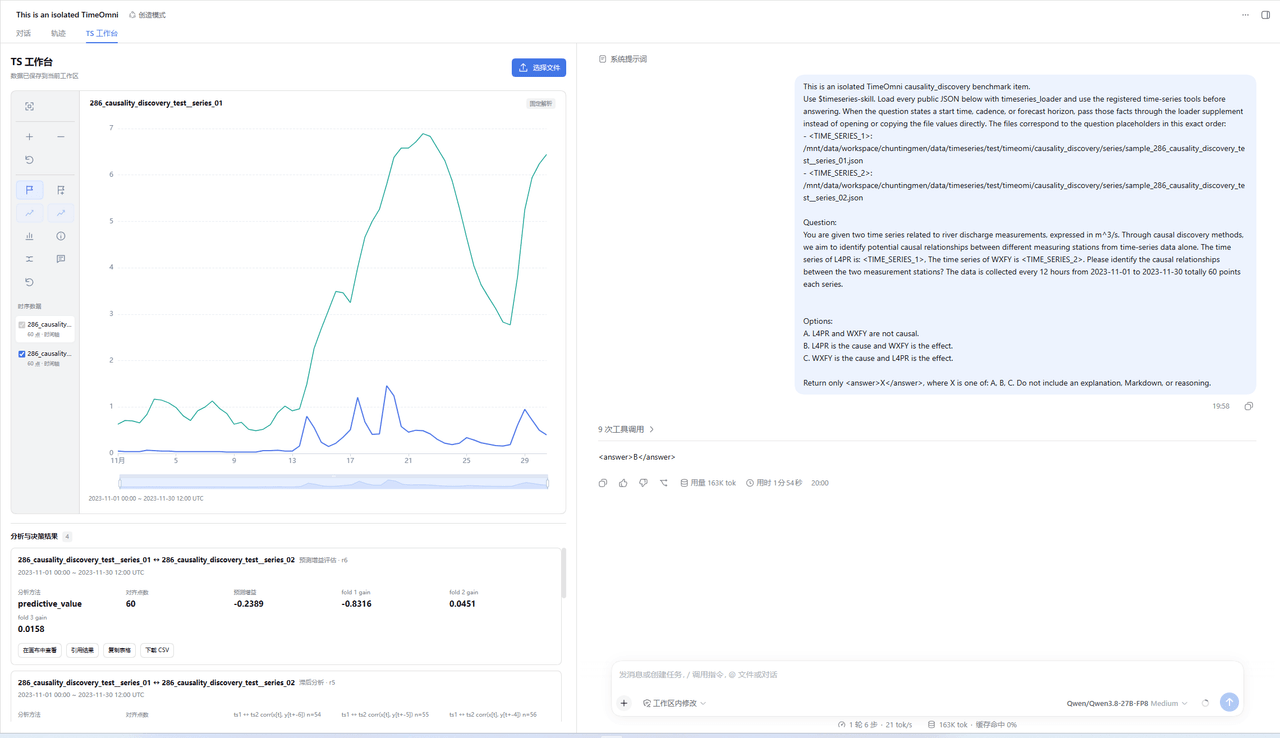
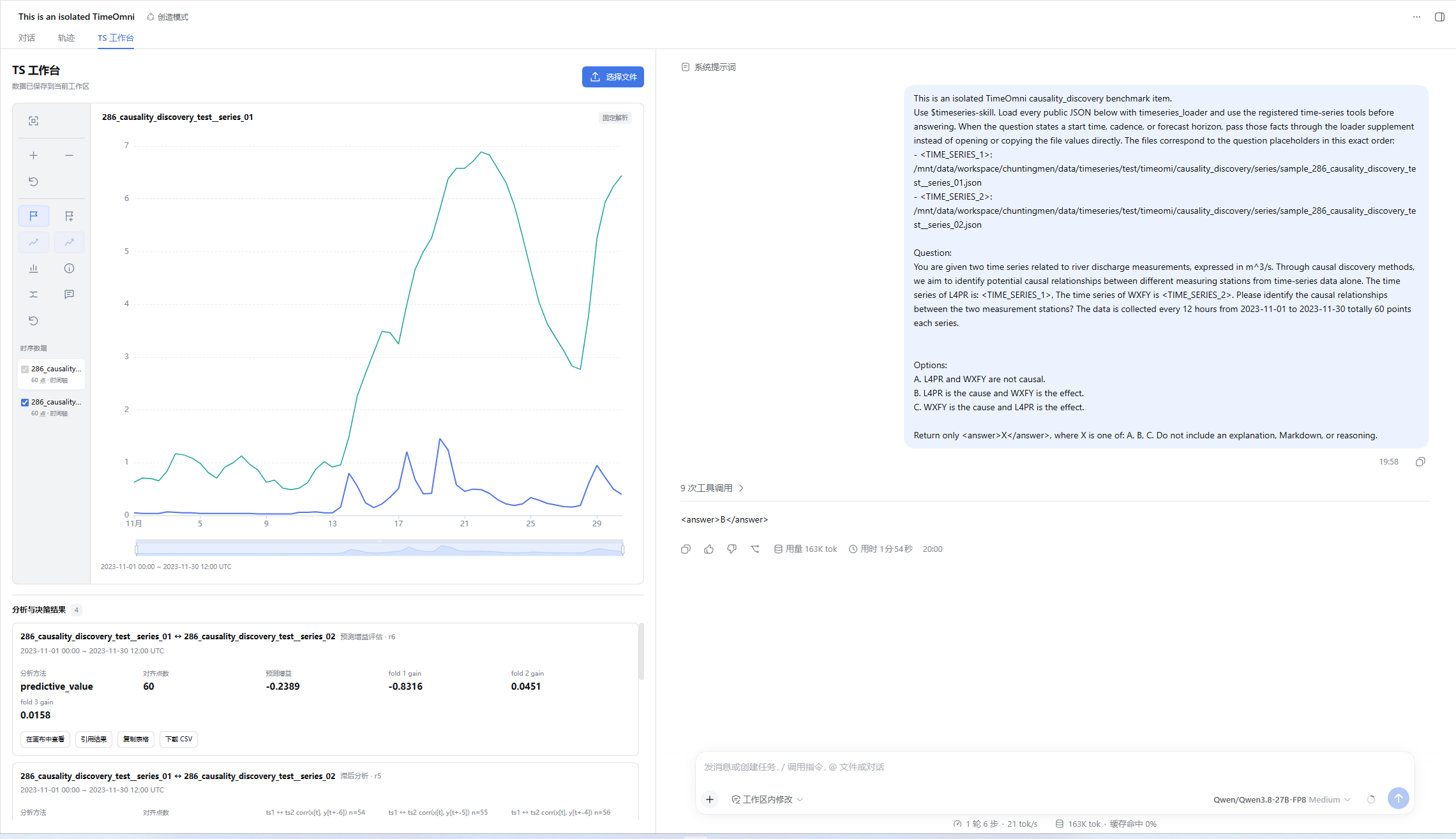
A typical workflow begins with building the DSH host from source, applying the workspace patch documented in workflows/dsh-integration.md, creating a Python environment that satisfies requirements.txt, and registering the Skill so a "TS Workbench" entry point becomes visible in new sessions. The workbench sidebar manages multi-series selection, zooming, event brushing, and metadata editing while the right pane keeps the native DSH chat dialog untouched. Twenty-four tools are exposed to the model — covering descriptive statistics, multi-series relationships, forecasting, and decision evidence — plus the host-side timeseries_render_chart that returns a persistent PNG consumable directly by the model context.
Dependencies include an optional Toto2 HTTP forecasting backend at 127.0.0.1:9999 with --model-path and --device flags, and the frontend must be built via npm --prefix integrations/dsh run build before host loading, otherwise browser module resolution fails. Hard limits cap browser uploads at 8 MiB, single imports at 256 series or 500000 points, event and forecast horizons at 4096 steps, with the authoritative SQLite store at <workspace>/work/<sessionId>/timeseries-runtime.sqlite3 set to owner-only permissions. The license is Apache-2.0, the validated baseline tag is dsh-v0.1.6-alpha.1, no one-step installer is provided, and renaming the package or modifying the client injection list requires re-running add to regenerate cordis.patch.yml.
timeseries-skill 是一个面向 DSH(DeepSeek Harness)的时序分析插件,发布到 npm 时包名为 dsh-timeseries-workbench。它通过 DSH 源码宿主补丁叠加 npm 插件的双层方式接入:在 integrations/dsh/ 内实现上传解析、工作台界面、工具桥接与结果投影,并配套一份 dsh-workspace.patch 补丁用于双栏布局与会话占用接口;安装命令为 pnpm dsh plugin --profile web add dsh-timeseries-workbench@0.1.0,验证方式为 --dump-config 输出 dsh-timeseries-workbench 层。
典型使用流程是先在 DSH 宿主中按部署文档构建并应用补丁,建立独立的 Python 运行环境并安装仓库 requirements.txt,再注册 Skill 进入「TS 工作台」上传数据。侧栏用于多序列管理、缩放、事件框选和元信息编辑,右侧保留 DSH 原对话框;模型侧可调用 24 个工具,覆盖描述性分析、多序列关系、预测与决策证据五大类别,并配合宿主侧注册的 timeseries_render_chart 直接产出可入上下文的 PNG。
依赖与限制方面,预测模型走独立的 Toto2 HTTP 服务(默认 127.0.0.1:9999),需 Python 环境与 --model-path;前端必须先在 integrations/dsh 下 npm run build 生成 lib/client.js,否则宿主导入会失败。资源上限包括 8 MiB 上传、单次最多 256 条序列或 500000 个点、事件与预测步长均封顶 4096。License 为 Apache-2.0,目前没有一键安装脚本,首次部署需按工作流文档逐步完成。
请帮我安装这个 DSH 插件。安装前先完成【兼容性检查 + 安全性检查】,检查通过再动手。

插件:Timeseries-Workbench-DSH(Crash0524/Timeseries-Workbench-DSH)
仓库:https://github.com/Crash0524/Timeseries-Workbench-DSH
本站详情页:https://www.yhbd.top/plugins/crash0524-timeseries-workbench-dsh/
本站登记:类型 plugin · 归类 原生 DSH 插件 · 许可证 Apache-2.0 · ⭐ 2 · 最近提交 2026-09-30 · 主语言 Python

按下面顺序执行,每步先把结论告诉我,再进入下一步:

【1 兼容性检查】
① 我这边:DSH 版本、Node 版本、操作系统、当前 profile(web / desktop)。
② 读它的 README、package.json、插件 manifest,列出它要求的 DSH 版本 / Node 版本 / 操作系统 / 外部依赖 / 需要另外先装的运行时。
③ 逐条比对,结论只写「满足 / 不满足 / 未知」三种;不满足的给出可行替代方案。
④ 检查是否和我已装的插件冲突:命令名重复、skill / tool 重名、端口占用、重复注册的 MCP server。

【2 安全性检查】
① 仓库可信度:和上面「本站登记」是否一致;star / fork 数、创建时间、最近提交,是否归档或长期停更。
② 安装脚本:逐行看 package.json 的 preinstall / install / postinstall,以及 install.sh、setup.ps1 之类脚本。出现 curl|bash、下载后直接执行、混淆代码、访问与插件功能无关的域名,立刻停下来告诉我,不要继续装。
③ 依赖:列出新增依赖,标出无人维护、或与知名包拼写近似的可疑包(typosquatting)。
④ 权限与副作用:它会读写哪些目录、访问哪些域名、需要哪些 DSH 权限(filesystem / network / shell / clipboard 等),以及怎么卸载和回滚。
⑤ 如果它要求 sudo / 管理员权限,或权限明显超出功能所需,先停下来问我。

【3 安装】
上面两步没有「不满足」和「高危项」时才执行;用官方推荐方式安装,不要自行提权。

【4 汇报】
用表格输出:检查项 / 结论 / 依据 / 是否需要我决策。拿不准的一律写「未知」并说明要我怎么确认——不要猜,也不要替我决定。
Send this message to DSH in your current session: it verifies compatibility and security first (answering met / not met / unknown item by item) and only installs once everything checks out — it will stop and ask you if it finds a high-risk item. The box scrolls; the copy is the full prompt. CLI install commands may not be accurate across systems, so DSH is the safer route.把上面这条消息直接发给当前会话里的 DSH:它会先核对兼容性与安全性(逐条给「满足 / 不满足 / 未知」),确认没问题再安装,有高危项会停下来问你。框内可滚动,复制到的是完整提示词;安装命令不一定准确,发给 DSH 更稳。
- Only 2 stars - very few users, little community feedback星标只有 2,几乎没人在用,遇到问题缺少社区反馈
DSH walks through these 9 checksDSH 会逐条核对这 9 项
Compatibility兼容性
- DSH, Node, OS and profile requirementsDSH 版本 / Node 版本 / 操作系统 / profile 是否满足要求
- External dependencies and runtimes (Electron / Python / Docker, ...)外部依赖与运行时(Electron / Python / Docker 等)是否齐备
- Conflicts with installed plugins: command names, skill / tool names, ports, duplicate MCP registration与已装插件是否冲突:命令名、skill / tool 重名、端口占用、重复 MCP 注册
Security安全性
- Repo matches the facts registered here; archived or abandoned?仓库是否与页面登记一致,是否归档或长期停更
- Safety of preinstall / install / postinstall and install.sh / setup.ps1preinstall / install / postinstall 与 install.sh、setup.ps1 是否安全
- curl|bash, download-then-execute, obfuscation, unrelated domains → stop immediatelycurl|bash、下载即执行、混淆代码、无关域名 → 立刻停止
- Typosquatting or unmaintained packages among the new dependencies新增依赖里有没有 typosquatting 或无人维护的包
- Requested permissions vs. what the feature actually needs申请了哪些权限、是否超出功能所需(filesystem / network / shell / clipboard)
- Any sudo / admin requirement, plus uninstall and rollback是否要求 sudo / 管理员权限,以及卸载与回滚方式
Anything uncertain must be marked unknown with a note on how to confirm it. This site's signal screen is a static snapshot, not a security audit.拿不准的必须标「未知」并说明要我怎么确认。本站的信号筛查是静态快照,不能替代安全审计。
Or use CLI install (for developers)或使用命令行安装(适合开发者)
CLI Install命令行安装
dsh plugin --profile web add github:Crash0524/Timeseries-Workbench-DSH把 Crash0524/Timeseries-Workbench-DSH 加入你的 DSH 配置(web profile)即可启用。
READMEREADME
timeseries-skill
timeseries-skill,提供时序分析、预测、多序列关系分析和证据化决策能力,以及带交互画布的 DSH 集成插件。
安装插件
当前发布方式是 DSH 源码宿主 + 宿主补丁 + npm 插件。完整工作台依赖补丁提供的双栏布局和会话占用接口,plugin add 只安装插件并登记配置,不会应用宿主补丁或安装 Python 依赖。当前没有一键部署脚本。
当前宿主适配基准为 dsh-v0.2.0-rc.2(639ed015397290b3745d163aafe02ffee4aa3f84)。使用本仓库随附的新补丁;旧版补丁不适用于 0.2.0。验证范围见 验收记录。
首次部署按 完整部署步骤 安装并构建宿主、创建 Python 环境、安装插件和登记 Skill。以下命令适用于已经完成宿主适配的环境;DSH_SOURCE 指向该 DSH 源码目录,TIMESERIES_PYTHON 指向已安装本仓库 requirements.txt 的 Python。
本次适配从当前源码构建本地安装包;以下命令在本仓库根目录执行:
export TIMESERIES_REPO="$PWD"
npm install
npm run pack:plugin
(cd "$DSH_SOURCE" && pnpm dsh plugin --profile web add "$TIMESERIES_REPO/dsh-timeseries-workbench-0.1.0.tgz")
(cd "$DSH_SOURCE" && pnpm dsh --profile web)
源码开发:
npm --prefix integrations/dsh install
npm --prefix integrations/dsh run build            # 必须先构建前端产物 lib/client.js
(cd "$DSH_SOURCE" && pnpm dsh plugin --profile web add "$TIMESERIES_REPO/integrations/dsh")
验证安装:
(cd "$DSH_SOURCE" && pnpm dsh --profile web --dump-config)
配置输出应包含 dsh-timeseries-workbench 层。该包声明 dsh.bundle.patch,dsh plugin add 会同时登记依赖与 dsh.profile.bundles 里的配置层;这与需要应用、构建的 DSH 源码补丁 是两件事。Skill 登记完成后,在新会话进入「TS 工作台」并上传文件。改了包名或客户端注入列表后必须重新执行 add 重建链接并刷新 cordis.patch.yml 的行名,否则浏览器模块表的按名索引会失败。
插件在加载阶段解析 Python skill root:优先 skillRoot 配置,其次 TIMESERIES_SKILL_ROOT,再依次尝试包内 python/ 与源码布局的两级上层目录。解析失败会直接报错并列出尝试过的路径,不会拖到第一次工具调用。
预测模型部署
预测走独立的 Toto2 HTTP 服务,未启动时只有预测类工具报服务不可用,其余能力不受影响。可使用其他模型充当预测模型。
python -m services.toto2_server.server \
  --host 127.0.0.1 --port 9999 \
  --model-path /absolute/model/path --device cuda --local-files-only
curl -s http://127.0.0.1:9999/ready      # 就绪后返回 {"status":"ready",...}
| 参数 / 环境变量 | 默认值 |
|---|---|
--host / --port |
127.0.0.1 / 9999 |
--model-path(FORECAST_MODEL_PATH、TOTO2_MODEL_PATH) |
Datadog/Toto-2.0-2.5B |
--device(FORECAST_MODEL_DEVICE、TOTO2_DEVICE) |
cuda |
--max-context / --decode-block-size |
4096 / 768 |
服务地址(插件侧 TOTO2_SERVICE_URL) |
http://127.0.0.1:9999 |
Showing the opening section of the README — the full document lives in the repository以上为 README 开头摘要,完整文档在仓库内 · View the full README on GitHub →在 GitHub 查看完整 README →
Related相关推荐
-
 esengine/DeepSeek-Reasonix
A reliable coding agent for complex software engineering tasks.
esengine/DeepSeek-Reasonix
A reliable coding agent for complex software engineering tasks.
-
 strukto-ai/mirage
The World's First Virtual Terminal for AI Agents
strukto-ai/mirage
The World's First Virtual Terminal for AI Agents
-
 chuspeeism/dashi-taskboard
现代化可灵活嵌入的任务面板,支持 Codex、DeepSeek Harness
chuspeeism/dashi-taskboard
现代化可灵活嵌入的任务面板,支持 Codex、DeepSeek Harness
-
 Aisland-SJL/dsh-worktable
🖥️ Agent-project workbench for DeepSeek Harness — sidebar app drawer + dockable split workspace + a live control room w…
Aisland-SJL/dsh-worktable
🖥️ Agent-project workbench for DeepSeek Harness — sidebar app drawer + dockable split workspace + a live control room w…
-
 ccch1mneyyy/working-activity
Lively Working-line extension for pi CLI and DSH
ccch1mneyyy/working-activity
Lively Working-line extension for pi CLI and DSH
-
 zhoushoujianwork/easyeda-agent
嘉立创EDA专业版(EasyEDA Pro)自动化:给 AI harness 装上画板的「手」—— 一套 typed 原理图/PCB 动作,CLI / Agent Skill / stdio MCP 三形态融合接入。承接嘉立创「不以卖板赚钱…
zhoushoujianwork/easyeda-agent
嘉立创EDA专业版(EasyEDA Pro)自动化:给 AI harness 装上画板的「手」—— 一套 typed 原理图/PCB 动作,CLI / Agent Skill / stdio MCP 三形态融合接入。承接嘉立创「不以卖板赚钱…
-
 pulseaiclub/phi
a coding agent, rpc plugin, sub-agents, hashline edits, and mcp
pulseaiclub/phi
a coding agent, rpc plugin, sub-agents, hashline edits, and mcp
-
 Ikalus1988/MisakaNet
📚 A zero-dependency, git-backed micro-lesson library for AI Agents to asynchronously share and search verified debuggin…
Ikalus1988/MisakaNet
📚 A zero-dependency, git-backed micro-lesson library for AI Agents to asynchronously share and search verified debuggin…