
dsh-market/dsh-market
DeepSeek Harness 内置插件市场 — 浏览、搜索、一键安装 · DSH 可视化插件市场
Project Overview项目介绍
dsh-market is a native DeepSeek Harness (DSH) plugin that adds a full-featured community plugin marketplace to the DSH web interface. To install it, run the command dsh plugin --profile web add dshmarket via the DSH CLI, then restart dsh web to activate the new Plugin Market entry in DSH’s settings menu. It hosts over 2300 community-created plugins and themes, with support for category filtering, sorting by star count or update time, and bilingual descriptions that match your current UI language.
Once activated, users can browse featured content, search for specific tools, and one-click install any available plugin or theme. Most plugins activate after a simple page refresh, so no full DSH restart is required to use newly installed tools. It supports one-click theme switching, hot enable/disable of installed plugins, bookmarking favorite resources to a dedicated tab, and backing up your full plugin configuration to a portable JSON file that can be imported on another device. It also handles automatic update checks for all installed plugins, with one-click updates available for individual items or all plugins at once.
This plugin requires DSH web version 0.1.0-rc.6 or newer; if your installed version is older, the plugin will disable itself automatically and log a clear message to the browser console. It includes optimized fallback routing for GitHub resources for users in China, and supports adding a custom HTTPS prefix for GitHub acceleration if built-in routes do not work. The project is released under the open-source MIT license, and it is pre-installed by default on most popular third-party DSH desktop distributions.
这是一个专为 DeepSeek Harness 打造的原生插件市场插件,安装后会在 DSH 的设置菜单中新增「插件市场」入口。用户可以在这里浏览、搜索超过 2300 个社区贡献的插件和主题,支持按分类筛选、按点赞数或更新时间排序,还会自动显示匹配当前界面语言的双语描述。支持一键安装更新,大多数插件安装后无需重启 DSH 即可生效。
这款插件面向所有想要便捷发现和管理社区资源的 DeepSeek Harness 用户。日常使用流程非常简单:打开 DSH 设置进入插件市场,通过搜索或分类筛选找到需要的插件或主题,确认来源后点击安装即可查看实时进度。它还支持主题一键切换、插件热开关、收藏常用资源,并且可以导出插件配置备份,在另一台设备上快速恢复。
它要求 DSH web 版本不低于 0.1.0-rc.6,如果版本过低插件会自动禁用并在浏览器控制台提示原因。项目基于 MIT 许可证开源,针对中国访问环境优化了 GitHub 资源加载的 fallback 线路,支持用户自定义 GitHub 加速地址。安装方式为通过 DSH CLI 执行 dsh plugin --profile web add dshmarket,安装后重启 dsh web 即可使用。
请帮我安装这个 DSH 插件。安装前先完成【兼容性检查 + 安全性检查】,检查通过再动手。

插件:dsh-market(dsh-market/dsh-market)
仓库:https://github.com/dsh-market/dsh-market
本站详情页:https://www.yhbd.top/plugins/dsh-market-dsh-market/
本站登记:类型 plugin · 归类 原生 DSH 插件 · 许可证 MIT · ⭐ 5435 · 最近提交 2026-10-03 · 主语言 TypeScript

按下面顺序执行,每步先把结论告诉我,再进入下一步:

【1 兼容性检查】
① 我这边:DSH 版本、Node 版本、操作系统、当前 profile(web / desktop)。
② 读它的 README、package.json、插件 manifest,列出它要求的 DSH 版本 / Node 版本 / 操作系统 / 外部依赖 / 需要另外先装的运行时。
③ 逐条比对,结论只写「满足 / 不满足 / 未知」三种;不满足的给出可行替代方案。
④ 检查是否和我已装的插件冲突:命令名重复、skill / tool 重名、端口占用、重复注册的 MCP server。

【2 安全性检查】
① 仓库可信度:和上面「本站登记」是否一致;star / fork 数、创建时间、最近提交,是否归档或长期停更。
② 安装脚本:逐行看 package.json 的 preinstall / install / postinstall,以及 install.sh、setup.ps1 之类脚本。出现 curl|bash、下载后直接执行、混淆代码、访问与插件功能无关的域名,立刻停下来告诉我,不要继续装。
③ 依赖:列出新增依赖,标出无人维护、或与知名包拼写近似的可疑包(typosquatting)。
④ 权限与副作用:它会读写哪些目录、访问哪些域名、需要哪些 DSH 权限(filesystem / network / shell / clipboard 等),以及怎么卸载和回滚。
⑤ 如果它要求 sudo / 管理员权限,或权限明显超出功能所需,先停下来问我。

【3 安装】
上面两步没有「不满足」和「高危项」时才执行;用官方推荐方式安装,不要自行提权。

【4 汇报】
用表格输出:检查项 / 结论 / 依据 / 是否需要我决策。拿不准的一律写「未知」并说明要我怎么确认——不要猜,也不要替我决定。
Send this message to DSH in your current session: it verifies compatibility and security first (answering met / not met / unknown item by item) and only installs once everything checks out — it will stop and ask you if it finds a high-risk item. The box scrolls; the copy is the full prompt. CLI install commands may not be accurate across systems, so DSH is the safer route.把上面这条消息直接发给当前会话里的 DSH:它会先核对兼容性与安全性(逐条给「满足 / 不满足 / 未知」),确认没问题再安装,有高危项会停下来问你。框内可滚动,复制到的是完整提示词;安装命令不一定准确,发给 DSH 更稳。
- This site's static screen found no obvious risk signal (stars, license, activity, manifest)本站静态筛查没发现明显风险信号(星标、许可证、更新活跃度、清单完整度)
DSH walks through these 9 checksDSH 会逐条核对这 9 项
Compatibility兼容性
- DSH, Node, OS and profile requirementsDSH 版本 / Node 版本 / 操作系统 / profile 是否满足要求
- External dependencies and runtimes (Electron / Python / Docker, ...)外部依赖与运行时(Electron / Python / Docker 等)是否齐备
- Conflicts with installed plugins: command names, skill / tool names, ports, duplicate MCP registration与已装插件是否冲突:命令名、skill / tool 重名、端口占用、重复 MCP 注册
Security安全性
- Repo matches the facts registered here; archived or abandoned?仓库是否与页面登记一致,是否归档或长期停更
- Safety of preinstall / install / postinstall and install.sh / setup.ps1preinstall / install / postinstall 与 install.sh、setup.ps1 是否安全
- curl|bash, download-then-execute, obfuscation, unrelated domains → stop immediatelycurl|bash、下载即执行、混淆代码、无关域名 → 立刻停止
- Typosquatting or unmaintained packages among the new dependencies新增依赖里有没有 typosquatting 或无人维护的包
- Requested permissions vs. what the feature actually needs申请了哪些权限、是否超出功能所需(filesystem / network / shell / clipboard)
- Any sudo / admin requirement, plus uninstall and rollback是否要求 sudo / 管理员权限,以及卸载与回滚方式
Anything uncertain must be marked unknown with a note on how to confirm it. This site's signal screen is a static snapshot, not a security audit.拿不准的必须标「未知」并说明要我怎么确认。本站的信号筛查是静态快照,不能替代安全审计。
Or use CLI install (for developers)或使用命令行安装(适合开发者)
CLI Install命令行安装
dsh plugin --profile web add dshmarket把 dsh-market/dsh-market 加入你的 DSH 配置(web profile)即可启用。
READMEREADME

dsh-market
English | 中文


The plugin market inside DeepSeek Harness. Open Settings → Plugin Market → browse, search, one-click install.
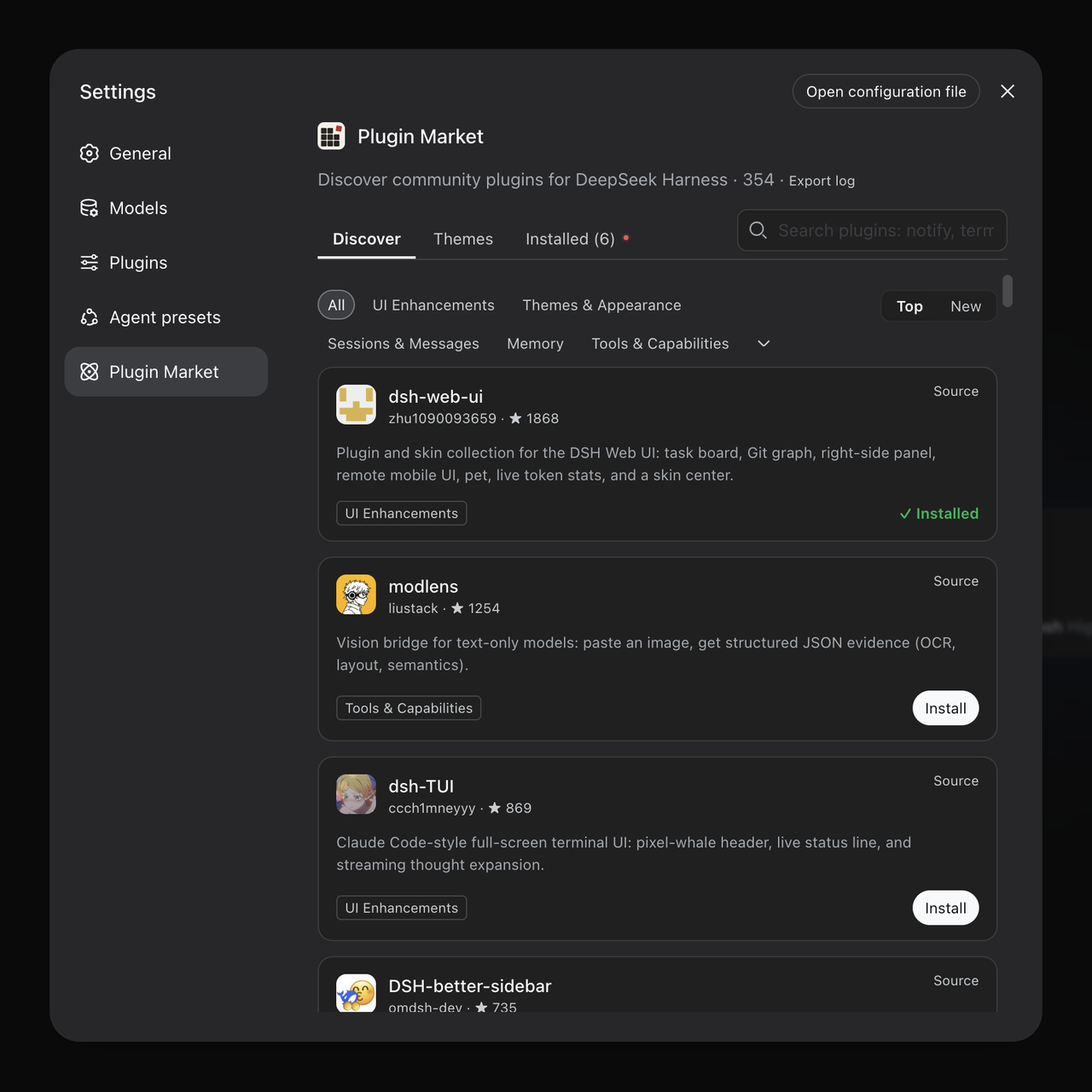
One-click themes: install, switch live, no restart.
Install
dsh plugin --profile web add dshmarket
Restart dsh web, then open Settings → Plugin Market.
Requires dsh web 0.1.0-rc.6 or newer. On an older host the market
disables itself and says so in the browser console rather than rendering
against primitives that are not there — if the Plugin Market entry never
appears, that is usually why. Worth checking when a desktop build bundles
its own dsh: it may be older than the one npm would give you (#139).
What you get
- Browse & search the full community catalog (4200+ plugins, growing daily) — category filters, star counts, top/new sorting, bilingual descriptions that follow your UI language
- Host-aware discovery — cards show the DSH requirement declared by
engines.dshor lockstep@deepseek-ai/dsh-*peers; an opt-in filter hides only confirmed mismatches with the running host. Undeclared, malformed, unavailable, and GitHub-only entries remain visible rather than being guessed incompatible - Screenshots — AppStore-style screenshots, auto-carousel when there's more than one, click to preview full-size: author-curated shots show right on the card (zero extra requests); plugins without curated shots fall back to automatic README extraction once you open the install dialog. Images load from GitHub hosting only
- Comments — every card opens the plugin's discussion thread in place. It is the same thread its pages on dshmarket.com and the catalog show, so a plugin has one conversation rather than three. Backed by GitHub Discussions through giscus: it loads when you open it, needs a GitHub account only to post, and the note above it says plainly that opening it contacts giscus.app and GitHub. On local dsh web, reading stays embedded while a dedicated GitHub action opens the exact discussion in a new tab for sign-in and posting, so the cross-site return never carries or depends on the host session
- Favorites — bookmark plugins and themes from Discover or the Themes tab; a dedicated Favorites tab lists them with search, sort, and install actions. Bookmarks persist in the profile's market state (
state.json); entries that leave the catalog can be cleared in one click - Groups — organise installed plugins into named groups (rename, delete, and per-group search); a plugin lives in one group and ungrouped is the default. Purely organisational: the panel says so, and nothing about enable state changes. The grouping itself is local state in the profile's
state.json - Notes — write your own one-line description for any installed plugin and it replaces the author's on that row, so a shelf of forty plugins answers "why did I install this" in your words. Stored locally beside groups and favorites, never sent anywhere
- Themes — a dedicated tab for community themes and skins: install → active immediately, switch with one click (themes are mutually exclusive, your choice survives restarts), uninstall to revert
- One-click install — confirm the source, watch live progress; most plugins go live after a page refresh, no restart
- Backup & restore — export your profile's plugin list and configuration as readable JSON, import it on another machine, store it on WebDAV with daily auto-backup, or sync through a private GitHub Gist; restores merge (plugins installed after the backup are kept), validate before writing, and roll back on failure
- Updates — per-plugin update checks (npm version or pinned commit vs HEAD), one-click update, or update everything at once; the market updates itself the same way. A plugin installed from an archive link is updated only through its own source: a catalog entry that merely shares the name is never offered as its update, so updating cannot silently replace it with a different plugin. Each row with an update pending carries a What changed link — the release notes, or the commits when the version cannot be aligned to one. A notice you are not acting on can be ignored for the rest of the boot instead of being dismissed again on every reload — scoped to the running host, so a restart brings the reminder back and ignoring it is never the same as turning it off
- Resilient GitHub routes — in the China download region, Git refs, README content, and avatars each keep their own fallback order. The market remembers the last working route, switches only after transport/HTTP/payload validation fails, and rejects proxy error pages disguised as HTTP 200. If every built-in route fails, Settings → Plugins → Plugin configuration → GitHub acceleration accepts one persistent custom HTTPS prefix;
DSHM_GITHUB_PROXYremains the operator-owned override - Public update API — plugin-owned settings pages can use the versioned, capability-gated update API v1 (beta) instead of copying package-manager logic or depending on private Market UI responses
- Uninstall — two-step confirm; plugins installed this session are removed live
- Hot disable / enable — toggles write
- id: …+disabled: true|falseinto the profile'scordis.patch.yml(the official patch layer, mechanism ported from dsh-plugin-hub): DSH's HMR re-composes within ~1s, no restart, and the loader re-applies the choice on every boot; hand-edited patch rows show as badges, host-infrastructure plugins are protected from toggling, and a malformed patch file is never made worse - Restart when needed — changes that cannot hot-load show a one-click restart beside the pending-change banner; the action is restricted to same-origin loopback requests
- Recovery when a restart does not come back — DSH's boot is all-or-nothing: one plugin that cannot load stops the whole process, and the market's own UI dies with the host it was serving from. Now that failure prompt offers Adjust plugins: the ones DSH blamed are marked red and left unticked, you choose what should be enabled at the next start, the choice is written through the same
cordis.patch.ymlrows the market's own toggles use (plusdsh.profile.bundlesfor a disable-carrier), and the boot is retried. It is served by the detached restart helper on the same address the page was already polling, so it works even though the host is gone — and opening the URL fresh renders a standalone version of the same page. When DSH starts normally, none of it appears - Zero jargon — if a component is missing (pnpm), the market detects it and offers a one-click automatic setup
- Log export — one click produces a sanitized plain-text log for bug reports (home paths and credential shapes are masked; nothing is ever sent anywhere). The market's version sits next to the page heading, so a screenshot of a problem already carries it
- Settings card — on dsh 0.1.0-rc.7 and newer the market manages itself from Settings → Plugins → Plugin configuration, next to every other plugin: see the running version, pick a release channel (stable, or beta to try builds still being verified — the market only, never your other plugins; a third dev channel appears once developer mode is switched on, and carries builds published straight off a branch), update, or remove the market — with an opt-in cleanup that also drops the disable rows it wrote, so plugins it switched off start running again rather than staying off with no UI left to switch them back on
- Diagnostics — the plugin load order and conflict surface, one page: bundle stack with official/community badges, duplicate loader entries, dependency version mismatches, multi-version core packages, overrides and invalid config entries, and leftover directories — a package directory an interrupted update left without its
package.json, and pnpm's own*_tmp_*staging directories. Nothing there stops a start, so it is listed rather than warned about, and it is the only place that names what is on disk. Plain-language terms, problem blocks highlighted, everything collapsible
Showing the opening section of the README — the full document lives in the repository以上为 README 开头摘要,完整文档在仓库内 · View the full README on GitHub →在 GitHub 查看完整 README →
Related相关推荐
-
 freestylefly/awesome-gpt-image-2
Prompt as Code | GPT Image 2 / 2.5 提示词与案例库,530+ 个案例、20+ 套工业级模板与可复用 Skills,新增 2.5 同提示词对比专区,附完整提示词与生成记录,持续更新。
freestylefly/awesome-gpt-image-2
Prompt as Code | GPT Image 2 / 2.5 提示词与案例库,530+ 个案例、20+ 套工业级模板与可复用 Skills,新增 2.5 同提示词对比专区,附完整提示词与生成记录,持续更新。
-
 awesome-dsh-plugin/awesome-dsh-plugin
A curated list of plugins for DeepSeek Harness (dsh) · DeepSeek Harness 插件精选列表
awesome-dsh-plugin/awesome-dsh-plugin
A curated list of plugins for DeepSeek Harness (dsh) · DeepSeek Harness 插件精选列表
-
 zhu1090093659/dsh-web
DeepSeek Harness (DSH) Web 插件聚合生态 · 万物皆插件,通过创意工坊分发||DeepSeek Harness (DSH) Web Plugin Aggregation Ecosystem · Everything…
zhu1090093659/dsh-web
DeepSeek Harness (DSH) Web 插件聚合生态 · 万物皆插件,通过创意工坊分发||DeepSeek Harness (DSH) Web Plugin Aggregation Ecosystem · Everything…
-
 superdesigndev/treg
OpenRouter for agent tools. Join community here: https://discord.gg/6mQYYfFMAn
superdesigndev/treg
OpenRouter for agent tools. Join community here: https://discord.gg/6mQYYfFMAn
-
 AdamPlatin123/dsh-plugin-radar
DSH Plugin Radar — open-source ecosystem radar for DeepSeek Harness plugins: continuous discovery (21k+ candidates), k8s…
AdamPlatin123/dsh-plugin-radar
DSH Plugin Radar — open-source ecosystem radar for DeepSeek Harness plugins: continuous discovery (21k+ candidates), k8s…
- Devin-AXIS/deepseek-design DeepSeek Harness 可编辑设计系统:AI 生成、可视化编辑、模板市场与 PPT|Native Design & PPT Studio for DeepSeek Harness.
-
 0xsline/awesome-deepseek-harness
DeepSeek Harness (DSH) ecosystem: curated plugins, tools, and infrastructure from dsh-external/hub and the public dsh-pl…
0xsline/awesome-deepseek-harness
DeepSeek Harness (DSH) ecosystem: curated plugins, tools, and infrastructure from dsh-external/hub and the public dsh-pl…
- Zhiyuan-Fan/Awesome-DeepSeek-Harness-Plugins Curated DeepSeek Harness (DSH) plugins, extensions, tools, skills, clients, runtimes, integrations, and verified referen…