Fakek0f3sT/dsh-mcp-diff
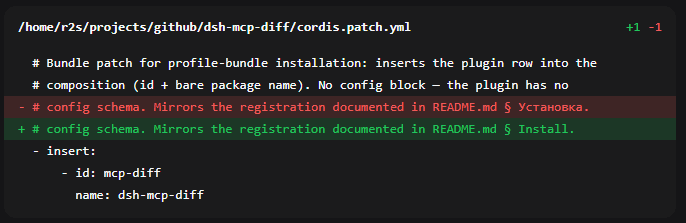
Uniform diff cards for every file mutation in DeepSeek Harness Web — MCP filesystem (edit_file/write_file) and built-in edit/write, collapsed by default, with per-line highlighting
项目介绍Project Overview
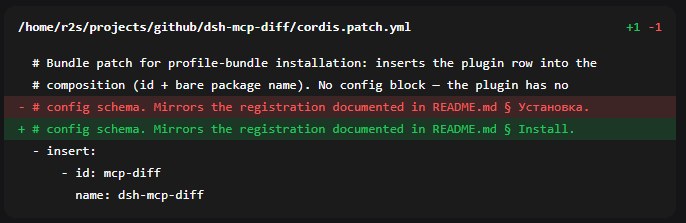
dsh-mcp-diff 是 DeepSeek Harness(Web GUI)的客户端插件,把所有文件改动统一渲染为折叠的 diff 卡片:默认收起,标头显示路径与 +N -M,逐行高亮新增为绿、删除为红。它同时覆盖内置 edit/write 工具与 filesystem MCP 服务器的 edit_file/write_file 调用,使二者外观一致。适用于审查聊天中的文件修改。注意:安装后必须重启 dsh web 并刷新页面,插件才会被加载;若 MCP 服务器名称非 filesystem,需在 src/client/index.tsx 中修改 TOOL_KEYS。
dsh-mcp-diff is a client plugin for the DeepSeek Harness web GUI that renders every file mutation as a uniform diff card, collapsed by default, with green additions and red deletions on a per-line basis. It covers both the built-in edit/write tools and the filesystem MCP server's edit_file/write_file calls, giving them one consistent look. Use it when reviewing file changes inside chat. Note: you must restart dsh web and refresh the page after installation, and edit TOOL_KEYS in src/client/index.tsx if your MCP server is not named filesystem.
请帮我了解并安装插件:【dsh-mcp-diff】【https://github.com/Fakek0f3sT/dsh-mcp-diff】把上面这条消息直接发给当前会话里的 DSH,让它帮你了解并安装。安装命令不一定准确,发给 DSH 更稳。Send this message to DSH in your current session. CLI install commands may not be accurate across systems — DSH will figure it out for you.
或使用命令行安装(适合开发者)Or use CLI install (for developers)
命令行安装CLI Install
dsh plugin --profile web add dsh-mcp-diff把 Fakek0f3sT/dsh-mcp-diff 加入你的 DSH 配置(web profile)即可启用。
READMEREADME
dsh-mcp-diff
A client plugin for the DeepSeek Harness (Web GUI) that renders every file mutation in the chat as uniform diff cards — collapsed by default, with per-line highlighting (green for additions, red for deletions).
Covers both the filesystem MCP server (edit_file / write_file) and the
built-in DSH tools (edit / write), bringing them to one look.
Why
By default DSH draws a diff only for its own file tools (edit, write), with
its own renderer. When the agent edits files through the
@modelcontextprotocol/server-filesystem MCP server, the call is named
mcp__filesystem__edit_file / mcp__filesystem__write_file — there is no
registered toolview for it, so the chat shows only a generic block with no diff.
The plugin:
- registers a toolview under the MCP keys and builds the diff from the server
response (a ready unified diff with context and
@@headers) or from the call arguments when there is no response yet (write_file, a still-runningedit_file); - also overrides the built-in
edit/write, unifying their contextual hunks (a per-line LCS: shared lines read as neutral context instead of being doubled); - renders everything as one card built on a native
<details>— collapsed by default, the header shows the path ++N -M, and it expands on click.
Install
# from npm (prebuilt, recommended)
dsh plugin --profile web add dsh-mcp-diff

# or from GitHub (built on install)
dsh plugin --profile web add github:Fakek0f3sT/dsh-mcp-diff
dsh plugin add is a pnpm forwarder: it adds the package to your profile
(~/.dsh/profiles/web) and, since the plugin declares dsh.bundle,
automatically includes it in dsh.profile.bundles — nothing to wire by hand.
Installed from GitHub, lib/ is built in place (the prepare script); from npm
it ships prebuilt.
Important: DSH picks up its plugin set only at startup — after installing,
restart dsh web and refresh the GUI page.
Check that the bundle is served:
curl -s http://127.0.0.1:3080/plugins/dsh-mcp-diff/client.js | head -c 80
Manually from a clone
git clone https://github.com/Fakek0f3sT/dsh-mcp-diff.git
cd dsh-mcp-diff && npm install && npm run build
cd ~/.dsh/profiles/web
npm install /path/to/dsh-mcp-diff
{
  "dependencies": { "dsh-mcp-diff": "link:./node_modules/dsh-mcp-diff" },
  "dsh": { "profile": { "bundles": [ "…", "dsh-mcp-diff" ] } }
}
Configuring for another MCP server
The toolview keys are set for the server name filesystem. If your filesystem
MCP server is named differently (the serverName field in the config), edit the
TOOL_KEYS constant in src/client/index.tsx (keys of the form
mcp__<serverName>__edit_file). The edit / write keys live there too —
remove them if you do not want to override the built-in renderer.
Development
npm install
npm run build
node --import tsx/esm src/client/parse-diff.test.ts   # diff-parser self-check
Compatibility
Tested on DSH 0.1.1-rc.2. The plugin imports only platform modules (react,
ui-primitives, ui-slots, runtime/client) — ui-tool internals are not imported.
License
MIT
相关推荐Related
-
 vlln/dsh-navbar
DSH 插件:对话节点导航条(右缘节点串快速跳转 user 消息)。官方 bundle 插件,dsh plugin --profile web add 安装
vlln/dsh-navbar
DSH 插件:对话节点导航条(右缘节点串快速跳转 user 消息)。官方 bundle 插件,dsh plugin --profile web add 安装
-
 SenmuuuuW/dsh-whale-report
深迹 DeepTrace — Your Agent, in numbers. DSH 插件:从会话事件日志生成日报/周报/月报/年报/自定义区间,确定性洞察与协作复盘,只读、不改写历史。
SenmuuuuW/dsh-whale-report
深迹 DeepTrace — Your Agent, in numbers. DSH 插件:从会话事件日志生成日报/周报/月报/年报/自定义区间,确定性洞察与协作复盘,只读、不改写历史。
-
 SnowCrescenter-tech/dsh-milestone
Git-style milestone timeline for DeepSeek Harness - hover for metadata, click to jump to any message. 会话里程碑导航条:像 Git 提交图…
SnowCrescenter-tech/dsh-milestone
Git-style milestone timeline for DeepSeek Harness - hover for metadata, click to jump to any message. 会话里程碑导航条:像 Git 提交图…
-
 XieZongChen/dsh-md-notes
A note-taking plugin for DeepSeek Harness (DSH). It provides a full MD notes manager and MD notes editor, letting you qu…
XieZongChen/dsh-md-notes
A note-taking plugin for DeepSeek Harness (DSH). It provides a full MD notes manager and MD notes editor, letting you qu…
-
 TencentCloud/tencentcloud-agentobs-sdk-dsh
tencentcloud-agentobs-sdk-dsh 是一个 DeepSeek Harness (DSH) 可观测插件,直接将 GenAI trace 数据上报到腾讯云日志服务 (CLS)。 它观察 DSH 原生的 session、…
TencentCloud/tencentcloud-agentobs-sdk-dsh
tencentcloud-agentobs-sdk-dsh 是一个 DeepSeek Harness (DSH) 可观测插件,直接将 GenAI trace 数据上报到腾讯云日志服务 (CLS)。 它观察 DSH 原生的 session、…
-
 linyp/dsh-plugin-langfuse
Langfuse observability for DeepSeek Harness (dsh): exports agent sessions as OpenTelemetry trace trees (GenAI semconv) t…
linyp/dsh-plugin-langfuse
Langfuse observability for DeepSeek Harness (dsh): exports agent sessions as OpenTelemetry trace trees (GenAI semconv) t…
-
 PerryLink/dsh-checkpoint-rewind
Claude Code /rewind for DeepSeek Harness — git-first workspace snapshots before every mutation, turn-boundary session fo…
PerryLink/dsh-checkpoint-rewind
Claude Code /rewind for DeepSeek Harness — git-first workspace snapshots before every mutation, turn-boundary session fo…
-
 lilwhich/dsh-plugin-gather
for better dsh
lilwhich/dsh-plugin-gather
for better dsh