
Finderchangchang/brewreel
精酿 BrewReel:让 DeepSeek 这类便宜模型也能做出好看的竖版宣传片。写一份产品简报,AI 挑镜头、写文案,一条命令出片。3 种配方、6 个行业、广告法校验,开源可商用。
Project Overview项目介绍
BrewReel is a video-generation skill suite designed for LLM coding assistants, built around a "cheap-model writes storyboard, components render the video" philosophy and originally published as promo-video-skill / 蒸馏视频. It ships three concrete integration paths: AI coding agents such as Claude Code, Codex, and opencode that can read SKILL.md install the repo as a skill and let the assistant write the storyboard, run validation, and render; a dedicated DeepSeek Harness plugin published to npm as dsh-brewreel that exposes 7 tools for validation, rendering, and inspection (still flagged as not yet tested against real DeepSeek models); and a standalone scripts/llm_make.py that calls any OpenAI-compatible endpoint, defaulting to DeepSeek, so non-agent environments can still feed a brief in and get a video out. Rendering is powered by Remotion 4.0 and produces 1080×1920 (journey defaults to 1080×1350) MP4s at 30 fps with on-the-fly synthesized soundtracks at –16 LUFS, sidestepping copyright issues by beat-mapping music to shot cuts.
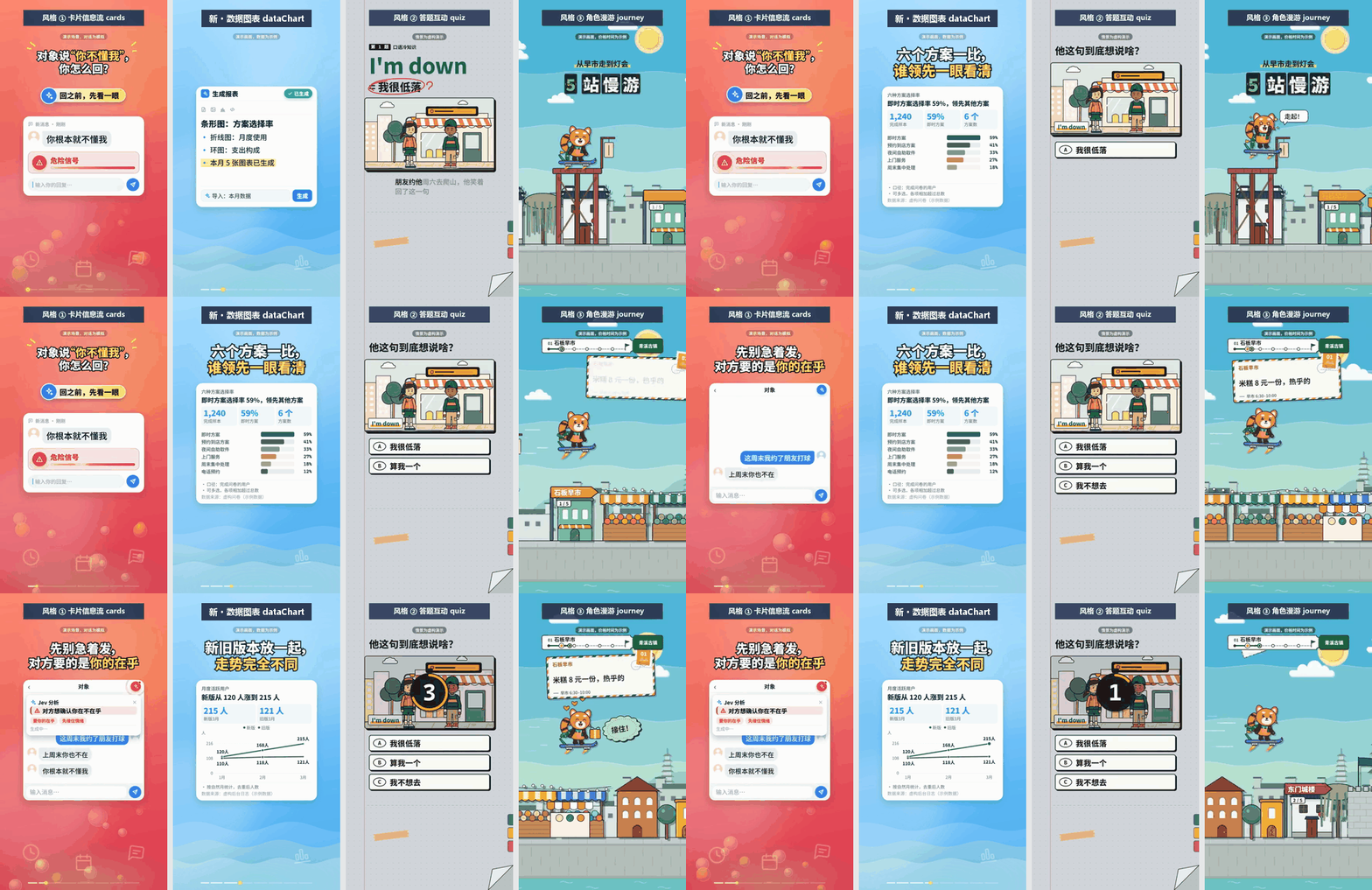
The typical workflow starts with the user writing a product brief; the LLM reads SKILL.md, selects camera shots, drafts copy, and fills in a storyboard.json that only contains selectable fields plus text — no coordinates, no code. A series of prebuilt components defined under styles/ then handle layout, motion, pacing, subtitle line-breaking, and safe-area checks, while make.mjs chains validation → music → render → composition → frame inspection into a single command that refuses to deliver anything marked ✗. Built-in compliance covers 《广告法》 extreme-word rules plus industry-specific red-lines for six verticals (software, food, ecommerce, education, beauty, travel), and subtitles can be Chinese or English with an additional scan that rejects English reels which mix in stray CJK characters. The three preset recipes — cards (9:16 default feed of bordered white cards), quiz (misconception → multiple choice → reveal → glossary card), and journey (4:5 / 9:16 mascot traversing a paper-cut city) — give the same engine three distinct narrative rhythms, and example storyboards for all nine industry + recipe combinations live under examples/, styles/quiz/examples/, and styles/journey/examples/.
Dependencies are non-trivial: Node.js 18+ is required, with 20 LTS recommended and Node 22 actively tested; the DeepSeek Harness plugin path additionally requires Node 22.19+ on the 22 line or any 24+. Python 3.10+ is needed because the music synthesis scripts import numpy and scipy, although llm_make.py itself only uses the standard library. First-run downloads add up to several hundred megabytes of rendering dependencies plus roughly 110 MB of Chrome Headless Shell, and the supported operating systems are Windows x64, macOS 15 or newer, and Linux distributions with glibc ≥ 2.35 (Alpine and NixOS are explicitly unsupported because they lack libnss3, libgbm, libasound2, and related shared libraries). The project is Apache-2.0 and commercial-friendly, but redistribution must keep the LICENSE and preserve the NOTICE attribution line, and Remotion's commercial license still applies — companies with four or more employees that profit must buy a Remotion Company License separately, a constraint the Apache-2.0 grant does not override.
精酿 BrewReel 是一个面向 LLM 编程助手的视频生成 skill 套件,主打用便宜模型写 storyboard.json、由组件化模板渲染出竖版宣传片,原始名字是 promo-video-skill / 蒸馏视频。它同时支持三种集成方式:第一种是 Claude Code、Codex、opencode 等能读 SKILL.md 的 AI 编程助手,把仓库直接装成 skill 即可;第二种是以 dsh-brewreel 这个 npm 包作为 DeepSeek Harness 插件使用,已发布但还未与真实 DeepSeek 模型实测;第三种是不依赖任何 agent,直接跑 scripts/llm_make.py 调用 OpenAI 兼容接口,默认指向 DeepSeek。底层渲染基于 Remotion 4.0,输出 1080×1920、30 fps 的成片并自动合成无版权问题的配乐。
典型工作流是用户先准备一份产品简报,AI 读完 SKILL.md 后挑选镜头、撰写文案并填入分镜 JSON,再由 make.mjs 串起校验、配乐、渲染、拼图、检查帧等步骤,一条命令出片。它适合需要快速产出短视频内容的电商、餐饮、教培、文旅、美业、软件等六个行业的产品运营、独立开发者和内容创作者。仓库内置 cards、quiz、journey 三种配方风格,分别对应 9:16 卡片信息流、答题互动和角色漫游三种叙事节奏,覆盖中英双语字幕;任何校验失败或 ✗ 标记的片子都不会交付。
依赖方面,Node.js 要求 18 以上(推荐 20 LTS 或 22),DeepSeek Harness 插件路径需要 22.19+ 的 22.x 或 24+;Python 3.10+ 用于配乐脚本的 numpy 和 scipy;首次下载约几百 MB 渲染依赖加 110 MB Chrome Headless Shell。系统支持 Windows x64、macOS 15 及以上、Linux glibc ≥ 2.35(不支持 Alpine、NixOS)。许可证为 Apache-2.0,可商用但需保留 LICENSE 和 NOTICE 中的署名;需要注意 Remotion 对四人以上营利组织需另行购买 Company License。
请帮我安装这个 DSH 插件。安装前先完成【兼容性检查 + 安全性检查】,检查通过再动手。

插件:brewreel(Finderchangchang/brewreel)
仓库:https://github.com/Finderchangchang/brewreel
本站详情页:https://www.yhbd.top/plugins/finderchangchang-brewreel/
本站登记:类型 plugin · 归类 多平台兼容工具(非 DSH 原生) · 许可证 Apache-2.0 · ⭐ 117 · 最近提交 2026-10-03 · 主语言 TypeScript

按下面顺序执行,每步先把结论告诉我,再进入下一步:

【1 兼容性检查】
① 我这边:DSH 版本、Node 版本、操作系统、当前 profile(web / desktop)。
② 读它的 README、package.json、插件 manifest,列出它要求的 DSH 版本 / Node 版本 / 操作系统 / 外部依赖 / 需要另外先装的运行时。
③ 逐条比对,结论只写「满足 / 不满足 / 未知」三种;不满足的给出可行替代方案。
④ 检查是否和我已装的插件冲突:命令名重复、skill / tool 重名、端口占用、重复注册的 MCP server。

【2 安全性检查】
① 仓库可信度:和上面「本站登记」是否一致;star / fork 数、创建时间、最近提交,是否归档或长期停更。
② 安装脚本:逐行看 package.json 的 preinstall / install / postinstall,以及 install.sh、setup.ps1 之类脚本。出现 curl|bash、下载后直接执行、混淆代码、访问与插件功能无关的域名,立刻停下来告诉我,不要继续装。
③ 依赖:列出新增依赖,标出无人维护、或与知名包拼写近似的可疑包(typosquatting)。
④ 权限与副作用:它会读写哪些目录、访问哪些域名、需要哪些 DSH 权限(filesystem / network / shell / clipboard 等),以及怎么卸载和回滚。
⑤ 如果它要求 sudo / 管理员权限,或权限明显超出功能所需,先停下来问我。

【3 安装】
上面两步没有「不满足」和「高危项」时才执行;用官方推荐方式安装,不要自行提权。

【4 汇报】
用表格输出:检查项 / 结论 / 依据 / 是否需要我决策。拿不准的一律写「未知」并说明要我怎么确认——不要猜,也不要替我决定。
Send this message to DSH in your current session: it verifies compatibility and security first (answering met / not met / unknown item by item) and only installs once everything checks out — it will stop and ask you if it finds a high-risk item. The box scrolls; the copy is the full prompt. CLI install commands may not be accurate across systems, so DSH is the safer route.把上面这条消息直接发给当前会话里的 DSH:它会先核对兼容性与安全性(逐条给「满足 / 不满足 / 未知」),确认没问题再安装,有高危项会停下来问你。框内可滚动,复制到的是完整提示词;安装命令不一定准确,发给 DSH 更稳。
- Not DSH-native: a multi-platform tool that may require Node / Electron or another runtime first非 DSH 原生,是多平台兼容工具:可能要先装 Node / Electron 等运行时
DSH walks through these 9 checksDSH 会逐条核对这 9 项
Compatibility兼容性
- DSH, Node, OS and profile requirementsDSH 版本 / Node 版本 / 操作系统 / profile 是否满足要求
- External dependencies and runtimes (Electron / Python / Docker, ...)外部依赖与运行时(Electron / Python / Docker 等)是否齐备
- Conflicts with installed plugins: command names, skill / tool names, ports, duplicate MCP registration与已装插件是否冲突:命令名、skill / tool 重名、端口占用、重复 MCP 注册
Security安全性
- Repo matches the facts registered here; archived or abandoned?仓库是否与页面登记一致,是否归档或长期停更
- Safety of preinstall / install / postinstall and install.sh / setup.ps1preinstall / install / postinstall 与 install.sh、setup.ps1 是否安全
- curl|bash, download-then-execute, obfuscation, unrelated domains → stop immediatelycurl|bash、下载即执行、混淆代码、无关域名 → 立刻停止
- Typosquatting or unmaintained packages among the new dependencies新增依赖里有没有 typosquatting 或无人维护的包
- Requested permissions vs. what the feature actually needs申请了哪些权限、是否超出功能所需(filesystem / network / shell / clipboard)
- Any sudo / admin requirement, plus uninstall and rollback是否要求 sudo / 管理员权限,以及卸载与回滚方式
Anything uncertain must be marked unknown with a note on how to confirm it. This site's signal screen is a static snapshot, not a security audit.拿不准的必须标「未知」并说明要我怎么确认。本站的信号筛查是静态快照,不能替代安全审计。
Or use CLI install (for developers)或使用命令行安装(适合开发者)
CLI Install命令行安装
dsh plugin --profile web add dsh-brewreel把 Finderchangchang/brewreel 加入你的 DSH 配置(web profile)即可启用。
READMEREADME

精酿 · BrewReel
便宜模型,也能酿出好片:写一份产品简报,AI 挑镜头、写文案,一条命令出一支竖版宣传片。




官网 · 快速开始 · 演示视频 · 首次出片指南 · English
原名 promo-video-skill / 蒸馏视频,旧地址自动跳转。
快速开始
需要 Node.js 18+、Python 3.10+;Windows 只支持 x64。
1. 装依赖。
git clone https://github.com/Finderchangchang/brewreel.git
cd brewreel/template && npm install && npx remotion browser ensure
cd .. && pip install numpy scipy
2. 跑一个样例,确认装好了。
node scripts/validate.mjs examples/ledger.json
node scripts/make.mjs examples/ledger.json --out ../brewreel-out/ledger
出片要几分钟,终端最后一行是「交付:<mp4 路径>」。--out 不能指向仓库里面。
3. 让 AI 写分镜。 把整个仓库 clone 到 ~/.claude/skills/brewreel/(Claude Code)或 ~/.agents/skills/brewreel/,把简报交给助手(模板见 brief-template.md),让它照 SKILL.md 出片。不用 agent 也行:python scripts/llm_make.py path/to/brief.md 直接调 DeepSeek 这类 OpenAI 兼容接口。
环境变量写法、平台支持表、运行环境要求见 安装与上手。
在 DeepSeek Harness 里用
仓库自带 DeepSeek Harness 插件 dsh-brewreel,模型调插件的工具完成校验、出片和核对。需要 dsh 0.1.7-rc.2 或更高的 0.1.x:
npm install -g @deepseek-ai/dsh@0.1.7-rc.2 pnpm    # 还没装 dsh 时
dsh plugin --profile web add dsh-brewreel
dsh web
插件还没接真实 DeepSeek 模型实测。7 个工具、安全说明和许可提醒见 安装与上手。
能做什么
 cards 卡片信息流(默认) |
 quiz 答题互动 |
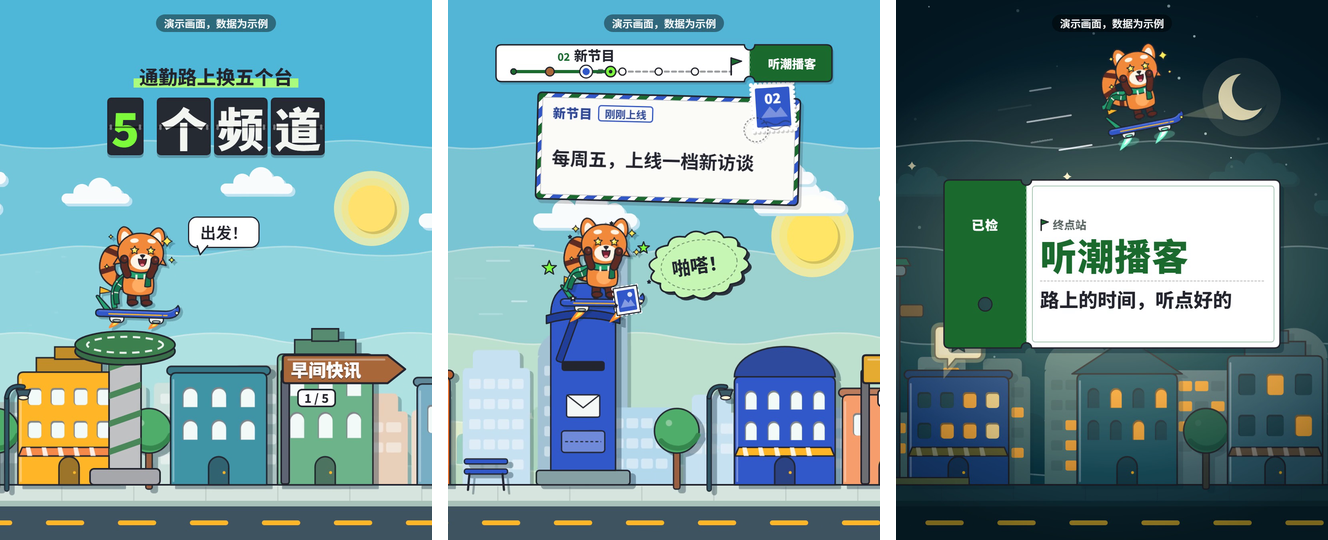 journey 角色漫游 |
Showing the opening section of the README — the full document lives in the repository以上为 README 开头摘要,完整文档在仓库内 · View the full README on GitHub →在 GitHub 查看完整 README →
Related相关推荐
- voyager-crew/voyager Enhancement suite for Gemini, AI Studio, Claude, ChatGPT & DeepSeek — plus a prompt manager for any website, DeepSeek Ha…
-
 freestylefly/wesight
Open-source desktop AI agent workspace with one-click Claude Code, Codex, OpenClaw, Hermes Agent setup and custom LLM mo…
freestylefly/wesight
Open-source desktop AI agent workspace with one-click Claude Code, Codex, OpenClaw, Hermes Agent setup and custom LLM mo…
- houyanchao/chatgpt-gemini-timeline ChatGPT & Gemini:Add Folders, Timeline & Prompts. - 为 ChatGPT & Gemini 添加文件夹、提示词库和时间轴。
- iamaanahmad/everything-kiro The complete collection of Kiro IDE configs, agents, skills, hooks, and MCP integrations for maximum productivity.
-
 omdsh-dev/dsh-llm-fallbacks
An dsh plugin for role-based LLM retry&fallback strategy. 基于角色的模型重试备用策略插件
omdsh-dev/dsh-llm-fallbacks
An dsh plugin for role-based LLM retry&fallback strategy. 基于角色的模型重试备用策略插件
-
 cloveric/tarocub
The local-first answer to Grok Bot, OpenAI dots and Meta Muse: always-on personal AI bots that run on your own machine a…
cloveric/tarocub
The local-first answer to Grok Bot, OpenAI dots and Meta Muse: always-on personal AI bots that run on your own machine a…
-
 MJorgin/dsh-agent-conductor
⚡ DSH 指挥家 / Conductor for DeepSeek Harness — in-session dispatch to 11 external agent CLIs (Codex, Claude Code, TraeCode…
MJorgin/dsh-agent-conductor
⚡ DSH 指挥家 / Conductor for DeepSeek Harness — in-session dispatch to 11 external agent CLIs (Codex, Claude Code, TraeCode…
- zeng6125-rgb/dsh-llm-retry-settings DSH 插件:LLM 自动重试设置卡片——重试次数/退避/抖动与 25 个错误码可勾选(也能自己输入),可按 provider/model 单独设策略、回答被输出 token 上限截断时自动续写且提示词可改,内置重试观测面板,改完实时生效。