gdgfd22/deepseek-harness-ssh
Safety-gated SSH development plugin for DeepSeek Harness and MCP, built for GPU and offline laboratory servers.
项目介绍Project Overview
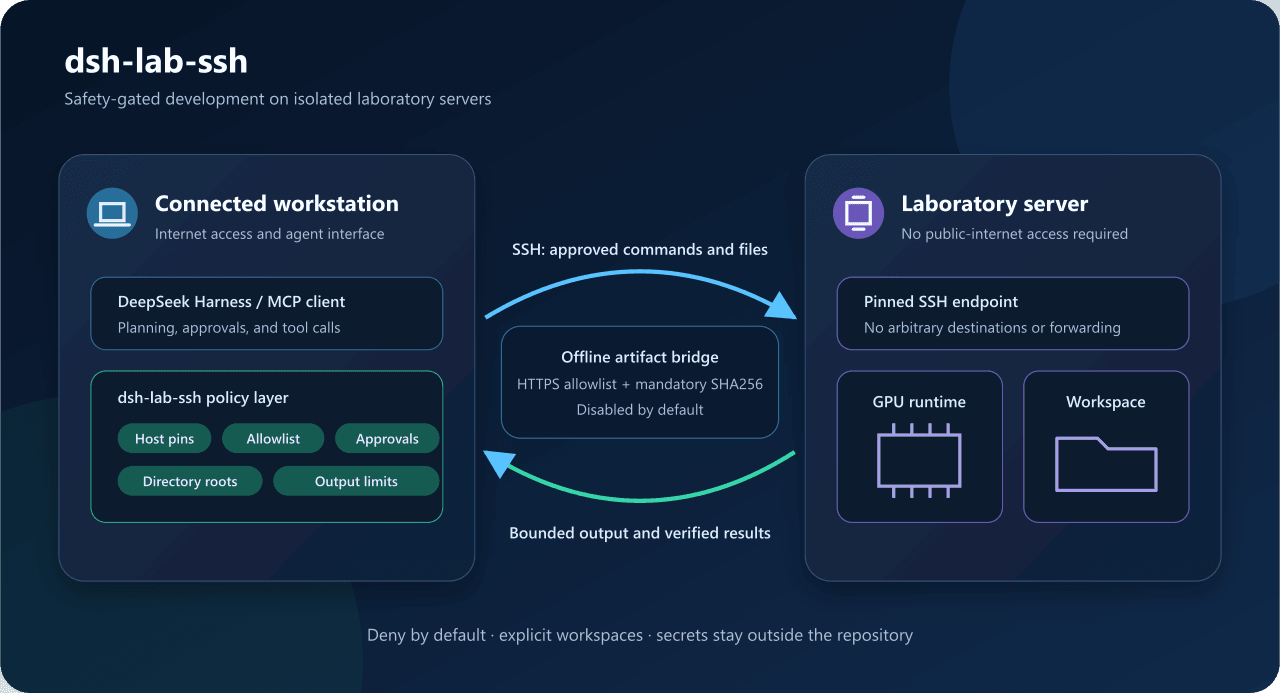
dsh-lab-ssh 是面向 DeepSeek Harness 与标准 MCP 客户端的安全门控 SSH 开发插件,让工作站上的代理在公网隔离条件下使用实验室 GPU、运行时和指定源码目录。它通过固定主机别名、主机密钥指纹、命令白名单、受限目录与原子文件读写实施默认拒绝策略;适用于离线 GPU 服务器受控开发。0.3.0 为实验预览,部署前需锁定已测试的 DSH 版本。
dsh-lab-ssh is a safety-gated SSH development plugin for DeepSeek Harness and standard MCP clients. It lets a workstation agent use an isolated lab server’s GPU, runtime, and explicitly configured source workspace through fixed host aliases, pinned host keys, command allowlists, bounded file access, and atomic writes. Use it for controlled offline-server development. Version 0.3.0 is experimental; pin a tested DSH version before deployment.
请帮我了解并安装插件:【deepseek-harness-ssh】【https://github.com/gdgfd22/deepseek-harness-ssh】把上面这条消息直接发给当前会话里的 DSH,让它帮你了解并安装。安装命令不一定准确,发给 DSH 更稳。Send this message to DSH in your current session. CLI install commands may not be accurate across systems — DSH will figure it out for you.
或使用命令行安装(适合开发者)Or use CLI install (for developers)
命令行安装CLI Install
dsh plugin --profile web add github:gdgfd22/deepseek-harness-ssh把 gdgfd22/deepseek-harness-ssh 加入你的 DSH 配置(web profile)即可启用。
READMEREADME
dsh-lab-ssh
English | 简体中文
Safety-gated SSH development tools for DeepSeek Harness and standard MCP clients.
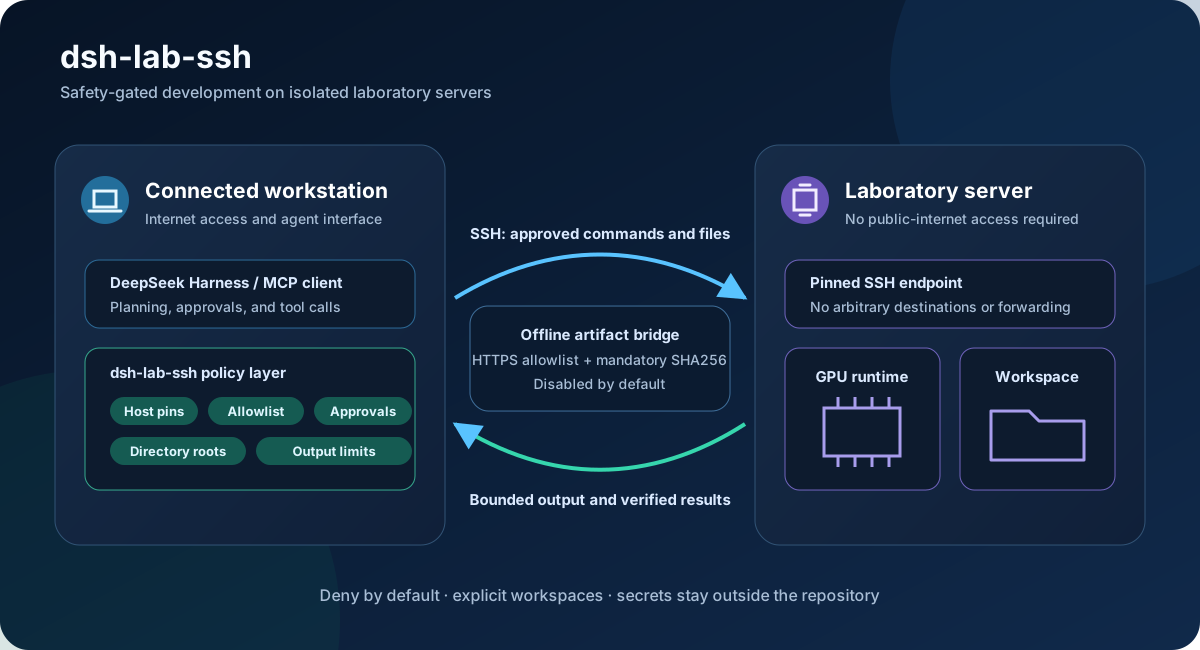
The plugin lets an agent running on a connected workstation use a laboratory server's GPU, runtime, and explicitly configured source workspace while the server remains isolated from the public internet.
Version 0.3.0 is an experimental preview. Pin a tested DeepSeek Harness version before laboratory deployment.
This is an independent community plugin and is not an official DeepSeek AI package.
Why it exists
Giving an agent a normal SSH terminal exposes arbitrary destinations, commands, and filesystem paths. This project inserts a deny-by-default policy layer:
- fixed model-visible host aliases;
- pinned OpenSSH SHA256 host-key fingerprints;
- environment, local-key-file, or SSH Agent credential references;
- per-host command allowlists, auto-approval rules, and deny rules;
- bounded command output and timeouts;
- alias-based remote directory roots with canonical containment checks;
- bounded UTF-8 reads and atomic, hash-protected writes;
- optional alias-based command working directories;
- a disabled-by-default HTTPS artifact bridge for offline servers;
- one JSON policy shared by DeepSeek Harness and Codex MCP.
The plugin does not expose arbitrary hosts, interactive shells, inline secrets, unrestricted file transfer, delete/move/chmod operations, background commands, port forwarding, reverse tunnels, or agent forwarding.
Status
The DeepSeek Harness plugin, stdio MCP server, command policy, restricted SFTP access, working-directory aliases, and first artifact-bridge layer are implemented. The test suite contains 25 tests across 9 files and never contacts real laboratory infrastructure or the public internet.
Visual short-lived credential sessions, persistent audit, role-based policy, directory sync, dependency closure, caching, and resumable transfer remain future work.
Quick start
Requirements:
- Node.js
^22.19or>=24; - DeepSeek Harness
0.1.0-rc.7or a compatible0.1.xpreview; - pnpm on
PATHfordsh plugin.
Build and install:
Set-Location <PLUGIN_DIR>
npm install
npm run build
npx -y @deepseek-ai/dsh@0.1.0-rc.7 plugin --profile web add <PLUGIN_DIR>
Copy the example configuration outside the repository, replace every placeholder, and point the DSH user patch at it:
- id: lab-ssh
  config:
    configFile: C:/Users/<USER>/.dsh/lab-ssh.private.json
Set credential environment variables in the same process that starts DSH:
$env:LAB_SSH_GPU01_PASSWORD = '<enter locally>'
npx -y @deepseek-ai/dsh@0.1.0-rc.7 web
See the Chinese operator guide and Chinese quick start for configuration, approval policy, offline artifact staging, and troubleshooting.
Tools
ssh_list_hosts: list redacted configured host aliases.ssh_list_file_roots: list directory aliases and access policy.ssh_list_directory: list bounded entries under an authorized root.ssh_read_file: read bounded UTF-8 text and return its SHA256.ssh_write_file: create or atomically replace bounded UTF-8 text.ssh_exec: run an allowlisted command on a fixed host and optional directory alias.ssh_stage_artifact: approval-gated download, verification, and atomic upload of one artifact.
Offline servers
The artifact bridge is not a transparent proxy. The workstation accepts an HTTPS URL without credentials or query tokens, validates every redirect against an administrator domain allowlist, enforces a size limit and mandatory trusted SHA256, then atomically creates the file inside an explicitly artifact-enabled remote root. Existing files are not replaced.
Generic SOCKS/HTTP proxying, SSH forwarding, and reverse tunnels remain out of scope so server network isolation is preserved.
Codex MCP
The repository contains the safe empty config/lab-ssh.empty.json and project-level .codex/config.toml. Build the package and reload Codex in a trusted project to discover the MCP server. For real deployment, point a private Codex configuration at a JSON file outside the repository.
The server can also be started directly:
node <PLUGIN_DIR>/lib/mcp-server.js --config <PRIVATE_CONFIG_PATH>
Develop and verify
npm install
npm run typecheck
npm test
npm run build
npm run pack:check
On Windows, run a clean-room acceptance test that reclones the public repository into the system temporary directory and reuses neither the current dependencies, build output, DSH profile, nor private SSH configuration:
powershell -ExecutionPolicy Bypass -File scripts/clean-room-test.ps1
It runs npm ci, type checking, tests, build, package inspection, isolated-profile plugin installation, and a DSH Web HTTP smoke test with hosts: []. Port 3180 is used by default, and the temporary environment is removed afterward.
Review SECURITY.md before publishing. Real SSH configuration, credentials, logs, local profiles, build output, and archives must not be committed or included in a release.
License
MIT
相关推荐Related
-
 nexu-io/open-design
🎨 Best DeepSeek Harness Design Plugin. The open-source Claude Design alternative. 🖥️ Local-first desktop app. 🖼️ Your…
nexu-io/open-design
🎨 Best DeepSeek Harness Design Plugin. The open-source Claude Design alternative. 🖥️ Local-first desktop app. 🖼️ Your…
-
 freestylefly/awesome-gpt-image-2
Prompt as Code | GPT-Image2 工业级提示词引擎与模板库,530+ 个案例逆向工程,20+ 套工业级模板,并提炼出Skills,持续更新中
freestylefly/awesome-gpt-image-2
Prompt as Code | GPT-Image2 工业级提示词引擎与模板库,530+ 个案例逆向工程,20+ 套工业级模板,并提炼出Skills,持续更新中
-
 anywhere-labs/dsh-desktop
为 DeepSeek Harness (DSH) 插件生态打造的现代化桌面端解决方案。万物皆「插件」,桌面本身也是「插件」。
anywhere-labs/dsh-desktop
为 DeepSeek Harness (DSH) 插件生态打造的现代化桌面端解决方案。万物皆「插件」,桌面本身也是「插件」。
- Nagi-ovo/voyager Enhancement suite for Gemini, AI Studio, Claude & ChatGPT — plus a prompt manager for any web UI, DeepSeek Harness inclu…
-
 walkinglabs/learn-harness-engineering
Harness engineering beginner tutorial, from 0 to 1
walkinglabs/learn-harness-engineering
Harness engineering beginner tutorial, from 0 to 1
-
 awesome-dsh-plugin/awesome-dsh-plugin
A curated list of plugins for DeepSeek Harness (dsh) · DeepSeek Harness 插件精选列表
awesome-dsh-plugin/awesome-dsh-plugin
A curated list of plugins for DeepSeek Harness (dsh) · DeepSeek Harness 插件精选列表
-
 MemTensor/MemOS
Self-evolving memory OS for LLM & AI Agents: ultra-persistent memory, hybrid-retrieval, and cross-task skill reuse, with…
MemTensor/MemOS
Self-evolving memory OS for LLM & AI Agents: ultra-persistent memory, hybrid-retrieval, and cross-task skill reuse, with…
- yjh051108/dsh-routing-suite dsh-routing-suite — injector + router-standard kit: install the runtime injector first, then the task-aware reasoning-mo…