
hoyyang/dsh-glm-mode
GLM Mode: fully tuned coding agent preset for zhipuai/glm-5.3-flash in DeepSeek Harness — PTC presentation, guard family, isolated compaction
Project Overview项目介绍
dsh-glm-mode is a DSH-native agent preset plugin purpose-built for the zhipuai/glm-5.3-flash model from Zhipu AI. It ships a "GLM Mode" preset that flips the presentation layer into PTC Code Mode, collapsing the full tool catalog into a single run_code tool so the model composes multi-step work as TypeScript programs (the maintainer's A/B comparison reports roughly 15% fewer input tokens under matched conditions) and enables automatic 1M-context compression at a 75% trigger threshold with 22% retention. Installation is dsh plugin add dsh-glm-mode from npm or dsh plugin add hoyyang/dsh-glm-mode from the GitHub source, after which a DSH reload surfaces the preset in the selector and the user picks the zhipuai/glm-5.3-flash model.
The intended audience is DSH users who run GLM-5.3-flash heavily and want defensive guardrails against the model's known failure modes. Two guards are bundled: a thinking-loop guard that performs sentence-level repetition detection on streaming reasoning chunks (default thresholds: 8 repeats, 48-char minimum sentence length, 2000-char arming threshold before judging) and synthesizes a finish{max-tokens} frame to hard-cancel the upstream request; and a tool-spin guard that catches hallucinated "top-level write tool" placeholder runs (5 in a row, code under 200 chars, 900000 ms idle window) and injects a corrective user message via the official agent/pre-step channel without truncating the live stream. Both guards scope exclusively to zhipuai glm-* routes and stay zero-cost on other models.
For dependencies and limits, the project bundles 52 self-tests in scripts/selftest-loop-guard.mjs that all pass, covering truncation grammar, route matrix, arming thresholds, fail-open semantics, and ledger integrity, while a headless cold-boot smoke test against the real model also passes and uninstall/reinstall is idempotent. Local build requires Node and pnpm: pnpm install, then npm run build to produce the tgz, and npm run selftest to run the synthetic stream matrix; guard firings are appended to ~/.dsh/dsh-glm-mode/guard-events.jsonl with a kind field of reasoning-loop or tool-spin. Note that wire-layer thinking format and tool_stream settings live in the user-level settings.yaml under the z.ai provider routing block rather than inside the plugin. The license is MIT and the plugin is free.
dsh-glm-mode 是一款 DSH 原生插件,为智谱 zhipuai/glm-5.3-flash 模型量身打造的"GLM 模式"编码 Agent 预设。它把整套工具目录折叠成一个 run_code Code Mode 工具,让模型以 TypeScript 程序串联多步调用(同条件 A/B 实测 input token 下降约 15%),并启用 1M 上下文自动压缩(阈值 75%、保留 22%)。插件以 dsh plugin add dsh-glm-mode 装入 DSH,重启后在预设选择器里勾选"GLM 模式"、模型切到 glm-5.3-flash 即可启用,全部配置在 cordis.patch.yml 中提供,开箱即用。
典型用法面向在 DSH 内频繁跑 GLM-5.3-flash、又担心模型偶发失控的开发者与 Agent 玩家。插件附带两道守卫:思考死循环守卫对 reasoning 增量做句子级重复检测(默认 8 次、最小句长 48 字符、武装阈值 2000 字符),触发即合成 finish{max-tokens} 并硬取消上游;工具空转守卫识别模型幻觉出的"顶层 write 工具"占位调用(默认 5 连击、code 长度上限 200 字符、窗口 900000 毫秒),经 agent/pre-step 通道追加纠偏消息,不截断正常流。两道守卫均只作用于 zhipuai glm-* 路由,对其他模型零开销。
依赖与构建方面,本地需 Node 与 pnpm,pnpm install && npm run build 可产出 tgz,npm run selftest 运行 52 项合成流自测覆盖截断语法、武装阈值防误伤、fail-open 与账本防线;卸载重装幂等。冷启动静态检测 A–E 全绿,守卫触发记录追加到 ~/.dsh/dsh-glm-mode/guard-events.jsonl(kind 区分 reasoning-loop / tool-spin)。注意 wire 层 thinking 格式与 tool_stream 需在 settings.yaml 的 z.ai provider 路由层配置,不在插件内。许可证为 MIT,无任何附加费用。
请帮我安装这个 DSH 插件。安装前先完成【兼容性检查 + 安全性检查】,检查通过再动手。

插件:dsh-glm-mode(hoyyang/dsh-glm-mode)
仓库:https://github.com/hoyyang/dsh-glm-mode
本站详情页:https://www.yhbd.top/plugins/hoyyang-dsh-glm-mode/
本站登记:类型 plugin · 归类 原生 DSH 插件 · 许可证 MIT · ⭐ 2 · 最近提交 2026-09-18 · 主语言 TypeScript

按下面顺序执行,每步先把结论告诉我,再进入下一步:

【1 兼容性检查】
① 我这边:DSH 版本、Node 版本、操作系统、当前 profile(web / desktop)。
② 读它的 README、package.json、插件 manifest,列出它要求的 DSH 版本 / Node 版本 / 操作系统 / 外部依赖 / 需要另外先装的运行时。
③ 逐条比对,结论只写「满足 / 不满足 / 未知」三种;不满足的给出可行替代方案。
④ 检查是否和我已装的插件冲突:命令名重复、skill / tool 重名、端口占用、重复注册的 MCP server。

【2 安全性检查】
① 仓库可信度:和上面「本站登记」是否一致;star / fork 数、创建时间、最近提交,是否归档或长期停更。
② 安装脚本:逐行看 package.json 的 preinstall / install / postinstall,以及 install.sh、setup.ps1 之类脚本。出现 curl|bash、下载后直接执行、混淆代码、访问与插件功能无关的域名,立刻停下来告诉我,不要继续装。
③ 依赖:列出新增依赖,标出无人维护、或与知名包拼写近似的可疑包(typosquatting)。
④ 权限与副作用:它会读写哪些目录、访问哪些域名、需要哪些 DSH 权限(filesystem / network / shell / clipboard 等),以及怎么卸载和回滚。
⑤ 如果它要求 sudo / 管理员权限,或权限明显超出功能所需,先停下来问我。

【3 安装】
上面两步没有「不满足」和「高危项」时才执行;用官方推荐方式安装,不要自行提权。

【4 汇报】
用表格输出:检查项 / 结论 / 依据 / 是否需要我决策。拿不准的一律写「未知」并说明要我怎么确认——不要猜,也不要替我决定。
Send this message to DSH in your current session: it verifies compatibility and security first (answering met / not met / unknown item by item) and only installs once everything checks out — it will stop and ask you if it finds a high-risk item. The box scrolls; the copy is the full prompt. CLI install commands may not be accurate across systems, so DSH is the safer route.把上面这条消息直接发给当前会话里的 DSH:它会先核对兼容性与安全性(逐条给「满足 / 不满足 / 未知」),确认没问题再安装,有高危项会停下来问你。框内可滚动,复制到的是完整提示词;安装命令不一定准确,发给 DSH 更稳。
- Only 2 stars - very few users, little community feedback星标只有 2,几乎没人在用,遇到问题缺少社区反馈
DSH walks through these 9 checksDSH 会逐条核对这 9 项
Compatibility兼容性
- DSH, Node, OS and profile requirementsDSH 版本 / Node 版本 / 操作系统 / profile 是否满足要求
- External dependencies and runtimes (Electron / Python / Docker, ...)外部依赖与运行时(Electron / Python / Docker 等)是否齐备
- Conflicts with installed plugins: command names, skill / tool names, ports, duplicate MCP registration与已装插件是否冲突:命令名、skill / tool 重名、端口占用、重复 MCP 注册
Security安全性
- Repo matches the facts registered here; archived or abandoned?仓库是否与页面登记一致,是否归档或长期停更
- Safety of preinstall / install / postinstall and install.sh / setup.ps1preinstall / install / postinstall 与 install.sh、setup.ps1 是否安全
- curl|bash, download-then-execute, obfuscation, unrelated domains → stop immediatelycurl|bash、下载即执行、混淆代码、无关域名 → 立刻停止
- Typosquatting or unmaintained packages among the new dependencies新增依赖里有没有 typosquatting 或无人维护的包
- Requested permissions vs. what the feature actually needs申请了哪些权限、是否超出功能所需(filesystem / network / shell / clipboard)
- Any sudo / admin requirement, plus uninstall and rollback是否要求 sudo / 管理员权限,以及卸载与回滚方式
Anything uncertain must be marked unknown with a note on how to confirm it. This site's signal screen is a static snapshot, not a security audit.拿不准的必须标「未知」并说明要我怎么确认。本站的信号筛查是静态快照,不能替代安全审计。
Or use CLI install (for developers)或使用命令行安装(适合开发者)
CLI Install命令行安装
dsh plugin add dsh-glm-mode把 hoyyang/dsh-glm-mode 加入你的 DSH 配置(web profile)即可启用。
READMEREADME
dsh-glm-mode

「GLM 模式」:为 zhipuai/glm-5.3-flash 调优的 DSH 编码 Agent 预设——装上即得 PTC 程序化工具调用、GLM 专属自动压缩,外加思考死循环守卫与工具空转守卫双层防护。


安装
dsh plugin add dsh-glm-mode
(npm 包名独享;也可用 GitHub 源:dsh plugin add hoyyang/dsh-glm-mode)
零配置可用(全部开关默认开启)。新会话在预设选择器里选「GLM 模式」,模型选 zhipuai/glm-5.3-flash 即可。
有啥用
- PTC 程序化工具调用:全量工具目录以 Code Mode 呈现,一个 TypeScript 程序组合多步操作,减少往返轮次与 input token(同条件 A/B 实测 input −15%)。
- 思考死循环守卫:GLM-5.3-flash 在高推理档位下有 long-decode 退化缺陷(vLLM #56868 同款报告)——实测曾出现单步纯思考 131,072 token、同一句循环约 2,500 次、29.5 分钟烧满上限。守卫对流做句子级重复检测,提前截断并复用「输出 token 上限」链路,发「继续」即续跑。
- 工具空转守卫:PTC 模式下模型可能幻觉出「顶层 write 工具」并连发占位调用(实测事故连发 37 次、最长连续 23 步空转)。守卫识别空转后经官方通道注入一条纠偏消息,把模型拉回正轨——事后纠偏、不截断正常流。
- GLM 专属自动压缩:1M 上下文按 75% 阈值 / 22% 保留自动压缩,压缩后原地摘要无缝续跑;未选 GLM 预设的 GLM 会话也有溢出级兜底。
- 原生多模态:预设声明 text+image 输入,截图直接看。
30 秒上手
dsh plugin add dsh-glm-mode- 重启 DSH(或热重载)
- 新会话 → 预设选「GLM 模式」
- 模型选
zhipuai/glm-5.3-flash - 正常干活——守卫在后台静默工作,无需任何操作
进阶用法
全部配置项(cordis.patch.yml,默认即推荐值):
| 键 | 默认 | 说明 |
|---|---|---|
| compactEnabled | true | 自动压缩开关(false 保留手动 /compact) |
| glmThresholdRatio | 0.75 | GLM 会话压缩阈值 |
| glmRetainRatio | 0.22 | 压缩后保留占比 |
| otherThresholdRatio | 0.98 | 非 GLM 模型兜底阈值 |
| glmPresetEnabled | true | 随插件安装/卸载 GLM 模式预设 |
| loopGuardEnabled | true | 思考死循环守卫开关 |
| loopGuardRepeatThreshold | 8 | 同一句子连续重复 N 次即判定死循环 |
| loopGuardMinSentenceChars | 48 | 参与比对的句子最小长度(字符) |
| loopGuardMinReasoningChars | 2000 | 累计 reasoning 字符达到后才武装判定 |
| spinGuardEnabled | true | 工具空转守卫开关 |
| spinGuardStreakThreshold | 5 | 连续占位 run_code 达 N 次即注入纠偏 |
| spinGuardMaxCodeChars | 200 | 占位判定的 code 长度上限(≥ 视为有实质内容) |
| spinGuardWindowMs | 900000 | 距最近占位超过该毫秒数视为断流(不干预) |
守卫触发对账:~/.dsh/dsh-glm-mode/guard-events.jsonl(JSONL 只增流水,kind 字段区分 reasoning-loop / tool-spin)。
Showing the opening section of the README — the full document lives in the repository以上为 README 开头摘要,完整文档在仓库内 · View the full README on GitHub →在 GitHub 查看完整 README →
Related相关推荐
-
 king-bcolor/dsh-multi-tenant-projects
Multi-tenant projects & users plugin for DeepSeek Harness (DSH): per-user symlinked workspaces, login gate, session isol…
king-bcolor/dsh-multi-tenant-projects
Multi-tenant projects & users plugin for DeepSeek Harness (DSH): per-user symlinked workspaces, login gate, session isol…
- kinyokun/dsh-session-import DSH 会话日志导入插件:解析 /export 的 zip/jsonl,结构真实性验证 + SHA-256 指纹校验,同步模型/预设/权限等状态,导入/删除实时推送免刷新
- azazo1/dsh-fork-inbox-guard DSH host plugin: drop the pending prompts a fork inherits, so a fork child answers the prompt you send it instead of the…
-
 hashgraph-online/hol-guard
Open-source antivirus for AI agents: block risky tools, secret access, prompt injection, malicious packages, MCP servers…
hashgraph-online/hol-guard
Open-source antivirus for AI agents: block risky tools, secret access, prompt injection, malicious packages, MCP servers…
-
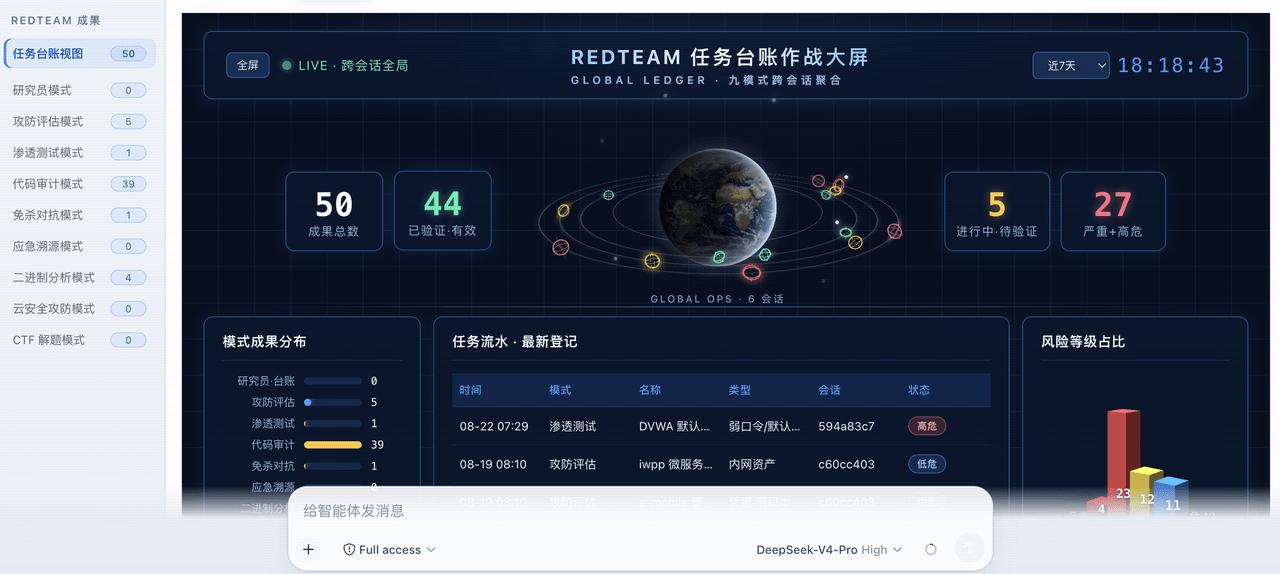 SeaOf0/dsh-redteam-model
基于dsh web实现的多种模式,目的是服务于redteam进行授权的安全研究,覆盖渗透测试、红队评估、代码审计等范围领域,请勿用于非法行为。(允许二开,赋予模块各位自己的业务逻辑,方法论只有自己熟练的才好用,好的方法论=好的生态)
SeaOf0/dsh-redteam-model
基于dsh web实现的多种模式,目的是服务于redteam进行授权的安全研究,覆盖渗透测试、红队评估、代码审计等范围领域,请勿用于非法行为。(允许二开,赋予模块各位自己的业务逻辑,方法论只有自己熟练的才好用,好的方法论=好的生态)
-
 howmp/dsh-pentest
面向 DeepSeek Harness(dsh)的渗透测试模式 @CloverSecLabs
howmp/dsh-pentest
面向 DeepSeek Harness(dsh)的渗透测试模式 @CloverSecLabs
- PerryLink/dsh-industry-research Industry and company research domain pack for DeepSeek Harness: methodology skills, industry chain mapping, public-sourc…
-
 dhicoc/dsh-reverse-skill
Complete reverse-skill (88 SKILL.md) as a DeepSeek Harness (dsh) Cordis plugin — reverse engineering, authorized pentest…
dhicoc/dsh-reverse-skill
Complete reverse-skill (88 SKILL.md) as a DeepSeek Harness (dsh) Cordis plugin — reverse engineering, authorized pentest…