king-bcolor/dsh-multi-tenant-projects
DeepSeek Harness(DSH)的多租户项目与用户插件:按用户符号链接工作区、登录门禁、会话隔离、工作区写锁及系统提示词防护。
Project Overview项目介绍
This is a native plugin built exclusively for DeepSeek Harness (DSH) that adds multi-tenant project and user management to a single DSH instance. It binds real host directories to projects, generates per-user symlinked workspaces inside each project, and adds password-protected login to the DSH web UI to keep sessions and files isolated between multiple shared users. To install, you can run a one-line command dsh plugin --profile web add github:king-bcolor/dsh-multi-tenant-projects, since the repo ships pre-built artifacts and no local build is required. You can also pin to a specific release by appending a version tag like #v0.1.0 to the install command, as long as your Node version meets DSH’s base requirements.
After installation, you need to restart DSH and check the console logs for the confirmation message that the plugin is ready. The first step is to log in as the bootstrap admin with the default username admin and default password admin (you should change this immediately after your first login). From the admin console located in Settings → Projects & Users, you can create new projects, bind existing local directories or let the system auto-generate new workspaces, then create per-project users with unique passwords. Once users are created, they can log in and only access their own isolated workspaces and sessions.
The plugin is licensed under the permissive open-source MIT license, and it has several known limitations you should be aware of before deployment. Isolation provided by the plugin is soft rather than a hard security boundary: cwd filtering is projection-based, technically inclined users can bypass front-end guards, and agent isolation is enforced only via prompt instructions. There is only a single admin model, and no dedicated user interface for token revocation — disabling a user account will instantly invalidate all of their existing tokens. It also requires a full DSH restart after any changes to the client-side code to push updates to end-user browsers.
这是一个专为DeepSeek Harness(DSH)开发的原生插件,为单实例DSH部署提供多租户项目与用户管理能力。核心功能包括将实际工作区目录绑定为项目,为每个用户生成项目内的符号链接工作区,给Web UI添加密码登录防护,实现多个用户共享同一DSH实例时的会话与文件隔离。推荐使用dsh plugin命令行一键安装,仓库已自带预构建产物,不需要本地构建,只要你的Node版本满足DSH本身的要求即可。
典型使用流程是,管理员登录后先进入设置的「Projects & Users」控制台创建项目,可绑定已有本地目录或让系统自动生成新工作区,接着在项目下创建普通用户并分配登录密码。普通用户登录后只能访问自己工作区下的会话和文件,权限被固定为工作区写入,无法修改权限,系统也会自动注入边界规则提示Agent遵守隔离要求。该插件适合团队内部多个可信成员共享同一DSH实例的场景使用。
需要注意的是,该插件提供的是软边界隔离,不是硬安全边界,cwd过滤是查询投影,技术用户可以伪造浏览器令牌,Agent层隔离是提示级别的。如果实例暴露在公网,需要在DSH前端搭配反向代理认证、VPN等真正的安全边界。插件采用MIT许可证开源,当前为单管理员模型,没有令牌撤销UI,禁用用户即可使其所有令牌失效。
请帮我安装这个 DSH 插件。安装前先完成【兼容性检查 + 安全性检查】,检查通过再动手。

插件:dsh-multi-tenant-projects(king-bcolor/dsh-multi-tenant-projects)
仓库:https://github.com/king-bcolor/dsh-multi-tenant-projects
本站详情页:https://www.yhbd.top/plugins/king-bcolor-dsh-multi-tenant-projects/
本站登记:类型 plugin · 归类 原生 DSH 插件 · 许可证未声明 · ⭐ 26 · 最近提交 2026-08-16 · 主语言 TypeScript

按下面顺序执行,每步先把结论告诉我,再进入下一步:

【1 兼容性检查】
① 我这边:DSH 版本、Node 版本、操作系统、当前 profile(web / desktop)。
② 读它的 README、package.json、插件 manifest,列出它要求的 DSH 版本 / Node 版本 / 操作系统 / 外部依赖 / 需要另外先装的运行时。
③ 逐条比对,结论只写「满足 / 不满足 / 未知」三种;不满足的给出可行替代方案。
④ 检查是否和我已装的插件冲突:命令名重复、skill / tool 重名、端口占用、重复注册的 MCP server。

【2 安全性检查】
① 仓库可信度:和上面「本站登记」是否一致;star / fork 数、创建时间、最近提交,是否归档或长期停更。
② 安装脚本:逐行看 package.json 的 preinstall / install / postinstall,以及 install.sh、setup.ps1 之类脚本。出现 curl|bash、下载后直接执行、混淆代码、访问与插件功能无关的域名,立刻停下来告诉我,不要继续装。
③ 依赖:列出新增依赖,标出无人维护、或与知名包拼写近似的可疑包(typosquatting)。
④ 权限与副作用:它会读写哪些目录、访问哪些域名、需要哪些 DSH 权限(filesystem / network / shell / clipboard 等),以及怎么卸载和回滚。
⑤ 如果它要求 sudo / 管理员权限,或权限明显超出功能所需,先停下来问我。

【3 安装】
上面两步没有「不满足」和「高危项」时才执行;用官方推荐方式安装,不要自行提权。

【4 汇报】
用表格输出:检查项 / 结论 / 依据 / 是否需要我决策。拿不准的一律写「未知」并说明要我怎么确认——不要猜,也不要替我决定。
Send this message to DSH in your current session: it verifies compatibility and security first (answering met / not met / unknown item by item) and only installs once everything checks out — it will stop and ask you if it finds a high-risk item. The box scrolls; the copy is the full prompt. CLI install commands may not be accurate across systems, so DSH is the safer route.把上面这条消息直接发给当前会话里的 DSH:它会先核对兼容性与安全性(逐条给「满足 / 不满足 / 未知」),确认没问题再安装,有高危项会停下来问你。框内可滚动,复制到的是完整提示词;安装命令不一定准确,发给 DSH 更稳。
- No license declared - all rights reserved by default; ask the author before commercial use or redistribution未声明开源许可证 —— 默认「保留所有权利」,商用或再分发前先问作者
- 26 stars - an early-stage project星标 26,属于早期项目
DSH walks through these 9 checksDSH 会逐条核对这 9 项
Compatibility兼容性
- DSH, Node, OS and profile requirementsDSH 版本 / Node 版本 / 操作系统 / profile 是否满足要求
- External dependencies and runtimes (Electron / Python / Docker, ...)外部依赖与运行时(Electron / Python / Docker 等)是否齐备
- Conflicts with installed plugins: command names, skill / tool names, ports, duplicate MCP registration与已装插件是否冲突:命令名、skill / tool 重名、端口占用、重复 MCP 注册
Security安全性
- Repo matches the facts registered here; archived or abandoned?仓库是否与页面登记一致,是否归档或长期停更
- Safety of preinstall / install / postinstall and install.sh / setup.ps1preinstall / install / postinstall 与 install.sh、setup.ps1 是否安全
- curl|bash, download-then-execute, obfuscation, unrelated domains → stop immediatelycurl|bash、下载即执行、混淆代码、无关域名 → 立刻停止
- Typosquatting or unmaintained packages among the new dependencies新增依赖里有没有 typosquatting 或无人维护的包
- Requested permissions vs. what the feature actually needs申请了哪些权限、是否超出功能所需(filesystem / network / shell / clipboard)
- Any sudo / admin requirement, plus uninstall and rollback是否要求 sudo / 管理员权限,以及卸载与回滚方式
Anything uncertain must be marked unknown with a note on how to confirm it. This site's signal screen is a static snapshot, not a security audit.拿不准的必须标「未知」并说明要我怎么确认。本站的信号筛查是静态快照,不能替代安全审计。
Or use CLI install (for developers)或使用命令行安装(适合开发者)
CLI Install命令行安装
dsh plugin --profile web add github:king-bcolor/dsh-multi-tenant-projects把 king-bcolor/dsh-multi-tenant-projects 加入你的 DSH 配置(web profile)即可启用。
READMEREADME
dsh-multi-tenant-projects
简体中文 | English
Multi-tenant "Projects & Users" for a single DeepSeek Harness (DSH) instance: bind real workspace directories to projects, hand out per-user symlinked workspaces inside each project, and gate the Web UI behind password login — so several people can share one DSH deployment without seeing each other's sessions or files.
Threat model — read this first. This plugin is a soft boundary, not a hard security perimeter. The cwd filter is a query projection, browser tokens can be forged by a technical user, and the agent-layer isolation is prompt-level. For anything exposed to the public internet, put a real boundary (reverse-proxy auth, ngrok basic auth, VPN…) in front of DSH and treat this plugin as convenience isolation between trusted-ish teammates.
Features
- Projects bound to real directories (auto-created, or bind an existing workspace path via the host-native directory picker).
- One-shot users per project with password login; Bearer tokens with sha256 fingerprints, TTL, and instant invalidation when a user is disabled.
- Same-name users across projects — storage key is
<project>/<user>; log in asproject/userwhen a bare name is ambiguous. - Per-user workspace: a real directory whose entries are symlinks to the project's files; new project entries can be re-synced (
admin/sync). - Login gate: a full-frame login card while the guard is armed and no valid token is stored (fails open if the plugin API itself is broken).
- Restricted UI for normal users: sidebar shows only their own cwd-bucketed sessions (with durable titles — cold sessions no longer fall back to the directory name), settings entry and workspace switcher are shadowed away, the hero picker offers only their own workspace, auto-connected on login.
- Permission lock: every normal-user session is pinned to workspace-write and
/permissionswitching is refused; the composer access-mode chip is frozen at Workspace Write (admins keep the full menu). - System-prompt guard, two layers: a host-injected
受限会话守则section in the system prompt itself (never disclose anything outside the user's workspace, never run boundary-probing commands, refuse cross-boundary requests even when asked) plus a per-workspaceAGENTS.mdbaseline that is auto-refreshed on sync. - Admin console in Settings → Projects & Users: create/list projects and users, disable users, one-shot token handoff, directory binding, sync links.
- Sign-out badge in the sidebar footer for both admins and users.
Showing the opening section of the README — the full document lives in the repository以上为 README 开头摘要,完整文档在仓库内 · View the full README on GitHub →在 GitHub 查看完整 README →
Related相关推荐
- kinyokun/dsh-session-import DSH 会话日志导入插件:解析 /export 的 zip/jsonl,结构真实性验证 + SHA-256 指纹校验,同步模型/预设/权限等状态,导入/删除实时推送免刷新
- azazo1/dsh-fork-inbox-guard DSH host plugin: drop the pending prompts a fork inherits, so a fork child answers the prompt you send it instead of the…
-
 hoyyang/dsh-glm-mode
GLM Mode: fully tuned coding agent preset for zhipuai/glm-5.3-flash in DeepSeek Harness — PTC presentation, guard family…
hoyyang/dsh-glm-mode
GLM Mode: fully tuned coding agent preset for zhipuai/glm-5.3-flash in DeepSeek Harness — PTC presentation, guard family…
-
 hashgraph-online/hol-guard
Open-source antivirus for AI agents: block risky tools, secret access, prompt injection, malicious packages, MCP servers…
hashgraph-online/hol-guard
Open-source antivirus for AI agents: block risky tools, secret access, prompt injection, malicious packages, MCP servers…
-
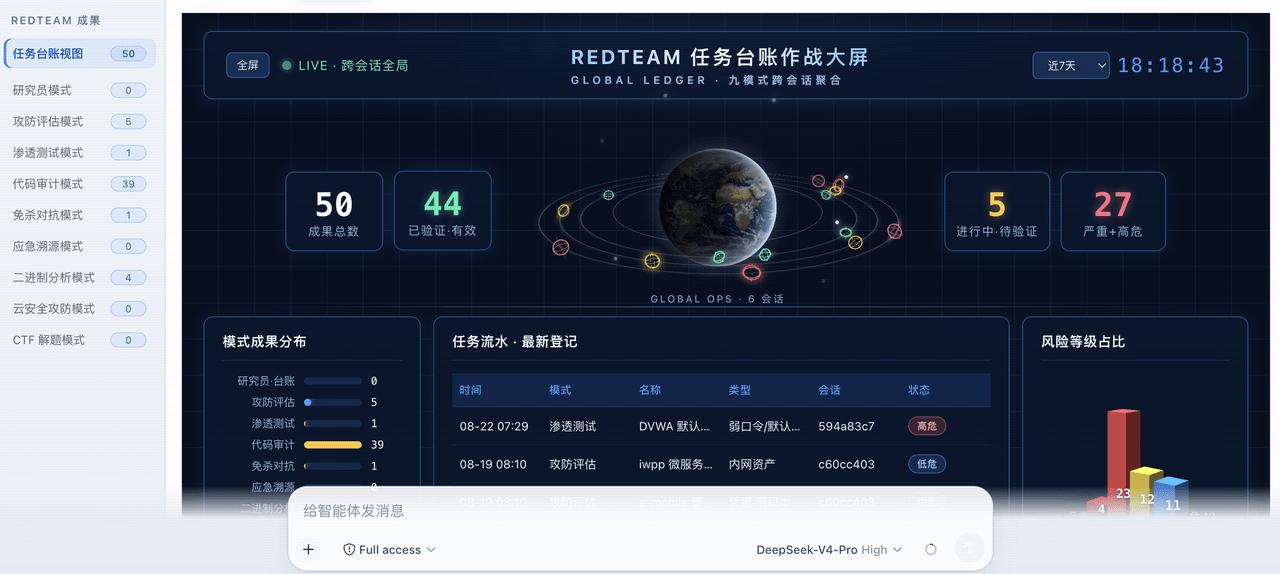 SeaOf0/dsh-redteam-model
基于dsh web实现的多种模式,目的是服务于redteam进行授权的安全研究,覆盖渗透测试、红队评估、代码审计等范围领域,请勿用于非法行为。(允许二开,赋予模块各位自己的业务逻辑,方法论只有自己熟练的才好用,好的方法论=好的生态)
SeaOf0/dsh-redteam-model
基于dsh web实现的多种模式,目的是服务于redteam进行授权的安全研究,覆盖渗透测试、红队评估、代码审计等范围领域,请勿用于非法行为。(允许二开,赋予模块各位自己的业务逻辑,方法论只有自己熟练的才好用,好的方法论=好的生态)
-
 howmp/dsh-pentest
面向 DeepSeek Harness(dsh)的渗透测试模式 @CloverSecLabs
howmp/dsh-pentest
面向 DeepSeek Harness(dsh)的渗透测试模式 @CloverSecLabs
- PerryLink/dsh-industry-research Industry and company research domain pack for DeepSeek Harness: methodology skills, industry chain mapping, public-sourc…
-
 dhicoc/dsh-reverse-skill
Complete reverse-skill (88 SKILL.md) as a DeepSeek Harness (dsh) Cordis plugin — reverse engineering, authorized pentest…
dhicoc/dsh-reverse-skill
Complete reverse-skill (88 SKILL.md) as a DeepSeek Harness (dsh) Cordis plugin — reverse engineering, authorized pentest…