iimaguest/phone-tunnel-pool
Refreshable Cloudflare quick-tunnel pool for the dsh web GUI — phone access with QR + embedded login
Project Overview项目介绍
phone-tunnel-pool is a DSH plugin that adds a floating widget to the dsh web GUI, enabling a self-healing Cloudflare quick-tunnel pool for 127.0.0.1:3080 with a scannable QR code for phone access. Core features include 12-hour generational rotation, a chase service worker that follows host changes, pre-authenticated migrations, and idle-based retirement. Use it when you need remote GUI access from a phone. Caveat: quick tunnels have no uptime SLA, the QR is a bearer secret, and cloudflared plus Python qrcode must be installed.
DSH 插件 phone-tunnel-pool 在 dsh web GUI 旁提供浮动小组件,为 127.0.0.1:3080 启用自愈式 Cloudflare quick-tunnel 池并生成可扫码二维码。核心能力为 12 小时代际轮换、追逐式 Service Worker、凭据预注入及空闲回收,便于手机扫码远程访问本地 dsh。需先装 cloudflared 并安装 Python qrcode 包;快速隧道无 SLA 且为承载型凭据,用完请关闭。
请帮我了解并安装插件:【phone-tunnel-pool】【https://github.com/iimaguest/phone-tunnel-pool】Send this message to DSH in your current session. CLI install commands may not be accurate across systems — DSH will figure it out for you.把上面这条消息直接发给当前会话里的 DSH,让它帮你了解并安装。安装命令不一定准确,发给 DSH 更稳。
Or use CLI install (for developers)或使用命令行安装(适合开发者)
CLI Install命令行安装
dsh plugin --profile web add github:iimaguest/phone-tunnel-pool把 iimaguest/phone-tunnel-pool 加入你的 DSH 配置(web profile)即可启用。
READMEREADME
phone-tunnel-pool — Cloudflare quick-tunnel pool for the dsh web GUI
English | 简体中文
Enable/disable a self-healing Cloudflare quick-tunnel pool for
http://127.0.0.1:3080 (the DeepSeek Harness web GUI) from a floating widget
with a scannable QR code. One scan from your phone, and the pool keeps
itself alive:
- Generational rotation (12h): a new pair of tunnels spawns on schedule; older generations stay alive while anything is still on them.
- Chase service worker: every origin your browser touches registers a service worker. Dead or rotated hostnames redirect to a live sibling or the newest primary — the same open tab survives generation changes as long as it stays connected.
- Prompt-free migrations: the proxy injects credentials only into pages it has already authenticated; before any redirect the watchdog pre-authenticates the target hostname (minting its auth cookie), so migrations land authenticated — no "Authentication required" popups.
- Usage-based retirement: generations retire only when idle (no tabs / websockets / recent traffic) or at a hard age cap.
- Respawn with backoff: dead tunnels are replaced with new hostnames; quick-tunnel mint quota (Cloudflare 429) is respected via exponential backoff + a 2-probe dead-grace (DNS propagation).
Extra: the daemon runs detached and adopts across dsh web restarts, so
the same URL, password and QR stay valid until you click Disable — no
re-scan (an OS reboot still costs one fresh scan; a named tunnel removes even
that — see PLAN.md §7).
Install / Uninstall
# install (from this public repo)
dsh plugin --profile web add github:iimaguest/phone-tunnel-pool
dsh web        # the GUI shows a floating 📱 widget (bottom-right)

# uninstall (one command — removes the dependency AND the dsh.profile.bundles layer)
dsh plugin --profile web remove phone-tunnel-pool
dsh web
After install: open the widget → Enable → scan the QR with your phone
camera. Install/remove reconcile dsh.profile.bundles against the installed
state automatically — never edit ~/.dsh/profiles/web/package.json by hand;
a stray bundle entry with no matching dependency is exactly the kind of state
that fails profile boot ("cannot resolve profile bundle").
Prerequisites (all of them)
| What | Needed? | Who provides it |
|---|---|---|
dsh web running on its default port 3080 (DSH_TARGET_PORT to override) |
required | you (the plugin tunnels to it) |
cloudflared binary on PATH |
required | you — brew install cloudflared (or apt/dnf/Chocolatey, or set DSH_CLOUDFLARED to the existing binary) |
| Node.js runtime | required | dsh itself — no separate install (the daemon reuses dsh's node) |
python3 + qrcode package |
optional | you — pip install qrcode; without it the widget shows URL + login instead of a scannable QR |
caffeinate |
optional | macOS ships it; skipped elsewhere |
| PowerShell | optional | Windows ships it — used only for process cleanup on Windows (no pkill there) |
| Outbound network | required | cloudflared → Cloudflare edge on 443/7844 (no inbound port needed) |
The widget preflights these on dsh web start and shows a yellow warning
line (with the exact fix, e.g. brew install cloudflared) before you even
click Enable; the daemon also fails fast with a readable error if cloudflared
is missing at Enable time, and refresh in the popup re-checks everything —
a stale error clears once the prereqs pass.
The feature flag set is version-gated on cloudflared --version:
2024.6+ enables the opt-in post-quantum handshake (DSH_PQ=1), 2024.8+ adds
--management-diagnostics=false; older builds (apt/dnf packages) get a
reduced, compatible flag set.
Platforms. macOS, Linux and Windows (Windows uses PowerShell for process
cleanup; caffeinate is macOS-only and silently skipped elsewhere). The
daemon's state file and log live in the per-OS temp directory
(os.tmpdir()); the widget settings file (iptunnel-settings.json) lives in
~/.dsh.
Screenshots
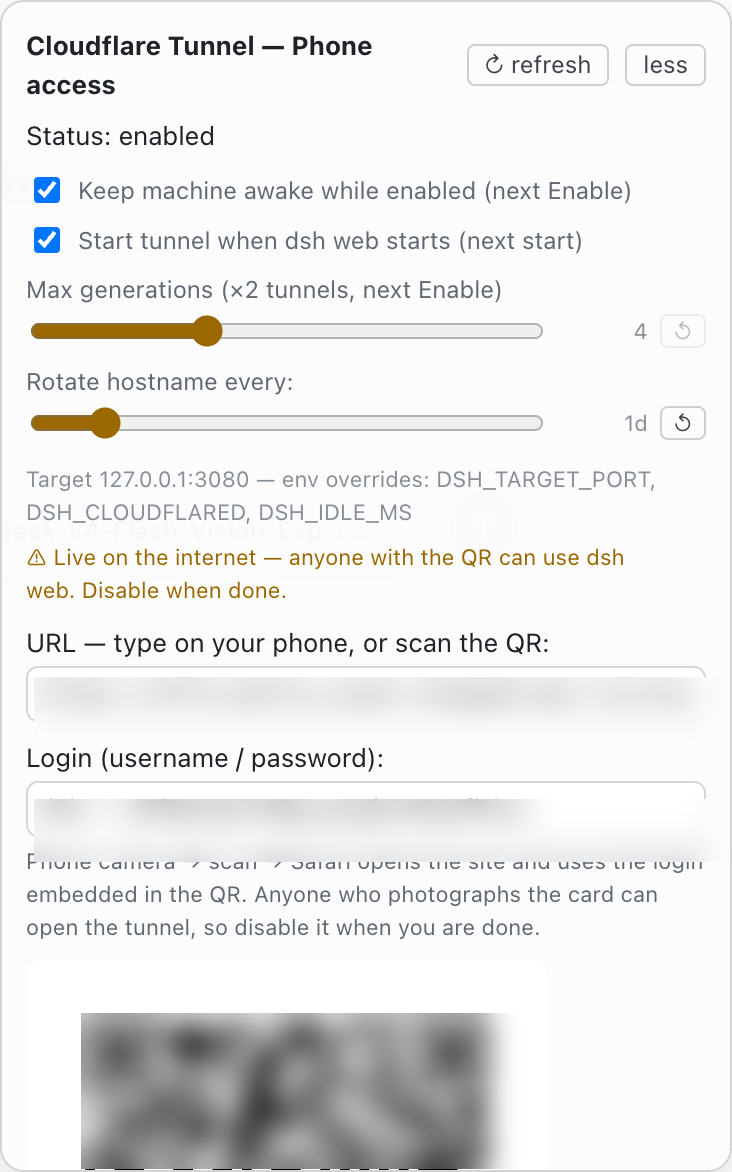
Live hostnames, credentials and the QR are blurred out in these shots.
How it's wired
dsh web GUI  <--  /iptunnel routes  --  auth proxy (127.0.0.1:3090)
                                              │  Basic + session cookie,
                                              │  Host rewrite to 127.0.0.1:3080
                                              │  (the GUI's browser-trust fence)
                                              ▼
cloudflared A ─ to ─ auth proxy ───────────────────────────────────┐
cloudflared B ─ to ─ auth proxy ───────────────────────────────────┤ (tunnel daemon
    ... new generations ...  ──────────────────────────────────   │   manages all)
Files: lib/index.js (host API: enable/disable/adopt, state + QR SVG routes),
lib/daemon.mjs (detached pool brain: spawn, probe, rotate, retire, respawn),
cf-auth-proxy.mjs (public /iptunnel/* service paths + Basic auth +
watchdog injection + credential handoff), iptunnel-sw.js (chase service
worker), iptunnel-watchdog.js (open-tab watchdog), lib/client.js
(widget), verify.sh (end-to-end audit). PLAN.md = full spec + edge cases;
NOTES.md = engineering history.
Resource footprint (minimal by default)
- Disabled = zero processes (just the floating pill in the GUI).
- Enabled = 1 node daemon + 1 auth proxy + 2
cloudflaredper live generation. Default ceiling: 4 generations × 2 = 8 tunnels (a busy pool runs all of them; idle generations retire on their own after 60 min). - Knobs to shrink further:
DSH_MAX_GENS=2(≤4 tunnels),DSH_IDLE_MS=1200000(retire after 20 min idle),DSH_PQ— post-quantum handshake is opt-in (DSH_PQ=1) because it costs CPU per connection; without it the tunnel uses the classic handshake. - Phone battery: the watchdog backs off 30s → 300s (5 min) while nothing changes.
- Keep-awake is opt-in:
caffeinate(macOS) is off by default; turn it on in the widget ("Keep machine awake while enabled") or viaDSH_CAFFEINATE=1— it applies on the next Enable (and lets the display sleep —-ionly, no screen-on drain). Without it, an idle MacBook may sleep and the pool goes quiet until it wakes. - Daemon log is capped at 512 KB (keeps the last 128 KB); probes run at 30s.
Security model
- The password is generated per Enable, held in memory, shown in the
widget and embedded in the QR; nothing is committed or published. (The
daemon keeps the current credentials in a
0600state file under the OS temp dir so the tunnel survives a dsh web restart; that file is deleted on disable.) /iptunnel/*service paths (health, sw-config, sw.js, entry, watchdog.js, telemetry, preauth) are public by necessity — browsers fetch service workers without credentials; they carry hostnames and pool liveness only. The credential handoff (/iptunnel/preauth) mints a cookie only for a caller presenting the valid password; it never echoes anything.window.__ptAuthis injected only into HTML the proxy has authenticated.- The proxy listens on 127.0.0.1; public network exposure happens only through the tunnel hostnames — the QR/hostname is a bearer secret (anyone who gets it can open the tunnel while enabled): disable when done.
- Quick tunnels are testing-grade (no uptime SLA, per-IP mint quota). The repo-agnostic sibling package carries the same pattern for any local port; a named tunnel is the lifetime endgame (one stable hostname → no re-scans, no prompts, no quota).
License
Apache-2.0 — see LICENSE. Third-party code:
cloudflared (distributed by
Cloudflare), the Python qrcode library — used at runtime, not vendored.
Related相关推荐
- hyqibot/DeepSeek-Harness-Token-Free A token-free desktop client for the DeepSeek Harness,enjoy!为 DeepSeek Harness (DSH) 生态打造的全免Token费的桌面端 ,极简极易。内置多模态+顶尖…
-
 Tencent-TDS/dsh-kuikly-expert
Kuikly DeepSeek Harness plugin that turns your AI agent into a Kuikly cross-platform app development expert.
Tencent-TDS/dsh-kuikly-expert
Kuikly DeepSeek Harness plugin that turns your AI agent into a Kuikly cross-platform app development expert.
- KYinCode/dsh-hot-installer DeepSeek Harness (dsh) 插件热管理器:装一次、重启一次,之后装插件、卸插件、升级插件全部即时生效,不用再重启。 | A plugin that makes installing, removing and upgrad…
- alllllllllli/Living-Dream-DSH Living Dream DSH - DeepSeek Harness desktop config framework with 8+ MCP servers, free model access, mobile remote, one-…
- xxccdl/DeepSeek-Harness-Mobile 在 Android 手机上运行 DeepSeek Harness AI 助手的 React Native 应用,内置 Termux + proot-distro 完整 Linux 环境,无需 root,支持手机控制
- lansi-ai/dsh-forge 把 DeepSeek Harness 做成一个真正的桌面应用:Electron 主进程内嵌 Cordis Host(与官方 Web 版同内核、零移植), 渲染进程加载官方 Web UI 发行物(file:///自定义协议 + IPC 桥接,…
- cyber-moshen/dsh-plugin-market DSH插件市场,自动更新,热重载插件,多种排序方案,快速管理和安装插件
- kirbylynx/deepshell-agent A desktop agent powered by DeepSeek Harness.