invalidnaaaame/dsh-scroll-timeline
DSH web插件:在聊天侧边栏上实现ChatGPT风格的滚动时间线——磁性山形悬停效果,点击跳转到用户消息。源自vlln/dsh-navbar(MIT许可)。
项目介绍Project Overview
dsh-scroll-timeline 是 DSH 官方 bundle 插件,为 ChatGPT 式侧边栏提供滚动时间轴。核心能力:在侧边栏右缘渲染等距横向条节点(每条用户消息一根),实时标记阅读位置,悬停时产生磁吸"山峦"形变,并支持悬停预览与点击平滑跳转。适用于长对话快速定位。注意:仅限浏览器端,需重启 web 才会生效;用户消息不足 2 条时自动隐藏。
dsh-scroll-timeline is an official DSH bundle plugin that adds a ChatGPT-style scroll timeline to the chat sidebar. It renders an evenly spaced rail of horizontal bar nodes (one per user message) along the right edge, tracking the current reading position, forming a magnetic "mountain" shape on hover, and offering hover preview plus smooth click-to-jump. Use it for quick navigation in long sessions. Note: browser-only, requires a web restart to activate, and auto-hides when fewer than two user messages exist.
请帮我了解并安装插件:【dsh-scroll-timeline】【https://github.com/invalidnaaaame/dsh-scroll-timeline】把上面这条消息直接发给当前会话里的 DSH,让它帮你了解并安装。安装命令不一定准确,发给 DSH 更稳。Send this message to DSH in your current session. CLI install commands may not be accurate across systems — DSH will figure it out for you.
或使用命令行安装(适合开发者)Or use CLI install (for developers)
命令行安装CLI Install
dsh plugin --profile web add "github:invalidnaaaame/dsh-scroll-timeline#main"把 invalidnaaaame/dsh-scroll-timeline 加入你的 DSH 配置(web profile)即可启用。
READMEREADME
dsh-scroll-timeline
A ChatGPT-style scroll timeline for the chat sidebar: a rail of horizontal bar nodes (one per user message) with magnetic mountain hover, hover preview, and click-to-jump.
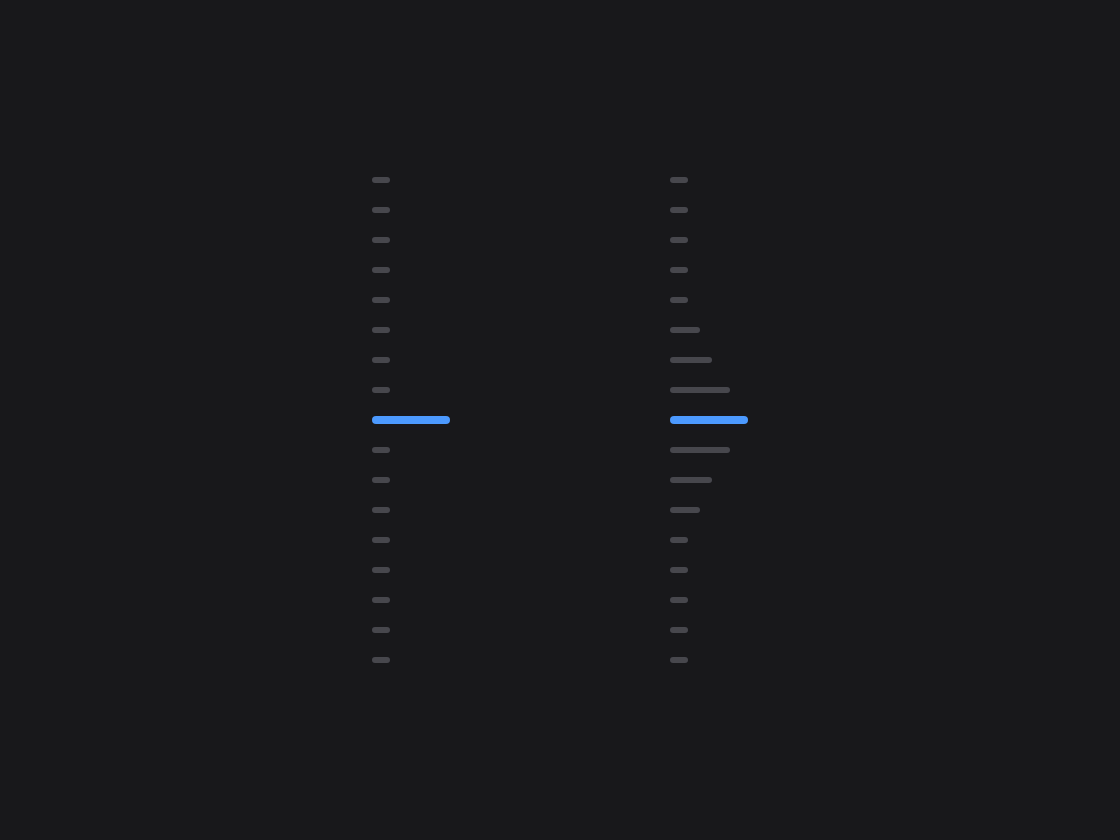
An evenly spaced node rail on the right edge of the sidebar (one horizontal bar per user message) — the peak bar follows your reading position, hovering grows a magnetic "mountain" (design ratios 39/30/21/15/9; base and peak widths are adjustable via CSS variables), a hover preview card (6-line clamp), click-to-jump with smooth scrolling and a brand-blue highlight, full history always visible, and auto-hide when there are fewer than 2 user messages. Form factor: a bundle plugin in the official form factor (dsh.bundle + dshClient channel, browser-only, empty Node half), 0 patches. Third-party plugin, not affiliated with the official DeepSeek Harness project.
Compatibility: verified on dsh
0.1.0-rc.6through0.1.1-rc.2(the anchor contractdata-time-hover-root/data-chat-flowis still present in the latest release).
Derived from vlln/dsh-navbar (MIT, spec issue dsh-external/issues#144), with the interaction redesigned: horizontal bar nodes, magnetic mountain hover, sidebar-adjacent positioning, and full history.
Preview
Features
| Feature | Description |
|---|---|
| Scroll timeline | Vertical node rail on the right edge of the sidebar, one horizontal bar per user message (3px tall, 14px hit area) |
| Reading position | Peak bar (39px brand blue) follows the current reading position |
| Magnetic mountain | While the pointer is over the rail, the nearest node becomes the peak and neighbors extend in progressively decreasing amounts (39/30/21/15/9) |
| Hover preview | Hovering a node shows a message preview card (6-line clamp, aligned with the official HoverCard look, opens to the right) |
| Click to jump | Smooth-scrolls to the message + brand-blue highlight ring |
| Full history | Always shows every historical node; long sessions scroll within the container |
| Auto-hide | Hidden with fewer than 2 user messages or outside the chat page |
Zero data-channel dependencies: driven only by the official anchor attribute (data-time-hover-root, user rows since 0806); no polling, no routes, no tools.
The base and peak widths can be tuned via CSS variables (on the rail container):
[data-dsh-navbar] {
  --dsh-navbar-base-w: 9px;  /* base width */
  --dsh-navbar-peak-w: 39px; /* peak width (hover/active) */
}
Install
Recommended: one-line git install (build artifacts are committed; git sources don't trigger a build):
dsh plugin --profile web add "github:invalidnaaaame/dsh-scroll-timeline#main"
Or from a local directory (with source): git clone, then cd dsh-scroll-timeline && dsh plugin --profile web add ..
After installing, restart web for it to take effect; the Settings → Plugins panel can disable/enable it.
Usage
Works out of the box; no commands, no tools. The timeline appears on the right edge of the sidebar in the chat (Chat) view; hover to preview, click to jump. Animations are disabled under prefers-reduced-motion.
Development
pnpm install
pnpm run build      # tsdown: client bundle (lib/client.js)
- client:
src/client/index.ts(self-rendered DOM + official anchor contract, no React dependency) - Node half:
src/index.mjs(empty apply; the bundle mount carrier)
License
MIT. Derived from vlln/dsh-navbar (MIT, Copyright (c) 2026 Sam Gao (vlln)); see LICENSE.
相关推荐Related
-
 ruvnet/ruflo
🌊 The original agent meta-harness. Deploy intelligent multi-player swarms, coordinate autonomous workflows, and build c…
ruvnet/ruflo
🌊 The original agent meta-harness. Deploy intelligent multi-player swarms, coordinate autonomous workflows, and build c…
-
 amruthpillai/reactive-resume
A one-of-a-kind resume builder that keeps your privacy in mind. Completely secure, customizable, portable, open-source a…
amruthpillai/reactive-resume
A one-of-a-kind resume builder that keeps your privacy in mind. Completely secure, customizable, portable, open-source a…
-
 volcengine/OpenViking
Self-evolving Context Database for AI Agents. Unify Agent Memory, Knowledge RAG and Skills.
volcengine/OpenViking
Self-evolving Context Database for AI Agents. Unify Agent Memory, Knowledge RAG and Skills.
-
 Molunerfinn/PicGo
:rocket: The Ultimate Image Uploader for Efficient Creators. Supports Obsidian, Typora, VS Code etc. and 60+ image hosti…
Molunerfinn/PicGo
:rocket: The Ultimate Image Uploader for Efficient Creators. Supports Obsidian, Typora, VS Code etc. and 60+ image hosti…
-
 titanwings/colleague-skill
将冰冷的离别化为温暖的 Skill,欢迎加入数字生命1.0!Transforming cold farewells into warm skills? It's giving rebirth era. Welcome to Digital …
titanwings/colleague-skill
将冰冷的离别化为温暖的 Skill,欢迎加入数字生命1.0!Transforming cold farewells into warm skills? It's giving rebirth era. Welcome to Digital …
-
 nocobase/nocobase
NocoBase is an open-source AI + no-code platform for building business systems fast. Instead of generating everything fr…
nocobase/nocobase
NocoBase is an open-source AI + no-code platform for building business systems fast. Instead of generating everything fr…
-
 Tencent/WeKnora
Open-source LLM knowledge platform: turn raw documents into a queryable RAG, an autonomous reasoning agent, and a self-m…
Tencent/WeKnora
Open-source LLM knowledge platform: turn raw documents into a queryable RAG, an autonomous reasoning agent, and a self-m…
- Nagi-ovo/voyager Enhancement suite for Gemini, AI Studio, Claude & ChatGPT — plus a prompt manager for any web UI, DeepSeek Harness inclu…