IT-coder-Yy/dsh-git-plugin
DeepSeek Harness Web 的可视化 Git 工作台——检查仓库、执行常见 Git 操作,并安全地运行 AI 生成的工作流。
项目介绍Project Overview
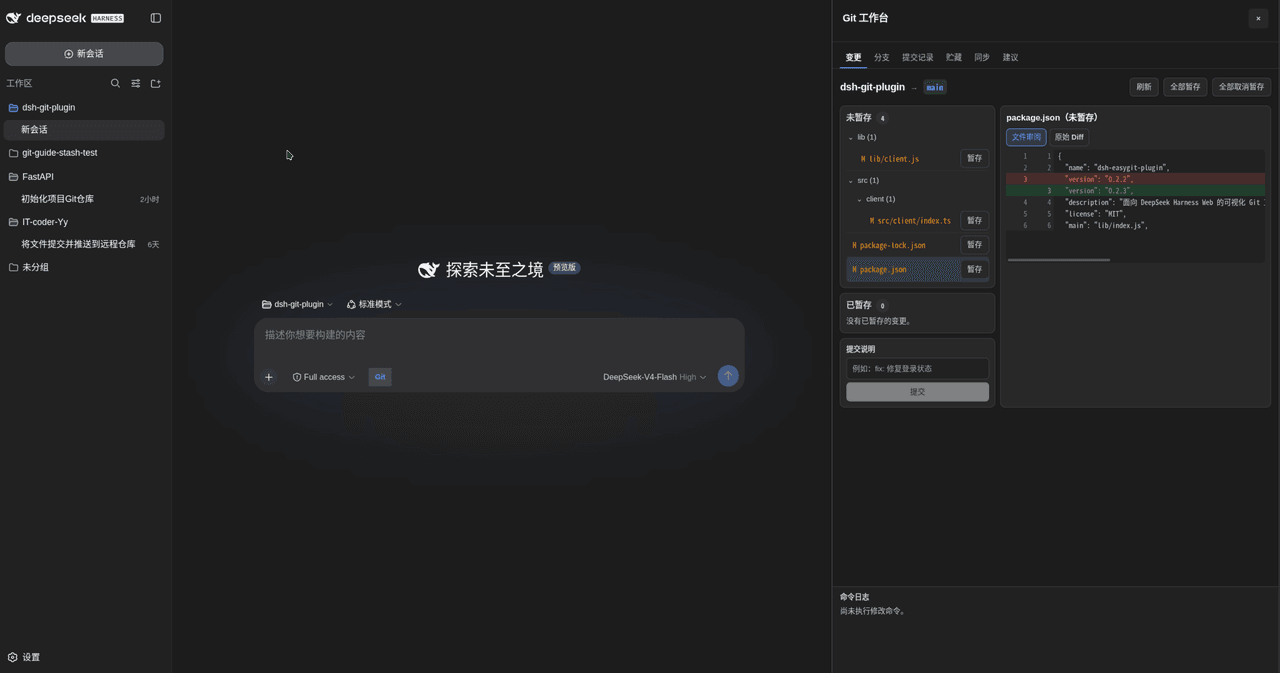
DSH Git 插件是 DeepSeek Harness Web 的可视化 Git 工作台,可查看仓库状态、提交历史、分支与远程同步等。核心能力包括一键暂存、提交、分支管理与 rebase,以及将自然语言请求转化为可审核的 Git 步骤并执行。每次执行前都会基于保守白名单校验命令,rebase 和强制删除分支等高风险操作需显式确认。注意:仅建议在受信仓库和受信 Git 配置下使用。
DSH Git Plugin is a visual Git workbench for DeepSeek Harness Web that exposes repository state, commit history, branches, and remote sync. Core capabilities cover one-click stage, commit, branch management, rebase, and turning natural-language requests into reviewable, step-by-step Git proposals that can be executed or copied. Commands are validated against a conservative allowlist both at proposal time and immediately before execution, with explicit confirmation required for history rewrites and forceful branch deletion. Use it only with trusted repositories and trusted Git configuration.
请帮我了解并安装插件:【dsh-git-plugin】【https://github.com/IT-coder-Yy/dsh-git-plugin】把上面这条消息直接发给当前会话里的 DSH,让它帮你了解并安装。安装命令不一定准确,发给 DSH 更稳。Send this message to DSH in your current session. CLI install commands may not be accurate across systems — DSH will figure it out for you.
或使用命令行安装(适合开发者)Or use CLI install (for developers)
命令行安装CLI Install
dsh plugin --profile web add dsh-easygit-plugin把 IT-coder-Yy/dsh-git-plugin 加入你的 DSH 配置(web profile)即可启用。
READMEREADME
DSH Git Plugin
A visual Git workbench for inspecting repositories, running common actions, and safely executing AI-generated Git workflows in DeepSeek Harness Web.






English · 简体中文
How to use
👀 Inspect Git state → 🖱️ Run a quick action or ask the Agent → ✅ Review → 🚀 Execute
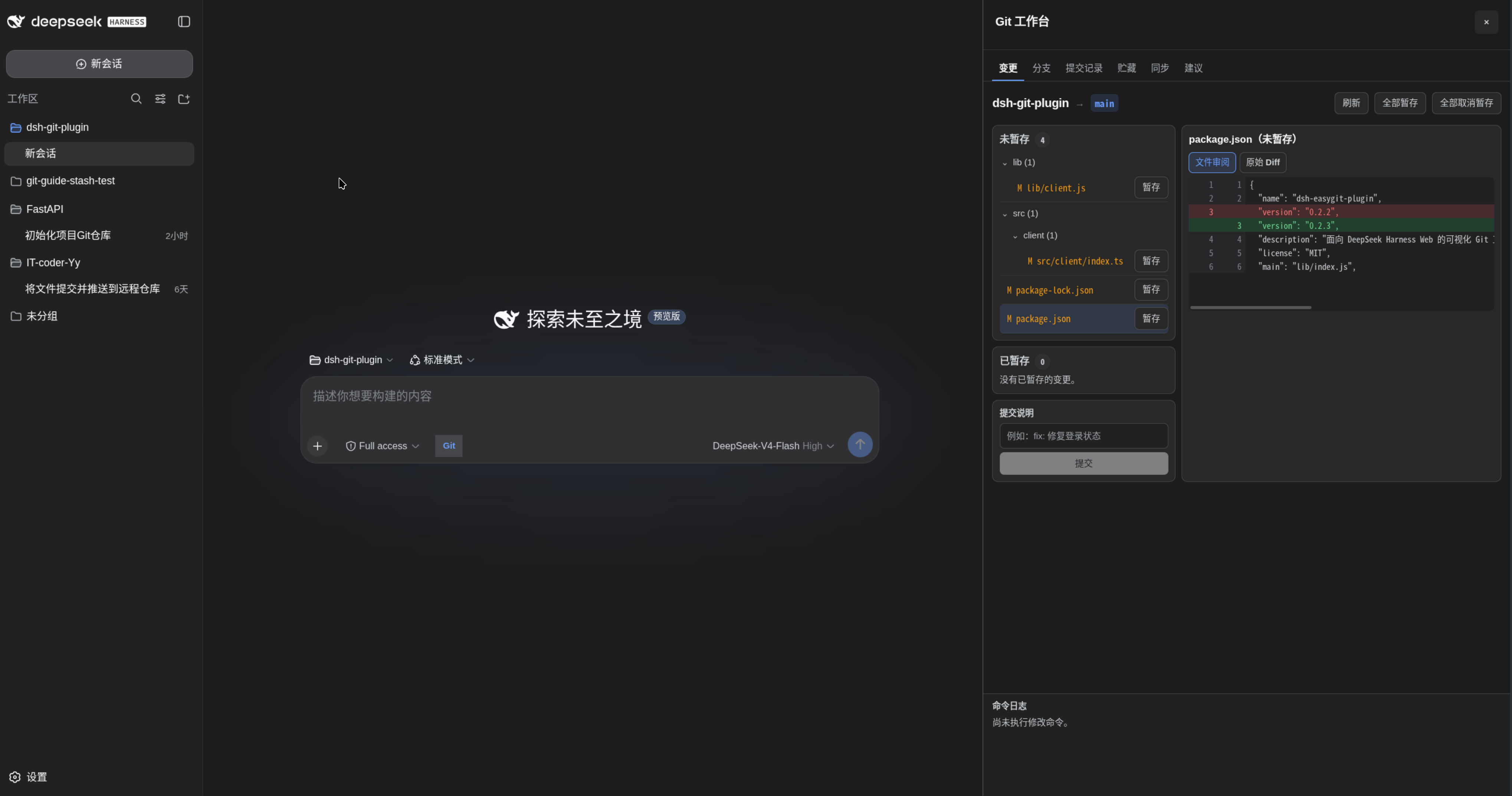
Preview
Features
- Visual repository state: See the current branch, staged and unstaged files, and each file's formatted review view or raw diff.
- Commit history and details: Browse the current branch as a commit graph, then click a commit to inspect its message, author, timestamps, parents, changed files, statistics, and full diff.
- One-click Git actions: Stage or unstage one file or all files, create commits, and create, search, switch, or safely delete local branches directly from the workbench.
- Remote sync and Rebase: Inspect upstream, ahead/behind counts, and working-tree state; fetch, fast-forward pull, push, set an upstream for a new branch, or safely start, continue, and abort a Rebase.
- References at a glance: Inspect local branches, remote branches, and tags without leaving DeepSeek Harness Web.
- Natural-language workflows: Turn a request into a clear, step-by-step Git command proposal, then execute it directly or copy it for manual execution.
- Actionable failure handling: Keep the failed command, output, and post-failure repository diagnostics together; offer a safe recovery proposal for recognized failures or let the Agent analyze a complex failure.
- Safety by default: Validate commands against a conservative allowlist, require confirmation for high-risk operations and history rewrites, prevent proposal replay, and redact common credentials from diagnostics.
Quick start
0. Allow immediate installation of the new package
Newer versions of pnpm may delay recently published packages. To install the latest release immediately, add dsh-easygit-plugin to ~/.dsh/profiles/web/pnpm-workspace.yaml:
minimumReleaseAgeExclude:
  - dsh-easygit-plugin
1. Install the plugin
dsh plugin --profile web add dsh-easygit-plugin
2. Start DSH Web
dsh web
3. Open the Git workbench
Use the Git button beside the composer to inspect changes, review commit history, stage files, commit changes, manage branches, or synchronize with a remote. Rebase and forceful branch deletion require an explicit risk confirmation.
For a more involved workflow, ask the Agent for a Git operation. For example:
Commit the documentation update to the current branch with the message "docs: update guide"
Review the generated steps in the Git workbench, then choose direct execution or manual execution.
Install from source
git clone https://github.com/IT-coder-Yy/dsh-git-plugin.git
cd dsh-git-plugin
npm install
npm run build
dsh plugin --profile web add ${PWD}
Install from GitHub repository
dsh plugin --profile web add github:IT-coder-Yy/dsh-git-plugin
Update the plugin
dsh plugin --profile web update dsh-easygit-plugin
Uninstall the plugin
dsh plugin --profile web remove dsh-easygit-plugin
How it works
The plugin registers two model tools:
| Tool | Description |
|---|---|
git_repo_state |
Reads the current repository state without modifying it. |
git_propose |
Validates and registers one or more Git steps. |
The Web profile adds a Git action beside the composer and opens the workbench in the native details area. Its tabs provide visual access to working-tree changes and diffs, branches and references, commit history and details, stashes, remote synchronization, and Agent-generated proposals. Commands are validated both when a proposal is created and immediately before execution. When an action fails, the workbench preserves structured error context and repository diagnostics; recognized failures can create a new recovery proposal, while complex failures can be handed back to the Agent for analysis.
Security
- Each step must contain exactly one allowed
git <subcommand> ...command. - Shell control operators, command substitution, redirection, executable hooks, and unsafe Git options are rejected.
- High-risk operations, including history rewrites, require explicit confirmation and proposals can only be executed once.
- The plugin follows the Shell and sandbox policies provided by DeepSeek Harness; use it only with trusted repositories and trusted Git configuration.
Please report vulnerabilities privately by following SECURITY.md.
Compatibility
Last verified on 2026-08-20 with DeepSeek Harness 0.1.0-rc.8 and dsh-easygit-plugin 0.2.3. Verification covered npm run check (68 tests), 24 reproducible build artifacts, a dry-run npm package, a temporary DSH Web-profile composition, and end-to-end Git operations against a temporary local copy of the FastAPI repository. The end-to-end coverage includes repository inspection, diffs, commits, branches, stashes, fetch/pull/push, successful and conflicted Rebases, recovery behavior, and proposal safety checks.
Development
Requires Node.js ^22.19.0 || >=24.0.0, Git, and a DeepSeek Harness developer preview release that supports static Cordis plugins.
npm install
npm run check
npm pack --dry-run --ignore-scripts
License
相关推荐Related
-
 nexu-io/open-design
🎨 Best DeepSeek Harness Design Plugin. The open-source Claude Design alternative. 🖥️ Local-first desktop app. 🖼️ Your…
nexu-io/open-design
🎨 Best DeepSeek Harness Design Plugin. The open-source Claude Design alternative. 🖥️ Local-first desktop app. 🖼️ Your…
-
 ruvnet/ruflo
🌊 The original agent meta-harness. Deploy intelligent multi-player swarms, coordinate autonomous workflows, and build c…
ruvnet/ruflo
🌊 The original agent meta-harness. Deploy intelligent multi-player swarms, coordinate autonomous workflows, and build c…
-
 esengine/DeepSeek-Reasonix
DeepSeek-native AI coding agent for your terminal. Engineered around prefix-cache stability — leave it running.
esengine/DeepSeek-Reasonix
DeepSeek-native AI coding agent for your terminal. Engineered around prefix-cache stability — leave it running.
-
 volcengine/OpenViking
Self-evolving Context Database for AI Agents. Unify Agent Memory, Knowledge RAG and Skills.
volcengine/OpenViking
Self-evolving Context Database for AI Agents. Unify Agent Memory, Knowledge RAG and Skills.
-
 Molunerfinn/PicGo
:rocket: The Ultimate Image Uploader for Efficient Creators. Supports Obsidian, Typora, VS Code etc. and 60+ image hosti…
Molunerfinn/PicGo
:rocket: The Ultimate Image Uploader for Efficient Creators. Supports Obsidian, Typora, VS Code etc. and 60+ image hosti…
-
 titanwings/colleague-skill
将冰冷的离别化为温暖的 Skill,欢迎加入数字生命1.0!Transforming cold farewells into warm skills? It's giving rebirth era. Welcome to Digital …
titanwings/colleague-skill
将冰冷的离别化为温暖的 Skill,欢迎加入数字生命1.0!Transforming cold farewells into warm skills? It's giving rebirth era. Welcome to Digital …
-
 nocobase/nocobase
NocoBase is an open-source AI + no-code platform for building business systems fast. Instead of generating everything fr…
nocobase/nocobase
NocoBase is an open-source AI + no-code platform for building business systems fast. Instead of generating everything fr…
-
 anywhere-labs/deepseek-harness-desktop
为 DeepSeek Harness (DSH) 插件生态打造的现代化桌面端解决方案。万物皆「插件」,桌面本身也是「插件」。
anywhere-labs/deepseek-harness-desktop
为 DeepSeek Harness (DSH) 插件生态打造的现代化桌面端解决方案。万物皆「插件」,桌面本身也是「插件」。