Jack-sun-learner/dsh-image-skin
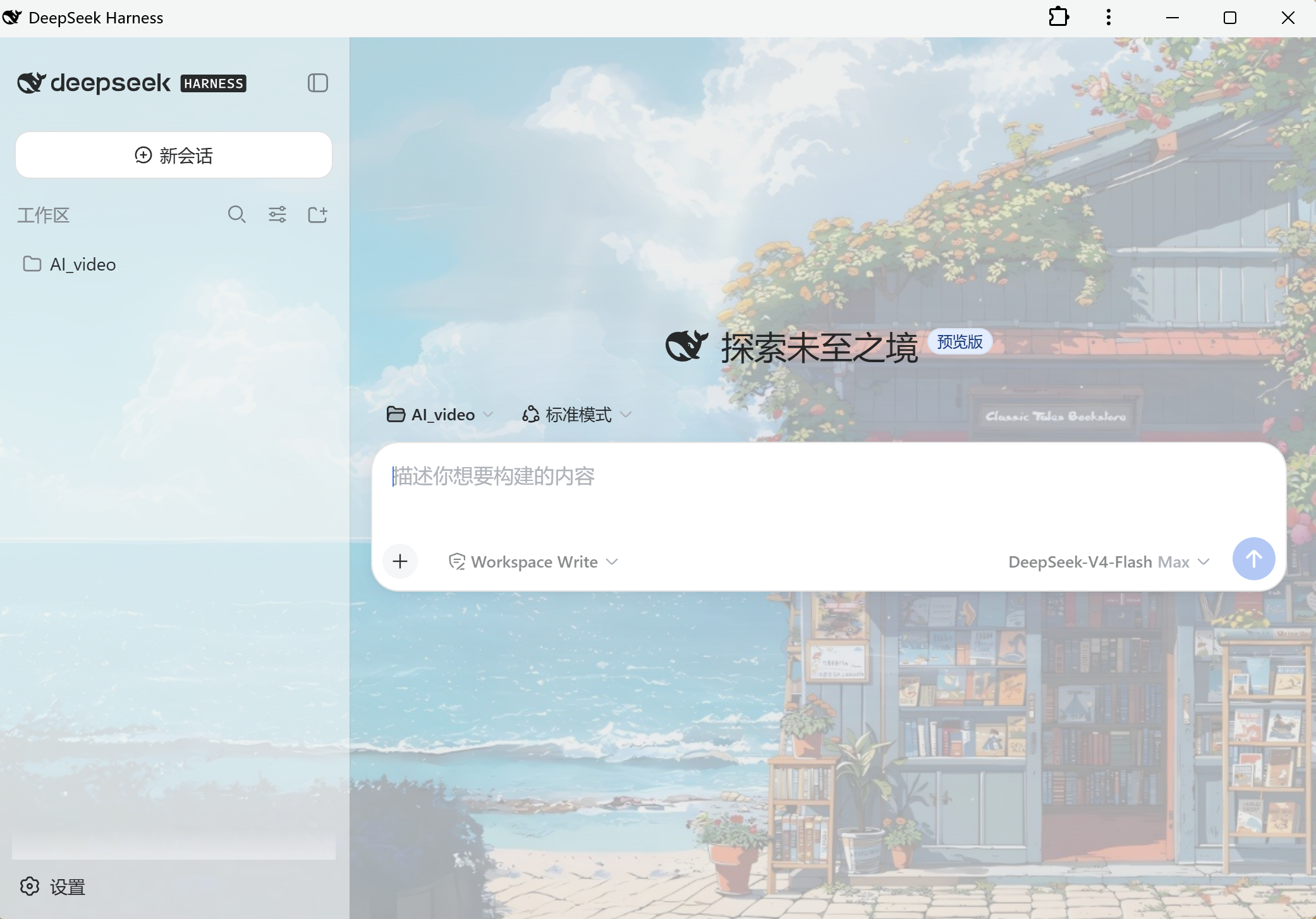
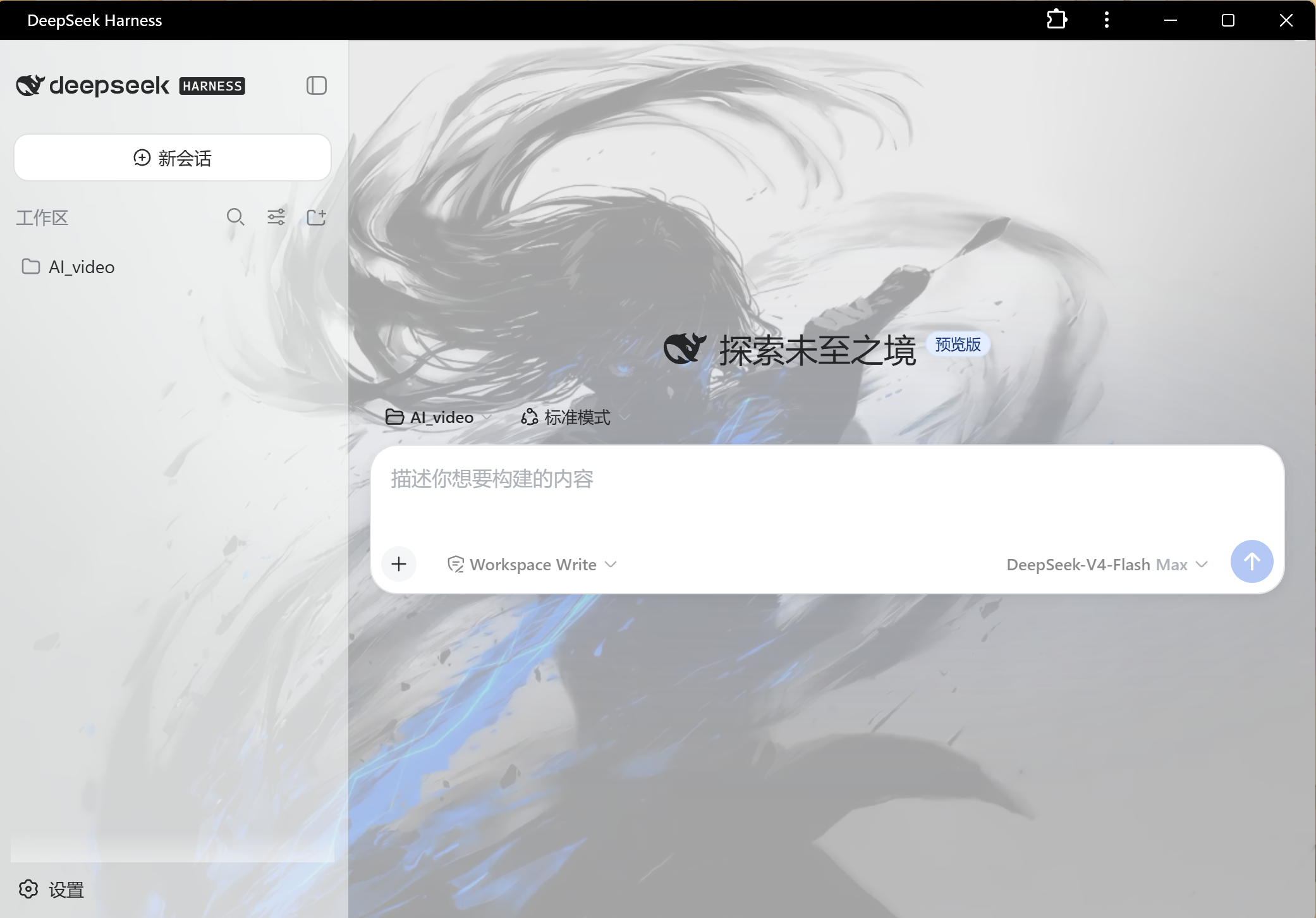
- 图片皮肤:在 设置 → 图片皮肤 上传照片(可多选)到图库,点击缩略图一键应用: - k-means 提取主色/辅色/强调色,自动生成明暗两套主题 token(背景、面板、侧栏、边框、品牌强调色、文字色全部跟随图片主色调) - 图片作为页面背景(半透明面板透出图片),支持浓度、模糊(画布预烘焙)调节 - 图库缩略图网格:当前应用项高亮"应用中",右上角 × 可删除单项;图库存于浏览器本地 - 桌面宠物(独立置顶窗口,活在主屏幕上,与 DSH 浏览器窗口无关): - 5 个预设形象(猫/兔/鲸/龙/柴犬,共 30 张 GDI+ 生成的表情素材),大小 60–240px 可调
catalog 简介 / catalog descriptioncatalog description:DSH 图片皮肤插件:导入 PNG/JPG/WebP 自动生成主题配色,可选 Q 版宠物(程序化/AI 生图)
项目介绍Project Overview
dsh-image-skin 是 DSH 的图片皮肤与桌面宠物插件。上传图片到本地图库后,用 k-means 提取主色自动生成明暗主题 token,并将图片作为可调浓度、模糊的背景;另含 WPF 置顶桌面宠物,支持拖拽、互动并在 agent 运行时显示思考状态。适合想个性化界面或添加陪伴宠物时使用。注意:宠物依赖 Windows PowerShell/WPF,部分不支持半透明的面板可能不跟随背景。
dsh-image-skin is a DSH plugin for image-based skins and a desktop pet. It uploads images to a local gallery, uses k-means to extract colors and generate light/dark theme tokens, and applies the image as an adjustable blurred background. It also provides a WPF always-on-top pet that can be dragged, interacts with the mouse, and reflects busy agent status. Use it for interface personalization or a companion pet. Note: the pet requires Windows PowerShell/WPF, and some non-transparent panels may not follow the background.
请帮我了解并安装插件:【dsh-image-skin】【https://github.com/Jack-sun-learner/dsh-image-skin】把上面这条消息直接发给当前会话里的 DSH,让它帮你了解并安装。安装命令不一定准确,发给 DSH 更稳。Send this message to DSH in your current session. CLI install commands may not be accurate across systems — DSH will figure it out for you.
或使用命令行安装(适合开发者)Or use CLI install (for developers)
命令行安装CLI Install
dsh plugin --profile web add github:jack-sun-learner/dsh-image-skin把 Jack-sun-learner/dsh-image-skin 加入你的 DSH 配置(web profile)即可启用。
READMEREADME
dsh-image-skin — 图片皮肤 + 桌面宠物插件
效果图
功能
- 图片皮肤:在 设置 → 图片皮肤 上传照片(可多选)到图库,点击缩略图一键应用:
- k-means 提取主色/辅色/强调色,自动生成明暗两套主题 token(背景、面板、侧栏、边框、品牌强调色、文字色全部跟随图片主色调)
- 图片作为页面背景(半透明面板透出图片),支持浓度、模糊(画布预烘焙)调节
- 图库缩略图网格:当前应用项高亮"应用中",右上角 × 可删除单项;图库存于浏览器本地
- 桌面宠物(独立置顶窗口,活在主屏幕上,与 DSH 浏览器窗口无关):
- 5 个预设形象(猫/兔/鲸/龙/柴犬,共 30 张 GDI+ 生成的表情素材),大小 60–240px 可调
- 行为:出现时打招呼 → 30 秒无互动躲到屏幕右缘露出半身 → 鼠标悬停跳跃回应 → 左键拖拽自由摆放(自动记住位置)→ 右键关闭
- 与 DSH 联动:有 agent 在运作时宠物进入思考状态(轮询宿主
/api/dsh-image-skin/busy),完成后气泡"搞定啦!" - 通过宿主 API 启动/停止(
pet-launch/pet-stop),由 PowerShell/WPF 实现,零额外依赖
- 状态保存在浏览器 localStorage,重启后自动恢复
结构
package.json          # dsh.bundle.patch + dsh.client.platform: web
cordis.patch.yml      # 组合插入行
lib/host.js           # 宿主端:/api/dsh-image-skin 路由(busy / pet-launch / pet-stop)
lib/client.js         # 客户端:皮肤/图库/桌面宠物控制/设置页(__ModuleLoader__ 加载)
pet/dsh-pet.ps1       # 桌面宠物窗口(WPF 透明置顶,物理坐标定位)
pet/gen-pet-assets.ps1# 宠物素材生成(C# GDI+,5 角色 × 6 表情)
pet/assets/           # 30 张宠物素材 PNG
安装 Install
从 GitHub 安装(推荐):
dsh plugin --profile web add github:jack-sun-learner/dsh-image-skin
本地开发安装(link: 源,修改即时生效):
dsh plugin --profile web add link:D:\AI_video\plugins\dsh-image-skin
安装后重启 web 服务生效。仓库地址:https://github.com/jack-sun-learner/dsh-image-skin
开发迭代注意
profile 对 link: 依赖创建 junction 指向源码目录,修改源码无需同步副本,重启 web 服务后生效。
语法检查:node --check lib/client.js lib/host.js;宠物脚本注意 PowerShell 5.1 需要 UTF-8 with BOM 才能正确解析中文注释。
已知说明
- 宠物窗口位置使用 Win32
SetWindowPos物理坐标定位(WPF 的 Left/Top 在幽灵显示器/虚拟桌面场景会落到屏幕外)。 - 背景图方案:token 覆盖把应用面板底色变半透明 + body 背景挂图(叠加深色渐变遮罩保证文字对比度)。若某面板不支持半透明会显得不跟随,属预期。
相关推荐Related
-
 nexu-io/open-design
🎨 Best DeepSeek Harness Design Plugin. The open-source Claude Design alternative. 🖥️ Local-first desktop app. 🖼️ Your…
nexu-io/open-design
🎨 Best DeepSeek Harness Design Plugin. The open-source Claude Design alternative. 🖥️ Local-first desktop app. 🖼️ Your…
-
 freestylefly/awesome-gpt-image-2
Prompt as Code | GPT-Image2 工业级提示词引擎与模板库,530+ 个案例逆向工程,20+ 套工业级模板,并提炼出Skills,持续更新中
freestylefly/awesome-gpt-image-2
Prompt as Code | GPT-Image2 工业级提示词引擎与模板库,530+ 个案例逆向工程,20+ 套工业级模板,并提炼出Skills,持续更新中
-
 anywhere-labs/dsh-desktop
为 DeepSeek Harness (DSH) 插件生态打造的现代化桌面端解决方案。万物皆「插件」,桌面本身也是「插件」。
anywhere-labs/dsh-desktop
为 DeepSeek Harness (DSH) 插件生态打造的现代化桌面端解决方案。万物皆「插件」,桌面本身也是「插件」。
- Nagi-ovo/voyager Enhancement suite for Gemini, AI Studio, Claude & ChatGPT — plus a prompt manager for any web UI, DeepSeek Harness inclu…
-
 walkinglabs/learn-harness-engineering
Harness engineering beginner tutorial, from 0 to 1
walkinglabs/learn-harness-engineering
Harness engineering beginner tutorial, from 0 to 1
-
 awesome-dsh-plugin/awesome-dsh-plugin
A curated list of plugins for DeepSeek Harness (dsh) · DeepSeek Harness 插件精选列表
awesome-dsh-plugin/awesome-dsh-plugin
A curated list of plugins for DeepSeek Harness (dsh) · DeepSeek Harness 插件精选列表
-
 MemTensor/MemOS
Self-evolving memory OS for LLM & AI Agents: ultra-persistent memory, hybrid-retrieval, and cross-task skill reuse, with…
MemTensor/MemOS
Self-evolving memory OS for LLM & AI Agents: ultra-persistent memory, hybrid-retrieval, and cross-task skill reuse, with…
- yjh051108/dsh-routing-suite dsh-routing-suite — injector + router-standard kit: install the runtime injector first, then the task-aware reasoning-mo…