joeseesun/qiaomu-rss-dsh
在 DeepSeek Harness 中阅读 RSS,与原生 AI 对话伴读文章 | RSS reading with native AI companion for DeepSeek Harness
Project Overview项目介绍
Qiaomu RSS (qiaomu-rss-dsh) is a community-built reading plugin created specifically for DeepSeek Harness 0.2.0-rc.2, shipped as a DSH bundle that loads via the dsh plugin --profile desktop add or --profile web add command against the verified .tgz and matching .sha256 from GitHub Releases. It brings curated Qiaomu channels and personal RSS/Atom subscriptions into a single workspace, exposing three reading variants per piece (original, translated, and Qiaomu-rewritten), plus unread, favorite, search, media playback, and OPML import/export. AI companion chat opens in Harness's native conversation panel using the host's already-configured model and workspace, with the article attached as live context, and the package is published only on GitHub Releases, never to npm.
The typical workflow starts from the sidebar entry, where the user searches an author or podcast, switches channels to load cached then freshly fetched items, and opens an article in the resizable reading pane; tapping the wand or selecting a passage launches the right-hand native conversation with the article pre-attached, so quick prompts, comparisons, and follow-up questions can be sent without copying text. Subscription discovery lets the reader add any RSS/Atom address directly, browse seventy-three curated podcast sources inherited from the Qiaomu AI RSS catalog, and play inline audio attachments. The tool targets Chinese readers who want one window for reading and follow-up dialogue inside Harness, and listeners who prefer to consolidate independent-blog and podcast feeds in the same surface.
It depends on Node.js 22+ and the Harness dsh CLI, requires a configured model for the AI companion and for generating missing reading variants, but needs no key for plain reading. Subscription plus reading state lives outside the repo at storages/qiaomu-rss/data.json inside the user's Harness home, surviving upgrades. The bundled independent-blog list retains its upstream MIT notice, while the whole plugin is GPL-3.0-only. From source, contributors run npm ci, npm run build, and npm test, then commit the regenerated lib/ because the DSH bundle loads those committed artifacts, so end users should prefer the Release tarball.
乔木 RSS(qiaomu-rss-dsh)是为 DeepSeek Harness 0.2.0-rc.2 打造的 DSH 原生阅读插件,把精选频道与个人 RSS/Atom 订阅带进同一工作区,并提供原文、译文和乔木改写三种阅读版本,支持未读、收藏、搜索、媒体播放以及 OPML 导入导出。它通过 dsh plugin --profile desktop add 或 --profile web add 将预构建 .tgz 加载为 bundle,使用 Harness 已配置的模型与账号;插件侧栏入口名为「乔木 RSS」。它是社区作品,非 DeepSeek 官方维护,预构建包只发布在 GitHub Releases,不上 npm。
典型流程:打开侧栏进入乔木 RSS,在左上角搜索作者或播客、切换频道查看新文章;阅读时通过魔法棒或选中文本唤起 AI 伴读,右侧原生对话面板默认工作区自动带上当前文章作为上下文,可发送快捷提示词追问、对比或解释。探索页支持直接输入 RSS 地址订阅,73 个内置播客源取自乔木 AI RSS 目录,文章里的音频附件可直接播放。它面向习惯在 Harness 内一站式完成阅读与追问的中文用户,以及想集中管理独立博客和播客订阅的读者。
依赖方面,需要 Node.js 22+ 与 Harness dsh CLI,AI 伴读和缺失版本生成依赖宿主已配置的模型,普通阅读不需要密钥;订阅与阅读状态保存在 Harness home 的 storages/qiaomu-rss/data.json,升级不会清空。内置独立博客清单保留上游 MIT 许可,整库采用 GPL-3.0-only。从源码构建请运行 npm ci、npm run build、npm test 并提交更新的 lib/,最终使用建议安装 Release 包而非 GitHub 源码。
请帮我安装这个 DSH 插件。安装前先完成【兼容性检查 + 安全性检查】,检查通过再动手。

插件:qiaomu-rss-dsh(joeseesun/qiaomu-rss-dsh)
仓库:https://github.com/joeseesun/qiaomu-rss-dsh
本站详情页:https://www.yhbd.top/plugins/joeseesun-qiaomu-rss-dsh/
本站登记:类型 plugin · 归类 原生 DSH 插件 · 许可证 GPL-3.0 · ⭐ 39 · 最近提交 2026-10-01 · 主语言 JavaScript

按下面顺序执行,每步先把结论告诉我,再进入下一步:

【1 兼容性检查】
① 我这边:DSH 版本、Node 版本、操作系统、当前 profile(web / desktop)。
② 读它的 README、package.json、插件 manifest,列出它要求的 DSH 版本 / Node 版本 / 操作系统 / 外部依赖 / 需要另外先装的运行时。
③ 逐条比对,结论只写「满足 / 不满足 / 未知」三种;不满足的给出可行替代方案。
④ 检查是否和我已装的插件冲突:命令名重复、skill / tool 重名、端口占用、重复注册的 MCP server。

【2 安全性检查】
① 仓库可信度:和上面「本站登记」是否一致;star / fork 数、创建时间、最近提交,是否归档或长期停更。
② 安装脚本:逐行看 package.json 的 preinstall / install / postinstall,以及 install.sh、setup.ps1 之类脚本。出现 curl|bash、下载后直接执行、混淆代码、访问与插件功能无关的域名,立刻停下来告诉我,不要继续装。
③ 依赖:列出新增依赖,标出无人维护、或与知名包拼写近似的可疑包(typosquatting)。
④ 权限与副作用:它会读写哪些目录、访问哪些域名、需要哪些 DSH 权限(filesystem / network / shell / clipboard 等),以及怎么卸载和回滚。
⑤ 如果它要求 sudo / 管理员权限,或权限明显超出功能所需,先停下来问我。

【3 安装】
上面两步没有「不满足」和「高危项」时才执行;用官方推荐方式安装,不要自行提权。

【4 汇报】
用表格输出:检查项 / 结论 / 依据 / 是否需要我决策。拿不准的一律写「未知」并说明要我怎么确认——不要猜,也不要替我决定。
Send this message to DSH in your current session: it verifies compatibility and security first (answering met / not met / unknown item by item) and only installs once everything checks out — it will stop and ask you if it finds a high-risk item. The box scrolls; the copy is the full prompt. CLI install commands may not be accurate across systems, so DSH is the safer route.把上面这条消息直接发给当前会话里的 DSH:它会先核对兼容性与安全性(逐条给「满足 / 不满足 / 未知」),确认没问题再安装,有高危项会停下来问你。框内可滚动,复制到的是完整提示词;安装命令不一定准确,发给 DSH 更稳。
- 39 stars - an early-stage project星标 39,属于早期项目
DSH walks through these 9 checksDSH 会逐条核对这 9 项
Compatibility兼容性
- DSH, Node, OS and profile requirementsDSH 版本 / Node 版本 / 操作系统 / profile 是否满足要求
- External dependencies and runtimes (Electron / Python / Docker, ...)外部依赖与运行时(Electron / Python / Docker 等)是否齐备
- Conflicts with installed plugins: command names, skill / tool names, ports, duplicate MCP registration与已装插件是否冲突:命令名、skill / tool 重名、端口占用、重复 MCP 注册
Security安全性
- Repo matches the facts registered here; archived or abandoned?仓库是否与页面登记一致,是否归档或长期停更
- Safety of preinstall / install / postinstall and install.sh / setup.ps1preinstall / install / postinstall 与 install.sh、setup.ps1 是否安全
- curl|bash, download-then-execute, obfuscation, unrelated domains → stop immediatelycurl|bash、下载即执行、混淆代码、无关域名 → 立刻停止
- Typosquatting or unmaintained packages among the new dependencies新增依赖里有没有 typosquatting 或无人维护的包
- Requested permissions vs. what the feature actually needs申请了哪些权限、是否超出功能所需(filesystem / network / shell / clipboard)
- Any sudo / admin requirement, plus uninstall and rollback是否要求 sudo / 管理员权限,以及卸载与回滚方式
Anything uncertain must be marked unknown with a note on how to confirm it. This site's signal screen is a static snapshot, not a security audit.拿不准的必须标「未知」并说明要我怎么确认。本站的信号筛查是静态快照,不能替代安全审计。
Or use CLI install (for developers)或使用命令行安装(适合开发者)
CLI Install命令行安装
dsh plugin --profile desktop add "$PWD/qiaomu-rss-dsh-0.7.1.tgz"把 joeseesun/qiaomu-rss-dsh 加入你的 DSH 配置(web profile)即可启用。
READMEREADME
乔木 RSS · qiaomu-rss-dsh
中文 · English
让订阅变成真正读进去的内容。 在 Harness 里发现值得关注的作者,读原文或中文版本,再带着当前文章向 AI 追问。
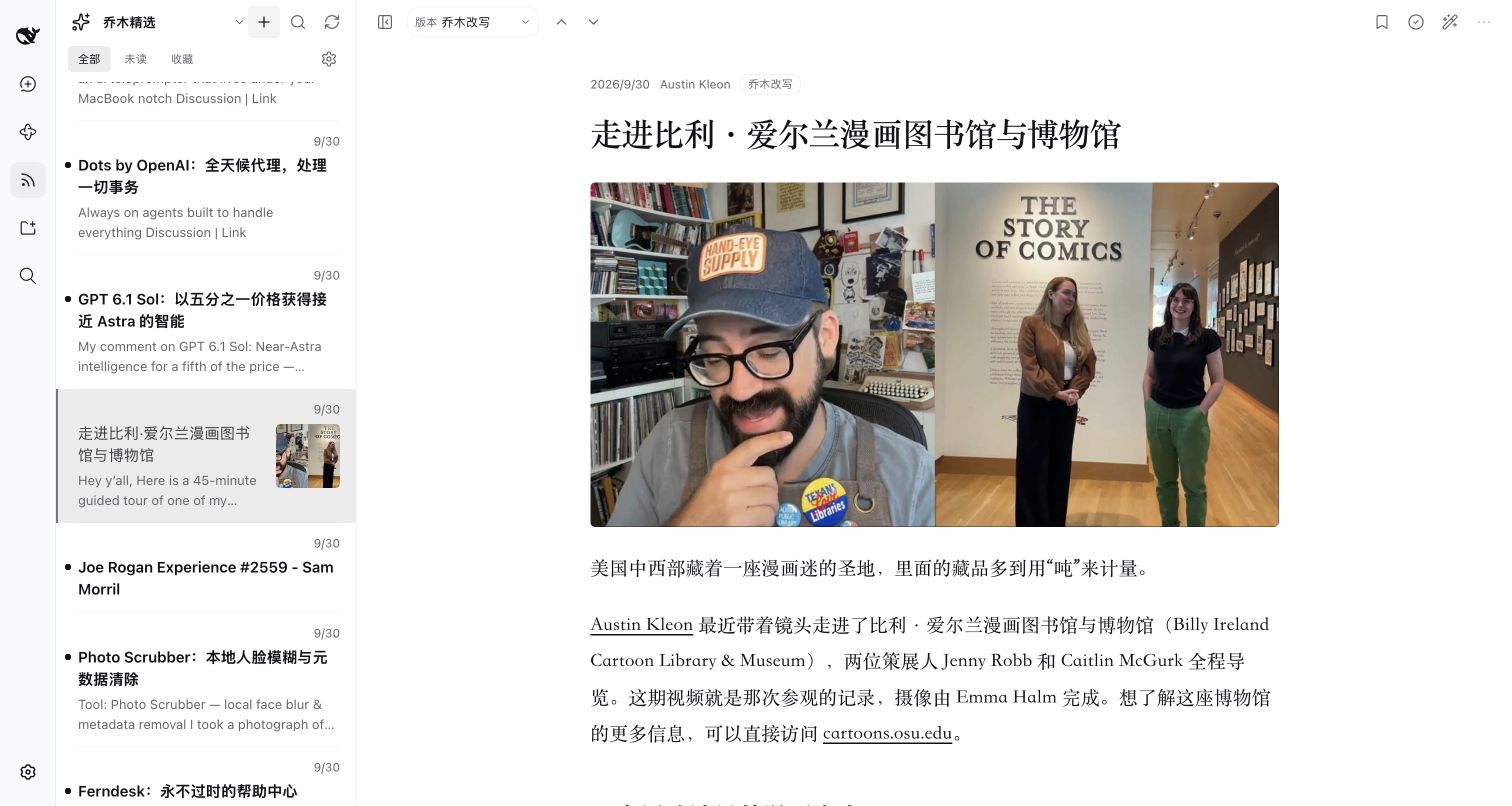
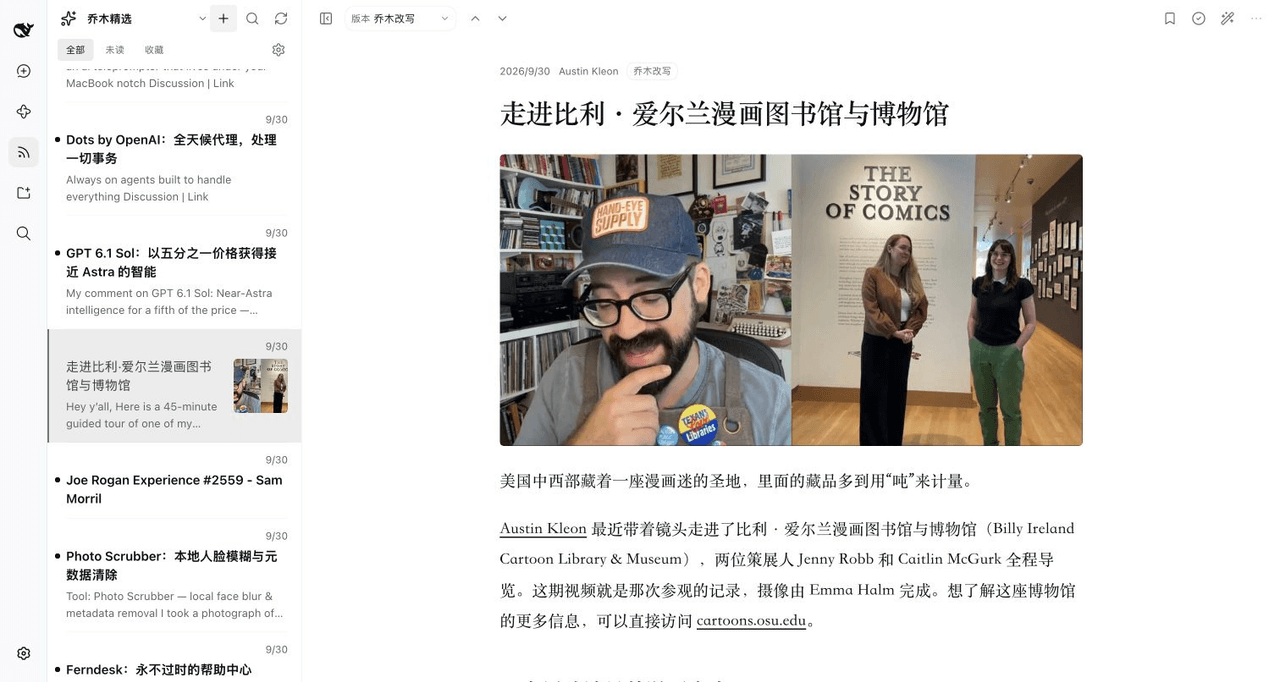
真实截图:独立 Harness Web profile,公开文章与服务已有的改写版本;没有合成 AI 回答。截图说明
- 少切几个窗口: 订阅列表、文章正文、原生 AI 对话在同一工作区。
- 外文文章也能顺畅读: 在已有原文、译文和改写之间切换;缺失版本可交给已配置的模型生成。
- 从“看过”走向“看懂”: 让伴读带着文章上下文继续解释、比较与追问。
- 订阅由你决定: 发现博客与播客、添加 RSS/Atom 地址,用 OPML 迁移订阅。
Read RSS inside DeepSeek Harness and discuss the current article in its native AI conversation.
这是公开源码的社区插件,并非 DeepSeek 官方维护或背书。预构建安装包见 GitHub Releases;目前不发布 npm 包。已在 DeepSeek Harness 0.2.0-rc.2 的 Desktop 和隔离 Web profile 中验证。
能做什么
| 功能 | 使用方式 |
|---|---|
| 乔木精选与个人订阅 | 从左上角搜索并切换频道,自动加载该频道的新文章;在探索页添加 RSS/Atom 源,导入或导出 OPML |
| 阅读文章 | 切换原文、译文和乔木改写;支持未读、收藏、搜索与媒体内容 |
| AI 伴读 | 点击文章工具栏的魔法棒,或选中正文,右侧直接打开 Harness 原生对话;默认工作区自动连接当前文章,选段引用内嵌在输入框内,可展开或移除;翻译、解释、概括默认只处理选段,文章作为参考上下文 |
| 海外播客原文 | 搜索节目、浏览单集并获取已有完整转写;导入后可阅读、翻译和伴读 |
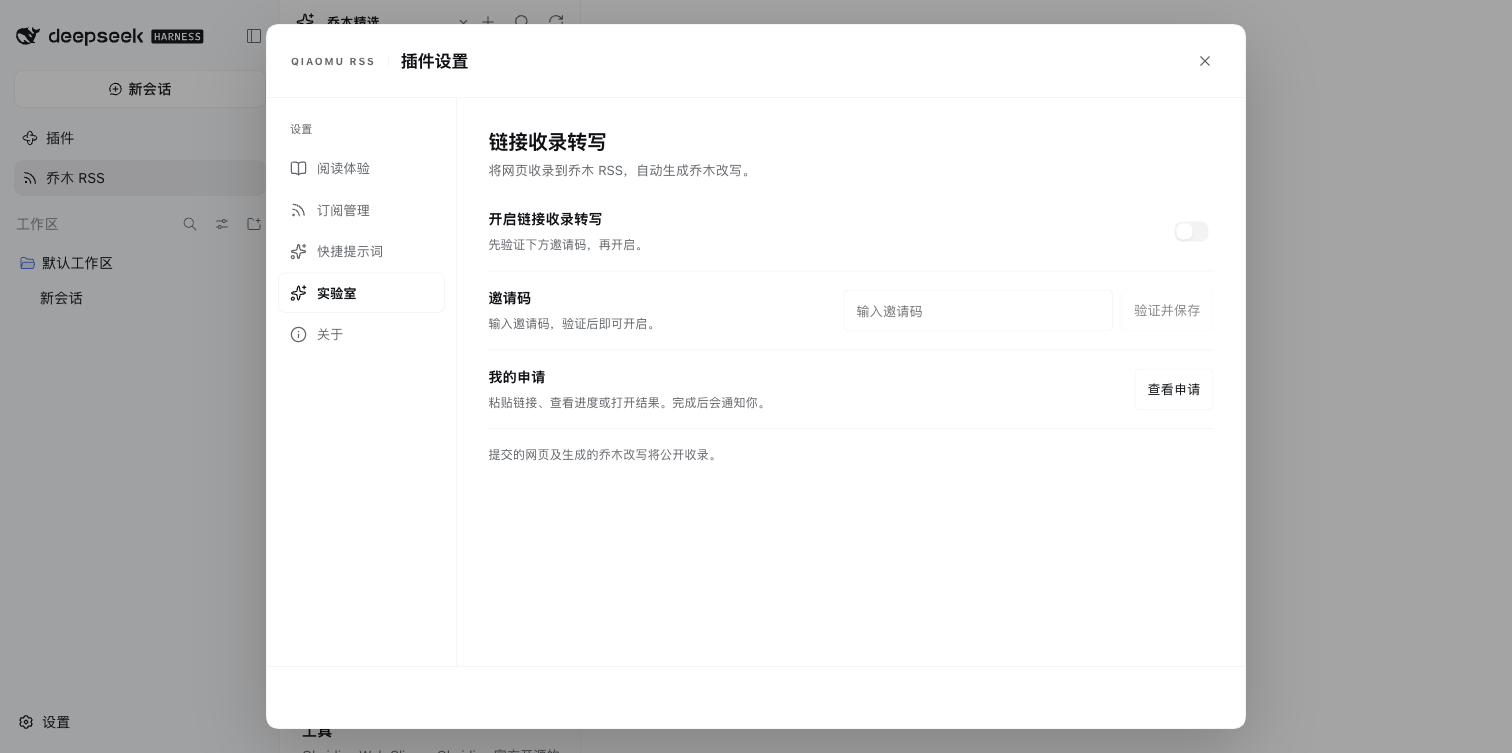
| 链接收录与改写(实验室) | 在设置中启用并验证邀请码,粘贴链接或右键正文链接提交;在「申请收录」查看进度、重试失败申请,完成后打开中文改写与 AI 伴读 |
| 插件设置 | 调整阅读外观和乔木服务地址;用弹窗编辑订阅、重命名或取消分组,管理 OPML 与快捷提示词,并查看关于与打赏信息 |
| Agent 工具 | 提供频道、文章、搜索、订阅、刷新和阅读版本相关的八个 rss_* 工具 |
链接收录与改写
在「插件设置 → 实验室」启用链接收录,输入邀请码并点击「验证并保存」,随后打开「申请收录」。粘贴网页地址提交,或右键文章中的链接选择「申请收录改写」。完成的申请可直接打开阅读,失败的申请可重试。任务在 Host 保存;重启会恢复进度检查,完成或失败时在 RSS 面板通知。没有未完成任务时不持续查询服务器。
链接会发送到设置中的乔木服务,生成的改写公开收录。此功能是网页收录和 AI 改写,与「海外播客原文」提供的已有逐字稿不同。实验室默认关闭。邀请码与实例访问密钥保存在本机插件数据中,不返回通用设置,不提供 Agent 提交工具;管理员管理功能本版未迁移。
真实界面
查看已合并的桌面版 AI 伴读实拍
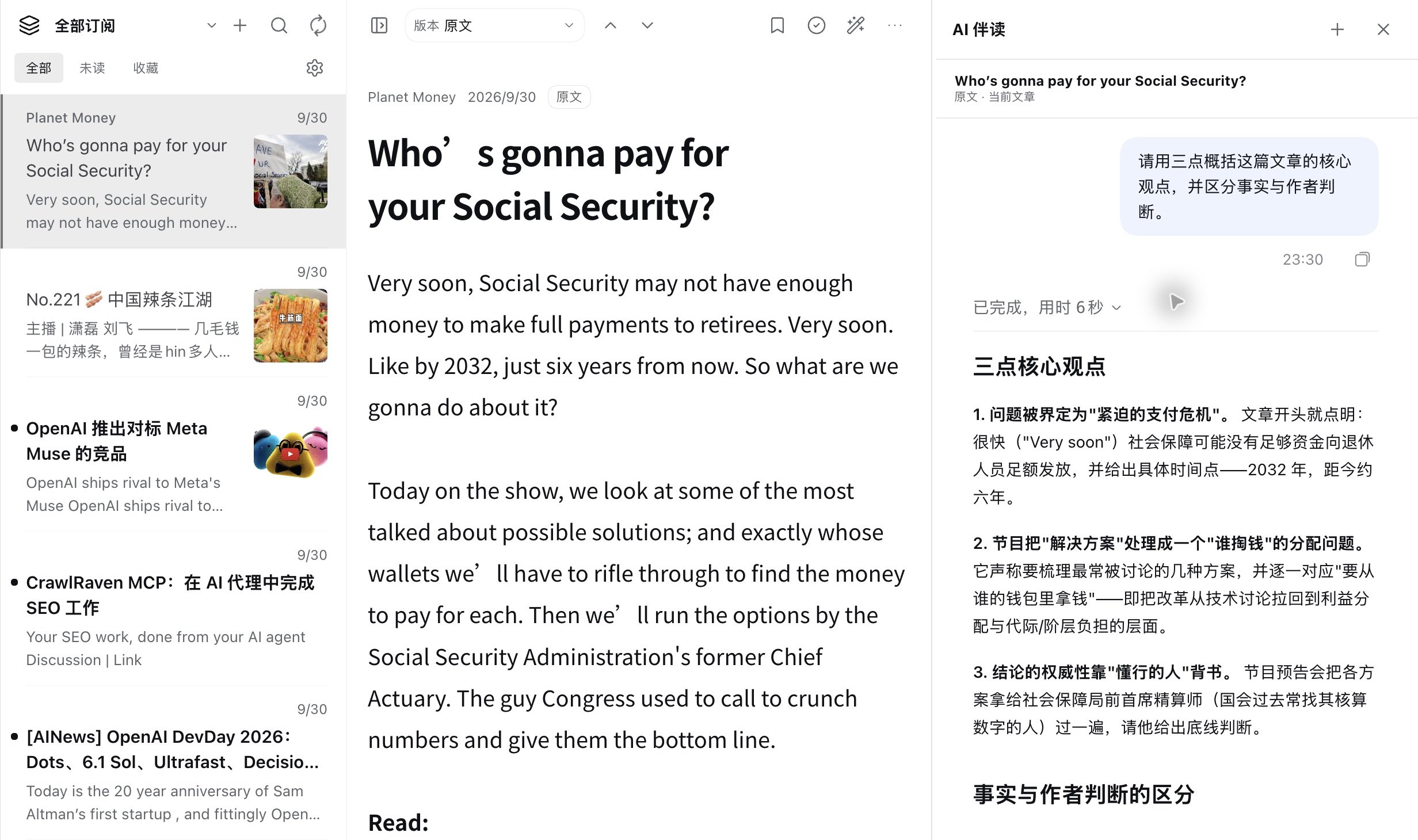
此前桌面构建实拍:打开 Planet Money 文章后,发送「概括要点」,右侧返回对应文章的概括。该截图由此前的 PR #6 合入;该截图为此前版本;v0.6.0 的选段翻译已在 Desktop 原生对话中验证;v0.7.0 新功能在隔离 Web profile 中验证。
切换频道时先显示已缓存文章,再自动拉取该频道的新内容;刷新按钮仍可手动强制更新。切换文章时,阅读区用轻量骨架显示加载状态。默认阅读版本仅在当前文章有内容时生效,缺失时自动选择其他已有版本或原文;手动选择缺失版本仍可调用 Harness 生成。文章与伴读之间的分割线可拖动,也可用方向键微调、双击复位。打开伴读时文章列表保持可见,文章左上角也可打开频道列表。伴读输入框上方的快捷提示词可横向滚动点选并直接发送;末端的 + 可直达设置新增提示词。已有手写草稿时不会覆盖或误发。本机个人提示词保存在插件的浏览器存储中,可在设置中编辑。探索订阅包含来自原版乔木 RSS 目录的 73 个播客 RSS 源;订阅后可使用文章中的音频附件播放。插件不提供 Obsidian 式笔记、划线保存或日记写入。
Showing the opening section of the README — the full document lives in the repository以上为 README 开头摘要,完整文档在仓库内 · View the full README on GitHub →在 GitHub 查看完整 README →
Related相关推荐
-
 ZSeven-W/dsh-openpencil
The DeepSeek Harness plugin for OpenPencil — preview, inspect, and edit real .op documents inside a conversation.
ZSeven-W/dsh-openpencil
The DeepSeek Harness plugin for OpenPencil — preview, inspect, and edit real .op documents inside a conversation.
-
 LAU-MARS/dsh-cad
deepseek harness 2D and 3D CAD plugin
LAU-MARS/dsh-cad
deepseek harness 2D and 3D CAD plugin
-
 penguin-oo/dsh-bookmarks
Bookmark assistant replies in DeepSeek Harness: per-message bookmarks with notes/tags, a cross-session center, and one-c…
penguin-oo/dsh-bookmarks
Bookmark assistant replies in DeepSeek Harness: per-message bookmarks with notes/tags, a cross-session center, and one-c…
-
 tylina/dsh-tylina
Edit typeset Typst documents inside DeepSeek Harness. Share a workspace with your agent, from first draft to finished PD…
tylina/dsh-tylina
Edit typeset Typst documents inside DeepSeek Harness. Share a workspace with your agent, from first draft to finished PD…
- lutrodev/dsh-roleplay Roleplay plugin suite for DeepSeek Harness: character cards, lorebooks, personas, presets, state, and conversation tools…
-
 SherUnlocked-4869/dsh-plugin-msg-nav
DeepSeek Harness 对话节点导航条插件:在对话区右缘渲染一列短横线节点串(每条真实用户消息一个节点),跟随阅读位置;鼠标靠近节点串时,节点条「变形弹出」为单行消息预览面板(覆盖原位置,移开复原),点击任意预览平滑跳转 + 高亮…
SherUnlocked-4869/dsh-plugin-msg-nav
DeepSeek Harness 对话节点导航条插件:在对话区右缘渲染一列短横线节点串(每条真实用户消息一个节点),跟随阅读位置;鼠标靠近节点串时,节点条「变形弹出」为单行消息预览面板(覆盖原位置,移开复原),点击任意预览平滑跳转 + 高亮…
- zjl1989-li/dsh-harness-zh-cn DeepSeek Harness 中文汉化插件:运行时把所有系统提示词、工具描述与运行时上下文翻译成中文(system-prompt/assemble 瀑布钩子,零源码修改)
-
 13071301808/dsh-composer-expand
Composer expand/collapse toggle for DeepSeek Harness (dsh): a ⬆/⬇ button in the composer tool row grows the input to a t…
13071301808/dsh-composer-expand
Composer expand/collapse toggle for DeepSeek Harness (dsh): a ⬆/⬇ button in the composer tool row grows the input to a t…