Johnblur/dsh-bilingual-reader
Project Overview项目介绍
dsh-bilingual-reader is a native plugin built specifically for DeepSeek Harness (DSH), targeting the dsh-better-sidebar component. It renders academic PDFs directly inside the sidebar using the browser or Electron PDF engine, then offers selection-based translation: when the user selects and copies a sentence, the plugin invokes the LLM with surrounding context to translate it into the chosen language. The translation runs through DSH's already-configured model and API key via a one-shot ctx.llm call, so it never pollutes the main chat context and only serves as a reading aid.
The typical workflow starts by clicking the + button in the better-sidebar to open the "Bilingual Reading" tab (internal id translator, displayed as 翻译 / translator depending on UI language). From there the user clicks "Browse…" to pick a PDF from the workspace or pastes a path and clicks "Load". After selecting and copying text in the PDF viewer, the desktop build auto-triggers translation by watching system clipboard changes; if that fails, the user can click the "Translate" button or press Ctrl+V inside the tab to paste content directly. The lower panel then displays original text alongside its translation, with dropdowns for source and target language (auto-detect, custom language entry supported), a context-length slider, and a domain field. It targets researchers and students reading foreign-language papers inside DSH who want isolated translation help.
Installation is performed with dsh plugin add github:Johnblur/dsh-bilingual-reader, after which the user must fully quit DSH Desktop from the tray and relaunch it. Runtime dependencies include dsh-better-sidebar (≥0.17.1), @deepseek-ai/dsh-llm (≥0.1.2-rc.1), and pdfjs-dist used on the host side for text extraction. Defaults can be overridden via the environment variables DSH_BILINGUAL_PROVIDER (default deepseek-official) and DSH_BILINGUAL_MODEL (default deepseek-v4-flash-vision-exp). From DSH Desktop 2.0.9 onward the host runs in an Electron utilityProcess where electron.clipboard is unavailable, so users must upgrade to plugin v1.1.1+ to regain auto-translation and PDF text extraction. The project is released under the MIT license, and contributors can run pnpm i, pnpm build (tsdown + tsc), pnpm typecheck, pnpm test (vitest), and pnpm selfcheck for offline logic verification.
dsh-bilingual-reader 是一款面向 DeepSeek Harness(DSH)的原生插件,专为 dsh-better-sidebar 侧边栏设计。它利用浏览器或 Electron 的 PDF 引擎在侧栏内渲染论文 PDF,并提供划词翻译功能:用户选中句子并复制,插件即结合上下文调用大模型译成中文,翻译通过 DSH 已配置的模型与 API key 完成,完全不写回主对话上下文。
典型使用流程是先在侧边栏通过 + 按钮打开"双语阅读"标签(内部名为 translator),然后点击"浏览…"选择工作区中的 PDF 文件或粘贴路径加载。在 PDF 阅读区域选中并复制文本后,桌面版会自动监听剪贴板变化触发翻译;若剪贴板读取失败,可点击"翻译"按钮或按 Ctrl+V 粘贴翻译。下方会同时显示原文与译文,并支持切换源语言、目标语言、调整上下文长度及指定领域。它主要面向需要在 DSH 中阅读外文文献、又不想污染主对话上下文的研究者和学生。
安装命令为 dsh plugin add github:Johnblur/dsh-bilingual-reader,完成后需彻底退出 DSH Desktop 托盘进程再重新打开。依赖包括 dsh-better-sidebar(≥0.17.1)、@deepseek-ai/dsh-llm(≥0.1.2-rc.1)以及 pdfjs-dist,并支持环境变量 DSH_BILINGUAL_PROVIDER 与 DSH_BILINGUAL_MODEL 覆盖默认模型。DSH Desktop 2.0.9 以后需使用 v1.1.1+ 版本才能解决 utilityProcess 下的剪贴板与 PDF 取文问题。项目采用 MIT 许可证,开发侧提供 pnpm 构建、类型检查、vitest 测试与 selfcheck 自检命令。
请帮我安装这个 DSH 插件。安装前先完成【兼容性检查 + 安全性检查】,检查通过再动手。

插件:dsh-bilingual-reader(Johnblur/dsh-bilingual-reader)
仓库:https://github.com/Johnblur/dsh-bilingual-reader
本站详情页:https://www.yhbd.top/plugins/johnblur-dsh-bilingual-reader/
本站登记:类型 plugin · 归类 原生 DSH 插件 · 许可证 MIT · ⭐ 2 · 最近提交 2026-09-11 · 主语言 TypeScript

按下面顺序执行,每步先把结论告诉我,再进入下一步:

【1 兼容性检查】
① 我这边:DSH 版本、Node 版本、操作系统、当前 profile(web / desktop)。
② 读它的 README、package.json、插件 manifest,列出它要求的 DSH 版本 / Node 版本 / 操作系统 / 外部依赖 / 需要另外先装的运行时。
③ 逐条比对,结论只写「满足 / 不满足 / 未知」三种;不满足的给出可行替代方案。
④ 检查是否和我已装的插件冲突:命令名重复、skill / tool 重名、端口占用、重复注册的 MCP server。

【2 安全性检查】
① 仓库可信度:和上面「本站登记」是否一致;star / fork 数、创建时间、最近提交,是否归档或长期停更。
② 安装脚本:逐行看 package.json 的 preinstall / install / postinstall,以及 install.sh、setup.ps1 之类脚本。出现 curl|bash、下载后直接执行、混淆代码、访问与插件功能无关的域名,立刻停下来告诉我,不要继续装。
③ 依赖:列出新增依赖,标出无人维护、或与知名包拼写近似的可疑包(typosquatting)。
④ 权限与副作用:它会读写哪些目录、访问哪些域名、需要哪些 DSH 权限(filesystem / network / shell / clipboard 等),以及怎么卸载和回滚。
⑤ 如果它要求 sudo / 管理员权限,或权限明显超出功能所需,先停下来问我。

【3 安装】
上面两步没有「不满足」和「高危项」时才执行;用官方推荐方式安装,不要自行提权。

【4 汇报】
用表格输出:检查项 / 结论 / 依据 / 是否需要我决策。拿不准的一律写「未知」并说明要我怎么确认——不要猜,也不要替我决定。
Send this message to DSH in your current session: it verifies compatibility and security first (answering met / not met / unknown item by item) and only installs once everything checks out — it will stop and ask you if it finds a high-risk item. The box scrolls; the copy is the full prompt. CLI install commands may not be accurate across systems, so DSH is the safer route.把上面这条消息直接发给当前会话里的 DSH:它会先核对兼容性与安全性(逐条给「满足 / 不满足 / 未知」),确认没问题再安装,有高危项会停下来问你。框内可滚动,复制到的是完整提示词;安装命令不一定准确,发给 DSH 更稳。
- Only 2 stars - very few users, little community feedback星标只有 2,几乎没人在用,遇到问题缺少社区反馈
DSH walks through these 9 checksDSH 会逐条核对这 9 项
Compatibility兼容性
- DSH, Node, OS and profile requirementsDSH 版本 / Node 版本 / 操作系统 / profile 是否满足要求
- External dependencies and runtimes (Electron / Python / Docker, ...)外部依赖与运行时(Electron / Python / Docker 等)是否齐备
- Conflicts with installed plugins: command names, skill / tool names, ports, duplicate MCP registration与已装插件是否冲突:命令名、skill / tool 重名、端口占用、重复 MCP 注册
Security安全性
- Repo matches the facts registered here; archived or abandoned?仓库是否与页面登记一致,是否归档或长期停更
- Safety of preinstall / install / postinstall and install.sh / setup.ps1preinstall / install / postinstall 与 install.sh、setup.ps1 是否安全
- curl|bash, download-then-execute, obfuscation, unrelated domains → stop immediatelycurl|bash、下载即执行、混淆代码、无关域名 → 立刻停止
- Typosquatting or unmaintained packages among the new dependencies新增依赖里有没有 typosquatting 或无人维护的包
- Requested permissions vs. what the feature actually needs申请了哪些权限、是否超出功能所需(filesystem / network / shell / clipboard)
- Any sudo / admin requirement, plus uninstall and rollback是否要求 sudo / 管理员权限,以及卸载与回滚方式
Anything uncertain must be marked unknown with a note on how to confirm it. This site's signal screen is a static snapshot, not a security audit.拿不准的必须标「未知」并说明要我怎么确认。本站的信号筛查是静态快照,不能替代安全审计。
Or use CLI install (for developers)或使用命令行安装(适合开发者)
CLI Install命令行安装
dsh plugin add github:Johnblur/dsh-bilingual-reader把 Johnblur/dsh-bilingual-reader 加入你的 DSH 配置(web profile)即可启用。
READMEREADME
dsh-bilingual-reader
中文 | English
在 DeepSeek Harness (DSH) 的 dsh-better-sidebar 里阅读论文 PDF,用大模型做划词翻译的插件。
在侧边栏打开 PDF → 选中一句话复制 → 插件结合上下文用大模型译成中文。翻译走 DSH 现有模型,完全隔离主对话上下文,只作阅读辅助。
使用场景
- 你在 DSH 侧边栏(better-sidebar)打开一篇论文 PDF 阅读。
- 想快速弄懂某个句子 / 术语:选中 + 复制,插件自动翻译。
- 不想把内容丢进主对话去问 —— 翻译只发生在插件里,不污染主对话上下文。
特性
- PDF 原生渲染:用浏览器 / Electron 的 PDF 引擎显示原文 —— 排版完美、可翻页、可复制,与内置阅读器一致。
- 划词翻译:复制选中文本 → 桌面版自动翻译;自动不可用时点「翻译」按钮,或在插件里按 Ctrl+V 直接粘贴翻译(不需要任何权限,一定可用)。
- 多语种互译:源语言 / 目标语言各一个下拉框。内置中文 / 英语 / 日语 / 韩语,也可点「+语言…」手动添加任意语言。默认目标语言跟随界面语言。
- 语种自动识别:源语言选「自动识别」时,先用零成本字符集启发式判断(中 / 日 / 韩稳定);当有多个同文种语言(如同时含英 / 法 / 德)或启发式读不准时,再交给大模型识别一次,结果预填源语言、可随时改。
- 上下文感知:在全文里查找复制内容的唯一位置,取周边文字作上下文。唯一命中最准;多处出现 / 未命中则无上下文直译(避免错误上下文误导)。
- 上下文长度可调:滑块控制取周围多少字作上下文。
- 设置持久化:源语言、目标语言、上下文长度、自定义语言都会记住,下次打开直接用。
- 原文 + 译文对照:下方同时显示复制的原文与译文,便于核对,并支持一键复制译文。
- 隔离主对话:翻译走
ctx.llm的一次性独立调用,不写回主会话,复用 DSH 已配置的模型与 API key。
小语种说明:翻译质量的下限由所用大模型决定。插件通过明确源 / 目标语言名(并允许自定义语言名)来尽可能引导模型,但小语种(训练数据少)的质量上限仍在模型本身。
安装
dsh plugin add github:Johnblur/dsh-bilingual-reader
装完彻底退出托盘里的 DSH Desktop 再重新打开。
使用
- better-sidebar 侧栏
+→ 打开「双语阅读」标签(标签栏名为translator,菜单内按界面语言显示翻译/translator)。 - 点「浏览…」从工作区选一个 PDF,或输入 / 粘贴路径点「加载」。
- 在上方 PDF 里选中一段文字并复制:
- 桌面版:主机监听系统剪贴板变化,自动翻译。
- 自动不可用时:点「翻译」按钮,或在本标签页里按 Ctrl+V(粘贴自带剪贴板内容,不依赖任何权限)。
- 下方显示 原文 + 译文;用下拉框选择互译语言(源选「自动识别」可让插件判断),用「上下文」滑块调整取上下文的长度,「领域」可指定或交给插件自动识别。
依赖与说明
- 依赖 DSH 运行时注入的服务(
dsh-better-sidebar、@deepseek-ai/dsh-llm)与pdfjs-dist(主机端取文)。 - 适配的 DSH 版本:
@deepseek-ai/dsh-llm≥ 0.1.2-rc.1(deepFreeze已从dsh-llm的公开导出中移除,v1.0.2 起不再依赖它)。dsh-better-sidebar≥ 0.17.1。DSH 更新后若插件报does not provide an export named 'deepFreeze',需升级插件到 v1.0.2+。 - DSH Desktop 2.0.9+:该版本起主机进程运行在 Electron
utilityProcess中,electron.clipboard不再可用。v1.1.1 起插件自带系统剪贴板监听进程,并修正了 pdfjs 在utilityProcess下被判为浏览器、导致 PDF 取文失败的问题。升级 DSH 后若复制不触发翻译,请升级插件到 v1.1.1+。 - 复用 DSH 现有模型与 API key(无需额外 key),可用环境变量覆盖:
DSH_BILINGUAL_PROVIDER(默认deepseek-official)DSH_BILINGUAL_MODEL(默认deepseek-v4-flash-vision-exp)
- 「自动翻译」依赖主机读取系统剪贴板;无法读取时(如纯 web 端)可用「翻译」按钮或 Ctrl+V。
本地构建(给开发者)
pnpm i
pnpm build      # tsdown -> lib/ + tsc -> lib/types
pnpm typecheck  # tsc --noEmit,覆盖 src/ 与 test/
pnpm test       # vitest:纯逻辑 + 隔离测试
pnpm selfcheck  # 纯逻辑自检;vitest 无法在 DSH 沙箱里 spawn 时用它
常见问题
- 复制后不自动翻译:确认用的是桌面版;或点「翻译」按钮,或在本标签页按 Ctrl+V。
- 领域识别不出来 / 显示"未从该 PDF 提取到文本":先看标签页里那一行诊断提示,它会写明失败原因(加载失败、扫描件、领域识别失败)。
- 译文没用上下文:选中的词在文中出现多次 / 没匹配到唯一位置 → 插件主动用无上下文直译,避免错误上下文。
- 想更准:选中一整句而不是单个词,通常能唯一匹配、上下文更准。
- 重新打开后标签还是旧标题:旧标签是开标签时固化的标题;关掉该标签重新通过
+打开即可显示translator。
License
MIT
Related相关推荐
-
 yogsoth-ai/de-anthropocentric-research-engine
A 267-skill research graph in pure markdown — 51 research operations built from 216 single-purpose steps, composed in an…
yogsoth-ai/de-anthropocentric-research-engine
A 267-skill research graph in pure markdown — 51 research operations built from 216 single-purpose steps, composed in an…
-
 ZSeven-W/dsh-openpencil
The DeepSeek Harness plugin for OpenPencil — preview, inspect, and edit real .op documents inside a conversation.
ZSeven-W/dsh-openpencil
The DeepSeek Harness plugin for OpenPencil — preview, inspect, and edit real .op documents inside a conversation.
-
 HanaAyane/dsh-reasoning-effort
DSH适用的Codex风格的思考强度滑块,以及大肥鱼跑步滑块。Codex-style model and reasoning-effort slider for DeepSeek Harness
HanaAyane/dsh-reasoning-effort
DSH适用的Codex风格的思考强度滑块,以及大肥鱼跑步滑块。Codex-style model and reasoning-effort slider for DeepSeek Harness
- T-Auto/dsh-std DSH Plugin Interoperability Meta-Protocol / DSH 插件互操作元协议
- FylarOpen/dsh-fylar-office-editor Office document preview, editing, and DOCX generation for DeepSeek Harness, powered by Fylar Office SDK.
- reddapidev/dsh-reddit-radar A dsh plugin that periodically scans reddapi.dev for new Reddit leads matching your one-sentence ICP, dedupes what you'v…
-
 HuanLinOTO/dsh-plugin-better-sidebar-plugin-office
为 better-sidebar 提供 Office 三件套预览(.docx/.xlsx/.pptx),独立 bundle 瘦身主体 | Provides Office-suite preview (.docx/.xlsx/.pptx) f…
HuanLinOTO/dsh-plugin-better-sidebar-plugin-office
为 better-sidebar 提供 Office 三件套预览(.docx/.xlsx/.pptx),独立 bundle 瘦身主体 | Provides Office-suite preview (.docx/.xlsx/.pptx) f…
-
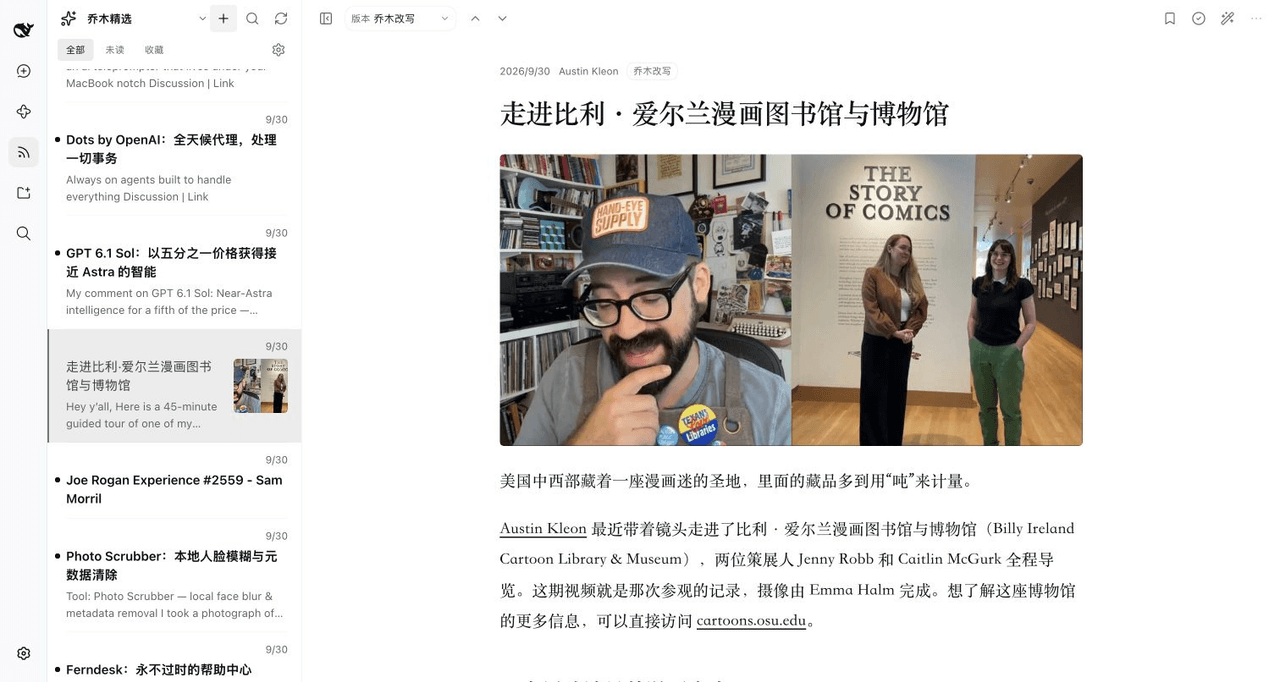 joeseesun/qiaomu-rss-dsh
在 DeepSeek Harness 中阅读 RSS,与原生 AI 对话伴读文章 | RSS reading with native AI companion for DeepSeek Harness
joeseesun/qiaomu-rss-dsh
在 DeepSeek Harness 中阅读 RSS,与原生 AI 对话伴读文章 | RSS reading with native AI companion for DeepSeek Harness