kami-mura/dsh-logo-silhouette
项目介绍Project Overview
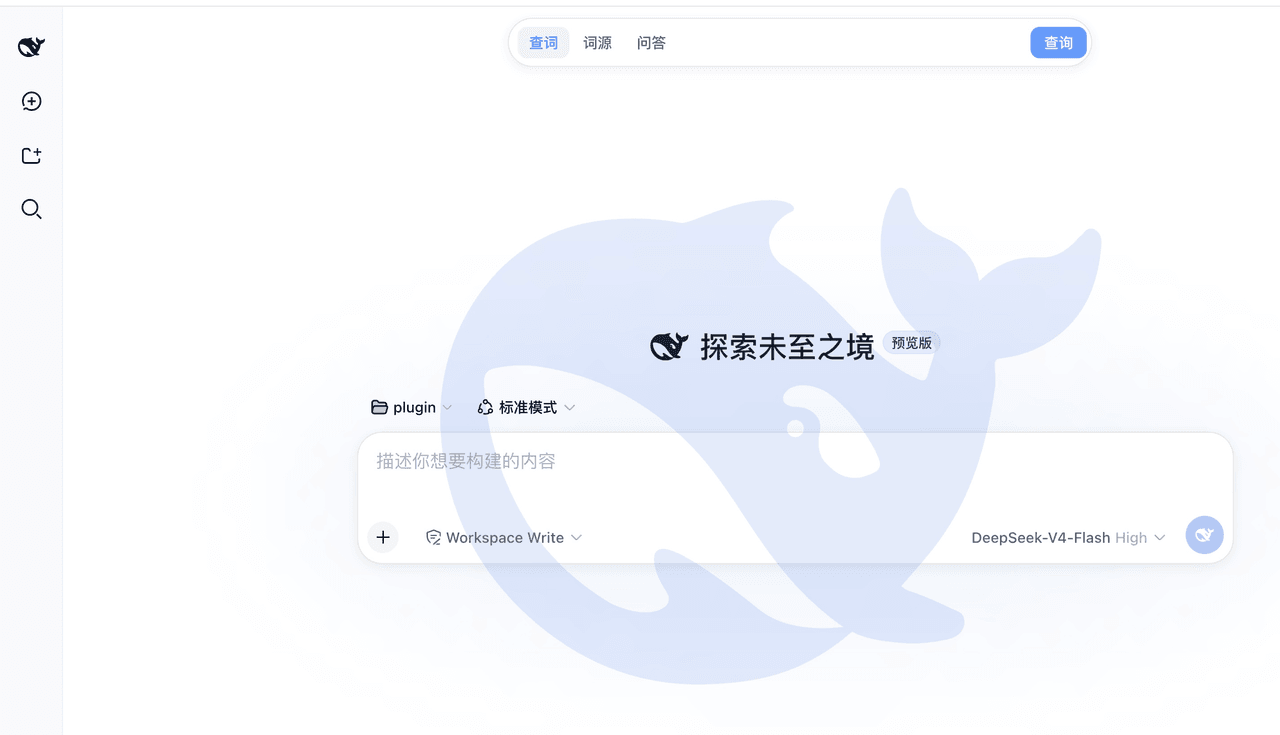
dsh-logo-silhouette 是 DeepSeek Harness Web GUI 的全屏背景水印插件,在视口左下角展示大号 DeepSeek 鲸鱼 logo 剪影,纯视觉、pointer-events: none 不挡点击与滚动,并自动适配亮色/夜间模式(含平滑过渡、mask 渐隐、窄屏缩放、prefers-reduced-motion)。适合想给 dsh 界面加品牌装饰背景时使用。注意:安装后需重启 dsh web 服务才生效;鲸鱼 logo 为 DeepSeek 品牌资产,本插件仅作装饰,不代表官方关联。
dsh-logo-silhouette is a full-screen background watermark plugin for the DeepSeek Harness (dsh) web GUI. It renders a large DeepSeek whale-logo silhouette fixed at the bottom-left of the viewport, purely visual with pointer-events: none, and auto-adapts to light/dark modes with smooth transitions, mask fade-out, narrow-screen scaling, and reduced-motion support. Use it to add a branded decorative backdrop to the dsh interface. Caveat: restart the dsh web GUI after installing; the whale logo is a DeepSeek brand asset used decoratively, with no official affiliation.
请帮我了解并安装插件:【dsh-logo-silhouette】【https://github.com/kami-mura/dsh-logo-silhouette】把上面这条消息直接发给当前会话里的 DSH,让它帮你了解并安装。安装命令不一定准确,发给 DSH 更稳。Send this message to DSH in your current session. CLI install commands may not be accurate across systems — DSH will figure it out for you.
或使用命令行安装(适合开发者)Or use CLI install (for developers)
命令行安装CLI Install
dsh plugin --profile web add dsh-logo-silhouette把 kami-mura/dsh-logo-silhouette 加入你的 DSH 配置(web profile)即可启用。
READMEREADME
dsh-logo-silhouette
DeepSeek 鲸鱼 logo 剪影 —— DeepSeek Harness(dsh)Web GUI 的全屏背景水印插件。
纯视觉、pointer-events: none 完全不挡交互,亮色 / 夜间模式自动适配。
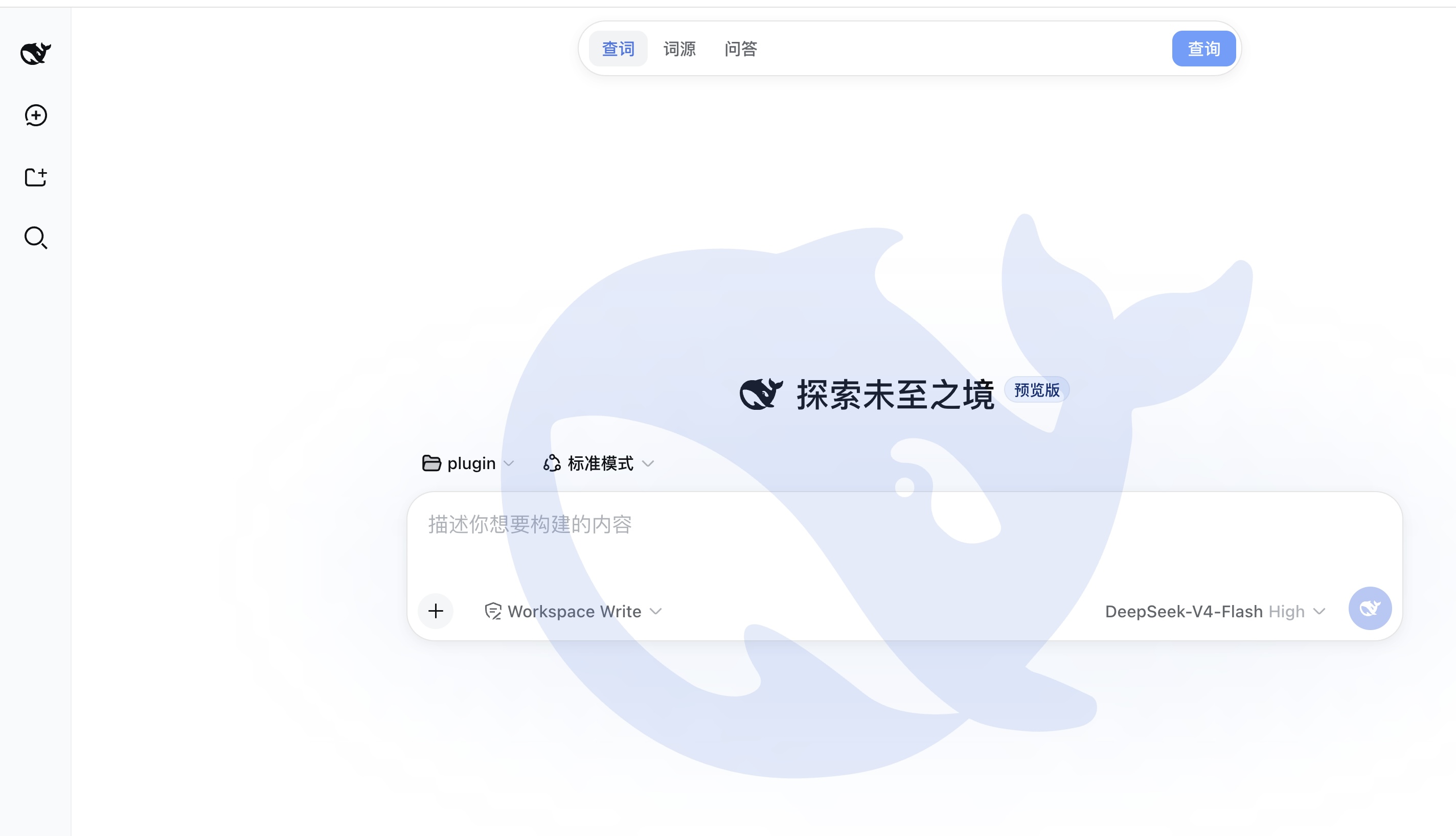
DeepSeek whale-logo silhouette — a full-screen background watermark plugin for
the DeepSeek Harness (dsh)
web GUI. Purely visual, pointer-events: none, auto-adapts to light / dark.
安装 / Install
dsh plugin --profile web add dsh-logo-silhouette
安装后需重启 dsh web 服务生效。
Restart the dsh web GUI to see it.
卸载 / Uninstall
dsh plugin --profile web remove dsh-logo-silhouette
效果 / Effects
- 固定铺满视口的背景层(
z-index: 0,不挡点击、不挡滚动) - 大号鲸鱼 logo 剪影固定在左下角(高
min(56vh, 600px)),aria-hidden - 亮色模式:DeepSeek 品牌蓝(设计令牌
--dsw-static-deepseek-500),opacity: .15 - 夜间模式:柔和浅蓝(
--dsw-static-deepseek-300),opacity: .12 - 夜间模式优化:
- 颜色 / 透明度随主题 300ms 平滑过渡,切换不跳变
- 鲸鱼顶部 mask 渐隐,上缘融入背景,去掉"贴纸感"
- 暗色下降低不透明度,减少深色底上的眩光
- 窄屏自动缩小并修正定位(
left/bottom) - 尊重
prefers-reduced-motion,系统暗色prefers-color-scheme兜底
安装说明 / Install notes
该包是标准的 dsh bundle(dsh.bundle.patch),dsh plugin add 会自动把它加入
profile 的层栈(dsh.profile.bundles),无需手改任何配置文件。
dsh plugin --profile web add dsh-logo-silhouette installs the bundle into the
profile layer stack automatically — no manual config edits.
从 GitHub 安装 / From git:
dsh plugin --profile web add github:kami-mura/dsh-logo-silhouette
开发 / Develop
lib/client.js—— 手写的 client bundle(window.__ModuleLoader__格式,无构建依赖), 全部视觉与 CSS 在这里lib/index.js—— host 半体(纯视觉插件,无宿主逻辑)assets/favicon.svg—— logo 源文件(vendored from deepseek-harness,MIT)scripts/build.js—— 从assets/favicon.svg提取鲸鱼路径并写回lib/client.js:
npm run build
调整样式:改 lib/client.js 里的 CSS 常量(颜色走 DSH 设计令牌
--dsw-static-deepseek-*,带兜底色;位置 / 尺寸 / 透明度直接改数值)。
License / 许可
MIT。鲸鱼 logo 图形取自 deepseek-harness 仓库(MIT 许可);DeepSeek 鲸鱼 logo 系 DeepSeek 品牌资产,本插件仅将其作为 装饰性水印展示,不代表与 DeepSeek 官方有关联。
相关推荐Related
-
 nexu-io/open-design
🎨 Best DeepSeek Harness Design Plugin. The open-source Claude Design alternative. 🖥️ Local-first desktop app. 🖼️ Your…
nexu-io/open-design
🎨 Best DeepSeek Harness Design Plugin. The open-source Claude Design alternative. 🖥️ Local-first desktop app. 🖼️ Your…
-
 freestylefly/awesome-gpt-image-2
Prompt as Code | GPT-Image2 工业级提示词引擎与模板库,530+ 个案例逆向工程,20+ 套工业级模板,并提炼出Skills,持续更新中
freestylefly/awesome-gpt-image-2
Prompt as Code | GPT-Image2 工业级提示词引擎与模板库,530+ 个案例逆向工程,20+ 套工业级模板,并提炼出Skills,持续更新中
-
 anywhere-labs/dsh-desktop
为 DeepSeek Harness (DSH) 插件生态打造的现代化桌面端解决方案。万物皆「插件」,桌面本身也是「插件」。
anywhere-labs/dsh-desktop
为 DeepSeek Harness (DSH) 插件生态打造的现代化桌面端解决方案。万物皆「插件」,桌面本身也是「插件」。
- Nagi-ovo/voyager Enhancement suite for Gemini, AI Studio, Claude & ChatGPT — plus a prompt manager for any web UI, DeepSeek Harness inclu…
-
 walkinglabs/learn-harness-engineering
Harness engineering beginner tutorial, from 0 to 1
walkinglabs/learn-harness-engineering
Harness engineering beginner tutorial, from 0 to 1
-
 awesome-dsh-plugin/awesome-dsh-plugin
A curated list of plugins for DeepSeek Harness (dsh) · DeepSeek Harness 插件精选列表
awesome-dsh-plugin/awesome-dsh-plugin
A curated list of plugins for DeepSeek Harness (dsh) · DeepSeek Harness 插件精选列表
-
 MemTensor/MemOS
Self-evolving memory OS for LLM & AI Agents: ultra-persistent memory, hybrid-retrieval, and cross-task skill reuse, with…
MemTensor/MemOS
Self-evolving memory OS for LLM & AI Agents: ultra-persistent memory, hybrid-retrieval, and cross-task skill reuse, with…
- yjh051108/dsh-routing-suite dsh-routing-suite — injector + router-standard kit: install the runtime injector first, then the task-aware reasoning-mo…