
Kanadego/dsh-heartbeat
一个致力于让Agent在日常交流中更加拥有“活人感”的DSH插件。
Project Overview项目介绍
dsh-heartbeat is a native DSH plugin built exclusively for DeepSeek Harness, designed to give the DSH agent a consistent sense of presence by running on a timed cycle. It automatically wakes up on a set schedule to maintain memory, capture user context, collect new information aligned with user interests, and only speaks when appropriate per configured rules. After installation, all core features are accessible through a dedicated heartbeat card in the DSH settings page, so no command line interaction is needed for daily use. The recommended install method is running the npm command via PowerShell, and users can also install from source for development or custom modifications.
Core features include a seven-phase repeating heartbeat cycle, with a built-in discretion gate that enforces rules for quiet hours, daily expression limits, and cooldown periods between messages. By default, the plugin leans toward speaking, but it will never interrupt or disturb the user if they are busy or it is outside of active hours. It adds time awareness and status updates, dynamically adjusting prompt injection based on the model’s capabilities, and supports optional full-screen visual perception via an external multimodal model through ModLens. On first launch, the plugin automatically checks for and installs required presets, and it will never overwrite existing user customizations.
All runtime data is stored exclusively in the plugin’s dedicated data/ directory, with sensitive files encrypted using Windows DPAPI under the CurrentUser scope, so data cannot be decrypted on other machines or user accounts. The plugin includes a one-click burn feature to securely delete runtime data, and it enforces path guards that block unauthorized writes outside of the data/ directory. It is released under the permissive MIT open source license, and it only supports Windows currently due to the DPAPI encryption dependency. Advanced users can access a full set of CLI commands for manual management of seeds, profiles, session bindings, and more.
dsh-heartbeat 是专为 DeepSeek Harness 开发的原生心跳插件,旨在让 DSH Agent 拥有持续存在感,按照固定节律自动唤醒,完成记忆维护、用户感知、信息采集和分寸化表达。插件安装后全部功能都集成在 DSH 设置页的心跳卡片中,日常使用无需操作命令行,配置和状态查看都可通过可视化界面完成。
插件核心功能包括七相循环的心跳节律,内置分寸闸门控制静默时段、每日表达上限、开口冷却等规则,默认倾向开口但在用户忙碌或深夜时段绝不会主动打扰。它支持时间感知与状态栏提示,能根据模型能力动态调整提示词注入方式,还可通过 ModLens 外接多模态模型做可选的全屏视觉感知,优先保护用户隐私。
所有运行数据默认存储在插件专属 data 目录,敏感数据使用 Windows DPAPI 加密,支持一键焚毁运行时数据,隐私安全有保障。插件支持通过 npm 一键安装,也可从源码安装开发改造,首次启动会自动预设配置,不会覆盖用户已修改的自定义设置,遵循 MIT 开源许可协议。
请帮我安装这个 DSH 插件。安装前先完成【兼容性检查 + 安全性检查】,检查通过再动手。

插件:dsh-heartbeat(Kanadego/dsh-heartbeat)
仓库:https://github.com/Kanadego/dsh-heartbeat
本站详情页:https://www.yhbd.top/plugins/kanadego-dsh-heartbeat/
本站登记:类型 plugin · 归类 原生 DSH 插件 · 许可证 MIT · ⭐ 6 · 最近提交 2026-09-30 · 主语言 TypeScript

按下面顺序执行,每步先把结论告诉我,再进入下一步:

【1 兼容性检查】
① 我这边:DSH 版本、Node 版本、操作系统、当前 profile(web / desktop)。
② 读它的 README、package.json、插件 manifest,列出它要求的 DSH 版本 / Node 版本 / 操作系统 / 外部依赖 / 需要另外先装的运行时。
③ 逐条比对,结论只写「满足 / 不满足 / 未知」三种;不满足的给出可行替代方案。
④ 检查是否和我已装的插件冲突:命令名重复、skill / tool 重名、端口占用、重复注册的 MCP server。

【2 安全性检查】
① 仓库可信度:和上面「本站登记」是否一致;star / fork 数、创建时间、最近提交,是否归档或长期停更。
② 安装脚本:逐行看 package.json 的 preinstall / install / postinstall,以及 install.sh、setup.ps1 之类脚本。出现 curl|bash、下载后直接执行、混淆代码、访问与插件功能无关的域名,立刻停下来告诉我,不要继续装。
③ 依赖:列出新增依赖,标出无人维护、或与知名包拼写近似的可疑包(typosquatting)。
④ 权限与副作用:它会读写哪些目录、访问哪些域名、需要哪些 DSH 权限(filesystem / network / shell / clipboard 等),以及怎么卸载和回滚。
⑤ 如果它要求 sudo / 管理员权限,或权限明显超出功能所需,先停下来问我。

【3 安装】
上面两步没有「不满足」和「高危项」时才执行;用官方推荐方式安装,不要自行提权。

【4 汇报】
用表格输出:检查项 / 结论 / 依据 / 是否需要我决策。拿不准的一律写「未知」并说明要我怎么确认——不要猜,也不要替我决定。
Send this message to DSH in your current session: it verifies compatibility and security first (answering met / not met / unknown item by item) and only installs once everything checks out — it will stop and ask you if it finds a high-risk item. The box scrolls; the copy is the full prompt. CLI install commands may not be accurate across systems, so DSH is the safer route.把上面这条消息直接发给当前会话里的 DSH:它会先核对兼容性与安全性(逐条给「满足 / 不满足 / 未知」),确认没问题再安装,有高危项会停下来问你。框内可滚动,复制到的是完整提示词;安装命令不一定准确,发给 DSH 更稳。
- Only 6 stars - very few users, little community feedback星标只有 6,几乎没人在用,遇到问题缺少社区反馈
DSH walks through these 9 checksDSH 会逐条核对这 9 项
Compatibility兼容性
- DSH, Node, OS and profile requirementsDSH 版本 / Node 版本 / 操作系统 / profile 是否满足要求
- External dependencies and runtimes (Electron / Python / Docker, ...)外部依赖与运行时(Electron / Python / Docker 等)是否齐备
- Conflicts with installed plugins: command names, skill / tool names, ports, duplicate MCP registration与已装插件是否冲突:命令名、skill / tool 重名、端口占用、重复 MCP 注册
Security安全性
- Repo matches the facts registered here; archived or abandoned?仓库是否与页面登记一致,是否归档或长期停更
- Safety of preinstall / install / postinstall and install.sh / setup.ps1preinstall / install / postinstall 与 install.sh、setup.ps1 是否安全
- curl|bash, download-then-execute, obfuscation, unrelated domains → stop immediatelycurl|bash、下载即执行、混淆代码、无关域名 → 立刻停止
- Typosquatting or unmaintained packages among the new dependencies新增依赖里有没有 typosquatting 或无人维护的包
- Requested permissions vs. what the feature actually needs申请了哪些权限、是否超出功能所需(filesystem / network / shell / clipboard)
- Any sudo / admin requirement, plus uninstall and rollback是否要求 sudo / 管理员权限,以及卸载与回滚方式
Anything uncertain must be marked unknown with a note on how to confirm it. This site's signal screen is a static snapshot, not a security audit.拿不准的必须标「未知」并说明要我怎么确认。本站的信号筛查是静态快照,不能替代安全审计。
Or use CLI install (for developers)或使用命令行安装(适合开发者)
CLI Install命令行安装
dsh plugin --profile web add @kanadego/dsh-heartbeat把 Kanadego/dsh-heartbeat 加入你的 DSH 配置(web profile)即可启用。
READMEREADME
dsh-heartbeat
让 DeepSeek Harness 的 agent 拥有持续存在感的心跳插件:她按节律自己醒来,维护记忆与画像、感知你的忙闲、按兴趣闲逛看新东西,然后按分寸决定开不开口——开口要有真实来处,沉默要有具体理由。



预览
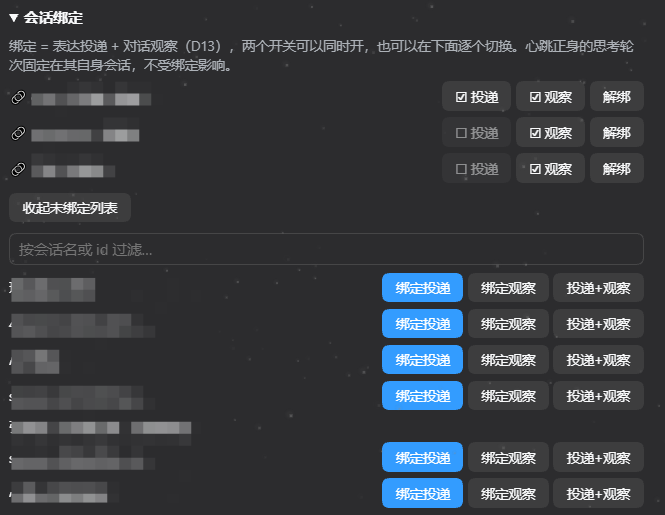
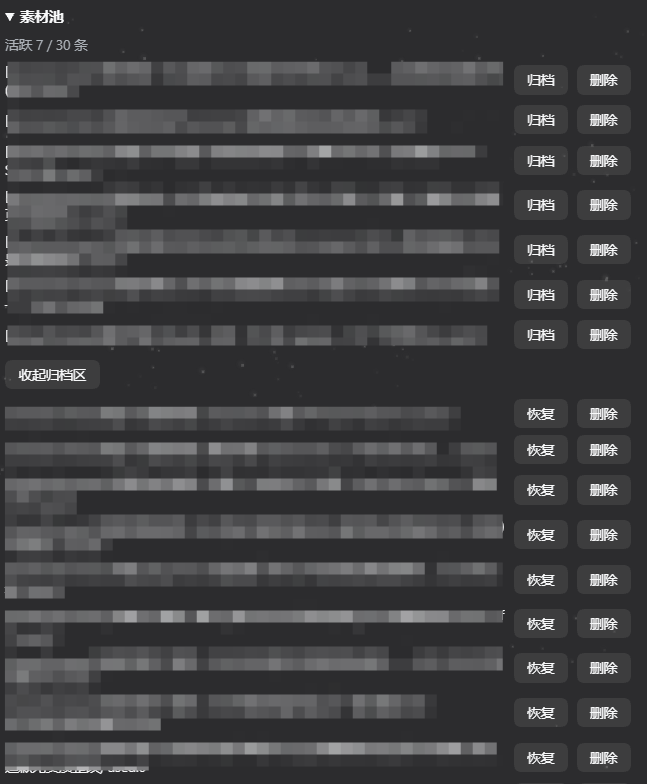
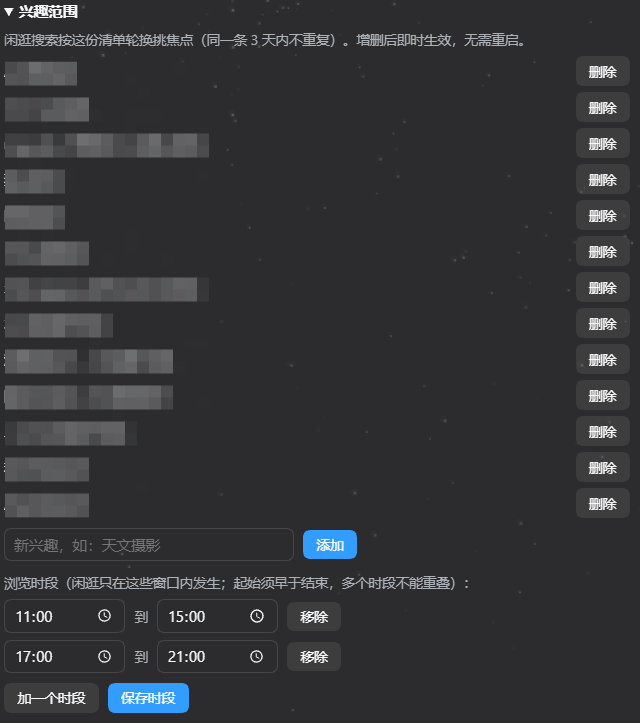
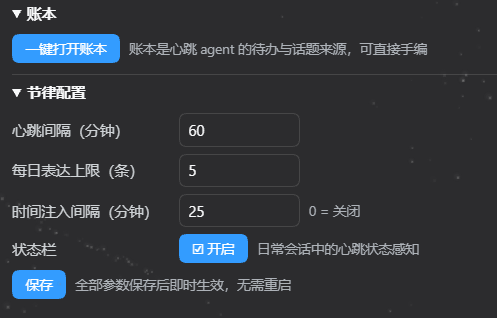
全部能力都收在 DSH 设置页的心跳卡片里,日常使用零命令行:
| 心跳状态 | 会话绑定 |
|---|---|
 |
 |
| 素材池 | 兴趣范围 |
|---|---|
 |
 |
| 用户画像(只读) | 账本 · 节律配置 · 状态栏 |
|---|---|
 |
 |
关键概念
文档里反复出现几个词,先在这里一次说清:
| 词 | 意思 |
|---|---|
| 心跳 | 本插件的核心动作——不用你开口,agent 按固定节律自己「醒一次」:做维护、感知环境、决定要不要说话。醒一次叫一跳,默认 20 分钟一跳。 |
| 宿主 | 运行插件的那个程序,即 DSH 本体。心跳是挂在宿主里的插件——模型通道、会话、工具这些能力都由宿主提供。 |
| 客户端 | 宿主里负责界面的那一侧(Web 界面或者 DSH desktop)。设置页的心跳卡片属于客户端;卡片显示不出来,通常是客户端插件没加载成功,与心跳本体无关。 |
| 相 | 一跳内部的一个阶段。主循环共七相——维护 → 采集 → 闲逛 → 闸门 → Digest → 反刍备料 → 投递,最后统一由留痕收尾。每相结束都会在审计日志留一条 phase_done,所以「这一跳停在哪」可以直接查。 |
| 引擎室 | 跑心跳内部轮次的那个 agent,和你在会话里对话的 agent 是分开的。它只负责采集、反刍、备料,不直接跟你说话;真正开口的是你读的那个会话里的 agent。 |
| 心跳正身 | 心跳自己专用的一个会话,同时也是它的决策现场——每跳的推理轮次都在这里发生。它在会话列表里和普通会话长得一样,日常不用去动它(CLI 的 sessions list 会把它单独标出来)。 |
| 闸门 | 决定「这一跳能不能开口」的纯代码判定层,依次看:静默时段 → 你是不是在忙 → 你在不在场 → 今天说够没有 → 距上次开口够久没。全不通过就安静,并在日志里写下具体原因。它也是省 token 的关键——判「别说」时,后面的模型调用根本不发生。 |
| 观察 | 投递的反向动作——把绑定的会话里你新说的话收进画像收件箱,作为了解你的证据。它发生在采集相:只取当时有活 agent 的绑定会话、每跳最多 10 条、每条只留第一句(≤80 字),插件自己注入的消息会被跳过。 |
| 反刍 | 投递之前的备料步骤:引擎室从素材池挑出最值得说的几条,各压缩成一句话(不带理由、不排序)。名字取自反刍动物把食物嚼细再咽。 |
| 投递 | 把备好的素材包送进你某个会话的动作。把心跳绑定到常用会话,agent 就会「到你那个房间里说话」。 |
核心功能
插件的一切都围绕一次心跳展开:不用你开口,agent 按固定节律自己醒过来,走完一轮判断,再决定要不要说话。整体链路:
定时器:默认 20 分钟一跳
  │
  ▼
①  维护 ── 清素材池 / 滚动日志 / 判断该不该合并画像
②  采集 ── 全屏截图(加密落盘)+ 忙闲判定 + 前台窗口类别
           ╰─ 观察:把绑定会话里你新说的话收进画像收件箱
②′ 闲逛 ── 条件触发:agent 自己按兴趣焦点用 web_search 看新东西
③  闸门 ── 纯代码判定:静默窗 / 忙时 / 在场 / 每日上限 / 冷却
           ╰─ 判「别说」→ 本跳到此为止,一个 token 都不花
④  Digest ── 拼出「此刻状态」:画像 + 时间 + 素材池 + 待办
⑤  反刍 ── 引擎室从素材池挑 ≤3 条,各压成一句话(备料)
⑥  投递 ── 拼成素材包,送进你指定投递的那个会话
⑦  留痕 ── 写审计日志 + 账本(真正开口了才计数)
  │
  ▼
你读的那个会话 ── 那里的 agent 按当下处境,决定说不说、说哪条
Showing the opening section of the README — the full document lives in the repository以上为 README 开头摘要,完整文档在仓库内 · View the full README on GitHub →在 GitHub 查看完整 README →
Related相关推荐
-
 TencentCloudBase/CloudBase-AI-Toolkit
Backend for AI coding agents on CloudBase — database, auth, functions via Plugin, Skills & MCP.
TencentCloudBase/CloudBase-AI-Toolkit
Backend for AI coding agents on CloudBase — database, auth, functions via Plugin, Skills & MCP.
-
 youdotcom-oss/agent-skills
You.com skills and plugins for web search, content extraction, research, finance, and integration discovery, helping AI …
youdotcom-oss/agent-skills
You.com skills and plugins for web search, content extraction, research, finance, and integration discovery, helping AI …
-
 MiaoQichuan/new-litigation-visualization
把法律画出来 · Make the Law Visible —— 给法律人的诉讼可视化工具集:把凌乱的诉讼图重画成能进材料的图,直接读案件材料画准一张时间轴,并提供庭前三大法宝(大事记表、庭审对抗图、法律关系图)。Claude Skill …
MiaoQichuan/new-litigation-visualization
把法律画出来 · Make the Law Visible —— 给法律人的诉讼可视化工具集:把凌乱的诉讼图重画成能进材料的图,直接读案件材料画准一张时间轴,并提供庭前三大法宝(大事记表、庭审对抗图、法律关系图)。Claude Skill …
- Weaxs/stock-analysis-plugin Multi-market stock analysis, screening & backtesting plugin for AI agents — 39 tools + 20 strategy skills across A/HK/US…
-
 unitarylab/quantum-practices
量子计算最佳实践 Quantum Algorithms Best Practices
unitarylab/quantum-practices
量子计算最佳实践 Quantum Algorithms Best Practices
-
 greenthree/ProbHub-skill
算法竞赛出题自动化skill(个人出题习惯),支持完善题面、构造数据、组卷用typ编译pdf和生成domjudge题目包
greenthree/ProbHub-skill
算法竞赛出题自动化skill(个人出题习惯),支持完善题面、构造数据、组卷用typ编译pdf和生成domjudge题目包
-
 GoalfyAI/goalfydata
A shared data backend for AI agents and authorized teams.
GoalfyAI/goalfydata
A shared data backend for AI agents and authorized teams.
-
 lxfu1/dsh-plugin-chart
DeepSeek Harness plugin that bundles the AntV chart visualization skill and a native chart-generation tool.
lxfu1/dsh-plugin-chart
DeepSeek Harness plugin that bundles the AntV chart visualization skill and a native chart-generation tool.